
Virtual Belfry
Visual Windows ringing simulator with detailed striking analysis
Our verdict
#3 of 5 in Change-ringing practice software · For teaching displays and detailed striking analysis
Pros
- Excellent visual tools for explaining ringing and reviewing errors
- Detailed reports separate persistent bias from inconsistent striking
- Can analyse a whole real band with sensors on every bell
Cons
- Windows only and the highest software price in this group
- Keyboard input does not drive the animated ringer
Skip if: Ringers who want mobile access, built-in online ringing or the simplest interface.
Rankings and alternatives
- #3 of 5 Change-ringing practice software For teaching displays and detailed striking analysis
- Abel #1 For all-round solo and tower practice
- Beltower #2 For adaptive practice, composing and conducting
- Ringing Room #4 For online bands and filling empty bells


Change-ringing practice software scores
Evaluated Nov 12, 2026 Evidence ↓- Physical bell inputs 4
4/5 means: Tower-bell sensors plus multiple external inputs, without a documented handbell-controller route
Serial, Bagley multi-bell and generic COM interfaces support physical tower-bell inputs, with several user bells. A dedicated moving-handbell-controller route isn't documented in the current guidance read.
- Striking feedback 5
5/5 means: Live feedback plus detailed post-practice breakdowns that isolate recurring faults
Live early/late views lead into mean and spread, position, handstroke/backstroke and followed-bell breakdowns, plus saved session histories and average error in milliseconds.
- Solo practice 4
4/5 means: Complete solo practice with recovery, repetition or adaptive pacing
Solo Go waits for the ringer to join during opening rounds and offers configurable starts, exercises and method practice, without Beltower's cooperative speed throughout a touch.
- Methods and compositions 4
4/5 means: Broad method library with custom methods and touches, conducting or splicing
Supplied methods, exercises and compositions can be extended through MicroSIRIL and edit dialogs, including spliced compositions and half-lead calls.
- Learner guidance 5
5/5 means: Several complementary teaching views, exercises and session-review tools
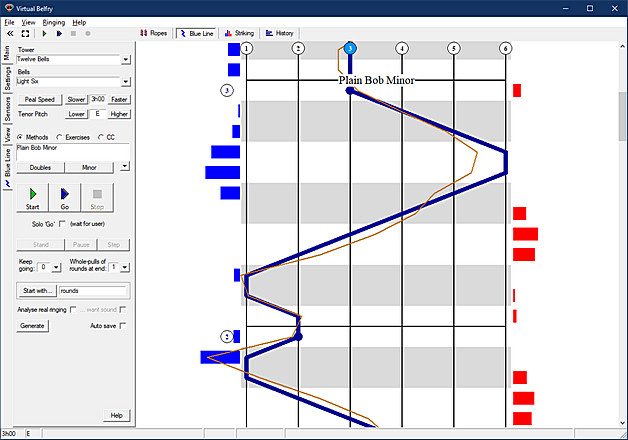
Animated ringers and photographic bells, exercises, blue-line review, configurable simultaneous views and detailed post-touch analysis serve both teaching and self-review.
- Online band practice 1
1/5 means: No shared online-band mode documented in the current product guidance
The current home, control-panel, FAQ, download and version-history pages read don't document a shared online-band mode or a Muster integration. This is an unknown, not a confirmed absence.
Rests partly on what the sources don't mention, which is a weaker signal than what they say.
- Device coverage 2
2/5 means: Windows desktop only
It is a Windows PC program, with no iPad version; macOS and mobile aren't supported natively.
- Software price 3
3/5 means: One-time purchase from £26 to £45
The program licence costs £39.95, with a ten-pull evaluation available before purchase and separately generated activation keys.
Pricing
- Program licence £39.95 one-time Two personally used computers; shared tower use needs a separate licence
- Program licence in Australia A$75.00 one-time
From the vendor’s pricing page, checked Nov 12, 2026. That page is authoritative.
Evidence and sources
Change-ringing practice software scores
Physical bell inputs 1 quote
-
“Virtual Belfry supports three sensor types: RS232 control signals (CTS, RI etc.) via the pins of a serial port; The Bagley multi-bell interface; Other, generic COM port-based interfaces. Belfree and Simbell wireless sensors are in this category, as are custom-built interfaces using (for example) an Arduino.”
belfryware.com/control_panel.html · checked
Striking feedback 5 quotes
-
“Each bar represents two numbers: the mean (i.e. average) placement and the "standard deviation" - a statistical measure that gives you an idea of how spread out the blows were from the overall average. Ideally, the mean should be close to zero and the standard deviation should be as small as possible (a figure in the 30s is very good ringing and in the 20s is essentially faultless).”
belfryware.com/striking_window.html · checked -
“By ticking the "Split by Stroke" option on the control panel (or just clicking or tapping on the graphic itself), you can break this graphic down further to show separate bars for handstrokes and backstrokes in each position.”
belfryware.com/striking_window.html · checked -
“Average Error: Summarises the accuracy of the ringing in a single number (shown in a column of the list), being the average amount by which all the blows in the touch differed from perfection. It is probably the most useful of the three as it provides an easy comparison between all the touches shown. It is calibrated in milliseconds so the comparison is meaningful even between, say, minor and maximus.”
belfryware.com/history_window.html · checked -
“A history window where all results in a session accumulate and can be saved to show trends over time.”
archive.cccbr.org.uk/services/ict/catalogue/pc-windows/virtual-belfry · checked -
“This option shows a breakdown not by position, but by the bell that was followed.”
belfryware.com/striking_window.html · checked
Solo practice 2 quotes
-
“The bells will ring any method, composition or call change sequence you choose from the program’s built-in lists. There is also a separate menu of exercises, useful for teaching. You can add new items to any of these lists (e.g. methods obtained from the MicroSIRIL library). You can call touches manually (using the keyboard), or by starting a pre-defined composition. Compositions are stored in formats that closely match their normal written forms and allow splicing, half-lead calls and more.”
archive.cccbr.org.uk/services/ict/catalogue/pc-windows/virtual-belfry · checked -
“Solo Go is a feature designed for people who practise alone. When this box is ticked and Start is pressed (to start ringing a method) the program will ring rounds until you join in with your own bell, then ring a few more rounds before starting into changes. This behaviour can be fine-tuned on the Settings panel.”
belfryware.com/control_panel.html · checked
Methods and compositions 2 quotes
-
“The bells will ring any method, composition or call change sequence you choose from the program’s built-in lists. There is also a separate menu of exercises, useful for teaching. You can add new items to any of these lists (e.g. methods obtained from the MicroSIRIL library). You can call touches manually (using the keyboard), or by starting a pre-defined composition. Compositions are stored in formats that closely match their normal written forms and allow splicing, half-lead calls and more.”
archive.cccbr.org.uk/services/ict/catalogue/pc-windows/virtual-belfry · checked -
“Changes to the following are now saved immediately rather than waiting until the program is closed: - Methods, exercises, call change sequences and compositions using the edit dialogs;”
belfryware.com/versions.html · checked
Learner guidance 4 quotes
-
“Virtual Belfry is a bellringing simulator program for PCs. It includes various animated graphical displays designed specifically to help with teaching, individual practice, presentations and all-of-band development.”
belfryware.com · checked -
“The bells will ring any method, composition or call change sequence you choose from the program’s built-in lists. There is also a separate menu of exercises, useful for teaching. You can add new items to any of these lists (e.g. methods obtained from the MicroSIRIL library). You can call touches manually (using the keyboard), or by starting a pre-defined composition. Compositions are stored in formats that closely match their normal written forms and allow splicing, half-lead calls and more.”
archive.cccbr.org.uk/services/ict/catalogue/pc-windows/virtual-belfry · checked -
“By ticking the "Split by Stroke" option on the control panel (or just clicking or tapping on the graphic itself), you can break this graphic down further to show separate bars for handstrokes and backstrokes in each position.”
belfryware.com/striking_window.html · checked -
“Blank speaks for itself. Turning the screen blank during a teaching session can sometimes be useful if the student is focusing too much on the screen and neglecting to listen.”
belfryware.com/striking_window.html · checked
Device coverage 1 quote
-
“The program requires a PC running Windows XP or later. A modern machine running the latest version of Windows is best, ideally with touchscreen capability if it's being used in a teaching environment.”
belfryware.com · checked
Software price 3 quotes
-
“Click on the link below to download the latest version (3.12). It will run with all features enabled, but until you purchase it (using the ordering page), it will run in "evaluation mode". The main limitation is that each time you start the bells ringing they will ring ten whole pulls and then stop.”
belfryware.com/downloads.html · checked -
“Virtual Belfry 3.12 (only) £39.95”
belfryware.com/buying_vb.html · checked -
“Please don't be concerned if your Licence Key and Activation Key take a few hours or overnight to be emailed to you following purchase. The keys are NOT generated automatically.”
belfryware.com/buying_vb.html · checked
Facts
License 1 quote
-
“Note that the program requires a PC-specific Activation Key in order to run fully (without one it runs in a limited "evaluation" mode). Activation keys are supplied by the author to customers upon receipt of a registration code taken from the PC on which Virtual Belfry has been installed.”
belfryware.com/licence_conditions.html · checked
Runs on 1 quote
-
“Virtual Belfry is a bellringing simulator program for PCs. It includes various animated graphical displays designed specifically to help with teaching, individual practice, presentations and all-of-band development.”
belfryware.com · checked
Needs 3 quotes
-
“Virtual Belfry is a bellringing simulator program for PCs. It includes various animated graphical displays designed specifically to help with teaching, individual practice, presentations and all-of-band development.”
belfryware.com · checked -
“Note that the program requires a PC-specific Activation Key in order to run fully (without one it runs in a limited "evaluation" mode). Activation keys are supplied by the author to customers upon receipt of a registration code taken from the PC on which Virtual Belfry has been installed.”
belfryware.com/licence_conditions.html · checked -
“Analyse real ringing will record and analyse normal ringing with a real band (provided you have a sensor on every bell). If you are running a silent practice, tick the "want sound" option; for real ringing, where the bells can be heard normally, clear this box and the program will not generate any bell sounds during your ringing (it will still generate sounds during simulator ringing, so these two options can be left as you want them permanently if desired).”
belfryware.com/control_panel.html · checked
Other quotes
Not cited by a score or fact 4 quotes
-
“The best advice is to avoid using the Ropes window when you want to practise by tapping the spacebar. Look at the Blue Line window instead. The animated ringers are great for practising ropesight, but only if you have one of the ropes in your hand!”
belfryware.com/faq.html · checked -
“Instead, tapping the spacebar has no effect on the animation and simply causes the bell to sound immediately. This is not a program fault and is quite intentional.”
belfryware.com/faq.html · checked -
“I am often asked which is my preference, I predominantly use Virtual Belfry, the reason is that I like the superior graphics, the interface is very simple and the support is superb. Having said that, I also have Abel which is the most prevalent, and Beltower which is the most fully featured and I often switch between them to achieve a particular goal.”
Roger Booth, Simbell author and simulator practitioner · elginhill.com/simbell_home/simbell-software · checked -
“Please note that the ringer images require a separate download and setup (see below). There is no charge for the images, but the download is quite large and is separate from the program to facilitate future program upgrades etc.”
belfryware.com/downloads.html · checked
Pricing
belfryware.com/buying_vb.html · checked