
Affinity
Canva's free all-in-one vector, photo and layout app for Windows, Mac and iPad
Our verdict
#3 of 8 in Graphic design software for beginners · Free professional design app
What it does
- Vector, photo and layout tools in one app
- CMYK print PDFs and vector export
- Opens Photoshop and Illustrator files
- Windows, Mac and iPad
Pros
- Professional tools at no cost
- Logos you draw are fully yours to use as a brand
- Room to grow for years
Cons
- Very few templates; you design from scratch
- Real learning curve for a newcomer
- No phone or browser version
- AI tools need a paid Canva plan
- Skip if:
- You need finished designs today and don't want to learn
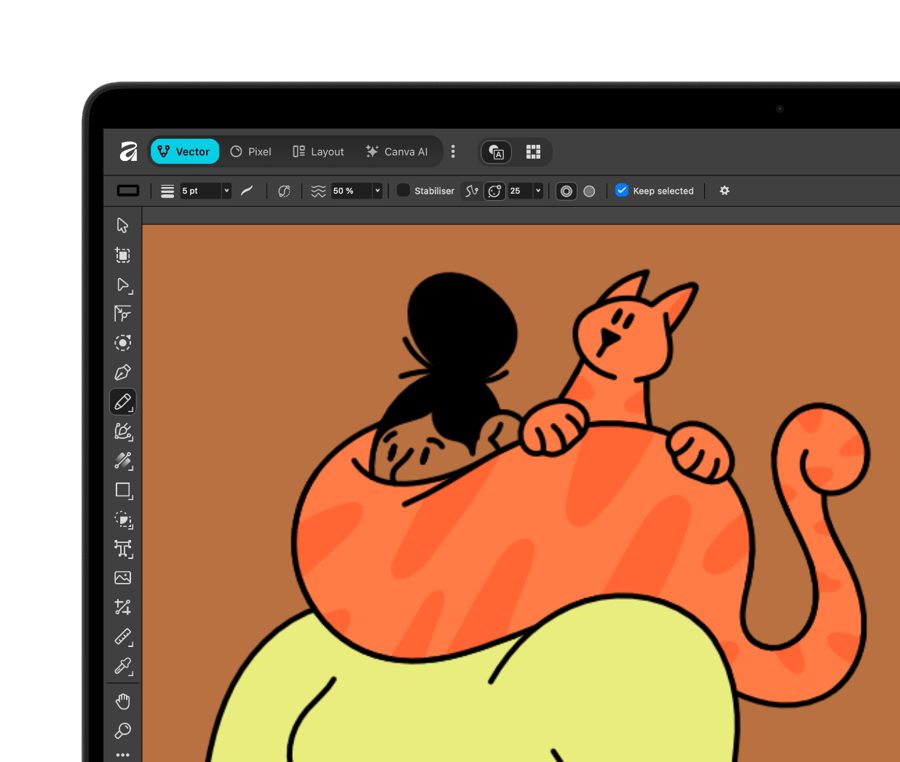
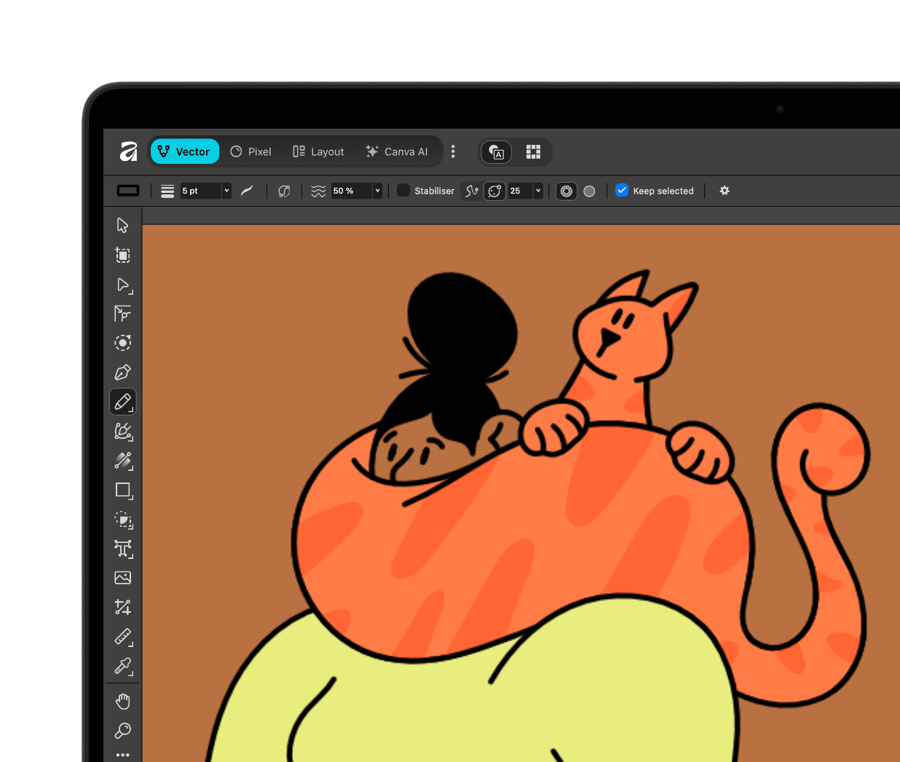
Affinity (also called Affinity by Canva or Affinity Studio) is a free desktop and tablet app that combines the former Affinity Designer, Photo and Publisher into one program with Vector, Pixel and Layout studios. It is aimed at working designers more than beginners, so it ships few templates but many tutorials with example documents. A free Canva account is required to sign in, and the app works offline. It runs on Windows, macOS and iPad (the iPad app launched in November 2026, adds a Sketch Studio for Apple Pencil drawing, and shares the .af file format with desktop). Generative AI tools (Canva AI) need a paid Canva premium plan.
What users say
Evidence ↓Reviewers describe an interface that is clean, responsive and easy to use for a three-in-one app, and call it a good fit for students and anyone learning design or image editing. Reviewers also note it is not a template-driven app like Canva itself, and that its paid AI tools are unremarkable. When it launched as free, some readers of one publication worried about ads, AI training, lock-in and a future subscription; Canva denies AI training. This is a handful of reviewers and an unquantified set of comments.
Rankings and alternatives
- Graphic design software for beginners #3 of 8 Free professional design app
- Canva #1 Best for most beginners
- Adobe Express #2 Canva-style app with more free tools
- VistaCreate #4 Template app with print ordering

Graphic design software for beginners scores
Evaluated Nov 17, 2026 Evidence ↓- Ease for non-designers · counts double 2
2/5 means: A professional layout of panels and tools; most newcomers need tutorials before they finish a first design
A professional multi-studio layout of panels and tools, with tutorials and detailed tooltips; reviewers find it clean but it is not template-driven, so most newcomers need tutorials before a first design.
- Templates for everyday jobs · counts double 2
2/5 means: A few starter layouts, or templates for only one or two of these kinds
The new-document screen offers paper sizes and little in the way of templates; tutorials include example documents. Canva's library is separate and I did not verify access from inside Affinity.
- What the free version lets you make 5
5/5 means: The whole app is free, for any use, with no watermarks, caps or paid tier for the core tools
The whole core app is free for individuals with no subscription, reported without watermarks or limits. AI tools are a paid Canva add-on, so the core tools have no paid tier; a Canva account is needed. Commercial-use terms not read.
- Print and export quality 5
5/5 means: Everything a print shop asks for, including CMYK and PDF/X, plus vector formats
PDF export keeps CMYK (reviewed); knowledge of long-standing Affinity support for PDF/X, bleed, crop marks, spot colors, SVG, EPS and transparent PNG. Not confirmed on the pages read.
- Photo editing and background removal 5
5/5 means: Full layer-based photo editing with masks and retouching, plus quick automatic tools
Full layer-based, non-destructive photo editing with masks, adjustments, retouching and raw development. Object selection is available (free per one review, premium per another); background removal sits in the Canva AI tools, which I could not confirm.
- Making a logo you can use as a brand 5
5/5 means: Full vector drawing and export with no license limits on the result
Full vector drawing, image trace and vector export, with no stock-template license restricting the result since it ships almost no templates. License terms for brand use not read.
- Room to grow 5
5/5 means: Professional depth in vector, photo and layout work, the same tools paid designers use
Professional vector, photo and layout in one app, treated by reviewers as an alternative to Photoshop, Illustrator and InDesign.
- Phone and computer support 3
3/5 means: Desktop computers and a tablet, or a browser plus limited mobile apps
Windows, Mac and iPad apps, no browser version and no iPhone or Android app listed.
- AI helpers · counts half 2
2/5 means: One or two AI tools, or AI only through a separate paid product
AI exists only through the paid Canva premium plan (generative fill, edit, upscaling and more) and reviewers find the tools average; no design generation or resizing documented.
Pricing
- Affinity (individuals) Free
- Canva Pro (for AI tools) $144.00/year , extra
Prices checked Nov 17, 2026.
Evidence and sources
What users say
Summary 6 quotes
-
running the app presents you with a new document screen that asks you to choose your paper size, but doesn’t have much in the way of templates. It’s not that kind of app. What it does have are plenty of tutorials - something that’s always been a strength of Affinity, right from the first release - that include example documents.
Ian Evenden, freelance reviewer at Creative Bloq · creativebloq.com/design/design-software/affinity-by-canva-review-free-is-the-magic-number · published · checked -
It’s perfect for students, and comes with enough pro features to interest working creatives. While it’s not ideal for photographers producing large numbers of files, due to a lack of a catalogue, this remains a great app for vector drawings, print layouts and image editing that’s made all the more accessible by its new low price.
Ian Evenden, freelance reviewer at Creative Bloq · creativebloq.com/design/design-software/affinity-by-canva-review-free-is-the-magic-number · published · checked -
Canva’s Affinity is an impressive tool: its designers managed to cram three apps into one, and not turn it into a convoluted mess. Instead, the interface is clean and well designed, the tools are responsive. Overall, it’s a fun app to use.
Steve Paris, reviewer at TechRadar · techradar.com/pro/affinity-by-canva-2026-review · published · checked -
Some think the app will start to show adverts like many free mobile apps do. Others think it will be used to train AI (something Canva denies).
creativebloq.com/design/design-software/free-affinity-app-sparks-huge-debate-among-artists-and-designers · published · checked -
They lock you into their ecosystem with the 'free' version, and then some months or a year into the future the enshittification starts and suddenly you will have to pay a subscription if you want to use your projects,
Reader comment on Creative Bloq's Facebook post, unnamed commenter · creativebloq.com/design/design-software/free-affinity-app-sparks-huge-debate-among-artists-and-designers · checked -
I have to admit that I was among those looking for the catch, but I've been using the new Affinity casually for a day, and my first impression is generally positive. The app works smoothly and I've been able to find most of the tools I'd expect, including masks, adjustment layers and retouching tools.
Joe Foley, freelance journalist at Creative Bloq · creativebloq.com/design/design-software/free-affinity-app-sparks-huge-debate-among-artists-and-designers · checked
Graphic design software for beginners scores
Ease for non-designers 3 quotes
-
running the app presents you with a new document screen that asks you to choose your paper size, but doesn’t have much in the way of templates. It’s not that kind of app. What it does have are plenty of tutorials - something that’s always been a strength of Affinity, right from the first release - that include example documents.
Ian Evenden, freelance reviewer at Creative Bloq · creativebloq.com/design/design-software/affinity-by-canva-review-free-is-the-magic-number · published · checked -
Canva’s Affinity is an impressive tool: its designers managed to cram three apps into one, and not turn it into a convoluted mess. Instead, the interface is clean and well designed, the tools are responsive. Overall, it’s a fun app to use.
Steve Paris, reviewer at TechRadar · techradar.com/pro/affinity-by-canva-2026-review · published · checked -
mouse over any tool and you’ll get some information about its purpose. Big deal you might think: almost every other software program does that. True… except here, they go into great detail for each of them, and if that’s not enough for you, there’s a ‘learn more’ button that opens a ‘Help’ window with even more information.
Steve Paris, reviewer at TechRadar · techradar.com/pro/affinity-by-canva-2026-review · published · checked
Templates for everyday jobs 1 quote
-
running the app presents you with a new document screen that asks you to choose your paper size, but doesn’t have much in the way of templates. It’s not that kind of app. What it does have are plenty of tutorials - something that’s always been a strength of Affinity, right from the first release - that include example documents.
Ian Evenden, freelance reviewer at Creative Bloq · creativebloq.com/design/design-software/affinity-by-canva-review-free-is-the-magic-number · published · checked
What the free version lets you make 4 quotes
-
Affinity is free for individuals (seriously). Just choose your preferred platform below to get started.
affinity.studio · checked -
Unless you open up the Canva AI options and pay for their use, there are no AI tools on offer, even denoising.
Ian Evenden, freelance reviewer at Creative Bloq · creativebloq.com/design/design-software/affinity-by-canva-review-free-is-the-magic-number · published · checked -
It's completely free. No subscriptions, no perpetual licenses. 'Free forever' is the promise.
Steve Paris, reviewer at TechRadar · techradar.com/pro/affinity-by-canva-2026-review · published · checked -
you need to log in to your Canva account, or create one, before you can use the software. It’s not that big a deal as setting one up is free, and you’ll still be able to access the app when offline.
Steve Paris, reviewer at TechRadar · techradar.com/pro/affinity-by-canva-2026-review · published · checked
Print and export quality 1 quote
-
PDF export is also comprehensive, with the ability to rasterise the entire document and keep its colours in CMYK.
Ian Evenden, freelance reviewer at Creative Bloq · creativebloq.com/design/design-software/affinity-by-canva-review-free-is-the-magic-number · published · checked
Photo editing and background removal 3 quotes
-
The exception to this seems to be object selection, which allows you to download the model without asking for any money, and enables the object selection tool in the photo-editing persona
Ian Evenden, freelance reviewer at Creative Bloq · creativebloq.com/design/design-software/affinity-by-canva-review-free-is-the-magic-number · published · checked -
These include features such as AI-based object selection, generative fill, upscaling, generative edit, portrait blur, lighting, colorise and depth tools.
Steve Paris, reviewer at TechRadar · techradar.com/pro/affinity-by-canva-2026-review · published · checked -
I have to admit that I was among those looking for the catch, but I've been using the new Affinity casually for a day, and my first impression is generally positive. The app works smoothly and I've been able to find most of the tools I'd expect, including masks, adjustment layers and retouching tools.
Joe Foley, freelance journalist at Creative Bloq · creativebloq.com/design/design-software/free-affinity-app-sparks-huge-debate-among-artists-and-designers · checked
Making a logo you can use as a brand 2 quotes
-
running the app presents you with a new document screen that asks you to choose your paper size, but doesn’t have much in the way of templates. It’s not that kind of app. What it does have are plenty of tutorials - something that’s always been a strength of Affinity, right from the first release - that include example documents.
Ian Evenden, freelance reviewer at Creative Bloq · creativebloq.com/design/design-software/affinity-by-canva-review-free-is-the-magic-number · published · checked -
It’s perfect for students, and comes with enough pro features to interest working creatives. While it’s not ideal for photographers producing large numbers of files, due to a lack of a catalogue, this remains a great app for vector drawings, print layouts and image editing that’s made all the more accessible by its new low price.
Ian Evenden, freelance reviewer at Creative Bloq · creativebloq.com/design/design-software/affinity-by-canva-review-free-is-the-magic-number · published · checked
Room to grow 2 quotes
-
It’s perfect for students, and comes with enough pro features to interest working creatives. While it’s not ideal for photographers producing large numbers of files, due to a lack of a catalogue, this remains a great app for vector drawings, print layouts and image editing that’s made all the more accessible by its new low price.
Ian Evenden, freelance reviewer at Creative Bloq · creativebloq.com/design/design-software/affinity-by-canva-review-free-is-the-magic-number · published · checked -
I have to admit that I was among those looking for the catch, but I've been using the new Affinity casually for a day, and my first impression is generally positive. The app works smoothly and I've been able to find most of the tools I'd expect, including masks, adjustment layers and retouching tools.
Joe Foley, freelance journalist at Creative Bloq · creativebloq.com/design/design-software/free-affinity-app-sparks-huge-debate-among-artists-and-designers · checked
Phone and computer support 2 quotes
-
Fully optimized for macOS. Runs natively on Apple silicon and Intel.
affinity.studio · checked -
Windows 10® May 2020 Update (2004, 20H1, build 19041) or later
beyondphototips.com/affinity-system-requirements-3-0 · published · checked
AI helpers 3 quotes
-
If you’re on a Canva premium plan, you can unlock powerful AI tools directly in Affinity.
affinity.studio · checked -
Unless you open up the Canva AI options and pay for their use, there are no AI tools on offer, even denoising.
Ian Evenden, freelance reviewer at Creative Bloq · creativebloq.com/design/design-software/affinity-by-canva-review-free-is-the-magic-number · published · checked -
These include features such as AI-based object selection, generative fill, upscaling, generative edit, portrait blur, lighting, colorise and depth tools.
Steve Paris, reviewer at TechRadar · techradar.com/pro/affinity-by-canva-2026-review · published · checked
Facts
License 1 quote
-
Affinity is free for individuals (seriously). Just choose your preferred platform below to get started.
affinity.studio · checked
Runs on 4 quotes
-
Fully optimized for macOS. Runs natively on Apple silicon and Intel.
affinity.studio · checked -
Windows 10® May 2020 Update (2004, 20H1, build 19041) or later
beyondphototips.com/affinity-system-requirements-3-0 · published · checked -
Affinity for iPad is available now in the App Store, with the same professional tools as Affinity on desktop and core tools that are free for individuals.
canva.com/newsroom/news/affinity-for-ipad · published · checked -
Affinity for iPad is compatible with iPadOS 18.0+.
CG Channel, trade news site (unsigned article) · cgchannel.com/2026/11/free-tool-canva-launches-affinity-for-ipad · published · checked
Needs 3 quotes
-
You’ll need to sign up for a Canva account to get it, and once logged in, you’re presented with a choice of Mac or Windows versions
Ian Evenden, freelance reviewer at Creative Bloq · creativebloq.com/design/design-software/affinity-by-canva-review-free-is-the-magic-number · published · checked -
you need to log in to your Canva account, or create one, before you can use the software. It’s not that big a deal as setting one up is free, and you’ll still be able to access the app when offline.
Steve Paris, reviewer at TechRadar · techradar.com/pro/affinity-by-canva-2026-review · published · checked -
Windows 10® May 2020 Update (2004, 20H1, build 19041) or later
beyondphototips.com/affinity-system-requirements-3-0 · published · checked
More from the sources
Pricing 2 quotes
-
As a guide, Canva Pro would cost an individual $15 / €12 a month, or $120 / €110 a year, which will unlock all those AI tools, as well as everything else Canva’s premium side of things already offers.
Steve Paris, reviewer at TechRadar · techradar.com/pro/affinity-by-canva-2026-review · published · checked -
Only certain AI features like depth maps, colorization, and generative edit require Canva Premium ($15/month).
Ravi Teja KNTS, tech writer at iGeeksBlog · igeeksblog.com/canva-affinity-vs-photoshop-comparison · published · checked
Features 23 quotes
-
Bring PSD, AI, IDML, DWG, and other file types into Affinity with layers and structure preserved.
affinity.studio · checked -
Affinity can work with both raw files and JPEGs/TIFFs. Unlike Lightroom, though, it can’t work on both seamlessly. Like Photoshop, it has to pass raw files through a Develop process first. The tools available are close to those you’ll find in Adobe Camera Raw. You don’t get AI masking tools, perspective corrections or AI noise reduction, but you do get lens corrections, tonal and color adjustments and basic gradient and brush masking tools. It’s not quite Adobe Camera Raw, but it’s a decent substitute.
Rod Lawton, photography journalist at Digital Camera World · digitalcameraworld.com/tech/software/affinity-review · published · checked -
Keep in mind, though, that if you’re looking for one-click presets and inspiration, you won’t find it here. Affinity is for creators who know what they want to do and how to do it.
Rod Lawton, photography journalist at Digital Camera World · digitalcameraworld.com/tech/software/affinity-review · published · checked -
Affinity’s Inpainting tool does an excellent job of removing objects, and without the need for AI.
Rod Lawton, photography journalist at Digital Camera World · digitalcameraworld.com/tech/software/affinity-review · published · checked -
Raw files are opened by dragging and dropping them onto the interface or icon, using File>Open or accessing files via the Welcome splash page and the software automatically changes the Pixel icon to Develop. Fujifilm shooters will be delighted to hear that Affinity is fully compatible with X-Trans CMOS sensor Raws.
Will Cheung, photographic journalist at Amateur Photographer · amateurphotographer.com/review/affinity-by-canva-review · published · checked -
In my test the same Raw image in Affinity looked darker and much lower in contrast and saturation compared with Adobe (with the same colour space) which showed a much brighter, altogether snappier image.
Will Cheung, photographic journalist at Amateur Photographer · amateurphotographer.com/review/affinity-by-canva-review · published · checked -
Affinity has noise reduction with five sliders to fine-tune luminance and colour and it performs reasonably well, but there’s no single click option and it’s not AI-powered.
Will Cheung, photographic journalist at Amateur Photographer · amateurphotographer.com/review/affinity-by-canva-review · published · checked -
Another tool to highlight is the Inpainting Brush. The Clone Brush can be used to tidy up small areas but if you’re looking to remove larger parts of the image the Inpainting Brush can do the job very well with a single click. Just brush over the area you want to edit and a few seconds later it’s gone.
Will Cheung, photographic journalist at Amateur Photographer · amateurphotographer.com/review/affinity-by-canva-review · published · checked -
Among the additional skills are AI-powered tools that include remove background, subject select, portrait lighting and several generative features.
Will Cheung, photographic journalist at Amateur Photographer · amateurphotographer.com/review/affinity-by-canva-review · published · checked -
there are no single-click subject-focused masks in this free software.
Will Cheung, photographic journalist at Amateur Photographer · amateurphotographer.com/review/affinity-by-canva-review · published · checked -
Click on the tool’s heading and you see a range of preview thumbnails showing the effect of the various settings and if you then click on a thumbnail the main preview image updates to show the effect and a palette appears to allow you to tweak the preview.
Will Cheung, photographic journalist at Amateur Photographer · amateurphotographer.com/review/affinity-by-canva-review · published · checked -
Today, you can apply presets, noise reduction, curves adjustments, and more before you begin applying masks, layers, and other nondestructive editing tools to your image.
Alberto Lima, photographer and reviewer at The Phoblographer · thephoblographer.com/2026/09/15/affinity-version-3-3-review · published · checked -
I tested Affinity 3.3’s Pixel Develop tool (aka photo editor) with files from the Fujifilm GFX 100 II, and Nikon Z7 II – all of which were ingestible by my beta software without issue.
Alberto Lima, photographer and reviewer at The Phoblographer · thephoblographer.com/2026/09/15/affinity-version-3-3-review · published · checked -
Remove distractions using inpainting
canva.com/design-school/lessons/affinity-pixel-studio · published · checked -
learn how to move from quick fixes to intentional, refined edits. You’ll start with essential adjustments like cropping and straightening, then remove distractions with inpainting.
canva.com/design-school/lessons/affinity-pixel-studio · published · checked -
Apple Pencil pressure, tilt, barrel roll, squeeze and hover all work alongside natural gestures.
canva.com/newsroom/news/affinity-for-ipad · published · checked -
In Sketch Studio, built for Apple Pencil and touch, pressure and tilt show up in every mark, and the full brush library can be shaped into exactly the tool you need.
canva.com/newsroom/news/affinity-for-ipad · published · checked -
Because sketch, vector, photo editing, and layout all live in the same .af file, you can build on those first lines and bring them into the vector space.
canva.com/newsroom/news/affinity-for-ipad · published · checked -
unlike the desktop version, it also includes the Sketch Studio, a new digital sketching toolset that takes the app into territory staked out by tools like Procreate.
CG Channel, trade news site (unsigned article) · cgchannel.com/2026/11/free-tool-canva-launches-affinity-for-ipad · published · checked -
it still looks pretty capable, with over 350 editable brushes that respond to pressure, tilt and barrel roll when using the Apple Pencil stylus.
CG Channel, trade news site (unsigned article) · cgchannel.com/2026/11/free-tool-canva-launches-affinity-for-ipad · published · checked -
The new iPad app supports the new Affinity .af file format, meaning that it is possible to exchange project files with the desktop edition of the software once again.
CG Channel, trade news site (unsigned article) · cgchannel.com/2026/11/free-tool-canva-launches-affinity-for-ipad · published · checked -
Adobe Illustrator ® (Ai files), PSD, PDF, EPS, SVG, JPG, JPEG XL, TIFF, EXR, DXF, and DWG file support
apps.apple.com/us/app/id1616833418 · checked -
The new unified app can also import project files from Adobe software, including Photoshop PSD files, Illustrator AI files and InDesign INDD and IDML files.
CG Channel, trade news site (unsigned article) · cgchannel.com/2026/11/free-tool-canva-launches-affinity-for-ipad · published · checked
Show all 23
Limits and known issues 5 quotes
-
There are no image cataloguing tools either. You’ll need another program to manage your photo library
Rod Lawton, photography journalist at Digital Camera World · digitalcameraworld.com/tech/software/affinity-review · published · checked -
Once you’re in the regular pixel-editing mode, Affinity is very fast – at least, it is on my base-level Mac Studio with an M2 Pro processor and 32GB of RAM.
Rod Lawton, photography journalist at Digital Camera World · digitalcameraworld.com/tech/software/affinity-review · published · checked -
You might have noticed there hasn’t been any mention of Affinity’s cataloguing and keywording functions but that’s because they don’t exist. So, if you were hoping that Affinity would be a free Lightroom alternative, think again.
Will Cheung, photographic journalist at Amateur Photographer · amateurphotographer.com/review/affinity-by-canva-review · published · checked -
if you’re coming from Lightroom or Capture One, the single file approach to editing and lack of catalog management tools makes this a pass.
Alberto Lima, photographer and reviewer at The Phoblographer · thephoblographer.com/2026/09/15/affinity-version-3-3-review · published · checked -
In real use, Affinity feels snappy. I opened large RAW files and layered PSDs without slowdowns.
Ravi Teja KNTS, tech writer at iGeeksBlog · igeeksblog.com/canva-affinity-vs-photoshop-comparison · published · checked
What users say 3 quotes
-
Affinity is a technical, professional program, however, so don’t expect quick fixes or instant effects.
Rod Lawton, photography journalist at Digital Camera World · digitalcameraworld.com/tech/software/affinity-review · published · checked -
Those new to Affinity might find it daunting initially especially as it’s so richly featured and getting familiar with it needs practice, practice and yet more practice.
Will Cheung, photographic journalist at Amateur Photographer · amateurphotographer.com/review/affinity-by-canva-review · published · checked -
It seems to be more of a digital sketching toolset – Canva describes it as being for “roughing out concepts” – than a fully fledged digital painting tool for illustration or concept art.
CG Channel, trade news site (unsigned article) · cgchannel.com/2026/11/free-tool-canva-launches-affinity-for-ipad · published · checked
Platforms and requirements 4 quotes
-
DirectX 10-compatible graphics cards and above, hardware GPU acceleration requires Direct3D level 12.0-capable card
digitalcameraworld.com/tech/software/affinity-review · published · checked -
While the iPad editions of Affinity Photo 2, Affinity Designer 2 and Affinity Publisher 2 – the final editions of the old standalone apps – are all available free, they are unable to open files saved from the new unified desktop edition.
CG Channel, trade news site (unsigned article) · cgchannel.com/2026/11/free-tool-canva-launches-affinity-for-ipad · published · checked -
There's a newer Affinity app for iPad, free to download. Desktop-grade vector design, photo editing, page layout and sketching in one app. Search Affinity by Canva.
apps.apple.com/us/app/id1616833418 · checked -
Users who had bought them could continue using the apps, but they didn't support the new .af file format.
Joe Foley, freelance journalist at Creative Bloq · creativebloq.com/news/affinity-for-ipad-just-made-the-free-adobe-alternative-even-more-complete · published · checked
How widely it is used 1 quote
-
You get bought out by Canva for $500 million, of course! This happened back in March 2024
techradar.com/pro/affinity-by-canva-2026-review · published · checked
Pricing
affinity.studio · checked