VistaCreate
Browser-based design tool (formerly Crello, backed by VistaPrint) with templates for social posts, flyers and print, now aimed at small businesses.
Our verdict
#4 of 8 in Graphic design software for beginners · Template app with print ordering
What it does
- 100,000 templates on the free plan
- Order prints from VistaPrint inside the editor
- Animated templates for social posts
- Browser, iPhone and Android apps
Pros
- Unlimited free JPG and PNG downloads
- Pro covers up to 10 seats for one price
Cons
- Much smaller library than Canva
- Limited design control once you know the basics
- Background removal is occasionally unreliable
- Choose if:
- You want to design and order printed flyers or cards in one place
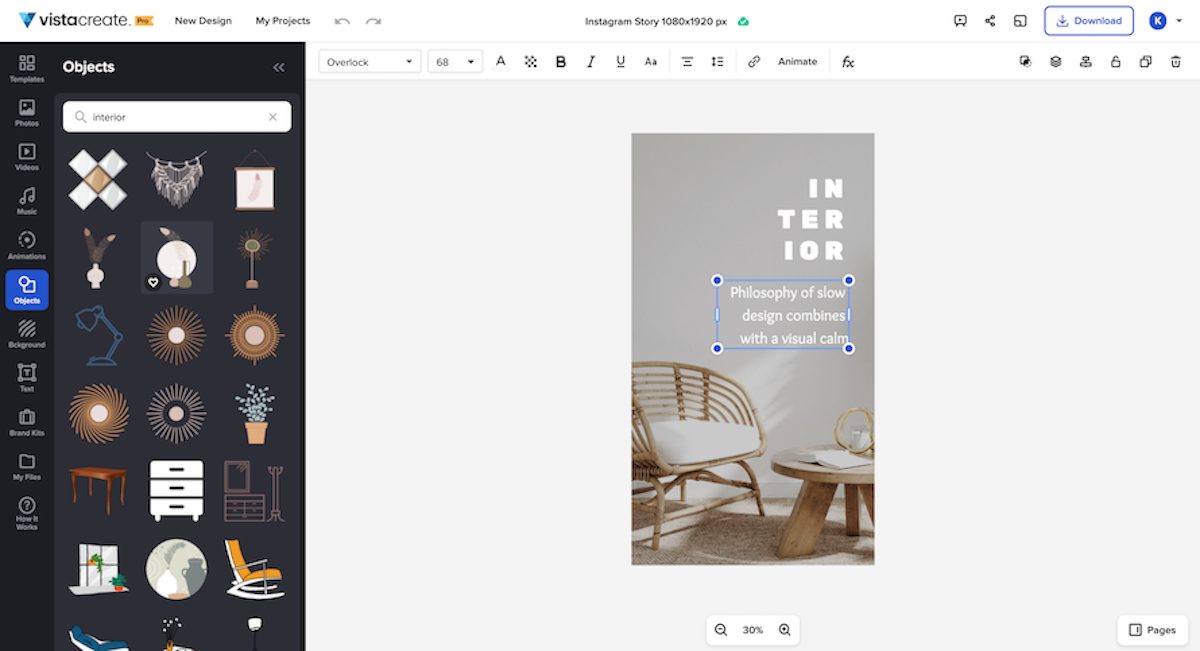
VistaCreate, formerly Crello and owned by the VistaPrint parent company Vista, is an online design platform with drag-and-drop templates for social posts, flyers, posters and other print formats, animated designs, a brand kit and AI tools such as background removal, image generation and an AI writer. It runs in a browser and as iOS and Android apps. The free Starter plan covers one seat with 100K templates, 1M stock items and 10 GB storage; Pro adds 200K+ templates, 170M+ stock items, a one-click resizer, unlimited storage and up to 10 seats. Designs can be sent to VistaPrint for printing in about 20 countries. It is proprietary software, and the vendor now markets it as an AI design platform for small businesses.
What users say
Evidence ↓Reviewers describe it as easy for people with no design background and quick for social and promo graphics. A SelectHub synthesis of 633 reviews on three review sites reports 91 percent would recommend it, but also limited customization for experienced designers, basic video editing, and occasional problems with background removal. One ecommerce reviewer found it faster than Canva for banners but noted fewer integrations and a smaller template library. These are one aggregator's summary and one reviewer, not a measured consensus.
Rankings and alternatives
- Graphic design software for beginners #4 of 8 Template app with print ordering
- Canva #1 Best for most beginners
- Adobe Express #2 Canva-style app with more free tools
- Affinity #3 Free professional design app


Graphic design software for beginners scores
Evaluated Nov 17, 2026 Evidence ↓- Ease for non-designers · counts double 4
4/5 means: Approachable; most newcomers finish a decent design in their first session with a little looking around
SelectHub's synthesis of 633 reviews says it is easy for people with no design experience, and one reviewer found it needs fewer clicks than Canva for banners. The evidence is an aggregator summary and one reviewer, so 4 not 5.
- Templates for everyday jobs · counts double 4
4/5 means: Hundreds of thousands of templates covering nearly all of these kinds, with a large stock library
The vendor lists 100K templates on Starter and 200K+ on Pro, with 1M and 170M+ stock items. Print formats cover flyers, posters and cards, and animated templates are reported. That is far below Canva's millions; counts by kind were not published.
- What the free version lets you make 3
3/5 means: Watermark-free downloads, but paid items are mixed through the library, or key formats and tools are paid
A review says free downloads are unlimited as JPG or PNG with no time limit, and Starter has 10 GB storage. Watermark rules for premium items, commercial use and which tools are Pro-only (the resizer is) were not confirmed.
- Print and export quality 2
2/5 means: Full-size PNG or JPG, with no print PDF and no vector or transparent export
JPG, PNG, PDF, GIF and MP4 are listed and prints can be ordered from VistaPrint. No source read documents bleed, CMYK, SVG or transparent PNG, so this is a low-confidence lean on what is documented.
- Photo editing and background removal 3
3/5 means: One-click background removal and simple fixes, but little control
The AI tools include Background Remover, BG Changer, Object Grabber, Object Remover and Image Enhancer, which would suggest 4. Reviewers report occasional background-removal problems, and no layer-based editing is documented.
- Making a logo you can use as a brand unknown
No logo maker, vector output or trademark license terms turned up in the pages read.
- Room to grow 2
2/5 means: Free placement of elements, but little control over type, alignment or layers
A reviewer cites limited customization for experienced designers and limited advanced layers or effects. It has brand kits, version history and the resizer, but no documented depth in type or vectors.
- Phone and computer support 4
4/5 means: A browser and full mobile apps, with no desktop app, or desktop apps on every system plus one mobile system
Web plus iOS and Android apps, with no desktop app found. A reviewer says the mobile experience could be improved, and sync was not verified.
- AI helpers · counts half 4
4/5 means: AI image generation, text and editing tools with generous limits on the paid plan
The vendor lists design and image generation, an image enhancer, an AI writer and a resizer on Pro. Per-plan limits and result quality were not shown, and the resizer is Pro-only.
Pricing
- Starter Free
- Pro $10.00/month
Prices checked Nov 17, 2026.
Evidence and sources
What users say
Summary 5 quotes
-
In a side-by-side workflow test, I found VistaCreate made it easier to create ecommerce banners and sale promos with fewer clicks and less tweaking.
Bogdan Rancea, founder of ecomm.design (an ecommerce showcase site) · ecomm.design/vistacreate-pricing · published · checked -
VistaCreate reviews indicate a 'excellent' User Satisfaction Rating of 91% based on 633 user reviews from 3 recognized software review sites.
selecthub.com/p/graphic-design-software/vistacreate · checked -
VistaCreate is praised for its intuitive design, making it easy to navigate and use, even for those without prior graphic design experience.
selecthub.com/p/graphic-design-software/vistacreate · checked -
Occasional issues with the background removal tool have also been reported, indicating that while this feature can be useful, its reliability and accuracy might not always be on par with user expectations.
selecthub.com/p/graphic-design-software/vistacreate · checked -
Fewer integrations than Canva
Bogdan Rancea, founder of ecomm.design (an ecommerce showcase site) · ecomm.design/vistacreate-pricing · published · checked
Graphic design software for beginners scores
Ease for non-designers 3 quotes
-
VistaCreate reviews indicate a 'excellent' User Satisfaction Rating of 91% based on 633 user reviews from 3 recognized software review sites.
selecthub.com/p/graphic-design-software/vistacreate · checked -
VistaCreate is praised for its intuitive design, making it easy to navigate and use, even for those without prior graphic design experience.
selecthub.com/p/graphic-design-software/vistacreate · checked -
In a side-by-side workflow test, I found VistaCreate made it easier to create ecommerce banners and sale promos with fewer clicks and less tweaking.
Bogdan Rancea, founder of ecomm.design (an ecommerce showcase site) · ecomm.design/vistacreate-pricing · published · checked
Templates for everyday jobs 2 quotes
-
Starter plan
create.vista.com/plans · checked -
Once you’re done with your graphic design project, click the “Print online” button in the upper-right corner of the artboard to print the design. Check your final design before sending it for printing. You’ll get redirected to VistaPrint’s online printing service, where you can provide details on your order.
create.vista.com/features/print · checked
What the free version lets you make 3 quotes
-
Starter plan
create.vista.com/plans · checked -
open the design that you’ve made in VistaCreate and use the Resize tool (available for VistaCreate Pro users).
create.vista.com/features/print · checked -
You can create unlimited designs, download them in JPG or PNG format,
Bogdan Rancea, founder of ecomm.design (an ecommerce showcase site) · ecomm.design/vistacreate-pricing · published · checked
Print and export quality 3 quotes
-
Once you’re done with your graphic design project, click the “Print online” button in the upper-right corner of the artboard to print the design. Check your final design before sending it for printing. You’ll get redirected to VistaPrint’s online printing service, where you can provide details on your order.
create.vista.com/features/print · checked -
Currently, you can order custom online printing in certain countries: the US, Canada, Australia, New Zealand, Singapore, UK, Italy, Spain, Portugal, Ireland, France, India, Switzerland, Austria, Germany, Belgium, Netherlands, Sweden, Denmark, Norway, and Finland — with more countries to come.
create.vista.com/features/print · checked -
You can create unlimited designs, download them in JPG or PNG format,
Bogdan Rancea, founder of ecomm.design (an ecommerce showcase site) · ecomm.design/vistacreate-pricing · published · checked
Photo editing and background removal 2 quotes
-
Design Generator, Design Improver, Image Generator, Image Enhancer, Background Remover, BG Changer, Object Grabber, Object Remover, AI Writer, Sticker Maker
create.vista.com/plans · checked -
Occasional issues with the background removal tool have also been reported, indicating that while this feature can be useful, its reliability and accuracy might not always be on par with user expectations.
selecthub.com/p/graphic-design-software/vistacreate · checked
Room to grow 2 quotes
-
Occasional issues with the background removal tool have also been reported, indicating that while this feature can be useful, its reliability and accuracy might not always be on par with user expectations.
selecthub.com/p/graphic-design-software/vistacreate · checked -
Fewer integrations than Canva
Bogdan Rancea, founder of ecomm.design (an ecommerce showcase site) · ecomm.design/vistacreate-pricing · published · checked
Phone and computer support 2 quotes
-
Trusted by businesses globally.Backed by VistaPrint.
create.vista.com · checked -
Fewer integrations than Canva
Bogdan Rancea, founder of ecomm.design (an ecommerce showcase site) · ecomm.design/vistacreate-pricing · published · checked
AI helpers 2 quotes
-
Design Generator, Design Improver, Image Generator, Image Enhancer, Background Remover, BG Changer, Object Grabber, Object Remover, AI Writer, Sticker Maker
create.vista.com/plans · checked -
open the design that you’ve made in VistaCreate and use the Resize tool (available for VistaCreate Pro users).
create.vista.com/features/print · checked
Facts
License 1 quote
-
VistaCreate is an AI-powered design platform for small businesses. Start with a photo, an idea, or a template and turn it into professional designs for social media, ads, product listings, marketing materials, print, and more.
create.vista.com · checked
Runs on 1 quote
-
Trusted by businesses globally.Backed by VistaPrint.
create.vista.com · checked
Users 1 quote
-
Trusted by businesses globally.Backed by VistaPrint.
create.vista.com · checked
More from the sources
Pricing 2 quotes
-
Pro annual subscription is free for 14 days, then $120 USD per year, billed upfront. Renews automatically each year until canceled. Cancel anytime in Account Settings or by contacting Support.
create.vista.com/plans · checked -
For just $13/month (or $10/month billed annually), you unlock the full platform.
Bogdan Rancea, founder of ecomm.design (an ecommerce showcase site) · ecomm.design/vistacreate-pricing · published · checked
Pricing
create.vista.com/plans · checked