
Autodesk Fusion
Integrated CAD, CAM and PCB design in one cloud-connected desktop app, with a free personal-use tier that includes the Electronics workspace.
Our verdict
#8 of 9 in PCB design software for hobbyists · For boards that must fit a 3D case
Pros
- Board and enclosure design in one program
- Mature EAGLE-derived routing and libraries
Cons
- Personal license bans selling boards and must be renewed
- Cloud storage and an Autodesk account are required
- Slower than EAGLE was, and harder to learn than KiCad or EasyEDA
- Choose if:
- You already design your enclosures in Fusion
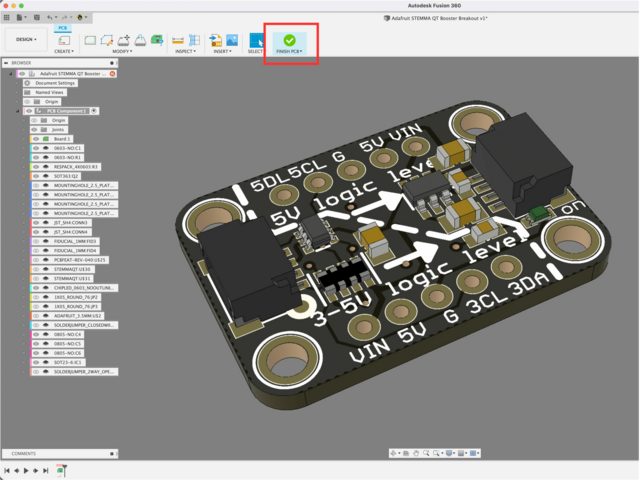
Autodesk Fusion (formerly Fusion 360) is a desktop app with cloud storage that combines 3D CAD, CAM, simulation and electronics (schematic and PCB layout) design. Its Electronics workspace is the successor to Autodesk EAGLE, which Autodesk announced it would stop selling and supporting on June 7, 2026. A free personal-use tier is limited to non-commercial hobby use by people earning under $1,000 USD a year from it, and caps the electronics side at 2 schematic sheets and, since late 2025 per Autodesk support, 4 signal layers with no board-area cap. The paid subscription lifts electronics limits to 999 schematics and 16 layers. Designs live in Autodesk’s cloud and an Autodesk account is required.
What users say
Evidence ↓Most of the views read come from unhappy former EAGLE users on Autodesk and SparkFun forums. They object to cloud-only project storage, the lack of a native Linux version and a Fusion that feels slower than EAGLE; this group is self-selected and several members moved to KiCad or Altium. Hobbyists also complained that the old personal limits (2 layers, 80 cm2) were too tight for cheap-fab boards of about 100 x 100 mm, and one KiCad user welcomed the 2025 relaxation because it keeps the PCB and enclosure in one tool. No review of day-to-day routing was read.
Rankings and alternatives



Hobbyist PCB design software scores
Evaluated Nov 17, 2026 Evidence ↓- Layout and routing power · counts double 4
4/5 means: Strong interactive routing with differential pairs and length tuning, and one notable weakness in speed, polish or rule setup
The Electronics workspace has a push-and-shove style interactive router, differential pairs, length tuning, rule-based DRC, 4 signal layers in the personal tier, and 3D PCB with enclosure sync and STEP export. The scored weaknesses are the 4-layer cap and an EAGLE-derived interface; this rests on background knowledge, not a read page.
- Free-use headroom 3
3/5 means: Free for personal projects with limits a growing hobbyist will meet, such as a non-commercial clause, public-by-default projects or a cap on layers or documents
Free with 4 signal layers and unlimited board area since October 2025, but non-commercial only (under $1,000 USD revenue), 10 active documents, 3-year renewal, and a schematic sheet limit that I did not confirm after the change.
- Ease of a first board 2
2/5 means: Learnable, but its workflow or interface fights newcomers and help is thin
Knowledge says there is a learning curve from EAGLE heritage, command-line style commands and a heavy app, with plenty of tutorials. Users call it slower than EAGLE. I read no direct beginner account. Writer calibration: the EAGLE-derived interface is widely criticized as unfriendly and Fusion as slower than EAGLE, so the workflow fights newcomers (level 2) even with tutorials available.
- Parts libraries 3
3/5 means: A decent library with some gaps, or a large one of uneven quality, and workable part creation
From background knowledge, Fusion has built-in libraries, a Library.io search and EAGLE-library compatibility, and SnapEDA and Ultra Librarian export in EAGLE format, but built-in quality is uneven. No page read covers it.
- Path to manufactured boards 3
3/5 means: Complete fabrication and assembly output, sent to a fab by hand
From background knowledge, it outputs Gerber, drill, BOM and pick-and-place through CAM jobs and fab-specific CAM presets, and I know of no built-in ordering. Not covered by a read page.
- Ownership of your designs 2
2/5 means: Cloud-first or account-tied, with limited export or a renewable license that could be withdrawn
Designs live in Autodesk's cloud and an account is required, the personal license is renewable, and users criticize cloud-only storage. Export exists (EAGLE-format and Gerber), but the format is proprietary.
- Help and community 4
4/5 means: A large community with plenty of tutorials and shared projects
From background knowledge, Fusion and EAGLE have large communities with many tutorials, videos and forum answers. No page read measures it.
- Platforms · counts half 3
3/5 means: Two of Windows, macOS and Linux
Windows and macOS are supported natively (background knowledge). Users report no native Linux version, which gives 2 of 3 desktops.
Pricing
- Fusion for personal use Free Free for 3 years and renewable, for non-commercial home use by people earning under $1,000 USD a year from it. 10 active editable documents. Electronics limited to 2 schematics and, per Autodesk support from October 2025, 4 signal layers and unlimited board area (Autodesk's older page text says 2 layers and 80 cm2).
- Autodesk Fusion subscription Contact sales Price not read; Autodesk's page showed only a placeholder. Electronics limits are 999 schematics, 16 layers and unlimited board area. Advanced functionality through extensions costs extra; no electronics-extension price was found.
Prices checked Nov 17, 2026.
Evidence and sources
What users say
Summary 4 quotes
-
many of us are unwilling and unable due to security reasons to have our designs and IP handles and stored in the cloud on someone elses computer which we have no control over. there is no means to run fusion natively under any linux distro.
Johngalt, SparkFun community forum user · community.sparkfun.com/t/autodesk-eagle-is-end-of-life/45787 · published · checked -
And third problem Fusion is slower than Eagle. I tested it on modern PC with Win 10 and Fusion is objectively slower.
pavel.t7t, Autodesk forum user (EAGLE user moving to KiCad for hobby work) · forums.autodesk.com/t5/eagle-forum-read-only/eagle-dying-on-june-7-2026/m-p/12952477/highlight/true · published · checked -
That's great news I will definitely give it a try for my new PCB, this might be what I need to migrate from Kicad, so I can keep my PCB and enclosure on the same platform
majedmohammad, Autodesk forum user (KiCad user) · forums.autodesk.com/t5/fusion-electronics-forum/restrictions-in-the-hobbyist-version/td-p/9536686 · published · checked -
Most PCB manufacturers have a fixed economic price for PCBs up to around 100x100mm (maybe a little bit more), and if the size is larger in either direction, the PCB price more than doubles.
silvio3105, Autodesk forum user · forums.autodesk.com/t5/fusion-electronics-forum/restrictions-in-the-hobbyist-version/td-p/9536686 · published · checked
Hobbyist PCB design software scores
Layout and routing power 2 quotes
-
I just confirmed it and the new limits are in place. So basically, you can do max a 4 layer board with unlimited board size.
jorge_garcia, Autodesk product support specialist for Fusion 360 and EAGLE · forums.autodesk.com/t5/fusion-electronics-forum/restrictions-in-the-hobbyist-version/td-p/9536686 · published · checked -
note that Gemini search results are outdated and the AI states incorrect limitations like 2 signal layers in PCB layout, even though the 10/2025 document states 4 signal layers.
digiphis, Autodesk employee on the Autodesk forum · forums.autodesk.com/t5/fusion-electronics-forum/restrictions-in-the-hobbyist-version/td-p/9536686 · published · checked
Free-use headroom 5 quotes
-
Fusion 360 for personal use is a limited free version that includes basic functionality and can be renewed on a 3-year basis.
www-pt.autodesk.com/ca-en/products/fusion-360/personal · checked -
10 active and editable Fusion 360 documents, unlimited inactive documents
www-pt.autodesk.com/ca-en/products/fusion-360/personal · checked -
A hobbyist user must generate less than $1,000 USD in annual revenue, using Fusion 360 for home-based, non-commercial design, manufacturing, and fabrication projects.
www-pt.autodesk.com/ca-en/products/fusion-360/personal · checked -
I just confirmed it and the new limits are in place. So basically, you can do max a 4 layer board with unlimited board size.
jorge_garcia, Autodesk product support specialist for Fusion 360 and EAGLE · forums.autodesk.com/t5/fusion-electronics-forum/restrictions-in-the-hobbyist-version/td-p/9536686 · published · checked -
note that Gemini search results are outdated and the AI states incorrect limitations like 2 signal layers in PCB layout, even though the 10/2025 document states 4 signal layers.
digiphis, Autodesk employee on the Autodesk forum · forums.autodesk.com/t5/fusion-electronics-forum/restrictions-in-the-hobbyist-version/td-p/9536686 · published · checked
Ease of a first board 1 quote
-
And third problem Fusion is slower than Eagle. I tested it on modern PC with Win 10 and Fusion is objectively slower.
pavel.t7t, Autodesk forum user (EAGLE user moving to KiCad for hobby work) · forums.autodesk.com/t5/eagle-forum-read-only/eagle-dying-on-june-7-2026/m-p/12952477/highlight/true · published · checked
Ownership of your designs 2 quotes
-
Fusion 360 for personal use is a limited free version that includes basic functionality and can be renewed on a 3-year basis.
www-pt.autodesk.com/ca-en/products/fusion-360/personal · checked -
many of us are unwilling and unable due to security reasons to have our designs and IP handles and stored in the cloud on someone elses computer which we have no control over. there is no means to run fusion natively under any linux distro.
Johngalt, SparkFun community forum user · community.sparkfun.com/t/autodesk-eagle-is-end-of-life/45787 · published · checked
Platforms 1 quote
-
many of us are unwilling and unable due to security reasons to have our designs and IP handles and stored in the cloud on someone elses computer which we have no control over. there is no means to run fusion natively under any linux distro.
Johngalt, SparkFun community forum user · community.sparkfun.com/t/autodesk-eagle-is-end-of-life/45787 · published · checked
Facts
License 2 quotes
-
Fusion 360 for personal use is a limited free version that includes basic functionality and can be renewed on a 3-year basis.
www-pt.autodesk.com/ca-en/products/fusion-360/personal · checked -
A hobbyist user must generate less than $1,000 USD in annual revenue, using Fusion 360 for home-based, non-commercial design, manufacturing, and fabrication projects.
www-pt.autodesk.com/ca-en/products/fusion-360/personal · checked
More from the sources
Features 1 quote
-
Exclusive access to EAGLE Premium and HSMWorks
www-pt.autodesk.com/ca-en/products/fusion-360/personal · checked
Limits and known issues 3 quotes
-
EAGLE Free Subscribers: Fusion 360 for Personal Use is the suggested path forward. Fusion 360 for Personal Use is free and includes integrated CAD, CAM, and CAE functionality, up to two sheets per schematics, two Signal Layers, and a 80mm2 board area. If you’re looking for more, cost-effective monthly and annual subscription options are available.
just_Tony, SparkFun forum user quoting Autodesk's EAGLE announcement · community.sparkfun.com/t/autodesk-eagle-is-end-of-life/45787 · published · checked -
Limited electronics and PCB design: 2 schematics 2 layers 80cm2 board area
www-pt.autodesk.com/ca-en/products/fusion-360/personal · checked -
Unified electronics and PCB design: 999 schematics 16 layers Unlimited board area
www-pt.autodesk.com/ca-en/products/fusion-360/personal · checked
License 1 quote
-
Effective June 7, 2026, Autodesk will no longer sell, nor support EAGLE. As long as you continue to subscribe to Fusion 360, you will have access to EAGLE until the mentioned date.
kostkaV5ARK, Autodesk forum user quoting an Autodesk email · forums.autodesk.com/t5/eagle-forum-read-only/eagle-dying-on-june-7-2026/m-p/12952477/highlight/true · published · checked