
Microsoft Clipchamp
Microsoft's beginner-friendly video editor, free at up to 1080p with no watermark, in the browser and as the Windows 11 app
Our verdict
#5 of 8 in Free video editors for beginners · Already on your Windows 11 PC
What it does
- AI captions in over 80 languages, AI voiceover and silence removal on the free plan
- Screen, webcam and voice recording built in
- Runs as a Windows 11 app or in Chrome or Edge on Mac, Linux and Chromebook
Pros
- No install on Windows 11, and works on a Chromebook
- Unlimited watermark-free 1080p exports
- Easy to learn
Cons
- No keyframes and little audio or color control
- Needs a Microsoft account, and 4K export is paid
- Wants 8 GB of memory or more and gets unstable on older machines
- Choose if:
- You use a Chromebook or prefer a Microsoft account to a CapCut account for captioning videos
Microsoft Clipchamp is a timeline-based video editor that runs in desktop Chrome or Edge, including on Mac, Linux and Chromebook, and as an app built into Windows 11 and available for Windows 10. The free plan for personal accounts needs a personal Microsoft account and exports unlimited videos up to 1080p without a watermark, with free stock media, AI captions, text-to-speech and a screen and webcam recorder. Premium (4K export, premium stock, filters and effects, brand kit) now comes with a Microsoft 365 Personal or Family subscription. Editing and exporting run on your own computer rather than in the cloud. A separate work version exists for Microsoft 365 business and education accounts.
What users say
Evidence ↓The few practitioner accounts read are positive on ease of use and the generous free tier. A 2022 Windows Central review found a small learning curve and a drag-and-drop interface, and a vendor-selected Trustpilot reviewer was surprised how much the free version includes. The same reviewer hit file-locating and playback glitches on two PCs, and Microsoft's own guidance warns that older computers can see slow performance, freezing and crashing. These are single accounts, not a measured consensus.
Rankings and alternatives
- Free video editors for beginners #5 of 8 Already on your Windows 11 PC
- CapCut #1 Easiest path to a finished video
- iMovie #2 Best for Mac owners
- DaVinci Resolve 21 #3 The free editor you won't outgrow



Free video editors for beginners scores
Evaluated Nov 17, 2026 Evidence ↓- Ease of learning · counts double 5
5/5 means: As easy as the simplest consumer editors; drag clips in, trim, add music and export without instructions
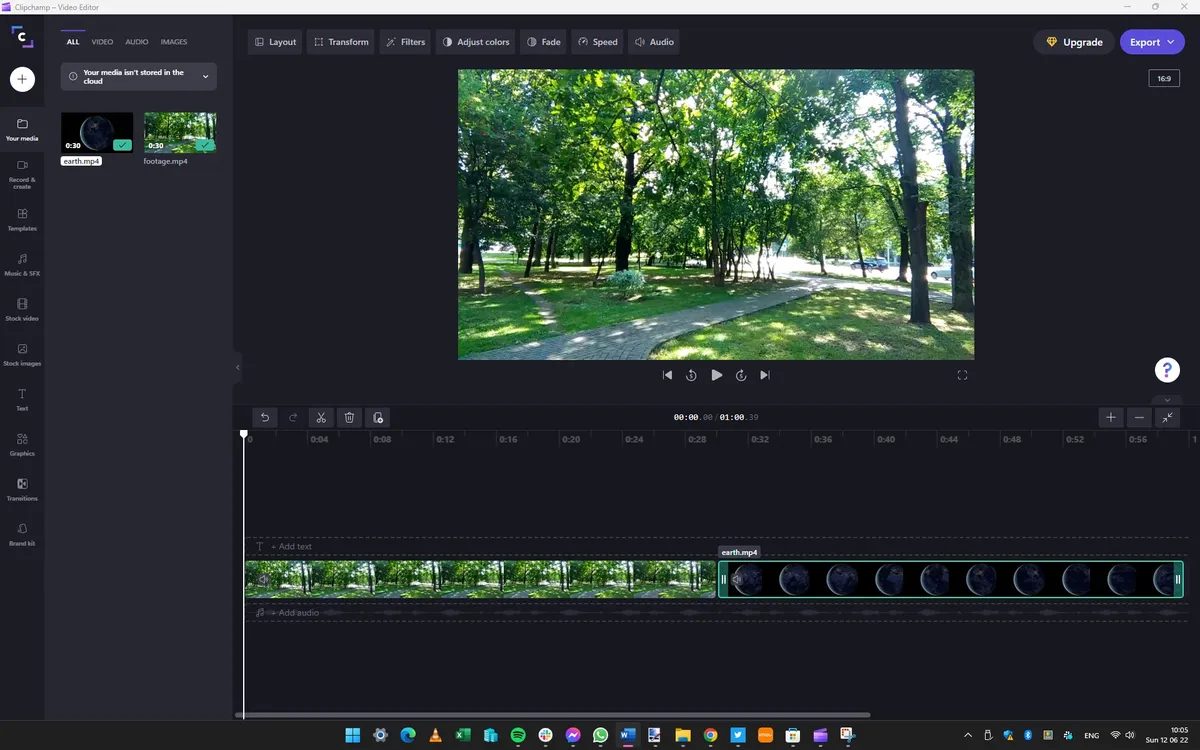
A simple drag-and-drop editor with a small learning curve; a reviewer found people can jump straight into editing. It opens with templates and a clear media panel and timeline, in the style of the simplest consumer editors.
- Editing depth and room to grow · counts double 2
2/5 means: A simple timeline with titles and transitions, but few tracks, no keyframes and little color or audio control
A multi-layer timeline with trimming, transitions, filters, color adjustments, speed and fades, but no keyframe animation and little audio mixing or color control. From knowledge: fine for simple YouTube and school videos, and outgrown quickly by anyone who wants animated graphics or detailed audio work.
- What the free version gives you 3
3/5 means: Watermark-free exports, but capped at 1080p or limited by an account, a paid stock library or regular upgrade prompts
Unlimited watermark-free exports at up to 1080p on the free plan. Short of 4 because it needs a personal Microsoft account, 4K export is paid (through Microsoft 365 Personal or Family), and premium stock, audio and effects sit in the same library; a competing vendor's guide says a project that uses one can't be exported on the free plan.
- Built-in shortcuts in the free version 4
4/5 means: Most of these free, with usage caps or paid items mixed in
The free plan includes AI captions in over 80 languages, AI voiceover, silence removal, screen and webcam recording, templates and a free stock library. Short of 5 because part of the stock library is premium.
- Runs well on an ordinary laptop 3
3/5 means: Works on an ordinary laptop with lag on long or high-resolution projects, or occasional crashes
Video is processed locally in the browser or Windows app, and Microsoft recommends at least 8 GB of memory (16 GB better) and warns older computers may see slow performance, freezing or crashes. A reviewer also hit file-relinking and playback glitches.
- Tutorials and help 3
3/5 means: A moderate community; most common questions have an answer
From knowledge: Microsoft's support pages and a growing set of YouTube tutorials, helped by being built into Windows 11, but far fewer tutorials than CapCut, iMovie or DaVinci Resolve.
- Computers it runs on · counts half 5
5/5 means: Windows, Mac, Linux and Chromebook
Built into Windows 11, and runs in Chrome or Edge on Windows, Mac, Linux and Chromebook.
Pricing
- Free Free Personal Microsoft account required. Unlimited exports up to 1080p with no watermark. Projects that contain Premium stock or effects cannot be exported until the Premium items are removed or you upgrade (per a competitor's article). No content backup to OneDrive on free; source files stay on your computer.
- Premium (via Microsoft 365 Personal or Family) Contact sales The pricing page no longer lists a standalone Clipchamp Premium price; Premium features (4K export, premium stock, premium filters and effects, brand kit) are included with a Microsoft 365 Personal or Family subscription. Price of Microsoft 365 not checked here.
Prices checked Nov 17, 2026.
Evidence and sources
What users say
Summary 3 quotes
-
Clipchamp has a small learning curve, so people should be able to jump right into editing. While it can be used for more advanced multi-layer video projects, you could also just clip together a few gaming highlights and call it a day. Clipchamp has a simple drag-and-drop interface that extends throughout the entire app.
Sean Endicott, reviewer at Windows Central · windowscentral.com/clipchamp-video-editor-review · published · checked -
I ran into several syncing issues during my video editing. Syncing files across devices led to some errors while Clipchamp tried to locate files. Several times when I moved a clip and then tried to play it back on my timeline, Clipchamp would show the wrong part of my clip.
Sean Endicott, reviewer at Windows Central · windowscentral.com/clipchamp-video-editor-review · published · checked -
I never expected that a free version would have all these features. I was amazed and honestly grateful for having a free, well-featured, and user-friendly video editing site.
Monika, Trustpilot reviewer · clipchamp.com/en · checked
Free video editors for beginners scores
Ease of learning 1 quote
-
Clipchamp has a small learning curve, so people should be able to jump right into editing. While it can be used for more advanced multi-layer video projects, you could also just clip together a few gaming highlights and call it a day. Clipchamp has a simple drag-and-drop interface that extends throughout the entire app.
Sean Endicott, reviewer at Windows Central · windowscentral.com/clipchamp-video-editor-review · published · checked
Editing depth and room to grow 2 quotes
-
The free plan also includes all basic editing tools like trim, crop, rotate, resize, and more, as well as AI video editing features like AI subtitles, voiceovers, and silence removal.
clipchamp.com/en/pricing · checked -
Clipchamp has a small learning curve, so people should be able to jump right into editing. While it can be used for more advanced multi-layer video projects, you could also just clip together a few gaming highlights and call it a day. Clipchamp has a simple drag-and-drop interface that extends throughout the entire app.
Sean Endicott, reviewer at Windows Central · windowscentral.com/clipchamp-video-editor-review · published · checked
What the free version gives you 6 quotes
-
Start editing videos with beginner-friendly tools for free. Premium features are now included with Microsoft 365 Personal and Family plans.
clipchamp.com/en/pricing · checked -
Export videos in up to 1080p (full HD) video resolution for free, with no watermarks.
clipchamp.com/en/pricing · checked -
The free plan for Clipchamp video editor lets you work on and export as many videos as you like.
clipchamp.com/en/pricing · checked -
Sign in with a personal Microsoft account to get started with Clipchamp video editor. No payment or downloads required.
clipchamp.com/en/pricing · checked -
Access additional premium features with a Microsoft 365 Personal or Family subscription. Explore high-definition 4K UHD video exports, premium stock assets, and access the brand kit tool.
clipchamp.com/en/pricing · checked -
If you incorporate any premium stock video, audio tracks, or effects into your project, Clipchamp will not allow you to export the video until you upgrade.
fluxnote.io/guides/clipchamp-free-plan-limitations · published · checked
Built-in shortcuts in the free version 4 quotes
-
Access additional premium features with a Microsoft 365 Personal or Family subscription. Explore high-definition 4K UHD video exports, premium stock assets, and access the brand kit tool.
clipchamp.com/en/pricing · checked -
The free plan also includes all basic editing tools like trim, crop, rotate, resize, and more, as well as AI video editing features like AI subtitles, voiceovers, and silence removal.
clipchamp.com/en/pricing · checked -
Record audio, screen, and webcam securely, using Windows and Mac devices.
clipchamp.com/en · checked -
Improve video accessibility by generating accurate AI captions in over 80 global languages.
clipchamp.com/en · checked
Runs well on an ordinary laptop 5 quotes
-
In Clipchamp for personal accounts, your media files don't get uploaded to a server for processing. They get processed locally on your machine and don't leave your computer unless you decide to use one of the sharing options or content backup.
support.microsoft.com/en-us/clipchamp/how-clipchamp-stores-and-processes-media-files-in-editing-projects · checked -
The available memory/RAM should be at least 8 GB (16 GB or higher is better) and your machine should be a 64-bit computer running a 64-bit OS and the 64-bit version of Edge or Chrome.
support.microsoft.com/en-us/clipchamp/make-sure-clipchamp-works-well-for-you · checked -
If you're working with an older computer that doesn't meet these requirements, the editor may still function, but be aware that you could encounter problems like slow performance, freezing, and crashing, and would have a better experience on a different computer.
support.microsoft.com/en-us/clipchamp/make-sure-clipchamp-works-well-for-you · checked -
In Clipchamp's personal version, if you are not using the content backup feature and delete, rename, or move source media files on your computer, it could cause problems when you reopen the editing project, so be sure to keep these files.
support.microsoft.com/en-us/clipchamp/make-sure-clipchamp-works-well-for-you · checked -
I ran into several syncing issues during my video editing. Syncing files across devices led to some errors while Clipchamp tried to locate files. Several times when I moved a clip and then tried to play it back on my timeline, Clipchamp would show the wrong part of my clip.
Sean Endicott, reviewer at Windows Central · windowscentral.com/clipchamp-video-editor-review · published · checked
Computers it runs on 2 quotes
-
Find Clipchamp video editor in the Start menu on Windows 11 or download for Windows 10 from the Microsoft Store. Premium video editing features are available with a Microsoft 365 subscription.
clipchamp.com/en · checked -
Use Clipchamp on a supported Windows, Mac, or Linux desktop or laptop computer, or on a Chromebook.
support.microsoft.com/en-us/clipchamp/which-web-browsers-does-clipchamp-support · checked
Facts
Runs on 3 quotes
-
Find Clipchamp video editor in the Start menu on Windows 11 or download for Windows 10 from the Microsoft Store. Premium video editing features are available with a Microsoft 365 subscription.
clipchamp.com/en · checked -
Use Clipchamp on a supported Windows, Mac, or Linux desktop or laptop computer, or on a Chromebook.
support.microsoft.com/en-us/clipchamp/which-web-browsers-does-clipchamp-support · checked -
The desktop video editor isn't supported in Android or iOS mobile browsers, including the mobile versions of Edge and Chrome.
support.microsoft.com/en-us/clipchamp/which-web-browsers-does-clipchamp-support · checked
Needs 2 quotes
-
Sign in with a personal Microsoft account to get started with Clipchamp video editor. No payment or downloads required.
clipchamp.com/en/pricing · checked -
The available memory/RAM should be at least 8 GB (16 GB or higher is better) and your machine should be a 64-bit computer running a 64-bit OS and the 64-bit version of Edge or Chrome.
support.microsoft.com/en-us/clipchamp/make-sure-clipchamp-works-well-for-you · checked
Pricing
clipchamp.com/en/pricing · checked