
DaVinci Resolve 21
Free all-in-one video editor with color, effects and audio tools, from Blackmagic Design
Our verdict
#1 of 8 in Video editing software for YouTube · Best overall, and free to start
What it does
- Editing, color grading, effects and a full audio mixer in one app
- Free version with no watermark and 4K export
- Studio adds transcript editing, silence removal, automatic subtitles and Voice Isolation
- Runs on Windows, Mac and Linux
Pros
- The most capable free editor, with a one-time upgrade instead of a subscription
- Professional color and audio tools, so the channel never outgrows it
- Studio's voice cleanup rescues audio recorded in an ordinary room
Cons
- Steep to learn; expect weeks of tutorials before you're quick
- Automatic captions need Studio, and the caption workflow is clumsy
- Needs 16 GB of memory on Windows and is happiest with a dedicated graphics card
- Choose if:
- You want to pay once, or not at all, and grow into a professional editor
- Skip if:
- Your laptop has 8 GB of memory and no graphics card
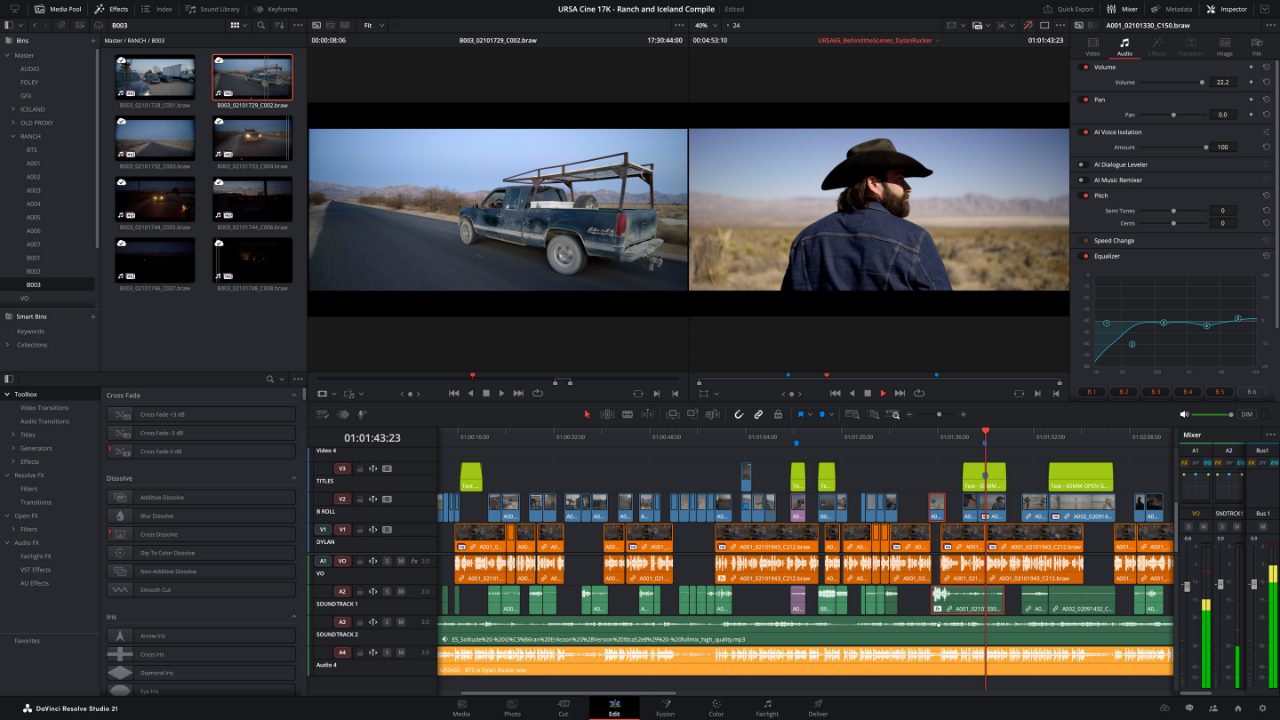
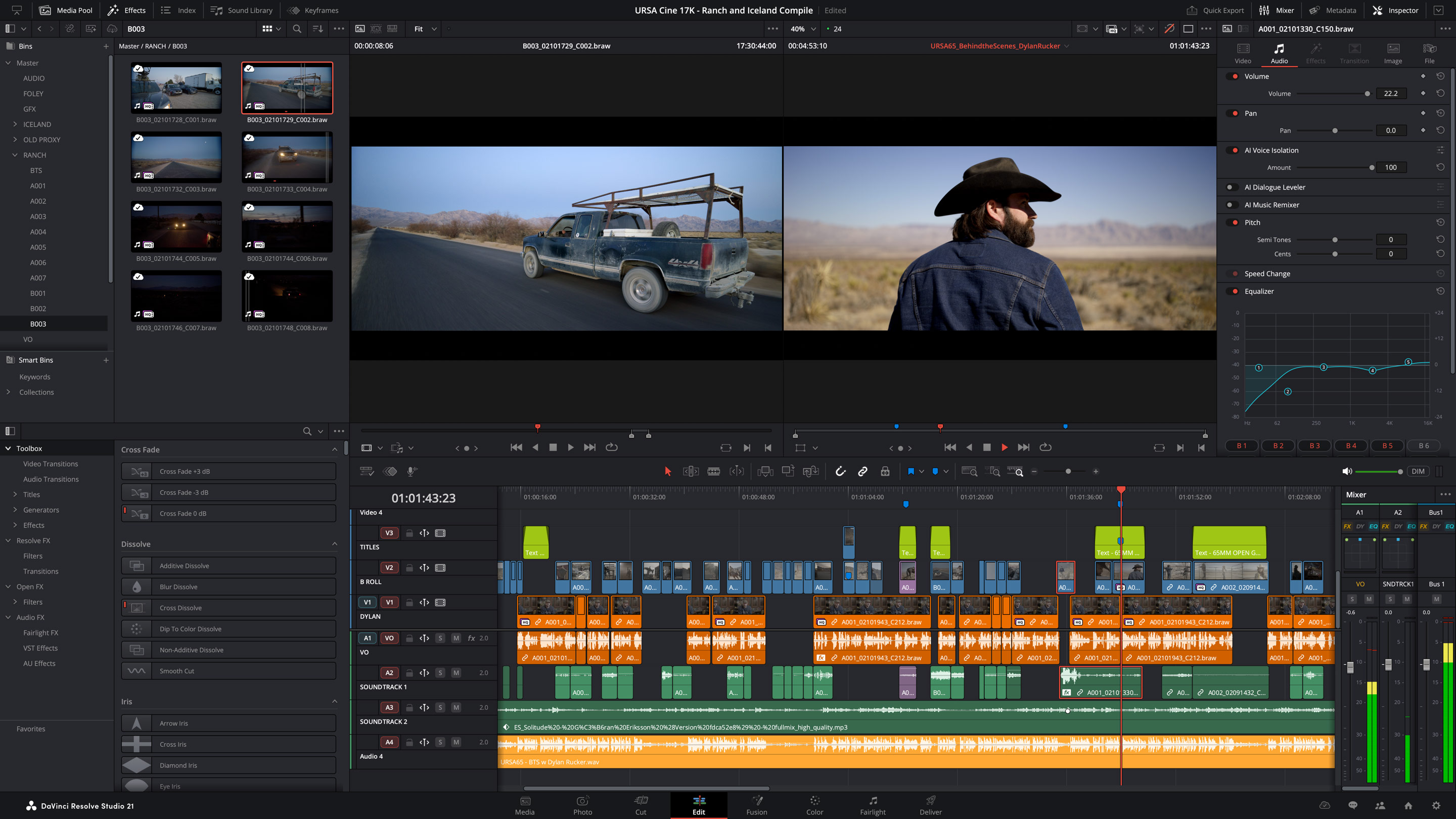
DaVinci Resolve is Blackmagic Design’s desktop video editor, which also covers color grading, motion graphics and audio mixing in one app. The free edition installs on Windows, macOS and Linux and exports up to Ultra HD (3840 x 2160) at up to 60 fps in 8-bit formats. A one-time $295 Studio edition adds AI tools, noise reduction, voice isolation, hardware H.264 and H.265 acceleration, multi-GPU support and 4K-and-beyond output. The free edition is proprietary freeware with no subscription. Its Cut page is built for fast edits, while the Edit page uses a conventional track timeline.
What users say
Evidence ↓Feedback in the sources read is limited and mostly not from YouTubers. A film professor who teaches Resolve to freshmen says his students all started on the free version and he was happy with it. Two editors who moved from Premiere Pro say the Edit page is easy to pick up, one saying there is no massive learning curve and the other that it is similar to Premiere. A CineD reviewer says Fusion, the effects page, has a steep learning curve. Critically, one commenter on a 2020 review found Resolve buggy and slow, though others in the same thread had no problems, and a tutorial site says long-GOP H.264 and H.265 phone and camera clips are often the cause of choppy playback, with proxies as the usual fix. No source measured how many people find the Cut page useful.
Rankings and alternatives
- Video editing software for YouTube #1 of 8 Best overall, and free to start
- Adobe Premiere #2 The standard, if you'll hire editors
- CyberLink PowerDirector #3 Most editor for the money on Windows
- Final Cut Pro for Mac #4 The fast choice on a Mac
- Video editing software for Mac #2 of 7 Pro color and audio, free
- iMovie #3 Family videos, already installed
- Wondershare Filmora #5 Easy editing with a one-time price
- CapCut #6 Quick social clips for free
- Free video editors for beginners #3 of 8 The free editor you won't outgrow
- Shotcut #4 Open source and light on older laptops
- Microsoft Clipchamp #5 Already on your Windows 11 PC
- Kdenlive #6 Fullest open-source editor









Free video editors for beginners scores
Evaluated Nov 17, 2026 Evidence ↓- Ease of learning · counts double 3
3/5 means: A real learning curve of a few sessions, with a conventional editing layout that tutorials explain well
Basic cutting on the Edit or simplified Cut page works like any track-based editor, and countless tutorials walk through a first video. But the program opens onto a professional workspace with seven pages, project settings and terms like nodes, and the color and Fusion pages have a steep learning curve. Most newcomers need a few sessions and a tutorial before their first export feels routine.
- Editing depth and room to grow · counts double 5
5/5 means: Professional depth in editing, color, audio and effects, the same tools paid work uses
The free version has the same edit, Fusion effects, color and Fairlight audio pages as the paid Studio version, the same tools used for film and TV work. Studio adds AI tools, noise reduction and more effects, but nothing a beginner's videos depend on.
- What the free version gives you 4
4/5 means: Watermark-free 4K exports with no account needed; some advanced or AI features are paid
No watermark, no subscription and no account to edit (the registration form on the download page can be skipped, from knowledge), with export up to Ultra HD 4K at 60 fps. Short of 5 because the paid Studio version ($295 once) holds back automatic subtitles, voice isolation, noise reduction, AI tools, hardware H.264/H.265 encoding and some camera formats, and using a Studio-only effect in the free version puts a watermark on the export.
- Built-in shortcuts in the free version 2
2/5 means: Title presets and some effects, but no automatic captions and no media library
The free version has a large library of titles, transitions and effects, but automatic subtitles from speech, voice isolation and the AI masking tools are Studio-only, and it has no stock footage or music library built into the editor.
- Runs well on an ordinary laptop 2
2/5 means: Needs more memory or graphics than a typical laptop has, or users widely report crashes
Blackmagic asks for 16 GB of memory on Windows (8 GB on Apple Silicon Macs) and a GPU with OpenCL or CUDA support, and the free version encodes H.264 and H.265 on the CPU because hardware encoding is Studio-only. On a typical 8 GB Windows laptop with integrated graphics, playback and exports are slow, and phone footage in some formats won't play in the free version.
- Tutorials and help 5
5/5 means: A huge community; almost any question already has a video answer
From knowledge: a huge community of YouTube tutorials and courses, free official training books from Blackmagic, and an active official forum; almost any question already has a video answer.
- Computers it runs on · counts half 4
4/5 means: Windows, Mac and Linux, or Windows, Mac and Chromebook
Windows, Mac (Apple Silicon only) and Linux; no browser or Chromebook version.
Video editing software for Mac scores
Evaluated Nov 17, 2026 Evidence ↓- Editing depth and room to grow 5
5/5 means: Professional depth in editing, effects and finishing, the tools full-time editors and studios use
The free edition keeps the full Edit, Cut, Fusion, color and Fairlight pages, with multicam, keyframes, masks, tracking and plug-ins, the tools used on film and TV work, so it is a 5 and not a 4. Studio adds Magic Mask and more effects, and the free edition also lost scripting from v21.1.
- Learning curve 2
2/5 means: A professional tool with a steep start; most people need weeks of tutorials to edit quickly
Switchers from Premiere call the Edit page easy and the Cut page is simplified, but there are seven pages, Fusion is steep, and one App Store reviewer calls the learning curve steep, so most newcomers need weeks of tutorials; not a 3 because no source shows most beginners finish a first video in a few sessions.
- How well it runs on an Apple silicon Mac · counts double 4
4/5 means: Smooth and fast on most Apple silicon Macs, with slowdowns only on heavy projects or the smallest laptops
Native Apple silicon app; Puget says the free edition on macOS gets hardware H.264/HEVC decode and encode, Larry Jordan found Resolve 19.1 fast and the base M4 adequate for single-camera work, and a reviewer edits 4K/24 on an M4 Air with no issues. Not a 5: the Air is fanless and may throttle, an M1 Air user reported three crashes, Resolve trails Final Cut, and 10-bit paths on free are not confirmed.
- Built-in time-savers 2
2/5 means: One or two of these, or several that are locked behind a paid tier the scored version doesn't include
Subtitles from audio, text-based editing, IntelliCut silence removal, Smart Reframe and voice isolation are all Studio-only, so the free edition keeps mainly vertical timelines, manual subtitles and templates. A 3 would need several of these included; Studio would score about 4.
- Color and audio tools 5
5/5 means: Professional grading and audio mixing in the same app
The free edition has the full color page with HDR grading and the Fairlight audio page with mixing and effects such as a hum remover and de-esser. It lacks voice isolation and UltraNR noise reduction (Studio), which keeps it from being flawless, but the grading and mixing are professional, so 5 and not 4.
- What you pay over three years 5
5/5 means: Free
Free with no subscription, and it exports without a general watermark; the watermark appears only if Studio-only effects are used. Studio is a one-time $295, which would score 4.
- Fit with iPhone, iPad and other Apple apps 4
4/5 means: An iPad or iPhone version that opens the same projects, plus good iPhone format support
Resolve for iPad opens the same project files as desktop, the free Blackmagic Camera app records H.264, H.265 and ProRes and syncs into projects through Blackmagic Cloud. Not a 5: there is no Photos library import documented, and Apple Log and 10-bit iPhone HEVC handling on the free edition are unconfirmed (one reviewer's ProRes Log file failed in the App Store build).
- Working with others and moving projects · counts half 5
5/5 means: Cross-platform, exchanges timelines with the major editors, and supports shared projects; common in client work
Runs on Windows and Linux, the free edition includes multi-user collaboration with Blackmagic Cloud libraries and a free self-hosted Project Server, and Resolve is widely used in client work. XML, AAF and EDL interchange is from general knowledge: no quote was saved for it.
Video editing software for YouTube scores
Evaluated Nov 17, 2026 Evidence ↓- Speed of cutting a typical YouTube video · counts double 5
5/5 means: Among the fastest for nearly every YouTube format, combining an efficient timeline with automatic cleanup or transcript editing
Studio has the Cut page for fast edits, text-based editing, AI IntelliCut silence removal and AI Multicam SmartSwitch for speaker-based angle switching, and hardware H.264/H.265 decoding for smoother cutting. Like Premiere Pro, it pairs an efficient timeline with editing by transcript and automatic silence removal. IntelliCut's Studio status is labeled only by a third party, and filler-word removal by name is not documented. The free edition lacks text-based editing and hardware decoding.
- Editing depth and production ceiling 5
5/5 means: Professional depth in editing, color, audio and effects, the tools full-time editors and studios use
Edit, Fusion effects, color, and Fairlight audio pages with multicam, keyframes, masks, tracking and plugins, the tools used for film and TV work. Studio adds Magic Mask and more effects; the free edition keeps nearly all of the depth.
- Automatic captions 3
3/5 means: Automatic captions that work, with a clear weakness in accuracy, languages, styling, workflow or caption-file export
Studio generates subtitles from audio and Resolve 20 added animated subtitle templates, but Larry Jordan found the workflow atrocious and the SRT files non-standard. Caption languages and SRT export were not confirmed from Blackmagic's pages. The free edition has no auto captions (only manual and imported SRT).
- Voice and audio cleanup 5
5/5 means: Best-in-class voice cleanup together with full audio mixing tools
Studio has AI voice isolation, a dialogue separator, UltraNR noise reduction, dialogue leveling in the voiceover palette and AI Audio Assistant mixing, on top of the full Fairlight mixing page. Auto ducking was not confirmed by name. The free edition has none of the voice isolation or AI tools.
- What a growing channel pays 4
4/5 means: $150 to $350 over three years
Studio is $295 one-time with free updates, which is $295 over three years (Blackmagic's page also shows a 20% online price of $236). Studio is needed for auto captions and voice isolation. No Speed Editor is included. The free edition costs nothing but lacks both.
- Shorts and vertical video 4
4/5 means: Automatic reframing to vertical from the same project, with presets or direct upload
Vertical timelines are supported with layouts that adapt on the Cut, Edit and Color pages, and Studio has Smart Reframe. Short of 5 because there is no clip-finding tool for long videos, and direct YouTube upload and Shorts presets were not confirmed. The free edition has no Smart Reframe.
- Learning curve 2
2/5 means: A professional tool with a steep start; most creators need weeks of tutorials to edit quickly
Switchers from Premiere Pro describe the Edit page as easy and similar to Premiere, and the Cut page is simplified, but Fusion is steep and the app has seven pages. No source measured how many creators find the Cut page useful. Like Premiere Pro, it is one of the professional tools with many pages and panels that most creators learn over weeks of tutorials. Same in the free edition.
- Smooth on a typical creator's computer 3
3/5 means: Works on a typical computer with lag on long or high-resolution projects, or occasional crashes
Studio adds hardware H.264/H.265 decoding, which the free edition lacks and which helps phone and camera footage. Requirements are 16 GB on Windows with a 4 GB VRAM GPU, and some users report crashes or lag on older laptops, with mixed accounts. Long-GOP footage can still need proxies. In the free edition, CPU decoding makes this weaker.
- Computers and devices it runs on · counts half 5
5/5 means: Windows and Mac, plus Linux, a browser or phone apps that open the same projects
Windows, Apple Silicon Macs and Linux, with the same installer for Studio. Linux is officially Rocky Linux 8.6 with a discrete GPU, which limits it, and there is no browser or phone app. Same in the free edition.
Pricing
- Free Free Limits mastering and output to Ultra HD (3840 x 2160) or lower, 60 fps and 8-bit formats, with a single processing GPU on Windows and Linux. Studio-only effects show a watermark if used. Whether a registration form is needed to download was not verified.
- Studio $295.00 one-time One-time purchase with free updates. Adds AI tools, noise reduction, voice isolation, text-based editing, hardware H.264 and H.265 acceleration, 10-bit video up to 120 fps and output beyond 4K. Blackmagic's page also shows a 20% online price of $236. No Speed Editor is bundled; the Speed Editor is a separate $435 product. Subtitles from audio, voice isolation, dialogue separator, Smart Reframe and noise reduction are Studio-only; IntelliCut silence removal is labeled Studio-only by a third party.
Prices checked Nov 17, 2026.
Evidence and sources
What users say
Summary 6 quotes
-
So, you can do nearly everything that Fusion offers for free, although this page has quite a steep learning curve. Once you wrap your head around concepts like nodes though, you will be able to create great effects here.
Alex Hohenthaner, reviewer at CineD · cined.com/davinci-resolve-18-6-free-vs-paid-studio-version · published · checked -
When I first began teaching DaVinci Resolve to my freshman class, everyone downloaded the free version for that specific reason—the cost. As I mentioned earlier, I too started with the free version and have been happy with it.
Chuck Gloman, associate professor in the TV/Film Department at DeSales University · tvtechnology.com/equipment/blackmagics-davinci-resolve-vs-davinci-resolve-studio-which-is-right-for-you · checked -
Easy to use interface, and no massive learning curve when switching from Premiere.
Fred van Leeuwen, video editor and reviewer at Fstoppers · fstoppers.com/review/goodbye-adobe-premiere-hello-da-vinci-resolve-466649 · published · checked -
Counterpoint: We dedicated about a month to switching from Premiere to Davinci Resolve and found found Resolve to be infuriatingly buggy and slow. It just failed and crashed all the time with our real-world video projects (several per week). It was literally the last straw before we switched to Macs and Final Cut.
fstoppers.com/review/goodbye-adobe-premiere-hello-da-vinci-resolve-466649 · published · checked -
The main editor, which is very similar to Premiere, and was easy to jump on to.
Lance Evans, creative director at Graphlink Media and runs a YouTube channel · creativebloq.com/entertainment/video-editing-software/i-finally-switched-from-adobe-to-davinci-resolve-heres-how-it-went · checked -
H.264 and H.265 get blamed first, and often fairly: many camera and phone versions use long-GOP compression, which is hard work to decode. The codec name alone still isn't a diagnosis.
DaVinci Resolve Club, independent Resolve tutorial site · davinciresolveclub.com/davinci-resolve-slow-playback · checked
Free video editors for beginners scores
Ease of learning 2 quotes
-
The edit page features drag and drop editing, context sensitive automatic trimming tools, fully customizable keyboard shortcuts so you can work faster, and a library full of hundreds of titles, transitions, and effects that you can add and animate.
blackmagicdesign.com/products/davinciresolve · checked -
So, you can do nearly everything that Fusion offers for free, although this page has quite a steep learning curve. Once you wrap your head around concepts like nodes though, you will be able to create great effects here.
Alex Hohenthaner, reviewer at CineD · cined.com/davinci-resolve-18-6-free-vs-paid-studio-version · published · checked
Editing depth and room to grow 4 quotes
-
The free version of DaVinci Resolve 21.1.2 includes all of the same high quality processing as DaVinci Resolve 21.1.2 Studio and can handle unlimited resolution media files. However it does limit project mastering and output to Ultra HD resolutions or lower and only supports a single processing GPU on Windows and Linux.
blackmagicdesign.com/support/content/readme/be08842994c94d999da4ab052d0a2b2a · checked -
The free version works with virtually all 8-bit video formats at up to 60fps in resolutions as high as Ultra HD 3840 x 2160. The free version includes multi-user collaboration and HDR grading!
blackmagicdesign.com/products/davinciresolve · checked -
Includes everything in the free version plus the DaVinci AI Neural Engine, dozens of additional Resolve FX, temporal and AI spatial noise reduction, text based editing, magic mask, film grain, optical blur and more. It also supports 10-bit video up to 120 frames per second and resolutions beyond 4K.
blackmagicdesign.com/products/davinciresolve · checked -
Hollywood’s most popular solution for editing, visual effects, motion graphics, color correction and audio post production, for Mac, Windows and Linux.
blackmagicdesign.com/products/davinciresolve · checked
What the free version gives you 9 quotes
-
If you need features such as support for multiple GPUs, 4K output, motion blur effects, temporal and spatial noise reduction, multiple AI-based tools, HDR tools, camera tracker, voice isolation, surround sound and immersive audio, multiple Resolve FX, 3D stereoscopic tools and remote rendering, please upgrade to DaVinci Resolve 21.1.2 Studio.
blackmagicdesign.com/support/content/readme/be08842994c94d999da4ab052d0a2b2a · checked -
The free version works with virtually all 8-bit video formats at up to 60fps in resolutions as high as Ultra HD 3840 x 2160. The free version includes multi-user collaboration and HDR grading!
blackmagicdesign.com/products/davinciresolve · checked -
Includes everything in the free version plus the DaVinci AI Neural Engine, dozens of additional Resolve FX, temporal and AI spatial noise reduction, text based editing, magic mask, film grain, optical blur and more. It also supports 10-bit video up to 120 frames per second and resolutions beyond 4K.
blackmagicdesign.com/products/davinciresolve · checked -
The watermark will show up if you want to use a Studio functionality in the free version
Alex Hohenthaner, reviewer at CineD · cined.com/davinci-resolve-18-6-free-vs-paid-studio-version · published · checked -
Studio also supports hardware-accelerated encoding and decoding of codecs such as H.264 and H.265, which will not only speed up working with this type of material but also significantly shorten the rendering process when exporting.
Alex Hohenthaner, reviewer at CineD · cined.com/davinci-resolve-18-6-free-vs-paid-studio-version · published · checked -
While the free version can handle many formats and codecs, only the Studio version will play back formats such as AVCHD, HEIF, J2K HT, and Sony XAVC, or 10-bit formats such as the H.264 10-bit 433 out of the Panasonic GH series.
Alex Hohenthaner, reviewer at CineD · cined.com/davinci-resolve-18-6-free-vs-paid-studio-version · published · checked -
Only in Studio can you find the following functions: Output stereo sound higher than 192 kbps Voice Isolation (to get rid of unwanted ambient sounds)
Alex Hohenthaner, reviewer at CineD · cined.com/davinci-resolve-18-6-free-vs-paid-studio-version · published · checked -
First of all, one of the biggest differences to some competitors: it’s only a one-time fee; there are no recurring charges and Blackmagic does not charge for updates.
Alex Hohenthaner, reviewer at CineD · cined.com/davinci-resolve-18-6-free-vs-paid-studio-version · published · checked -
Note you need to use Davinci Resolve Studio - the "Free" version does not support this workflow
cloud.wikis.utexas.edu/wiki/spaces/comm/pages/33425449/DaVinci+Resolve+Studio+Only+-+Auto+Caption+and+Subtitle+Workflow · checked
Built-in shortcuts in the free version 4 quotes
-
Includes everything in the free version plus the DaVinci AI Neural Engine, dozens of additional Resolve FX, temporal and AI spatial noise reduction, text based editing, magic mask, film grain, optical blur and more. It also supports 10-bit video up to 120 frames per second and resolutions beyond 4K.
blackmagicdesign.com/products/davinciresolve · checked -
The edit page features drag and drop editing, context sensitive automatic trimming tools, fully customizable keyboard shortcuts so you can work faster, and a library full of hundreds of titles, transitions, and effects that you can add and animate.
blackmagicdesign.com/products/davinciresolve · checked -
Only in Studio can you find the following functions: Output stereo sound higher than 192 kbps Voice Isolation (to get rid of unwanted ambient sounds)
Alex Hohenthaner, reviewer at CineD · cined.com/davinci-resolve-18-6-free-vs-paid-studio-version · published · checked -
Note you need to use Davinci Resolve Studio - the "Free" version does not support this workflow
cloud.wikis.utexas.edu/wiki/spaces/comm/pages/33425449/DaVinci+Resolve+Studio+Only+-+Auto+Caption+and+Subtitle+Workflow · checked
Runs well on an ordinary laptop 5 quotes
-
macOS 15 Sequoia or later. 8 GB of system memory or 16 GB when using Fusion. For monitoring, Blackmagic Design Desktop Video 12.9 or later. Apple Silicon based computer.
blackmagicdesign.com/support/content/readme/be08842994c94d999da4ab052d0a2b2a · checked -
Windows 10 Creators Update. 16 GB of system memory or 32 GB when using Fusion. Integrated GPU or discrete GPU with at least 4 GB of VRAM. GPU which supports OpenCL 1.2 or CUDA 12.8.
blackmagicdesign.com/support/content/readme/be08842994c94d999da4ab052d0a2b2a · checked -
Studio also supports hardware-accelerated encoding and decoding of codecs such as H.264 and H.265, which will not only speed up working with this type of material but also significantly shorten the rendering process when exporting.
Alex Hohenthaner, reviewer at CineD · cined.com/davinci-resolve-18-6-free-vs-paid-studio-version · published · checked -
While the free version can handle many formats and codecs, only the Studio version will play back formats such as AVCHD, HEIF, J2K HT, and Sony XAVC, or 10-bit formats such as the H.264 10-bit 433 out of the Panasonic GH series.
Alex Hohenthaner, reviewer at CineD · cined.com/davinci-resolve-18-6-free-vs-paid-studio-version · published · checked -
With the Studio version you have access to GPU hardware accelerated encoding on certain H.264 and H.265 codecs (which is much faster than the free version’s CPU encoding).
Chuck Gloman, associate professor in the TV/Film Department at DeSales University · tvtechnology.com/equipment/blackmagics-davinci-resolve-vs-davinci-resolve-studio-which-is-right-for-you · checked
Computers it runs on 4 quotes
-
macOS 15 Sequoia or later. 8 GB of system memory or 16 GB when using Fusion. For monitoring, Blackmagic Design Desktop Video 12.9 or later. Apple Silicon based computer.
blackmagicdesign.com/support/content/readme/be08842994c94d999da4ab052d0a2b2a · checked -
Windows 10 Creators Update. 16 GB of system memory or 32 GB when using Fusion. Integrated GPU or discrete GPU with at least 4 GB of VRAM. GPU which supports OpenCL 1.2 or CUDA 12.8.
blackmagicdesign.com/support/content/readme/be08842994c94d999da4ab052d0a2b2a · checked -
Rocky Linux 8.6. 32 GB of system memory. Discrete GPU with at least 4 GB of VRAM.
blackmagicdesign.com/support/content/readme/be08842994c94d999da4ab052d0a2b2a · checked -
Hollywood’s most popular solution for editing, visual effects, motion graphics, color correction and audio post production, for Mac, Windows and Linux.
blackmagicdesign.com/products/davinciresolve · checked
Video editing software for Mac scores
Editing depth and room to grow 5 quotes
-
The free version of DaVinci Resolve 21.1.2 includes all of the same high quality processing as DaVinci Resolve 21.1.2 Studio and can handle unlimited resolution media files. However it does limit project mastering and output to Ultra HD resolutions or lower and only supports a single processing GPU on Windows and Linux.
blackmagicdesign.com/support/content/readme/be08842994c94d999da4ab052d0a2b2a · checked -
If you need features such as support for multiple GPUs, 4K output, motion blur effects, temporal and spatial noise reduction, multiple AI-based tools, HDR tools, camera tracker, voice isolation, surround sound and immersive audio, multiple Resolve FX, 3D stereoscopic tools and remote rendering, please upgrade to DaVinci Resolve 21.1.2 Studio.
blackmagicdesign.com/support/content/readme/be08842994c94d999da4ab052d0a2b2a · checked -
Includes everything in the free version plus the DaVinci AI Neural Engine, dozens of additional Resolve FX, temporal and AI spatial noise reduction, text based editing, magic mask, film grain, optical blur and more. It also supports 10-bit video up to 120 frames per second and resolutions beyond 4K.
blackmagicdesign.com/products/davinciresolve · checked -
The edit page features drag and drop editing, context sensitive automatic trimming tools, fully customizable keyboard shortcuts so you can work faster, and a library full of hundreds of titles, transitions, and effects that you can add and animate.
blackmagicdesign.com/products/davinciresolve · checked -
In addition, Blackmagic removed scripting support in the free version, starting with v21.1.
pugetsystems.com/pugetbench/creators/davinci-resolve · checked
Learning curve 4 quotes
-
So, you can do nearly everything that Fusion offers for free, although this page has quite a steep learning curve. Once you wrap your head around concepts like nodes though, you will be able to create great effects here.
Alex Hohenthaner, reviewer at CineD · cined.com/davinci-resolve-18-6-free-vs-paid-studio-version · published · checked -
When I first began teaching DaVinci Resolve to my freshman class, everyone downloaded the free version for that specific reason—the cost. As I mentioned earlier, I too started with the free version and have been happy with it.
Chuck Gloman, associate professor in the TV/Film Department at DeSales University · tvtechnology.com/equipment/blackmagics-davinci-resolve-vs-davinci-resolve-studio-which-is-right-for-you · checked -
Easy to use interface, and no massive learning curve when switching from Premiere.
Fred van Leeuwen, video editor and reviewer at Fstoppers · fstoppers.com/review/goodbye-adobe-premiere-hello-da-vinci-resolve-466649 · published · checked -
The main editor, which is very similar to Premiere, and was easy to jump on to.
Lance Evans, creative director at Graphlink Media and runs a YouTube channel · creativebloq.com/entertainment/video-editing-software/i-finally-switched-from-adobe-to-davinci-resolve-heres-how-it-went · checked
How well it runs on an Apple silicon Mac 8 quotes
-
Even the base level M4 is more than adequate for most single camera editing, though I would strongly advise getting at least 1 TB of storage.
Larry Jordan, video editing trainer and reviewer · larryjordan.com/articles/performance-test-davinci-resolve-19-1 · published · checked -
A compression task that took 50 minutes on the 2018 Mac mini, took about a minute on the Mac Studio. The M4 Mac mini was very close behind and faster than the MacBook Pro.
Larry Jordan, video editing trainer and reviewer · larryjordan.com/articles/performance-test-davinci-resolve-19-1 · published · checked -
While Final Cut is still the performance king, Resolve delivers excellent performance in a fully-integrated software package.
Larry Jordan, video editing trainer and reviewer · larryjordan.com/articles/performance-test-davinci-resolve-19-1 · published · checked -
For editors working in Resolve, Premiere, or Final Cut, the M4 MacBook Air is surprisingly powerful. Video editing software has been designed to allow for low-horsepower editing, and proxy files make even complex jobs taxing for most computers, but I edit 4K/24 content in Resovle with no issues.
David Schloss, reviewer at Imaging Resource · imaging-resource.com/review/macbookm4review · checked -
No active cooling means potential thermal throttling under heavy loads
David Schloss, reviewer at Imaging Resource · imaging-resource.com/review/macbookm4review · checked -
When exporting the eight-minute video on the M1 Macbook Air, the rendering time was nine minutes. On my PC, rendering times were half that.
PremiumBeat author, blogger editing a game review on an 8 GB M1 MacBook Air · premiumbeat.com/blog/davinci-resolve-m1-vs-pc · published · checked -
Throughout my whole time editing the video, the M1 MacBook Air’s excellent battery life didn’t let me down.
PremiumBeat author, blogger editing a game review on an 8 GB M1 MacBook Air · premiumbeat.com/blog/davinci-resolve-m1-vs-pc · published · checked -
Please note if you are using the Free version of Resolve, macOS supports hardware encoding for H.264/HEVC, while Windows is limited to Native encoding.
pugetsystems.com/pugetbench/creators/davinci-resolve · checked
Built-in time-savers 7 quotes
-
If you need features such as support for multiple GPUs, 4K output, motion blur effects, temporal and spatial noise reduction, multiple AI-based tools, HDR tools, camera tracker, voice isolation, surround sound and immersive audio, multiple Resolve FX, 3D stereoscopic tools and remote rendering, please upgrade to DaVinci Resolve 21.1.2 Studio.
blackmagicdesign.com/support/content/readme/be08842994c94d999da4ab052d0a2b2a · checked -
Note you need to use Davinci Resolve Studio - the "Free" version does not support this workflow
cloud.wikis.utexas.edu/wiki/spaces/comm/pages/33425449/DaVinci+Resolve+Studio+Only+-+Auto+Caption+and+Subtitle+Workflow · checked -
On the cut, edit and color pages, when a vertical timeline or project is loaded, the page layouts automatically rearrange to optimize working with a vertical viewer.
blackmagicdesign.com/media/partial/release/20250404-02 · published · checked -
IntelliTrack (added in Resolve 19) and subtitles from audio (added in 18.5) are Studio features too.
Kunal Ganglani, software engineering blogger · kunalganglani.com/blog/davinci-resolve-21-ai-features-review · published · checked -
Blackmagic's Studio comparison page lists the DaVinci Neural Engine tools (facial recognition, Super Scale, Speed Warp, de-interlacing, Magic Mask, Smart Reframe, object removal and scene cut detection), AI voice isolation, the dialogue separator and AI UltraNR noise reduction as Studio features.
Kunal Ganglani, software engineering blogger · kunalganglani.com/blog/davinci-resolve-21-ai-features-review · published · checked -
Upgrade to the paid version of DaVinci Resolve Studio and you also get IntelliScript to create a timeline from script text, dialogue matcher, music editor to adjust track length automatically, animated subtitles, beat detector and Multicam SmartSwitch for automatic camera angle switching.
apps.apple.com/us/app/davinci-resolve/id571213070 · checked -
DaVinci Resolve Studio also includes major updates to Magic Mask and depth map, IntelliCut to remove silence and checkerboard speakers and audio assistant for a mastered final mix.
apps.apple.com/us/app/davinci-resolve/id571213070 · checked
Color and audio tools 4 quotes
-
If you need features such as support for multiple GPUs, 4K output, motion blur effects, temporal and spatial noise reduction, multiple AI-based tools, HDR tools, camera tracker, voice isolation, surround sound and immersive audio, multiple Resolve FX, 3D stereoscopic tools and remote rendering, please upgrade to DaVinci Resolve 21.1.2 Studio.
blackmagicdesign.com/support/content/readme/be08842994c94d999da4ab052d0a2b2a · checked -
The free version works with virtually all 8-bit video formats at up to 60fps in resolutions as high as Ultra HD 3840 x 2160. The free version includes multi-user collaboration and HDR grading!
blackmagicdesign.com/products/davinciresolve · checked -
Only in Studio can you find the following functions: Output stereo sound higher than 192 kbps Voice Isolation (to get rid of unwanted ambient sounds)
Alex Hohenthaner, reviewer at CineD · cined.com/davinci-resolve-18-6-free-vs-paid-studio-version · published · checked -
There’s a full suite of immersive audio tools, DaVinci Neural Engine AI voice isolation, music remixer and dialogue separator.
blackmagicdesign.com/products/davinciresolve/studio · checked
What you pay over three years 4 quotes
-
The free version of DaVinci Resolve 21.1.2 includes all of the same high quality processing as DaVinci Resolve 21.1.2 Studio and can handle unlimited resolution media files. However it does limit project mastering and output to Ultra HD resolutions or lower and only supports a single processing GPU on Windows and Linux.
blackmagicdesign.com/support/content/readme/be08842994c94d999da4ab052d0a2b2a · checked -
The free version works with virtually all 8-bit video formats at up to 60fps in resolutions as high as Ultra HD 3840 x 2160. The free version includes multi-user collaboration and HDR grading!
blackmagicdesign.com/products/davinciresolve · checked -
The watermark will show up if you want to use a Studio functionality in the free version
Alex Hohenthaner, reviewer at CineD · cined.com/davinci-resolve-18-6-free-vs-paid-studio-version · published · checked -
$295 Buy Online Now $236
blackmagicdesign.com/products/davinciresolve/studio · checked
Fit with iPhone, iPad and other Apple apps 6 quotes
-
I downloaded it from the App Store, and tried to import a video file which was shot on my iPhone 15 Pro Max in ProRes Log.Da Vinci Resolve did NOT RECOGNISE the file format.
Curtterp, Mac App Store reviewer and Final Cut Pro user · apps.apple.com/us/app/davinci-resolve/id571213070 · published · checked -
So I deleted the App Store version and downloaded from the BlackMagic website. Same version. I installed it and then I was able to import the Apple ProRes Log file. and work with it.
Curtterp, Mac App Store reviewer and Final Cut Pro user · apps.apple.com/us/app/davinci-resolve/id571213070 · published · checked -
For most users, the dividing line is drawn the moment they shoot 10-bit 4:2:2 footage on a mirrorless or cinema camera because Blackmagic lists 10-bit and all-intra camera formats, and hardware decoding for them, as Studio features.
Digital Filmmaker, independent review site · digitalfilmmaker.net/davinci-resolve-review · checked -
Recommended for use with Apple iPad Pro M1 or newer models with a minimum of 8GB of RAM. Earlier iPad models may be restricted to HD, and memory limitations may limit some features. DaVinci Resolve projects (drp) and project archives (dra) are fully compatible with DaVinci Resolve 20 on desktop.
apps.apple.com/us/app/davinci-resolve-for-ipad/id1581363826 · checked -
The record tab allows control over video resolution and recording format including H.264 and H.265. On iPhone and iPad you can also use Apple ProRes as well as AAC, IEEE Float and PCM audio formats.
blackmagicdesign.com/products/blackmagiccamera · checked -
You can even sync media from Blackmagic Camera into a DaVinci Resolve project as you’re recording so you’re ready to edit and color grade!
blackmagicdesign.com/products/blackmagiccamera · checked
Working with others and moving projects 5 quotes
-
The free version works with virtually all 8-bit video formats at up to 60fps in resolutions as high as Ultra HD 3840 x 2160. The free version includes multi-user collaboration and HDR grading!
blackmagicdesign.com/products/davinciresolve · checked -
Hollywood’s most popular solution for editing, visual effects, motion graphics, color correction and audio post production, for Mac, Windows and Linux.
blackmagicdesign.com/products/davinciresolve · checked -
You can assign any number of collaborators to a project, using Blackmagic Cloud to share projects. Multiple people can work on the same timeline!
blackmagicdesign.com/products/davinciresolve/collaboration · checked -
Creating your Blackmagic Cloud ID is easy and there’s no charge!
blackmagicdesign.com/products/davinciresolve/collaboration · checked -
DaVinci Resolve Project Server is free so you can share the same project or timeline with people simultaneously around the world.
blackmagicdesign.com/products/davinciresolve/collaboration · checked
Video editing software for YouTube scores
Speed of cutting a typical YouTube video 7 quotes
-
Includes everything in the free version plus the DaVinci AI Neural Engine, dozens of additional Resolve FX, temporal and AI spatial noise reduction, text based editing, magic mask, film grain, optical blur and more. It also supports 10-bit video up to 120 frames per second and resolutions beyond 4K.
blackmagicdesign.com/products/davinciresolve · checked -
The edit page features drag and drop editing, context sensitive automatic trimming tools, fully customizable keyboard shortcuts so you can work faster, and a library full of hundreds of titles, transitions, and effects that you can add and animate.
blackmagicdesign.com/products/davinciresolve · checked -
Studio also supports hardware-accelerated encoding and decoding of codecs such as H.264 and H.265, which will not only speed up working with this type of material but also significantly shorten the rendering process when exporting.
Alex Hohenthaner, reviewer at CineD · cined.com/davinci-resolve-18-6-free-vs-paid-studio-version · published · checked -
In the edit page, AI Multicam SmartSwitch automatically switches multi-cam angles based on the active speaker in a scene. After creating a multi-cam clip, click SmartSwitch in the multi-cam viewer. SmartSwitch analyzes and automatically selects clip angles based on audio, and lip movement in the video.
blackmagicdesign.com/media/partial/release/20250404-02 · published · checked -
AI IntelliCut provides powerful clip-based audio processing, automating time consuming tasks in seconds. Remove silence removes low level or silent areas for a cleaner audio track. Customers can split dialogue into a separate track per speaker for individual mixing and create an ADR list to replace dialogue.
blackmagicdesign.com/media/partial/release/20250404-02 · published · checked -
Customers can use AI IntelliScript to automatically generate timelines based on the original project script. AI IntelliScript will match the transcribed audio in media clips to the script and construct a timeline of the best selected takes, with any alternative takes placed on additional tracks for editor review.
blackmagicdesign.com/media/partial/release/20250404-02 · published · checked -
AI IntelliCut (Studio only)
Miracamp, DaVinci Resolve training company · miracamp.com/learn/davinci-resolve/whats-new-all-new-features-explained · checked
Editing depth and production ceiling 4 quotes
-
The free version of DaVinci Resolve 21.1.2 includes all of the same high quality processing as DaVinci Resolve 21.1.2 Studio and can handle unlimited resolution media files. However it does limit project mastering and output to Ultra HD resolutions or lower and only supports a single processing GPU on Windows and Linux.
blackmagicdesign.com/support/content/readme/be08842994c94d999da4ab052d0a2b2a · checked -
If you need features such as support for multiple GPUs, 4K output, motion blur effects, temporal and spatial noise reduction, multiple AI-based tools, HDR tools, camera tracker, voice isolation, surround sound and immersive audio, multiple Resolve FX, 3D stereoscopic tools and remote rendering, please upgrade to DaVinci Resolve 21.1.2 Studio.
blackmagicdesign.com/support/content/readme/be08842994c94d999da4ab052d0a2b2a · checked -
Includes everything in the free version plus the DaVinci AI Neural Engine, dozens of additional Resolve FX, temporal and AI spatial noise reduction, text based editing, magic mask, film grain, optical blur and more. It also supports 10-bit video up to 120 frames per second and resolutions beyond 4K.
blackmagicdesign.com/products/davinciresolve · checked -
The edit page features drag and drop editing, context sensitive automatic trimming tools, fully customizable keyboard shortcuts so you can work faster, and a library full of hundreds of titles, transitions, and effects that you can add and animate.
blackmagicdesign.com/products/davinciresolve · checked
Automatic captions 4 quotes
-
Note you need to use Davinci Resolve Studio - the "Free" version does not support this workflow
cloud.wikis.utexas.edu/wiki/spaces/comm/pages/33425449/DaVinci+Resolve+Studio+Only+-+Auto+Caption+and+Subtitle+Workflow · checked -
Keep a viewer’s attention in videos with subtitles that are animated as words are spoken using AI Animated Subtitles. Use the transcription tool to generate a subtitle track on their timeline and then drag the animated Fusion title templates onto the track header to change the appearance and animation style of the text.
blackmagicdesign.com/media/partial/release/20250404-02 · published · checked -
IntelliTrack (added in Resolve 19) and subtitles from audio (added in 18.5) are Studio features too.
Kunal Ganglani, software engineering blogger · kunalganglani.com/blog/davinci-resolve-21-ai-features-review · published · checked -
The improved accuracy is nice, but the workflow is atrocious.
Larry Jordan, video editing trainer · larryjordan.com/articles/comparing-captioning-in-final-cut-pro-11-premiere-pro-2025-resolve-20 · published · checked
Voice and audio cleanup 5 quotes
-
If you need features such as support for multiple GPUs, 4K output, motion blur effects, temporal and spatial noise reduction, multiple AI-based tools, HDR tools, camera tracker, voice isolation, surround sound and immersive audio, multiple Resolve FX, 3D stereoscopic tools and remote rendering, please upgrade to DaVinci Resolve 21.1.2 Studio.
blackmagicdesign.com/support/content/readme/be08842994c94d999da4ab052d0a2b2a · checked -
Only in Studio can you find the following functions: Output stereo sound higher than 192 kbps Voice Isolation (to get rid of unwanted ambient sounds)
Alex Hohenthaner, reviewer at CineD · cined.com/davinci-resolve-18-6-free-vs-paid-studio-version · published · checked -
The voiceover palette on the cut page records a voice over track during timeline playback. Customers get cue, record, and stop controls, plus quick access to voice isolation and dialogue leveling tools.
blackmagicdesign.com/media/partial/release/20250404-02 · published · checked -
Blackmagic's Studio comparison page lists the DaVinci Neural Engine tools (facial recognition, Super Scale, Speed Warp, de-interlacing, Magic Mask, Smart Reframe, object removal and scene cut detection), AI voice isolation, the dialogue separator and AI UltraNR noise reduction as Studio features.
Kunal Ganglani, software engineering blogger · kunalganglani.com/blog/davinci-resolve-21-ai-features-review · published · checked -
There’s a full suite of immersive audio tools, DaVinci Neural Engine AI voice isolation, music remixer and dialogue separator.
blackmagicdesign.com/products/davinciresolve/studio · checked
What a growing channel pays 5 quotes
-
If you need features such as support for multiple GPUs, 4K output, motion blur effects, temporal and spatial noise reduction, multiple AI-based tools, HDR tools, camera tracker, voice isolation, surround sound and immersive audio, multiple Resolve FX, 3D stereoscopic tools and remote rendering, please upgrade to DaVinci Resolve 21.1.2 Studio.
blackmagicdesign.com/support/content/readme/be08842994c94d999da4ab052d0a2b2a · checked -
First of all, one of the biggest differences to some competitors: it’s only a one-time fee; there are no recurring charges and Blackmagic does not charge for updates.
Alex Hohenthaner, reviewer at CineD · cined.com/davinci-resolve-18-6-free-vs-paid-studio-version · published · checked -
Note you need to use Davinci Resolve Studio - the "Free" version does not support this workflow
cloud.wikis.utexas.edu/wiki/spaces/comm/pages/33425449/DaVinci+Resolve+Studio+Only+-+Auto+Caption+and+Subtitle+Workflow · checked -
$295 Buy Online Now $236
blackmagicdesign.com/products/davinciresolve/studio · checked -
DaVinci Resolve Speed Editor Includes large search dial in a design that includes only the specific keys needed for editing. Includes Bluetooth with battery for wireless use so it's more portable than a full sized keyboard! $435
blackmagicdesign.com/products/davinciresolve/studio · checked
Shorts and vertical video 2 quotes
-
On the cut, edit and color pages, when a vertical timeline or project is loaded, the page layouts automatically rearrange to optimize working with a vertical viewer.
blackmagicdesign.com/media/partial/release/20250404-02 · published · checked -
Blackmagic's Studio comparison page lists the DaVinci Neural Engine tools (facial recognition, Super Scale, Speed Warp, de-interlacing, Magic Mask, Smart Reframe, object removal and scene cut detection), AI voice isolation, the dialogue separator and AI UltraNR noise reduction as Studio features.
Kunal Ganglani, software engineering blogger · kunalganglani.com/blog/davinci-resolve-21-ai-features-review · published · checked
Learning curve 4 quotes
-
So, you can do nearly everything that Fusion offers for free, although this page has quite a steep learning curve. Once you wrap your head around concepts like nodes though, you will be able to create great effects here.
Alex Hohenthaner, reviewer at CineD · cined.com/davinci-resolve-18-6-free-vs-paid-studio-version · published · checked -
When I first began teaching DaVinci Resolve to my freshman class, everyone downloaded the free version for that specific reason—the cost. As I mentioned earlier, I too started with the free version and have been happy with it.
Chuck Gloman, associate professor in the TV/Film Department at DeSales University · tvtechnology.com/equipment/blackmagics-davinci-resolve-vs-davinci-resolve-studio-which-is-right-for-you · checked -
Easy to use interface, and no massive learning curve when switching from Premiere.
Fred van Leeuwen, video editor and reviewer at Fstoppers · fstoppers.com/review/goodbye-adobe-premiere-hello-da-vinci-resolve-466649 · published · checked -
The main editor, which is very similar to Premiere, and was easy to jump on to.
Lance Evans, creative director at Graphlink Media and runs a YouTube channel · creativebloq.com/entertainment/video-editing-software/i-finally-switched-from-adobe-to-davinci-resolve-heres-how-it-went · checked
Smooth on a typical creator's computer 5 quotes
-
Windows 10 Creators Update. 16 GB of system memory or 32 GB when using Fusion. Integrated GPU or discrete GPU with at least 4 GB of VRAM. GPU which supports OpenCL 1.2 or CUDA 12.8.
blackmagicdesign.com/support/content/readme/be08842994c94d999da4ab052d0a2b2a · checked -
Studio also supports hardware-accelerated encoding and decoding of codecs such as H.264 and H.265, which will not only speed up working with this type of material but also significantly shorten the rendering process when exporting.
Alex Hohenthaner, reviewer at CineD · cined.com/davinci-resolve-18-6-free-vs-paid-studio-version · published · checked -
With the Studio version you have access to GPU hardware accelerated encoding on certain H.264 and H.265 codecs (which is much faster than the free version’s CPU encoding).
Chuck Gloman, associate professor in the TV/Film Department at DeSales University · tvtechnology.com/equipment/blackmagics-davinci-resolve-vs-davinci-resolve-studio-which-is-right-for-you · checked -
H.264 and H.265 get blamed first, and often fairly: many camera and phone versions use long-GOP compression, which is hard work to decode. The codec name alone still isn't a diagnosis.
DaVinci Resolve Club, independent Resolve tutorial site · davinciresolveclub.com/davinci-resolve-slow-playback · checked -
Resolve requires serious hardware to run. Forget running it on a laptop, especially one older than 3-4yrs.
fstoppers.com/review/goodbye-adobe-premiere-hello-da-vinci-resolve-466649 · published · checked
Computers and devices it runs on 4 quotes
-
macOS 15 Sequoia or later. 8 GB of system memory or 16 GB when using Fusion. For monitoring, Blackmagic Design Desktop Video 12.9 or later. Apple Silicon based computer.
blackmagicdesign.com/support/content/readme/be08842994c94d999da4ab052d0a2b2a · checked -
Windows 10 Creators Update. 16 GB of system memory or 32 GB when using Fusion. Integrated GPU or discrete GPU with at least 4 GB of VRAM. GPU which supports OpenCL 1.2 or CUDA 12.8.
blackmagicdesign.com/support/content/readme/be08842994c94d999da4ab052d0a2b2a · checked -
Rocky Linux 8.6. 32 GB of system memory. Discrete GPU with at least 4 GB of VRAM.
blackmagicdesign.com/support/content/readme/be08842994c94d999da4ab052d0a2b2a · checked -
Hollywood’s most popular solution for editing, visual effects, motion graphics, color correction and audio post production, for Mac, Windows and Linux.
blackmagicdesign.com/products/davinciresolve · checked
Facts
Runs on 4 quotes
-
macOS 15 Sequoia or later. 8 GB of system memory or 16 GB when using Fusion. For monitoring, Blackmagic Design Desktop Video 12.9 or later. Apple Silicon based computer.
blackmagicdesign.com/support/content/readme/be08842994c94d999da4ab052d0a2b2a · checked -
Windows 10 Creators Update. 16 GB of system memory or 32 GB when using Fusion. Integrated GPU or discrete GPU with at least 4 GB of VRAM. GPU which supports OpenCL 1.2 or CUDA 12.8.
blackmagicdesign.com/support/content/readme/be08842994c94d999da4ab052d0a2b2a · checked -
Rocky Linux 8.6. 32 GB of system memory. Discrete GPU with at least 4 GB of VRAM.
blackmagicdesign.com/support/content/readme/be08842994c94d999da4ab052d0a2b2a · checked -
Hollywood’s most popular solution for editing, visual effects, motion graphics, color correction and audio post production, for Mac, Windows and Linux.
blackmagicdesign.com/products/davinciresolve · checked
Needs 4 quotes
-
macOS 15 Sequoia or later. 8 GB of system memory or 16 GB when using Fusion. For monitoring, Blackmagic Design Desktop Video 12.9 or later. Apple Silicon based computer.
blackmagicdesign.com/support/content/readme/be08842994c94d999da4ab052d0a2b2a · checked -
Windows 10 Creators Update. 16 GB of system memory or 32 GB when using Fusion. Integrated GPU or discrete GPU with at least 4 GB of VRAM. GPU which supports OpenCL 1.2 or CUDA 12.8.
blackmagicdesign.com/support/content/readme/be08842994c94d999da4ab052d0a2b2a · checked -
Rocky Linux 8.6. 32 GB of system memory. Discrete GPU with at least 4 GB of VRAM.
blackmagicdesign.com/support/content/readme/be08842994c94d999da4ab052d0a2b2a · checked -
Current model Mac with Apple silicon. 8GB of system memory, 16GB when using Fusion, Mac OS X 15 or higher, at least a 1440 x 900 resolution display.
apps.apple.com/us/app/davinci-resolve/id571213070 · checked
More from the sources
Pricing 2 quotes
-
Davinci Resolve includes amazing editing tools for free, with even more amazing tools with Davinci Resolve Studio, for $95, which is actually a pretty good pricepoint for professional software such as this.
fayfoxxhearts, App Store reviewer · apps.apple.com/us/app/davinci-resolve-for-ipad/id1581363826 · published · checked -
Blackmagic Cloud puts you in control of your workflow and is charged based on monthly usage.
blackmagicdesign.com/products/davinciresolve/collaboration · checked
Features 1 quote
-
Smart reframe repurposes footage to dramatically different aspect ratios by recognizing the action in a scene and panning within it so you can quickly create square or vertical versions for posting to social media. Voice isolation lets you easily remove loud, undesirable sounds from interviews and dialogue recordings from noisy locations.
apps.apple.com/us/app/davinci-resolve-for-ipad/id1581363826 · checked
Limits and known issues 7 quotes
-
Those extra functions were so few, that I have been playing with it on smaller projects for about a year, and only just decided to install the Studio version because I needed to import using its 265 codec, only available in the studio version.
Lance Evans, creative director at Graphlink Media and runs a YouTube channel · creativebloq.com/entertainment/video-editing-software/i-finally-switched-from-adobe-to-davinci-resolve-heres-how-it-went · checked -
The Mac App store version of DaVinci Resolve does not support some external control panels, and may not be compatible with all 3rd party OpenFX or VST plugins. If you need these features, please download DaVinci Resolve from the Blackmagic Design support website.
apps.apple.com/us/app/davinci-resolve/id571213070 · checked -
Another had the free Mac App Store version and couldn't find anywhere to enter the code, so download the installer from Blackmagic's own site if you're buying Studio.
Digital Filmmaker, independent review site · digitalfilmmaker.net/davinci-resolve-review · checked -
DaVinci Resolve Studio supports up to 120fps at a massive 32K resolution, as well as support for multiple GPUs for real time playback of professional 10-bit formats, and accelerated H.264 and H.265 hardware decoding and encoding.
blackmagicdesign.com/products/davinciresolve/studio · checked -
In addition to all of the 8‑bit formats supported by the free version, DaVinci Resolve Studio lets you work with most professional formats. You also get support for advanced AVCHD, AVC-Intra and popular H.264 camera formats that use "all-I" intraframe encoding, and also 10‑bit encoding.
blackmagicdesign.com/products/davinciresolve/studio · checked -
Does anyone know if the free version use the Apple M1 video encoders/decoders on the Pro/Mac SOCs?
project_2501, MacRumors forum user · forums.macrumors.com/threads/does-the-free-davinci-resolve-use-apple-m1-video-h-a-codecs.2325262 · checked -
If Resolve is your editing platform of choice, when you are considering a new system, spend your money to purchase more GPU cores. After about 24 GB of RAM, you’ll get better performance from more GPUs, than more RAM or more CPUs.
Larry Jordan, video editing trainer and reviewer · larryjordan.com/articles/performance-test-davinci-resolve-19-1 · published · checked