
iMovie
Apple's free video editor for Mac, with a simple timeline and trailer templates.
Our verdict
#2 of 8 in Free video editors for beginners · Best for Mac owners
What it does
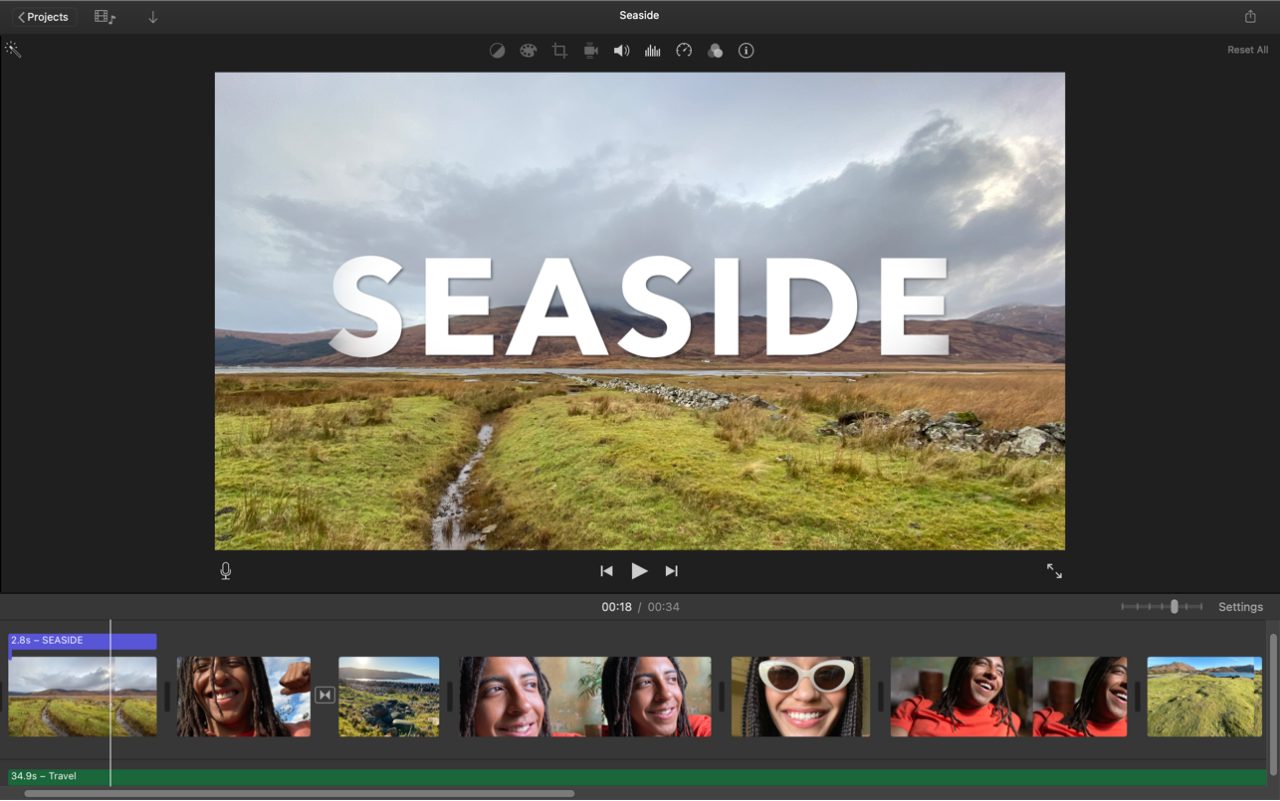
- Simple timeline with titles, transitions, green screen and picture-in-picture
- 29 trailer templates with their own music
- Projects can move to Final Cut Pro later
Pros
- Already installed on most Macs, with nothing to buy and no account
- 4K exports with no watermark
- About as easy as video editing gets
Cons
- Mac only
- No automatic captions
- No keyframes, masking or advanced audio, so ambitious editors outgrow it
- Skip if:
- Your Mac can't run a recent macOS
iMovie is Apple’s free video editor for Mac, iPhone and iPad. It offers a simple drag-and-drop timeline, titles, transitions, filters, green screen, picture-in-picture, built-in music and sound effects, and trailer templates, with export up to 4K. It is aimed at beginners, students and casual creators, and projects started on an iPhone or iPad can be finished on a Mac or sent to Final Cut Pro. It runs only on Apple devices and is a free download from the App Store. It has no keyframes or motion tracking, and Apple’s listing does not mention automatic captions. Normal projects are 16:9 only, so vertical video needs a workaround.
What users say
Evidence ↓Reviewers and App Store users describe iMovie as easy to start with and free, with no watermark or subscription. Limits come up as the user grows, including no keyframes or masking and a clunky timeline in places. One Mac reviewer outgrew it and moved to Final Cut Pro. These come from a few quotes, not a survey.
Rankings and alternatives
- Free video editors for beginners #2 of 8 Best for Mac owners
- CapCut #1 Easiest path to a finished video
- DaVinci Resolve 21 #3 The free editor you won't outgrow
- Shotcut #4 Open source and light on older laptops
- Video editing software for Mac #3 of 7 Family videos, already installed
- Final Cut Pro for Mac #1 Best for most Mac owners
- Adobe Premiere #4 Working with other editors
- Wondershare Filmora #5 Easy editing with a one-time price






Free video editors for beginners scores
Evaluated Nov 17, 2026 Evidence ↓- Ease of learning · counts double 5
5/5 means: As easy as the simplest consumer editors; drag clips in, trim, add music and export without instructions
Comes preinstalled on most Macs, so there's nothing to set up, and its simple timeline is the classic example of an editor a newcomer can figure out in minutes. An App Store reviewer says about five minutes.
- Editing depth and room to grow · counts double 2
2/5 means: A simple timeline with titles and transitions, but few tracks, no keyframes and little color or audio control
Picture-in-picture, side-by-side, green screen, color controls and stabilization, but no keyframe animation, masking or motion tracking and only basic audio, with a limited number of overlay tracks. Users who outgrow it move projects to Final Cut Pro.
- What the free version gives you 5
5/5 means: Everything free with no watermark, no account, no caps and no upsell
Free from Apple with no watermark, no subscription and no paid features; it edits and exports 4K.
- Built-in shortcuts in the free version 3
3/5 means: Either free automatic captions or a substantial free library of templates, music and stock, but not both
29 trailer templates, themes, titles, built-in music and sound effects, and green screen. No automatic captions or background removal.
- Runs well on an ordinary laptop 4
4/5 means: Smooth on an ordinary laptop for typical projects, with slowdowns only on heavy ones
Asks for only 4 GB of memory and runs well on Apple Silicon Macs; a long-time user says it almost never crashes. The catch is that it needs a very recent macOS, so older Macs that can't update can't run the current version.
- Tutorials and help 4
4/5 means: A large community with good official help and plenty of tutorials
Apple's user guides and Communities forum, plus years of YouTube tutorials; fewer new tutorials than CapCut or DaVinci Resolve because the app changes little.
- Computers it runs on · counts half 1
1/5 means: One operating system only
Mac only among computers (with separate iPhone and iPad apps).
Video editing software for Mac scores
Evaluated Nov 17, 2026 Evidence ↓- Editing depth and room to grow 2
2/5 means: A simple timeline with a layer or two of video, titles and transitions, but no keyframes, masks or multicam
One main storyline plus a single overlay layer, titles, transitions, picture-in-picture and green screen, but no keyframes, masking, tracking or multicam, so it is not a 3. It handles long projects, so it is not a 1.
- Learning curve 5
5/5 means: About as easy as video editing gets; common tasks work without instructions
Reviewers and App Store users describe it as figured out in minutes, with no setup, and its layout is the simplest of the Mac editors. Not scored lower because no source reports newcomers struggling.
- How well it runs on an Apple silicon Mac · counts double 5
5/5 means: Among the fastest editors on Apple silicon and smooth even on a MacBook Air with long 4K projects
Writer's calibration from 4: iMovie is Apple's own lightweight editor, sharing Apple's media frameworks with Final Cut Pro, and plays back and exports iPhone HEVC smoothly on any Apple silicon Mac, including a MacBook Air, from knowledge of how it runs. A long-time Mac user says it performs well and almost never crashes. No named benchmark was read, so the basis is knowledge.
- Built-in time-savers 2
2/5 means: One or two of these, or several that are locked behind a paid tier the scored version doesn't include
Trailer templates, one-click Enhance and stabilization on the Mac, but no automatic captions, transcript editing or auto reframe is documented, and vertical video needs a workaround. Absence of captions is not confirmed by an explicit Apple statement.
- Color and audio tools 2
2/5 means: Basic color adjustments and a noise slider or equalizer presets
Basic color correction, a background-noise reduction slider and equalizer presets, with only manual volume lowering for ducking; no scopes, LUTs or curves documented. Not a 3 because neither color nor voice cleanup is strong.
- What you pay over three years 5
5/5 means: Free
Free in the Mac App Store, with no watermark or subscription.
- Fit with iPhone, iPad and other Apple apps 5
5/5 means: Built around Apple's devices, from Photos import and Cinematic mode editing to projects that move between iPhone, iPad and Mac
Imports from Photos, edits Cinematic mode clips, imports HDR, and projects move between iPhone, iPad and Mac by AirDrop or iCloud Drive. The doubt is HDR: iMovie shares only SDR, and HDR export goes through Final Cut Pro, so a 4 is arguable.
- Working with others and moving projects · counts half 2
2/5 means: Exports finished video, plus a narrow path to one other editor or other computers
Exports finished video and can send a project to Final Cut Pro, but Apple devices only and no exchange format for other editors; not a 1 because of the Final Cut Pro path.
Pricing
- iMovie Free Free in the App Store for Mac, iPhone and iPad. No watermark or subscription is described on Apple's listing or in a third-party review.
Prices checked Nov 17, 2026.
Evidence and sources
What users say
Summary 4 quotes
-
Since iMovie often comes pre-installed, there’s no setup process. You open your Mac or iPhone and just start.
Guest author, contributor at AppleWorld.Today · appleworld.today/2025/07/is-imovie-editing-software-good-enough-for-a-beginner · published · checked -
There’s no motion tracking, masking, or keyframe animations. If you’re aiming for flashy transitions or complex layering, iMovie will start to feel like a playroom when you need a workshop.
Guest author, contributor at AppleWorld.Today · appleworld.today/2025/07/is-imovie-editing-software-good-enough-for-a-beginner · published · checked -
I have accomplished a lot with iMovie, but have now outgrown it. It performs well and almost never crashes. UX is clunky in places.
dsminter, Mac App Store reviewer · apps.apple.com/us/app/imovie/id408981434 · published · checked -
A beginner or a professional would only need about five minutes or so to figure it out.
App Store reviewer, iPhone/iPad app user · apps.apple.com/us/app/imovie/id377298193 · checked
Free video editors for beginners scores
Ease of learning 2 quotes
-
Since iMovie often comes pre-installed, there’s no setup process. You open your Mac or iPhone and just start.
Guest author, contributor at AppleWorld.Today · appleworld.today/2025/07/is-imovie-editing-software-good-enough-for-a-beginner · published · checked -
A beginner or a professional would only need about five minutes or so to figure it out.
App Store reviewer, iPhone/iPad app user · apps.apple.com/us/app/imovie/id377298193 · checked
Editing depth and room to grow 4 quotes
-
Create sophisticated picture-in-picture, side-by-side, and green screen effects
apps.apple.com/us/app/imovie/id408981434 · checked -
Send projects to your Mac via AirDrop or iCloud Drive to finish editing with iMovie or Final Cut Pro
apps.apple.com/us/app/imovie/id377298193 · checked -
There’s no motion tracking, masking, or keyframe animations. If you’re aiming for flashy transitions or complex layering, iMovie will start to feel like a playroom when you need a workshop.
Guest author, contributor at AppleWorld.Today · appleworld.today/2025/07/is-imovie-editing-software-good-enough-for-a-beginner · published · checked -
I have accomplished a lot with iMovie, but have now outgrown it. It performs well and almost never crashes. UX is clunky in places.
dsminter, Mac App Store reviewer · apps.apple.com/us/app/imovie/id408981434 · published · checked
What the free version gives you 2 quotes
-
With a streamlined design and intuitive editing features, iMovie lets you create Hollywood-style trailers and beautiful movies like never before. Browse your video library, share favorite moments, and create movies that you can edit at resolutions up to 4K.
apps.apple.com/us/app/imovie/id408981434 · checked -
No monthly subscription. No horrible watermark across your videos. No premium features hiding behind a paywall.
Guest author, contributor at AppleWorld.Today · appleworld.today/2025/07/is-imovie-editing-software-good-enough-for-a-beginner · published · checked
Built-in shortcuts in the free version 3 quotes
-
With a streamlined design and intuitive editing features, iMovie lets you create Hollywood-style trailers and beautiful movies like never before. Browse your video library, share favorite moments, and create movies that you can edit at resolutions up to 4K.
apps.apple.com/us/app/imovie/id408981434 · checked -
Create sophisticated picture-in-picture, side-by-side, and green screen effects
apps.apple.com/us/app/imovie/id408981434 · checked -
Choose from 29 trailer templates with stunning graphics and original scores by some of the world's top film composers
apps.apple.com/us/app/imovie/id408981434 · checked
Runs well on an ordinary laptop 3 quotes
-
System Requirements: macOS 26.4 or later, 4GB of memory, 3.5GB of available disk space.
apps.apple.com/us/app/imovie/id408981434 · checked -
Requires macOS 26.6 or later.
apps.apple.com/us/app/imovie/id408981434 · checked -
I have accomplished a lot with iMovie, but have now outgrown it. It performs well and almost never crashes. UX is clunky in places.
dsminter, Mac App Store reviewer · apps.apple.com/us/app/imovie/id408981434 · published · checked
Tutorials and help 1 quote
-
Learn about the latest features and how to use iMovie for Mac, iPhone, and iPad.
support.apple.com/imovie · checked
Computers it runs on 2 quotes
-
With a streamlined design and intuitive editing features, iMovie lets you create Hollywood-style trailers and beautiful movies like never before. Browse your video library, share favorite moments, and create movies that you can edit at resolutions up to 4K.
apps.apple.com/us/app/imovie/id408981434 · checked -
Send projects to your Mac via AirDrop or iCloud Drive to finish editing with iMovie or Final Cut Pro
apps.apple.com/us/app/imovie/id377298193 · checked
Video editing software for Mac scores
Editing depth and room to grow 3 quotes
-
Create sophisticated picture-in-picture, side-by-side, and green screen effects
apps.apple.com/us/app/imovie/id408981434 · checked -
There’s no motion tracking, masking, or keyframe animations. If you’re aiming for flashy transitions or complex layering, iMovie will start to feel like a playroom when you need a workshop.
Guest author, contributor at AppleWorld.Today · appleworld.today/2025/07/is-imovie-editing-software-good-enough-for-a-beginner · published · checked -
In iMovie, instead of inserting a new clip somewhere in the middle of the timeline, you can place it on top of what's already there. But you can only place one thing. Try to add a third layer and it instead cuts into the second one, moving or deleting footage.
AppleInsider author, reviewer at AppleInsider (byline not captured) · appleinsider.com/articles/25/10/24/inside-imovie-for-mac----far-more-powerful-than-its-given-credit-for · published · checked
Learning curve 3 quotes
-
Since iMovie often comes pre-installed, there’s no setup process. You open your Mac or iPhone and just start.
Guest author, contributor at AppleWorld.Today · appleworld.today/2025/07/is-imovie-editing-software-good-enough-for-a-beginner · published · checked -
A beginner or a professional would only need about five minutes or so to figure it out.
App Store reviewer, iPhone/iPad app user · apps.apple.com/us/app/imovie/id377298193 · checked -
I've worked with people doing YouTube videos solely in iMovie and for what they wanted, I couldn't recommend moving to Final Cut Pro.
AppleInsider author, reviewer at AppleInsider (byline not captured) · appleinsider.com/articles/25/10/24/inside-imovie-for-mac----far-more-powerful-than-its-given-credit-for · published · checked
How well it runs on an Apple silicon Mac 2 quotes
-
I have accomplished a lot with iMovie, but have now outgrown it. It performs well and almost never crashes. UX is clunky in places.
dsminter, Mac App Store reviewer · apps.apple.com/us/app/imovie/id408981434 · published · checked -
I've worked with people doing YouTube videos solely in iMovie and for what they wanted, I couldn't recommend moving to Final Cut Pro.
AppleInsider author, reviewer at AppleInsider (byline not captured) · appleinsider.com/articles/25/10/24/inside-imovie-for-mac----far-more-powerful-than-its-given-credit-for · published · checked
Built-in time-savers 3 quotes
-
Create sophisticated picture-in-picture, side-by-side, and green screen effects
apps.apple.com/us/app/imovie/id408981434 · checked -
Choose from 29 trailer templates with stunning graphics and original scores by some of the world's top film composers
apps.apple.com/us/app/imovie/id408981434 · checked -
iMovie vertical video is possible, but not in a normal project: iMovie's regular movie projects are widescreen 16:9 on both Mac and iPhone, so a vertical clip gets black bars on each side. On Mac, the workaround is an App Preview project (File > New App Preview), which keeps a vertical clip vertical.
blitzcutai.com/blog/imovie-vertical-video · published · checked
Color and audio tools 3 quotes
-
Select the "Reduce background noise" checkbox.
support.apple.com/guide/imovie/mov86277afbd/mac · checked -
One of the main effects here is to reduce the background noise. Just turn that on and then see how it sounds and adjust the percentage.
Gary Rosenzweig, author of MacMost video tutorials · macmost.com/imovie-for-mac-audio-tips-and-tricks.html · checked -
You can start cutting a project on your iPhone, then use AirDrop or iCloud Drive to wirelessly transfer it to your iPad. You can also send a project from your iPhone or iPad to your Mac for finishing touches like colour correction and animated maps. And you can even open iMovie projects in Final Cut Pro to take advantage of professional editing tools.
apple.com/ca/imovie · checked
What you pay over three years 2 quotes
-
With a streamlined design and intuitive editing features, iMovie lets you create Hollywood-style trailers and beautiful movies like never before. Browse your video library, share favorite moments, and create movies that you can edit at resolutions up to 4K.
apps.apple.com/us/app/imovie/id408981434 · checked -
No monthly subscription. No horrible watermark across your videos. No premium features hiding behind a paywall.
Guest author, contributor at AppleWorld.Today · appleworld.today/2025/07/is-imovie-editing-software-good-enough-for-a-beginner · published · checked
Fit with iPhone, iPad and other Apple apps 5 quotes
-
You can import and edit video clips captured in Cinematic mode on iPhone — for more artistic, professional‑looking scenes with minimal effort. Modify the depth-of-field effect in already captured material, and add and delete focus points to help guide the audience through your story.
apple.com/ca/imovie · checked -
You can start cutting a project on your iPhone, then use AirDrop or iCloud Drive to wirelessly transfer it to your iPad. You can also send a project from your iPhone or iPad to your Mac for finishing touches like colour correction and animated maps. And you can even open iMovie projects in Final Cut Pro to take advantage of professional editing tools.
apple.com/ca/imovie · checked -
Editing Cinematic mode video on Mac requires macOS Ventura or later.
support.apple.com/en-us/101995 · checked -
In iMovie version 10.2 or later on Mac, you can import HDR video into an iMovie project.
support.apple.com/en-us/102241 · checked -
You can share from iMovie in SDR.
support.apple.com/en-us/102241 · checked
Working with others and moving projects 3 quotes
-
Send projects to your Mac via AirDrop or iCloud Drive to finish editing with iMovie or Final Cut Pro
apps.apple.com/us/app/imovie/id377298193 · checked -
You can start cutting a project on your iPhone, then use AirDrop or iCloud Drive to wirelessly transfer it to your iPad. You can also send a project from your iPhone or iPad to your Mac for finishing touches like colour correction and animated maps. And you can even open iMovie projects in Final Cut Pro to take advantage of professional editing tools.
apple.com/ca/imovie · checked -
In iMovie version 10.2 or later on Mac, you can import HDR video into an iMovie project.
support.apple.com/en-us/102241 · checked
Facts
License 1 quote
-
With a streamlined design and intuitive editing features, iMovie lets you create Hollywood-style trailers and beautiful movies like never before. Browse your video library, share favorite moments, and create movies that you can edit at resolutions up to 4K.
apps.apple.com/us/app/imovie/id408981434 · checked
Runs on 2 quotes
-
With a streamlined design and intuitive editing features, iMovie lets you create Hollywood-style trailers and beautiful movies like never before. Browse your video library, share favorite moments, and create movies that you can edit at resolutions up to 4K.
apps.apple.com/us/app/imovie/id408981434 · checked -
Choose from 20 Storyboards that help you get started with popular video types
apps.apple.com/us/app/imovie/id377298193 · checked
Needs 2 quotes
-
System Requirements: macOS 26.4 or later, 4GB of memory, 3.5GB of available disk space.
apps.apple.com/us/app/imovie/id408981434 · checked -
Requires macOS 26.6 or later.
apps.apple.com/us/app/imovie/id408981434 · checked
More from the sources
Features 3 quotes
-
You can export a 4K clip or movie in its native resolution.
support.apple.com/guide/imovie/move6e0cb2ad/mac · checked -
By default, iPhone captures video in HDR.
support.apple.com/en-us/101995 · checked -
Final Cut Pro and Motion on Mac bring new ways to add Cinematic mode effects to video captured natively on iPhone 18 Pro. Editors can adjust focus points and depth of field directly in the Final Cut Pro timeline.
apple.com/uk/newsroom/2026/09/new-updates-coming-to-apple-creator-studio · published · checked
Limits and known issues 5 quotes
-
Version 10.4.5 Sep 29
apps.apple.com/us/app/imovie/id408981434 · checked -
Some titles and transitions are not available for use with app preview projects.
support.apple.com/guide/imovie/movd5d987b5d/mac · checked -
Apple today updated its video apps iMovie, Final Cut Pro, and Compressor for Mac with a unified sharing option for platforms like YouTube and Facebook.
Joe Rossignol, reporter at MacRumors · macrumors.com/2020/12/14/final-cut-pro-unified-youtube-facebook-sharing · published · checked -
iMovie details below follow Apple's current guides (iMovie 10.4.4 for Mac and iMovie 3.0.6 for iPhone and iPad), checked in November 2026.
blitzcutai.com/blog/imovie-vertical-video · published · checked -
Previously, Apple has made it simple to choose, say, YouTube, and have the right format video sent to that service. Now all you get is a series of options to do with the resolution of the video. Notably, there is no square option so iMovie can't directly make the best format videos for Instagram.
AppleInsider author, reviewer at AppleInsider (byline not captured) · appleinsider.com/articles/25/10/24/inside-imovie-for-mac----far-more-powerful-than-its-given-credit-for · published · checked
What users say 1 quote
-
Crazy how much value and advanced features something like CapCut gives you. I hope some of those will come to iMovie once Apple finds out they still own iMovie, and that vertical videos exist.
michelb76, AppleInsider forum commenter · appleinsider.com/articles/25/10/24/inside-imovie-for-mac----far-more-powerful-than-its-given-credit-for · checked
How widely it is used 1 quote
-
323K Ratings
apps.apple.com/us/app/imovie/id377298193 · checked
Pricing
apps.apple.com/us/app/imovie/id408981434 · checked