
CapCut
ByteDance's free video editor for Windows and macOS (also web and phones), built around templates, auto captions and short-form social video
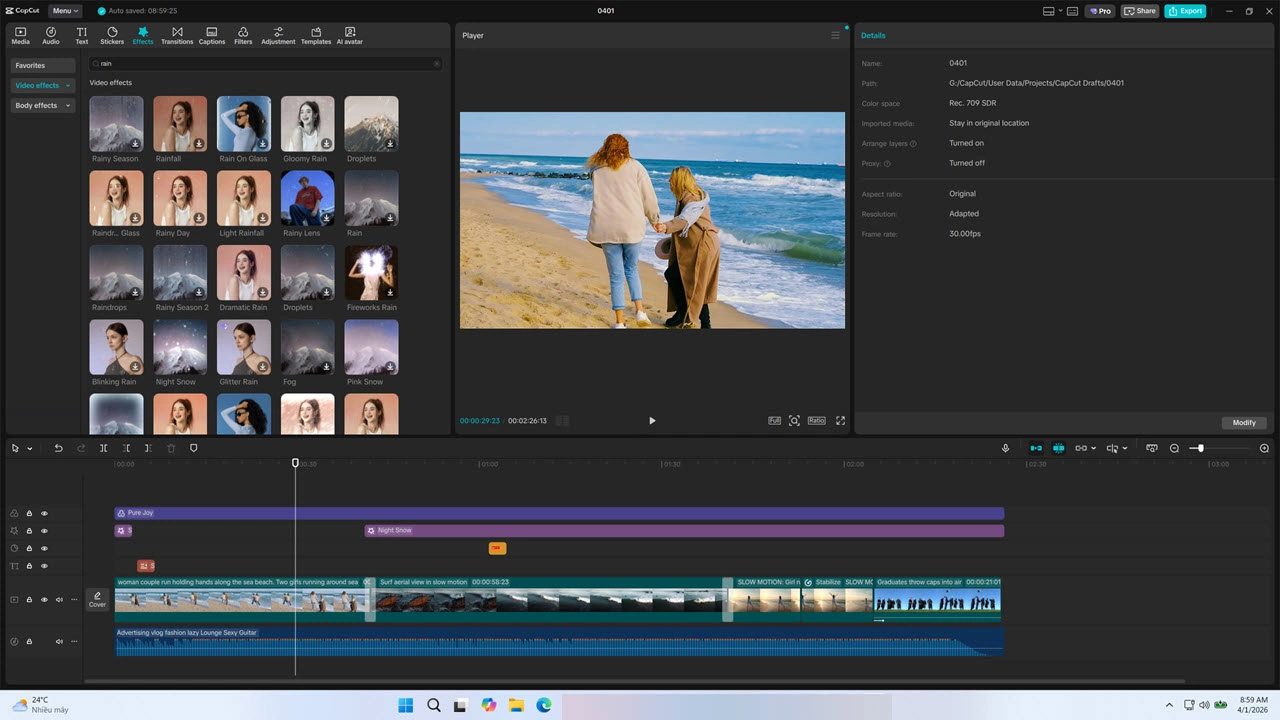
Our verdict
#1 of 8 in Free video editors for beginners · Easiest path to a finished video
What it does
- Automatic captions, text-to-speech and background removal on the free plan, with monthly caps
- Multiple video and audio tracks, animated changes to clips, speed effects and green screen tools
- Large library of templates, music and effects, part of it Pro-only
Pros
- The fastest way for a first-timer to get a finished, captioned video
- Free music, sound effects and templates built into the editor
- Huge number of tutorials, many of them for the phone app it shares tools with
Cons
- Pro-badged items mixed into the free library put a watermark on the export
- Free exports top out at 1080p and captions at about 10 minutes per video
- Needs an account, and the terms grant a broad license to your uploads
- Long projects with many layers get cramped and slow
- Choose if:
- You make short videos or YouTube videos under about 15 minutes and want captions without typing them
- Skip if:
- You want an editor that never asks you to pay or sign in
CapCut is a video editor from ByteDance, the company behind TikTok. Most people know it as a template-driven, easy-to-learn editor for short social videos, and it also has a multi-track desktop timeline with keyframes and color tools. It runs as a desktop app for Windows and macOS, in a web editor, and as iOS and Android apps, with projects syncing through a CapCut account. The Free plan costs nothing, but exports that use Pro-only templates, effects or stock elements require a Pro subscription, and the app pushes trials and upgrades. It is proprietary software, and in the US it is offered under terms with TikTok USDS Joint Venture.
What users say
Evidence ↓One hands-on reviewer (who publishes a competing tool) found it very easy for beginners, with useful auto captions and no watermark on free desktop exports, but limited for long, multi-track projects and basic on color grading. Other sources warn that the watermark depends on what you use, since Pro-only assets block a clean free export. This rests on a single review plus a secondary writeup of the help center, not a broad sample of users.
Rankings and alternatives
- Free video editors for beginners #1 of 8 Easiest path to a finished video
- iMovie #2 Best for Mac owners
- DaVinci Resolve 21 #3 The free editor you won't outgrow
- Shotcut #4 Open source and light on older laptops
- Video editing software for YouTube #5 of 8 Built for Shorts and quick turnarounds
- Adobe Premiere #2 The standard, if you'll hire editors
- CyberLink PowerDirector #3 Most editor for the money on Windows
- Final Cut Pro for Mac #4 The fast choice on a Mac
- Video editing software for Mac #6 of 7 Quick social clips for free
- Wondershare Filmora #5 Easy editing with a one-time price
- Descript #7 Editing talking videos by text








Free video editors for beginners scores
Evaluated Nov 17, 2026 Evidence ↓- Ease of learning · counts double 5
5/5 means: As easy as the simplest consumer editors; drag clips in, trim, add music and export without instructions
Widely called the easiest free editor to start with: drag clips in, trim, add music, captions and text from side panels, and export. A hands-on 2026 review says a complete beginner can finish a polished short video within 30 minutes of opening it, which matches the general reputation that made it the default editor for short-form creators.
- Editing depth and room to grow · counts double 3
3/5 means: Multiple tracks and keyframes, with clear limits in color, audio or long projects
The desktop app has a multi-track timeline, keyframes with graphs, a color wheel, chroma key and speed ramping. Short of 4 because it is built around short vertical videos: a 2026 review found projects with many layers cramped, lag on projects past about 15 minutes, and only basic color grading and audio mixing.
- What the free version gives you 2
2/5 means: Watermark-free only if you avoid paid items mixed through the library; key features capped and an account required
No watermark on exports that use only free items, but Pro-marked templates, effects and stock are mixed through the library, and a project that uses one exports watermarked or prompts for a subscription. Third-party guides agree the free plan stops at 1080p (CapCut publishes no cap), automatic captions are capped at about ten minutes per video, background removal uses limited monthly credits, and the desktop app needs a CapCut or TikTok account.
- Built-in shortcuts in the free version 4
4/5 means: Most of these free, with usage caps or paid items mixed in
The free plan includes automatic captions, text-to-speech voiceover, background removal, free music and sound effects and a large template library, all inside the editor. Short of 5 because captions and background removal are capped on the free plan and many templates and effects are Pro-only.
- Runs well on an ordinary laptop 4
4/5 means: Smooth on an ordinary laptop for typical projects, with slowdowns only on heavy ones
A 2026 review on a laptop with integrated graphics found it smooth for projects under 15 minutes, with lag on longer projects that stack several AI effects. Several AI features run online rather than on the laptop. No widespread crash reports were found.
- Tutorials and help 5
5/5 means: A huge community; almost any question already has a video answer
From knowledge: one of the most used editors in the world through its phone app, with an enormous number of video tutorials, template creators and how-to answers. Many tutorials show the phone app, but the desktop app shares its panels and terms.
- Computers it runs on · counts half 4
4/5 means: Windows, Mac and Linux, or Windows, Mac and Chromebook
Desktop apps for Windows and Mac plus a web editor that runs on a Chromebook; no Linux app.
Video editing software for Mac scores
Evaluated Nov 17, 2026 Evidence ↓- Editing depth and room to grow 3
3/5 means: Multiple tracks and keyframes, with clear limits in multicam, masking, motion graphics or long projects
Multi-track timeline, keyframes with graphs, chroma key and speed curves, so above 2. Reviewers call multi-layer projects cramped and lagging past 15-20 minutes, no multicam was found on CapCut's pages, and no third-party plug-ins, so not 4. Pro-only effects cannot be exported from Free.
- Learning curve 5
5/5 means: About as easy as video editing gets; common tasks work without instructions
A reviewer says a beginner can make a polished short video within 30 minutes and the learning curve is nearly flat; this matches CapCut's wide reputation as the easy editor. Single reviewer from a competitor's publisher, so the evidence is thin but consistent with common knowledge.
- How well it runs on an Apple silicon Mac · counts double 3
3/5 means: Fine for typical projects but lags on long or 4K timelines, or has little evidence of being tuned for Apple silicon
No official statement that the Mac build is native to Apple silicon, no Mac-specific test of playback or export speed, and the only lag reports (long projects with AI effects) come from a Windows laptop. Reports of washed-out iPhone HDR clips and one unread M2 export-failure thread keep it from 4. Not 2 because no widespread crash reports were found.
- Built-in time-savers 3
3/5 means: Several of these, with clear limits in accuracy, credits or what the scored version includes
Auto captions, filler-word removal, auto reframe and templates exist on desktop, but CapCut's own help names auto captions as having Pro-only functionality and other sources put filler removal and reframe on Pro, with Free captions reportedly capped at ten minutes per video. Not 2 because Free keeps some captions, templates and limited AI credits; not 4 because plan gating is disputed and some templates are mobile-only.
- Color and audio tools 2
2/5 means: Basic color adjustments and a noise slider or equalizer presets
Color wheels, auto adjust and LUT-style filters but reviewers call grading basic, and no scopes were found. Noise reduction and vocal isolation are listed under Pro, so Free has basic audio only. Not 3 because neither color nor voice cleanup is strong on Free.
- What you pay over three years 5
5/5 means: Free
Free costs nothing and the app adds no watermark of its own; exports are watermark-free provided no Pro-only templates, effects or assets are used. Pro at 179.99 USD a year (539.97 over three years) is not needed for this scored version.
- Fit with iPhone, iPad and other Apple apps 3
3/5 means: A phone or iPad app that can pass projects to the Mac, or good iPhone format support, but not both
An iPhone app and Mac app share an account, and the desktop page mentions project access across devices via Space, but how well projects open between iPhone and Mac is not described, and iPhone HDR clips are reported washed out. Photos library import was not verified. Not 4 because the cross-device project path and HDR handling are unconfirmed.
- Working with others and moving projects · counts half 3
3/5 means: Runs on Windows as well, or exports timelines to other editors, but not both well
Runs on Windows, Mac, web and phones, so the cross-platform half is met, but a third-party comparison reports no XML, AAF or EDL export, no real-time multi-user editing, and CapCut is not a standard in client work. Not 4 because timelines cannot leave; the absence is unverified against CapCut's own help.
Video editing software for YouTube scores
Evaluated Nov 17, 2026 Evidence ↓- Speed of cutting a typical YouTube video · counts double 4
4/5 means: Fast for most YouTube formats, with strong trimming tools and some automatic cleanup such as silence removal or editing by transcript, but slower for some common format
Desktop has one-click removal of pauses, repeated words and filler words, auto captions and smart media search, plus a plain multi-track timeline. Short of 5 because editing by transcript was not found, and a 2026 review reports lag on projects past about 15 minutes with effects. Free has the same timeline, but the plan for filler-word removal is not stated on CapCut's pages.
- Editing depth and production ceiling 3
3/5 means: Multiple tracks and keyframes, with clear limits in color, multicam, motion graphics or long projects
Multi-track timeline, keyframes with graphs, color wheels and LUTs, chroma key and masks, but reviewers call multi-layer projects cramped and color grading basic, and no multicam was found on CapCut's pages. Same on Free apart from Pro-only effects.
- Automatic captions 4
4/5 means: Accurate automatic captions with good styling and caption-file export, with one minor gap
Auto captions are a core, widely praised feature with styled animated looks, and CapCut's own help names them as having Pro-only functionality, so Pro is the safe configuration. SRT export, language count and accuracy were not verified, and Free is reportedly capped at about ten minutes per video (third-party), so a long video needs Pro.
- Voice and audio cleanup 3
3/5 means: Useful noise reduction or speech enhancement, but little else, or results reviewers call uneven
Pro lists noise reduction and voice enhance or vocal isolation, but the sources are CapCut's marketing article and a dated 2024 summary, and no review of the results was found. No automatic music ducking was documented. Free has only basic audio editing and voice effects.
- What a growing channel pays 3
3/5 means: $350 to $600 over three years
Pro on desktop is paid through the web at 179.99 USD a year, so 3 years is 539.97 USD (179.99 x 3). Monthly billing would be 719.64 USD, and the 9.99 USD Standard tier is a store plan that does not apply on desktop. Free exports without a watermark only if no Pro items are used and lacks Pro captions and noise reduction.
- Shorts and vertical video 4
4/5 means: Automatic reframing to vertical from the same project, with presets or direct upload
Auto reframe to 9:16, 1:1 and 16:9 from the same project, vertical projects, and sharing to YouTube from the export window. Short of 5 because a named long-video-to-Shorts clip finder and YouTube-specific presets were not found. The plan for auto reframe is not stated by CapCut.
- Learning curve 5
5/5 means: About as easy as video editing gets; common tasks work without instructions
Reviewers say a beginner can make a polished short video within 30 minutes and the learning curve is nearly flat. This is one reviewer from a competitor's publisher, but it matches CapCut's wide reputation.
- Smooth on a typical creator's computer 3
3/5 means: Works on a typical computer with lag on long or high-resolution projects, or occasional crashes
A 2026 review on an i7, 16 GB laptop found it smooth under 15 minutes and laggy with longer projects and stacked AI effects. Several AI features need internet. One test machine, and no crash reports were found.
- Computers and devices it runs on · counts half 5
5/5 means: Windows and Mac, plus Linux, a browser or phone apps that open the same projects
Windows and macOS desktop apps, plus web and iOS and Android apps, with projects syncing through CapCut Space. No Linux. Pro follows the account across devices, though features differ between versions.
Pricing
- Free Free Pricing page lists free templates and basic editing tools. The app does not add its own watermark, but most templates end with a CapCut logo clip to delete, and a project using Pro-only templates, effects or stock elements needs Pro to export without a watermark. No official free export resolution or length limit is published; on the web editor free 4K may carry watermarks or bitrate limits.
- Pro $19.99 /month US web price; yearly is 179.99 USD per year (billed upfront, about 15 USD a month). Includes premium templates, Pro features, 1,200 monthly AI credits and 1 TB storage. 7-day free trial for new users. The US App Store also lists a 9.99 USD Standard monthly tier not shown on the web page; a competing vendor's review reads CapCut's help center as describing Standard as a mobile store plan, so on desktop the choice is Free or Pro. The desktop app cannot take payment: Upgrade opens the web subscription page, so desktop buyers pay web prices. Pro features can be previewed on Free, but a project that uses them needs Pro to export. Which desktop features (auto captions, remove filler words, auto reframe, noise reduction, 4K) are Pro-only is not set out in one official table; sources disagree.
- Ultra $79.00 /month 900 USD per year billed yearly. Adds exclusive AI features and 8,645 monthly AI credits.
- Teams $12.49 /month per seat Two-seat monthly price; 107.50 USD per seat per year on yearly billing. Adds a brand kit.
Prices checked Nov 17, 2026.
Evidence and sources
What users say
Summary 5 quotes
-
CapCut's help says removing the watermark from a project that uses Pro materials requires Pro, at any resolution. If your project uses one of those elements, the free plan will not give you a watermark-free file.
dupple.com/learn/is-capcut-free · published · checked -
This is where CapCut PC genuinely shines in the free video editor category. The desktop version exports without a watermark on the free tier — a rarity among free tools that often gate this behind a paywall or slap a logo on your output.
Thuannd, reviewer at Atomi Systems, maker of a competing tool · atomisystems.com/screencasting/capcut-pc-review-2026-is-free-video-editing-really-worth-your-time · published · checked -
A complete beginner can produce a polished short-form video within 30 minutes of first opening the app. The learning curve is nearly flat.
Thuannd, reviewer at Atomi Systems · atomisystems.com/screencasting/capcut-pc-review-2026-is-free-video-editing-really-worth-your-time · published · checked -
Complex multi-track projects with dozens of layers can feel cramped
Thuannd, reviewer at Atomi Systems · atomisystems.com/screencasting/capcut-pc-review-2026-is-free-video-editing-really-worth-your-time · published · checked -
On a mid-range Windows laptop (Intel i7 12th gen, 16GB RAM, integrated graphics), CapCut PC ran smoothly for projects under 15 minutes. Longer projects with multiple AI effects applied simultaneously did cause occasional lag during preview playback
Thuannd, reviewer at Atomi Systems · atomisystems.com/screencasting/capcut-pc-review-2026-is-free-video-editing-really-worth-your-time · published · checked
Free video editors for beginners scores
Ease of learning 1 quote
-
A complete beginner can produce a polished short-form video within 30 minutes of first opening the app. The learning curve is nearly flat.
Thuannd, reviewer at Atomi Systems · atomisystems.com/screencasting/capcut-pc-review-2026-is-free-video-editing-really-worth-your-time · published · checked
Editing depth and room to grow 4 quotes
-
Complex multi-track projects with dozens of layers can feel cramped
Thuannd, reviewer at Atomi Systems · atomisystems.com/screencasting/capcut-pc-review-2026-is-free-video-editing-really-worth-your-time · published · checked -
On a mid-range Windows laptop (Intel i7 12th gen, 16GB RAM, integrated graphics), CapCut PC ran smoothly for projects under 15 minutes. Longer projects with multiple AI effects applied simultaneously did cause occasional lag during preview playback
Thuannd, reviewer at Atomi Systems · atomisystems.com/screencasting/capcut-pc-review-2026-is-free-video-editing-really-worth-your-time · published · checked -
Use advanced keyframes and graphs to make smoother and more precise animation
capcut.com/tools/desktop-video-editor · checked -
Full basic editing toolkit — cut, split, multi-track timeline, keyframe animation, chroma key, speed ramping, filters, basic AI voiceover, free music and sound effects, 1080p export, and a large library of free templates and effects. Templates and effects marked Pro export with a watermark. More content was gated after the 2025 restructure than before.
bigvu.tv/blog/capcut-free-vs-pro-what-2026s-restructure-actually-gives-you · published · checked
What the free version gives you 8 quotes
-
Start for free with the basics you need to create.
capcut.com/pricing · checked -
CapCut's help says removing the watermark from a project that uses Pro materials requires Pro, at any resolution. If your project uses one of those elements, the free plan will not give you a watermark-free file.
dupple.com/learn/is-capcut-free · published · checked -
CapCut's help center says the app does not add a watermark to exports on its own. The usual source is the template: most templates end with a short clip carrying the CapCut logo. Scroll to the end of the timeline and delete that clip before you export.
dupple.com/learn/is-capcut-free · published · checked -
When the export scan finds one, the app shows a prompt to start a free trial or subscribe.
dupple.com/learn/is-capcut-free · published · checked -
Basic AI tools: auto-captions (up to ten minutes per video), AI voice-over with text-to-speech, and background removal using limited monthly credits.
vidpros.com/capcut-pro-vs-free · published · checked -
Both the free version and Standard top out at 1080p while Pro supports 4K at 60 FPS with HDR compatibility.
vidpros.com/capcut-pro-vs-free · published · checked -
Full basic editing toolkit — cut, split, multi-track timeline, keyframe animation, chroma key, speed ramping, filters, basic AI voiceover, free music and sound effects, 1080p export, and a large library of free templates and effects. Templates and effects marked Pro export with a watermark. More content was gated after the 2025 restructure than before.
bigvu.tv/blog/capcut-free-vs-pro-what-2026s-restructure-actually-gives-you · published · checked -
You'll need a CapCut or TikTok account to sign in after installation.
bigvu.tv/blog/capcut-free-vs-pro-what-2026s-restructure-actually-gives-you · published · checked
Built-in shortcuts in the free version 3 quotes
-
If there’s one reason CapCut has dominated the creator space, it’s this. The AI Auto-Caption tool transcribes your video audio and generates styled, animated captions in seconds.
Thuannd, reviewer at Atomi Systems · atomisystems.com/screencasting/capcut-pc-review-2026-is-free-video-editing-really-worth-your-time · published · checked -
Basic AI tools: auto-captions (up to ten minutes per video), AI voice-over with text-to-speech, and background removal using limited monthly credits.
vidpros.com/capcut-pro-vs-free · published · checked -
Full basic editing toolkit — cut, split, multi-track timeline, keyframe animation, chroma key, speed ramping, filters, basic AI voiceover, free music and sound effects, 1080p export, and a large library of free templates and effects. Templates and effects marked Pro export with a watermark. More content was gated after the 2025 restructure than before.
bigvu.tv/blog/capcut-free-vs-pro-what-2026s-restructure-actually-gives-you · published · checked
Runs well on an ordinary laptop 1 quote
-
On a mid-range Windows laptop (Intel i7 12th gen, 16GB RAM, integrated graphics), CapCut PC ran smoothly for projects under 15 minutes. Longer projects with multiple AI effects applied simultaneously did cause occasional lag during preview playback
Thuannd, reviewer at Atomi Systems · atomisystems.com/screencasting/capcut-pc-review-2026-is-free-video-editing-really-worth-your-time · published · checked
Computers it runs on 1 quote
-
CapCut Desktop is compatible with: Windows 7 or above, with Windows 10 recommended macOS 10.14 or above
capcut.com/tools/desktop-video-editor · checked
Video editing software for Mac scores
Editing depth and room to grow 4 quotes
-
Complex multi-track projects with dozens of layers can feel cramped
Thuannd, reviewer at Atomi Systems · atomisystems.com/screencasting/capcut-pc-review-2026-is-free-video-editing-really-worth-your-time · published · checked -
On a mid-range Windows laptop (Intel i7 12th gen, 16GB RAM, integrated graphics), CapCut PC ran smoothly for projects under 15 minutes. Longer projects with multiple AI effects applied simultaneously did cause occasional lag during preview playback
Thuannd, reviewer at Atomi Systems · atomisystems.com/screencasting/capcut-pc-review-2026-is-free-video-editing-really-worth-your-time · published · checked -
Use advanced keyframes and graphs to make smoother and more precise animation
capcut.com/tools/desktop-video-editor · checked -
Wer lange Interviews, Multicam-Aufnahmen oder Kundenprojekte mit strengen Liefervorgaben bearbeitet, wird engagierte professionelle Redakteure immer noch berechenbarer finden.
Jessica Becker, author at BIGVU (competing tool vendor) · bigvu.tv/blog/de/capcut-desktop-review-seedance-systemanforderungen-k-456 · published · checked
Learning curve 1 quote
-
A complete beginner can produce a polished short-form video within 30 minutes of first opening the app. The learning curve is nearly flat.
Thuannd, reviewer at Atomi Systems · atomisystems.com/screencasting/capcut-pc-review-2026-is-free-video-editing-really-worth-your-time · published · checked
How well it runs on an Apple silicon Mac 3 quotes
-
On a mid-range Windows laptop (Intel i7 12th gen, 16GB RAM, integrated graphics), CapCut PC ran smoothly for projects under 15 minutes. Longer projects with multiple AI effects applied simultaneously did cause occasional lag during preview playback
Thuannd, reviewer at Atomi Systems · atomisystems.com/screencasting/capcut-pc-review-2026-is-free-video-editing-really-worth-your-time · published · checked -
Apple Silicon and Intel Macs: third-party sources report that CapCut runs on both. We found no official CapCut statement on whether it runs natively on Apple Silicon or through Rosetta.
hooked.so/guides/capcut-for-mac · published · checked -
Do you have the HDR option on your iPhone? It's causing this white filter.
care.submagic.co/en/article/my-video-loses-color-when-exported-hdr-issue-1fre8mg · published · checked
Built-in time-savers 7 quotes
-
If there’s one reason CapCut has dominated the creator space, it’s this. The AI Auto-Caption tool transcribes your video audio and generates styled, animated captions in seconds.
Thuannd, reviewer at Atomi Systems · atomisystems.com/screencasting/capcut-pc-review-2026-is-free-video-editing-really-worth-your-time · published · checked -
Basic AI tools: auto-captions (up to ten minutes per video), AI voice-over with text-to-speech, and background removal using limited monthly credits.
vidpros.com/capcut-pro-vs-free · published · checked -
If you are a Standard user but still see a prompt to join Pro in CapCut, it usually means that the feature you used—such as auto captions—includes Pro-only functionality.
capcut.com/help/capcut-pro-prompt-standard-user · checked -
while an advanced AI-powered tool set, including motion tracking and an auto caption generator, is exclusive to Pro users.
capcut.com/resource/capcut-standard-vs-pro · checked -
Improve your efficiency with Remove Filler Words. Let AI auto cut those pauses, repetitions and filler words. Snatch your video with just one-click!
capcut.com/tools/desktop-ai-power · checked -
Analyze video content and resize it without loosing details in the fastest way. Deliver a better experience for multi-platform creators.
capcut.com/tools/desktop-ai-power · checked -
CapCut's help center says: "Some templates are designed for mobile only and won't open on the desktop version."
hooked.so/guides/capcut-for-mac · published · checked
Color and audio tools 4 quotes
-
Use advanced keyframes and graphs to make smoother and more precise animation
capcut.com/tools/desktop-video-editor · checked -
Just some of the features that go with the auto caption generator, background remover, motion tracking, noise reduction, AI video, AI music,
capcut.com/resource/capcut-standard-vs-pro · checked -
Auto enhance voice quality and use tools like vocal isolation to separate vocals from background noise such as music.
Justin Brown, YouTube creator-educator at Primal Video (affiliate links to CapCut) · primalvideo.com/video-creation/editing/capcut-pro-review · published · checked -
Complex multi-track projects with dozens of layers can feel cramped
Thuannd, reviewer at Atomi Systems · atomisystems.com/screencasting/capcut-pc-review-2026-is-free-video-editing-really-worth-your-time · published · checked
What you pay over three years 5 quotes
-
Start for free with the basics you need to create.
capcut.com/pricing · checked -
CapCut's help center says the app does not add a watermark to exports on its own. The usual source is the template: most templates end with a short clip carrying the CapCut logo. Scroll to the end of the timeline and delete that clip before you export.
dupple.com/learn/is-capcut-free · published · checked -
CapCut's help says removing the watermark from a project that uses Pro materials requires Pro, at any resolution. If your project uses one of those elements, the free plan will not give you a watermark-free file.
dupple.com/learn/is-capcut-free · published · checked -
The app allows you to explore a wider range of tools, but exporting content that includes Pro features requires a Pro subscription.
capcut.com/help/capcut-pro-prompt-standard-user · checked -
USD19.99 /month
capcut.com/pricing · checked
Fit with iPhone, iPad and other Apple apps 3 quotes
-
Use advanced keyframes and graphs to make smoother and more precise animation
capcut.com/tools/desktop-video-editor · checked -
4.6 out of 5 1.1M Ratings
apps.apple.com/us/app/capcut-photo-video-editor/id1500855883 · checked -
Do you have the HDR option on your iPhone? It's causing this white filter.
care.submagic.co/en/article/my-video-loses-color-when-exported-hdr-issue-1fre8mg · published · checked
Working with others and moving projects 3 quotes
-
CapCut Desktop is compatible with: Windows 7 or above, with Windows 10 recommended macOS 10.14 or above
capcut.com/tools/desktop-video-editor · checked -
CapCut has no AAF, XML, or EDL export anywhere in the app, the interchange formats professional editors rely on to move a timeline between applications, according to [CapCut's own help center]
tryuncle.com/learn/davinci-resolve/capcut-vs-davinci-resolve · published · checked -
Real-time multi-user editing · No · Yes, via Blackmagic Cloud or Project Server
tryuncle.com/learn/davinci-resolve/capcut-vs-davinci-resolve · published · checked
Video editing software for YouTube scores
Speed of cutting a typical YouTube video 3 quotes
-
Improve your efficiency with Remove Filler Words. Let AI auto cut those pauses, repetitions and filler words. Snatch your video with just one-click!
capcut.com/tools/desktop-ai-power · checked -
Complex multi-track projects with dozens of layers can feel cramped
Thuannd, reviewer at Atomi Systems · atomisystems.com/screencasting/capcut-pc-review-2026-is-free-video-editing-really-worth-your-time · published · checked -
On a mid-range Windows laptop (Intel i7 12th gen, 16GB RAM, integrated graphics), CapCut PC ran smoothly for projects under 15 minutes. Longer projects with multiple AI effects applied simultaneously did cause occasional lag during preview playback
Thuannd, reviewer at Atomi Systems · atomisystems.com/screencasting/capcut-pc-review-2026-is-free-video-editing-really-worth-your-time · published · checked
Editing depth and production ceiling 3 quotes
-
Complex multi-track projects with dozens of layers can feel cramped
Thuannd, reviewer at Atomi Systems · atomisystems.com/screencasting/capcut-pc-review-2026-is-free-video-editing-really-worth-your-time · published · checked -
Use advanced keyframes and graphs to make smoother and more precise animation
capcut.com/tools/desktop-video-editor · checked -
Wer lange Interviews, Multicam-Aufnahmen oder Kundenprojekte mit strengen Liefervorgaben bearbeitet, wird engagierte professionelle Redakteure immer noch berechenbarer finden.
Jessica Becker, author at BIGVU (competing tool vendor) · bigvu.tv/blog/de/capcut-desktop-review-seedance-systemanforderungen-k-456 · published · checked
Automatic captions 4 quotes
-
If there’s one reason CapCut has dominated the creator space, it’s this. The AI Auto-Caption tool transcribes your video audio and generates styled, animated captions in seconds.
Thuannd, reviewer at Atomi Systems · atomisystems.com/screencasting/capcut-pc-review-2026-is-free-video-editing-really-worth-your-time · published · checked -
Basic AI tools: auto-captions (up to ten minutes per video), AI voice-over with text-to-speech, and background removal using limited monthly credits.
vidpros.com/capcut-pro-vs-free · published · checked -
If you are a Standard user but still see a prompt to join Pro in CapCut, it usually means that the feature you used—such as auto captions—includes Pro-only functionality.
capcut.com/help/capcut-pro-prompt-standard-user · checked -
while an advanced AI-powered tool set, including motion tracking and an auto caption generator, is exclusive to Pro users.
capcut.com/resource/capcut-standard-vs-pro · checked
Voice and audio cleanup 2 quotes
-
Just some of the features that go with the auto caption generator, background remover, motion tracking, noise reduction, AI video, AI music,
capcut.com/resource/capcut-standard-vs-pro · checked -
Auto enhance voice quality and use tools like vocal isolation to separate vocals from background noise such as music.
Justin Brown, YouTube creator-educator at Primal Video (affiliate links to CapCut) · primalvideo.com/video-creation/editing/capcut-pro-review · published · checked
What a growing channel pays 4 quotes
-
USD19.99 /month
capcut.com/pricing · checked -
Der Standardplan, den Sie möglicherweise auf Ihrem Telefon sehen, ist ein mobiler Store-Plan. Das CapCut-Hilfecenter beschreibt es als mobilorientiert. Wenn Sie auf dem Desktop bearbeiten, vergleichen Sie Free und Pro, nicht Standard.
Jessica Becker, author at BIGVU (competing tool vendor) · bigvu.tv/blog/de/capcut-desktop-review-seedance-systemanforderungen-k-456 · published · checked -
Sie können nicht innerhalb der Desktop-App bezahlen.
Jessica Becker, author at BIGVU (competing tool vendor) · bigvu.tv/blog/de/capcut-desktop-review-seedance-systemanforderungen-k-456 · published · checked -
The app allows you to explore a wider range of tools, but exporting content that includes Pro features requires a Pro subscription.
capcut.com/help/capcut-pro-prompt-standard-user · checked
Shorts and vertical video 3 quotes
-
Analyze video content and resize it without loosing details in the fastest way. Deliver a better experience for multi-platform creators.
capcut.com/tools/desktop-ai-power · checked -
Optionally, share your video instantly on platforms like YouTube or TikTok.
capcut.com/resource/how-to-use-capcut-on-pc · checked -
CapCut desktop video editor can help content creators condense longer videos into TikTok and YouTube shorts.
capcut.com/resource/how-to-use-capcut-on-pc · checked
Learning curve 1 quote
-
A complete beginner can produce a polished short-form video within 30 minutes of first opening the app. The learning curve is nearly flat.
Thuannd, reviewer at Atomi Systems · atomisystems.com/screencasting/capcut-pc-review-2026-is-free-video-editing-really-worth-your-time · published · checked
Smooth on a typical creator's computer 2 quotes
-
On a mid-range Windows laptop (Intel i7 12th gen, 16GB RAM, integrated graphics), CapCut PC ran smoothly for projects under 15 minutes. Longer projects with multiple AI effects applied simultaneously did cause occasional lag during preview playback
Thuannd, reviewer at Atomi Systems · atomisystems.com/screencasting/capcut-pc-review-2026-is-free-video-editing-really-worth-your-time · published · checked -
Wer lange Interviews, Multicam-Aufnahmen oder Kundenprojekte mit strengen Liefervorgaben bearbeitet, wird engagierte professionelle Redakteure immer noch berechenbarer finden.
Jessica Becker, author at BIGVU (competing tool vendor) · bigvu.tv/blog/de/capcut-desktop-review-seedance-systemanforderungen-k-456 · published · checked
Computers and devices it runs on 2 quotes
-
CapCut Desktop is compatible with: Windows 7 or above, with Windows 10 recommended macOS 10.14 or above
capcut.com/tools/desktop-video-editor · checked -
Use advanced keyframes and graphs to make smoother and more precise animation
capcut.com/tools/desktop-video-editor · checked
Facts
License 1 quote
-
an unconditional, non-exclusive, royalty-free, fully transferable, sub-licensable, perpetual and worldwide license
capcut.com/clause/terms-of-service · checked
Runs on 2 quotes
-
This is where CapCut PC genuinely shines in the free video editor category. The desktop version exports without a watermark on the free tier — a rarity among free tools that often gate this behind a paywall or slap a logo on your output.
Thuannd, reviewer at Atomi Systems, maker of a competing tool · atomisystems.com/screencasting/capcut-pc-review-2026-is-free-video-editing-really-worth-your-time · published · checked -
CapCut Desktop is compatible with: Windows 7 or above, with Windows 10 recommended macOS 10.14 or above
capcut.com/tools/desktop-video-editor · checked
Needs 2 quotes
-
CapCut Desktop is compatible with: Windows 7 or above, with Windows 10 recommended macOS 10.14 or above
capcut.com/tools/desktop-video-editor · checked -
To access or use some of our Services, you must create an account with us.
capcut.com/clause/terms-of-service · checked
More from the sources
Pricing 3 quotes
-
Yes, new users can start a 7-day free trial of CapCut Pro. No credit card is required to begin the trial, and you can cancel anytime before it ends.
capcut.com/pricing · checked -
The US App Store listing, checked the same day, names different subscriptions. It shows a Standard Monthly Subscription at $9.99 and a Pro monthly subscription at the same price as on the web, plus a yearly subscription at $89.99 with no tier name beside it.
dupple.com/learn/is-capcut-free · published · checked -
The Premium Services are only available to users of (i) the Apple iOS App version of the Platform who have a valid Apple ID account, (ii) the Google Android OS App version of the Platform who have a valid Google account or (iii) the CapCut Web version of the Platform who have a valid CapCut account.
capcut.com/clause/terms-of-service · checked
Features 3 quotes
-
Automatically identify and remove filler words, repeats and pauses from your footage.
Justin Brown, YouTube creator-educator at Primal Video (affiliate links to CapCut) · primalvideo.com/video-creation/editing/capcut-pro-review · published · checked -
Auf der Seite werden auch die One-Click-Sharing-Funktion auf YouTube und „virale Vorlagen“ für TikTok-Ersteller hervorgehoben.
Jessica Becker, author at BIGVU (competing tool vendor) · bigvu.tv/blog/de/capcut-desktop-review-seedance-systemanforderungen-k-456 · published · checked -
Custom video export resolution, HD video editor supports 4K 60fps exports and smart HDR.
apps.apple.com/us/app/capcut-photo-video-editor/id1500855883 · checked
Limits and known issues 7 quotes
-
The pricing page gives no export resolution for Free. CapCut's help article on 2K and 4K export says that on the web editor, free accounts may face watermarks or bitrate limits on 4K exports, while Pro subscribers get unrestricted 4K. Several third-party guides state that the free plan tops out at 1080p. CapCut's pages do not confirm that cap
dupple.com/learn/is-capcut-free · published · checked -
Export options include up to 4K resolution, and the output quality is clean with minimal compression artifacts at higher bitrate settings.
Thuannd, reviewer at Atomi Systems · atomisystems.com/screencasting/capcut-pc-review-2026-is-free-video-editing-really-worth-your-time · published · checked -
Both Standard and Pro users can save the video in 8k resolution.
capcut.com/resource/capcut-standard-vs-pro · checked -
werden 4K- und 60fps-Export als Pro-Vorteile aufgeführt und „4K-Export“ als Beispiel für eine Pro-Funktion auf dem Desktop aufgeführt.
capcut.com/help/join-capcut-pro · published · checked -
Wir haben keinen 4K-Export für ein kostenloses Desktop-Konto durchgeführt und können daher kein kostenloses 4K bestätigen.
Jessica Becker, author at BIGVU (competing tool vendor) · bigvu.tv/blog/de/capcut-desktop-review-seedance-systemanforderungen-k-456 · published · checked -
No, 4K video export is only available in CapCut Pro. The free version is limited to 1080p resolution.
miracamp.com/learn/capcut/price-free-vs-capcut-pro · checked -
Up to 4K at 60 fps, for free and Pro users, per CapCut help
hooked.so/guides/capcut-for-mac · published · checked
Platforms and requirements 1 quote
-
CapCut is designed to run on macOS 10.15 and later.
capcut.com/resource/download-capcut-for-mac · checked
License 2 quotes
-
The safeguards provided by the Joint Venture will also cover CapCut, and Lemon8 and a portfolio of other apps and websites in the US,
Mariella Moon, reporter at Engadget · engadget.com/big-tech/tiktok-finalizes-deal-for-its-us-entity-010543484.html · published · checked -
This update is mostly cosmetic — headings were renumbered and bullet lists became numbered lists.
toolongdidntread.it/companies/capcut/terms-2/v/20260827_rev01 · published · checked
Pricing
capcut.com/pricing · checked