
Wondershare Filmora
Desktop video editor for Windows and Mac with AI tools for cutting, captions and vertical clips
Our verdict
#5 of 7 in Video editing software for Mac · Easy editing with a one-time price
What it does
- Multi-track timeline with keyframes, masks, tracking and multicam
- Large effects and title library
- AI captions, silence removal and short-clip tools paid for with credits
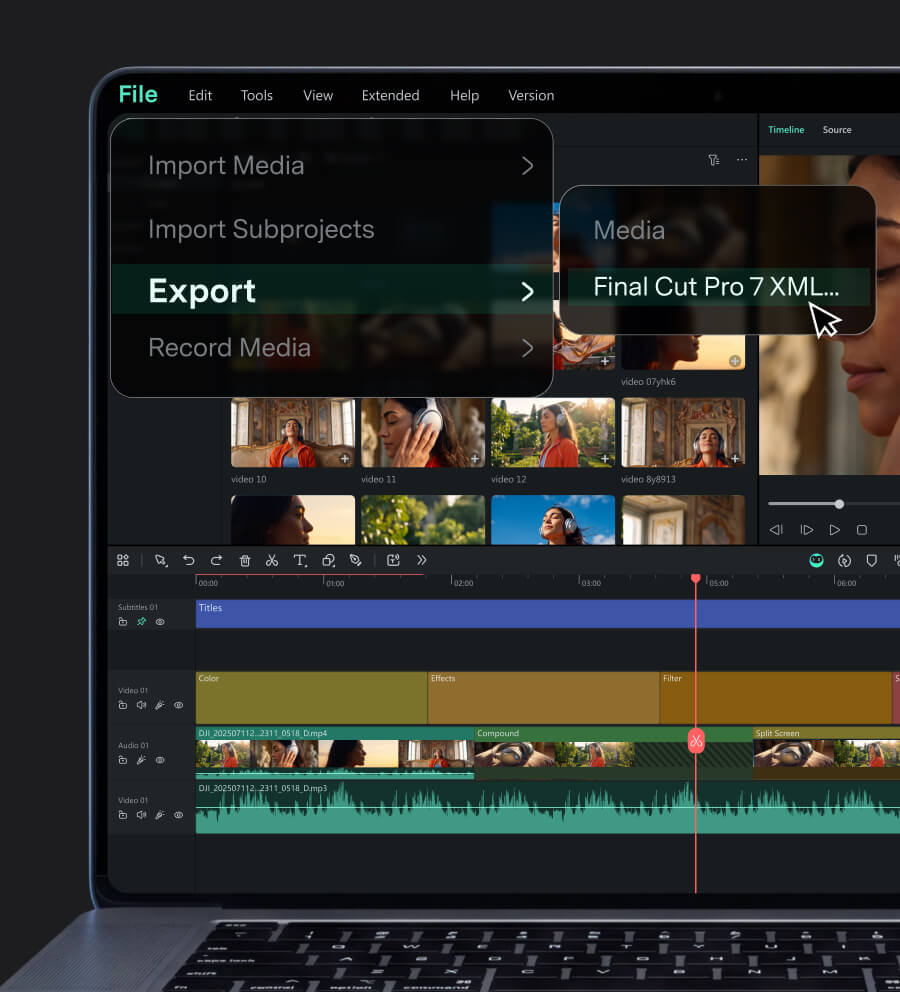
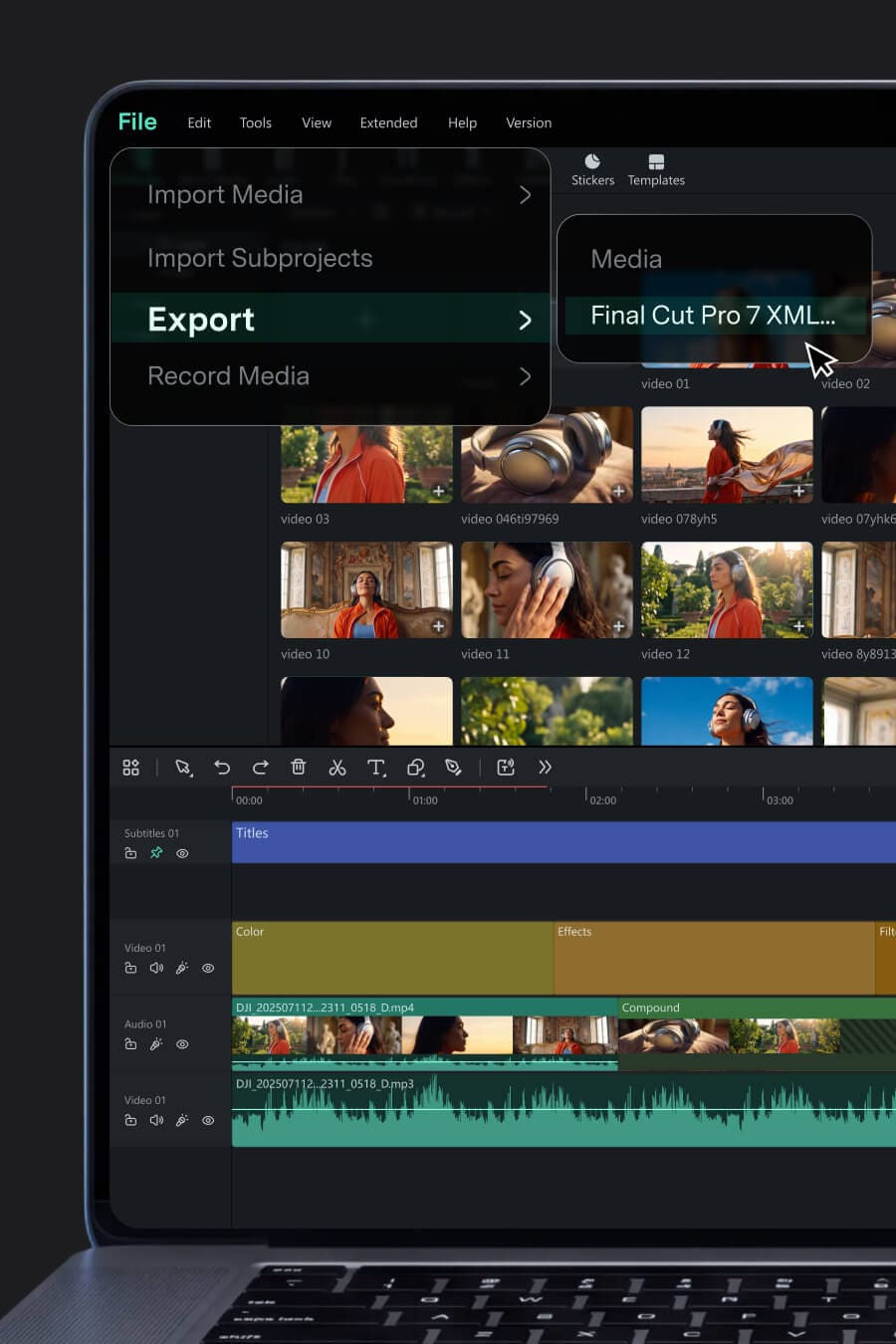
- Timeline XML export to Final Cut Pro, Premiere and Resolve
Pros
- Easier to learn than the professional editors
- Cheap one-time license
Cons
- The one-time license excludes future major versions and comes with a limited pool of AI credits
- Needs 16 GB of RAM for HD and 4K video on a Mac
- Free version exports with a watermark
- Choose if:
- You want more than iMovie offers but find Final Cut Pro intimidating
Filmora is a desktop video editor from Wondershare for Windows and macOS, with separate Android, iOS and iPadOS apps. It combines a multi-track timeline, keyframes, motion and planar tracking, color tools and a large library of effects, music and stock media with AI features such as silence removal, text-based editing, speech-to-text captions and Smart Short Clips. Many of the AI tools are paid for with AI credits, which depend on the plan. It is sold as a Basic or Advanced annual subscription, or a one-time perpetual license that covers updates within Filmora 16 only. The free version exports with a watermark.
What users say
Evidence ↓TechRadar's reviewer praises the depth of editing tools and says editing stayed responsive, but calls the interface a bit overwhelming for beginners; an older RedShark review of Filmora 13 called it an excellent beginner platform, so reviewers disagree. The most common complaint in the sources read is credits and billing. RedShark notes that AI generation needs credits and that free and perpetual users will eventually have to pay more, and Trustpilot reviewers (1.6 score from 521 reviews, which skews toward complaints) cite features that need extra credits, trial and charge confusion, and glitchy behavior. These are a handful of reviewers, not a systematic sample.
Rankings and alternatives
- Video editing software for Mac #5 of 7 Easy editing with a one-time price
- Final Cut Pro for Mac #1 Best for most Mac owners
- DaVinci Resolve 21 #2 Pro color and audio, free
- iMovie #3 Family videos, already installed
- Video editing software for YouTube #6 of 8 Cheap and simple, if you mind the credits
- Adobe Premiere #2 The standard, if you'll hire editors
- CyberLink PowerDirector #3 Most editor for the money on Windows
- CapCut #5 Built for Shorts and quick turnarounds






Video editing software for Mac scores
Evaluated Nov 17, 2026 Evidence ↓- Editing depth and room to grow 4
4/5 means: A full editor with multicam, keyframes, masks, tracking and plug-ins, short of the deepest professional finishing
Multi-track timeline, keyframes, planar and camera tracking, masks, track matte, multicam, animated charts and proxy editing; not 5 because it lacks the finishing depth of Resolve or Premiere, and not 3 because it has multicam, tracking and masks. Plan-by-plan availability was not verified.
- Learning curve 4
4/5 means: Approachable; most people finish a simple video in their first session with some looking around
Reviewers and Mac App Store users call it approachable, though TechRadar calls the dashboard "a bit overwhelming" for beginners and one reviewer disliked the forced tutorial. Reviewers disagree, so 4 rather than 5.
- How well it runs on an Apple silicon Mac · counts double 3
3/5 means: Fine for typical projects but lags on long or 4K timelines, or has little evidence of being tuned for Apple silicon
Filmora claims Apple silicon optimization, Metal rendering and ProRes support, but I found no independent Mac benchmarks, no statement of hardware HEVC/ProRes decoding, and no crash reports either way. It needs 16 GB for 4K by its own spec. Little evidence of tuning rather than evidence of problems, hence 3.
- Built-in time-savers 3
3/5 means: Several of these, with clear limits in accuracy, credits or what the scored version includes
It has silence removal, text-based editing, speech-to-text captions in 27 languages, Smart Short Clips and free Auto Reframe, but the perpetual plan has only a one-time pool of 1,000 AI credits and captions, text editing and Smart Short Clips are credit-priced. That is several tools with clear credit limits, so 3 rather than 4.
- Color and audio tools 3
3/5 means: Real color correction or strong voice cleanup, but weak at the other
From documentation on the Mac page and general knowledge, it has HSL, LUTs, curves, HDR and P3 support, audio ducking and noise removal, but these are consumer-level and not independently reviewed here. Not 4 because scopes and results were not confirmed.
- What you pay over three years 4
4/5 means: Under $350 over three years, usually a one-time purchase
The Mac perpetual license is $79.99 once, under $350 over three years (the vendor Mac App Store listing shows $79.99; TechRadar says $99.99, which would still be under $350). It covers only Filmora 16 updates.
- Fit with iPhone, iPad and other Apple apps 3
3/5 means: A phone or iPad app that can pass projects to the Mac, or good iPhone format support, but not both
Writer's calibration from 4, because the scale's 4 needs a phone or iPad version that opens the same projects, which was not verified, so good iPhone format support alone is a 3. iPhone iOS and iPadOS apps exist, and the Mac page lists Live Photos, Cinematic Video, HDR and P3 support and ProRes; the Mac App Store changelog mentions Photos library import. Not 5 because the perpetual license does not cover the mobile apps and I did not verify that projects open across devices.
- Working with others and moving projects · counts half 4
4/5 means: Runs on Windows or Linux and exports timelines to other editors, with limited shared editing
Runs on Windows, and exports timeline XML that Filmora says works with Premiere Pro, DaVinci Resolve and Final Cut Pro, but it is labeled new, carries only essential structure and has no shared projects. It is not common in paid client work, so 4 rather than 5.
Video editing software for YouTube scores
Evaluated Nov 17, 2026 Evidence ↓- Speed of cutting a typical YouTube video · counts double 4
4/5 means: Fast for most YouTube formats, with strong trimming tools and some automatic cleanup such as silence removal or editing by transcript, but slower for some common format
Filmora advertises pause removal and text-based editing for rough cuts on a conventional timeline, but the text-based editing tool is credit-priced and I did not verify its quality in long videos.
- Editing depth and production ceiling 4
4/5 means: A full editor with multicam, keyframes, masks and good color tools, short of the deepest professional finishing
Multi-track timeline, keyframes, motion and planar tracking, multicam and color tools including HSL, LUTs and curves. It is short of the deepest professional finishing; the plan-by-plan availability was not preserved.
- Automatic captions 3
3/5 means: Automatic captions that work, with a clear weakness in accuracy, languages, styling, workflow or caption-file export
Speech-to-text in 27 languages with animated subtitle styles, but it is credit-priced, so Advanced's 1,000 non-rolling monthly credits limit use. Accuracy and SRT export were not verified.
- Voice and audio cleanup 3
3/5 means: Useful noise reduction or speech enhancement, but little else, or results reviewers call uneven
From general knowledge Filmora has AI denoise, vocal remover and auto ducking, but none appeared in the pages read and I could not confirm results or plan limits.
- What a growing channel pays 4
4/5 means: $150 to $350 over three years
Advanced at $59.99 a year is $179.97 over three years, or $209.97 at the $69.99 regular price; both fall in the $150 to $350 band. Credits are included monthly with no rollover.
- Shorts and vertical video 4
4/5 means: Automatic reframing to vertical from the same project, with presets or direct upload
Auto Reframe is free of credits, Smart Short Clips finds clips with captions and templates (credit-priced), and direct YouTube upload exists. Reframe quality was not tested.
- Learning curve 3
3/5 means: A real learning curve of a few sessions, or an unusual editing model that takes adjusting to
TechRadar calls the dashboard overwhelming at first and notes a learning curve, while an older RedShark review of Filmora 13 called it beginner-friendly, so reviewers disagree.
- Smooth on a typical creator's computer 3
3/5 means: Works on a typical computer with lag on long or high-resolution projects, or occasional crashes
One reviewer saw no lag on Windows 11, while a Trustpilot reviewer calls it glitchy; system requirements and widespread crash reports were not found.
- Computers and devices it runs on · counts half 4
4/5 means: Windows and Mac with the same features
Advanced works on both Windows and Mac under one license. The separate mobile apps are not documented as opening the same desktop projects.
Pricing
- Free Free Basic editing features, but exports carry a Filmora watermark. No AI credits (TechRadar), limited creative assets and no cloud storage.
- Basic $49.99 /year Billed yearly and auto-renews. About $4.17 per month. Includes watermark-free 4K export, future version upgrades, 1 GB cloud storage and 500 AI Mate chats, but no monthly AI credits; the credit-priced AI features (including speech-to-text and Smart Short Clips) need credits. Valid on both Windows and Mac. The 2.9M+ Creative Assets library is a separate add-on with a 7-day trial.
- Advanced $59.99 /year Everything in Basic plus 1,000 AI credits per month (reset every 30 days, unused credits do not roll over) and 10 GB cloud storage. Shown at $59.99 with $69.99 struck through during a Black Friday banner on 2026-11-17, so $69.99 may be the regular price. About $5.00 per month at $59.99. Valid on both Windows and Mac.
- Perpetual $79.99 one-time One-time payment with updates within Filmora 16 only; a later major version is a separate paid upgrade. Includes a one-time pool of 1,000 AI credits, 1 GB cloud storage and watermark-free 4K export. The license is device-specific, so a Windows license works only on Windows and a Mac license only on Mac; TechRadar lists the Mac perpetual at $99.99.
- Filmora Creative Assets $19.99 /month , extra Optional add-on for the large effects, music and stock media library, with a 7-day trial. The price comes from TechRadar, not from the vendor page read; the vendor page did not show it. TechRadar also describes a Premium plan at $8.33 per month that bundles the assets and 2,000 credits, which did not appear on the vendor page.
Prices checked Nov 17, 2026.
Evidence and sources
What users say
Summary 7 quotes
-
Filmora from Wondershare is one of the most advanced AI generation and video editing platforms, with tons of features. These include advanced capabilities like planar tracking, AI Video Extender, prompt-based video editing, AI video translation, animated charts, and video stabilization.
Krishi Chowdhary, reviewer at TechRadar · techradar.com/computing/creative-software/wondershare-filmora-ai-video-editor-2026-review · published · checked -
We then played around with various video and audio editing settings, and all of them were applied to our video almost instantaneously. There was no lag or buffering while editing even the most complex or longest videos.
Krishi Chowdhary, reviewer at TechRadar · techradar.com/computing/creative-software/wondershare-filmora-ai-video-editor-2026-review · published · checked -
The Filmora dashboard can seem a bit overwhelming at first, especially if you are a beginner.
Krishi Chowdhary, reviewer at TechRadar · techradar.com/computing/creative-software/wondershare-filmora-ai-video-editor-2026-review · published · checked -
Furthermore, generating AI content requires credits, so subscribers of the free and perpetual plans will eventually need to spend more money to use these AI tools.
Shiv Rajagopal, reviewer at RedShark News · redsharknews.com/wondershare-filmora-13-reviewed-more-upgrades-and-more-power · checked -
far too many features require extra credit usage, from simple scene changes to the outlandishly expensive AI
james frost, Trustpilot reviewer · trustpilot.com/review/filmora.wondershare.net · published · checked -
Their website advertises a "Free 7-Day Trial," but I was charged the full amount immediately upon signing up
Mohammed, Trustpilot reviewer · trustpilot.com/review/filmora.wondershare.net · published · checked -
It has always been glitchy but for the reasonable subscription I have made do
Phil Johns, Trustpilot reviewer · trustpilot.com/review/filmora.wondershare.net · published · checked
Video editing software for Mac scores
Editing depth and room to grow 2 quotes
-
Filmora from Wondershare is one of the most advanced AI generation and video editing platforms, with tons of features. These include advanced capabilities like planar tracking, AI Video Extender, prompt-based video editing, AI video translation, animated charts, and video stabilization.
Krishi Chowdhary, reviewer at TechRadar · techradar.com/computing/creative-software/wondershare-filmora-ai-video-editor-2026-review · published · checked -
Import supported XML timelines into Filmora, or export a Filmora timeline for use in compatible editing workflows. Preserve essential clip structure, timing, tracks, and media relationships when moving a project between tools.
filmora.wondershare.com/video-editor-mac · checked
Learning curve 2 quotes
-
The Filmora dashboard can seem a bit overwhelming at first, especially if you are a beginner.
Krishi Chowdhary, reviewer at TechRadar · techradar.com/computing/creative-software/wondershare-filmora-ai-video-editor-2026-review · published · checked -
Got this because my mac is incompatable with imovie now. It's easy to use but I was peeved at the tutorial in the beginning.
Wkelcher, Mac App Store reviewer · apps.apple.com/us/app/filmora-movie-video-editor/id1516822341 · published · checked
How well it runs on an Apple silicon Mac 4 quotes
-
Operating system · macOS 26 (Tahoe), macOS 15 (Sequoia), macOS 14 (Sonoma), macOS 13 (Ventura), macOS 12 (Monterey), macOS 11 (Big Sur) and macOS 10.15 (Catalina). macOS 26 and macOS 15 are compatible with Filmora V13 or later. Apple M-series Macs are also supported.
filmora.wondershare.com/mac-tech-spec.html · checked -
Memory · 8 GB RAM. 16 GB RAM is required for HD and 4K videos.
filmora.wondershare.com/mac-tech-spec.html · checked -
Take full advantage of Apple silicon with Filmora's Metal Rendering Engine, which speeds up 4K editing and rendering by 50%. Work more smoothly with complex projects, larger frame sizes, and effect-heavy timelines.
filmora.wondershare.com/video-editor-mac · checked -
8K · .mp4 (H.264, HEVC), .mov (Apple ProRes)
filmora.wondershare.com/mac-tech-spec.html · checked
Built-in time-savers 6 quotes
-
1,000 Filmora AI credits (One-time)
filmora.wondershare.com/shop/buy/buy-video-editor.html · checked -
Smart Short Clips Paid by AI Credits
filmora.wondershare.com/shop/buy/buy-video-editor.html · checked -
Speech-to-Text Paid by AI Credits
filmora.wondershare.com/shop/buy/buy-video-editor.html · checked -
Auto Reframe Free
filmora.wondershare.com/shop/buy/buy-video-editor.html · checked -
Speech-to-Text (STT) support 27 languages:
filmora.wondershare.com/shop/buy/buy-video-editor.html · checked -
Remove pauses, edit from text, trim clips, and keep your timeline organized as you shape a cleaner first cut.
filmora.wondershare.com · checked
Color and audio tools 1 quote
-
Take full advantage of Apple silicon with Filmora's Metal Rendering Engine, which speeds up 4K editing and rendering by 50%. Work more smoothly with complex projects, larger frame sizes, and effect-heavy timelines.
filmora.wondershare.com/video-editor-mac · checked
What you pay over three years 5 quotes
-
1,000 Filmora AI credits (One-time)
filmora.wondershare.com/shop/buy/buy-video-editor.html · checked -
1,000 Filmora AI Credits (One-time) 2.9M+ Filmora Creative Assets 1 GB Cloud Storage Updates Within Filmora 16
filmora.wondershare.com/shop/buy/buy-mac-video-editor.html · checked -
Perpetual plans include all updates to the current major version but don’t include upgrades to future major versions, whereas subscription plans include all updates and upgrades during the subscription period.
filmora.wondershare.com/shop/buy/buy-mac-video-editor.html · checked -
Annual Subscription $49.99 Premium Monthly $35.99 Lifetime License $79.99 Advanced Annual Plan $59.99 Basic Annual Plan $49.99 Premium Annual Plan $79.99
apps.apple.com/us/app/filmora-movie-video-editor/id1516822341 · checked -
Also, all the prices mentioned above are for the Windows version, with Mac pricing being slightly higher. For instance, the Basic plan on Mac costs $5.83 per month, with a perpetual license priced at $99.99, whereas the Advanced plan costs $6.67 per month and the Premium plan costs $10 per month.
Krishi Chowdhary, reviewer at TechRadar · techradar.com/computing/creative-software/wondershare-filmora-ai-video-editor-2026-review · published · checked
Fit with iPhone, iPad and other Apple apps 3 quotes
-
Filmora is available on Windows, macOS, Android, iOS, and iPadOS.
filmora.wondershare.com · checked -
8K · .mp4 (H.264, HEVC), .mov (Apple ProRes)
filmora.wondershare.com/mac-tech-spec.html · checked -
Yes, one license is good for both Mac and PC (Windows) when you purchase either the Basic or Advanced plan. These plans offer multi-platform support, allowing you to use the software on Windows PC, Mac. However, if you choose the Perpetual Plan, the license is device-specific. This means if you purchase a Windows license, it will only work on Windows devices. Similarly, a Mac license will only work on Mac devices.
filmora.wondershare.com/shop/buy/buy-video-editor.html · checked
Working with others and moving projects 3 quotes
-
Timeline XML · .xml. (Exported XML files are compatible with Adobe Premiere Pro, DaVinci Resolve, and Final Cut Pro / Final Cut Pro X.)
filmora.wondershare.com/mac-tech-spec.html · checked -
Import supported XML timelines into Filmora, or export a Filmora timeline for use in compatible editing workflows. Preserve essential clip structure, timing, tracks, and media relationships when moving a project between tools.
filmora.wondershare.com/video-editor-mac · checked -
Yes, one license is good for both Mac and PC (Windows) when you purchase either the Basic or Advanced plan. These plans offer multi-platform support, allowing you to use the software on Windows PC, Mac. However, if you choose the Perpetual Plan, the license is device-specific. This means if you purchase a Windows license, it will only work on Windows devices. Similarly, a Mac license will only work on Mac devices.
filmora.wondershare.com/shop/buy/buy-video-editor.html · checked
Video editing software for YouTube scores
Speed of cutting a typical YouTube video 2 quotes
-
Remove pauses, edit from text, trim clips, and keep your timeline organized as you shape a cleaner first cut.
filmora.wondershare.com · checked -
Smart Short Clips Paid by AI Credits
filmora.wondershare.com/shop/buy/buy-video-editor.html · checked
Editing depth and production ceiling 1 quote
-
Filmora from Wondershare is one of the most advanced AI generation and video editing platforms, with tons of features. These include advanced capabilities like planar tracking, AI Video Extender, prompt-based video editing, AI video translation, animated charts, and video stabilization.
Krishi Chowdhary, reviewer at TechRadar · techradar.com/computing/creative-software/wondershare-filmora-ai-video-editor-2026-review · published · checked
Automatic captions 3 quotes
-
Speech-to-Text Paid by AI Credits
filmora.wondershare.com/shop/buy/buy-video-editor.html · checked -
Speech-to-Text (STT) support 27 languages:
filmora.wondershare.com/shop/buy/buy-video-editor.html · checked -
In a subscription plan, Filmora AI credits are issued every 30 days starting from the purchase date. Any unused credits from the previous 30-day period are reclaimed when the new credits are issued.
filmora.wondershare.com/shop/buy/buy-video-editor.html · checked
What a growing channel pays 2 quotes
-
1,000 Filmora AI Credits/mo Used for 20+ AI features
filmora.wondershare.com/shop/buy/buy-video-editor.html · checked -
Filmora's paid plans start at $4.17 per month. The Basic plan is not much different from the free plan, except that you get 500 uses of its proprietary AI Mate, along with 1GB of cloud storage.
Krishi Chowdhary, reviewer at TechRadar · techradar.com/computing/creative-software/wondershare-filmora-ai-video-editor-2026-review · published · checked
Shorts and vertical video 3 quotes
-
Auto Reframe Free
filmora.wondershare.com/shop/buy/buy-video-editor.html · checked -
Smart Short Clips Paid by AI Credits
filmora.wondershare.com/shop/buy/buy-video-editor.html · checked -
Yes, Filmora has an option to export videos directly to YouTube with an integrated "YouTube Upload" mode that compresses videos according to YouTube's recommended settings. Moreover, the Social Video Planner lets you schedule your video in advance, enabling consistent, timely distribution without needing to be online at the time of posting.
filmora.wondershare.com · checked
Learning curve 1 quote
-
The Filmora dashboard can seem a bit overwhelming at first, especially if you are a beginner.
Krishi Chowdhary, reviewer at TechRadar · techradar.com/computing/creative-software/wondershare-filmora-ai-video-editor-2026-review · published · checked
Smooth on a typical creator's computer 2 quotes
-
We then played around with various video and audio editing settings, and all of them were applied to our video almost instantaneously. There was no lag or buffering while editing even the most complex or longest videos.
Krishi Chowdhary, reviewer at TechRadar · techradar.com/computing/creative-software/wondershare-filmora-ai-video-editor-2026-review · published · checked -
It has always been glitchy but for the reasonable subscription I have made do
Phil Johns, Trustpilot reviewer · trustpilot.com/review/filmora.wondershare.net · published · checked
Computers and devices it runs on 2 quotes
-
Yes, one license is good for both Mac and PC (Windows) when you purchase either the Basic or Advanced plan. These plans offer multi-platform support, allowing you to use the software on Windows PC, Mac. However, if you choose the Perpetual Plan, the license is device-specific. This means if you purchase a Windows license, it will only work on Windows devices. Similarly, a Mac license will only work on Mac devices.
filmora.wondershare.com/shop/buy/buy-video-editor.html · checked -
Filmora is available on Windows, macOS, Android, iOS, and iPadOS.
filmora.wondershare.com · checked
Facts
License 2 quotes
-
A perpetual Filmora license allows you to use a specific version of Filmora continually with payment of a single fee. Therefore, the plan does not include future versions of Filmora. You may need to pay an additional lower-cost fee to resubscribe for support and upgrades.
filmora.wondershare.com/shop/buy/buy-video-editor.html · checked -
Yes, one license is good for both Mac and PC (Windows) when you purchase either the Basic or Advanced plan. These plans offer multi-platform support, allowing you to use the software on Windows PC, Mac. However, if you choose the Perpetual Plan, the license is device-specific. This means if you purchase a Windows license, it will only work on Windows devices. Similarly, a Mac license will only work on Mac devices.
filmora.wondershare.com/shop/buy/buy-video-editor.html · checked
Runs on 1 quote
-
Filmora is available on Windows, macOS, Android, iOS, and iPadOS.
filmora.wondershare.com · checked
Needs 3 quotes
-
Operating system · macOS 26 (Tahoe), macOS 15 (Sequoia), macOS 14 (Sonoma), macOS 13 (Ventura), macOS 12 (Monterey), macOS 11 (Big Sur) and macOS 10.15 (Catalina). macOS 26 and macOS 15 are compatible with Filmora V13 or later. Apple M-series Macs are also supported.
filmora.wondershare.com/mac-tech-spec.html · checked -
Memory · 8 GB RAM. 16 GB RAM is required for HD and 4K videos.
filmora.wondershare.com/mac-tech-spec.html · checked -
Apple M-series note: GoPro CineForm is not available on Mac with M1/M2/M3 chips.
filmora.wondershare.com/mac-tech-spec.html · checked
More from the sources
Pricing 1 quote
-
Enjoy Filmora 16 Updates Only
filmora.wondershare.com/shop/buy/buy-video-editor.html · checked
Limits and known issues 1 quote
-
You can access all of Filmora's basic editing features for free, and easily export your videos. However, watermarks will be added to the exported files.
filmora.wondershare.com/shop/buy/buy-video-editor.html · checked
What users say 1 quote
-
Wondershare doesn't honor purchase agreements! I've paid for a LIFETIME DEAL with Filmora 6 incl. all future upgrades and updates to the application.
StrictlyBagel, MacUpdate reviewer · filmora.macupdate.com · published · checked
How widely it is used 1 quote
-
This app hasn’t received enough ratings or reviews to display an overview.
apps.apple.com/us/app/filmora-movie-video-editor/id1516822341 · checked
Pricing
filmora.wondershare.com/shop/buy/buy-video-editor.html · checked