
CyberLink PowerDirector
Consumer-to-prosumer desktop video editor with a multi-track timeline and many AI tools, sold as a subscription or a one-time purchase
Our verdict
#3 of 8 in Video editing software for YouTube · Most editor for the money on Windows
What it does
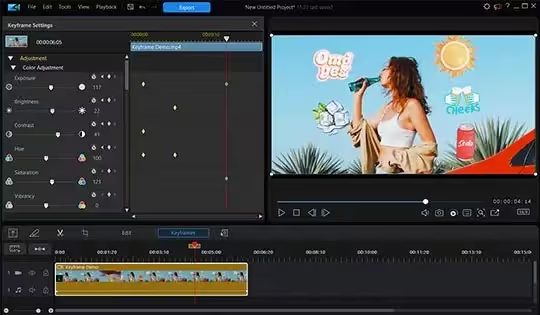
- Multi-track timeline with keyframes, masks, motion tracking and multicam
- AI noise removal, speech enhancement, wind removal and automatic ducking
- Auto Reframe and direct upload to YouTube
- Subscription or a one-time license
Pros
- Deep editing tools for a low yearly price
- Fast rendering and smooth on an ordinary Windows laptop
- Easier to learn than the professional editors
Cons
- Automatic captions and transcript editing use a monthly credit allowance
- The Mac version is a separate subscription and lags behind Windows
- CyberLink pushes hard toward the subscription
- Skip if:
- You edit on a Mac
PowerDirector is CyberLink’s desktop video editor for hobbyists and creators. It has a multi-track timeline with keyframes, masks, motion tracking and multicam, plus AI tools for captions, audio denoise, auto reframe and generative video. It is sold as PowerDirector 365, a subscription with monthly updates, 100 AI credits a month and a stock library, and as the one-time PowerDirector 2027 purchase, which gets core AI features but no regular updates. A free Essential version has limited features. It runs on Windows 10 and 11 and on macOS; the Mac version is a separate subscription and trails the Windows version in features.
What users say
Evidence ↓Reviewers are mostly positive. PCMag gave it a perfect score and Editors' Choice, praising render speed and a usable interface, with the number of options as its only listed con. TechRadar found it fast to edit in and fine on a mid-range laptop, but criticized the fixed interface, the default layer order, the heavy push toward the subscription and AI features that spend credits (subtitles included). Both are individual reviewers, and no user-forum sampling was read.
Rankings and alternatives
- Video editing software for YouTube #3 of 8 Most editor for the money on Windows
- DaVinci Resolve 21 #1 Best overall, and free to start
- Adobe Premiere #2 The standard, if you'll hire editors
- Final Cut Pro for Mac #4 The fast choice on a Mac



Video editing software for YouTube scores
Evaluated Nov 17, 2026 Evidence ↓- Speed of cutting a typical YouTube video · counts double 4
4/5 means: Fast for most YouTube formats, with strong trimming tools and some automatic cleanup such as silence removal or editing by transcript, but slower for some common format
Strong trimming tools (multi-trim, Precut, ripple), Text-Based Editing and AI Auto Edit, and reviewers call it very fast to render and edit in. Text-based editing costs credits, and I found no silence-removal documentation.
- Editing depth and production ceiling 4
4/5 means: A full editor with multicam, keyframes, masks and good color tools, short of the deepest professional finishing
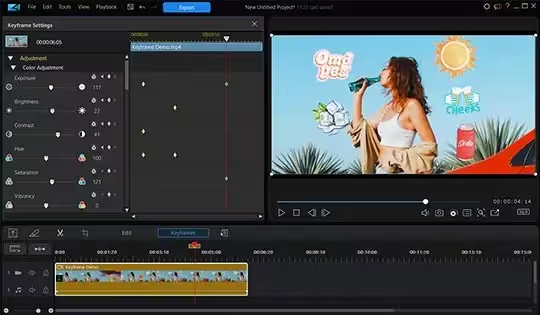
Up to 100 tracks, keyframes, masks, motion tracking, multicam and color tools. Short of the deepest professional finishing, and the interface is fixed.
- Automatic captions 3
3/5 means: Automatic captions that work, with a clear weakness in accuracy, languages, styling, workflow or caption-file export
Automatic speech-to-text works but is credit-metered at 100 credits a month on 365 that expire after 30 days. The per-minute credit cost was not found, so whether that covers a weekly channel is uncertain. SRT import is free. Languages, styles and SRT export are not documented in what I read.
- Voice and audio cleanup 4
4/5 means: Good one-click voice cleanup plus noise removal and ducking or leveling
AI Audio Denoise, Speech Enhancement, Wind Removal and Audio Ducking are listed. Short of 5 because reviewer accounts of results are thin and full mixing is lighter than the professional tools; per-edition availability of each item was not confirmed.
- What a growing channel pays 4
4/5 means: $150 to $350 over three years
PowerDirector 365 on annual billing at the $79.99 list price is $239.97 over three years, in the $150 to $350 band. Captions and cleanup are included.
- Shorts and vertical video 4
4/5 means: Automatic reframing to vertical from the same project, with presets or direct upload
9:16 projects, Portrait Preview, Auto Reframe to 9:16, 1:1 or 16:9, and direct upload to YouTube. No clip-finding for long videos was documented, and Auto Reframe is newer.
- Learning curve 4
4/5 means: Approachable; most creators edit a full video in their first session with some looking around
Reviewers call the interface clear and quick to learn, with a few quirks (default layer order, rigid layout) and a lot of options that can overwhelm.
- Smooth on a typical creator's computer 4
4/5 means: Smooth for typical projects, with slowdowns only on heavy ones
PCMag calls it the fastest renderer tested and TechRadar ran it well on a mid-range Core i5 laptop. Requirements are modest. No user reports of crashes were read.
- Computers and devices it runs on · counts half 3
3/5 means: Windows and Mac, with features missing or delayed on one of them
Windows 365 is Windows only. A separate Mac subscription exists with fewer features (no text-based editing). Mobile apps exist and PCMag says projects can continue on the desktop via cloud.
Pricing
- PowerDirector Essential Free Free version with limited features; premium effects can be added but are removed or must be paid for at export.
- PowerDirector 365 $54.99 /year Shown price on the vendor page's annual view; list price $79.99 per year ($4.58 a month equivalent, billed annually). Auto-renews; includes monthly updates, 100 AI credits a month, and a stock library. Windows only; Mac is a separate subscription. The monthly-billing price was not readable.
- Director Suite 365 $99.99 /year Shown price on the vendor page; list price $149.99 per year ($8.33 a month equivalent). Adds PhotoDirector 365 and AudioDirector 365, 250 AI credits a month and 100GB cloud storage.
- PowerDirector 2027 (Ultra/Ultimate perpetual) $139.99 one-time Perpetual license with core AI features, no regular updates, no monthly AI credits, 25GB cloud storage for 1 year. Upgrade price exists for 2025 and 2026 owners. Windows only.
Prices checked Nov 17, 2026.
Evidence and sources
What users say
Summary 5 quotes
-
On top of that, this software renders projects fastest among all the software we've tested. For its exceptional performance, deep feature set, and ease of use, PowerDirector earns an exceptional five-star rating and our Editors' Choice award for enthusiast video editing applications.
Michael Muchmore, reviewer at PCMag · pcmag.com/reviews/cyberlink-powerdirector · published · checked -
The program's user interface is about as clear and simple as a program with such a vast number of options can be, but it can still get overwhelming when you're in the weeds of fine-tuning video or audio effects.
Michael Muchmore, reviewer at PCMag · pcmag.com/reviews/cyberlink-powerdirector · published · checked -
It’s obviously not a top of the line machine, but it shows that despite that, PowerDirector still performed admirably. While some software demands ever more power, this one worked well on what is now considered a mid-range computer, which is definitely a tick in PowerDirector’s favour.
Steve Paris, reviewer at TechRadar · techradar.com/reviews/cyberlink-powerdirector-365 · published · checked -
As for the cost, although Cyberlink pushes you (hard) to rent their software, there is an option to buy a perpetual licence, which you can do for $140. Existing owners of versions 2024 and 2025 can upgrade for $90. You won’t get access to as many features, and you can only take advantage of any future updates for a year, but at least you won’t need to pay any more.
Steve Paris, reviewer at TechRadar · techradar.com/reviews/cyberlink-powerdirector-365 · published · checked -
Unlike Premiere Pro, the interface isn’t customisable. You work with what you get.
Steve Paris, reviewer at TechRadar · techradar.com/reviews/cyberlink-powerdirector-365 · published · checked
Video editing software for YouTube scores
Speed of cutting a typical YouTube video 3 quotes
-
Trim, split, layer, and arrange clips with frame-accurate control. Multi-track timelines, markers, snapping, and ripple editing give you every sequence exactly as intended.
cyberlink.com/products/powerdirector-video-editing-software/overview_en_US.html · checked -
PowerDirector AI features that require credits include the Anime Video effect, Speech to Text, Text-Based Editing, Text to Speech, and Video Enhancement.
Michael Muchmore, reviewer at PCMag · pcmag.com/reviews/cyberlink-powerdirector · published · checked -
On top of that, this software renders projects fastest among all the software we've tested. For its exceptional performance, deep feature set, and ease of use, PowerDirector earns an exceptional five-star rating and our Editors' Choice award for enthusiast video editing applications.
Michael Muchmore, reviewer at PCMag · pcmag.com/reviews/cyberlink-powerdirector · published · checked
Editing depth and production ceiling 2 quotes
-
Trim, split, layer, and arrange clips with frame-accurate control. Multi-track timelines, markers, snapping, and ripple editing give you every sequence exactly as intended.
cyberlink.com/products/powerdirector-video-editing-software/overview_en_US.html · checked -
Unlike Premiere Pro, the interface isn’t customisable. You work with what you get.
Steve Paris, reviewer at TechRadar · techradar.com/reviews/cyberlink-powerdirector-365 · published · checked
Automatic captions 4 quotes
-
Create natural voiceovers, clean up audio, transcribe and edit by text, generate captions, and build multilingual versions, all inside your video workflow.
cyberlink.com/products/powerdirector-video-editing-software/overview_en_US.html · checked -
PowerDirector AI features that require credits include the Anime Video effect, Speech to Text, Text-Based Editing, Text to Speech, and Video Enhancement.
Michael Muchmore, reviewer at PCMag · pcmag.com/reviews/cyberlink-powerdirector · published · checked -
Subtitles are added manually (a chore), by importing a compatible SRT or TXT file (a better option), or by spending credits to let AI do the work for you (the rise of the machines).
Steve Paris, reviewer at TechRadar · techradar.com/reviews/cyberlink-powerdirector-365 · published · checked -
If you’re renting the software you’ll have 100 of those each month, and you can also earn 3 additional credits every day, although you need to collect these manually to get them. Be aware that all these credits do not roll over and expire after 30 days.
Steve Paris, reviewer at TechRadar · techradar.com/reviews/cyberlink-powerdirector-365 · published · checked
Voice and audio cleanup 1 quote
-
AI Audio Denoise AI Speech Enhancement AI Wind Removal AI Voice Changer Audio Ducking
cyberlink.com/products/powerdirector-video-editing-software/pricing_en_US.html · checked
What a growing channel pays 1 quote
-
Full-Featured Video Editing with GenAI and New Features Every Month. $79.99 $54.99 ($4.58 /month)
cyberlink.com/products/powerdirector-video-editing-software/pricing_en_US.html · checked
Shorts and vertical video 3 quotes
-
Yes, you can upload videos directly to YouTube, TikTok, Facebook, and Vimeo from PowerDirector.
cyberlink.com/products/powerdirector-video-editing-software/overview_en_US.html · checked -
One feature I liked is ‘Auto-Reframe’, which analyses your project and crops it so it looks great on any platform, whether the video ends up being 16:9, 9:16 or 1:1.
Steve Paris, reviewer at TechRadar · techradar.com/reviews/cyberlink-powerdirector-365 · published · checked -
Portrait Preview. In a nod to the prevalence of TikTok-style vertical videos, this is a larger preview of videos shot in 9:16 (aka portrait mode).
Michael Muchmore, reviewer at PCMag · pcmag.com/reviews/cyberlink-powerdirector · published · checked
Learning curve 2 quotes
-
The program's user interface is about as clear and simple as a program with such a vast number of options can be, but it can still get overwhelming when you're in the weeds of fine-tuning video or audio effects.
Michael Muchmore, reviewer at PCMag · pcmag.com/reviews/cyberlink-powerdirector · published · checked -
Unlike Premiere Pro, the interface isn’t customisable. You work with what you get.
Steve Paris, reviewer at TechRadar · techradar.com/reviews/cyberlink-powerdirector-365 · published · checked
Smooth on a typical creator's computer 3 quotes
-
PowerDirector requires a 64-bit version of Microsoft Windows 11 or Windows 10. You need a minimum of 8GB RAM, 7GB of hard drive space, and at least a 128MB VGA VRAM graphics card (2GB for AI features).
Michael Muchmore, reviewer at PCMag · pcmag.com/reviews/cyberlink-powerdirector · published · checked -
On top of that, this software renders projects fastest among all the software we've tested. For its exceptional performance, deep feature set, and ease of use, PowerDirector earns an exceptional five-star rating and our Editors' Choice award for enthusiast video editing applications.
Michael Muchmore, reviewer at PCMag · pcmag.com/reviews/cyberlink-powerdirector · published · checked -
It’s obviously not a top of the line machine, but it shows that despite that, PowerDirector still performed admirably. While some software demands ever more power, this one worked well on what is now considered a mid-range computer, which is definitely a tick in PowerDirector’s favour.
Steve Paris, reviewer at TechRadar · techradar.com/reviews/cyberlink-powerdirector-365 · published · checked
Computers and devices it runs on 3 quotes
-
No, a single subscription is not cross-compatible. If you are looking for a subscription for Mac, please visit [PowerDirector 365 for Mac]
cyberlink.com/products/powerdirector-video-editing-software/pricing_en_US.html · checked -
Yes. PowerDirector is fully optimized for Windows 11 / 10 and macOS, allowing users to download the corresponding version based on their operating system.
cyberlink.com/products/powerdirector-video-editing-software/overview_en_US.html · checked -
The Mac version is close to parity with the Windows version. It has a lot of advanced features like AI Object Detection, AI Text to Video generation, speech-to-text, Motion Tracking, and Wind Removal, but lacks some features like the AI Anime Video creator and text-based editing.
Michael Muchmore, reviewer at PCMag · pcmag.com/reviews/cyberlink-powerdirector · published · checked
Facts
License 2 quotes
-
Full Video Editing with Core AI & GenAI. One-Time Purchase, No Monthly Updates. $139.99 Perpetual License
cyberlink.com/products/powerdirector-video-editing-software/pricing_en_US.html · checked -
Full-Featured Video Editing with GenAI and New Features Every Month. $79.99 $54.99 ($4.58 /month)
cyberlink.com/products/powerdirector-video-editing-software/pricing_en_US.html · checked
Runs on 2 quotes
-
Yes. PowerDirector is fully optimized for Windows 11 / 10 and macOS, allowing users to download the corresponding version based on their operating system.
cyberlink.com/products/powerdirector-video-editing-software/overview_en_US.html · checked -
PowerDirector requires a 64-bit version of Microsoft Windows 11 or Windows 10. You need a minimum of 8GB RAM, 7GB of hard drive space, and at least a 128MB VGA VRAM graphics card (2GB for AI features).
Michael Muchmore, reviewer at PCMag · pcmag.com/reviews/cyberlink-powerdirector · published · checked
Needs 1 quote
-
PowerDirector requires a 64-bit version of Microsoft Windows 11 or Windows 10. You need a minimum of 8GB RAM, 7GB of hard drive space, and at least a 128MB VGA VRAM graphics card (2GB for AI features).
Michael Muchmore, reviewer at PCMag · pcmag.com/reviews/cyberlink-powerdirector · published · checked
More from the sources
Pricing 3 quotes
-
$149.99 $99.99 ($8.33 /month) Everything in PowerDirector 365, plus:
cyberlink.com/products/powerdirector-video-editing-software/pricing_en_US.html · checked -
Yes, you can use PowerDirector 365 Essential for free with limited features
cyberlink.com/products/powerdirector-video-editing-software/pricing_en_US.html · checked -
A $139.99 Ultimate edition of the standalone video editor is the only version that's available as a lifetime license.
Michael Muchmore, reviewer at PCMag · pcmag.com/reviews/cyberlink-powerdirector · published · checked
Features 1 quote
-
Premium AI Agents & GenAI Features Monthly Feature & Content Updates 1,200 AI Credits for GenAI, Issued 100/mo
cyberlink.com/products/powerdirector-video-editing-software/pricing_en_US.html · checked
Limits and known issues 1 quote
-
PowerDirector 2027 is a one-time purchase that includes powerful features but does not receive regular updates, new content after purchase, or subscriber-exclusive benefits like monthly allowance of Credits for Generative AI tools.
cyberlink.com/products/powerdirector-video-editing-software/pricing_en_US.html · checked