
Adobe Premiere
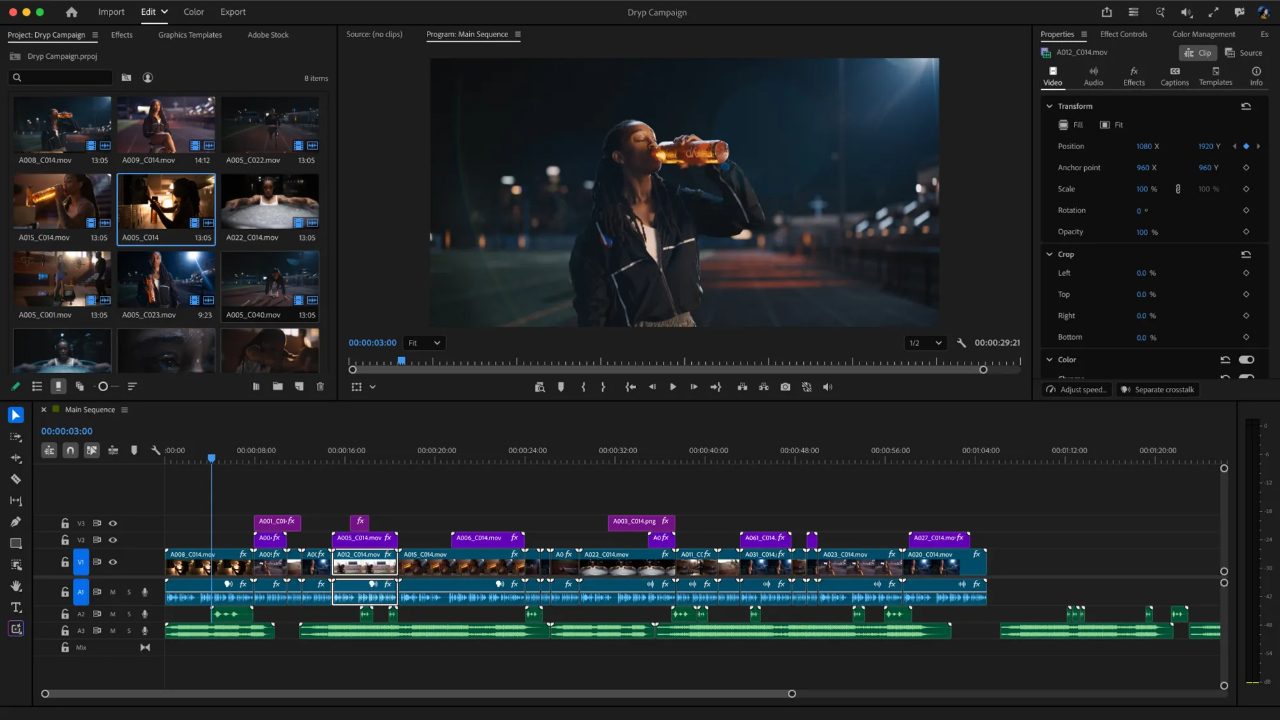
Subscription desktop video editor for Windows and Mac with text-based editing, AI captions, Enhance Speech and Auto Reframe, plus a free Premiere mobile app.
Our verdict
#2 of 8 in Video editing software for YouTube · The standard, if you'll hire editors
What it does
- Edit by transcript, with bulk removal of pauses and filler words
- Automatic captions with translation and SRT export
- Enhance Speech voice cleanup and automatic music ducking
- Auto Reframe for vertical versions of a horizontal edit
- Works with After Effects, Photoshop and a huge market of templates and plugins
Pros
- The most accurate automatic captions of the professional editors
- The editor most freelance editors and tutorials already use
- Professional depth: multicam, color, masks and motion graphics
Cons
- Subscription only, and the most expensive editor here over three years
- Heavy on memory, with frequent complaints about crashes
- A steep learning curve for someone new to professional editing
- Choose if:
- You'll hire editors or already pay for Adobe's other apps
Adobe Premiere Pro, which Adobe’s site now simply calls Adobe Premiere, is a professional timeline video editor for Windows and macOS, sold only as a Creative Cloud subscription with no perpetual license and a 7-day free trial. It covers text-based editing, AI-assisted rough cuts, automatic captions with translation, Enhance Speech audio cleanup, Lumetri color, multicam, Auto Reframe for 9:16 video, and Dynamic Link with After Effects. The Single App plan also includes monthly generative credits and cloud storage. Its depth suits serious creators, but reviewers say it takes longer to learn than simpler editors. Adobe also offers a free Premiere app for iPhone and Android as a separate, simpler editor.
What users say
Evidence ↓Reviewers agree that Premiere Pro is the most capable mainstream editor and that its AI features (text-based editing, captions, Enhance Speech, Generative Extend) save real time. The recurring criticisms are price, subscription-only licensing and a learning curve that suits committed editors more than beginners. One competing vendor argues it is slower and costlier than short-form tools for Shorts; that is a vendor's claim. These are a few reviews, not a measured consensus.
Rankings and alternatives
- Video editing software for YouTube #2 of 8 The standard, if you'll hire editors
- DaVinci Resolve 21 #1 Best overall, and free to start
- CyberLink PowerDirector #3 Most editor for the money on Windows
- Final Cut Pro for Mac #4 The fast choice on a Mac
- Video editing software for Mac #4 of 7 Working with other editors
- iMovie #3 Family videos, already installed
- Wondershare Filmora #5 Easy editing with a one-time price
- CapCut #6 Quick social clips for free





Video editing software for Mac scores
Evaluated Nov 17, 2026 Evidence ↓- Editing depth and room to grow 5
5/5 means: Professional depth in editing, effects and finishing, the tools full-time editors and studios use
Multicam, Lumetri, masking and tracking, Essential Graphics, Dynamic Link with After Effects and plug-ins, with dozens of layers per project; the tools full-time editors and studios use, so not 4.
- Learning curve 2
2/5 means: A professional tool with a steep start; most people need weeks of tutorials to edit quickly
Reviewers call it professional and too complex for beginners without tutorials, though more approachable than before; weeks of practice is the common account, so not 3.
- How well it runs on an Apple silicon Mac · counts double 3
3/5 means: Fine for typical projects but lags on long or 4K timelines, or has little evidence of being tuned for Apple silicon
Larry Jordan found Final Cut far faster in 2023 and Premiere slightly behind on a 2025 ProRes export; one forum user reports low CPU and GPU use on an M4 Pro. Premiere runs on an 8 GB MacBook Air but benefits from 16 GB. Evidence is dated and mixed, with no hard data on MacBook Air playback of iPhone HEVC, so not 4. Adobe's hardware-acceleration page was not readable.
- Built-in time-savers 4
4/5 means: Most of these, working well, with one notable gap
Text-Based Editing, captions with translation, Enhance Speech, AI Assistant rough cuts and Auto Reframe are included, but reframing often needs fixes and animated captions need extra work, so not 5.
- Color and audio tools 4
4/5 means: Good color tools with scopes and LUTs, plus good voice cleanup and mixing, short of a dedicated grading or audio suite
Lumetri color with scopes and LUTs, automatic Apple Log handling, Enhance Speech and Essential Sound; a dedicated grading suite like Resolve goes further, so not 5.
- What you pay over three years 2
2/5 means: $600 to $900 over three years
US$22.99 per month on annual billing is 22.99 x 12 x 3 = US$827.64 over three years, in the $600 to $900 band.
- Fit with iPhone, iPad and other Apple apps 3
3/5 means: A phone or iPad app that can pass projects to the Mac, or good iPhone format support, but not both
Writer's calibration from 4: iPhone ProRes Log is detected and tone-mapped automatically, and the free Premiere iPhone app can hand projects and media to the desktop app, but there is no iPad version and no Photos library import, so it has a phone app that passes projects plus good Log support rather than an iPad or iPhone version that opens the same projects (the 4).
- Working with others and moving projects · counts half 5
5/5 means: Cross-platform, exchanges timelines with the major editors, and supports shared projects; common in client work
Windows and Mac, XML/AAF/EDL exchange (from product knowledge, not in the evidence file), Team Projects and Frame.io included with the subscription, and Premiere is widely used in client and agency work (knowledge; no source read quantifies it).
Video editing software for YouTube scores
Evaluated Nov 17, 2026 Evidence ↓- Speed of cutting a typical YouTube video · counts double 5
5/5 means: Among the fastest for nearly every YouTube format, combining an efficient timeline with automatic cleanup or transcript editing
Efficient timeline and shortcuts plus Text-Based Editing with pause and filler-word removal; a competitor vendor says Shorts take multiple steps, but long-form cutting is among the fastest.
- Editing depth and production ceiling 5
5/5 means: Professional depth in editing, color, audio and effects, the tools full-time editors and studios use
Multicam, Lumetri color, masking and tracking, Essential Graphics, After Effects Dynamic Link and plugins; the tools used by full-time editors and studios.
- Automatic captions 5
5/5 means: Accurate automatic captions in many languages, quick to correct, with animated styles and caption-file export
Accurate automatic captions in a side-by-side test, easy to correct, styled, translated into 20+ languages and exported as SRT. Animated Shorts styles may need templates or plugins, but the overall level fits 5.
- Voice and audio cleanup 5
5/5 means: Best-in-class voice cleanup together with full audio mixing tools
Enhance Speech one-click cleanup plus Essential Sound auto-ducking, loudness matching and full mixing tools; reviewers say it will not rescue badly damaged audio.
- What a growing channel pays 2
2/5 means: $600 to $900 over three years
US$22.99 per month on an annual commitment is 22.99 x 12 x 3 = US$827.64 over three years, in the $600 to $900 band. Captions and Enhance Speech are included.
- Shorts and vertical video 4
4/5 means: Automatic reframing to vertical from the same project, with presets or direct upload
Auto Reframe and a 9:16 sequence from the same project plus export presets; no clip-finding from long videos or direct YouTube upload found, and reframing sometimes needs fixing.
- Learning curve 2
2/5 means: A professional tool with a steep start; most creators need weeks of tutorials to edit quickly
Reviewers call it professional and complex for beginners, though more approachable than before and with in-app tutorials; most creators need weeks of practice to edit quickly.
- Smooth on a typical creator's computer 3
3/5 means: Works on a typical computer with lag on long or high-resolution projects, or occasional crashes
Runs on a typical computer, with 16 GB recommended; reviewers and a competitor note slowdowns with 4K and heavy effects. Crash reports were not researched.
- Computers and devices it runs on · counts half 4
4/5 means: Windows and Mac with the same features
Windows and macOS with the same features; the free mobile app is a separate simpler editor, so no browser or phone projects are counted.
Pricing
- Premiere mobile app Free Free standalone social video editor for iPhone and Android (the successor to Premiere Rush's role). Generative AI features use credits. Separate from the desktop editor; not assessed here.
- Premiere Single App (annual, billed monthly) $22.99 /month Billed monthly on a 12-month commitment (22.99 x 12 = US$275.88 per year). Includes 25 monthly generative credits and reportedly 100 GB cloud storage. Adobe's own pricing page shows a 14-day full-refund window; the early-cancellation fee was not shown on the page read. Includes Creative Cloud integration with Photoshop, After Effects and Illustrator (per Adobe's page). 7-day free trial.
- Premiere Single App (month-to-month) $35.00 /month Figure from a June 2025 TechRadar review, not confirmed on Adobe's current pages.
- Premiere Single App (annual, prepaid) $264.00 /year Figure from a June 2025 TechRadar review (264 / 12 = US$22 per month), not confirmed on Adobe's current pages; Adobe's current annual-billed-monthly price is US$22.99 per month.
- Creative Cloud Pro $69.99 /month Regular price on an annual plan billed monthly (69.99 x 12 = US$839.88 per year). Adobe's plans page also showed a first-year promotion of US$29.99 per month that ended Nov 27, 2026. Bundle with 20+ apps including Photoshop and After Effects. The 2025 TechRadar review listed the All Apps plan at US$60 per month.
- Students and teachers (Creative Cloud Pro) $15.99 /month First-year promotion on an annual plan billed monthly, then US$39.99 per month (Adobe's plans page, offer ended Nov 27, 2026). For qualified students and teachers only; includes Premiere. A single-app student price was not shown.
Prices checked Nov 17, 2026.
Evidence and sources
What users say
Summary 6 quotes
-
Yes, it’s relatively expensive, and without a thorough going over the tutorials, it’s not going to be the best video editing software for beginners - it’s too professional and complex for that - but for veteran video editors or those prepared to learn the intricacies, it’s almost perfect.
Steve Paris, reviewer at TechRadar · techradar.com/reviews/adobe-premiere-pro-2022 · published · checked -
Premiere Pro still isn't the easiest video editor to learn, but it has become considerably more approachable than earlier versions.
machow2.com/adobe-premiere-review · checked -
After automatically transcribing your footage, Premiere Pro lets you edit your video simply by deleting words from the transcript. It’s particularly useful for interviews, podcasts and YouTube videos, dramatically reducing the time spent trimming dialogue.
machow2.com/adobe-premiere-review · checked -
While it won’t completely rescue severely damaged recordings, it performs remarkably well on everyday content.
machow2.com/adobe-premiere-review · checked -
The process for a creator with intermediate skills took approximately 28 minutes.
fluxnote.io/guides/is-premiere-pro-worth-it-for-youtube-shorts · published · checked -
While Premiere Pro can auto-transcribe speech, creating the popular, dynamically animated captions seen in viral Shorts requires manual keyframing or purchasing third-party plugins, which adds cost and complexity.
fluxnote.io/guides/is-premiere-pro-worth-it-for-youtube-shorts · published · checked
Video editing software for Mac scores
Editing depth and room to grow 1 quote
-
Premiere Pro offers almost unlimited flexibility here. Unlike simpler editors that encourage linear editing, Premiere allows you to build sophisticated projects containing dozens—or even hundreds—of video, graphics and audio layers.
machow2.com/adobe-premiere-review · checked
Learning curve 2 quotes
-
Yes, it’s relatively expensive, and without a thorough going over the tutorials, it’s not going to be the best video editing software for beginners - it’s too professional and complex for that - but for veteran video editors or those prepared to learn the intricacies, it’s almost perfect.
Steve Paris, reviewer at TechRadar · techradar.com/reviews/adobe-premiere-pro-2022 · published · checked -
Premiere Pro still isn't the easiest video editor to learn, but it has become considerably more approachable than earlier versions.
machow2.com/adobe-premiere-review · checked
How well it runs on an Apple silicon Mac 5 quotes
-
While Premiere Pro will run on an 8GB MacBook Air, projects involving multiple video tracks, colour grading or AI-powered features benefit enormously from additional memory.
machow2.com/adobe-premiere-review · checked -
Premiere Pro still isn't the easiest video editor to learn, but it has become considerably more approachable than earlier versions.
machow2.com/adobe-premiere-review · checked -
In sum, Final Cut Pro supports far more multicam streams and is significantly faster when rendering and exporting than Adobe Premiere Pro.
Larry Jordan, video editing trainer · larryjordan.com/articles/compare-render-export-and-multicam-performance-for-apple-final-cut-pro-and-adobe-premiere-pro · published · checked -
When exporting a ProRes 4444 project to ProRes 422, speeds were very close. However, Resolve 20 was the fastest, followed seven seconds later by Final Cut, while Premiere took 18 seconds longer.
Larry Jordan, video editing trainer · larryjordan.com/articles/compare-render-export-speeds-between-final-cut-pro-11-premiere-pro-2025-and-resolve-20 · published · checked -
Export times are significantly longer compared to Final Cut Pro or DaVinci Resolve
Carlos28699229h2l3, Adobe Community forum user · community.adobe.com/bug-reports-728/technical-report-underutilization-of-premiere-pro-on-macbook-pro-m4-pro-1331484 · published · checked
Built-in time-savers 4 quotes
-
Create your stories with industry-standard editing tools, and try Text-Based Editing to refine, reorder, and trim clips just like you’d edit a text document.
adobe.com/products/premiere.html · checked -
After automatically transcribing your footage, Premiere Pro lets you edit your video simply by deleting words from the transcript. It’s particularly useful for interviews, podcasts and YouTube videos, dramatically reducing the time spent trimming dialogue.
machow2.com/adobe-premiere-review · checked -
While Auto Reframe is a helpful feature for converting 16:9 video to 9:16, it often requires manual adjustments to keep the subject perfectly in frame, defeating the purpose of automation for creators needing to convert dozens of clips.
fluxnote.io/guides/is-premiere-pro-worth-it-for-youtube-shorts · published · checked -
I chose Premiere for its accuracy and ease of correction.
Larry Jordan, video editing trainer · larryjordan.com/articles/comparing-captioning-in-final-cut-pro-11-premiere-pro-2025-resolve-20 · published · checked
Color and audio tools 1 quote
-
While it won’t completely rescue severely damaged recordings, it performs remarkably well on everyday content.
machow2.com/adobe-premiere-review · checked
What you pay over three years 1 quote
-
US$22.99/moAnnual, billed monthly Professional video and film editing on desktop and iPhone.
adobe.com/creativecloud/plans.html · checked
Fit with iPhone, iPad and other Apple apps 3 quotes
-
Simply enable Auto Detect Log Video Color Space and drop an iPhone ProRes Log original camera media clip into a Rec 709 timeline.
eric escobar, Adobe Community Manager · community.adobe.com/announcements-732/now-in-beta-automatic-iphone-prores-log-video-support-313720 · published · checked -
Yes, if you have a paid subscription to {{adobe-premiere}} on desktop, you can import projects and media from Adobe Premiere on mobile.
adobe.com/products/premiere/app.html · checked -
US$22.99/moAnnual, billed monthly Professional video and film editing on desktop and iPhone.
adobe.com/creativecloud/plans.html · checked
Working with others and moving projects 4 quotes
-
After automatically transcribing your footage, Premiere Pro lets you edit your video simply by deleting words from the transcript. It’s particularly useful for interviews, podcasts and YouTube videos, dramatically reducing the time spent trimming dialogue.
machow2.com/adobe-premiere-review · checked -
It’s included with {{creative-cloud-pro}}, {{premiere}} and After Effects. No additional payment or registration is required.
adobe.com/my_en/cc-shared/fragments/products/premiere/collaboration/faq · checked -
{{premiere}} comes with access to the Frame.io for Creative Cloud plan. This plan is exclusive to Creative Cloud subscriptions and supports up to two users, five active projects and 250 GB of storage — great for quick feedback and basic sharing.
adobe.com/my_en/cc-shared/fragments/products/premiere/collaboration/faq · checked -
Team Projects is available in {{premiere}} with all Creative Cloud subscriptions.
adobe.com/my_en/cc-shared/fragments/products/premiere/collaboration/faq · checked
Video editing software for YouTube scores
Speed of cutting a typical YouTube video 2 quotes
-
Create your stories with industry-standard editing tools, and try Text-Based Editing to refine, reorder, and trim clips just like you’d edit a text document.
adobe.com/products/premiere.html · checked -
After automatically transcribing your footage, Premiere Pro lets you edit your video simply by deleting words from the transcript. It’s particularly useful for interviews, podcasts and YouTube videos, dramatically reducing the time spent trimming dialogue.
machow2.com/adobe-premiere-review · checked
Editing depth and production ceiling 1 quote
-
Premiere Pro offers almost unlimited flexibility here. Unlike simpler editors that encourage linear editing, Premiere allows you to build sophisticated projects containing dozens—or even hundreds—of video, graphics and audio layers.
machow2.com/adobe-premiere-review · checked
Automatic captions 1 quote
-
I chose Premiere for its accuracy and ease of correction.
Larry Jordan, video editing trainer · larryjordan.com/articles/comparing-captioning-in-final-cut-pro-11-premiere-pro-2025-resolve-20 · published · checked
Voice and audio cleanup 1 quote
-
While it won’t completely rescue severely damaged recordings, it performs remarkably well on everyday content.
machow2.com/adobe-premiere-review · checked
What a growing channel pays 1 quote
-
Get a 7-day free trial of Premiere, US$22.99/mo for the Annual, billed monthly plan.
adobe.com/products/premiere/campaign/pricing.html · checked
Shorts and vertical video 2 quotes
-
Adobe has refined support for vertical video, making it easier to produce content for TikTok, Instagram Reels and YouTube Shorts. Intelligent auto-reframing, platform-specific export presets and improved caption tools streamline publishing across multiple platforms without maintaining separate projects.
machow2.com/adobe-premiere-review · checked -
While Auto Reframe is a helpful feature for converting 16:9 video to 9:16, it often requires manual adjustments to keep the subject perfectly in frame, defeating the purpose of automation for creators needing to convert dozens of clips.
fluxnote.io/guides/is-premiere-pro-worth-it-for-youtube-shorts · published · checked
Learning curve 2 quotes
-
Yes, it’s relatively expensive, and without a thorough going over the tutorials, it’s not going to be the best video editing software for beginners - it’s too professional and complex for that - but for veteran video editors or those prepared to learn the intricacies, it’s almost perfect.
Steve Paris, reviewer at TechRadar · techradar.com/reviews/adobe-premiere-pro-2022 · published · checked -
Premiere Pro still isn't the easiest video editor to learn, but it has become considerably more approachable than earlier versions.
machow2.com/adobe-premiere-review · checked
Smooth on a typical creator's computer 2 quotes
-
While Premiere Pro will run on an 8GB MacBook Air, projects involving multiple video tracks, colour grading or AI-powered features benefit enormously from additional memory.
machow2.com/adobe-premiere-review · checked -
A 4K project with a few effects can lead to slow playback and long render times on machines without a dedicated GPU or less than 16GB of RAM.
fluxnote.io/guides/is-premiere-pro-worth-it-for-youtube-shorts · published · checked
Computers and devices it runs on 2 quotes
-
After automatically transcribing your footage, Premiere Pro lets you edit your video simply by deleting words from the transcript. It’s particularly useful for interviews, podcasts and YouTube videos, dramatically reducing the time spent trimming dialogue.
machow2.com/adobe-premiere-review · checked -
Adobe Premiere on mobile is available as a free, standalone social video editing app.
adobe.com/products/premiere.html · checked
Facts
License 1 quote
-
No. Adobe Premiere is available only as a membership, with options for a monthly or an annual commitment.
adobe.com/products/premiere.html · checked
Runs on 1 quote
-
After automatically transcribing your footage, Premiere Pro lets you edit your video simply by deleting words from the transcript. It’s particularly useful for interviews, podcasts and YouTube videos, dramatically reducing the time spent trimming dialogue.
machow2.com/adobe-premiere-review · checked
Needs 2 quotes
-
While Premiere Pro will run on an 8GB MacBook Air, projects involving multiple video tracks, colour grading or AI-powered features benefit enormously from additional memory.
machow2.com/adobe-premiere-review · checked -
If you only need Premiere Pro, the Single App plan is the most affordable choice. It includes: Adobe Premiere Pro - Adobe Express Premium - Adobe Firefly generative AI credits - 100GB of Creative Cloud storage
machow2.com/adobe-premiere-review · checked
More from the sources
Pricing 4 quotes
-
25 monthly generative credits to use for Firefly, Kling, Google Veo, and other top AI models
adobe.com/products/premiere.html · checked -
There are two ways to subscribe to Premiere Pro: the cheapest is to get the software on a standalone subscription, for $23 a month on an annual contract, $35 for a month-to-month subscription, or $264 a year upfront.
techradar.com/reviews/adobe-premiere-pro-2022 · published · checked -
Regularly at US$69.99/mo Alternatively at US$29.99/moAnnual, billed monthly
adobe.com/creativecloud/plans.html · checked -
Save 77% on 20+ apps, including Photoshop, Acrobat Pro, and more, plus Adobe Firefly creative AI. Pay US$15.99/mo the first year and US$39.99/mo after that. Ends Nov 27.
adobe.com/creativecloud/plans.html · checked
Features 1 quote
-
Adobe Premiere Pro is now simply called Adobe Premiere to represent the family of apps, spanning desktop and mobile. The desktop app still offers the same cutting-edge tools and pro-grade workflows.
adobe.com/products/premiere.html · checked
Limits and known issues 1 quote
-
it can only create up to 2 seconds of video or 10 seconds of audio, you can only use it at the start or end of a clip, not both, it won’t generate speech or music
Steve Paris, reviewer at TechRadar · techradar.com/reviews/adobe-premiere-pro-2022 · published · checked