
Final Cut Pro for Mac
Apple's Mac video editor with a magnetic timeline, automatic captions and one-click vertical reframing, bought once or via a subscription.
Our verdict
#1 of 7 in Video editing software for Mac · Best for most Mac owners
What it does
- Magnetic timeline with multicam, masks and tracking
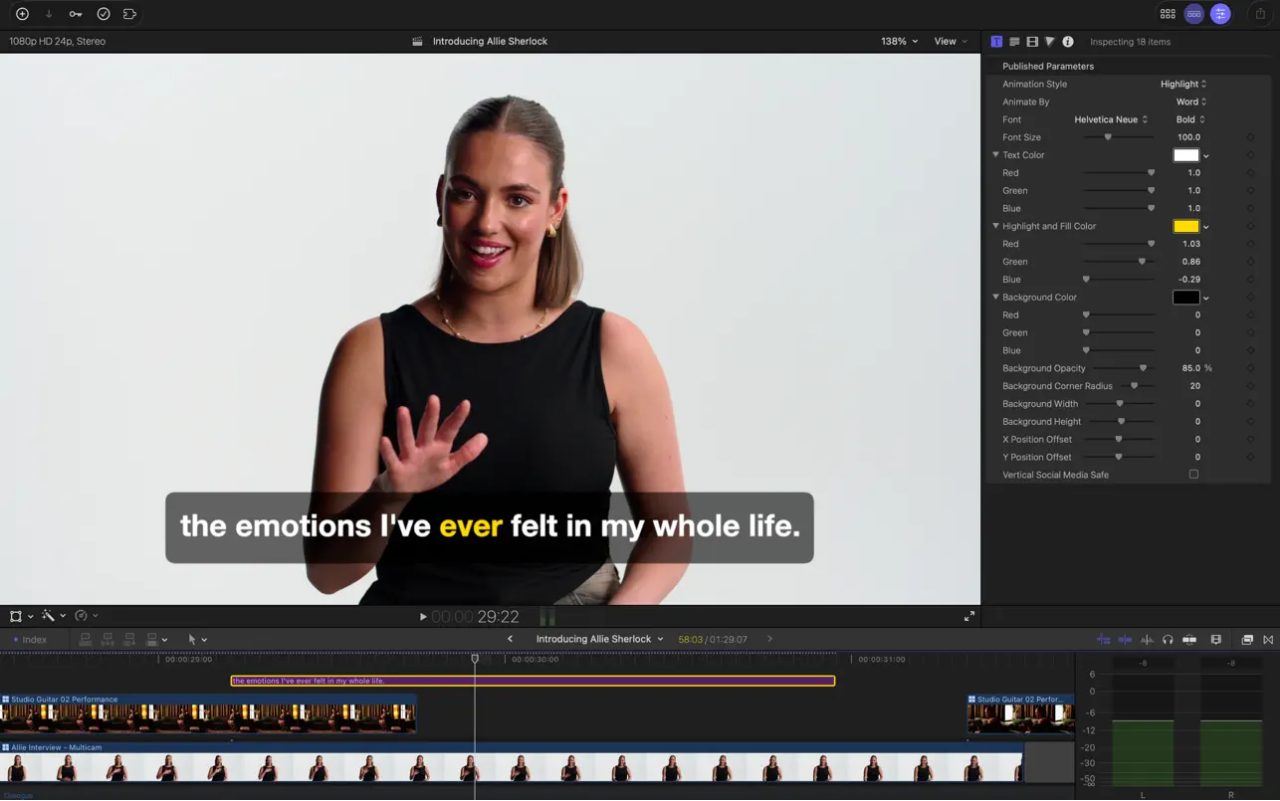
- On-device captions, Voice Isolation and automatic reframing for vertical video
- Photos import, Cinematic mode editing and Final Cut Camera support
- One-time purchase or Apple Creator Studio subscription
Pros
- Smooth and fast on every Apple silicon Mac, including a MacBook Air
- Paid once, with updates included so far
- Works closely with iPhone, iPad and the Photos library
Cons
- Mac-only, and moving projects to other editors needs paid converters
- The magnetic timeline takes adjusting to if you've used track-based editors
- Captions are U.S. English only and need proofreading
- Choose if:
- You edit on a Mac every week and want one editor for years without a subscription
Final Cut Pro is Apple’s video editor for the Mac, built around a magnetic timeline that keeps clips in sync as you move and trim them. It adds on-device AI tools such as automatic captions, transcript and visual search, Magnetic Mask, Smart Conform for square or vertical delivery, and Voice Isolation for cleaning up speech. It suits YouTube creators who work on a Mac, from hobbyists to full-time channels. It costs $299.99 once, or comes with the Apple Creator Studio subscription, which also covers Final Cut Pro for iPad, Motion and Compressor. It is commercial, closed-source software for macOS only.
What users say
Evidence ↓Reviewers who edit regularly praise its speed, and one creator who makes several long-form videos and a growing amount of short-form content each week says he edits in it daily. The magnetic timeline divides people. A Mac App Store reviewer says editors coming from track-based software may find it jarring and dislike it at first, but get fast once they adapt. A critical review of the version 12 search tools finds that transcripts cannot be viewed in a readable form or exported as text. These are individual views from a few reviewers, not a survey.
Rankings and alternatives
- Video editing software for Mac #1 of 7 Best for most Mac owners
- DaVinci Resolve 21 #2 Pro color and audio, free
- iMovie #3 Family videos, already installed
- Adobe Premiere #4 Working with other editors
- Video editing software for YouTube #4 of 8 The fast choice on a Mac
- CyberLink PowerDirector #3 Most editor for the money on Windows
- CapCut #5 Built for Shorts and quick turnarounds
- Wondershare Filmora #6 Cheap and simple, if you mind the credits







Video editing software for Mac scores
Evaluated Nov 17, 2026 Evidence ↓- Editing depth and room to grow 4
4/5 means: A full editor with multicam, keyframes, masks, tracking and plug-ins, short of the deepest professional finishing
Magnetic timeline, multicam, auditions, Magnetic Mask, keyframes, tracking and many third-party plug-ins make it a full editor. Not a 5 because Motion is a separate app, shared projects are missing and deep finishing is done elsewhere; not a 3 because multicam, masks and long projects are well covered.
- Learning curve 3
3/5 means: A real learning curve of a few sessions, or an unusual editing model that takes adjusting to
The trackless magnetic timeline is praised as fast once learned but reviewers say track-based editors find it jarring; newcomers with no habits usually adapt in a few sessions. Not a 4 because the unusual editing model takes adjusting to.
- How well it runs on an Apple silicon Mac · counts double 5
5/5 means: Among the fastest editors on Apple silicon and smooth even on a MacBook Air with long 4K projects
Writer's calibration from 4: Final Cut Pro is Apple's own editor built for Apple silicon, renders in the background and plays back iPhone HEVC and ProRes smoothly on any Apple silicon Mac, including a MacBook Air, from knowledge of how it runs. Larry Jordan's tests put it at or near the fastest exporter and far ahead of Premiere on 4K rendering, and he calls it the performance leader. No named MacBook Air or battery test exists, but the scale's 5 describes it better than the 4 given to Resolve, which trails it and needs more care on a fanless Air.
- Built-in time-savers 3
3/5 means: Several of these, with clear limits in accuracy, credits or what the scored version includes
Automatic captions (fastest but least accurate in Larry Jordan's test, U.S. English only), transcript and visual search, Smart Conform reframing and Voice Isolation. No silence or filler removal and no editing by transcript, and transcripts cannot be viewed or exported, so not a 4.
- Color and audio tools 4
4/5 means: Good color tools with scopes and LUTs, plus good voice cleanup and mixing, short of a dedicated grading or audio suite
Color wheels, curves, hue/saturation curves, LUTs, automatic Log camera LUT handling and Voice Isolation with Logic-derived audio effects and roles. Reviewers say Resolve's color and Fairlight are deeper, so not a 5. Whether Final Cut lacks a full mixer was not confirmed.
- What you pay over three years 4
4/5 means: Under $350 over three years, usually a one-time purchase
$299.99 one time counts once, which is under $350 over three years and cheaper than the $387 three-year cost of the annual subscription. Includes captions and updates for owners, with some premium content subscriber-only.
- Fit with iPhone, iPad and other Apple apps 5
5/5 means: Built around Apple's devices, from Photos import and Cinematic mode editing to projects that move between iPhone, iPad and Mac
Writer's calibration from 4: imports straight from the Photos library (knowledge), edits iPhone Cinematic mode focus and depth (12.4, macOS 27), handles iPhone Log via Final Cut Camera, which also feeds Live Multicam, and opens projects started in Final Cut Pro for iPad. The iPad app needing a Creator Studio subscription is a cost the cost criterion carries, not a gap in how the apps fit together.
- Working with others and moving projects · counts half 3
3/5 means: Runs on Windows as well, or exports timelines to other editors, but not both well
Mac only, no shared projects found, and the standard use in studios is stated. It exports FCPXML, but moving to Premiere or Pro Tools needs third-party converters such as XtoCC or X2Pro5, so a narrow path; not a 4 because it is Mac only with no shared editing.
Video editing software for YouTube scores
Evaluated Nov 17, 2026 Evidence ↓- Speed of cutting a typical YouTube video · counts double 4
4/5 means: Fast for most YouTube formats, with strong trimming tools and some automatic cleanup such as silence removal or editing by transcript, but slower for some common format
The magnetic timeline, Smart Conform and fast transcript and visual search make most YouTube cuts quick. There is no silence or filler-word removal and no editing by transcript (transcripts cannot be viewed or exported), so not a 5.
- Editing depth and production ceiling 4
4/5 means: A full editor with multicam, keyframes, masks and good color tools, short of the deepest professional finishing
Multicam, color wheels and curves with LUTs, Magnetic Mask, object tracking, Logic audio plug-ins and many third-party plug-ins. A reviewer notes most Hollywood houses still do not use it, and Motion is a separate app, so short of the deepest finishing.
- Automatic captions 3
3/5 means: Automatic captions that work, with a clear weakness in accuracy, languages, styling, workflow or caption-file export
Automatic, styled and animated captions, and the fastest of three editors in Larry Jordan's test, but least accurate. Apple lists U.S. English only, and caption-file export formats such as SRT are not documented in the pages read (known from experience, not verified).
- Voice and audio cleanup 4
4/5 means: Good one-click voice cleanup plus noise removal and ducking or leveling
Voice Isolation, background noise reduction and Logic Pro plug-ins for compression and EQ. Automatic music ducking is not documented in the pages read, so not a 5.
- What a growing channel pays 4
4/5 means: $150 to $350 over three years
$299.99 one-time is cheaper than $129 a year for three years ($387), and includes captions and Voice Isolation, so $299.99 falls in the $150 to $350 band.
- Shorts and vertical video 4
4/5 means: Automatic reframing to vertical from the same project, with presets or direct upload
Smart Conform reframes a project to vertical or square from the same project, with batch export and YouTube upload. It does not find short clips in a long video, so not a 5.
- Learning curve 3
3/5 means: A real learning curve of a few sessions, or an unusual editing model that takes adjusting to
Easy for newcomers per a store reviewer, but the magnetic timeline is an unusual model that track-based editors find jarring at first. Evidence is a single review plus general knowledge.
- Smooth on a typical creator's computer 5
5/5 means: Smooth and stable on almost any recent computer, even with long 4K projects
Apple builds it for Apple silicon and the Media Engine decodes H.264 and HEVC camera and phone footage in hardware, so long 4K timelines play back smoothly on ordinary Apple silicon Macs without proxies; that is its best-known strength among editors. One user reports a storage bug.
- Computers and devices it runs on · counts half 1
1/5 means: One operating system only
The one-time purchase is Mac only. Final Cut Pro for iPad is subscription-only and sends projects one way, to the Mac.
Pricing
- Final Cut Pro for Mac (one-time purchase) $299.99 one-time Mac App Store purchase. Includes free updates for existing owners. Some premium content is subscriber-only. Motion and Compressor are sold separately; their prices were not confirmed.
- Apple Creator Studio $12.99 /month Includes Final Cut Pro for Mac and iPad, Motion, Compressor, Logic Pro, Pixelmator Pro and MainStage. First month free for new subscribers. Projects can only be opened or edited while subscribed. Family Sharing for up to five other people.
- Apple Creator Studio (annual) $129.00 /year Billed once a year, which works out to $10.75 per month ($129 divided by 12).
- Apple Creator Studio for students and educators $29.99 /year $2.99 per month or $29.99 per year, for individual use only (no Family Sharing).
Prices checked Nov 17, 2026.
Evidence and sources
What users say
Summary 5 quotes
-
For me, I live in Final Cut Pro. Pumping out several long-form videos each week, coupled with an ever-increasing amount of short-form content, not a day goes by that I am not editing in Final Cut Pro.
AppleInsider reviewer, video creator and reviewer at AppleInsider · appleinsider.com/articles/26/01/28/apple-creator-studio-review-incredible-value-for-most-creative-pros · published · checked -
Speed has always been one of the hallmarks of Final Cut, and Visual Search supports that.
Scott Simmons, editor and reviewer at ProVideo Coalition · provideocoalition.com/review-apple-creator-studio · published · checked -
But what you can’t do is view the transcript in any useful and readable way.
Scott Simmons, editor and reviewer at ProVideo Coalition · provideocoalition.com/review-apple-creator-studio · published · checked -
Or even exporting that transcript as a text file to send to a client. That simple feature would be useful, but it’s not part of this new Final Cut Pro release.
Scott Simmons, editor and reviewer at ProVideo Coalition · provideocoalition.com/review-apple-creator-studio · published · checked -
Those who have edited in track-based software for years and years will find this jarring. Some will outright dislike it at first. But they really need to power through the paradigm shift to reach the point where the speed is really felt.
F-Stop Fitzgerald, Mac App Store reviewer · apps.apple.com/us/app/final-cut-pro/id424389933 · published · checked
Video editing software for Mac scores
Editing depth and room to grow 4 quotes
-
• The Magnetic Timeline uses advanced metadata and Clip Connections for faster, easier editing • Generate Captions uses AI to create closed captions or animated subtitles in the timeline by analyzing spoken audio • AI-powered Magnetic Mask automatically tracks and isolates people, objects, and shapes in any footage • Automatically transform projects for square or vertical delivery with Smart Conform
apps.apple.com/us/app/final-cut-pro/id424389933 · checked -
The Magnetic Timeline lets you move and trim freely while maintaining synchronization so you can explore endless creative possibilities. Connected Clips and storylines hold your edit together. Multicam helps you cut the perfect interview. And Auditions let you find the best take.
apple.com/apple-creator-studio · checked -
In sum, Final Cut Pro supports far more multicam streams and is significantly faster when rendering and exporting than Adobe Premiere Pro.
Larry Jordan, video editing trainer · larryjordan.com/articles/compare-render-export-and-multicam-performance-for-apple-final-cut-pro-and-adobe-premiere-pro · published · checked -
Final Cut Pro is an all-around solid piece of software for Mac users and is still the standard in many studios.
Kyle Alsberry, associate editor at Videomaker · videomaker.com/how-to/editing/workflow/davinci-resolve-vs-final-cut-pro-which-one-is-best-for-video-editing · checked
Learning curve 1 quote
-
Those who have edited in track-based software for years and years will find this jarring. Some will outright dislike it at first. But they really need to power through the paradigm shift to reach the point where the speed is really felt.
F-Stop Fitzgerald, Mac App Store reviewer · apps.apple.com/us/app/final-cut-pro/id424389933 · published · checked
How well it runs on an Apple silicon Mac 2 quotes
-
When exporting a ProRes 4444 project to ProRes 422, speeds were very close. However, Resolve 20 was the fastest, followed seven seconds later by Final Cut, while Premiere took 18 seconds longer.
Larry Jordan, video editing trainer · larryjordan.com/articles/compare-render-export-speeds-between-final-cut-pro-11-premiere-pro-2025-and-resolve-20 · published · checked -
In sum, Final Cut Pro supports far more multicam streams and is significantly faster when rendering and exporting than Adobe Premiere Pro.
Larry Jordan, video editing trainer · larryjordan.com/articles/compare-render-export-and-multicam-performance-for-apple-final-cut-pro-and-adobe-premiere-pro · published · checked
Built-in time-savers 6 quotes
-
• The Magnetic Timeline uses advanced metadata and Clip Connections for faster, easier editing • Generate Captions uses AI to create closed captions or animated subtitles in the timeline by analyzing spoken audio • AI-powered Magnetic Mask automatically tracks and isolates people, objects, and shapes in any footage • Automatically transform projects for square or vertical delivery with Smart Conform
apps.apple.com/us/app/final-cut-pro/id424389933 · checked -
Use Generate Captions to quickly add subtitles and easily customize their look to create accessible, ready-to-share content for social media and video platforms (requires a Mac with Apple silicon; available in U.S. English only)
apps.apple.com/us/app/final-cut-pro/id424389933 · checked -
But what you can’t do is view the transcript in any useful and readable way.
Scott Simmons, editor and reviewer at ProVideo Coalition · provideocoalition.com/review-apple-creator-studio · published · checked -
Or even exporting that transcript as a text file to send to a client. That simple feature would be useful, but it’s not part of this new Final Cut Pro release.
Scott Simmons, editor and reviewer at ProVideo Coalition · provideocoalition.com/review-apple-creator-studio · published · checked -
Your videos adjust seamlessly to fit every aspect ratio, so that they’re ready to share on Mac, iPhone, iPad, and all your favorite social platforms.
apple.com/final-cut-pro · checked -
If you need captions, it's fine. If you need ACCURATE captions, it isn't.
Larry Jordan, video editing trainer · larryjordan.com/articles/comparing-captioning-in-final-cut-pro-11-premiere-pro-2025-resolve-20 · published · checked
Color and audio tools 3 quotes
-
Eliminate background noise and improve clarity of speech so your edit sounds pristine.
apple.com/final-cut-pro · checked -
The Color Board and Color Inspector tool provide further flexibility, enabling the use of color wheels to apply grading and effects to individual clips and allowing the application of multiple effects to a single clip.
Kyle Alsberry, associate editor at Videomaker · videomaker.com/how-to/editing/workflow/davinci-resolve-vs-final-cut-pro-which-one-is-best-for-video-editing · checked -
Its depth in color grading tools, Fusion integration and Fairlight audio module offer professional-grade precision and flexibility.
Kyle Alsberry, associate editor at Videomaker · videomaker.com/how-to/editing/workflow/davinci-resolve-vs-final-cut-pro-which-one-is-best-for-video-editing · checked
What you pay over three years 2 quotes
-
You can try Apple Creator Studio free for 30 days. After your free trial, new subscribers pay $12.99 per month or $129 per year. Educator and student subscriptions are $2.99 per month or $29.99 per year. Final Cut Pro is also available as a one-time purchase for $299.99.
apple.com/final-cut-pro · checked -
A one-time purchase will still be available, but access to some of the premium content is available only to Apple Creator Studio subscribers. If you already own Final Cut Pro, it will continue to be updated.
apple.com/final-cut-pro · checked
Fit with iPhone, iPad and other Apple apps 5 quotes
-
While the one-time purchases are sticking around and Apple promises to bring the same features to both for the time being, the iPad apps are only available via a Creator Studio subscription.
AppleInsider reviewer, reviewer at AppleInsider · appleinsider.com/articles/26/01/28/apple-creator-studio-review-incredible-value-for-most-creative-pros · published · checked -
Edit videos with Cinematic mode effects recorded in Final Cut Camera to adjust focus points and depth of field. (Requires macOS 27 Golden Gate.)
redsharknews.com/final-cut-camera-2-4-final-cut-pro-12-4 · checked -
Cinematic mode effects are also now available for regular video, including ProRes and Apple Log footage.
redsharknews.com/final-cut-camera-2-4-final-cut-pro-12-4 · checked -
Fixes an issue that could cause Final Cut Pro to quit when importing a project created in Final Cut Pro for iPad.
redsharknews.com/final-cut-camera-2-4-final-cut-pro-12-4 · checked -
Now users can benefit from the increased flexibility and dynamic range of Log combined with smaller HEVC files.
Filipe Espósito, reporter at 9to5Mac · 9to5mac.com/2024/11/13/final-cut-camera-log-encoded-hevc · published · checked
Working with others and moving projects 5 quotes
-
Incredibly fast export for playback on Apple devices and upload to platforms such as Instagram and YouTube • Export audio stems and multiple versions of a finished video using roles metadata • Import and export XML for third-party workflows like color grading and sound mixing
apps.apple.com/us/app/final-cut-pro/id424389933 · checked -
DaVinci Resolve enables multiple editors to work on the same project simultaneously using Blackmagic Cloud.
Kyle Alsberry, associate editor at Videomaker · videomaker.com/how-to/editing/workflow/davinci-resolve-vs-final-cut-pro-which-one-is-best-for-video-editing · checked -
Final Cut Pro is an all-around solid piece of software for Mac users and is still the standard in many studios.
Kyle Alsberry, associate editor at Videomaker · videomaker.com/how-to/editing/workflow/davinci-resolve-vs-final-cut-pro-which-one-is-best-for-video-editing · checked -
It works by converting the exported Final Cut Pro XML into an AAF file, which Avid Pro Tools can then open as a session, delivering seamless integration between the two applications.
x2pro.net · checked -
I exported an XML file of this project from Final Cut, converted it into Premiere format using XtoCC, then opened it in Premiere.
Larry Jordan, video editing trainer · larryjordan.com/articles/why-does-apple-final-cut-pro-only-use-efficiency-cores-for-exporting · published · checked
Video editing software for YouTube scores
Speed of cutting a typical YouTube video 4 quotes
-
• The Magnetic Timeline uses advanced metadata and Clip Connections for faster, easier editing • Generate Captions uses AI to create closed captions or animated subtitles in the timeline by analyzing spoken audio • AI-powered Magnetic Mask automatically tracks and isolates people, objects, and shapes in any footage • Automatically transform projects for square or vertical delivery with Smart Conform
apps.apple.com/us/app/final-cut-pro/id424389933 · checked -
The Magnetic Timeline lets you move and trim freely while maintaining synchronization so you can explore endless creative possibilities. Connected Clips and storylines hold your edit together. Multicam helps you cut the perfect interview. And Auditions let you find the best take.
apple.com/apple-creator-studio · checked -
Speed has always been one of the hallmarks of Final Cut, and Visual Search supports that.
Scott Simmons, editor and reviewer at ProVideo Coalition · provideocoalition.com/review-apple-creator-studio · published · checked -
Or even exporting that transcript as a text file to send to a client. That simple feature would be useful, but it’s not part of this new Final Cut Pro release.
Scott Simmons, editor and reviewer at ProVideo Coalition · provideocoalition.com/review-apple-creator-studio · published · checked
Editing depth and production ceiling 2 quotes
-
The Magnetic Timeline lets you move and trim freely while maintaining synchronization so you can explore endless creative possibilities. Connected Clips and storylines hold your edit together. Multicam helps you cut the perfect interview. And Auditions let you find the best take.
apple.com/apple-creator-studio · checked -
• The Magnetic Timeline uses advanced metadata and Clip Connections for faster, easier editing • Generate Captions uses AI to create closed captions or animated subtitles in the timeline by analyzing spoken audio • AI-powered Magnetic Mask automatically tracks and isolates people, objects, and shapes in any footage • Automatically transform projects for square or vertical delivery with Smart Conform
apps.apple.com/us/app/final-cut-pro/id424389933 · checked
Automatic captions 3 quotes
-
• The Magnetic Timeline uses advanced metadata and Clip Connections for faster, easier editing • Generate Captions uses AI to create closed captions or animated subtitles in the timeline by analyzing spoken audio • AI-powered Magnetic Mask automatically tracks and isolates people, objects, and shapes in any footage • Automatically transform projects for square or vertical delivery with Smart Conform
apps.apple.com/us/app/final-cut-pro/id424389933 · checked -
Use Generate Captions to quickly add subtitles and easily customize their look to create accessible, ready-to-share content for social media and video platforms (requires a Mac with Apple silicon; available in U.S. English only)
apps.apple.com/us/app/final-cut-pro/id424389933 · checked -
If you need captions, it's fine. If you need ACCURATE captions, it isn't.
Larry Jordan, video editing trainer · larryjordan.com/articles/comparing-captioning-in-final-cut-pro-11-premiere-pro-2025-resolve-20 · published · checked
Voice and audio cleanup 1 quote
-
Eliminate background noise and improve clarity of speech so your edit sounds pristine.
apple.com/final-cut-pro · checked
What a growing channel pays 2 quotes
-
You can try Apple Creator Studio free for 30 days. After your free trial, new subscribers pay $12.99 per month or $129 per year. Educator and student subscriptions are $2.99 per month or $29.99 per year. Final Cut Pro is also available as a one-time purchase for $299.99.
apple.com/final-cut-pro · checked -
A one-time purchase will still be available, but access to some of the premium content is available only to Apple Creator Studio subscribers. If you already own Final Cut Pro, it will continue to be updated.
apple.com/final-cut-pro · checked
Shorts and vertical video 4 quotes
-
• The Magnetic Timeline uses advanced metadata and Clip Connections for faster, easier editing • Generate Captions uses AI to create closed captions or animated subtitles in the timeline by analyzing spoken audio • AI-powered Magnetic Mask automatically tracks and isolates people, objects, and shapes in any footage • Automatically transform projects for square or vertical delivery with Smart Conform
apps.apple.com/us/app/final-cut-pro/id424389933 · checked -
Export multiple projects, clips, or clip ranges simultaneously for different destinations, such as mobile devices or social media.
apple.com/final-cut-pro · checked -
Your videos adjust seamlessly to fit every aspect ratio, so that they’re ready to share on Mac, iPhone, iPad, and all your favorite social platforms.
apple.com/final-cut-pro · checked -
Incredibly fast export for playback on Apple devices and upload to platforms such as Instagram and YouTube • Export audio stems and multiple versions of a finished video using roles metadata • Import and export XML for third-party workflows like color grading and sound mixing
apps.apple.com/us/app/final-cut-pro/id424389933 · checked
Learning curve 1 quote
-
Those who have edited in track-based software for years and years will find this jarring. Some will outright dislike it at first. But they really need to power through the paradigm shift to reach the point where the speed is really felt.
F-Stop Fitzgerald, Mac App Store reviewer · apps.apple.com/us/app/final-cut-pro/id424389933 · published · checked
Smooth on a typical creator's computer 2 quotes
-
Final Cut Pro for Mac requires macOS 15.6 or later, 8GB of memory (16GB recommended), a Metal-capable graphics card (Intel-based Mac computers only), and 7.2GB of available disk space. Some features require a Mac with Apple silicon.
apple.com/final-cut-pro · checked -
System Requirements: macOS 26.6 or later, 8 GB of memory (16 GB recommended), Metal-capable graphics card (Intel-based Mac computers only), 7.2 GB of available disk space.
apps.apple.com/us/app/final-cut-pro/id424389933 · checked
Computers and devices it runs on 3 quotes
-
System Requirements: macOS 26.6 or later, 8 GB of memory (16 GB recommended), Metal-capable graphics card (Intel-based Mac computers only), 7.2 GB of available disk space.
apps.apple.com/us/app/final-cut-pro/id424389933 · checked -
Final Cut Pro for iPad requires iPadOS 18.6 or later and an iPad with Apple M1 chip or later, iPad (A16), or iPad mini (A17 Pro).
apple.com/final-cut-pro · checked -
While the one-time purchases are sticking around and Apple promises to bring the same features to both for the time being, the iPad apps are only available via a Creator Studio subscription.
AppleInsider reviewer, reviewer at AppleInsider · appleinsider.com/articles/26/01/28/apple-creator-studio-review-incredible-value-for-most-creative-pros · published · checked
Facts
License 1 quote
-
You can try Apple Creator Studio free for 30 days. After your free trial, new subscribers pay $12.99 per month or $129 per year. Educator and student subscriptions are $2.99 per month or $29.99 per year. Final Cut Pro is also available as a one-time purchase for $299.99.
apple.com/final-cut-pro · checked
Runs on 3 quotes
-
Final Cut Pro for Mac requires macOS 15.6 or later, 8GB of memory (16GB recommended), a Metal-capable graphics card (Intel-based Mac computers only), and 7.2GB of available disk space. Some features require a Mac with Apple silicon.
apple.com/final-cut-pro · checked -
Final Cut Pro for iPad requires iPadOS 18.6 or later and an iPad with Apple M1 chip or later, iPad (A16), or iPad mini (A17 Pro).
apple.com/final-cut-pro · checked -
While the one-time purchases are sticking around and Apple promises to bring the same features to both for the time being, the iPad apps are only available via a Creator Studio subscription.
AppleInsider reviewer, reviewer at AppleInsider · appleinsider.com/articles/26/01/28/apple-creator-studio-review-incredible-value-for-most-creative-pros · published · checked
Needs 3 quotes
-
Final Cut Pro for Mac requires macOS 15.6 or later, 8GB of memory (16GB recommended), a Metal-capable graphics card (Intel-based Mac computers only), and 7.2GB of available disk space. Some features require a Mac with Apple silicon.
apple.com/final-cut-pro · checked -
System Requirements: macOS 26.6 or later, 8 GB of memory (16 GB recommended), Metal-capable graphics card (Intel-based Mac computers only), 7.2 GB of available disk space.
apps.apple.com/us/app/final-cut-pro/id424389933 · checked -
Use Generate Captions to quickly add subtitles and easily customize their look to create accessible, ready-to-share content for social media and video platforms (requires a Mac with Apple silicon; available in U.S. English only)
apps.apple.com/us/app/final-cut-pro/id424389933 · checked
More from the sources
Pricing 1 quote
-
On your Mac or iPad, you can download Apple Creator Studio, which includes Final Cut Pro (Mac and iPad), Motion (Mac only), and Compressor (Mac only), from the App Store. You can also get Final Cut Pro, Motion, and Compressor as one-time-purchase Mac apps on the App Store.
apple.com/final-cut-pro · checked
Limits and known issues 1 quote
-
Projects in Final Cut Pro, Logic Pro, and Pixelmator Pro remain on all your devices, and you can copy or share them to any other device. To open or edit a project, you need to be an active subscriber.
apple.com/apple-creator-studio · checked
Pricing
apple.com/final-cut-pro · checked