
Kdenlive
Free, open-source multi-track video editor for Windows, macOS and Linux
Our verdict
#6 of 8 in Free video editors for beginners · Fullest open-source editor
What it does
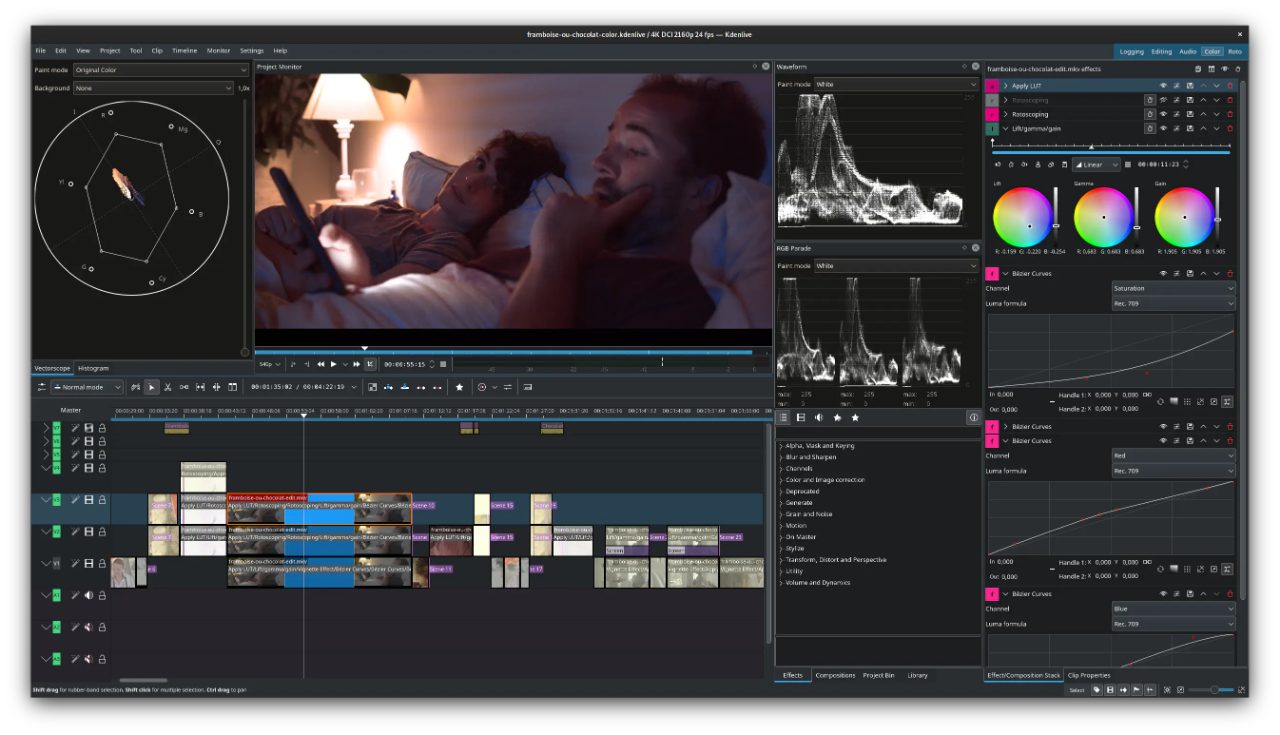
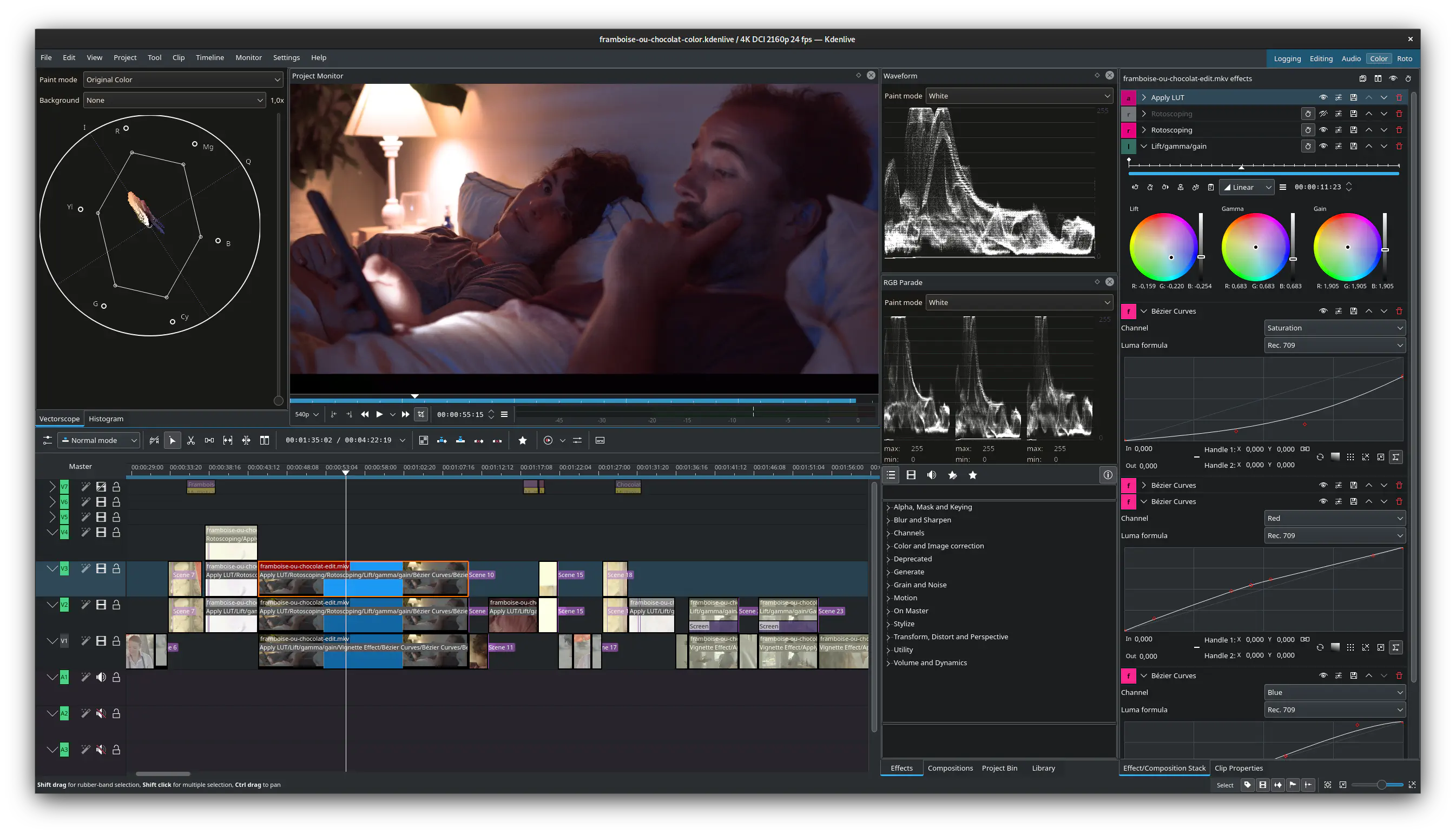
- Unlimited tracks, keyframes, color scopes, audio mixer and multicam
- Automatic subtitles that run on your own computer
- Proxy editing for slower machines
Pros
- The deepest free editor with no account and no paid tier
- Conventional layout that tutorials explain well
- Native builds for Windows, Apple Silicon and Intel Macs, and Linux
Cons
- Crashes on Windows in long, effect-heavy sessions
- Automatic subtitles need a model download and setup first
- Smaller tutorial community than DaVinci Resolve
- Choose if:
- You use Linux, or want a full open-source editor with no strings
Kdenlive (KDE Non-Linear Video Editor) is a free desktop video editor made by the KDE community, a small and mostly volunteer team. It has a multi-track timeline, keyframed effects, color tools, an audio mixer, title clips and automatic subtitles from speech recognition. It runs on Windows 10 or newer, macOS 13 or newer (separate Apple Silicon and Intel builds), Linux and BSD, and is licensed under the GPL. There are no paid tiers, accounts or watermarks, and proxy clips help it play smoothly on modest computers. The interface follows a traditional editor layout, so reviewers describe a moderate learning curve for first-time editors.
What users say
Evidence ↓Reviewers read here call Kdenlive free and capable but not the simplest start. One independent reviewer rates the learning curve as moderate for complete beginners, easier than DaVinci Resolve but harder than mobile apps, and says its interface is less polished than commercial software. The same reviewer reports crashes on Windows in longer sessions with heavy effects and says it is more stable on Linux; this is a single source without a sample size. A 2022 Linux-site article calls the basics easy to learn. Few independent user discussions were read, so how widely these views are shared is not established.
Rankings and alternatives
- Free video editors for beginners #6 of 8 Fullest open-source editor
- CapCut #1 Easiest path to a finished video
- iMovie #2 Best for Mac owners
- DaVinci Resolve 21 #3 The free editor you won't outgrow



Free video editors for beginners scores
Evaluated Nov 17, 2026 Evidence ↓- Ease of learning · counts double 3
3/5 means: A real learning curve of a few sessions, with a conventional editing layout that tutorials explain well
A 2026 reviewer calls the learning curve moderate for complete beginners: harder than phone apps, less intimidating than DaVinci Resolve, with basics learnable in a few hours from the docs and YouTube. The interface is less polished than commercial editors and some menus feel inconsistently organized.
- Editing depth and room to grow · counts double 4
4/5 means: A full editor with unlimited tracks, keyframes, color correction and audio tools, short of professional finishing
Unlimited video and audio tracks, keyframes, proxy editing, color scopes and LUTs, an audio mixer, multicam and nested sequences. Short of 5 because its color grading and effects are weaker than professional tools such as DaVinci Resolve.
- What the free version gives you 5
5/5 means: Everything free with no watermark, no account, no caps and no upsell
Free and open source (GPL), with no account, no watermark, no paid tier and no upsell.
- Built-in shortcuts in the free version 3
3/5 means: Either free automatic captions or a substantial free library of templates, music and stock, but not both
Free automatic subtitles from speech, run on the computer with Whisper or VOSK once a model is downloaded, plus title clips and a speech editor that cuts by transcript. No built-in stock music or footage library and no template library.
- Runs well on an ordinary laptop 3
3/5 means: Works on an ordinary laptop with lag on long or high-resolution projects, or occasional crashes
Proxy editing keeps playback smooth on modest hardware, but a 2026 reviewer reports crashes on Windows in long sessions with heavy effects on high-resolution footage, and says it is more stable on Linux.
- Tutorials and help 3
3/5 means: A moderate community; most common questions have an answer
A full online manual and a fair number of YouTube tutorials, but a smaller tutorial community than Premiere Pro or DaVinci Resolve.
- Computers it runs on · counts half 4
4/5 means: Windows, Mac and Linux, or Windows, Mac and Chromebook
Windows 10 or newer, macOS (Apple Silicon and Intel) and Linux.
Pricing
- Kdenlive Free Free with no account. The project asks for optional donations. The reviewer states no subscription, trial or watermark; the product pages read do not say this in so many words.
Prices checked Nov 17, 2026.
Evidence and sources
What users say
Summary 4 quotes
-
For complete beginners, Kdenlive has a moderate learning curve. It is more complex than mobile apps, but less intimidating than DaVinci Resolve's node-based colour system.
Author of videoeditorguide blog, reviewer · videoeditorguide.blogspot.com/2026/03/kdenlive-review-2026-best-free-open.html · published · checked -
One genuine criticism is that Kdenlive's interface is less polished than commercial software. Menus can feel inconsistently organised, and some features require more steps to access than necessary.
Author of videoeditorguide blog, reviewer · videoeditorguide.blogspot.com/2026/03/kdenlive-review-2026-best-free-open.html · published · checked -
The main performance caveat is stability on Windows. Some users report crashes during longer editing sessions or when applying multiple heavy effects to high-resolution footage. The auto-save feature protects most work in these cases, but it is worth saving your project manually at regular intervals on Windows. Kdenlive is generally considered more stable on Linux, which makes sense given its origins in the KDE ecosystem.
Author of videoeditorguide blog, reviewer · videoeditorguide.blogspot.com/2026/03/kdenlive-review-2026-best-free-open.html · published · checked -
Basic video editing in Kdenlive is easy if you know how to do it. Each of these Kdenlive features probably takes less than a minute to learn.
Arindam, author of DebugPoint (Linux site) · debugpoint.com/kdenlive-features · published · checked
Free video editors for beginners scores
Ease of learning 3 quotes
-
For complete beginners, Kdenlive has a moderate learning curve. It is more complex than mobile apps, but less intimidating than DaVinci Resolve's node-based colour system.
Author of videoeditorguide blog, reviewer · videoeditorguide.blogspot.com/2026/03/kdenlive-review-2026-best-free-open.html · published · checked -
One genuine criticism is that Kdenlive's interface is less polished than commercial software. Menus can feel inconsistently organised, and some features require more steps to access than necessary.
Author of videoeditorguide blog, reviewer · videoeditorguide.blogspot.com/2026/03/kdenlive-review-2026-best-free-open.html · published · checked -
Basic video editing in Kdenlive is easy if you know how to do it. Each of these Kdenlive features probably takes less than a minute to learn.
Arindam, author of DebugPoint (Linux site) · debugpoint.com/kdenlive-features · published · checked
Editing depth and room to grow 4 quotes
-
Proxy editing is a key feature here. By creating lower-resolution versions of your clips for use during editing, Kdenlive can maintain smooth playback on hardware that would otherwise lag with high-resolution footage.
videoeditorguide.blogspot.com/2026/03/kdenlive-review-2026-best-free-open.html · published · checked -
Ingest footage in almost any audio or video format, review its metadata or use proxies for smooth playback even on low-end systems.
kdenlive.org · checked -
Create professional subtitles with automatic transcription, advanced layering and styling.
kdenlive.org · checked -
Add simple title clips with ease or seamlessly connect your project to Glaxnimate for complex motion graphics.
kdenlive.org · checked
What the free version gives you 2 quotes
-
The software is distributed under the GNU Public License-3.0, while parts of the source code are available under different licenses such as GPL-2.0-or-later and GPL-3.0-or-later.
en.wikipedia.org/wiki/Kdenlive · checked -
Kdenlive is completely free to use — no subscription, no trial period, no watermark. All features are available to everyone from day one, which is relatively rare even among free video editors.
videoeditorguide.blogspot.com/2026/03/kdenlive-review-2026-best-free-open.html · published · checked
Built-in shortcuts in the free version 4 quotes
-
Create professional subtitles with automatic transcription, advanced layering and styling.
kdenlive.org · checked -
While you can configure and set up both, VOSK and Whisper, for speech recognition, the engine that is selected in the Speech to Text configuration section is being used for speech recognition the next time you use this feature.
docs.kdenlive.org/en/effects_and_filters/speech_to_text.html · checked -
If the 9GB model has not yet been downloaded, it will be downloaded now. With a 100MB/s download speed this will take about 12 minutes!
docs.kdenlive.org/en/effects_and_filters/speech_to_text.html · checked -
Add simple title clips with ease or seamlessly connect your project to Glaxnimate for complex motion graphics.
kdenlive.org · checked
Runs well on an ordinary laptop 2 quotes
-
The main performance caveat is stability on Windows. Some users report crashes during longer editing sessions or when applying multiple heavy effects to high-resolution footage. The auto-save feature protects most work in these cases, but it is worth saving your project manually at regular intervals on Windows. Kdenlive is generally considered more stable on Linux, which makes sense given its origins in the KDE ecosystem.
Author of videoeditorguide blog, reviewer · videoeditorguide.blogspot.com/2026/03/kdenlive-review-2026-best-free-open.html · published · checked -
Proxy editing is a key feature here. By creating lower-resolution versions of your clips for use during editing, Kdenlive can maintain smooth playback on hardware that would otherwise lag with high-resolution footage.
videoeditorguide.blogspot.com/2026/03/kdenlive-review-2026-best-free-open.html · published · checked
Tutorials and help 2 quotes
-
Kdenlive is part of the KDE Community and developed by a small, mostly volunteer team from all over the world.
kdenlive.org · checked -
Smaller tutorial community than Premiere Pro or DaVinci Resolve
videoeditorguide.blogspot.com/2026/03/kdenlive-review-2026-best-free-open.html · published · checked
Computers it runs on 3 quotes
-
Kdenlive is the acronym for KDE Non-Linear Video Editor. It works on Linux, Windows, macOS, and BSD.
kdenlive.org · checked -
Requires Windows 10 or newer.
kdenlive.org/download · checked -
Silicon Intel Requires macOS 13 (Ventura) or newer
kdenlive.org/download · checked
Facts
License 1 quote
-
The software is distributed under the GNU Public License-3.0, while parts of the source code are available under different licenses such as GPL-2.0-or-later and GPL-3.0-or-later.
en.wikipedia.org/wiki/Kdenlive · checked
Runs on 3 quotes
-
Kdenlive is the acronym for KDE Non-Linear Video Editor. It works on Linux, Windows, macOS, and BSD.
kdenlive.org · checked -
Requires Windows 10 or newer.
kdenlive.org/download · checked -
Silicon Intel Requires macOS 13 (Ventura) or newer
kdenlive.org/download · checked
More from the sources
Features 1 quote
-
No AI-powered features — all editing is manual
videoeditorguide.blogspot.com/2026/03/kdenlive-review-2026-best-free-open.html · published · checked
Pricing
kdenlive.org/download · checked