
Due - Reminders & Timers
Persistent reminders and countdown timers for iPhone, iPad, Apple Watch and Mac
Our verdict
#8 of 10 in To-do list apps for iPhone · Reminders that nag until you act
Pros
- Alerts keep repeating until you act
- Fast entry with typed dates and preset times
- Cheap one-time price
Cons
- Not built for projects or long lists
- Dated look
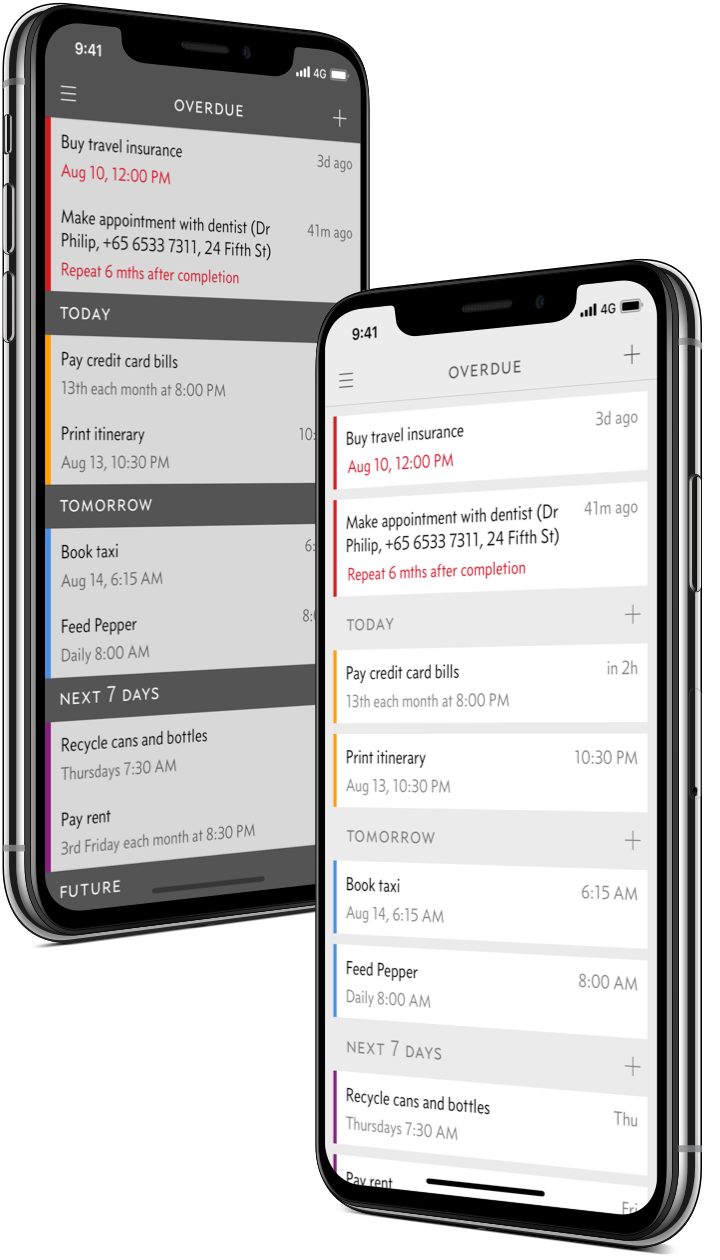
Due is a reminders and countdown-timer app for iPhone and iPad, with an Apple Watch app and a separately sold Mac app. It is best known for Auto Snooze, which keeps notifying you about an overdue reminder until you mark it done or reschedule it, and it adds Critical and Prominent alerts, natural-language dates, recurring reminders, widgets, Control Center and Shortcuts. It is built for time-based personal reminders rather than projects. Reminders sync through iCloud or Dropbox with no account. It is a paid app with an optional yearly upgrade subscription for new features.
What users say
Evidence ↓Users on the App Store and a MacPowerUsers thread praise the nagging alerts for things they would otherwise miss, and several say it replaced Apple Reminders for time-critical items. Forum users also describe it as a fit for routine tasks that do not belong to a project, and keep a separate task manager for those. A critical App Store reviewer finds the interface dated and the price high for what it does. The forum thread is from 2018 and these are individual accounts, not a survey.
Rankings and alternatives
- To-do list apps for iPhone #8 of 10 Reminders that nag until you act
- Todoist #1 Best all-rounder across iPhone, Windows, and Android
- TickTick #2 Calendar, habits, and focus timer in one app
- Apple Reminders #3 Free and already on your iPhone
iPhone to-do list apps scores
Evaluated Nov 17, 2026 Evidence ↓- Pleasant and quick to use · counts double 3
3/5 means: Easy enough, but bare, dated or pushy, with clear rough edges reviewers and users mention
Easy, but dated, the scale's middle level. 4.7 from 2.8K US App Store ratings and long-running praise for its quick-entry design; a critical reviewer calls the interface dated and finds completed tasks hard to view.
- Fast capture 4
4/5 means: Typed dates and times plus most system shortcuts
Typed or spoken dates, widgets, Control Center, Shortcuts, Siri and a Watch app. A typed line sets the date and repeat but not a list or tags, and a share sheet was not confirmed.
- Reminders that get your attention 5
5/5 means: Time alerts, flexible repeats, and alerts that repeat or ring until you act, usually with location alerts too
Auto Snooze repeats an alert until you act, Critical and Prominent Alerts break through silent mode and ring like an alarm, and repeats are flexible (every 3rd Wednesday). That meets the top level, whose location alerts are usual rather than required; persistent alerts are the whole point of the app.
- Organizing lots of tasks 1
1/5 means: A single inbox or list of reminders, with no lists or projects of your own
Vendor pages mention no lists, projects, tags or subtasks, and an editorial site and forum users describe it as reminder-only. Not a confirmed absence, since current release notes were not read.
- Planning your day and week 3
3/5 means: Today and upcoming views, without your calendar events beside them
The list is grouped into Overdue, Today, Tomorrow, Next 7 Days and Future, which works as Today and upcoming sections. No calendar events or calendar grid are documented.
- Devices it works on 3
3/5 means: All the Apple devices most readers own, but nothing for Windows, Android or the web
iPhone, iPad, Apple Watch and a separate Mac app with iCloud or Dropbox sync. No web, Windows or Android app was found.
- Cost over three years 4
4/5 means: Under $40
$7.99 for iPhone and iPad plus a Mac app that cost $9.99 in 2018 (current price unconfirmed) is about $18 over three years. The optional $4.99/yr Upgrade Pass is not needed to unlock everything at purchase.
- Sharing lists with others · counts half 1
1/5 means: No shared lists
No shared lists or assignment appear on the vendor pages, and none are known to exist. Family Sharing covers only the in-app purchases.
Pricing
- Due for iPhone and iPad $7.99 one-time US App Store price. Includes every feature at purchase and new features released within a year. Bug-fix and compatibility updates are free afterward.
- Due Upgrade Pass (Mobile) $4.99 /year , extra Optional. Gives new features released after the first year. Features already unlocked stay available if you stop subscribing.
- Due for Mac Contact sales Sold separately and required for Mac sync. Current price not confirmed; it was $9.99 in 2018.
Prices checked Nov 17, 2026.
Evidence and sources
What users say
Summary 4 quotes
-
There were way too many missed reminders in the native iOS app. The persistent and nagging snoozing and alerting in Due makes the native app seem unreliable and incomparable.
Phirenze, App Store reviewer · apps.apple.com/us/app/due-reminders-timers/id390017969 · checked -
It could definitely use an update to the UI to make it more modern looking.
DarkEvilWizard, App Store reviewer · apps.apple.com/us/app/due-reminders-timers/id390017969 · published · checked -
For me, Due is for routine tasks that don’t really belong to a project but nevertheless I need to keep a handle on when they get done.
Aaron_Antcliff, MacPowerUsers forum user · talk.macpowerusers.com/t/due-app-persistent-and-noisy/7191 · published · checked -
two apps doing similar work… Makes it harder to shrink my app count.
RichardC, MacPowerUsers forum user · talk.macpowerusers.com/t/due-app-persistent-and-noisy/7191 · published · checked
iPhone to-do list apps scores
Pleasant and quick to use 4 quotes
-
2.8K Ratings
apps.apple.com/us/app/due-reminders-timers/id390017969 · checked -
There were way too many missed reminders in the native iOS app. The persistent and nagging snoozing and alerting in Due makes the native app seem unreliable and incomparable.
Phirenze, App Store reviewer · apps.apple.com/us/app/due-reminders-timers/id390017969 · checked -
It could definitely use an update to the UI to make it more modern looking.
DarkEvilWizard, App Store reviewer · apps.apple.com/us/app/due-reminders-timers/id390017969 · published · checked -
Due also added integration with Apple’s Reminders app, which lets you designate Reminders lists from which you can manually or automatically import tasks.
John Voorhees, Managing Editor at MacStories · macstories.net/reviews/due-30-adds-pure-black-theme-custom-snooze-times-and-haptic-feedback · published · checked
Fast capture 2 quotes
-
Type or say “Dentist 3p Thu” or “Meeting in 1h 20m”. Due spots the date, and one tap sets it. 5. Powerful Recurring Reminders From simple daily reminders to the every-3rd-Wednesday-of-the-month kind, Due keeps up with your routine.
apps.apple.com/us/app/due-reminders-timers/id390017969 · checked -
Wear an Apple Watch? Due comes with you. Mark reminders done, snooze them, add new ones, start and stop timers—all from your wrist. It's a companion to Due on iPhone, so keep your iPhone nearby. 8. Widgets, Control Center & Shortcuts See what's coming up on your Home Screen and Lock Screen. Start timers and add reminders from Control Center, and automate the rest with Shortcuts.
apps.apple.com/us/app/due-reminders-timers/id390017969 · checked
Reminders that get your attention 2 quotes
-
Auto Snooze* keeps nudging you about a missed reminder until you mark it done or reschedule it. Choose between every 1, 5, 10, 15, 30 and 60 minutes. 2. Impossible to Miss Some reminders can't wait. Use Critical Alerts to get through silent mode and Focus. Or use Prominent Alerts†, which ring like an alarm until you act.
apps.apple.com/us/app/due-reminders-timers/id390017969 · checked -
Type or say “Dentist 3p Thu” or “Meeting in 1h 20m”. Due spots the date, and one tap sets it. 5. Powerful Recurring Reminders From simple daily reminders to the every-3rd-Wednesday-of-the-month kind, Due keeps up with your routine.
apps.apple.com/us/app/due-reminders-timers/id390017969 · checked
Organizing lots of tasks 2 quotes
-
Choose Due if persistent reminders, recurring alerts, and timers matter more than project organization. Users seeking broader task-management features, calendar integration, or a single purchase covering the listed Apple platforms may prefer an alternative.
itechguides.com/products/due · checked -
For me, Due is for routine tasks that don’t really belong to a project but nevertheless I need to keep a handle on when they get done.
Aaron_Antcliff, MacPowerUsers forum user · talk.macpowerusers.com/t/due-app-persistent-and-noisy/7191 · published · checked
Planning your day and week 1 quote
-
Choose Due if persistent reminders, recurring alerts, and timers matter more than project organization. Users seeking broader task-management features, calendar integration, or a single purchase covering the listed Apple platforms may prefer an alternative.
itechguides.com/products/due · checked
Devices it works on 2 quotes
-
Your reminders and timers on your iPhone, iPad, Apple Watch and Mac‡, all kept in sync with iCloud or Dropbox. 10. No Account, Completely Private There's no account to sign up for.
apps.apple.com/us/app/due-reminders-timers/id390017969 · checked -
Requires iOS 18.0 or later.
apps.apple.com/us/app/due-reminders-timers/id390017969 · checked
Cost over three years 2 quotes
-
When you purchase Due today, you will have access to every feature in the app today—no further purchase required. You will also get every new feature released within a year of your purchase. The optional Due Upgrade Pass subscription gives you access to new features released after that first year. And here's the deal: Every feature that you have unlocked will remain available to you, forever—even if you stop subscribing.
apps.apple.com/us/app/due-reminders-timers/id390017969 · checked -
$7.99 · In‑App Purchases
apps.apple.com/us/app/due-reminders-timers/id390017969 · checked
Sharing lists with others 1 quote
-
Your reminders and timers on your iPhone, iPad, Apple Watch and Mac‡, all kept in sync with iCloud or Dropbox. 10. No Account, Completely Private There's no account to sign up for.
apps.apple.com/us/app/due-reminders-timers/id390017969 · checked
Facts
Runs on 2 quotes
-
Your reminders and timers on your iPhone, iPad, Apple Watch and Mac‡, all kept in sync with iCloud or Dropbox. 10. No Account, Completely Private There's no account to sign up for.
apps.apple.com/us/app/due-reminders-timers/id390017969 · checked -
Requires iOS 18.0 or later.
apps.apple.com/us/app/due-reminders-timers/id390017969 · checked
Needs 1 quote
-
Requires iOS 18.0 or later.
apps.apple.com/us/app/due-reminders-timers/id390017969 · checked
Pricing
apps.apple.com/us/app/due-reminders-timers/id390017969 · checked