Apple Reminders
Free built-in Apple to-do app with Siri, location and Messages reminders, shared lists and iCloud sync
Our verdict
#3 of 10 in To-do list apps for iPhone · Free and already on your iPhone
What it does
- Lists, groups, sections, tags, flags, and custom smart lists
- Time, location, and "when I message this person" reminders
- Urgent reminders that ring like an alarm through silent mode
- Free shared lists with tasks assigned to people
Pros
- Free, built in, and synced through iCloud
- Siri, Control Center, and Apple Watch capture work out of the box
- More ways to trigger a reminder than any other app here
Cons
- Typing a task sets only the date, not the list or priority
- No Windows or Android app
- No start dates or time blocking
- Choose if:
- Everyone you share lists with uses an iPhone
Apple Reminders is the free to-do app Apple ships on iPhone, iPad, Mac, Apple Watch and Apple Vision Pro. It covers lists, groups, sections, subtasks, tags, custom smart lists, flags, priorities, a column (Kanban-style) view and list templates, with reminders by date and time, location, or the next time you message a person. Siri, a Control Center and Action Button control, widgets and Apple Intelligence task suggestions handle quick capture, and dated reminders show in the Calendar app. Lists can be shared and reminders assigned to people you share with. Everything syncs through iCloud. It is proprietary Apple software with no separate purchase; there is no Windows or Android app.
What users say
Evidence ↓A blogger who left Todoist for Reminders says it is free, on all his devices and good for everyday tasks, and advises newcomers on iPhone and Mac to try it first. His main complaint, echoed by a comparison post, is that it is more basic than dedicated task apps, with natural-language input that handles simple and medium-complexity dates but does not set lists or priority. App Store reviewers like the design but report no search within a single list and no hourly recurrence (as of the 2022 and 2024 reviews). These are a few individual accounts, not measured findings.
Rankings and alternatives
- To-do list apps for iPhone #3 of 10 Free and already on your iPhone
- Todoist #1 Best all-rounder across iPhone, Windows, and Android
- TickTick #2 Calendar, habits, and focus timer in one app
- Microsoft To Do #4 Free pick for Outlook and Windows users
- Free to-do list apps #4 of 8 Free pick if everything you own is Apple
- Google Tasks #5 Simplest choice for Gmail and Google Calendar users
- Tasks.org #6 Open source and offline, for Android
- Notion #7 For people who already plan in Notion



Free to-do list apps scores
Evaluated Nov 17, 2026 Evidence ↓- Pleasant and quick to use · counts double 4
4/5 means: Clean and easy to pick up, with minor complaints such as busy screens or upgrade prompts
4.8 from 1.1M App Store ratings and reviewers call it nicely designed and simple; minor complaints such as no search inside a single list and no hourly repeats. Ratings come only from Apple users.
- Same tasks on every device, free · counts double 2
2/5 means: One maker's devices only (Apple devices, or Android), with at most a limited web version for the rest
Apple devices only, with no Android, Windows or Mac-independent app. iCloud.com in a browser lets you create, complete and organize lists but is a limited version that needs an Apple device for extra detail, so it counts as a limited web version.
- Reminders and repeating tasks, free 4
4/5 means: Time alerts and flexible repeats, plus either location alerts or alerts that ring until you act
Time alerts, daily, weekly and custom repeats, location alerts and (iOS 26.2) alarm-style alerts that sound through Focus; no repeat counted from completion and no hourly repeat reported in older reviews.
- What the free plan holds back 5
5/5 means: Everything is free, with no caps a person hits, no ads and no upgrade prompts
Free and built in, with no ads, upgrade prompts or task caps that I know of. It needs iCloud to sync, but task data is tiny against the 5 GB free tier (my inference; Apple's storage page was unreadable).
- Fast capture 4
4/5 means: Typed dates and times plus most shortcuts
Typed natural-language dates and repeats, Siri, Control Center and Action Button controls, widgets and share-sheet capture; typed text doesn't set list or priority, and there is no email forwarding or browser extension.
- Organizing lots of tasks 4
4/5 means: Most of the toolkit, missing one big piece such as saved custom filters
Lists in groups, sections, subtasks, tags, flags, priorities, column view and custom smart lists (saved filters). No start dates, the one piece missing for 5.
- Planning your day and week 4
4/5 means: Today and upcoming views plus tasks on a calendar or your events beside them, but no time blocking
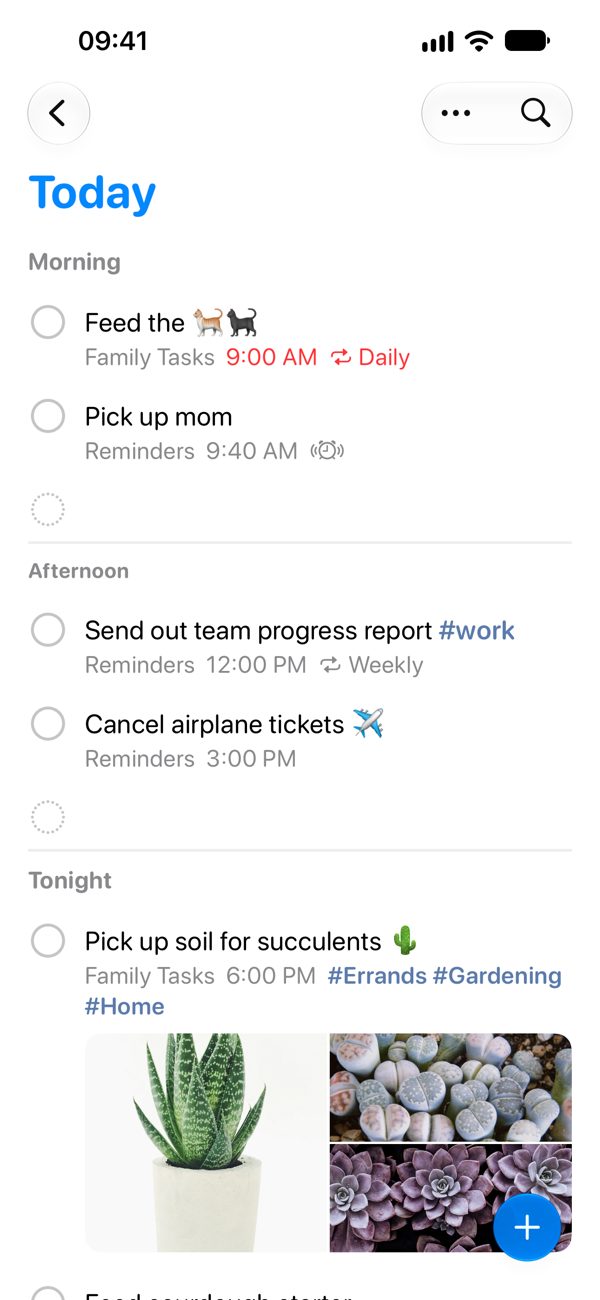
Today (split by part of the day) and Scheduled views, and dated reminders appear and can be edited in the Calendar app; no time blocking on a timeline.
- Sharing lists for free · counts half 4
4/5 means: Shared lists with tasks assigned to people
Shared lists everyone can edit, with reminders assigned to people on the list; no comments on tasks found. Invitees need an iCloud account, and what a web-only invitee can do is not documented.
iPhone to-do list apps scores
Evaluated Nov 17, 2026 Evidence ↓- Pleasant and quick to use · counts double 4
4/5 means: Clean and easy to pick up, with minor complaints such as busy screens or upgrade prompts
Clean, quick to pick up, 4.8 average from 1.1M App Store ratings, and reviewers call it nicely designed. Individual complaints are no search within a list and weak natural-language input, so not a 5.
- Fast capture 4
4/5 means: Typed dates and times plus most system shortcuts
Typed natural-language dates, Siri, widgets, Control Center, Action Button and Lock Screen control, Apple Watch, share-sheet suggestions. A critic says typed input does not set list or priority and handles only simple to medium dates, so not a 5.
- Reminders that get your attention 5
5/5 means: Time alerts, flexible repeats, and alerts that repeat or ring until you act, usually with location alerts too
Time, location and "when messaging" alerts with daily, weekly and custom repeats, plus urgent reminders that ring like an alarm with snooze, even in silent mode or a Focus. Repeats don't offer "after completion", but the alarm and location alerts cover the rest of the top level.
- Organizing lots of tasks 4
4/5 means: Most of the toolkit, missing one big piece such as saved custom filters or separate start dates
Lists, groups, sections, subtasks, tags, flags, priorities, custom smart lists and column view. Missing separate start dates, the one big piece.
- Planning your day and week 4
4/5 means: Today and upcoming views with calendar events beside tasks, or tasks shown on a calendar, but no time blocking
Today (split into morning, afternoon, tonight) and Scheduled views, and dated reminders appear in the Calendar app next to events. No time blocking.
- Devices it works on 4
4/5 means: Apple devices plus a web version or Windows or Android apps with clear gaps, or broad coverage missing a Mac or Watch app
iPhone, iPad, Mac, Watch and Vision Pro, plus iCloud.com in a browser for Windows and Android (from knowledge; the page was not read). No Windows or Android apps.
- Cost over three years 5
5/5 means: Free, with nothing held back
Free and built in, with nothing held back. Needs an iCloud account, whose free 5 GB tier is enough for tasks.
- Sharing lists with others · counts half 4
4/5 means: Shared lists with tasks assigned to people
Shared lists everyone can edit, with reminders assignable to people in the list. No comments on tasks, and sharing needs iCloud accounts (requirement known, not read on a page).
Pricing
- Reminders (built in) Free Free and preinstalled on Apple devices. Syncing and sharing use iCloud, which includes 5 GB of free storage shared with photos, backups and files.
Prices checked Nov 17, 2026.
Evidence and sources
What users say
Summary 6 quotes
-
It's present across all my devices, is free to use and performs well for everyday tasks.
Rahul Chowdhury, blogger at Hulry, former Todoist and Things 3 user · hulry.com/todoist-vs-apple-reminders · published · checked -
This app might be all you need and more for your tasks workflow.
Rahul Chowdhury, blogger at Hulry · hulry.com/todoist-vs-apple-reminders · published · checked -
Although the Reminders app has some level of natural language detection built into the app, it isn't as powerful and versatile as Todoist's.
Rahul Chowdhury, blogger at Hulry · hulry.com/todoist-vs-apple-reminders · published · checked -
Apple Reminders is more basic in terms of features but integrates seamlessly with the Apple ecosystem.
Shashank Dubey, content and marketing writer at Wbcom Designs · wbcomdesigns.com/todoist-vs-things-vs-reminders · published · checked -
it’s quite annoying that there is no search bar in individual lists, you can only search items in all of reminders at once.
Marz-0, App Store reviewer · apps.apple.com/us/app/reminders/id1108187841 · published · checked -
Reminders app is very useful & nicely designed overall, it does everything needed except more-frequently-than-daily reminders with minimal if any pain points in the interface.
maustin89, App Store reviewer · apps.apple.com/us/app/reminders/id1108187841 · published · checked
Free to-do list apps scores
Pleasant and quick to use 4 quotes
-
1.1M Ratings
apps.apple.com/us/app/reminders/id1108187841 · checked -
it’s quite annoying that there is no search bar in individual lists, you can only search items in all of reminders at once.
Marz-0, App Store reviewer · apps.apple.com/us/app/reminders/id1108187841 · published · checked -
Reminders app is very useful & nicely designed overall, it does everything needed except more-frequently-than-daily reminders with minimal if any pain points in the interface.
maustin89, App Store reviewer · apps.apple.com/us/app/reminders/id1108187841 · published · checked -
It's present across all my devices, is free to use and performs well for everyday tasks.
Rahul Chowdhury, blogger at Hulry, former Todoist and Things 3 user · hulry.com/todoist-vs-apple-reminders · published · checked
Same tasks on every device, free 4 quotes
-
Get notified and mark reminders as complete right from your wrist and automatically sync across your iPhone, iPad, Mac, or Apple Vision Pro with iCloud.
apps.apple.com/us/app/reminders/id1108187841 · checked -
With Reminders on iCloud.com, you can create and manage to-do items and organize them into lists.
support.apple.com/guide/icloud/reminders-on-icloudcom-overview-mmc0cd794a/icloud · checked -
Use the Reminders app on a device with iOS 13, iPadOS 13, macOS 10.15, or later to add additional details.
support.apple.com/en-ie/guide/icloud/mmc0cd77d9/icloud · checked -
It is especially useful if you are on a Windows device because Apple doesn’t make a Reminders app for Windows computers.
Jonathan Wylie, Medium blogger (Mac user) · medium.com/macoclock/did-you-know-you-can-access-apple-reminders-on-the-web-d5614bd5ebb7 · published · checked
Reminders and repeating tasks, free 3 quotes
-
Trigger reminders by specific locations, for example when you arrive at home or work, or when you get in your car. • Tag people in a reminder to get a reminder the next time you chat with them in Messages.
apps.apple.com/us/app/reminders/id1108187841 · checked -
Reminders app is very useful & nicely designed overall, it does everything needed except more-frequently-than-daily reminders with minimal if any pain points in the interface.
maustin89, App Store reviewer · apps.apple.com/us/app/reminders/id1108187841 · published · checked -
Alarms will activate even when a Focus is on or your device is muted.
macrumors.com/how-to/set-alarm-style-iphone-reminders-in-ios-26-2 · checked
What the free plan holds back 1 quote
-
Reminders is on all my Apple devices and works with an active iCloud subscription.
Rahul Chowdhury, blogger at Hulry · hulry.com/todoist-vs-apple-reminders · published · checked
Fast capture 4 quotes
-
Use Siri to create reminders with your voice, or add Reminders to your Control Center or iPhone Action Button to quickly create a reminder on the go.
apps.apple.com/us/app/reminders/id1108187841 · checked -
Share a webpage, note, or any text to the Reminders app and Apple Intelligence will suggest relevant tasks and grocery items from what you’re looking at. • Natural language support allows you to type phrases to create reminder settings. Try something like “Jog every other morning” for a specific, recurring reminder.
apps.apple.com/us/app/reminders/id1108187841 · checked -
You can add the ‘New Reminder’ control to: - Control Center - the Action Button - or your Lock Screen
Ryan Christoffel, writer at 9to5Mac · 9to5mac.com/2025/10/13/heres-everything-new-in-reminders-with-ios-26 · published · checked -
Although the Reminders app has some level of natural language detection built into the app, it isn't as powerful and versatile as Todoist's.
Rahul Chowdhury, blogger at Hulry · hulry.com/todoist-vs-apple-reminders · published · checked
Organizing lots of tasks 2 quotes
-
Custom Smart Lists automatically include reminders that matter most to you by gathering to-dos based on tags, dates, times, locations, flags, and priority.
apps.apple.com/us/app/reminders/id1108187841 · checked -
Organize reminders within a list by creating section headers; tap Auto-Categorize at the top of a list to have Apple Intelligence organize your reminders into sections by related categories. You can also try viewing sections in column view to arrange them across your screen. It’s a powerful way to visualize tasks, or even make simple kanban boards.
apps.apple.com/us/app/reminders/id1108187841 · checked
Planning your day and week 3 quotes
-
Create, edit, and complete scheduled reminders from within the Calendar app.
apps.apple.com/us/app/reminders/id1108187841 · checked -
Custom Smart Lists automatically include reminders that matter most to you by gathering to-dos based on tags, dates, times, locations, flags, and priority.
apps.apple.com/us/app/reminders/id1108187841 · checked -
I love how the Today view is neatly partitioned into parts of the day — morning, afternoon and tonight.
Rahul Chowdhury, blogger at Hulry · hulry.com/todoist-vs-apple-reminders · published · checked
Sharing lists for free 2 quotes
-
Share and collaborate on a list of reminders - everyone with access to the shared list will be able to add or complete reminders. • Assign reminders to people with whom you share lists.
apps.apple.com/us/app/reminders/id1108187841 · checked -
Reminders on iCloud.com is available for collaboration for web-only accounts.
support.apple.com/guide/icloud/reminders-on-icloudcom-overview-mmc0cd794a/icloud · checked
iPhone to-do list apps scores
Pleasant and quick to use 5 quotes
-
1.1M Ratings
apps.apple.com/us/app/reminders/id1108187841 · checked -
Reminders app is very useful & nicely designed overall, it does everything needed except more-frequently-than-daily reminders with minimal if any pain points in the interface.
maustin89, App Store reviewer · apps.apple.com/us/app/reminders/id1108187841 · published · checked -
It's present across all my devices, is free to use and performs well for everyday tasks.
Rahul Chowdhury, blogger at Hulry, former Todoist and Things 3 user · hulry.com/todoist-vs-apple-reminders · published · checked -
This app might be all you need and more for your tasks workflow.
Rahul Chowdhury, blogger at Hulry · hulry.com/todoist-vs-apple-reminders · published · checked -
Although the Reminders app has some level of natural language detection built into the app, it isn't as powerful and versatile as Todoist's.
Rahul Chowdhury, blogger at Hulry · hulry.com/todoist-vs-apple-reminders · published · checked
Fast capture 5 quotes
-
Use Siri to create reminders with your voice, or add Reminders to your Control Center or iPhone Action Button to quickly create a reminder on the go.
apps.apple.com/us/app/reminders/id1108187841 · checked -
Share a webpage, note, or any text to the Reminders app and Apple Intelligence will suggest relevant tasks and grocery items from what you’re looking at. • Natural language support allows you to type phrases to create reminder settings. Try something like “Jog every other morning” for a specific, recurring reminder.
apps.apple.com/us/app/reminders/id1108187841 · checked -
Get notified and mark reminders as complete right from your wrist and automatically sync across your iPhone, iPad, Mac, or Apple Vision Pro with iCloud.
apps.apple.com/us/app/reminders/id1108187841 · checked -
You can add the ‘New Reminder’ control to: - Control Center - the Action Button - or your Lock Screen
Ryan Christoffel, writer at 9to5Mac · 9to5mac.com/2025/10/13/heres-everything-new-in-reminders-with-ios-26 · published · checked -
Although the Reminders app has some level of natural language detection built into the app, it isn't as powerful and versatile as Todoist's.
Rahul Chowdhury, blogger at Hulry · hulry.com/todoist-vs-apple-reminders · published · checked
Reminders that get your attention 2 quotes
-
Trigger reminders by specific locations, for example when you arrive at home or work, or when you get in your car. • Tag people in a reminder to get a reminder the next time you chat with them in Messages.
apps.apple.com/us/app/reminders/id1108187841 · checked -
Alarms will activate even when a Focus is on or your device is muted.
macrumors.com/how-to/set-alarm-style-iphone-reminders-in-ios-26-2 · checked
Organizing lots of tasks 2 quotes
-
Custom Smart Lists automatically include reminders that matter most to you by gathering to-dos based on tags, dates, times, locations, flags, and priority.
apps.apple.com/us/app/reminders/id1108187841 · checked -
Organize reminders within a list by creating section headers; tap Auto-Categorize at the top of a list to have Apple Intelligence organize your reminders into sections by related categories. You can also try viewing sections in column view to arrange them across your screen. It’s a powerful way to visualize tasks, or even make simple kanban boards.
apps.apple.com/us/app/reminders/id1108187841 · checked
Planning your day and week 2 quotes
-
Create, edit, and complete scheduled reminders from within the Calendar app.
apps.apple.com/us/app/reminders/id1108187841 · checked -
I love how the Today view is neatly partitioned into parts of the day — morning, afternoon and tonight.
Rahul Chowdhury, blogger at Hulry · hulry.com/todoist-vs-apple-reminders · published · checked
Devices it works on 1 quote
-
Get notified and mark reminders as complete right from your wrist and automatically sync across your iPhone, iPad, Mac, or Apple Vision Pro with iCloud.
apps.apple.com/us/app/reminders/id1108187841 · checked
Cost over three years 1 quote
-
Reminders is on all my Apple devices and works with an active iCloud subscription.
Rahul Chowdhury, blogger at Hulry · hulry.com/todoist-vs-apple-reminders · published · checked
Sharing lists with others 1 quote
-
Share and collaborate on a list of reminders - everyone with access to the shared list will be able to add or complete reminders. • Assign reminders to people with whom you share lists.
apps.apple.com/us/app/reminders/id1108187841 · checked
Facts
License 1 quote
-
1.1M Ratings
apps.apple.com/us/app/reminders/id1108187841 · checked
Runs on 1 quote
-
Get notified and mark reminders as complete right from your wrist and automatically sync across your iPhone, iPad, Mac, or Apple Vision Pro with iCloud.
apps.apple.com/us/app/reminders/id1108187841 · checked
Needs 1 quote
-
Reminders is on all my Apple devices and works with an active iCloud subscription.
Rahul Chowdhury, blogger at Hulry · hulry.com/todoist-vs-apple-reminders · published · checked
More from the sources
Features 9 quotes
-
Thanks to Apple Intelligence, and only with your explicit permission, Reminders can create intelligent sections inside your lists and automatically sort your tasks into them.
Ryan Christoffel, writer at 9to5Mac · 9to5mac.com/2025/10/13/heres-everything-new-in-reminders-with-ios-26 · published · checked -
Choose from options like Hourly, Daily, Weekly, Monthly, or Custom
Gary Rosenzweig, author of MacMost (Mac and iPhone tutorial site) · macmost.com/how-to-use-repeating-reminders.html · published · checked -
We can go to Custom. With Custom we set the Frequency to Weekly. Now we can select this specific days, like that. It would only be on those days.
Gary Rosenzweig, author of MacMost · macmost.com/how-to-use-repeating-reminders.html · published · checked -
You could also set Daily but have it be every so many days. So something could be every ten days.
Gary Rosenzweig, author of MacMost · macmost.com/how-to-use-repeating-reminders.html · published · checked -
If I were to click the circle here showing that the task has been completed and then simply wait you could see it changes to tomorrow at 10:00 a.m.
Gary Rosenzweig, author of MacMost · macmost.com/how-to-use-repeating-reminders.html · published · checked -
With the Reminders widget, you can complete items from the iPhone Home Screen or Lock Screen.
support.apple.com/guide/iphone/complete-items-iph3fb74d597/ios · checked -
Completed items are hidden on your list.
support.apple.com/guide/iphone/complete-items-iph3fb74d597/ios · checked -
Apple Watch Workout
support.apple.com/guide/shortcuts/add-automations-apdfbdbd7123/ios · checked -
This allows you to track things like whether you exercised automatically from your Apple Watch, or whether you closed all your rings today.
reviewer at The Sweet Setup, app review site · thesweetsetup.com/apps/best-habit-tracking-app-ios · checked
Limits and known issues 2 quotes
-
I cannot export his reminders from iCloud. There is no option there.
tedwill, MacRumors forum member · forums.macrumors.com/threads/icloud-for-windows-no-longer-doing-task-sync.2327115 · checked -
Now this doesn't cover all situations. Like I mentioned before, you can't set something to alert you every hour from 9 to 5. You kind of have to just ignore the last one if you want hourly like that. You also can't have it do different times on different days.
Gary Rosenzweig, author of MacMost · macmost.com/how-to-use-repeating-reminders.html · published · checked
What users say 1 quote
-
Besides medications this is also very useful as a habit tracker. So if there's certain things you want to remember to do everyday, like exercise or call your mother, you can set those up to repeat daily.
Gary Rosenzweig, author of MacMost · macmost.com/how-to-use-repeating-reminders.html · published · checked
Platforms and requirements 1 quote
-
Recently, tasks are no longer an option for syncing. In the setup program, tasks / reminders are no longer there.
tedwill, MacRumors forum member · forums.macrumors.com/threads/icloud-for-windows-no-longer-doing-task-sync.2327115 · checked