Microsoft To Do
Free Microsoft to-do app with My Day planning, Outlook sync and shared lists
Our verdict
#3 of 8 in Free to-do list apps · Free with no limits or upgrade prompts
What it does
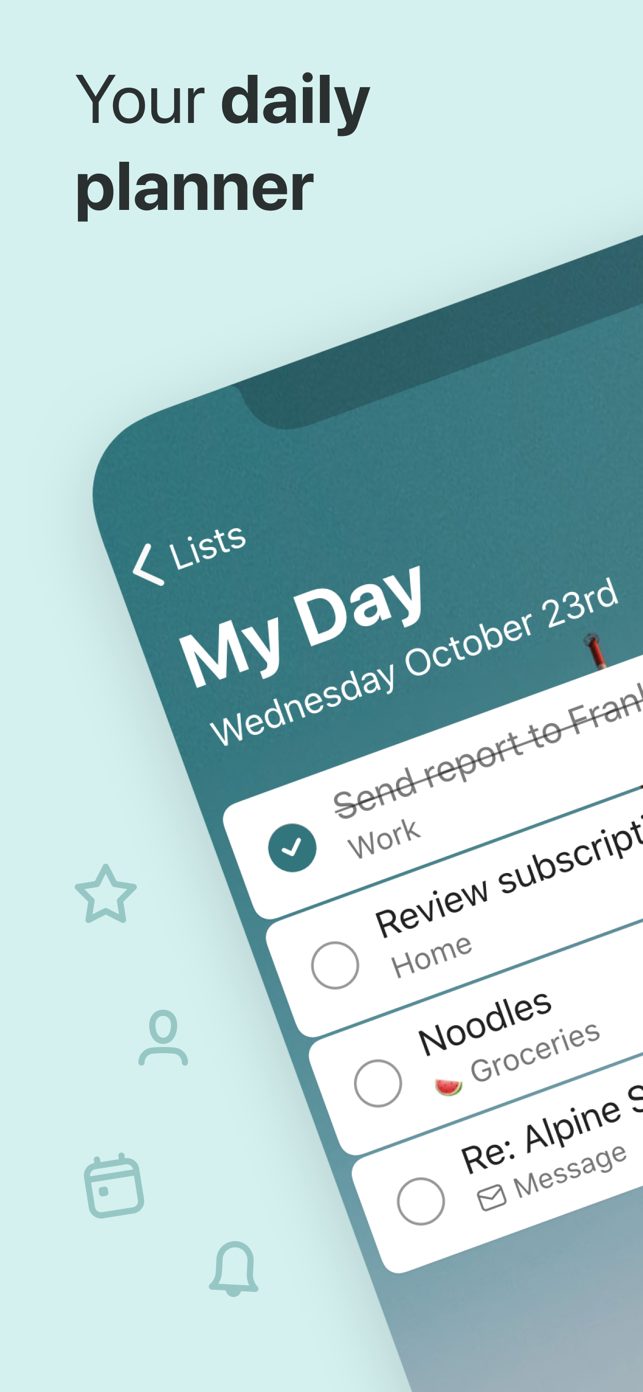
- My Day as a daily focus list you fill each morning
- Flagged Outlook emails become tasks
- Shared lists with assigned tasks
- Apps for Android, iPhone, Windows, Mac, the web and Apple Watch
Pros
- Everything is free, with no ads, caps or upgrade prompts
- Clean and easy to learn
- No list limits to work around
Cons
- One reminder per task, and no location or alarm-style reminders
- No calendar view
- Slow to gain features, with Microsoft's effort going to Planner
- Choose if:
- You use Outlook, or you never want to think about a free plan's limits
- Skip if:
- You want your tasks on a calendar
Microsoft To Do is Microsoft’s personal task app, the successor to Wunderlist. It keeps tasks in lists and groups with steps, notes, 25 MB attachments, one-time or recurring due dates and reminders, and a My Day view with suggested tasks. Tasks sync with Outlook, and flagged Outlook emails appear as tasks. Apps run on iPhone, iPad, Apple Watch, Mac, Windows, Android and the web. It is free with a Microsoft account, and Microsoft has not announced a retirement, though it is putting its new task work into Planner, Outlook and Copilot.
What users say
Evidence ↓The App Store shows 4.7 out of 5 from 270K US ratings. Reviewers who use it praise its simple, quick lists, the Planned view and sync across phone, tablet and PC; a Windows Central editor uses it daily but says it is not the best in its class. The critical views are one App Store reviewer who waited years for requested sorting options and a forum analysis that says Microsoft's task investment has moved to Planner and Copilot. Treat these as individual views, not a sampled measure.
Rankings and alternatives
- Free to-do list apps #3 of 8 Free with no limits or upgrade prompts
- Todoist #1 Fastest capture and best free sharing
- TickTick #2 Most features on a free plan
- Apple Reminders #4 Free pick if everything you own is Apple
- To-do list apps for iPhone #4 of 10 Free pick for Outlook and Windows users
- Things 3 #5 The most polished app, bought once
- Any.do #6 Daily planning with WhatsApp reminders
- Structured - Daily Planner #7 Time blocking on a visual timeline

Free to-do list apps scores
Evaluated Nov 17, 2026 Evidence ↓- Pleasant and quick to use · counts double 4
4/5 means: Clean and easy to pick up, with minor complaints such as busy screens or upgrade prompts
Clean, simple lists with My Day and a 4.7 App Store rating from 270K ratings; reviewers praise its simplicity. Minor complaints are sparse customization and slow fixes.
- Same tasks on every device, free · counts double 5
5/5 means: Apps for Android, iPhone, Windows and Mac, plus a web version
Apps for Android, iPhone, Windows and Mac plus a web app, all free with a Microsoft account, and an Apple Watch app. Mac and Android rest on a review list and product knowledge, not a vendor page.
- Reminders and repeating tasks, free 3
3/5 means: Time alerts and flexible repeats, but no location alerts and nothing that rings until you act
Time reminders and daily, weekday, weekly, monthly, yearly or custom repeats. One reminder per task, no location alerts, no repeat-until-dismissed and no repeat counted from completion found (the last three are not confirmed absent).
- What the free plan holds back 5
5/5 means: Everything is free, with no caps a person hits, no ads and no upgrade prompts
Free with a Microsoft account and no paid tier; sharing, My Day and 25 MB attachments included. No caps or ads were found on pages read; the lack of ads and upgrade prompts rests partly on product knowledge.
- Fast capture 4
4/5 means: Typed dates and times plus most shortcuts
Typed dates, reminders and repeats in the title (Windows, iOS, reportedly Android), widgets, flagged Outlook email and Microsoft assistants. No browser extension or email-forwarding address found, and typed parsing is not on every platform.
- Organizing lots of tasks 3
3/5 means: Lists with subtasks, plus a few of tags, sections, groups or built-in smart lists
Lists, groups, step checklists (not nested),
- Planning your day and week 3
3/5 means: Today and upcoming views, without tasks on a calendar or your events beside them
My Day and a Planned view (earlier, today, tomorrow, later) but no calendar view or events beside tasks found; a calendar gap is a long-standing request, though current absence is not confirmed.
- Sharing lists for free · counts half 4
4/5 means: Shared lists with tasks assigned to people
Personal-account lists can be shared and tasks assigned to people (assigning from product knowledge); no task comments.
iPhone to-do list apps scores
Evaluated Nov 17, 2026 Evidence ↓- Pleasant and quick to use · counts double 4
4/5 means: Clean and easy to pick up, with minor complaints such as busy screens or upgrade prompts
US App Store rating 4.7 from 270K ratings and reviewers call it clean and simple. Complaints are of sorting options and fixes that wait for years, and a columnist says it is not the best in its class.
- Fast capture 4
4/5 means: Typed dates and times plus most system shortcuts
Typed due dates, an Apple Watch app, flagged Outlook email to task, plus iOS widgets, Siri and the share sheet from general knowledge. A typed line does not set the repeat or list, so not a 5.
- Reminders that get your attention 2
2/5 means: Time alerts with simple daily, weekly or monthly repeats
Time reminders with daily, weekly, monthly and yearly repeats, including every few days or chosen weekdays, but no rules such as "third Wednesday of the month" or "a week after I finish it". No location reminders and nothing that repeats until you act.
- Organizing lots of tasks 3
3/5 means: Lists with subtasks, plus a few of tags, sections, groups or built-in smart lists
Lists, groups, steps, notes,
- Planning your day and week 3
3/5 means: Today and upcoming views, without your calendar events beside them
My Day with suggestions and a Planned view by date. Calendar events do not sit beside tasks on iPhone and there is no calendar grid or time blocking.
- Devices it works on 5
5/5 means: Full apps on iPhone, iPad, Mac, Watch, Windows, Android and the web
iPhone, iPad, Apple Watch, Mac, Windows, Android and web.
- Cost over three years 5
5/5 means: Free, with nothing held back
Free with a Microsoft account, with nothing held back for personal use.
- Sharing lists with others · counts half 4
4/5 means: Shared lists with tasks assigned to people
Shared lists on personal accounts, and tasks can be assigned to members of a shared list (general knowledge). No task comments.
Pricing
- Free Free Free on the App Store with a Microsoft account, personal or work or school. Microsoft 365 is not required for personal use. Sharing, My Day suggestions and 25 MB attachments are included.
Prices checked Nov 17, 2026.
Evidence and sources
What users say
Summary 6 quotes
-
4.7 out of 5 270K Ratings
apps.apple.com/us/app/microsoft-to-do/id1212616790 · checked -
Why are so many requests being ignored (for years) by Microsoft? I’m about to move on from this app and try another one specifically for groceries, but boy what a headache that would be. To Do could be an excellent, simple app if Microsoft would take care of some key requests (and apparently bugs).
DILNDAL, App Store reviewer · apps.apple.com/us/app/microsoft-to-do/id1212616790 · published · checked -
And the best part is you can view everything that needs to be done today, tomorrow, next week, and later from all of those lists all on one page in the “Planned” tab. This app also works really well across multiple platforms by instantly syncing changes. I use it on my iPhone, iPad, and Windows PC.
TheZZman2000, App Store reviewer · apps.apple.com/us/app/microsoft-to-do/id1212616790 · published · checked -
The real concern is more precise: Microsoft has shifted task-management investment toward Planner, Teams, Outlook, and Copilot. To Do remains supported, useful, and connected—but it is no longer where Microsoft is visibly trying to define the future of work.
windowsforum.com/news/microsoft-to-do-is-not-retiring-but-planner-and-copilot-take-priority.441339 · published · checked -
Even so, it's not like Microsoft To Do is the best in its class, because it really isn't.
Ben Wilson, Senior Editor at Windows Central · windowscentral.com/microsoft/windows-11/i-still-use-microsoft-to-do-can-it-avoid-the-graveyard · published · checked -
It's lightweight and runs on all my PCs — even my Android phone — with a functional widget I can add to the cover screen of my Samsung Galaxy Z Flip 7 for glanceable reminders. It pulls hints from natural language to set due dates and, more importantly, helps me remember everything in my daily workflow.
Ben Wilson, Senior Editor at Windows Central · windowscentral.com/microsoft/windows-11/i-still-use-microsoft-to-do-can-it-avoid-the-graveyard · published · checked
Free to-do list apps scores
Pleasant and quick to use 5 quotes
-
4.7 out of 5 270K Ratings
apps.apple.com/us/app/microsoft-to-do/id1212616790 · checked -
And the best part is you can view everything that needs to be done today, tomorrow, next week, and later from all of those lists all on one page in the “Planned” tab. This app also works really well across multiple platforms by instantly syncing changes. I use it on my iPhone, iPad, and Windows PC.
TheZZman2000, App Store reviewer · apps.apple.com/us/app/microsoft-to-do/id1212616790 · published · checked -
Microsoft To Do offers limited customization for task views. You can sort tasks by due date, importance, or added date, but customization options beyond that are minimal.
thedigitalprojectmanager.com/tools/microsoft-to-do-review · published · checked -
Even so, it's not like Microsoft To Do is the best in its class, because it really isn't.
Ben Wilson, Senior Editor at Windows Central · windowscentral.com/microsoft/windows-11/i-still-use-microsoft-to-do-can-it-avoid-the-graveyard · published · checked -
It's lightweight and runs on all my PCs — even my Android phone — with a functional widget I can add to the cover screen of my Samsung Galaxy Z Flip 7 for glanceable reminders. It pulls hints from natural language to set due dates and, more importantly, helps me remember everything in my daily workflow.
Ben Wilson, Senior Editor at Windows Central · windowscentral.com/microsoft/windows-11/i-still-use-microsoft-to-do-can-it-avoid-the-graveyard · published · checked
Same tasks on every device, free 3 quotes
-
iPhone Requires iOS 17.6 or later. iPad Requires iPadOS 17.6 or later. Apple Watch Requires watchOS 10.6 or later.
apps.apple.com/us/app/microsoft-to-do/id1212616790 · checked -
allowing you to manage tasks across desktop (Mac or Windows), web, and mobile devices (including Android, iPhone, iPad, and Apple Watch).
thedigitalprojectmanager.com/tools/microsoft-to-do-review · published · checked -
It's lightweight and runs on all my PCs — even my Android phone — with a functional widget I can add to the cover screen of my Samsung Galaxy Z Flip 7 for glanceable reminders. It pulls hints from natural language to set due dates and, more importantly, helps me remember everything in my daily workflow.
Ben Wilson, Senior Editor at Windows Central · windowscentral.com/microsoft/windows-11/i-still-use-microsoft-to-do-can-it-avoid-the-graveyard · published · checked
Reminders and repeating tasks, free 3 quotes
-
Set one-time or recurring due dates and reminders • Break your tasks into manageable steps • Attach up to 25MB of files to any task
apps.apple.com/us/app/microsoft-to-do/id1212616790 · checked -
Select Repeat and choose when your task will repeat: daily, on weekdays, weekly, monthly, yearly, or a custom repetition.
support.microsoft.com/en-us/todo/add-due-dates-and-reminders-in-microsoft-to-do · checked -
To Do only supports one reminder per task. Repeating reminders not supported
tasks.org/docs/sync_microsoft · checked
What the free plan holds back 3 quotes
-
To Do is free and available on all your devices.
apps.apple.com/us/app/microsoft-to-do/id1212616790 · checked -
Set one-time or recurring due dates and reminders • Break your tasks into manageable steps • Attach up to 25MB of files to any task
apps.apple.com/us/app/microsoft-to-do/id1212616790 · checked -
For lists in personal accounts, you can collaborate with anyone with updated notifications for any changes to your to-do lists.
apps.apple.com/us/app/microsoft-to-do/id1212616790 · checked
Fast capture 3 quotes
-
Capture tasks from different Microsoft apps and services and sync them with Microsoft To Do, from flagging emails as tasks in Outlook to lists from Cortana.
apps.apple.com/us/app/microsoft-to-do/id1212616790 · checked -
It's lightweight and runs on all my PCs — even my Android phone — with a functional widget I can add to the cover screen of my Samsung Galaxy Z Flip 7 for glanceable reminders. It pulls hints from natural language to set due dates and, more importantly, helps me remember everything in my daily workflow.
Ben Wilson, Senior Editor at Windows Central · windowscentral.com/microsoft/windows-11/i-still-use-microsoft-to-do-can-it-avoid-the-graveyard · published · checked -
We currently support this in To Do Windows app from version 2.66 and above. We also support smart due date, reminder suggestions in To Do iOS app. We are working on expanding support to other platforms.
support.microsoft.com/en-us/todo/smart-due-date-reminder-recognition-in-microsoft-to-do · checked
Organizing lots of tasks 5 quotes
-
Set one-time or recurring due dates and reminders • Break your tasks into manageable steps • Attach up to 25MB of files to any task
apps.apple.com/us/app/microsoft-to-do/id1212616790 · checked -
Assign priority tags (Important or Normal) to tasks. The “Important” tag adds the task to the "Important" smart list, helping you focus on high-priority work and better manage your workload.
thedigitalprojectmanager.com/tools/microsoft-to-do-review · published · checked -
Microsoft To Do offers limited customization for task views. You can sort tasks by due date, importance, or added date, but customization options beyond that are minimal.
thedigitalprojectmanager.com/tools/microsoft-to-do-review · published · checked -
To Do only supports one reminder per task. Repeating reminders not supported
tasks.org/docs/sync_microsoft · checked -
Proper tagging solution – not many people are aware of the #tag option so allow you view these tags somewhere other than having to search for them.
mdevitt, Microsoft Tech Community forum user with about 900 tasks · techcommunity.microsoft.com/discussions/to-do/todo-could-be-much-more---bugs--basic-features-missing/2149615 · published · checked
Planning your day and week 3 quotes
-
Accomplish what’s important to you each day with My Day and Suggestions, personalized day planner tools. Intelligent suggestions recommend tasks from across your lists that may be relevant each day.
apps.apple.com/us/app/microsoft-to-do/id1212616790 · checked -
And the best part is you can view everything that needs to be done today, tomorrow, next week, and later from all of those lists all on one page in the “Planned” tab. This app also works really well across multiple platforms by instantly syncing changes. I use it on my iPhone, iPad, and Windows PC.
TheZZman2000, App Store reviewer · apps.apple.com/us/app/microsoft-to-do/id1212616790 · published · checked -
Proper tagging solution – not many people are aware of the #tag option so allow you view these tags somewhere other than having to search for them.
mdevitt, Microsoft Tech Community forum user with about 900 tasks · techcommunity.microsoft.com/discussions/to-do/todo-could-be-much-more---bugs--basic-features-missing/2149615 · published · checked
Sharing lists for free 2 quotes
-
For lists in personal accounts, you can collaborate with anyone with updated notifications for any changes to your to-do lists.
apps.apple.com/us/app/microsoft-to-do/id1212616790 · checked -
However, Microsoft To Do does not include advanced collaboration features like task comments, activity tracking, real-time co-editing, or role-based permissions.
thedigitalprojectmanager.com/tools/microsoft-to-do-review · published · checked
iPhone to-do list apps scores
Pleasant and quick to use 5 quotes
-
4.7 out of 5 270K Ratings
apps.apple.com/us/app/microsoft-to-do/id1212616790 · checked -
Why are so many requests being ignored (for years) by Microsoft? I’m about to move on from this app and try another one specifically for groceries, but boy what a headache that would be. To Do could be an excellent, simple app if Microsoft would take care of some key requests (and apparently bugs).
DILNDAL, App Store reviewer · apps.apple.com/us/app/microsoft-to-do/id1212616790 · published · checked -
And the best part is you can view everything that needs to be done today, tomorrow, next week, and later from all of those lists all on one page in the “Planned” tab. This app also works really well across multiple platforms by instantly syncing changes. I use it on my iPhone, iPad, and Windows PC.
TheZZman2000, App Store reviewer · apps.apple.com/us/app/microsoft-to-do/id1212616790 · published · checked -
Even so, it's not like Microsoft To Do is the best in its class, because it really isn't.
Ben Wilson, Senior Editor at Windows Central · windowscentral.com/microsoft/windows-11/i-still-use-microsoft-to-do-can-it-avoid-the-graveyard · published · checked -
It's lightweight and runs on all my PCs — even my Android phone — with a functional widget I can add to the cover screen of my Samsung Galaxy Z Flip 7 for glanceable reminders. It pulls hints from natural language to set due dates and, more importantly, helps me remember everything in my daily workflow.
Ben Wilson, Senior Editor at Windows Central · windowscentral.com/microsoft/windows-11/i-still-use-microsoft-to-do-can-it-avoid-the-graveyard · published · checked
Fast capture 3 quotes
-
iPhone Requires iOS 17.6 or later. iPad Requires iPadOS 17.6 or later. Apple Watch Requires watchOS 10.6 or later.
apps.apple.com/us/app/microsoft-to-do/id1212616790 · checked -
Capture tasks from different Microsoft apps and services and sync them with Microsoft To Do, from flagging emails as tasks in Outlook to lists from Cortana.
apps.apple.com/us/app/microsoft-to-do/id1212616790 · checked -
It's lightweight and runs on all my PCs — even my Android phone — with a functional widget I can add to the cover screen of my Samsung Galaxy Z Flip 7 for glanceable reminders. It pulls hints from natural language to set due dates and, more importantly, helps me remember everything in my daily workflow.
Ben Wilson, Senior Editor at Windows Central · windowscentral.com/microsoft/windows-11/i-still-use-microsoft-to-do-can-it-avoid-the-graveyard · published · checked
Reminders that get your attention 1 quote
-
Set one-time or recurring due dates and reminders • Break your tasks into manageable steps • Attach up to 25MB of files to any task
apps.apple.com/us/app/microsoft-to-do/id1212616790 · checked
Organizing lots of tasks 3 quotes
-
Set one-time or recurring due dates and reminders • Break your tasks into manageable steps • Attach up to 25MB of files to any task
apps.apple.com/us/app/microsoft-to-do/id1212616790 · checked -
Assign priority tags (Important or Normal) to tasks. The “Important” tag adds the task to the "Important" smart list, helping you focus on high-priority work and better manage your workload.
thedigitalprojectmanager.com/tools/microsoft-to-do-review · published · checked -
Microsoft To Do offers limited customization for task views. You can sort tasks by due date, importance, or added date, but customization options beyond that are minimal.
thedigitalprojectmanager.com/tools/microsoft-to-do-review · published · checked
Planning your day and week 2 quotes
-
Accomplish what’s important to you each day with My Day and Suggestions, personalized day planner tools. Intelligent suggestions recommend tasks from across your lists that may be relevant each day.
apps.apple.com/us/app/microsoft-to-do/id1212616790 · checked -
And the best part is you can view everything that needs to be done today, tomorrow, next week, and later from all of those lists all on one page in the “Planned” tab. This app also works really well across multiple platforms by instantly syncing changes. I use it on my iPhone, iPad, and Windows PC.
TheZZman2000, App Store reviewer · apps.apple.com/us/app/microsoft-to-do/id1212616790 · published · checked
Devices it works on 2 quotes
-
iPhone Requires iOS 17.6 or later. iPad Requires iPadOS 17.6 or later. Apple Watch Requires watchOS 10.6 or later.
apps.apple.com/us/app/microsoft-to-do/id1212616790 · checked -
allowing you to manage tasks across desktop (Mac or Windows), web, and mobile devices (including Android, iPhone, iPad, and Apple Watch).
thedigitalprojectmanager.com/tools/microsoft-to-do-review · published · checked
Cost over three years 1 quote
-
To Do is free and available on all your devices.
apps.apple.com/us/app/microsoft-to-do/id1212616790 · checked
Sharing lists with others 2 quotes
-
For lists in personal accounts, you can collaborate with anyone with updated notifications for any changes to your to-do lists.
apps.apple.com/us/app/microsoft-to-do/id1212616790 · checked -
However, Microsoft To Do does not include advanced collaboration features like task comments, activity tracking, real-time co-editing, or role-based permissions.
thedigitalprojectmanager.com/tools/microsoft-to-do-review · published · checked
Facts
Runs on 2 quotes
-
iPhone Requires iOS 17.6 or later. iPad Requires iPadOS 17.6 or later. Apple Watch Requires watchOS 10.6 or later.
apps.apple.com/us/app/microsoft-to-do/id1212616790 · checked -
allowing you to manage tasks across desktop (Mac or Windows), web, and mobile devices (including Android, iPhone, iPad, and Apple Watch).
thedigitalprojectmanager.com/tools/microsoft-to-do-review · published · checked
Needs 1 quote
-
iPhone Requires iOS 17.6 or later. iPad Requires iPadOS 17.6 or later. Apple Watch Requires watchOS 10.6 or later.
apps.apple.com/us/app/microsoft-to-do/id1212616790 · checked
More from the sources
Features 2 quotes
-
Tasks in Outlook Tasks automatically sync with Microsoft To Do if you're using the same Microsoft account.
thedigitalprojectmanager.com/tools/microsoft-to-do-review · published · checked -
For Microsoft 365 work accounts, tasks assigned through Planner can surface alongside personal to-dos and flagged email.
windowsforum.com/news/microsoft-to-do-is-not-retiring-but-planner-and-copilot-take-priority.441339 · published · checked
Limits and known issues 3 quotes
-
Microsoft To Do is not being retired, and there is no Microsoft announcement, support notice, migration timetable, or service-health message indicating that the personal task app is headed for shutdown.
windowsforum.com/news/microsoft-to-do-is-not-retiring-but-planner-and-copilot-take-priority.441339 · published · checked -
Windows Latest also reports that Planner integration is not planned for Outlook Classic, where Microsoft To Do remains the established task option.
windowsforum.com/news/microsoft-to-do-is-not-retiring-but-planner-and-copilot-take-priority.441339 · published · checked -
We fixed some bugs to improve the app experience.
apps.apple.com/us/app/microsoft-to-do/id1212616790 · checked
What users say 1 quote
-
Unless I am missing something there is no way to export your tasks and list and task owners. It would seem they are making it deliberately hard to leave.
Microsoft Tech Community forum user, team user · techcommunity.microsoft.com/discussions/to-do/does-not-sync-reliably-and-getting-worse--how-to-export-lists-to-to-doist/2098078 · published · checked
Pricing
apps.apple.com/us/app/microsoft-to-do/id1212616790 · checked