Things 3
One-time-purchase personal task manager for iPhone, iPad, Mac and Apple Watch
Our verdict
#5 of 10 in To-do list apps for iPhone · The most polished app, bought once
What it does
- Areas, projects, headings, tags, and checklists
- Separate "When" start dates and deadlines
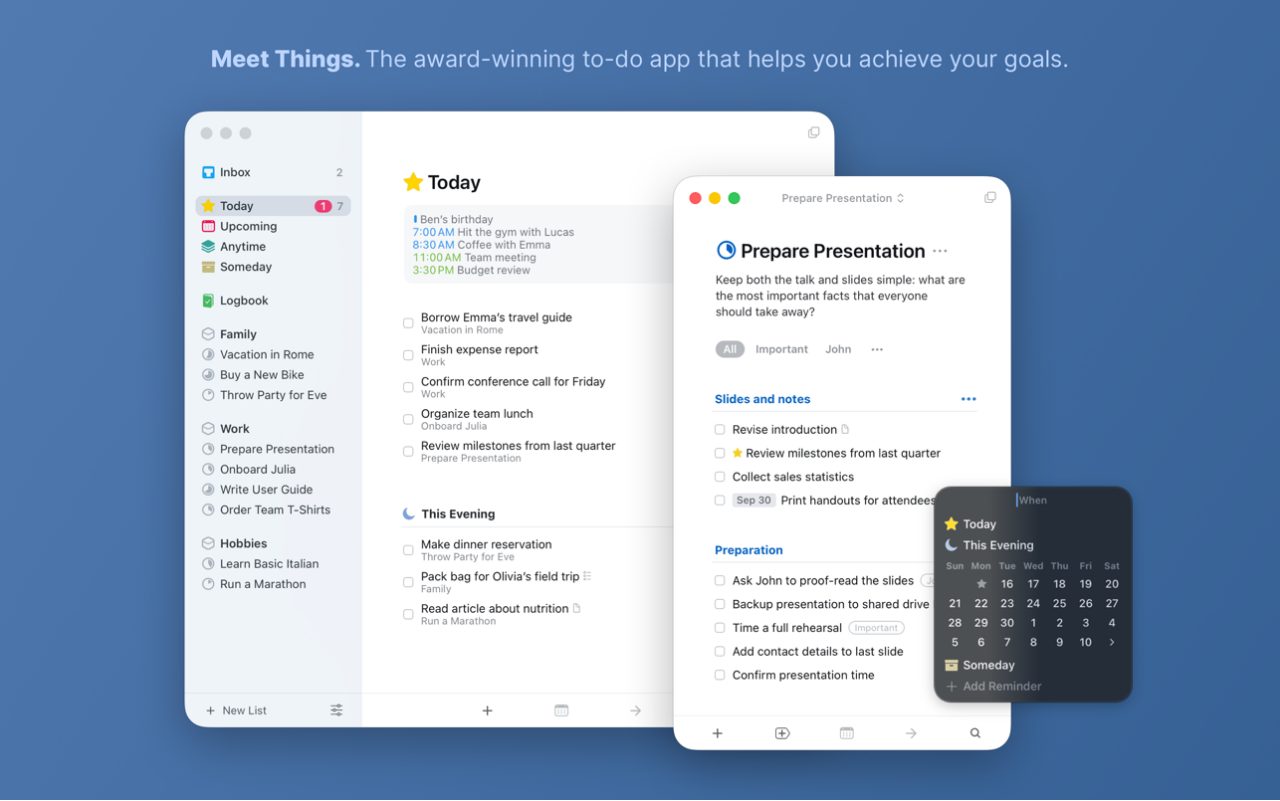
- Today view with your calendar events beside tasks
- One-time purchase per device, with free Things Cloud sync
Pros
- The most polished and pleasant design of any app here
- No subscription
- Strong accessibility support
Cons
- No sharing or assigning tasks
- Apple devices only
- No location reminders or alerts that repeat until you act
- Mac and iPad are separate purchases
- Skip if:
- You share chores with a partner or need your tasks on a Windows PC
Things 3 is a personal task manager from Cultured Code for Apple devices. It organizes to-dos into areas, projects, headings, tags and checklists, and plans them with Today, This Evening, Upcoming and Someday lists that show calendar events alongside tasks. It runs on iPhone, Apple Watch, iPad, Mac and Apple Vision Pro, syncs through the free Things Cloud, and is sold as a separate one-time App Store purchase for each platform with no subscription. It has no Windows, Android or web version and no list sharing or task assignment with other people.
What users say
Evidence ↓Reviewers and App Store and forum users broadly agree that Things is unusually polished and simple to start with while still deep enough for serious personal work, and some like paying once instead of subscribing. Critics (a handful of reviewers in the sources read, not a measured share) say it is a tool for one person or small projects that struggles with larger multi-person projects and dependencies, wants more layout flexibility in Today, and is Apple-only and priced separately per device. Repeating to-dos were a long-standing complaint that version 3.23 addressed in August 2026.
Rankings and alternatives
- To-do list apps for iPhone #5 of 10 The most polished app, bought once
- Todoist #1 Best all-rounder across iPhone, Windows, and Android
- TickTick #2 Calendar, habits, and focus timer in one app
- Apple Reminders #3 Free and already on your iPhone

iPhone to-do list apps scores
Evaluated Nov 17, 2026 Evidence ↓- Pleasant and quick to use · counts double 5
5/5 means: Among the best-regarded apps on iPhone for design and ease, praised widely by reviewers and long-time users
Widely praised by reviewers and long-time users for polish and a gentle learning curve; 4.8 from 28K iPhone ratings and two Apple Design Awards. Many of the praise quotes are curated by the vendor.
- Fast capture 4
4/5 means: Typed dates and times plus most system shortcuts
Typed natural-language dates and times, widgets, Siri, Shortcuts, share extension, Mail to Things, Control Center and Lock Screen buttons, and a Watch app. A typed line does not set the list or tags, so not 5.
- Reminders that get your attention 3
3/5 means: Time alerts with flexible repeats, but no location alerts and nothing that repeats until you act
Time reminders and flexible repeats (fixed schedule or after completion, improved in 3.23). No location alerts (well-known absence; a forum comment implies it) and no alerts that repeat until acted on.
- Organizing lots of tasks 4
4/5 means: Most of the toolkit, missing one big piece such as saved custom filters or separate start dates
Areas, projects, headings, tags, checklists, separate start dates and deadlines, Someday, fast search and tag filtering. No saved custom filters or views, the missing big piece.
- Planning your day and week 4
4/5 means: Today and upcoming views with calendar events beside tasks, or tasks shown on a calendar, but no time blocking
Today, This Evening and Upcoming with calendar events beside tasks. No calendar grid or time blocking.
- Devices it works on 3
3/5 means: All the Apple devices most readers own, but nothing for Windows, Android or the web
iPhone, Watch, iPad, Mac and Vision Pro, with free sync. Nothing for Windows, Android or the web.
- Cost over three years 3
3/5 means: $40 to $100
iPhone $9.99 plus Mac $49.99 is $59.98 one time, with no subscription, so $59.98 over three years.
- Sharing lists with others · counts half 1
1/5 means: No shared lists
No shared lists or task assignment; only Family Sharing of the purchase. Stated by a third-party review and well-known for the product, not confirmed on a vendor page.
Pricing
- Things for iPhone and Apple Watch $9.99 one-time One-time App Store purchase with no in-app purchases listed; includes the Apple Watch app. Up to six family members can use it through Family Sharing. Things Cloud sync is free.
- Things for iPad $19.99 one-time , extra Separate purchase. The $19.99 figure comes from a 2023 third-party review; check the App Store for the current price.
- Things for Mac $49.99 one-time , extra Separate purchase with a free 15-day trial from the vendor's website.
Prices checked Nov 17, 2026.
Evidence and sources
What users say
Summary 6 quotes
-
Recurring tasks can be set to recur on successive calendar intervals or a on a set interval after a given task is marked completed. (Great for things like replacing your furnace filters.)
ORTNPalms, App Store reviewer · apps.apple.com/us/app/things-3/id904237743 · published · checked -
4.8 out of 5 28K Ratings
apps.apple.com/us/app/things-3/id904237743 · checked -
In contrast, Things 3 is wonderfully simple and clarifying. It’s as powerful as my previous app, but it strips out all the distractions and the fussiness, leaving pure, easy-to-access essentials: tagging, scheduling & project organizing.
Jmw6838, App Store reviewer · apps.apple.com/us/app/things-3/id904237743 · published · checked -
I wish that there was more options for the layout of the Today list. I wish that you could have more than one column or even a corkboard-style view.
NOTaPANDA, App Store reviewer · apps.apple.com/us/app/things-3/id904280696 · published · checked -
I am a professional project manager and would recommend THINGS to anyone who manages smaller projects and/or wants to manage personal tasks with functionality that exceeds the native Reminders app. However THINGS struggles when managing bigger projects with multiple resources and dependencies.
J Michael T, MacRumors forum user, professional project manager · macrumors.com/2026/08/19/things-3-23-brings-long-requested-overhaul-of-repeating-to-dos · published · checked -
“Things never feels messy or overbearing, no matter the length of your task list. Lovely, unfolding animations keep your place, and there’s a super-fast search tool if you get lost.
David Pierce, WIRED reviewer, quoted by Cultured Code · culturedcode.com/things/features · checked
iPhone to-do list apps scores
Pleasant and quick to use 4 quotes
-
Recurring tasks can be set to recur on successive calendar intervals or a on a set interval after a given task is marked completed. (Great for things like replacing your furnace filters.)
ORTNPalms, App Store reviewer · apps.apple.com/us/app/things-3/id904237743 · published · checked -
4.8 out of 5 28K Ratings
apps.apple.com/us/app/things-3/id904237743 · checked -
In contrast, Things 3 is wonderfully simple and clarifying. It’s as powerful as my previous app, but it strips out all the distractions and the fussiness, leaving pure, easy-to-access essentials: tagging, scheduling & project organizing.
Jmw6838, App Store reviewer · apps.apple.com/us/app/things-3/id904237743 · published · checked -
“Things never feels messy or overbearing, no matter the length of your task list. Lovely, unfolding animations keep your place, and there’s a super-fast search tool if you get lost.
David Pierce, WIRED reviewer, quoted by Cultured Code · culturedcode.com/things/features · checked
Fast capture 5 quotes
-
Reminders — set a time and Things will remind you. • Repeaters — automatically repeat to-dos on a schedule you set. • This Evening — a special place for your evening plans. • Calendar integration — see your events and to-dos together. • Tags — categorize your to-dos and quickly filter lists. • Quick Find — instantly find to-dos or switch between lists. • Magic Plus — drag the + button to insert to-dos anywhere in a list. • Share extension — create to-dos with content from other apps. • Widgets — see lists on your home/lock screens. • Mail to Things — forward an email to Things; now it’s a to-do. • Markdown — structure & style your notes.
apps.apple.com/us/app/things-3/id904237743 · checked -
You can also enjoy a beautiful dark mode at sunset, connect your calendars, add a variety of widgets, create to-dos via Siri, import from Reminders—Things can do it all! There’s even Shortcuts integration if you want to automate your workflows.
apps.apple.com/us/app/things-3/id904237743 · checked -
MADE FOR APPLE WATCH Things comes with a great app for Apple Watch. Just raise your wrist to glance at your Today list, mark to-dos complete as you go, and dictate new ones on the fly—all synced instantly with your iPhone, iPad, and Mac.
apps.apple.com/us/app/things-3/id904237743 · checked -
Our new natural language date parser understands time as well. Type “Wed 8pm”, and you’re all set.
culturedcode.com/things/features · checked -
Since releasing we’ve been hard at work building new features like Dark Mode, Dynamic Type, Widgets, Control Center & Lock Screen Buttons, Mail to Things, Siri & Shortcuts integration, Keyboard & Trackpad support for iPad, Markdown, Writing Tools support, a URL Scheme, and much more.
culturedcode.com/things/features · checked
Reminders that get your attention 4 quotes
-
You can add to-dos to Today or This Evening, set a time to be reminded, schedule something for a later date, or put things on hold in Someday.
culturedcode.com/things/features · checked -
Complete repeating tasks early: Repeating to-dos now display a regular checkbox, just like any other to-do, allowing them to be completed early, with the next copy scheduled based on the existing rule.
macrumors.com/2026/08/19/things-3-23-brings-long-requested-overhaul-of-repeating-to-dos · published · checked -
After-completion repeat changes: To-dos that repeat a period of time after completion, rather than on a fixed schedule, simply move to the new date when rescheduled, with no prompt.
macrumors.com/2026/08/19/things-3-23-brings-long-requested-overhaul-of-repeating-to-dos · published · checked -
Apple's Reminders is probably more suitable for most people (since one of its core functions is reminders, like location-based reminders), but for project management Things has been brilliant.
Diopter, MacRumors forum user, long-time Things user (8 votes) · macrumors.com/2026/08/19/things-3-23-brings-long-requested-overhaul-of-repeating-to-dos · published · checked
Organizing lots of tasks 3 quotes
-
• Your Areas Create an Area for each sphere of your life, such as Work, Family, Finance, and so on. This keeps everything neatly organized, and helps you see the big picture as you set your plans in motion.
apps.apple.com/us/app/things-3/id904237743 · checked -
If you like, you can add more details (tags, a checklist, a start date, a deadline), but those fields are neatly tucked away in the corner until you need them.
culturedcode.com/things/features · checked -
You can add to-dos to Today or This Evening, set a time to be reminded, schedule something for a later date, or put things on hold in Someday.
culturedcode.com/things/features · checked
Planning your day and week 2 quotes
-
Calendar events now display together with your to-dos, giving an outline of your schedule.
culturedcode.com/things/features · checked -
It shows everything on your agenda for the coming days: scheduled to-dos, repeating to-dos, deadlines, and calendar events.
culturedcode.com/things/features · checked
Devices it works on 2 quotes
-
Things also has full-featured apps for iPhone, iPad, Apple Watch, and Apple Vision Pro (sold separately). All your devices sync seamlessly via our free Things Cloud service.
apps.apple.com/us/app/things-3/id904280696 · checked -
No, there is no official Windows version of Things 3. Cultured Code, the developer of Things, has focused primarily on the Apple ecosystem, and as a result, Things 3 is only available for macOS, iOS, and watchOS.
crm.org/news/things-3-review · published · checked
Cost over three years 3 quotes
-
Things 3 Organize your life $9.99
apps.apple.com/us/app/things-3/id904237743 · checked -
Only for Mac $49.99
apps.apple.com/us/app/things-3/id904280696 · checked -
Things is also available for Mac, iPad, and Apple Vision Pro (sold separately). • Sync is provided for free via our Things Cloud service. • A free trial is available for Mac: www.things.app
apps.apple.com/us/app/things-3/id904237743 · checked
Sharing lists with others 1 quote
-
On the collaboration front, Things 3 lets you share the app with family members at no additional cost. It's a handy feature for households juggling multiple schedules. However, beyond this, Things 3 currently doesn't offer any other collaboration features.
crm.org/news/things-3-review · published · checked
Facts
License 1 quote
-
Things 3 Organize your life $9.99
apps.apple.com/us/app/things-3/id904237743 · checked
Runs on 1 quote
-
Things also has full-featured apps for iPhone, iPad, Apple Watch, and Apple Vision Pro (sold separately). All your devices sync seamlessly via our free Things Cloud service.
apps.apple.com/us/app/things-3/id904280696 · checked
Needs 1 quote
-
The update requires macOS 13.3, iOS and iPadOS 16.4, watchOS 9.1, and visionOS 26, or newer.
macrumors.com/2026/08/19/things-3-23-brings-long-requested-overhaul-of-repeating-to-dos · published · checked
More from the sources
Pricing 3 quotes
-
Visit our website now and get a free 15-day trial for your Mac: www.things.app
apps.apple.com/us/app/things-3/id904280696 · checked -
iPad · $19.99
techrepublic.com/article/things-3-review · published · checked -
Once you buy the apps, they are yours forever. There are no premium services, pro plans, or subscriptions to deal with. However, there might be additional costs if a new version or major update is released in the future. For now, the company has stated that there are no immediate plans for a "Things 4" release.
crm.org/news/things-3-review · published · checked
Features 3 quotes
-
Quick Entry — create to-dos from anywhere, as soon as the thought hits you.
apps.apple.com/us/app/things-3/id904280696 · checked -
THINGS 3.25 Things is ready for iPhone Duo! We’ve tailored the app for the new device, with a dynamic layout for all poses, a sidebar for your lists, and more.
apps.apple.com/us/app/things-3/id904237743 · checked -
Larger Text Increase the text size in the app to 200% or more.
apps.apple.com/us/app/things-3/id904237743 · checked
Limits and known issues 1 quote
-
The desktop app saves deleted tasks to a "Trash" folder built into the app which has been a lifesaver for me when I have inadvertently deleted items I did not mean to delete. The logbook still exists to store completed tasks but deleted tasks are available as opposed to deleted iOS or iPad OS tasks disappearing immediately.
J Michael T, MacRumors forum user, professional project manager · macrumors.com/2026/08/19/things-3-23-brings-long-requested-overhaul-of-repeating-to-dos · published · checked
Pricing
culturedcode.com/things/pricing · checked