Structured - Daily Planner
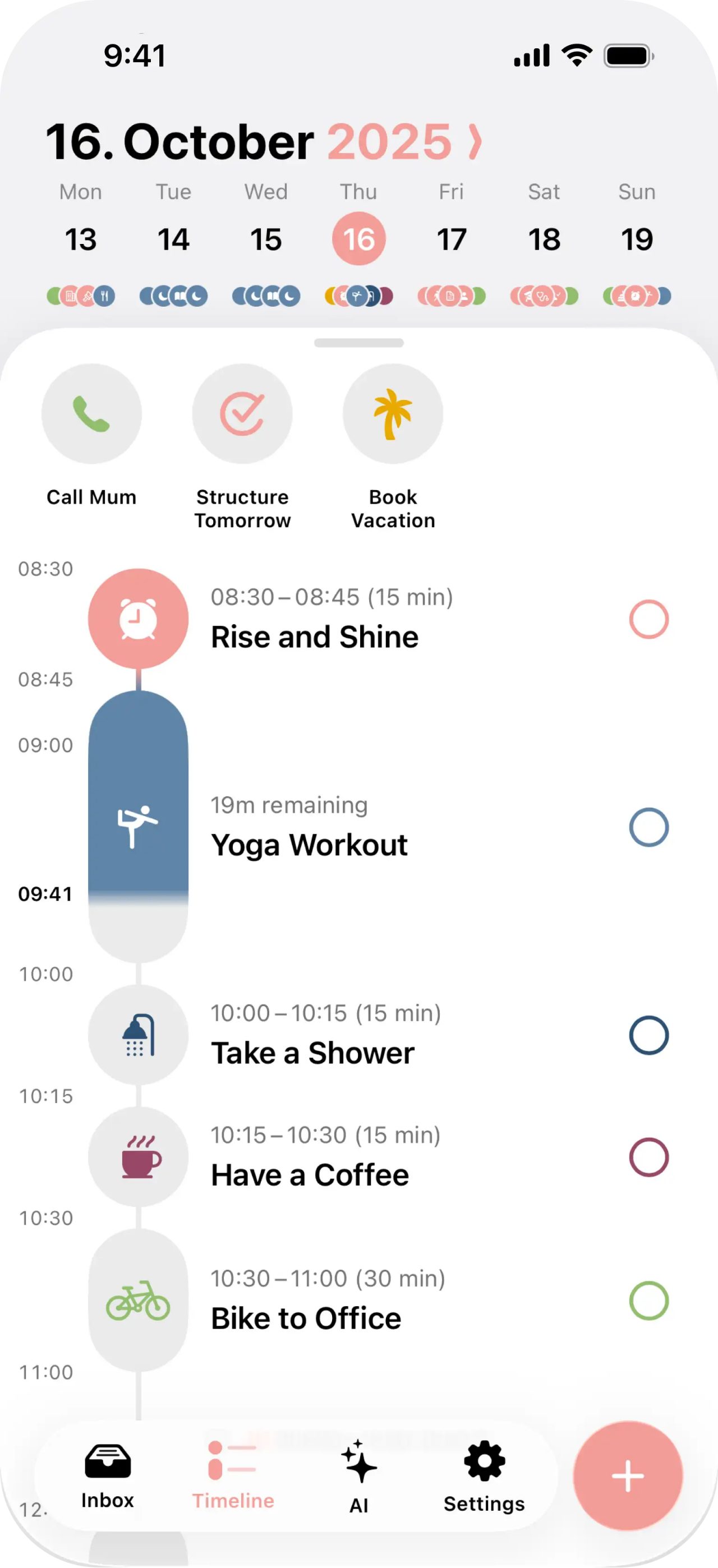
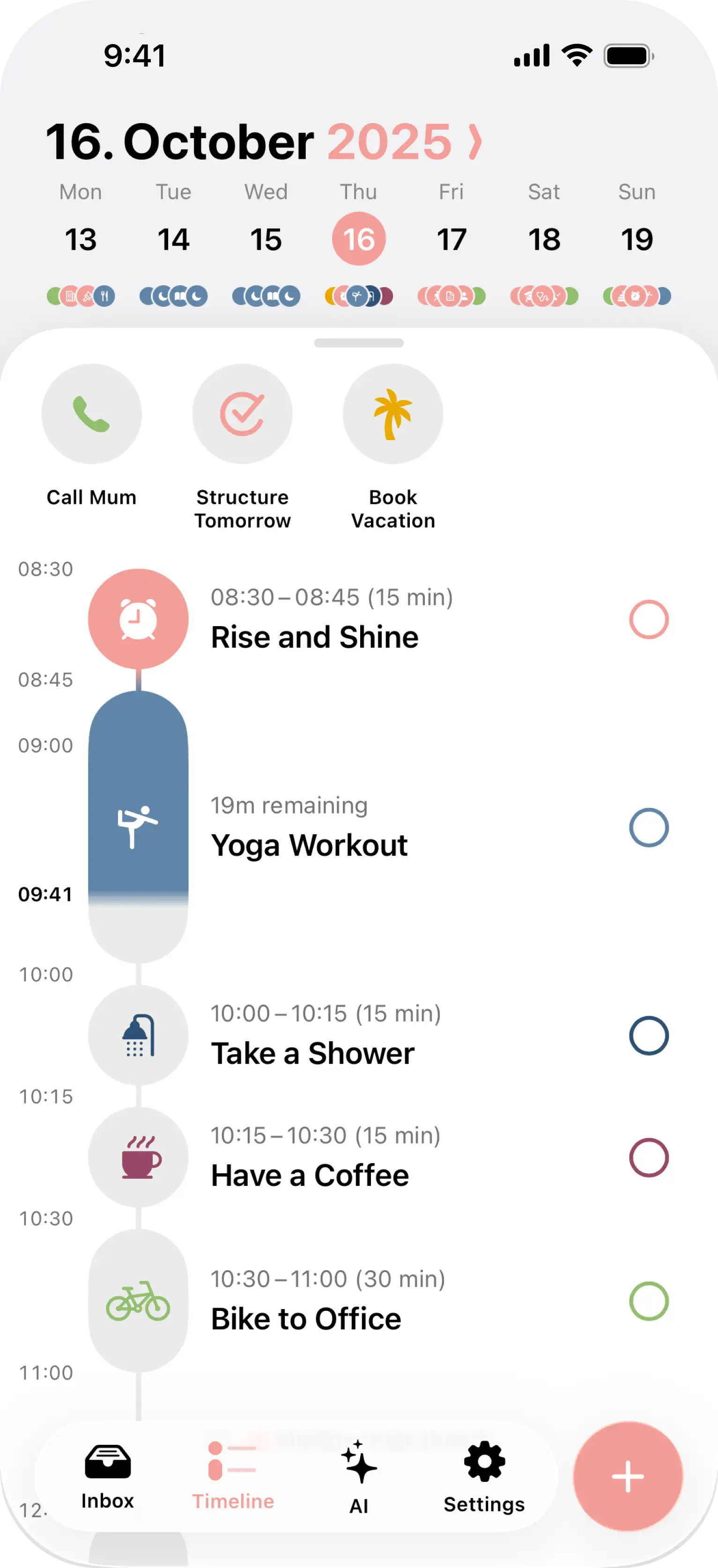
Visual day planner that puts tasks and calendar events on one timeline
Our verdict
#7 of 10 in To-do list apps for iPhone · Time blocking on a visual timeline
Pros
- The clearest view of your day by the hour
- Live Activity shows the current task on the lock screen
- A one-time lifetime option
Cons
- No projects or lists for a long backlog
- Repeating tasks and calendar import need Pro
Structured is a day planner from unorderly GmbH that places tasks, calendar events and routines on a single drag-and-drop timeline, and many people use it as a to-do app. The free version has a task Inbox, sub-tasks with notes, color coding, widgets, Live Activities and a focus timer. Structured Pro adds recurring tasks, Apple Calendar, Google Calendar and Apple Reminders import, AI day planning, Replan and custom notifications. It runs on iPhone, iPad, Apple Watch and Mac, with Android and web versions that have fewer features, and syncs through its own Structured Cloud or iCloud. It is a proprietary app for personal use with no sharing or collaboration, and Pro is sold monthly, yearly or as a lifetime purchase.
What users say
Evidence ↓App Store reviewers, many of them people with ADHD, praise the visual timeline, the Inbox for capturing tasks to schedule later and the one-time lifetime purchase, and the US App Store shows 4.8 out of 5 from 169K ratings. The critical views come from a competitor's review and a second-hand quote of one reviewer. They say there is no collaboration, sync between devices has been unreliable, and Android and web lag behind iOS. One reviewer also wants tasks to bump forward automatically instead of being slid by hand. These are individual views and the competitor's blog is a vendor claim.
Rankings and alternatives
- To-do list apps for iPhone #7 of 10 Time blocking on a visual timeline
- Todoist #1 Best all-rounder across iPhone, Windows, and Android
- TickTick #2 Calendar, habits, and focus timer in one app
- Apple Reminders #3 Free and already on your iPhone
iPhone to-do list apps scores
Evaluated Nov 17, 2026 Evidence ↓- Pleasant and quick to use · counts double 4
4/5 means: Clean and easy to pick up, with minor complaints such as busy screens or upgrade prompts
US App Store shows 4.8 from 169K ratings and an Editors' Choice blurb, and reviewers praise the calm timeline. A competitor's review reports sync problems and lag on busy days, and one user must hand-slide tasks to fix overlaps, so not the top level.
- Fast capture 3
3/5 means: Several system shortcuts (widgets, Siri, Watch), but dates are picked by hand or typed dates are a beta
Widgets, Live Activities, an Apple Watch app, Shortcuts and Siri exist, and AI voice capture is Pro. Typed dates, times and repeats are only an opt-in beta. Share sheet support was not found.
- Reminders that get your attention 3
3/5 means: Time alerts with flexible repeats, but no location alerts and nothing that repeats until you act
Pro adds custom notifications, morning planning and overdue reminders, and recurring tasks. How flexible the repeats are rests on general knowledge. No location reminders or alerts that repeat until you act were found.
- Organizing lots of tasks 1
1/5 means: A single inbox or list of reminders, with no lists or projects of your own
Tasks live on the day's timeline or in a single Inbox, with sub-tasks, colors and icons, but no lists or projects of your own, tags or saved filters, which is the scale's lowest level. This rests on the app's design as the vendor describes it and on general knowledge.
- Planning your day and week 5
5/5 means: All of 4 plus a calendar grid with time blocking
A drag-and-drop timeline with time blocking is the core. Pro shows Apple Calendar, Google Calendar and Reminders items beside tasks, and the site mentions week and month views.
- Devices it works on 4
4/5 means: Apple devices plus a web version or Windows or Android apps with clear gaps, or broad coverage missing a Mac or Watch app
iPhone, iPad, Mac and Apple Watch sync, and Android and web versions exist but lag on Pro and AI features. There is no Windows app.
- Cost over three years 3
3/5 means: $40 to $100
Lifetime is $99.99; three years of the yearly plan is about $89.97 at the $29.99 figure ($29.99 x 3), though the US yearly tier is unresolved among $9.99 to $49.99. Either figure falls in the $40 to $100 band, assuming one Pro purchase covers iPhone and Mac.
- Sharing lists with others · counts half 1
1/5 means: No shared lists
A competitor's review says there is no collaboration, shared lists or assignment, and no vendor feature list shows any.
Pricing
- Free Free Timeline planner, Inbox, sub-tasks, color coding, widgets, Live Activities, focus timer and sync across Apple devices. No recurring tasks, calendar or Reminders import, or AI planning.
- Pro Yearly $29.99 /year The US App Store list shows several yearly Pro tiers from $9.99 to $49.99 without saying which applies; $29.99 is the figure a Sep 2026 review gives. Check the in-app paywall. A Sep 2026 review reports a 3-day free trial.
- Pro Monthly $2.99 /month The US App Store list shows monthly tiers of $2.99, $6.99 and $7.99; $2.99 is the figure a Sep 2026 review gives. In some regions the vendor offers a 12-month commitment plan instead.
- Pro Lifetime $99.99 one-time One-time purchase listed on the US App Store. Earlier listings in other pages show lower or regional prices, so it varies by region and time.
Prices checked Nov 17, 2026.
Evidence and sources
What users say
Summary 5 quotes
-
Structured pulls in your Apple Calendar, Google Calendar, and Apple Reminders so everything shows up on one timeline instead of three separate apps. When it works, it's seamless. When it doesn't, it's the single most common complaint attached to this app.
blog.saner.ai/structured-review · published · checked -
The app is personal-only. There's no collaboration, no shared calendars, and no way to assign a task to someone else, which rules it out for teams or even simple household coordination.
blog.saner.ai/structured-review · published · checked -
I have so many fleeting thoughts thoughout the day and sometimes those thoughts have nothing to do with what I am currently working on. When I get the random thought about needing to order groceries some time in the next week or pay a bill before the end of the month, I can quickly create a task in the app and leave it in the "Inbox" space. Then when I am ready and decide what day and time I want to schedule that task for I can go back in and edit that task and schedule it where I want it.
Brianna Srader, App Store reviewer with ADHD who uses it on a Mac for work · apps.apple.com/us/app/structured-daily-planner-todo/id1499198946 · published · checked -
I enter things into my Apple Calendar and then use Structured to check things off through the day, so I have noticed two items which might improve this further: I wish it could pull travel time from my Calendar, so that I don't add tasks into space where I need to be driving; and it would be nice to be able to add an unexpected event or task (let's say run to the grocery store for 30 mins) and have everything bump forward accordingly, rather than having to hand slide it to eliminate overlaps.
skc7, App Store reviewer with a 5-star review · apps.apple.com/us/app/structured-daily-planner-todo/id1499198946 · checked -
Where it falls short is collaboration and cross-platform support. If you work in a team or need Windows and Android apps, look elsewhere
Dave Swift, reviewer at daveswift.com (rated it 8 out of 10) · blog.saner.ai/structured-review · published · checked
iPhone to-do list apps scores
Pleasant and quick to use 4 quotes
-
4.8
apps.apple.com/us/app/structured-daily-planner-todo/id1499198946 · checked -
Structured pulls in your Apple Calendar, Google Calendar, and Apple Reminders so everything shows up on one timeline instead of three separate apps. When it works, it's seamless. When it doesn't, it's the single most common complaint attached to this app.
blog.saner.ai/structured-review · published · checked -
I have so many fleeting thoughts thoughout the day and sometimes those thoughts have nothing to do with what I am currently working on. When I get the random thought about needing to order groceries some time in the next week or pay a bill before the end of the month, I can quickly create a task in the app and leave it in the "Inbox" space. Then when I am ready and decide what day and time I want to schedule that task for I can go back in and edit that task and schedule it where I want it.
Brianna Srader, App Store reviewer with ADHD who uses it on a Mac for work · apps.apple.com/us/app/structured-daily-planner-todo/id1499198946 · published · checked -
I enter things into my Apple Calendar and then use Structured to check things off through the day, so I have noticed two items which might improve this further: I wish it could pull travel time from my Calendar, so that I don't add tasks into space where I need to be driving; and it would be nice to be able to add an unexpected event or task (let's say run to the grocery store for 30 mins) and have everything bump forward accordingly, rather than having to hand slide it to eliminate overlaps.
skc7, App Store reviewer with a 5-star review · apps.apple.com/us/app/structured-daily-planner-todo/id1499198946 · checked
Fast capture 5 quotes
-
FREE FEATURES - Visual day planner with an intuitive drag-and-drop timeline - Inbox to capture ideas fast and sort them later - Syncs across iPhone, iPad, Apple Watch, and Mac - Break big projects into sub-tasks with notes - Pomodoro focus timer, Live Activities, and interactive widgets - Color-coding and hundreds of icons to personalize your schedule
apps.apple.com/us/app/structured-daily-planner-todo/id1499198946 · checked -
STRUCTURED PRO - Connect your calendars and Reminders for a complete daily schedule organizer - Build recurring tasks and routines - AI-powered day planning: draft your schedule in seconds - Replan: automatically reschedules missed or forgotten tasks - Custom notifications to match your workflow
apps.apple.com/us/app/structured-daily-planner-todo/id1499198946 · checked -
Natural Language Task Creation detects dates, times, durations, and repeating schedules in English, German, French, and Spanish.
apps.apple.com/us/app/structured-daily-planner-todo/id1499198946 · checked -
Ask Siri AI to create and update tasks in Structured.
apps.apple.com/us/app/structured-daily-planner-todo/id1499198946 · checked -
Structured pulls in your Apple Calendar, Google Calendar, and Apple Reminders so everything shows up on one timeline instead of three separate apps. When it works, it's seamless. When it doesn't, it's the single most common complaint attached to this app.
blog.saner.ai/structured-review · published · checked
Reminders that get your attention 2 quotes
-
STRUCTURED PRO - Connect your calendars and Reminders for a complete daily schedule organizer - Build recurring tasks and routines - AI-powered day planning: draft your schedule in seconds - Replan: automatically reschedules missed or forgotten tasks - Custom notifications to match your workflow
apps.apple.com/us/app/structured-daily-planner-todo/id1499198946 · checked -
Planning reminders can now include separate morning planning and overdue reminders, so you can get the right nudge at the right time.
apps.apple.com/us/app/structured-daily-planner-todo/id1499198946 · checked
Organizing lots of tasks 3 quotes
-
FREE FEATURES - Visual day planner with an intuitive drag-and-drop timeline - Inbox to capture ideas fast and sort them later - Syncs across iPhone, iPad, Apple Watch, and Mac - Break big projects into sub-tasks with notes - Pomodoro focus timer, Live Activities, and interactive widgets - Color-coding and hundreds of icons to personalize your schedule
apps.apple.com/us/app/structured-daily-planner-todo/id1499198946 · checked -
Structured plans your day, but it doesn't touch your notes, your inbox, or your documents.
blog.saner.ai/structured-review · published · checked -
I have so many fleeting thoughts thoughout the day and sometimes those thoughts have nothing to do with what I am currently working on. When I get the random thought about needing to order groceries some time in the next week or pay a bill before the end of the month, I can quickly create a task in the app and leave it in the "Inbox" space. Then when I am ready and decide what day and time I want to schedule that task for I can go back in and edit that task and schedule it where I want it.
Brianna Srader, App Store reviewer with ADHD who uses it on a Mac for work · apps.apple.com/us/app/structured-daily-planner-todo/id1499198946 · published · checked
Planning your day and week 3 quotes
-
FREE FEATURES - Visual day planner with an intuitive drag-and-drop timeline - Inbox to capture ideas fast and sort them later - Syncs across iPhone, iPad, Apple Watch, and Mac - Break big projects into sub-tasks with notes - Pomodoro focus timer, Live Activities, and interactive widgets - Color-coding and hundreds of icons to personalize your schedule
apps.apple.com/us/app/structured-daily-planner-todo/id1499198946 · checked -
STRUCTURED PRO - Connect your calendars and Reminders for a complete daily schedule organizer - Build recurring tasks and routines - AI-powered day planning: draft your schedule in seconds - Replan: automatically reschedules missed or forgotten tasks - Custom notifications to match your workflow
apps.apple.com/us/app/structured-daily-planner-todo/id1499198946 · checked -
Structured pulls in your Apple Calendar, Google Calendar, and Apple Reminders so everything shows up on one timeline instead of three separate apps. When it works, it's seamless. When it doesn't, it's the single most common complaint attached to this app.
blog.saner.ai/structured-review · published · checked
Devices it works on 5 quotes
-
FREE FEATURES - Visual day planner with an intuitive drag-and-drop timeline - Inbox to capture ideas fast and sort them later - Syncs across iPhone, iPad, Apple Watch, and Mac - Break big projects into sub-tasks with notes - Pomodoro focus timer, Live Activities, and interactive widgets - Color-coding and hundreds of icons to personalize your schedule
apps.apple.com/us/app/structured-daily-planner-todo/id1499198946 · checked -
Requires iOS 18.0 or later.
apps.apple.com/us/app/structured-daily-planner-todo/id1499198946 · checked -
Structured Cloud is now out of beta and is the default sync option for new users. If you already use Structured and want to switch, you can now do that anytime in Settings > Structured Cloud.
apps.apple.com/us/app/structured-daily-planner-todo/id1499198946 · checked -
Without Pro, you can still use almost every feature of Structured for free, and the app will never include ads or sell your data.
help.structured.app/en/articles/324674 · checked -
Structured pulls in your Apple Calendar, Google Calendar, and Apple Reminders so everything shows up on one timeline instead of three separate apps. When it works, it's seamless. When it doesn't, it's the single most common complaint attached to this app.
blog.saner.ai/structured-review · published · checked
Cost over three years 3 quotes
-
Structured Pro (Lifetime) $99.99
apps.apple.com/us/app/structured-daily-planner-todo/id1499198946 · checked -
Structured Pro is available as a monthly_*_ or yearly subscription or a lifetime purchase.
help.structured.app/en/articles/324674 · checked -
Structured pulls in your Apple Calendar, Google Calendar, and Apple Reminders so everything shows up on one timeline instead of three separate apps. When it works, it's seamless. When it doesn't, it's the single most common complaint attached to this app.
blog.saner.ai/structured-review · published · checked
Sharing lists with others 1 quote
-
The app is personal-only. There's no collaboration, no shared calendars, and no way to assign a task to someone else, which rules it out for teams or even simple household coordination.
blog.saner.ai/structured-review · published · checked
Facts
Runs on 3 quotes
-
FREE FEATURES - Visual day planner with an intuitive drag-and-drop timeline - Inbox to capture ideas fast and sort them later - Syncs across iPhone, iPad, Apple Watch, and Mac - Break big projects into sub-tasks with notes - Pomodoro focus timer, Live Activities, and interactive widgets - Color-coding and hundreds of icons to personalize your schedule
apps.apple.com/us/app/structured-daily-planner-todo/id1499198946 · checked -
Requires iOS 18.0 or later.
apps.apple.com/us/app/structured-daily-planner-todo/id1499198946 · checked -
Without Pro, you can still use almost every feature of Structured for free, and the app will never include ads or sell your data.
help.structured.app/en/articles/324674 · checked
Needs 1 quote
-
Requires iOS 18.0 or later.
apps.apple.com/us/app/structured-daily-planner-todo/id1499198946 · checked
Users 2 quotes
-
Trusted by 1.5 million active users
apps.apple.com/us/app/structured-daily-planner-todo/id1499198946 · checked -
600K+ tasks daily 15M+ downloads 500K+ pro users 30+ languages 400K+ 5-star reviews
structured.app · checked
Pricing
apps.apple.com/us/app/structured-daily-planner-todo/id1499198946 · checked