
Tasks.org
Open-source Android to-do app with reminders, subtasks and Google Tasks or Microsoft To Do sync
Our verdict
#6 of 8 in Free to-do list apps · Open source and offline, for Android
What it does
- Works offline with no account
- Nested subtasks, tags, and custom filters
- Location reminders and flexible repeats, free
- Optional sync with Google Tasks, Microsoft To Do, or your own CalDAV server
Pros
- Your tasks stay on your phone unless you choose a sync
- Open source, with no ads
- Organizing tools that rival paid apps
Cons
- Android only, with no iPhone app
- Private sync and the desktop app need the paid tier
- Telemetry is on until you turn it off
- Choose if:
- You use Android and want your to-do list to stay off the cloud
- Skip if:
- You need your tasks on an iPhone or a computer for free without Google or Microsoft
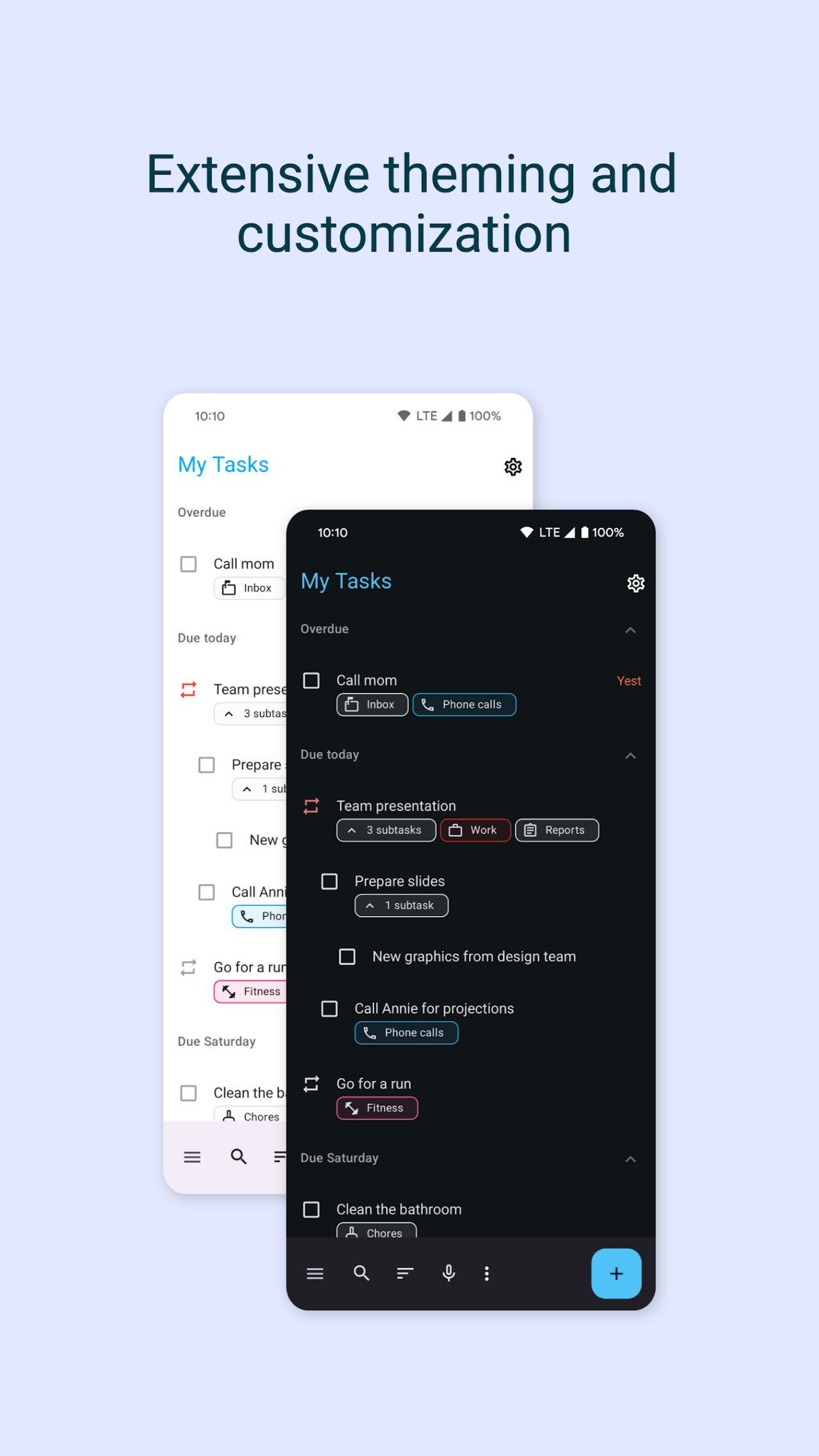
Tasks.org is an open-source to-do and reminders app for Android, built on the code of the discontinued Astrid app and licensed under GPLv3. It offers unlimited tasks, lists, tags, nested subtasks, filters, flexible repeating tasks, time and location reminders, widgets and voice entry, and works offline with no account. The free app syncs with Google Tasks and Microsoft To Do; other sync options (DAVx5, CalDAV, EteSync) and the desktop app need a paid subscription that starts at $0.99 a year, and the Tasks.org Cloud plan adds its own sync, list sharing and email-to-task. A desktop version is in alpha, and there is no iPhone app. It is available on Google Play and F-Droid.
What users say
Evidence ↓Play Store users rate it 4.6 out of 5 from about 13.7K reviews. A long-time user praises its simple interface; another worries that growing settings erode that simplicity. One reviewer found that telemetry is on by default. These are individual views, not a sampled measure.
Rankings and alternatives
- Free to-do list apps #6 of 8 Open source and offline, for Android
- Todoist #1 Fastest capture and best free sharing
- TickTick #2 Most features on a free plan
- Microsoft To Do #3 Free with no limits or upgrade prompts
Free to-do list apps scores
Evaluated Nov 17, 2026 Evidence ↓- Pleasant and quick to use · counts double 4
4/5 means: Clean and easy to pick up, with minor complaints such as busy screens or upgrade prompts
Play rating 4.6 from 13.7K reviews and a long-time user praising a simple interface; a small number of reviewers note settings creep and fiddly date-then-time picking. No heavy upgrade nagging.
- Same tasks on every device, free · counts double 2
2/5 means: One maker's devices only (Apple devices, or Android), with at most a limited web version for the rest
The free app is Android only (plus Wear OS); tasks reach other devices only through Google Tasks or Microsoft To Do sync, whose own apps and web are not Tasks.org. Tasks.org's desktop app (alpha) and Cloud sync are paid; the $0.99/year tier unlocks the desktop app and CalDAV, which would move this toward 3. Level 1 is arguable.
- Reminders and repeating tasks, free 5
5/5 means: Time alerts, flexible repeats including repeats counted from when you finish, and location alerts or alerts that ring until you act
Free tier lists recurring tasks, notifications and location reminders. From knowledge, repeats can be counted from completion and notifications can be set to repeat persistently, but I did not verify these on a fetched page.
- What the free plan holds back 4
4/5 means: Everything most people use is free; a few extras or sync options are paid, with little nagging
Unlimited tasks, lists and reminders, no ads; held back are CalDAV/DAVx5/EteSync sync, desktop, some theming, sharing and email-to-task. The $0.99/year tier would unlock everything except Cloud features, which would move this to 5. Telemetry is on by default.
- Fast capture 3
3/5 means: Several shortcuts (widgets, voice, sharing), but dates are picked by hand
Widgets, voice entry (title only, details entered after) and Android sharing exist; dates are picked by hand, with no typed natural-language dates found. Email-to-task is Cloud only.
- Organizing lots of tasks 5
5/5 means: Lists in folders, sections or tags, nested subtasks, start dates, and saved filters or custom views
Lists, tags, unlimited-depth subtasks, filters, search and manual sorting are free; from knowledge it also has start dates, custom saved filters and list grouping, not verified on a fetched page.
- Planning your day and week 3
3/5 means: Today and upcoming views, without tasks on a calendar or your events beside them
From knowledge there are a Today filter and date-grouped lists (overdue, due today, later) but no in-app calendar view of tasks; not verified on a fetched page.
- Sharing lists for free · counts half 2
2/5 means: Sharing only through a paid plan
Friends and Family list sharing is part of the paid Tasks.org Cloud plan; the free app has none. The $0.99/year tier does not include it.
Pricing
- Free Free Android app with no account or internet needed, unlimited tasks, lists, tags and reminders, recurring tasks, location reminders, and sync with Google Tasks and Microsoft To Do. No ads. Some customization (such as list colors) is locked, per a 2025 review of the Play version.
- Name-your-price $0.99 /year Pay what you want from $0.99 per year, or sponsor on GitHub for $1 per year. Unlocks all in-app features including self-hosted sync with DAVx5, CalDAV and EteSync, custom themes and icons, and Tasks.org for desktop.
- Tasks.org Cloud $29.99 /year Shown as $2.49 per month billed annually ($29.99 per year); GitHub sponsorship is $30 per year. Adds the name-your-price features plus Tasks.org Cloud sync between Android and desktop, Friends and Family list sharing, email-to-task, and an Apple Reminders connection on iOS.
Prices checked Nov 17, 2026.
Evidence and sources
What users say
Summary 4 quotes
-
13.7K reviews
play.google.com/store/apps/details · checked -
With its simple interface and useful features, it's the best to do list manager I've used on Android. Been using it since 2014 when it was called Astrid.
play.google.com/store/apps/details · checked -
I do worry that as the feature list and number of settings grow, it could be moving away from the simplicity that originally made it better than the alternatives I have used.
play.google.com/store/apps/details · checked -
Another thing that I didn't like about Tasks.org was that telemetry was enabled by default. Of course, it can be disabled from the settings (from the About page), but it would've been better if the app asked me before enabling that.
Sourav Rudra, reviewer at It's FOSS · itsfoss.com/news/tasks-org · published · checked
Free to-do list apps scores
Pleasant and quick to use 3 quotes
-
13.7K reviews
play.google.com/store/apps/details · checked -
With its simple interface and useful features, it's the best to do list manager I've used on Android. Been using it since 2014 when it was called Astrid.
play.google.com/store/apps/details · checked -
I do worry that as the feature list and number of settings grow, it could be moving away from the simplicity that originally made it better than the alternatives I have used.
play.google.com/store/apps/details · checked
Same tasks on every device, free 5 quotes
-
Tasks.org is a free and open-source task management app for Android. It supports CalDAV synchronization, recurring tasks, notifications, location-based reminders, custom filters, and much more.
tasks.org/docs · checked -
Connect to Google Tasks and Microsoft To Do
tasks.org/pricing · checked -
Self-hosted synchronization with DAVx⁵, CalDAV, and EteSync
tasks.org/pricing · checked -
Instant sync between Android and desktop
tasks.org/pricing · checked -
Desktop (alpha): tasks.org/download
github.com/tasks/tasks · checked
Reminders and repeating tasks, free 2 quotes
-
Location-Based Reminders: Set reminders based on arrival or departure from specific locations.
play.google.com/store/apps/details · checked -
Manage your tasks on Android for free and connect to popular cloud services.
tasks.org/pricing · checked
What the free plan holds back 6 quotes
-
Tasks.org respects your privacy. Enjoy an ad-free experience with no ad or location tracking.
play.google.com/store/apps/details · checked -
Manage your tasks on Android for free and connect to popular cloud services.
tasks.org/pricing · checked -
Self-hosted synchronization with DAVx⁵, CalDAV, and EteSync
tasks.org/pricing · checked -
$2.49/month Billed annually ($29.99/year)
tasks.org/pricing · checked -
Only sync with Google Tasks was available in the free version.
Sourav Rudra, reviewer at It's FOSS · itsfoss.com/news/tasks-org · published · checked -
Another thing that I didn't like about Tasks.org was that telemetry was enabled by default. Of course, it can be disabled from the settings (from the About page), but it would've been better if the app asked me before enabling that.
Sourav Rudra, reviewer at It's FOSS · itsfoss.com/news/tasks-org · published · checked
Fast capture 3 quotes
-
Customizable Widgets: Access your tasks at a glance with highly customizable widgets.
play.google.com/store/apps/details · checked -
$2.49/month Billed annually ($29.99/year)
tasks.org/pricing · checked -
It was also possible to create tasks using my voice, simply by tapping on the microphone logo and starting to speak. Still, I had to enter the rest of the details in the next step.
Sourav Rudra, reviewer at It's FOSS · itsfoss.com/news/tasks-org · published · checked
Organizing lots of tasks 2 quotes
-
Conquer Complex Projects: Organize your tasks with nested, collapsible subtasks of unlimited depth.
play.google.com/store/apps/details · checked -
Manage your tasks on Android for free and connect to popular cloud services.
tasks.org/pricing · checked
Sharing lists for free 1 quote
-
$2.49/month Billed annually ($29.99/year)
tasks.org/pricing · checked
Facts
License 1 quote
-
Tasks is free software, licensed under the GNU GPLv3
tasks.org · checked
Runs on 3 quotes
-
Tasks.org is a free and open-source task management app for Android. It supports CalDAV synchronization, recurring tasks, notifications, location-based reminders, custom filters, and much more.
tasks.org/docs · checked -
Automatic Backups: Secure your data with automatic backups to internal storage, Google Drive, and the Android Backup Service.
play.google.com/store/apps/details · checked -
Desktop (alpha): tasks.org/download
github.com/tasks/tasks · checked
Users 1 quote
-
500K+
play.google.com/store/apps/details · checked
More from the sources
Pricing 1 quote
-
Choose your own subscription price. Unlocks all in-app features.
tasks.org/pricing · checked
Features 3 quotes
-
Use offline, self-host, or setup EteSync for end-to-end encryption. There are no ads and your data is never shared with anyone
tasks.org · checked -
Sync with Tasks.org Cloud, Google Tasks, DAVx⁵, Microsoft To Do, CalDAV, EteSync, and DecSync CC, or work completely offline.
play.google.com/store/apps/details · checked -
Later, I found out that if I had gone for the F-Droid version, I would've had access to all the features of Tasks.org.
Sourav Rudra, reviewer at It's FOSS · itsfoss.com/news/tasks-org · published · checked
Pricing
tasks.org/pricing · checked