
Freenotes
Handwriting notes and PDF annotation app for iPad with AI and audio recording
Our verdict
#7 of 9 in Note-taking apps for iPad · Free to start, with ads and a note cap
Pros
- Planner-friendly PDF links
- Handwriting search and audio with transcripts
Cons
- Ads and a note cap on the free version
- Confusing, overlapping paid options
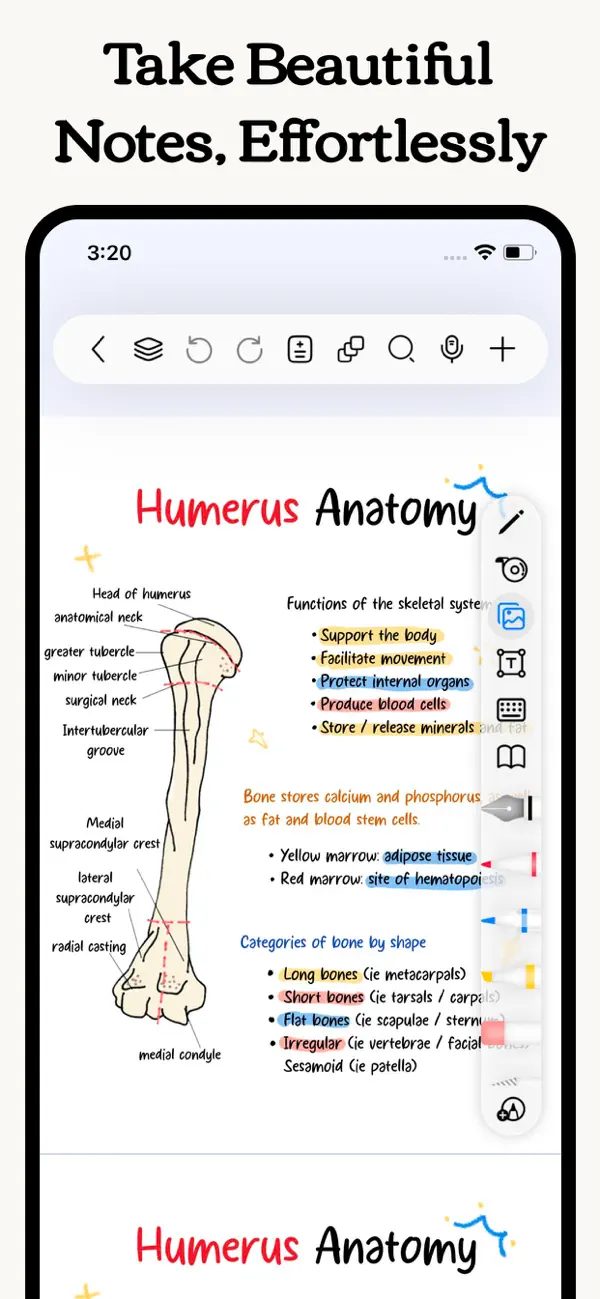
Freenotes is a handwriting-first note-taking and PDF annotation app for iPad, also on iPhone, Apple Silicon Macs and Apple Vision, from Singapore-based Freenotes AI Pte. Ltd. It offers pressure-sensitive pens, an infinite canvas, handwriting OCR search, hyperlinked planner support, audio recording with transcription and AI summaries, and iCloud and Google Drive backup. The app is free with ads, but newer free users face a cap on how many notes they can create, and AI tools, ad removal and more storage sit behind purchases. It is closed-source.
What users say
Evidence ↓Early App Store reviewers praised it as a clean, free alternative with no notebook limit, a view that is now dated. A reviewer from late 2025 and another more recent one say free users now hit a note cap (35 created, deletions counted), ads and AI upsells; one college student says recordings force on transcription. One blogger notes the vendor's website says little, which may worry people storing important notes. These are individual reviews, not a representative sample.
Rankings and alternatives
- Note-taking apps for iPad #7 of 9 Free to start, with ads and a note cap
- Goodnotes #1 Best all-rounder for class notes and PDFs
- Notability #2 For recording lectures alongside your notes
- Noteshelf 3 #3 Nicest pens for a one-time price


iPad handwritten note-taking apps scores
Evaluated Nov 17, 2026 Evidence ↓- Writing feel · counts double 4
4/5 means: Smooth, natural ink and a good set of pens and editing tools, with minor complaints
Pressure-sensitive pens, stabilization, palm rejection, lasso, tape and ruler, praised by reviewers (4.7 from 66K ratings), but shape snapping is unreliable and there are no independent hands-on tests; not clearly a level-5 favorite.
- Marking up PDFs and slides 4
4/5 means: Full PDF markup with page management, with small gaps
Highlight, comment, add and rotate pages, hyperlinks and outlines kept on export; annotations flatten and large files may lag, and it is not known as a leading PDF app.
- Finding notes later 4
4/5 means: Searches handwriting and typed text across the whole library
Handwriting OCR search across notebooks plus folders, nested folders and outlines; search of text inside imported PDFs and scans is not documented.
- Recording lectures 3
3/5 means: Records audio with a transcript, but playback isn't tied to your handwriting
Records with transcription and AI summaries, with replay from transcript text, but playback is not tied to handwriting. Whether the transcript is in the unlimited-notes plan (Plus) rather than Pro is not documented.
- Sync and other devices 3
3/5 means: Syncs between iPad, iPhone and Mac
iCloud and Google Drive sync across iPad, iPhone and Apple Silicon Mac. An Android account is mentioned in release notes, but shared notes there are unconfirmed, and one competitor says Apple-only.
- Cost of unlimited notes 3
3/5 means: $20 to $50 over four years
Lifetime Plus is $29.99 one-time versus $9.99 per year x 4 = $39.96, so $29.99. It is not documented which purchase lifts the free note cap; Remove Ads is also $29.99.
- Turning handwriting into text · counts half 3
3/5 means: Converts selected handwriting, with accuracy complaints
Lasso conversion to editable text plus handwriting beautification, but no accuracy evidence and fewer editing options than leaders.
Pricing
- Free Free Shows ads. Per reviewers, new free users have a capped note count (one reviewer says 35 notes created, including deleted ones); older 2025 third-party reviews list a watermark on exported annotated PDFs, 3 AI questions a day and 500 MB cloud storage, which may be out of date.
- Plus Yearly $9.99 /year Ad-free and member templates per the changelog as read by a competitor. Also sold weekly at $1.99 per week.
- Plus Lifetime $29.99 one-time
- Remove Ads $29.99 one-time , extra Ad removal only. Earlier third-party reports show $9.99 and $6.99, so the price has changed.
- Pro Yearly $39.99 /year Adds AI summaries, PDF chat, homework helper, study companion and flashcards per the competitor's table. Also sold weekly at $6.99 per week, and one competitor table lists $19.99 per month.
Prices checked Nov 17, 2026.
Evidence and sources
What users say
Summary 4 quotes
-
I would continue using the app with these restrictions & wouldn’t mind much, except that the notes limit INCLUDES DELETIONS. 35 max, not just 35 you can keep in your library, 35 that you are allowed to create EVER before you have to start paying a subscription.
Vickie W3, App Store reviewer, long-time user · apps.apple.com/us/app/freenotes-ai-notes-taking/id6464237904 · published · checked -
I rely heavily on the recording audio feature, but every time I try to record, it automatically turns on transcription. And I can’t make it not automatically turn on.
softt.e, App Store reviewer, college student · apps.apple.com/us/app/freenotes-ai-notes-taking/id6464237904 · checked -
The design of the user interface is very nice and clean (very neat), great job on the design. I was so surprised when I first double tapped with 2 fingers and it does the undo for me automatically!
Hon.T, App Store reviewer · apps.apple.com/us/app/freenotes-ai-notes-taking/id6464237904 · published · checked -
Freenotes is feature-rich, but its official website provides limited information, which may raise some concerns when it comes to storing important data. Still, if you’re looking for a free option, it may be worth giving it a try.
Arekore author, blogger who says they use Noteshelf 3 · en.arekore.app/productivity/best-handwriting-note-apps-for-ipad · published · checked
iPad handwritten note-taking apps scores
Writing feel 5 quotes
-
Quick Search via OCR Search through your handwritten scripts easily using accurate text recognition. PDF Annotation Highlight, underline, and add comments to documents with custom pen styles. Infinite Canvas Sketch ideas or mind map on a whiteboard that expands as you work. Apple Pencil Pro Support Experience low-latency writing that feels like real paper. Shape Recognition Turn rough drawings into clean, perfect geometric shapes for diagrams. Hyperlink Support Navigate through digital planners using clickable internal and external links.
apps.apple.com/us/app/freenotes-ai-notes-taking/id6464237904 · checked -
The design of the user interface is very nice and clean (very neat), great job on the design. I was so surprised when I first double tapped with 2 fingers and it does the undo for me automatically!
Hon.T, App Store reviewer · apps.apple.com/us/app/freenotes-ai-notes-taking/id6464237904 · published · checked -
Shape and diagram tools · ✓Shapes, connectors, text inside shapes, and Quick Diagramming · !Ruler and line tools, but fewer diagram controls and no shape adjustment after creation
goodnotes.com/blog/goodnotes-vs-freenotes · published · checked -
Fitting Figure” doesn't consistently convert shapes. No resizing or editing options. Annotations flatten automatically; editable layers cannot be kept. Fixed spacing for dotted lines; no dashed line options. Lacks fill patterns and border controls. Subfolders only appear in sidebars, complicating organization. You cannot link definitions in notes. Colors have no descriptive names; users rely on hex codes. It may crash or lag with large files.
updf.com/annotate-pdf/freenotes-review · checked -
4.7 out of 5 66K Ratings
apps.apple.com/us/app/freenotes-ai-notes-taking/id6464237904 · checked
Marking up PDFs and slides 3 quotes
-
Quick Search via OCR Search through your handwritten scripts easily using accurate text recognition. PDF Annotation Highlight, underline, and add comments to documents with custom pen styles. Infinite Canvas Sketch ideas or mind map on a whiteboard that expands as you work. Apple Pencil Pro Support Experience low-latency writing that feels like real paper. Shape Recognition Turn rough drawings into clean, perfect geometric shapes for diagrams. Hyperlink Support Navigate through digital planners using clickable internal and external links.
apps.apple.com/us/app/freenotes-ai-notes-taking/id6464237904 · checked -
Freenotes supports clickable internal and external links, which is particularly useful for hyperlinked textbooks, planners, and study PDFs.
goodnotes.com/blog/goodnotes-vs-freenotes · published · checked -
Fitting Figure” doesn't consistently convert shapes. No resizing or editing options. Annotations flatten automatically; editable layers cannot be kept. Fixed spacing for dotted lines; no dashed line options. Lacks fill patterns and border controls. Subfolders only appear in sidebars, complicating organization. You cannot link definitions in notes. Colors have no descriptive names; users rely on hex codes. It may crash or lag with large files.
updf.com/annotate-pdf/freenotes-review · checked
Finding notes later 3 quotes
-
Quick Search via OCR Search through your handwritten scripts easily using accurate text recognition. PDF Annotation Highlight, underline, and add comments to documents with custom pen styles. Infinite Canvas Sketch ideas or mind map on a whiteboard that expands as you work. Apple Pencil Pro Support Experience low-latency writing that feels like real paper. Shape Recognition Turn rough drawings into clean, perfect geometric shapes for diagrams. Hyperlink Support Navigate through digital planners using clickable internal and external links.
apps.apple.com/us/app/freenotes-ai-notes-taking/id6464237904 · checked -
OCR search can recognize handwriting in notebooks, including notes you add while working through PDFs, so you can find something you wrote earlier without manually scanning every page.
goodnotes.com/blog/goodnotes-vs-freenotes · published · checked -
Fitting Figure” doesn't consistently convert shapes. No resizing or editing options. Annotations flatten automatically; editable layers cannot be kept. Fixed spacing for dotted lines; no dashed line options. Lacks fill patterns and border controls. Subfolders only appear in sidebars, complicating organization. You cannot link definitions in notes. Colors have no descriptive names; users rely on hex codes. It may crash or lag with large files.
updf.com/annotate-pdf/freenotes-review · checked
Recording lectures 3 quotes
-
Mobile real‑time audio transcription has been upgraded! Capture important ideas while you listen, with AI‑powered refinement and accurate translation to quickly organize key points. Tap any text to replay the corresponding audio
apps.apple.com/us/app/freenotes-ai-notes-taking/id6464237904 · checked -
Freenotes can record, transcribe, and summarize lectures. But Goodnotes can help when reviewing them later because it syncs your handwriting to the audio timeline; tapping a note takes you to the exact point in the recording when you wrote it.
goodnotes.com/blog/goodnotes-vs-freenotes · published · checked -
I rely heavily on the recording audio feature, but every time I try to record, it automatically turns on transcription. And I can’t make it not automatically turn on.
softt.e, App Store reviewer, college student · apps.apple.com/us/app/freenotes-ai-notes-taking/id6464237904 · checked
Sync and other devices 4 quotes
-
iCloud & Google Drive Sync Securely back up your digital notebook to access your data anywhere.
apps.apple.com/us/app/freenotes-ai-notes-taking/id6464237904 · checked -
Requires iPadOS 15.5 or later.
apps.apple.com/us/app/freenotes-ai-notes-taking/id6464237904 · checked -
Cross-system subscription sync is here! Log in with the same account on iOS and Android to enjoy shared subscription benefits across both platforms.
apps.apple.com/us/app/freenotes-ai-notes-taking/id6464237904 · checked -
Goodnotes is the better fit if your studying moves beyond your iPad. You can keep the same library accessible across Apple devices, Windows, Android, Chromebooks, and the web, while Freenotes is good if you work only within the Apple ecosystem.
goodnotes.com/blog/goodnotes-vs-freenotes · published · checked
Cost of unlimited notes 3 quotes
-
Freenotes Yearly Plus Member $9.99 Freenotes Weekly Plus Member $1.99 Freenotes Weekly Pro Member $6.99 Freenotes Plus Member Lifetime $29.99 Freenotes Yearly Plus Member $9.99 Freenotes Yearly Pro Member $39.99 Freenotes Remove Ads $29.99
apps.apple.com/us/app/freenotes-ai-notes-taking/id6464237904 · checked -
I would continue using the app with these restrictions & wouldn’t mind much, except that the notes limit INCLUDES DELETIONS. 35 max, not just 35 you can keep in your library, 35 that you are allowed to create EVER before you have to start paying a subscription.
Vickie W3, App Store reviewer, long-time user · apps.apple.com/us/app/freenotes-ai-notes-taking/id6464237904 · published · checked -
Free (with ads) · Free · Free · Handwriting and PDF annotation still described as available without AI Plus · $1.99/week · $9.99/year · Ad-free / member templates per changelog Plus Lifetime · — · $29.99 one-time · Listed as “Freenotes Plus Member Lifetime” Remove Ads · — · $29.99 one-time · US App Store IAP, verified 2026-08-26 Pro (AI) · $19.99/month or $6.99/week · $39.99/year · AI summary, PDF chat, homework helper, study companion, flashcards
goodnotes.com/blog/goodnotes-vs-freenotes · published · checked
Turning handwriting into text 2 quotes
-
Freenotes can record, transcribe, and summarize lectures. But Goodnotes can help when reviewing them later because it syncs your handwriting to the audio timeline; tapping a note takes you to the exact point in the recording when you wrote it.
goodnotes.com/blog/goodnotes-vs-freenotes · published · checked -
Shape and diagram tools · ✓Shapes, connectors, text inside shapes, and Quick Diagramming · !Ruler and line tools, but fewer diagram controls and no shape adjustment after creation
goodnotes.com/blog/goodnotes-vs-freenotes · published · checked
Facts
License 1 quote
-
Free · In‑App Purchases · Designed for iPad. Not verified for macOS.
apps.apple.com/us/app/freenotes-ai-notes-taking/id6464237904 · checked
Runs on 3 quotes
-
Free · In‑App Purchases · Designed for iPad. Not verified for macOS.
apps.apple.com/us/app/freenotes-ai-notes-taking/id6464237904 · checked -
Requires iPadOS 15.5 or later.
apps.apple.com/us/app/freenotes-ai-notes-taking/id6464237904 · checked -
Cross-system subscription sync is here! Log in with the same account on iOS and Android to enjoy shared subscription benefits across both platforms.
apps.apple.com/us/app/freenotes-ai-notes-taking/id6464237904 · checked
Needs 1 quote
-
Requires iPadOS 15.5 or later.
apps.apple.com/us/app/freenotes-ai-notes-taking/id6464237904 · checked
Users 1 quote
-
Join over 1 million happy users transitioning to a smarter, paperless future.
apps.apple.com/us/app/freenotes-ai-notes-taking/id6464237904 · checked
More from the sources
Features 1 quote
-
Freenotes is an all-in-one workspace designed for students and professionals who want the natural feel of handwriting with the power of artificial intelligence.
apps.apple.com/us/app/freenotes-ai-notes-taking/id6464237904 · checked
Limits and known issues 3 quotes
-
The developer, Free Notes AI Note Taker LTD, indicated that the app’s privacy practices may include handling of data as described below.
apps.apple.com/us/app/freenotes-ai-notes-taking/id6464237904 · checked -
Cloud backup · ✓Google Drive, Dropbox, OneDrive, and WebDAV · !Only Google Drive backup available
goodnotes.com/blog/goodnotes-vs-freenotes · published · checked -
Free users see ads and can ask three questions daily (summaries, translations, AI chat). No access to advanced AI tools (like code debugging). Annotated PDFs have a “Created with Freenotes” watermark. The maximum image export resolution is 1080p. 500MB of cloud storage is available for notes and PDFs. No backup option for Google Drive or other services.
updf.com/annotate-pdf/freenotes-review · checked
Pricing
apps.apple.com/us/app/freenotes-ai-notes-taking/id6464237904 · checked