
Fritzing
Open-source PCB design app that turns a virtual breadboard into a schematic and a board layout, aimed at makers and Arduino users.
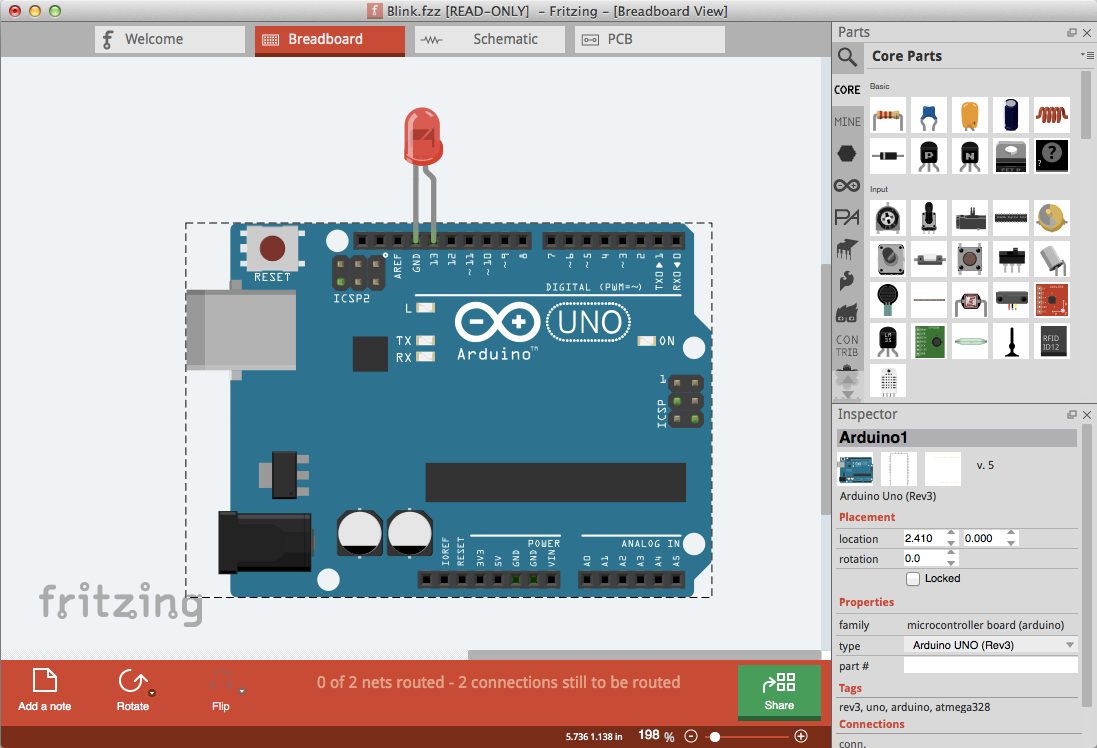
Our verdict
#6 of 9 in PCB design software for hobbyists · Turns a breadboard into a board
Pros
- Breadboard, schematic, and PCB views stay in sync
- Maker-friendly parts from Arduino, Adafruit, and SparkFun
- Gerber export and built-in ordering
Cons
- Limited to two copper layers and basic routing
- Custom parts are hard to make
- Official installers cost money
- Choose if:
- You're turning a breadboard project into a shield or a simple carrier board
Fritzing is a desktop electronic design automation application for makers, hobbyists and educators. It starts from a realistic breadboard view and keeps breadboard, schematic and PCB views in sync, with manual and automatic trace routing, a design rule check and Gerber export for sending boards to a fab. It ships with a large parts library including Arduino, Adafruit and SparkFun parts and a parts editor for custom parts. It runs on Windows, macOS and Linux. The source code is GPL v3 and free to build yourself, while the official ready-made installers are sold on the Fritzing website to fund development.
What users say
Evidence ↓Few practitioner accounts were found. One retailer staff reply on a forum calls it great for drawing breadboard diagrams and converting them to a PCB, with large maker parts libraries, but says it can be a little clunky, and points to KiCad as the stronger free alternative. A trade-press review (not a user) places it at simple to moderately complex boards rather than high-speed multilayer work.
Rankings and alternatives



Hobbyist PCB design software scores
Evaluated Nov 17, 2026 Evidence ↓- Layout and routing power · counts double 1
1/5 means: Basic two-layer layout with minimal routing help; fine-pitch or high-speed boards are impractical
Two-copper-layer PCB view (from general knowledge, no quote states the count), basic routing with an autorouter for simple boards and a DRC, and no differential pairs, length tuning or push-and-shove. A reviewer limits it to simple to moderately complex boards.
- Free-use headroom 4
4/5 means: No design limits for a small one-time price, or free with no design limits but a meaningful string attached such as paid-only routing features
The official installer is a small one-time payment ($12 shown, $40 business option) with the full feature set and no design limits; building from source is free. The GPL license places no restriction on selling boards. The price page doesn't say whether updates are included.
- Ease of a first board 4
4/5 means: Approachable; most newcomers finish a simple board in a day or two
The breadboard-first workflow with synced schematic and PCB views is approachable and widely used in education, though one source calls the app a little clunky. Based on the README, a trade article and one forum reply, plus general knowledge; no tutorials were reviewed.
- Parts libraries 3
3/5 means: A decent library with some gaps, or a large one of uneven quality, and workable part creation
Large maker-oriented libraries (Arduino, Adafruit, SparkFun) with a dedicated Adafruit bin, but the library is weaker on general ICs and footprints, and the parts editor is widely considered awkward (general knowledge; not stated in the sources read). No SnapEDA-style importer is documented.
- Path to manufactured boards 4
4/5 means: Complete output plus built-in or plugin ordering of boards from at least one fab
Extended Gerber (RS-274X), BOM and pick-and-place export, plus built-in upload and ordering through the AISLER partnership. Assembly files may need extra work, and there is no JLCPCB or PCBWay integration documented.
- Ownership of your designs 4
4/5 means: Local files in an open format, with a project-continuity risk such as a single maintainer
Local files, offline use and GPL source code, so designs stay usable. The .fzz format is a zip of XML but is not an interchange format other EDA tools import well (general knowledge), and the project depends on one main maintainer (since 2019) with support from a few others.
- Help and community 4
4/5 means: A large community with plenty of tutorials and shared projects
A large, long-running maker and education community with an official forum, many tutorials and shared example sketches. The repository has about 4.9k GitHub stars. No published user count or tutorial survey was read, so this rests partly on general knowledge.
- Platforms · counts half 5
5/5 means: Windows, macOS and Linux natively, or a full browser editor plus native clients
Native Windows, macOS (universal binary) and Linux (AppImage, x86-64 and ARM64) builds.
Pricing
- Official installer $12.00 one-time The download page shows $12 and, beside a "I am a business customer" option, $40. The page text does not say which applies to whom or whether updates are included; it says the purchase funds development. Earlier pages and a 2021 forum post cite about 6 to 8 euros, so the price has changed.
- Build from source Free Source code is free on GitHub under GPL v3; you compile it yourself. A trade-press article says the self-compiled build has the full feature set.
Prices checked Nov 17, 2026.
Evidence and sources
What users say
Summary 2 quotes
-
Fritzing is great for drawing diagrams of how you’ve got stuff set up on a breadboard, as well as converting that into a PCB, it also has enormous libraries of maker gear by Adafruit, SparkFun, and more, but it can be a little clunky to use sometimes.
James, staff reply on the Core Electronics (maker retailer) forum · forum.core-electronics.com.au/t/fritzing-is-it-worth-6-euro/11494 · published · checked -
KiCAD is fast becoming a worthy competitor to even some pro EDA software, and is open source and free!
James, staff reply on the Core Electronics (maker retailer) forum · forum.core-electronics.com.au/t/fritzing-is-it-worth-6-euro/11494 · published · checked
Hobbyist PCB design software scores
Layout and routing power 1 quote
-
While it is capable of producing professional PCB layouts, Fritzing is generally intended for simple to moderately complex boards rather than high-speed multilayer designs.
electronicsforu.com/technology-trends/fritzing-a-practical-eda-tool-for-rapid-pcb-prototyping · published · checked
Free-use headroom 3 quotes
-
Version 1.0.8 was released on August 12, 2026.
fritzing.org/download · checked -
The source code of Fritzing is under GNU GPL v3, the documentation and part designs under Creative Commons Attribution-ShareALike 3.0 Unported.
github.com/fritzing/fritzing-app · checked -
Fritzing remains an open-source project. Engineers can download the source code free of charge and compile it themselves. The official pre-built installers available from the Fritzing website require a modest contribution that supports ongoing development. Unlike many commercial EDA tools, there is no restricted “free” edition; the official download includes the complete feature set, including PCB design, Gerber export, custom part creation, and project documentation tools.
electronicsforu.com/technology-trends/fritzing-a-practical-eda-tool-for-rapid-pcb-prototyping · published · checked
Ease of a first board 3 quotes
-
The source code of Fritzing is under GNU GPL v3, the documentation and part designs under Creative Commons Attribution-ShareALike 3.0 Unported.
github.com/fritzing/fritzing-app · checked -
While it is capable of producing professional PCB layouts, Fritzing is generally intended for simple to moderately complex boards rather than high-speed multilayer designs.
electronicsforu.com/technology-trends/fritzing-a-practical-eda-tool-for-rapid-pcb-prototyping · published · checked -
Fritzing is great for drawing diagrams of how you’ve got stuff set up on a breadboard, as well as converting that into a PCB, it also has enormous libraries of maker gear by Adafruit, SparkFun, and more, but it can be a little clunky to use sometimes.
James, staff reply on the Core Electronics (maker retailer) forum · forum.core-electronics.com.au/t/fritzing-is-it-worth-6-euro/11494 · published · checked
Parts libraries 3 quotes
-
While it is capable of producing professional PCB layouts, Fritzing is generally intended for simple to moderately complex boards rather than high-speed multilayer designs.
electronicsforu.com/technology-trends/fritzing-a-practical-eda-tool-for-rapid-pcb-prototyping · published · checked -
Fritzing is great for drawing diagrams of how you’ve got stuff set up on a breadboard, as well as converting that into a PCB, it also has enormous libraries of maker gear by Adafruit, SparkFun, and more, but it can be a little clunky to use sometimes.
James, staff reply on the Core Electronics (maker retailer) forum · forum.core-electronics.com.au/t/fritzing-is-it-worth-6-euro/11494 · published · checked -
Version 1.0.6 enabled hardware acceleration by default, improved PCB editing, enhanced Gerber export, and added a dedicated Adafruit Parts Bin.
electronicsforu.com/technology-trends/fritzing-a-practical-eda-tool-for-rapid-pcb-prototyping · published · checked
Path to manufactured boards 2 quotes
-
While it is capable of producing professional PCB layouts, Fritzing is generally intended for simple to moderately complex boards rather than high-speed multilayer designs.
electronicsforu.com/technology-trends/fritzing-a-practical-eda-tool-for-rapid-pcb-prototyping · published · checked -
From now on, you get 3 Arduino-sized PCBs for 11.92€ instead of 23.84€.
blog.fritzing.org/tag/fab · checked
Ownership of your designs 1 quote
-
The source code of Fritzing is under GNU GPL v3, the documentation and part designs under Creative Commons Attribution-ShareALike 3.0 Unported.
github.com/fritzing/fritzing-app · checked
Help and community 1 quote
-
The source code of Fritzing is under GNU GPL v3, the documentation and part designs under Creative Commons Attribution-ShareALike 3.0 Unported.
github.com/fritzing/fritzing-app · checked
Platforms 1 quote
-
Version 1.0.8 was released on August 12, 2026.
fritzing.org/download · checked
Facts
License 1 quote
-
The source code of Fritzing is under GNU GPL v3, the documentation and part designs under Creative Commons Attribution-ShareALike 3.0 Unported.
github.com/fritzing/fritzing-app · checked
Runs on 1 quote
-
Version 1.0.8 was released on August 12, 2026.
fritzing.org/download · checked
Needs 1 quote
-
Version 1.0.8 was released on August 12, 2026.
fritzing.org/download · checked
Pricing
fritzing.org/download · checked