Joplin
Free, open source Markdown note-taking app for Android, desktop and iOS, with optional paid Joplin Cloud sync
Our verdict
#5 of 10 in Note-taking apps for Android · Free, open source and encrypted
What it does
- Notebooks, tags, and to-dos with reminders
- Sync through Dropbox, OneDrive, Nextcloud, or Joplin Cloud
- End-to-end encryption
- Search that reads text in images and PDFs
- Evernote import
Pros
- Free and open source, with encryption you control
- Every note is stored on the phone and works offline
- Desktop apps for Windows, Mac, and Linux
Cons
- The Android app is slower and clunkier than the desktop one
- Free sync means connecting your own cloud account
- No web version without Joplin Cloud
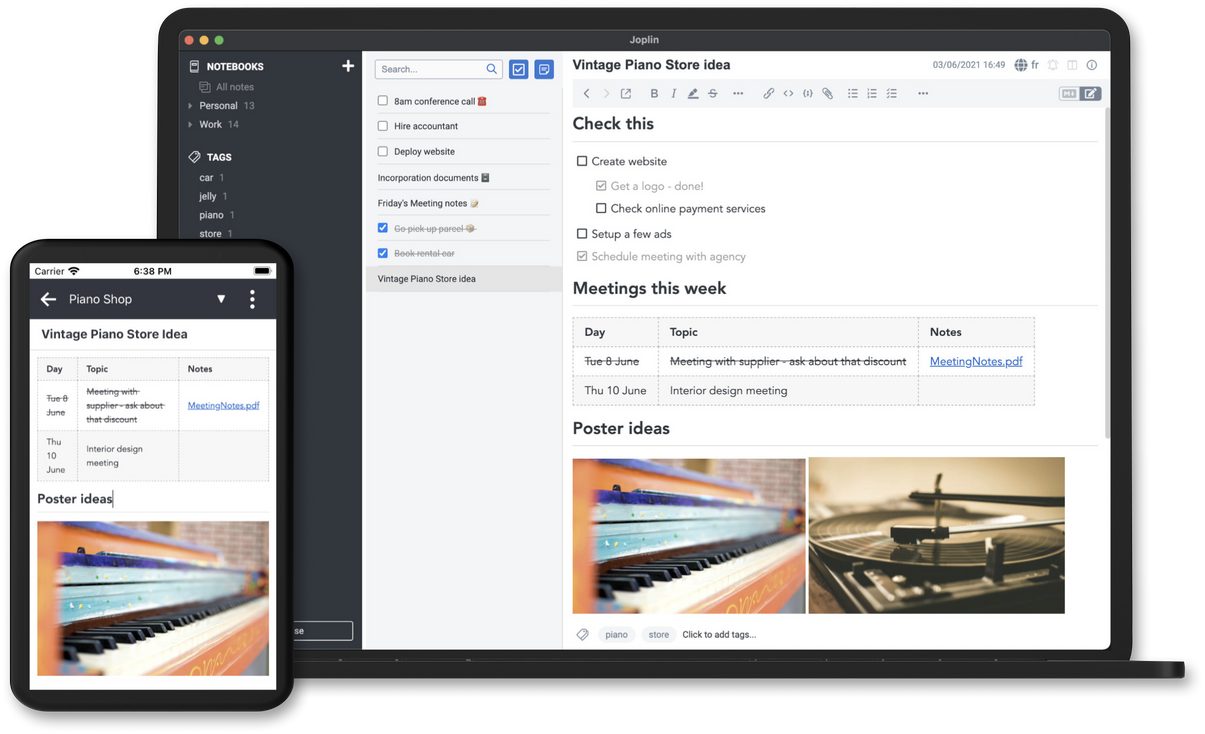
Joplin is a free, open source, offline-first note-taking and to-do app that organizes Markdown notes into notebooks with tags and full-text search. It runs on Android, iOS, Windows, macOS and Linux, with a web clipper for Firefox and Chrome. Notes sync with end-to-end encryption to Nextcloud, Dropbox, OneDrive and other services you supply, or to the paid Joplin Cloud, which also adds a web app, note publishing and notebook sharing. Evernote exports and Markdown files can be imported.
What users say
Evidence ↓Reviewers find Joplin's feature set generous for a free app and its interface simple, and one long-time user calls the Android app more functional than its competition. The critical accounts concern Android specifically, where a three-year user reported slow opening, poor performance with long notes and unreliable sync to OneDrive and Dropbox. These are single accounts from around 2022, so they may not reflect current versions.
Rankings and alternatives
- Note-taking apps for Android #5 of 10 Free, open source and encrypted
- Google Keep #1 Best for quick notes and lists
- Samsung Notes #2 Galaxy phones and S Pen handwriting
- Microsoft OneNote #3 Long notes you also open on a Windows PC


Android note-taking apps scores
Evaluated Nov 17, 2026 Evidence ↓- Pleasant to use on Android · counts double 3
3/5 means: A decent Android app with clear rough edges, such as slow starts, a learning curve or awkward editing on a phone
Users praise function and privacy but a blogger and a Play reviewer describe a slow-to-open, laggy mobile app that is weaker than the desktop one. Those accounts are mostly dated and single, so not a 2.
- Getting a note down fast 3
3/5 means: A new-note widget or the share menu, but capture is slowed by app startup or missing voice or photo notes
Saving from the share menu, voice transcription, photos and reminders are available, but no new-note home-screen widget is documented and the app is reported slow to open, which slows quick capture.
- Writing and organizing longer notes 4
4/5 means: A full editor with notebooks, tags or links, plus search that reads photos, scans or handwriting, or a richer structure such as nested pages or linked notes
Notebooks, tags, tables, attachments and search with OCR of images and PDFs, but the mobile editor is rich text with no live Markdown preview, and plugins are desktop-centered.
- Works on all your devices 4
4/5 means: Android plus a web version or desktop apps that cover Windows and Mac, with a clear gap such as no desktop app, no web version, or sync only through your own Dropbox or OneDrive account
Apps for Android, iOS, Windows, macOS and Linux. Free sync means setting up Dropbox, OneDrive or Nextcloud, and the web app needs paid Joplin Cloud, so a clear gap remains.
- Cost for one person 4
4/5 means: Free for typical use, with a paid plan for storage, sync or extras some readers will want
The apps are free and sync works through your own cloud account; optional Joplin Cloud starts at 28.69 EUR a year billed yearly (2 GB, 10 MB per note).
- Privacy and owning your notes · counts half 5
5/5 means: End-to-end encrypted or local-first, open source, with your notes as plain files or a full open export
Open source, end-to-end encrypted sync, offline-first local storage, Markdown notes and Evernote import. Full export in open formats is known from Joplin's design (Markdown and JEX), not confirmed in the pages read.
- Handwriting with a stylus · counts half 2
2/5 means: A basic drawing or sketch tool, or handwriting only through plugins
A basic built-in drawing tool for sketches and handwriting on tablets (the Play listing's manuscript notes); no PDF markup or handwriting-to-text is documented.
- Works without a connection · counts half 5
5/5 means: Notes are stored on the phone and everything works offline
Offline-first; all data is stored on the phone and works without a connection.
Pricing
- Joplin app Free The apps are free; you sync through your own Nextcloud, Dropbox, OneDrive or similar account at no cost to Joplin.
- Joplin Cloud Basic €2.99 /month , extra Billed monthly. Billed yearly it is 28.69 EUR a year (about 2.40 EUR a month). 2 GB storage, 10 MB per note or attachment, includes the web app and unlimited devices; no Email to Note or notebook sharing. 14-day free trial.
- Joplin Cloud Pro €5.99 /month , extra Billed monthly. Billed yearly it is 57.48 EUR a year (4.79 EUR a month). 30 GB storage, 200 MB per note or attachment, adds Email to Note and sharing notebooks. A Pro 100 GB tier is 9.99 EUR a month (95.88 EUR a year).
Prices checked Nov 17, 2026.
Evidence and sources
What users say
Summary 3 quotes
-
We didn’t encounter any significant challenges when using Joplin. The app has a pretty neat interface that makes it simple to navigate.
Stefan Ionescu, reviewer at TechRadar · techradar.com/reviews/joplin · published · checked -
However, the Android app has never been as good as its desktop counterpart. It has serious performance issues when editing long notes and is slow to open. The app has overall been more functional than the competition, however.
ctrl.blog author, blogger and three-year Joplin user · ctrl.blog/entry/joplin-notes-sync · checked -
OneDrive and Dropbox.com worked fine on desktop, but the synchronization on Android was fraught with problems. Syncing would frequently fail, and I had to restart the synchronization to get it working manually.
ctrl.blog author, blogger and three-year Joplin user · ctrl.blog/entry/joplin-notes-sync · checked
Android note-taking apps scores
Pleasant to use on Android 5 quotes
-
However, the Android app has never been as good as its desktop counterpart. It has serious performance issues when editing long notes and is slow to open. The app has overall been more functional than the competition, however.
ctrl.blog author, blogger and three-year Joplin user · ctrl.blog/entry/joplin-notes-sync · checked -
OneDrive and Dropbox.com worked fine on desktop, but the synchronization on Android was fraught with problems. Syncing would frequently fail, and I had to restart the synchronization to get it working manually.
ctrl.blog author, blogger and three-year Joplin user · ctrl.blog/entry/joplin-notes-sync · checked -
Great for privacy; it's FOSS, you self-host notes and you control the data. But the mobile app is far too feature poor and lag-prone. WYSIWYG not implemented. Automatic bullets in lists not supported. No live previews of markdowns. Mobile is an afterthought. Great for minimalistic, no frills, notes, but that's it. Use desktop app for a better experience.
play.google.com/store/apps/details · checked -
I've used a lot of notes & notebook managers over the years, and this is hands down the best. Great for journaling & notes, but on the desktop it excels for even long-form documents
play.google.com/store/apps/details · checked -
We didn’t encounter any significant challenges when using Joplin. The app has a pretty neat interface that makes it simple to navigate.
Stefan Ionescu, reviewer at TechRadar · techradar.com/reviews/joplin · published · checked
Getting a note down fast 1 quote
-
Capture multimedia notes effortlessly. In Joplin you can : • create manuscript notes, • transcribe speech to note, • add multimedia: photos, videos, PDFs, and images, • insert documents as attachments, • create math expressions, add tables, write code and insert diagrams, • create to-dos and add reminders.
play.google.com/store/apps/details · checked
Writing and organizing longer notes 5 quotes
-
Joplin is a free, open source note taking and to-do application, which can handle a large number of notes organised into notebooks. The notes are searchable, can be copied, tagged and modified either from the applications directly or from your own text editor. The notes are in Markdown format.
joplinapp.org/help · checked -
Full text search is available on all platforms to quickly find the information you need. The app can be customised using plugins and themes, and you can also easily create your own.
joplinapp.org/help · checked -
Effortlessly find your notes, even within PDFs and images, thanks to the powerful search feature enhanced by Optical Character Recognition (OCR) technology.
play.google.com/store/apps/details · checked -
On the desktop app, use a web clipper extension, wide-range of community plugins and a Markdown editor. Experience flawless handwriting and drawing on your tablet.
play.google.com/store/apps/details · checked -
Great for privacy; it's FOSS, you self-host notes and you control the data. But the mobile app is far too feature poor and lag-prone. WYSIWYG not implemented. Automatic bullets in lists not supported. No live previews of markdowns. Mobile is an afterthought. Great for minimalistic, no frills, notes, but that's it. Use desktop app for a better experience.
play.google.com/store/apps/details · checked
Works on all your devices 3 quotes
-
The notes can be securely synchronised using end-to-end encryption with various cloud services including Nextcloud, Dropbox, OneDrive and Joplin Cloud.
joplinapp.org/help · checked -
The application is available for Windows, Linux, macOS, Android and iOS. A Web Clipper, to save web pages and screenshots from your browser, is also available for Firefox and Chrome.
joplinapp.org/help · checked -
Basic · 2.99€ /month · 2.40€ /month (28.69€ /year ) · 10 MB per note or attachment · 2 GB storage space · Publish notes to the internet · Sync as many devices as you want · Joplin Web App
joplinapp.org/plans · checked
Cost for one person 3 quotes
-
The notes can be securely synchronised using end-to-end encryption with various cloud services including Nextcloud, Dropbox, OneDrive and Joplin Cloud.
joplinapp.org/help · checked -
Basic · 2.99€ /month · 2.40€ /month (28.69€ /year ) · 10 MB per note or attachment · 2 GB storage space · Publish notes to the internet · Sync as many devices as you want · Joplin Web App
joplinapp.org/plans · checked -
Pro · 5.99€ /month · 4.79€ /month (57.48€ /year ) · 200 MB per note or attachment · 30 GB storage space
joplinapp.org/plans · checked
Privacy and owning your notes 4 quotes
-
Joplin is a free, open source note taking and to-do application, which can handle a large number of notes organised into notebooks. The notes are searchable, can be copied, tagged and modified either from the applications directly or from your own text editor. The notes are in Markdown format.
joplinapp.org/help · checked -
Joplin is "offline first", which means you always have all your data on your phone or computer. This ensures that your notes are always accessible, whether you have an internet connection or not.
joplinapp.org/help · checked -
The notes can be securely synchronised using end-to-end encryption with various cloud services including Nextcloud, Dropbox, OneDrive and Joplin Cloud.
joplinapp.org/help · checked -
Notes exported from Evernote can be imported into Joplin, including the formatted content (which is converted to Markdown), resources (images, attachments, etc.) and complete metadata (geolocation, updated time, created time, etc.). Plain Markdown files can also be imported.
joplinapp.org/help · checked
Handwriting with a stylus 2 quotes
-
Capture multimedia notes effortlessly. In Joplin you can : • create manuscript notes, • transcribe speech to note, • add multimedia: photos, videos, PDFs, and images, • insert documents as attachments, • create math expressions, add tables, write code and insert diagrams, • create to-dos and add reminders.
play.google.com/store/apps/details · checked -
On the desktop app, use a web clipper extension, wide-range of community plugins and a Markdown editor. Experience flawless handwriting and drawing on your tablet.
play.google.com/store/apps/details · checked
Works without a connection 1 quote
-
Joplin is "offline first", which means you always have all your data on your phone or computer. This ensures that your notes are always accessible, whether you have an internet connection or not.
joplinapp.org/help · checked
Facts
License 1 quote
-
Joplin is a free, open source note taking and to-do application, which can handle a large number of notes organised into notebooks. The notes are searchable, can be copied, tagged and modified either from the applications directly or from your own text editor. The notes are in Markdown format.
joplinapp.org/help · checked
Runs on 2 quotes
-
The application is available for Windows, Linux, macOS, Android and iOS. A Web Clipper, to save web pages and screenshots from your browser, is also available for Firefox and Chrome.
joplinapp.org/help · checked -
Basic · 2.99€ /month · 2.40€ /month (28.69€ /year ) · 10 MB per note or attachment · 2 GB storage space · Publish notes to the internet · Sync as many devices as you want · Joplin Web App
joplinapp.org/plans · checked
Users 1 quote
-
500K+ Downloads
play.google.com/store/apps/details · checked
More from the sources
Pricing 2 quotes
-
14-day free trial. Cancel anytime during the trial and you won't be charged.
joplinapp.org/plans · checked -
As we’ve mentioned, the main Joplin app is free to use. But, you’ll have to pay for the Joplin Cloud service to enable note syncing and sharing, customer support, and to access the app through a web-based interface.
Stefan Ionescu, reviewer at TechRadar · techradar.com/reviews/joplin · published · checked
Limits and known issues 2 quotes
-
One of the major drawbacks of the Joplin app is that you can’t contact any direct support representatives for solutions to problems that you encounter with the app. But, in place of this, there’s an official support forum where users often exchange answers to each other’s inquiries.
Stefan Ionescu, reviewer at TechRadar · techradar.com/reviews/joplin · published · checked -
Joplin struggles with synchronization targets other than the local file system once you exceed approximately 600 notes.
ctrl.blog author, blogger and three-year Joplin user · ctrl.blog/entry/joplin-notes-sync · checked
Pricing
joplinapp.org/plans · checked