
Google Keep
Free Google note app for quick notes, lists, voice memos and sketches
Our verdict
#1 of 10 in Note-taking apps for Android · Best for quick notes and lists
What it does
- Home-screen widgets for a new note, one pinned note, or a list of notes
- Text, checklist, drawing, voice, and photo notes
- Search that finds text inside photos
- Sharing notes and lists with other people
- A web version for any computer
Pros
- Opens fast and needs no setup
- Free with a Google account
- The same notes in any computer's browser
Cons
- Labels only, with no folders or notebooks
- Awkward for long documents
- Reminders now run through Google Tasks, and location reminders are gone
- Skip if:
- You depend on reminders that fire when you arrive somewhere
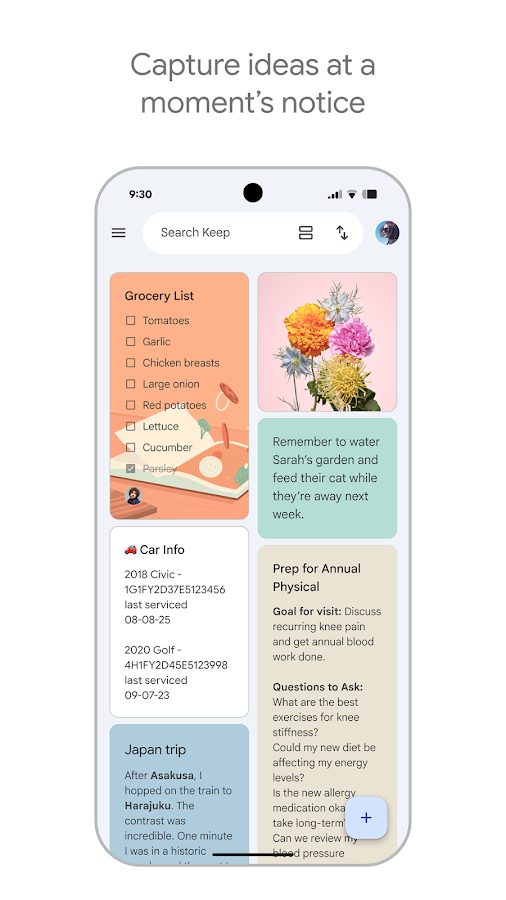
Google Keep is a free note-taking app from Google built around short notes, checklists, photos, voice memos and drawings that sit as color-coded cards, organized with labels, pins and search. It runs on Android, iPhone and iPad, and in a web browser (including Chromebooks and desktop Windows and Mac), and syncs through a Google account. Notes can be shared with collaborators, and have a reported limit of 20,000 characters, so it suits quick capture, reminders and small group lists better than long, structured lecture notes or PDF markup.
What users say
Evidence ↓A reviewer at Cloudwards calls it a good simple tool for jotting notes and ideas, though fewer features than competitors. Critics point to long-note performance on Android (one Play reviewer), no text search inside a note (two blog commenters), and note that the Play listing rates the app 4.7 from 2.67M reviews. These are small samples and do not show how common each view is.
Rankings and alternatives
- Note-taking apps for Android #1 of 10 Best for quick notes and lists
- Samsung Notes #2 Galaxy phones and S Pen handwriting
- Microsoft OneNote #3 Long notes you also open on a Windows PC
- Simplenote #4 Plain text that syncs everywhere for free
- Note-taking apps for students #8 of 10 Quick notes and lists
- Google Docs #2 For group projects and Google schools
- Notion #3 For organized typists at college
- Apple Notes #4 If everything you own is Apple


Android note-taking apps scores
Evaluated Nov 17, 2026 Evidence ↓- Pleasant to use on Android · counts double 5
5/5 means: Among the fastest and easiest note apps on Android, usable in minutes, with few complaints
Among the quickest note apps to open and use on Android, preinstalled on many phones and usable with no setup; a 4.7 Play rating from 2.67M reviews and an editor who relies on it as a fast scratchpad. One Play reviewer reports stutter on very long notes.
- Getting a note down fast 5
5/5 means: As 4, plus lock-screen or stylus capture or reminders built in, with capture as the app's central design
Capture is the app's central design, with a Quick capture widget that starts a text, list, drawing, voice or photo note, single-note and note-list widgets, voice notes, time reminders (now through Google Tasks), and saving from other apps' share menu (product knowledge). Lock-screen and stylus capture have not shipped.
- Writing and organizing longer notes 2
2/5 means: Short notes with basic formatting, kept in order by labels or tags only
Labels, colors and pins only (no folders or notebooks described), though Android has headings and bold, and search reads text in English photos; 20,000-character limit is third-party. Could argue 3 for images and OCR search.
- Works on all your devices 4
4/5 means: Android plus a web version or desktop apps that cover Windows and Mac, with a clear gap such as no desktop app, no web version, or sync only through your own Dropbox or OneDrive account
Android, iOS and a web app that covers Windows, Mac and Chromebook, with no desktop app.
- Cost for one person 5
5/5 means: Everything is free
Free with a Google account; some Gemini features need a paid AI plan, but the scored features do not.
- Privacy and owning your notes · counts half 2
2/5 means: Notes are in the vendor's cloud without end-to-end encryption, with a full export
Notes sit in Google's cloud without end-to-end encryption (from product knowledge; no page read states it), with a full Takeout export in HTML and JSON. Could be 3 for the readable export.
- Handwriting with a stylus · counts half 2
2/5 means: A basic drawing or sketch tool, or handwriting only through plugins
Basic drawing with pen, marker and highlighter; no PDF markup and no documented handwriting-to-text; the Pixel Tablet lock-screen handwriting shortcut never shipped.
- Works without a connection · counts half 4
4/5 means: All notes work offline on the phone after a sync, with small limits
Notes are stored on the Android device and edits made offline merge later; no explicit offline statement was found, and a full re-download is needed on reload.
Student class-notes apps scores
Evaluated Nov 17, 2026 Evidence ↓- Typing class notes · counts double 2
2/5 means: Fine for short plain notes; long or structured lecture notes get awkward
Cards for short notes with headings, bold, italic and lists on web and Android, and checklists, but no tables or equations, a reported 20,000-character limit per note and no notebooks. Reports of lag on long notes come from one Play review.
- Works on all your devices 5
5/5 means: Full apps or a full web version everywhere, synced on the plan a student would use
Android and iOS apps plus a full web version that works on Windows, Mac and Chromebooks, all synced on the free plan. Formatting parity on iPhone is unclear.
- Cost for a student 5
5/5 means: Everything a student needs is free
Free with a Google account; a third-party review says notes do not count against Drive storage. Some Gemini features need a paid plan but are not needed for notes.
- Organizing and finding notes 2
2/5 means: A flat list sorted with labels or colors, with search
Structure is flat (labels, colors, pins, no folders or notebooks), but search reads text in images through OCR. Search does not locate a term inside a long note, per two commenters. Without notebooks or folders the structure is the flat, label-sorted list of level 2, whatever the image search adds.
- Easy to pick up 5
5/5 means: Usable in minutes with no setup
A simple card interface that reviewers call easy to use, with nothing to set up beyond a Google account.
- Handwriting and marking up slides · counts half 2
2/5 means: A basic drawing tool, or PDF markup only through add-ons
A basic drawing tool (pen, marker, highlighter, grids) exists. No PDF or slide markup was found in the sources read, and it is not known to exist in Keep.
- Group projects 4
4/5 means: Live editing together, with a limit such as a paid host or an account for everyone in the same app
Collaborators can edit text, lists, images and audio, and shared edits sync quickly in practice. Everyone needs a Google account, and there are no comments or version history. Live-editing behavior is not stated in the sources.
- Recording lectures · counts half 3
3/5 means: Records with a transcript, or with playback tied to your notes, but only on some devices or a pricier plan
Voice memos with a transcript attach to a note, mainly on mobile apps. Playback is not tied to typed notes at the moment of recording, and length limits and platform coverage were not found.
- Works without Wi-Fi · counts half 4
4/5 means: Works offline in the apps, with the web version needing a connection
The Android and iOS apps keep notes on the device and work offline. The web version needs a connection unless set up as a Chrome app, which one old comment says works offline.
Pricing
- Free Free Free with a Google account. A third-party review says notes do not count against Google Drive storage (id 6). Some Gemini features in Keep need a paid Google AI plan (id 8); school Workspace for Education availability was not checked.
Prices checked Nov 17, 2026.
Evidence and sources
What users say
Summary 3 quotes
-
Google Keep is great if you’re just after a simple tool to quickly jot down notes and ideas.
Cloudwards reviewer, reviewer at Cloudwards · cloudwards.net/google-keep-review · checked -
the moment you try to type anything over a paragraph, the app stutters and essentially becomes unable.
play.google.com/store/apps/details · checked -
you cannot actually find text within a specific note.
Chris A, commenter on the Cloudwards review · cloudwards.net/google-keep-review · published · checked
Android note-taking apps scores
Pleasant to use on Android 3 quotes
-
1B+
play.google.com/store/apps/details · checked -
the moment you try to type anything over a paragraph, the app stutters and essentially becomes unable.
play.google.com/store/apps/details · checked -
Compared to other apps like Apple’s offering, Google Keep is a much more basic app.
Abner Li, editor-in-chief at 9to5Google · 9to5google.com/2026/01/03/recap-google-keep-2025 · published · checked
Getting a note down fast 5 quotes
-
To be able to quickly create notes from your home screen, select the "Quick capture" widget.
support.google.com/keep/answer/13302793 · checked -
For now, Keep's Quick capture widget is the nearest practical workaround, but it is not the same thing as a native lock screen note shortcut. It can speed up note creation from a home screen panel, yet users still have to unlock the device before they can start writing.
android.gadgethacks.com/news/google-keep-lock-screen-notes-feature-still-missing-after-two-years · checked -
It appears the “Google Keep” handwriting tool for the “Pixel Tablet” lock screen has been discontinued without ever being officially released.
jetstream.blog/en/pixel-tablet-google-keep-lock-screen-shortcut-discontinued · published · checked -
You no longer get reminder notifications from Google Keep. To receive reminder notifications on your mobile device, install one of these apps:
support.google.com/calendar/answer/16540694 · checked -
Tip: You can also create text notes on a single click when you single tap Create
support.google.com/keep/answer/2888246 · checked
Writing and organizing longer notes 4 quotes
-
The notes have a character limit of 20,000
cloudwards.net/google-keep-review · checked -
To sort and find your notes in Google Keep, you can label, color, and pin notes. If you’re sharing a note, only you’ll be able to see your labels, colors, and pins. You can have up to 50 labels.
support.google.com/keep/answer/6191044 · checked -
Tip: You can search for text in photos, like images of receipts, by typing the words in the photo. (Available in English only.)
support.google.com/keep/answer/2888263 · checked -
To apply a heading style to a paragraph: Tap
support.google.com/keep/answer/2888246 · checked
Works on all your devices 2 quotes
-
There are apps available for Android and iOS, and you can use Keep within a browser, too.
cloudwards.net/google-keep-review · checked -
Keep works on your phone, tablet, computer and Wear OS device. Everything syncs across all of your devices so your thoughts are always with you.
play.google.com/store/apps/details · checked
Cost for one person 2 quotes
-
Google Keep costs absolutely nothing — it’s completely free to use.
cloudwards.net/google-keep-review · checked -
Availability depends on your Google account type, as some Gemini features require a paid Google AI plan.
cloudwards.net/google-keep-review · checked
Privacy and owning your notes 1 quote
-
In the archive, click the "archive_browse.html" file. This will launch a web app in your browser so you can easily browse through all your Google Keep data.
Shubham Agarwal, freelance technology journalist at How-To Geek · howtogeek.com/694042/how-to-export-your-google-keep-notes-and-attachments · published · checked
Handwriting with a stylus 2 quotes
-
If you want to draw a note, there are a few tools included. You get a pen, marker and highlighter, and you can customize the color and size of these tools in the dropdown menu.
cloudwards.net/google-keep-review · checked -
It appears the “Google Keep” handwriting tool for the “Pixel Tablet” lock screen has been discontinued without ever being officially released.
jetstream.blog/en/pixel-tablet-google-keep-lock-screen-shortcut-discontinued · published · checked
Works without a connection 2 quotes
-
If you edit the same note on different devices and one of the devices is offline, you may see a "Conflicting edits found" notification.
support.google.com/keep/answer/6102239 · checked -
When you reload Keep, your notes will be saved and then downloaded to your device again. This can take some time and requires a strong internet connection.
support.google.com/keep/answer/6102239 · checked
Student class-notes apps scores
Typing class notes 4 quotes
-
The notes have a character limit of 20,000
cloudwards.net/google-keep-review · checked -
Google Keep now supports rich-text formatting on the web and Android, letting you add headings, bold, italic and underlined text to your notes.
cloudwards.net/google-keep-review · checked -
Plus, it lacks rich-text editing, so it’s not the best choice if you’re creating research notes or using it for business.
cloudwards.net/google-keep-review · checked -
the moment you try to type anything over a paragraph, the app stutters and essentially becomes unable.
play.google.com/store/apps/details · checked
Works on all your devices 2 quotes
-
There are apps available for Android and iOS, and you can use Keep within a browser, too.
cloudwards.net/google-keep-review · checked -
Keep works on your phone, tablet, computer and Wear OS device. Everything syncs across all of your devices so your thoughts are always with you.
play.google.com/store/apps/details · checked
Cost for a student 3 quotes
-
Google Keep allows unlimited note creation with no bandwidth restrictions, and it doesn’t count against your Google Drive storage limit.
cloudwards.net/google-keep-review · checked -
Google Keep costs absolutely nothing — it’s completely free to use.
cloudwards.net/google-keep-review · checked -
Availability depends on your Google account type, as some Gemini features require a paid Google AI plan.
cloudwards.net/google-keep-review · checked
Organizing and finding notes 2 quotes
-
You can use Keep’s optical character recognition (OCR) to extract text from clipped sources and other images. Plus, with Google’s accurate speech recognition, you can dictate notes and let Google Keep transcribe them.
cloudwards.net/google-keep-review · checked -
you cannot actually find text within a specific note.
Chris A, commenter on the Cloudwards review · cloudwards.net/google-keep-review · published · checked
Easy to pick up 1 quote
-
Google Keep is great if you’re just after a simple tool to quickly jot down notes and ideas.
Cloudwards reviewer, reviewer at Cloudwards · cloudwards.net/google-keep-review · checked
Handwriting and marking up slides 1 quote
-
If you want to draw a note, there are a few tools included. You get a pen, marker and highlighter, and you can customize the color and size of these tools in the dropdown menu.
cloudwards.net/google-keep-review · checked
Group projects 1 quote
-
You can share a note with other people so they can edit text, lists, images, drawings, and audio recordings.
support.google.com/keep/answer/6101196 · checked
Recording lectures 1 quote
-
You can use Keep’s optical character recognition (OCR) to extract text from clipped sources and other images. Plus, with Google’s accurate speech recognition, you can dictate notes and let Google Keep transcribe them.
cloudwards.net/google-keep-review · checked
Works without Wi-Fi 1 quote
-
It allows offline access
Clement l, commenter on the Cloudwards review · cloudwards.net/google-keep-review · published · checked
Facts
Runs on 2 quotes
-
There are apps available for Android and iOS, and you can use Keep within a browser, too.
cloudwards.net/google-keep-review · checked -
Keep works on your phone, tablet, computer and Wear OS device. Everything syncs across all of your devices so your thoughts are always with you.
play.google.com/store/apps/details · checked
Users 1 quote
-
1B+
play.google.com/store/apps/details · checked
More from the sources
Features 8 quotes
-
In May 2026, Android Authority found the feature resurfacing in Google Keep version 5.26.181.01.90, with hidden settings that directly reference lock screen notes. The feature still is not live for ordinary users
android.gadgethacks.com/news/google-keep-lock-screen-notes-feature-still-missing-after-two-years · checked -
You can edit the date or time in Keep, Calendar, Tasks, or Gemini.
support.google.com/keep/answer/3187168 · checked -
Outside of the Android app, text formatting rolled out on the web
Abner Li, editor-in-chief at 9to5Google · 9to5google.com/2026/01/03/recap-google-keep-2025 · published · checked -
Your calendar grid in Calendar Your task list
support.google.com/calendar/answer/16540694 · checked -
4. To set up the date and time, under "Pick date & time," select the time, date, and recurrence.
support.google.com/keep/answer/3187168 · checked -
You'll see all notes with upcoming reminders.
support.google.com/keep/answer/3187168 · checked -
Anyone you share with can label, color, archive, or add reminders without changing the note for others.
support.google.com/keep/answer/6101196 · checked -
you can only create a reminder for an entire list of tasks and not for individual list entries.
Anya Zhukova, writer at Online Tech Tips · online-tech-tips.com/google-tasks-vs-google-keep-which-is-better · published · checked
Limits and known issues 2 quotes
-
Location-based reminders in Keep: You can no longer create or get location-based reminders.
support.google.com/calendar/answer/16540694 · checked -
Repeating tasks: The maximum interval for repeating tasks in Calendar is 1000 days, weeks, months, or years.
support.google.com/calendar/answer/16540694 · checked
What users say 1 quote
-
Google Keep lets you create checklists inside notes, but Google Tasks adds helpful extra functionality and has an interface tailor-made for handling lists.
Taylor Kerns, writer at Android Police · tech.yahoo.com/apps/articles/google-tasks-unsung-hero-googles-131010987.html · published · checked
Pricing
cloudwards.net/google-keep-review · checked