Microsoft OneNote
Free Microsoft notebook app with infinite-canvas pages, Apple Pencil ink and OneDrive sync
Our verdict
#1 of 10 in Note-taking apps for students · Best free all-rounder
What it does
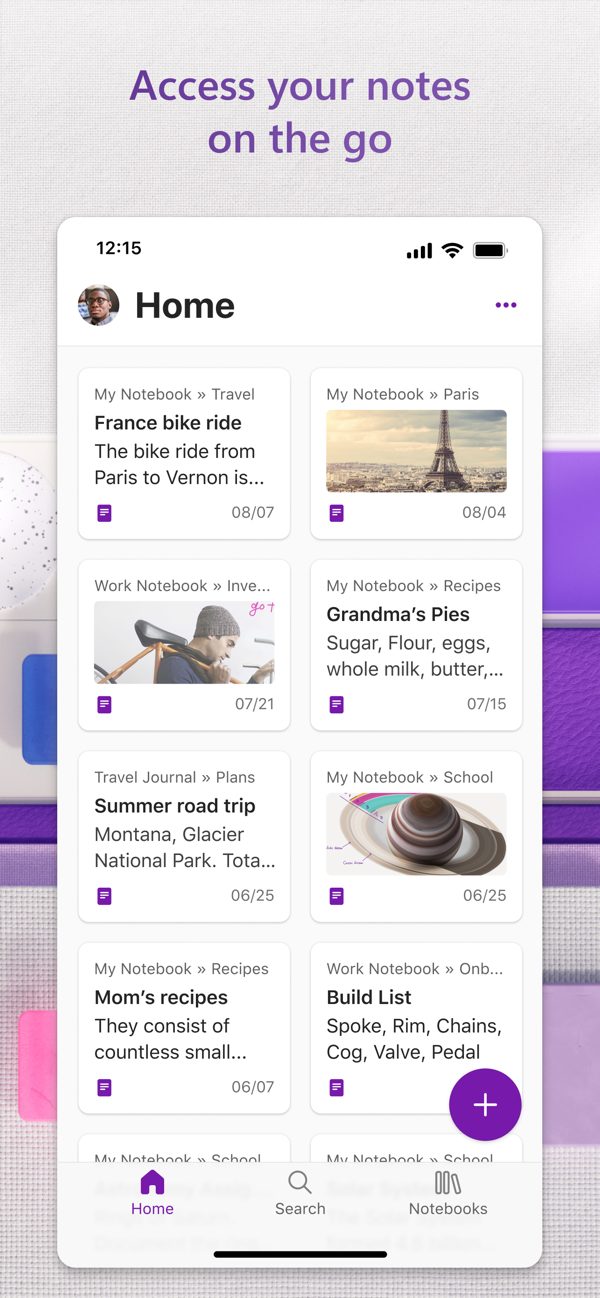
- Notebooks, sections, and pages for each course
- Typing, stylus ink, and pasted slides on the same page
- Audio recordings tied to your notes on Windows and Mac
- Search that reads text in images and printouts
Pros
- Free on Windows, Mac, iPhone, iPad, Android, and the web
- Takes typed, handwritten, and recorded notes in one place
- Shared notebooks for group work with free Microsoft accounts
Cons
- Features differ between Windows, Mac, and iPad
- Freeform pages get messy for long typed notes
- The web version doesn't work offline
- Choose if:
- You use a mix of Windows, Apple and Android devices
OneNote is Microsoft’s note-taking app, organized as notebooks, sections and pages with a free-form canvas where typed text, ink, images and PDF printouts sit together. The iPad app is free to download and sign in with a Microsoft account, and writes with Apple Pencil or a finger; notes sync through OneDrive to Windows, Mac, Android, iPhone and the web. On iPad, Microsoft’s documentation says handwriting stays as ink and cannot be converted to typed text. A Microsoft 365 subscription, bought in the app or from Microsoft, adds Copilot features and more OneDrive storage than the free 5 GB.
What users say
Evidence ↓The practitioner views here are a few App Store reviews from students, mostly dated 2018 to 2020, so they show what some iPad users hit rather than what most do. The favorable view is that OneNote mixes typed and handwritten notes on a near-limitless canvas with a convenient organization structure. The critical views are that iPad lacked handwriting search, ink-to-text and audio linked to notes, that undo jumped the scroll position in long slide decks, that PDF pages could display rotated differently between iPad and computer, and that notes became read-only without a connection. One Microsoft Q&A answer from 2026 still says ink cannot be converted to text on iPad.
Rankings and alternatives
- Note-taking apps for students #1 of 10 Best free all-rounder
- Google Docs #2 For group projects and Google schools
- Notion #3 For organized typists at college
- Apple Notes #4 If everything you own is Apple
- Note-taking apps for Android #3 of 10 Long notes you also open on a Windows PC
- Google Keep #1 Best for quick notes and lists
- Samsung Notes #2 Galaxy phones and S Pen handwriting
- Simplenote #4 Plain text that syncs everywhere for free
- Note-taking apps for iPad #9 of 9 Free and on every platform, weakest ink
- Goodnotes #1 Best all-rounder for class notes and PDFs
- Notability #2 For recording lectures alongside your notes
- Noteshelf 3 #3 Nicest pens for a one-time price







Android note-taking apps scores
Evaluated Nov 17, 2026 Evidence ↓- Pleasant to use on Android · counts double 3
3/5 means: A decent Android app with clear rough edges, such as slow starts, a learning curve or awkward editing on a phone
Very widely used (1B+ downloads, 4.5 stars), but Play reviews and Microsoft Q&A describe slow or missing sync, page conflicts and rendering problems, and the tablet app is called neglected.
- Getting a note down fast 4
4/5 means: Widgets that make a new note, saving from the share menu, and voice or photo notes
Widgets for new text, audio and picture notes, share-sheet saving, Sticky Notes, and voice dictation are documented. Sticky Notes need the feed, which is not on Android tablets, and sync can lag.
- Writing and organizing longer notes 4
4/5 means: A full editor with notebooks, tags or links, plus search that reads photos, scans or handwriting, or a richer structure such as nested pages or linked notes
Notebooks, sections and pages, rich formatting, images and scanning with text extraction are documented. Tags, section groups and ink search on Android were not established, so the top level is not reached.
- Works on all your devices 5
5/5 means: Full apps or a full web version on Android, Windows, Mac and iPhone, synced on the plan you'd use
Apps for Windows, Mac, Android, iPhone and iPad plus the web, synced through a free Microsoft account.
- Cost for one person 4
4/5 means: Free for typical use, with a paid plan for storage, sync or extras some readers will want
The app and basic use are free; the 5 GB free OneDrive storage is shared, and Microsoft 365 is the paid option for more storage and extras. Free storage is a cap some will hit, so 4 rather than 5.
- Privacy and owning your notes · counts half 2
2/5 means: Notes are in the vendor's cloud without end-to-end encryption, with a full export
Notes are in Microsoft's cloud without end-to-end encryption by default, from knowledge; export on Android was not researched, so 2 is a judgment.
- Handwriting with a stylus · counts half 3
3/5 means: Handwriting works, but as a side feature, with few tools or rough ink
Pen input works on Android tablets, but Microsoft's Android docs list only viewing desktop ink, ink-to-text is desktop-only, and an S Pen user reports shifted layout and bad PDF export.
- Works without a connection · counts half 4
4/5 means: All notes work offline on the phone after a sync, with small limits
Microsoft says all versions cache notebooks and sync later; creating notebooks and text recognition in images need a connection. One reviewer lists "No offline autosaving".
Student class-notes apps scores
Evaluated Nov 17, 2026 Evidence ↓- Typing class notes · counts double 4
4/5 means: A full typed editor with headings, lists, tables and either equations or a freeform page, with small gaps
Freeform canvas with headings, lists, tables, checklists, images, printouts and typed or ink equations on Windows; text sits in movable boxes rather than a linear document, and long notes can lag (from general knowledge plus the Cloudwards cons).
- Works on all your devices 4
4/5 means: Apps or a full web version for Windows, Mac, iPhone and Android, synced on the student's plan, with a clear gap on one of them
Apps for Windows, Mac, iOS and Android plus a web version (Chromebook via web or Android app), synced through OneDrive on a free account; feature gaps between platforms (math, ink-to-text, audio) are the clear catch.
- Cost for a student 5
5/5 means: Everything a student needs is free
The app is free with a Microsoft account or school account and needs no subscription; 5 GB of free OneDrive covers typical text notes, though large audio or PDFs can fill it. Education A1 storage was not confirmed.
- Organizing and finding notes 5
5/5 means: As 3, plus both a richer structure and search that reads images, scans or handwriting
Notebooks, sections, section groups, pages, subpages, tags and links give strong course structure, and search reads text in images and handwriting (OCR needs a connection); platform coverage of handwriting search was not confirmed.
- Easy to pick up 4
4/5 means: Easy to start, with depth to learn later
Easy to begin typing, but the freeform canvas, ribbon UI and several Windows versions confuse some users; judged from general knowledge, not a read review. Raised from 3 on calibration: clicking anywhere on a page and typing works from the first minute, and one reviewer ranks its learning curve below Obsidian alongside Evernote and Google Keep (obsidian evidence 47), so the freeform canvas is depth to learn later rather than a confusing start.
- Handwriting and marking up slides · counts half 3
3/5 means: Handwriting and PDF markup work, but as a side feature, or only on some devices or plans
Strong ink on Windows 2-in-1s with ink-to-text and ink-to-math, but iPad cannot convert ink to text and has had undo and PDF rotation problems; Android tablets not examined.
- Group projects 4
4/5 means: Live editing together, with a limit such as a paid host or an account for everyone in the same app
Shared notebooks are edited together for free with a Microsoft account (near-live sync) but every classmate needs a Microsoft account, and version history, comments and sync conflicts were not confirmed in sources.
- Recording lectures · counts half 4
4/5 means: Playback tied to your notes on the plan a student would use
Audio recorded while taking notes plays back tied to those notes on Windows and Mac, on the free app; iPad lacks this, and transcription is a Microsoft 365 feature, so no transcript level was claimed.
- Works without Wi-Fi · counts half 4
4/5 means: Works offline in the apps, with the web version needing a connection
Apps keep a cached copy for editing offline and sync later, while the web version needs a connection; creating notebooks and OCR need internet.
iPad handwritten note-taking apps scores
Evaluated Nov 17, 2026 Evidence ↓- Writing feel · counts double 3
3/5 means: Fine for quick notes, with few pens or rough edges that long sessions expose
Apple Pencil ink with pens, highlighters, lasso and shape snapping on an infinite canvas, but no source here measures iPad ink quality or latency, and the iPad app is generally regarded as behind GoodNotes and Notability for long writing sessions (from general knowledge, not a read source).
- Marking up PDFs and slides 3
3/5 means: PDF markup works, with clear limits such as odd page handling, rotation problems or slow long files
PDFs go in as printouts you can write on, but users report rotation problems, display differences between devices and undo jumping in long slide decks; there is no PDF outline or link handling.
- Finding notes later 3
3/5 means: Searches handwriting only within one note, on some devices, or unreliably
Notebooks, sections and pages with keyword search across notebooks. Handwriting search was reported as PC-only on iPad in 2018 and 2020 reviews, and Microsoft's iPad search page does not say it searches ink or images, so it is unreliable or unconfirmed on iPad.
- Recording lectures 2
2/5 means: Records audio as a separate clip, not tied to the writing or transcribed
The iPad app records audio and dictates, but no current source shows playback tied to ink or typed notes on iPad (reviewers said that was PC-only), and the free plan's transcription is unclear.
- Sync and other devices 5
5/5 means: The same notes on iPad and on Windows, Android or the web, as well as Apple devices
Free OneDrive sync gives the same notes on iPad, iPhone, Mac, Windows, Android and the web; reliability complaints exist but are older and from single users.
- Cost of unlimited notes 5
5/5 means: Free, with no cap on notes
Free with no cap on notes or notebooks; the only limit is the 5 GB of shared OneDrive storage, which text and ink notes rarely fill (heavy PDF printouts and audio would use more).
- Turning handwriting into text · counts half 1
1/5 means: No conversion of handwriting to text
A 2026 Microsoft Q&A answer (AI-labeled, citing Microsoft docs) says OneNote for iPad cannot convert handwriting to text, and a 2020 reviewer asked for it. Cloudwards lists ink-to-text for the app generally, but not for iPad.
Pricing
- Free Free The iPad app is free to download and use with a Microsoft account. Free OneDrive storage is 5 GB shared with other Microsoft apps, per a third-party review (Cloudwards, July 2026); Microsoft's own page was not read.
- Microsoft 365 Personal $9.99 /month , extra Monthly price shown as an in-app purchase on the App Store (a second Personal entry at $11.99 is listed without explanation). Cloudwards (third-party) gives $99.99 per year and 1 TB of OneDrive storage, but its own table disagrees, so confirm the yearly price on Microsoft's pricing page. Which Copilot features each plan includes was not established.
- Microsoft 365 Family $12.99 /month , extra Monthly price shown as an in-app purchase on the App Store. Cloudwards (third-party) gives $129.99 per year for up to six people with 1 TB of storage each (6 TB total). Confirm the yearly price on Microsoft's pricing page.
Prices checked Nov 17, 2026.
Evidence and sources
What users say
Summary 5 quotes
-
I have been using this app to help me take notes on PDF’s of readings or PowerPoints from classes. The issue I’ve run into is either certain images not loading across devices or some not updating at all. Some PDF’s I’ve had to rotate on my iPad, but they are still wrong on my computer.
Jahbcjd, App Store reviewer, full-time student · apps.apple.com/us/app/microsoft-onenote/id410395246 · published · checked -
Another feature causing issues on the iPad is the “undo” button will sometimes force me to scroll to a different part of my notes. Or, if I somehow don’t hit exactly the undo, I am forced to the top of my notes. Which, if I am in the middle of an over 100 slide PowerPoint during lecture, has me wasting time trying to scroll back to my spot. I know it might be hard to include, but it would be nice if my Apple Pencil shared features it has on my device with OneNote. If I could have the option of my hand writing turning into text or even being able to search my notes for something handwritten would save me a lot of time.
Jahbcjd, App Store reviewer, full-time student · apps.apple.com/us/app/microsoft-onenote/id410395246 · published · checked -
Super versatile note taking and sharing app. It has some really cool features only for the PC software that i wish i had on the iPad like searching hand written notes and turning them into text, or recording audio and linking your notes to the place in which they occur in the audio. (You can use most of these on a p/c after you take notes with your iPad though.) But at the end of the day it is still a great fusion of typed and hand-written notes (if you have an apple pencil), with a pretty convenient organization structure and a nearly limitless canvas.
Dan Dan 42, App Store reviewer, student · apps.apple.com/us/app/microsoft-onenote/id410395246 · published · checked -
My biggest problem was when my school’s network was unable to connect to microsoft online. If this app can’t connect, you will get several warnings and all your notes are effectively in a read-only mode. I spent several minutes looking for an offline mode, but I ultimately ended up scrambling to take notes on paper that day.
Dan Dan 42, App Store reviewer, student · apps.apple.com/us/app/microsoft-onenote/id410395246 · published · checked -
OneNote for iPad does not support handwriting-to-text conversion. Handwriting can be entered with Apple Pencil or touch, but it cannot be converted into typed text in the iPad app.
learn.microsoft.com/en-us/answers/questions/5806446/handwriting-to-text-with-apple-pencil-on-ipad · published · checked
Android note-taking apps scores
Pleasant to use on Android 5 quotes
-
1B+ Downloads
play.google.com/store/apps/details · checked -
Whenever I try to use the android app: open app; see that the contents of my notes are out of date; wait several minutes; nothing happens; search around in vain for a manual sync; open and close app completely several times; give up. Seriously, what's the point of keeping my notes on the cloud if the app literally never syncs?
Google Play reviewer, Google Play reviewer (name not shown) · play.google.com/store/apps/details · checked -
Update 8/31/26: Cannot log in on Android. It's a widespread issue. Key bugs. First, it sometimes erases what I wrote. I always go back to check that my work was saved. Second, the short timeout for password protected notes to lock, activates even while I'm writing. Third, frequent page conflicts for no reason, as I only use on one device.
Google Play reviewer, Google Play reviewer (name not shown) · play.google.com/store/apps/details · published · checked -
OneNote on Android does not always display or export long handwritten pages the same way as desktop, so a full “mobile layout reset” usually is not available.
Kai-H, Microsoft External Staff moderator on Microsoft Q&A · learn.microsoft.com/en-us/answers/questions/5850015/onenote-app-issues-on-android-devices · published · checked -
Unfortunately, the Android tablet version fails to take advantage of greater screen space and capabilities of the tablet world.
Being Productive Substack author, productivity blogger · beingproductive.substack.com/p/onenote-on-android-the-forgotten · published · checked
Getting a note down fast 6 quotes
-
Get to your most recent notes right from your phone's Home screen with the OneNote Recent widget.
support.microsoft.com/en-us/onenote/key-features-of-onenote-for-android · checked -
Create notes, audio notes, and picture notes right from your phone's home screen with OneNote Widget.
support.microsoft.com/en-us/onenote/key-features-of-onenote-for-android · checked -
Share web content, articles, images, videos, and files with OneNote.
support.microsoft.com/en-us/onenote/key-features-of-onenote-for-android · checked -
The OneNote feed is automatically shown in the OneNote for Android app.
support.microsoft.com/en-us/onenote/use-the-onenote-feed-in-microsoft-onenote · checked -
The OneNote feed is not currently available when using OneNote on Android tablets and or on Android-based Surface Duo devices.
support.microsoft.com/en-us/onenote/use-the-onenote-feed-in-microsoft-onenote · checked -
Voice-to-text smart notes: Take accurate voice notes with voice dictation • Generate transcriptions from audio files • Dictate smart notes in 27 languages (note some languages are in preview)
play.google.com/store/apps/details · checked
Writing and organizing longer notes 2 quotes
-
Create notebooks and sections on OneDrive from your Android devices.
support.microsoft.com/en-us/onenote/key-features-of-onenote-for-android · checked -
Voice-to-text smart notes: Take accurate voice notes with voice dictation • Generate transcriptions from audio files • Dictate smart notes in 27 languages (note some languages are in preview)
play.google.com/store/apps/details · checked
Works on all your devices 2 quotes
-
This change only applies to Windows, where we have both OneNote and OneNote for Windows 10. Other versions of OneNote—including OneNote for Mac, OneNote for iOS (iPhone and iPad), OneNote for Android, and OneNote for the web—are unchanged.
support.microsoft.com/en-us/onenote/frequently-asked-questions-about-onenote-in-office-2019-and-microsoft-365 · checked -
Requires Android OS 9.0 or later. • A free Microsoft account is required to use OneNote.
play.google.com/store/apps/details · checked
Cost for one person 3 quotes
-
It only provides 5GB of cloud storage space, which is shared across OneDrive (check out our OneDrive Review) and other Microsoft 365 apps.
Kanza Javed, writer at Cloudwards · cloudwards.net/onenote-review · published · checked -
The Personal plan costs $9.99 per month or $99.99 per year, and it comes with 1TB of cloud storage, though there’s no free trial for it. The Family plan offers a one-month free trial and costs $12.99 per month or $129.99 per year, covering up to six users. You get a total of 6TB of cloud storage, but you can only use up to 1TB of it per person, which is the same as the Personal plan.
Kanza Javed, writer at Cloudwards · cloudwards.net/onenote-review · published · checked -
Requires Android OS 9.0 or later. • A free Microsoft account is required to use OneNote.
play.google.com/store/apps/details · checked
Handwriting with a stylus 5 quotes
-
The Ink to Math tool converts handwritten mathmatical symbols to text. The Ink to Text tool converts handwriting to text. These tools are found in the desktop version of OneNote.
it.stonybrook.edu/services/office-365/onenote · checked -
View 2D graphics, inked notes, and other formatting elements created in the desktop version of OneNote.
support.microsoft.com/en-us/onenote/key-features-of-onenote-for-android · checked -
Capture smart voice notes in ink. Use the pen & write down your to-do list in a task organizer
play.google.com/store/apps/details · checked -
OneNote on Android does not always display or export long handwritten pages the same way as desktop, so a full “mobile layout reset” usually is not available.
Kai-H, Microsoft External Staff moderator on Microsoft Q&A · learn.microsoft.com/en-us/answers/questions/5850015/onenote-app-issues-on-android-devices · published · checked -
I use OneNote both from my Samsung Tab S10 taking notes with the S Pen and also from the usual Desktop app for Windows 11. I used to get the same layout from both, with no problem while syncing from tablet to PC, now I have noticed differences between the two.
SR, Microsoft Q&A asker, Galaxy Tab S10 S Pen user · learn.microsoft.com/en-us/answers/questions/5850015/onenote-app-issues-on-android-devices · published · checked
Works without a connection 4 quotes
-
Yes, all versions of OneNote keep a cached copy of your notebooks on your device, so that you can access them even while you're offline. The next time you connect to the Internet, all of the changes you made will sync to OneDrive so that you'll be able to see them on other devices.
support.microsoft.com/en-us/onenote/frequently-asked-questions-about-onenote-in-office-2019-and-microsoft-365 · checked -
Please note that while you can always view and edit your notes while you're offline, some features which require Internet connectivity may not work, such as Optical Character Recognition, Researcher, and creating and deleting notebooks.
support.microsoft.com/en-us/onenote/frequently-asked-questions-about-onenote-in-office-2019-and-microsoft-365 · checked -
Though the browser-based version of OneNote requires you to be connected, each of the device-based OneNote apps lets you work offline; they'll sync up any of your notes once you have an internet connection again.
Jeffery Battersby, writer at Laptop Mag · laptopmag.com/how-to/microsoft-onenote-for-beginners · checked -
Limited storage on free plan No offline autosaving Lag & high loading time Syncing issues
Kanza Javed, writer at Cloudwards · cloudwards.net/onenote-review · published · checked
Student class-notes apps scores
Typing class notes 3 quotes
-
Limited storage on free plan No offline autosaving Lag & high loading time Syncing issues
Kanza Javed, writer at Cloudwards · cloudwards.net/onenote-review · published · checked -
For example, OneNote for Windows and the browser-based version offer a feature called Math Assistant with which you can perform mathematical calculations, and that feature is currently missing from the OneNote versions for macOS, iOS devices and Android.
Jeffery Battersby, writer at Laptop Mag · laptopmag.com/how-to/microsoft-onenote-for-beginners · checked -
The Ink to Math tool converts handwritten mathmatical symbols to text. The Ink to Text tool converts handwriting to text. These tools are found in the desktop version of OneNote.
it.stonybrook.edu/services/office-365/onenote · checked
Works on all your devices 3 quotes
-
This change only applies to Windows, where we have both OneNote and OneNote for Windows 10. Other versions of OneNote—including OneNote for Mac, OneNote for iOS (iPhone and iPad), OneNote for Android, and OneNote for the web—are unchanged.
support.microsoft.com/en-us/onenote/frequently-asked-questions-about-onenote-in-office-2019-and-microsoft-365 · checked -
Yes, and you can even share your notebook and collaborate with others if you're using a free account to access OneNote.
Jeffery Battersby, writer at Laptop Mag · laptopmag.com/how-to/microsoft-onenote-for-beginners · checked -
Windows, Mac, iOS, Android, Web, Chromebook
it.stonybrook.edu/services/office-365/onenote · checked
Cost for a student 2 quotes
-
It only provides 5GB of cloud storage space, which is shared across OneDrive (check out our OneDrive Review) and other Microsoft 365 apps.
Kanza Javed, writer at Cloudwards · cloudwards.net/onenote-review · published · checked -
OneNote is included with Office 365, which is a $100-a-year subscription for up to 6 home users or $70 annually for an individual account. Don't fret if you're not anOffice 365 subscriber, though; you can still use OneNote for free. However, you will need to create a Microsoft account to use OneNote.
Jeffery Battersby, writer at Laptop Mag · laptopmag.com/how-to/microsoft-onenote-for-beginners · checked
Organizing and finding notes 1 quote
-
Please note that while you can always view and edit your notes while you're offline, some features which require Internet connectivity may not work, such as Optical Character Recognition, Researcher, and creating and deleting notebooks.
support.microsoft.com/en-us/onenote/frequently-asked-questions-about-onenote-in-office-2019-and-microsoft-365 · checked
Easy to pick up 1 quote
-
Limited storage on free plan No offline autosaving Lag & high loading time Syncing issues
Kanza Javed, writer at Cloudwards · cloudwards.net/onenote-review · published · checked
Handwriting and marking up slides 4 quotes
-
OneNote for iPad does not support handwriting-to-text conversion. Handwriting can be entered with Apple Pencil or touch, but it cannot be converted into typed text in the iPad app.
learn.microsoft.com/en-us/answers/questions/5806446/handwriting-to-text-with-apple-pencil-on-ipad · published · checked -
I have been using this app to help me take notes on PDF’s of readings or PowerPoints from classes. The issue I’ve run into is either certain images not loading across devices or some not updating at all. Some PDF’s I’ve had to rotate on my iPad, but they are still wrong on my computer.
Jahbcjd, App Store reviewer, full-time student · apps.apple.com/us/app/microsoft-onenote/id410395246 · published · checked -
Another feature causing issues on the iPad is the “undo” button will sometimes force me to scroll to a different part of my notes. Or, if I somehow don’t hit exactly the undo, I am forced to the top of my notes. Which, if I am in the middle of an over 100 slide PowerPoint during lecture, has me wasting time trying to scroll back to my spot. I know it might be hard to include, but it would be nice if my Apple Pencil shared features it has on my device with OneNote. If I could have the option of my hand writing turning into text or even being able to search my notes for something handwritten would save me a lot of time.
Jahbcjd, App Store reviewer, full-time student · apps.apple.com/us/app/microsoft-onenote/id410395246 · published · checked -
The Ink to Math tool converts handwritten mathmatical symbols to text. The Ink to Text tool converts handwriting to text. These tools are found in the desktop version of OneNote.
it.stonybrook.edu/services/office-365/onenote · checked
Group projects 3 quotes
-
Yes, and you can even share your notebook and collaborate with others if you're using a free account to access OneNote.
Jeffery Battersby, writer at Laptop Mag · laptopmag.com/how-to/microsoft-onenote-for-beginners · checked -
If you are working on a project or task and need input from others, you can share your notebook to invite others to review or add content.
it.stonybrook.edu/services/office-365/onenote · checked -
Limited storage on free plan No offline autosaving Lag & high loading time Syncing issues
Kanza Javed, writer at Cloudwards · cloudwards.net/onenote-review · published · checked
Recording lectures 3 quotes
-
using the macOS version of OneNote, you can capture an audio recording at the same time you're taking notes. But on the iPad, you can record audio or take notes, but you can't do both at once.
Jeffery Battersby, writer at Laptop Mag · laptopmag.com/how-to/microsoft-onenote-for-beginners · checked -
Also, if you take notes while you record audio, your notes are automatically synced to the recording. Simply, hover over a note to hear what was said at the moment it was taken.
it.stonybrook.edu/services/office-365/onenote · checked -
Your note can include text, audio and video on the same page. The text and audio recording in a note is synced, whether the text is in ink or typed in.
Kanza Javed, writer at Cloudwards · cloudwards.net/onenote-review · published · checked
Works without Wi-Fi 3 quotes
-
Yes, all versions of OneNote keep a cached copy of your notebooks on your device, so that you can access them even while you're offline. The next time you connect to the Internet, all of the changes you made will sync to OneDrive so that you'll be able to see them on other devices.
support.microsoft.com/en-us/onenote/frequently-asked-questions-about-onenote-in-office-2019-and-microsoft-365 · checked -
Please note that while you can always view and edit your notes while you're offline, some features which require Internet connectivity may not work, such as Optical Character Recognition, Researcher, and creating and deleting notebooks.
support.microsoft.com/en-us/onenote/frequently-asked-questions-about-onenote-in-office-2019-and-microsoft-365 · checked -
Though the browser-based version of OneNote requires you to be connected, each of the device-based OneNote apps lets you work offline; they'll sync up any of your notes once you have an internet connection again.
Jeffery Battersby, writer at Laptop Mag · laptopmag.com/how-to/microsoft-onenote-for-beginners · checked
iPad handwritten note-taking apps scores
Writing feel 3 quotes
-
Super versatile note taking and sharing app. It has some really cool features only for the PC software that i wish i had on the iPad like searching hand written notes and turning them into text, or recording audio and linking your notes to the place in which they occur in the audio. (You can use most of these on a p/c after you take notes with your iPad though.) But at the end of the day it is still a great fusion of typed and hand-written notes (if you have an apple pencil), with a pretty convenient organization structure and a nearly limitless canvas.
Dan Dan 42, App Store reviewer, student · apps.apple.com/us/app/microsoft-onenote/id410395246 · published · checked -
The built-in inking features also let you turn handwriting into text, shapes and math. Using digital ink, you can edit your document using natural gestures. For example, selecting text by drawing a circle around it or erasing it by crossing it out will work. Also, you can make neater lines and shapes in handwritten notes by holding your pen in place for a few milliseconds.
Kanza Javed, writer at Cloudwards · cloudwards.net/onenote-review · published · checked -
Limited storage on free plan No offline autosaving Lag & high loading time Syncing issues
Kanza Javed, writer at Cloudwards · cloudwards.net/onenote-review · published · checked
Marking up PDFs and slides 3 quotes
-
I have been using this app to help me take notes on PDF’s of readings or PowerPoints from classes. The issue I’ve run into is either certain images not loading across devices or some not updating at all. Some PDF’s I’ve had to rotate on my iPad, but they are still wrong on my computer.
Jahbcjd, App Store reviewer, full-time student · apps.apple.com/us/app/microsoft-onenote/id410395246 · published · checked -
Another feature causing issues on the iPad is the “undo” button will sometimes force me to scroll to a different part of my notes. Or, if I somehow don’t hit exactly the undo, I am forced to the top of my notes. Which, if I am in the middle of an over 100 slide PowerPoint during lecture, has me wasting time trying to scroll back to my spot. I know it might be hard to include, but it would be nice if my Apple Pencil shared features it has on my device with OneNote. If I could have the option of my hand writing turning into text or even being able to search my notes for something handwritten would save me a lot of time.
Jahbcjd, App Store reviewer, full-time student · apps.apple.com/us/app/microsoft-onenote/id410395246 · published · checked -
When I try to “print” PPTs or PDFs to OneNote they often come out rotated improperly and there is no function within OneNote to correct it, though they’ve been aware of the issue for years.
Natalia Williams, reader commenting on the Cloudwards review · cloudwards.net/onenote-review · published · checked
Finding notes later 3 quotes
-
Another feature causing issues on the iPad is the “undo” button will sometimes force me to scroll to a different part of my notes. Or, if I somehow don’t hit exactly the undo, I am forced to the top of my notes. Which, if I am in the middle of an over 100 slide PowerPoint during lecture, has me wasting time trying to scroll back to my spot. I know it might be hard to include, but it would be nice if my Apple Pencil shared features it has on my device with OneNote. If I could have the option of my hand writing turning into text or even being able to search my notes for something handwritten would save me a lot of time.
Jahbcjd, App Store reviewer, full-time student · apps.apple.com/us/app/microsoft-onenote/id410395246 · published · checked -
Super versatile note taking and sharing app. It has some really cool features only for the PC software that i wish i had on the iPad like searching hand written notes and turning them into text, or recording audio and linking your notes to the place in which they occur in the audio. (You can use most of these on a p/c after you take notes with your iPad though.) But at the end of the day it is still a great fusion of typed and hand-written notes (if you have an apple pencil), with a pretty convenient organization structure and a nearly limitless canvas.
Dan Dan 42, App Store reviewer, student · apps.apple.com/us/app/microsoft-onenote/id410395246 · published · checked -
Unfortunately, OneNote for iPad or iPhone does not currently have a search-and-replace feature. You can only search for text using one keyword at a time.
support.microsoft.com/en-us/onenote/onenote-for-ipad-or-iphone-help-and-learning/search-notes-in-onenote-for-ipad-or-iphone · checked
Recording lectures 3 quotes
-
Voice smart notes: Take accurate notes with voice dictation • Click the Mic button to record, then click it again to end recording & save the file • Dictate smart notes in 27 languages (note some languages are in preview) & use Auto-Punctutation to format
apps.apple.com/us/app/microsoft-onenote/id410395246 · checked -
Super versatile note taking and sharing app. It has some really cool features only for the PC software that i wish i had on the iPad like searching hand written notes and turning them into text, or recording audio and linking your notes to the place in which they occur in the audio. (You can use most of these on a p/c after you take notes with your iPad though.) But at the end of the day it is still a great fusion of typed and hand-written notes (if you have an apple pencil), with a pretty convenient organization structure and a nearly limitless canvas.
Dan Dan 42, App Store reviewer, student · apps.apple.com/us/app/microsoft-onenote/id410395246 · published · checked -
Your note can include text, audio and video on the same page. The text and audio recording in a note is synced, whether the text is in ink or typed in.
Kanza Javed, writer at Cloudwards · cloudwards.net/onenote-review · published · checked
Sync and other devices 3 quotes
-
Requires iPadOS 26.0 or later.
apps.apple.com/us/app/microsoft-onenote/id410395246 · checked -
It only provides 5GB of cloud storage space, which is shared across OneDrive (check out our OneDrive Review) and other Microsoft 365 apps.
Kanza Javed, writer at Cloudwards · cloudwards.net/onenote-review · published · checked -
Limited storage on free plan No offline autosaving Lag & high loading time Syncing issues
Kanza Javed, writer at Cloudwards · cloudwards.net/onenote-review · published · checked
Cost of unlimited notes 2 quotes
-
Free · In‑App Purchases
apps.apple.com/us/app/microsoft-onenote/id410395246 · checked -
It only provides 5GB of cloud storage space, which is shared across OneDrive (check out our OneDrive Review) and other Microsoft 365 apps.
Kanza Javed, writer at Cloudwards · cloudwards.net/onenote-review · published · checked
Turning handwriting into text 3 quotes
-
OneNote for iPad does not support handwriting-to-text conversion. Handwriting can be entered with Apple Pencil or touch, but it cannot be converted into typed text in the iPad app.
learn.microsoft.com/en-us/answers/questions/5806446/handwriting-to-text-with-apple-pencil-on-ipad · published · checked -
Another feature causing issues on the iPad is the “undo” button will sometimes force me to scroll to a different part of my notes. Or, if I somehow don’t hit exactly the undo, I am forced to the top of my notes. Which, if I am in the middle of an over 100 slide PowerPoint during lecture, has me wasting time trying to scroll back to my spot. I know it might be hard to include, but it would be nice if my Apple Pencil shared features it has on my device with OneNote. If I could have the option of my hand writing turning into text or even being able to search my notes for something handwritten would save me a lot of time.
Jahbcjd, App Store reviewer, full-time student · apps.apple.com/us/app/microsoft-onenote/id410395246 · published · checked -
The built-in inking features also let you turn handwriting into text, shapes and math. Using digital ink, you can edit your document using natural gestures. For example, selecting text by drawing a circle around it or erasing it by crossing it out will work. Also, you can make neater lines and shapes in handwritten notes by holding your pen in place for a few milliseconds.
Kanza Javed, writer at Cloudwards · cloudwards.net/onenote-review · published · checked
Facts
License 1 quote
-
Free · In‑App Purchases
apps.apple.com/us/app/microsoft-onenote/id410395246 · checked
Runs on 1 quote
-
Requires iPadOS 26.0 or later.
apps.apple.com/us/app/microsoft-onenote/id410395246 · checked
Needs 1 quote
-
Free · In‑App Purchases
apps.apple.com/us/app/microsoft-onenote/id410395246 · checked
More from the sources
Pricing 2 quotes
-
Microsoft 365 Personal $9.99 Microsoft 365 Family $12.99 Microsoft 365 Personal $11.99
apps.apple.com/us/app/microsoft-onenote/id410395246 · checked -
Microsoft 365 subscriptions currently unlock local notebook support for OneNote.
support.microsoft.com/en-us/onenote/frequently-asked-questions-about-onenote-in-office-2019-and-microsoft-365 · checked
Features 5 quotes
-
AI-POWERED COPILOT NOTEBOOKS • Make sense of your files with AI chat • Summarize meetings, classes, and discussions easily from your notes • Listen to audio overviews, created directly from the notes you take
apps.apple.com/us/app/microsoft-onenote/id410395246 · checked -
Certain features, including Stickers and Math, require you to sign in with a Microsoft 365 subscription.
support.microsoft.com/en-us/onenote/frequently-asked-questions-about-onenote-in-office-2019-and-microsoft-365 · checked -
The sticky notes in your OneNote feed also appear in the Notes folder in Outlook on the web and in the Microsoft Sticky Notes app for Windows 10.
support.microsoft.com/en-us/onenote/use-the-onenote-feed-in-microsoft-onenote · checked -
At the welcome prompt about syncing with Microsoft apps, tap Continue. Alternatively, go into the Samsung Notes app settings, and then select Sync with Microsoft OneNote.
support.microsoft.com/en-us/onenote/use-the-onenote-feed-in-microsoft-onenote · checked -
AI-POWERED COPILOT NOTEBOOKS & TASK ORGANIZER • Make sense of your voice notes with AI chat memos • Summarize meetings, classes, and discussions and turn them into shareable docs
play.google.com/store/apps/details · checked
Limits and known issues 3 quotes
-
No, individual Samsung notes can't be created, edited in, or deleted from the OneNote feed.
support.microsoft.com/en-us/onenote/use-the-onenote-feed-in-microsoft-onenote · checked -
Sticky Notes functionality in OneNote currently requires an Exchange Online mailbox in order to store and sync your Sticky Notes.
support.microsoft.com/en-us/onenote/troubleshoot-sticky-notes-sync-errors-in-microsoft-onenote · checked -
there is only infinte canvas layout on mobile app.
SR, Microsoft Q&A asker, Galaxy Tab S10 S Pen user · learn.microsoft.com/en-us/answers/questions/5850015/onenote-app-issues-on-android-devices · published · checked
What users say 2 quotes
-
I figured it out: android users have to install microsoft launcher; within there's an option for ms sticky notes.
Villafana, Radhames Miguel, Microsoft Q&A asker · learn.microsoft.com/en-us/answers/questions/5664429/unable-to-view-sticky-notes-on-my-android-device-a · published · checked -
Efforts are put into Samsung Notes (an arguably superior handwriting app to OneNote) and then the notes are "synced" to OneNote for accessibility. A clumsy work-around to be sure.
Being Productive Substack author, productivity blogger · beingproductive.substack.com/p/onenote-on-android-the-forgotten · published · checked
Platforms and requirements 1 quote
-
It is recommended that you use the OneNote desktop app, given OneNote for Windows 10 will reach end-of-support in 2025.
support.microsoft.com/en-us/onenote/frequently-asked-questions-about-onenote-in-office-2019-and-microsoft-365 · checked
How widely it is used 1 quote
-
4.7 out of 5 1.1M Ratings
apps.apple.com/us/app/microsoft-onenote/id410395246 · checked
Pricing
apps.apple.com/us/app/microsoft-onenote/id410395246 · checked