
Simplenote
Free, minimal plain-text and Markdown notes app that syncs across Android, iOS, desktop and the web
Our verdict
#4 of 10 in Note-taking apps for Android · Plain text that syncs everywhere for free
Pros
- Free on every platform, Linux included
- Fast and uncluttered
- Version history for every note
Cons
- Text only, with no images or attachments
- Notes aren't encrypted on Simplenote's servers
- Choose if:
- Your computer runs Linux and you only need text notes
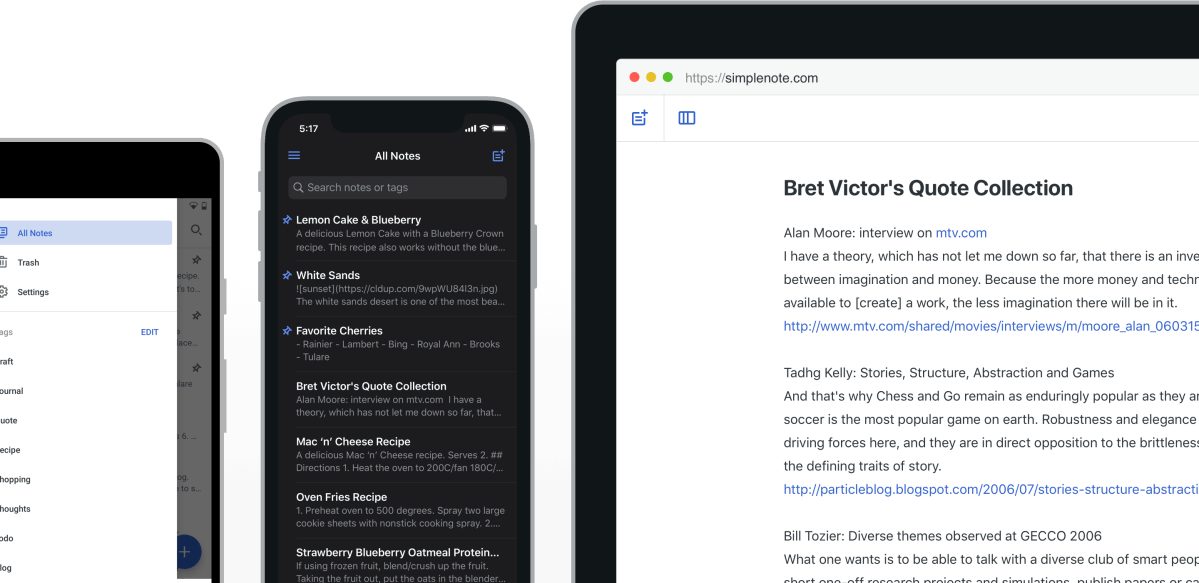
Simplenote is a free notes app from Automattic, the company behind WordPress.com. It keeps text-only notes organized by tags, with instant search, Markdown preview, checklists, version history and near real-time sync on Android, iOS, macOS, Windows, Linux and the web. Notes work offline, but are not encrypted at rest on the server, and notes cannot hold images or attachments. The apps’ source is public on GitHub, but the sync server is not open source.
What users say
Evidence ↓Reviewers praise the clean writing-focused interface, fast sync and free price, and a writer who used it as a main notes app for over a year said it kept notes in sync. One long-time user rated it 7/10 and reported losing roughly 1 in 100 notes, mostly on Android; that account is undated and from a single person.
Rankings and alternatives
- Note-taking apps for Android #4 of 10 Plain text that syncs everywhere for free
- Google Keep #1 Best for quick notes and lists
- Samsung Notes #2 Galaxy phones and S Pen handwriting
- Microsoft OneNote #3 Long notes you also open on a Windows PC



Android note-taking apps scores
Evaluated Nov 17, 2026 Evidence ↓- Pleasant to use on Android · counts double 4
4/5 means: Quick and comfortable on Android, easy to start, with minor complaints
Reviewers describe a clean, quick, easy app that is usable at once; one long-time user reports lost notes, which is a single, undated account.
- Getting a note down fast 3
3/5 means: A new-note widget or the share menu, but capture is slowed by app startup or missing voice or photo notes
From product knowledge, the Android app has a new-note widget and accepts text shared from other apps, but it has no voice or photo notes; no page read documents the widget or share menu.
- Writing and organizing longer notes 2
2/5 means: Short notes with basic formatting, kept in order by labels or tags only
Markdown, checklists, tags, search and history, but no images or attachments, no folders, and no search of images.
- Works on all your devices 5
5/5 means: Full apps or a full web version on Android, Windows, Mac and iPhone, synced on the plan you'd use
Free synced apps on Android, iOS, macOS, Windows, Linux and the web.
- Cost for one person 5
5/5 means: Everything is free
The vendor says everything is free; no paid plan found.
- Privacy and owning your notes · counts half 3
3/5 means: As 2, plus local storage, open source code or a widely readable export format
Cloud notes with no encryption at rest and no end-to-end encryption, a full export in JSON, and open-source client apps (sync server closed).
- Handwriting with a stylus · counts half 1
1/5 means: No handwriting or drawing
Text-only notes with no attachments or drawing; no source mentions a stylus.
- Works without a connection · counts half 4
4/5 means: All notes work offline on the phone after a sync, with small limits
All notes work offline once signed in and synced; edits sync on reconnect, and the same note edited in two places keeps only the latest edit as current.
Pricing
- Free Free Apps, backups, syncing and sharing are free. No paid plan was found.
Prices checked Nov 17, 2026.
Evidence and sources
What users say
Summary 3 quotes
-
I’ve lost some notes while using Simplenote. I’d guesstimate it to be roughly 1 in 100 notes. It‘s unacceptable for any note-taking app to lose data like this.
ctrl.blog reviewer, independent blogger who uses Simplenote daily · ctrl.blog/entry/review-simplenote · checked -
The app is clean, consistently keeps my notes in sync, and I can easily move the unformatted text to any other app of my choice.
Android Authority writer, reviewer who used Simplenote as primary notes app for over a year · androidauthority.com/google-keep-vs-simplenote-3499121 · published · checked -
Sure, it misses out on features like background colors or the ability to insert images, but I don’t miss those at all.
Android Authority writer, reviewer · androidauthority.com/google-keep-vs-simplenote-3499121 · published · checked
Android note-taking apps scores
Pleasant to use on Android 2 quotes
-
I’ve lost some notes while using Simplenote. I’d guesstimate it to be roughly 1 in 100 notes. It‘s unacceptable for any note-taking app to lose data like this.
ctrl.blog reviewer, independent blogger who uses Simplenote daily · ctrl.blog/entry/review-simplenote · checked -
The app is clean, consistently keeps my notes in sync, and I can easily move the unformatted text to any other app of my choice.
Android Authority writer, reviewer who used Simplenote as primary notes app for over a year · androidauthority.com/google-keep-vs-simplenote-3499121 · published · checked
Writing and organizing longer notes 4 quotes
-
Images, PDFs, or any other attachments cannot be added to a note at this time.
simplenote.com/help · checked -
You can organize your notes by adding tags to a note at the bottom of the note editing screen.
simplenote.com/help · checked -
You can enable and disable Markdown on a per-note basis by tapping the ellipsis action in the top app bar while viewing a note and tapping the Markdown checkbox.
simplenote.com/help · checked -
Sure, it misses out on features like background colors or the ability to insert images, but I don’t miss those at all.
Android Authority writer, reviewer · androidauthority.com/google-keep-vs-simplenote-3499121 · published · checked
Works on all your devices 2 quotes
-
All your notes, synced on all your devices. Get Simplenote now for iOS, Android, Mac, Windows, Linux, or in your browser.
simplenote.com · checked -
Apps, backups, syncing, sharing – it’s all completely free.
simplenote.com · checked
Cost for one person 1 quote
-
Apps, backups, syncing, sharing – it’s all completely free.
simplenote.com · checked
Privacy and owning your notes 3 quotes
-
Notes are not encrypted at rest due to server side constraints. For this reason we recommend not using Simplenote to store anything particularly sensitive.
simplenote.com/help · checked -
Simplenote is powered by the Simperium Sync'ing protocol.
github.com/Automattic/simplenote-android · checked -
Notes are synced through Simplenote’s proprietary server-software, so the open-source commitment only goes so far.
ctrl.blog reviewer, independent blogger who uses Simplenote daily · ctrl.blog/entry/review-simplenote · checked
Handwriting with a stylus 1 quote
-
Images, PDFs, or any other attachments cannot be added to a note at this time.
simplenote.com/help · checked
Works without a connection 1 quote
-
All Simplenote apps are designed to be used offline. You can access and edit your notes without an internet connection, provided you have signed in and downloaded all your notes while online.
simplenote.com/help · checked
Facts
License 2 quotes
-
Simplenote is powered by the Simperium Sync'ing protocol.
github.com/Automattic/simplenote-android · checked -
Notes are synced through Simplenote’s proprietary server-software, so the open-source commitment only goes so far.
ctrl.blog reviewer, independent blogger who uses Simplenote daily · ctrl.blog/entry/review-simplenote · checked
Runs on 1 quote
-
All your notes, synced on all your devices. Get Simplenote now for iOS, Android, Mac, Windows, Linux, or in your browser.
simplenote.com · checked
Pricing
simplenote.com · checked