
Samsung Notes
Samsung's free note-taking app for Galaxy phones and tablets, with S Pen handwriting and Galaxy AI
Our verdict
#2 of 10 in Note-taking apps for Android · Galaxy phones and S Pen handwriting
What it does
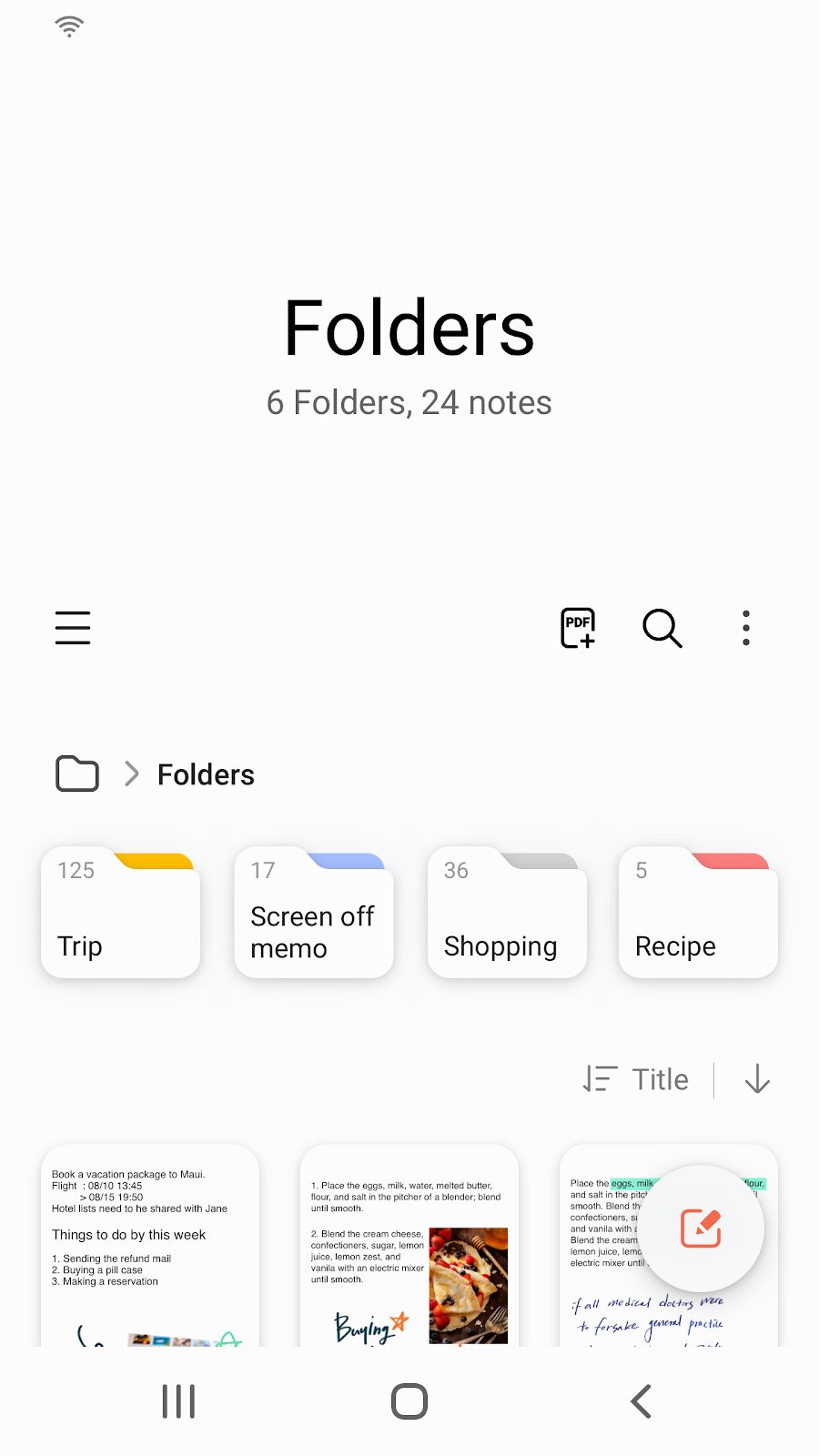
- Screen-off memos with the S Pen
- Handwriting, typing, photos, and PDF markup in one note
- Voice recordings tied to what you wrote
- Galaxy AI Note Assist on newer devices
- A Windows app and folder sync to OneNote
Pros
- The best handwriting on a Galaxy phone or tablet
- Free and already installed
- Typed and handwritten notes live together
Cons
- Officially works only on Samsung phones and tablets
- No Mac, iPhone, or web version
- Notes synced to OneNote are read-only there
- Skip if:
- You might switch to a Pixel or an iPhone in the next few years
Samsung Notes is a free note-taking app from Samsung for typed and handwritten notes, PDF annotation, voice recordings and S Pen sketching. It is built for Galaxy phones and tablets, where it comes preinstalled, and is officially supported only on Samsung’s Android devices. A Windows version from the Microsoft Store syncs notes through Samsung Cloud, and reportedly runs on any Windows PC since 2025. Notes can also sync to Microsoft OneNote. There is no Mac, iPhone or web version.
What users say
Evidence ↓Reviewers praise the S Pen writing feel and the range of tools, and a SamMobile writer (a Samsung fan site) highlights voice notes timecoded to handwriting. The recurring complaint is the Samsung lock-in, which a review summarizes as the app not always working smoothly on non-Samsung devices; a few Reddit users welcomed the 2025 Windows opening. Some users find the advanced features take time to learn. Sources are a few reviews and unnamed user summaries, not a measured sample.
Rankings and alternatives
- Note-taking apps for Android #2 of 10 Galaxy phones and S Pen handwriting
- Google Keep #1 Best for quick notes and lists
- Microsoft OneNote #3 Long notes you also open on a Windows PC
- Simplenote #4 Plain text that syncs everywhere for free


Android note-taking apps scores
Evaluated Nov 17, 2026 Evidence ↓- Pleasant to use on Android · counts double 4
4/5 means: Quick and comfortable on Android, easy to start, with minor complaints
Preinstalled and well regarded on Galaxy phones and tablets, with a modest learning curve for advanced features. Most readers on non-Samsung Android cannot officially use it, which this score does not reflect.
- Getting a note down fast 4
4/5 means: Widgets that make a new note, saving from the share menu, and voice or photo notes
Screen-off memo with the S Pen, voice notes timecoded to handwriting and a home-screen widget (from knowledge; one review lists no home-screen shortcuts) make capture strong on Galaxy. Share-sheet saving is not confirmed in the sources.
- Writing and organizing longer notes 4
4/5 means: A full editor with notebooks, tags or links, plus search that reads photos, scans or handwriting, or a richer structure such as nested pages or linked notes
Typed and handwritten notes with checklists, images, audio, PDFs, folders and tags, and search that reaches handwriting. Search is called imperfect, and the structure is not nested or linked.
- Works on all your devices 2
2/5 means: Android plus one other kind of device, with no web version
Officially only on Samsung Galaxy Android devices, plus a Windows app that reports say now installs on any PC. There is no Mac, iPhone or web version, and OneNote sync is the only route beyond Windows.
- Cost for one person 5
5/5 means: Everything is free
Free and preinstalled on Galaxy devices, with Samsung's basic Galaxy AI features free. Samsung Cloud storage limits were not found, and enhanced AI features may carry fees.
- Privacy and owning your notes · counts half 2
2/5 means: Notes are in the vendor's cloud without end-to-end encryption, with a full export
Sync runs through Samsung Cloud with no end-to-end encryption claim found. Export covers PDF, Word, PowerPoint, image and text, and individual notes can be locked, which needs a Samsung account.
- Handwriting with a stylus · counts half 5
5/5 means: Among the best Android apps to write in, with natural ink, PDF markup and handwriting-to-text
Widely regarded as among the best stylus note apps on Android, with smooth S Pen ink, many pens, PDF annotation and handwriting-to-text. It is strongest on S Pen devices.
- Works without a connection · counts half 5
5/5 means: Notes are stored on the phone and everything works offline
Notes are saved on the device and cloud sync is optional, so editing and searching work offline. No source states this outright.
Pricing
- Free Free Preinstalled and free on Galaxy devices. Galaxy AI basic features provided by Samsung are free, and Samsung enhanced or third-party AI features may carry fees. Samsung Cloud storage limits were not found.
Prices checked Nov 17, 2026.
Evidence and sources
What users say
Summary 5 quotes
-
Another user says they got the app to work on their ASUS ROG Strix G15 laptop. Meanwhile, a different commenter claims this update is a “game changer” and they “will use Samsung Notes again.”
androidauthority.com/samsung-notes-windows-update-3559666 · published · checked -
If you begin scribbling with the S Pen as you're recording a voice note, the app will actually timecode it with the voice, making it super simple to see what you wrote down when the voice note was being recorded.
Adnan Farooqui, writer at SamMobile (Samsung-focused news site) · sammobile.com/news/these-are-the-5-samsung-notes-features-you-need-to-check-out · published · checked -
The writing feels smooth and accurate, much better than on other devices.
Monika Dimitrovska, author at crm.org · crm.org/news/samsung-notes-review · published · checked -
Some say the app doesn’t always work smoothly across different devices, especially if Samsung doesn’t make those devices.
crm.org/news/samsung-notes-review · published · checked -
Some people find the app a bit tricky to figure out. They say it takes time to get used to all the cool things it can do, like turning handwriting into typed words or drawing perfect shapes.
crm.org/news/samsung-notes-review · published · checked
Android note-taking apps scores
Pleasant to use on Android 2 quotes
-
Some say the app doesn’t always work smoothly across different devices, especially if Samsung doesn’t make those devices.
crm.org/news/samsung-notes-review · published · checked -
Some people find the app a bit tricky to figure out. They say it takes time to get used to all the cool things it can do, like turning handwriting into typed words or drawing perfect shapes.
crm.org/news/samsung-notes-review · published · checked
Getting a note down fast 3 quotes
-
Using the screen off memo feature, users can write using an S Pen without turning the device screen on, which is then saved onto Samsung Notes.
en.wikipedia.org/wiki/Samsung_Notes · checked -
It listed the lack of home screen shortcuts as a disadvantage, as well as the fact access to secured notes are denied temporarily when inputting a wrong password.
en.wikipedia.org/wiki/Samsung_Notes · checked -
If you begin scribbling with the S Pen as you're recording a voice note, the app will actually timecode it with the voice, making it super simple to see what you wrote down when the voice note was being recorded.
Adnan Farooqui, writer at SamMobile (Samsung-focused news site) · sammobile.com/news/these-are-the-5-samsung-notes-features-you-need-to-check-out · published · checked
Writing and organizing longer notes 2 quotes
-
You won't be able to edit the PDFs, but you can draw on them or annotate them in the app.
samsung.com/us/support/answer/ANS10001384 · checked -
You can edit your pages and search for stuff easily. But the search isn’t perfect.
crm.org/news/samsung-notes-review · published · checked
Works on all your devices 4 quotes
-
It is officially only supported on Samsung's own Android devices, but on Windows PCs is no longer restricted to Samsung's devices since 2025.
en.wikipedia.org/wiki/Samsung_Notes · checked -
On October 3, 2023, it was revealed that Samsung Notes will forcibly stop working on Windows devices unless it is a Galaxy Book. In May 2025, it was reported that Samsung now allows the software to run on all Windows computers, although the Samsung Account app from the Microsoft Store is required for the backend to function.
en.wikipedia.org/wiki/Samsung_Notes · checked -
You can also use Samsung Cloud to sync your notes across all of your other Galaxy devices.
samsung.com/us/support/answer/ANS10001384 · checked -
Now that your notes are synchronized with your Samsung account, you can also make them available in Microsoft Office by syncing Samsung Notes with Microsoft OneNote!
samsung.com/us/support/answer/ANS10001384 · checked
Cost for one person 1 quote
-
Galaxy AI basic features provided by Samsung are free. Any Samsung enhanced AI features and all third party AI features are subject to different terms and may be subject to fees.
samsung.com/us/support/answer/ANS10001384 · checked
Privacy and owning your notes 2 quotes
-
You can save it as a PDF, Microsoft Word file, a PowerPoint file, an image, or a text file.
samsung.com/us/support/answer/ANS10001384 · checked -
A Samsung account is required to lock notes.
samsung.com/us/support/answer/ANS10001384 · checked
Handwriting with a stylus 2 quotes
-
You won't be able to edit the PDFs, but you can draw on them or annotate them in the app.
samsung.com/us/support/answer/ANS10001384 · checked -
The writing feels smooth and accurate, much better than on other devices.
Monika Dimitrovska, author at crm.org · crm.org/news/samsung-notes-review · published · checked
Facts
License 1 quote
-
It is officially only supported on Samsung's own Android devices, but on Windows PCs is no longer restricted to Samsung's devices since 2025.
en.wikipedia.org/wiki/Samsung_Notes · checked
Runs on 2 quotes
-
It is officially only supported on Samsung's own Android devices, but on Windows PCs is no longer restricted to Samsung's devices since 2025.
en.wikipedia.org/wiki/Samsung_Notes · checked -
On October 3, 2023, it was revealed that Samsung Notes will forcibly stop working on Windows devices unless it is a Galaxy Book. In May 2025, it was reported that Samsung now allows the software to run on all Windows computers, although the Samsung Account app from the Microsoft Store is required for the backend to function.
en.wikipedia.org/wiki/Samsung_Notes · checked
Needs 2 quotes
-
Note assist with Galaxy AI is available on select phones and tablets running Android 14 with One UI 6.1 or higher.
samsung.com/us/support/answer/ANS10001384 · checked -
A Samsung account is required to lock notes.
samsung.com/us/support/answer/ANS10001384 · checked
Users 1 quote
-
1B+
play.google.com/store/apps/details · checked
More from the sources
Features 2 quotes
-
Galaxy AI can also help you transcribe voice recordings. These voice memos can then be added to the Samsung Notes app.
samsung.com/us/support/answer/ANS10001384 · checked -
By tapping the Voice Recording icon while writing a note, you can record sound and create a note with sound.
play.google.com/store/apps/details · checked