
Kittl
Browser-based design app for logos, posters, merch and social graphics, with strong text effects and AI image tools
Our verdict
#6 of 8 in Graphic design software for beginners · Lettering-led designs and merch
What it does
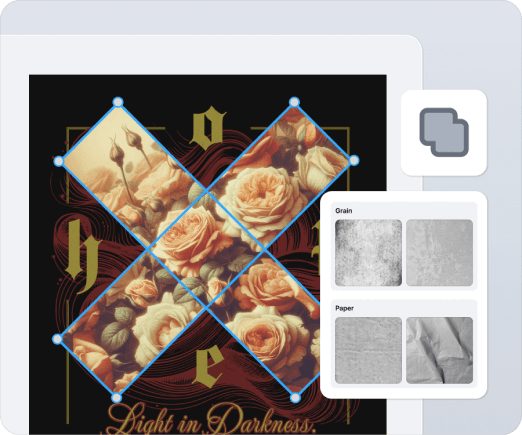
- Text effects, curved type and badge layouts
- Vector editing and SVG export on Pro
- Templates for merch, labels and posters
- Browser only
Pros
- Best typography tools of the template-style apps
- Logos built from your own elements can be trademarked
- Commercial license on every paid plan
Cons
- Free exports are small, watermarked and personal-use only
- No phone or desktop app
- Smaller template library, weighted toward merch
- Choose if:
- You design T-shirts, stickers or labels to sell
Kittl is a browser-based graphic design app that began in 2020 as a lettering tool and now offers templates, mockups, vector editing, layered text effects and AI image and video generation. It suits people making logos, posters, t-shirt graphics and social posts who care about typography. It runs only in a web browser, with no mobile or desktop app. The Free plan is for personal use with small watermarked exports, and paid plans add high-resolution and vector exports and a commercial license.
What users say
Evidence ↓Reviewers who tested Kittl describe a capable, typography-strong editor that is easy compared with Photoshop or Illustrator, but harder for a complete beginner than Canva because it uses terms like blend modes and anchor points (one reviewer's view, with a hands-on comparison). Another reviewer made a finished design and exported it within minutes from a t-shirt template. Reviewers agree the Free plan works for trying the editor but is too limited for real use. A recurring complaint, reported second-hand from Trustpilot, is that AI credits are spent on failed generations. All of these come from a few reviewers, some of whom use affiliate links.
Rankings and alternatives
- Graphic design software for beginners #6 of 8 Lettering-led designs and merch
- Canva #1 Best for most beginners
- Adobe Express #2 Canva-style app with more free tools
- Affinity #3 Free professional design app

Graphic design software for beginners scores
Evaluated Nov 17, 2026 Evidence ↓- Ease for non-designers · counts double 3
3/5 means: Learnable in a few sessions, but it assumes some design vocabulary or leaves layout decisions to the reader
Template-based editing is quick, but a reviewer with design training says Kittl assumes terms like blend modes and anchor points and picks Canva as easier. Artboards add complexity. Based mainly on one hands-on comparison.
- Templates for everyday jobs · counts double 3
3/5 means: Thousands of templates, but thin in some of these kinds or mostly in one style
Around 10,000 templates (counts conflict, up to about 100,000 on paid), covering logos, posters, t-shirts, social graphics and cards, but strongly typographic and merch-leaning, with no presentations and a stock library gated to higher plans.
- What the free version lets you make 2
2/5 means: Downloads are small, watermarked, capped to a few a day, or limited to personal use
Free exports are PNG/JPG capped at 800px and 72 dpi with a watermark, 5 projects, personal use only, and no PDF, SVG or transparent export.
- Print and export quality 3
3/5 means: High-resolution images and PDFs, but no print settings such as bleed, or no vector export
Pro gives up to 10,800px at 300 dpi, PDF, PNG and SVG with transparent backgrounds. Bleed, crop marks and CMYK were not found in anything read, so this is uncertain.
- Photo editing and background removal 3
3/5 means: One-click background removal and simple fixes, but little control
One-click AI background removal, upscaler and blend modes exist, but reviewers say deep photo editing is limited. No object-removal tool was documented.
- Making a logo you can use as a brand 4
4/5 means: Vector tools and output, with brand use allowed for designs built from the reader's own elements
Vector editing, a vectorizer, logo templates and SVG export. A logo built from your own uploads or AI elements can be trademarked, but raw templates and stock assets cannot. The license comes from reviewers summarizing it, not Kittl's own page.
- Room to grow 4
4/5 means: Advanced typography, vector editing or photo editing, short of a full professional suite
Layered text effects, blend modes, anchor-point vector editing and multiple artboards go beyond Canva, but it is short of a full pro suite and has weak photo editing.
- Phone and computer support 2
2/5 means: Desktop computers only, or a browser only
Browser only, with no mobile or desktop app, according to two reviewers.
- AI helpers · counts half 4
4/5 means: AI image generation, text and editing tools with generous limits on the paid plan
Many image models, AI vector and logo generation, background removal, video generation and a daily token allowance on Expert. Resizing and text-writing tools are only partly documented, tokens run out on heavy use, and failed generations reportedly use credits.
Pricing
- Free Free
- Pro $12.00/month per seat
- Expert $26.00/month per seat
- Max $48.00/month per seat
- AI token top-up packs $16.00 one-time , extra
Prices checked Nov 17, 2026.
Evidence and sources
What users say
Summary 5 quotes
-
However, using Kittl definitely requires you to have more understanding of graphic design terminology and techniques.
Matt Walsh, reviewer at Style Factory (Adobe Certified Associate in Photoshop and Illustrator) · stylefactoryproductions.com/blog/kittl-vs-canva · published · checked -
Kittl and Canva are both excellent, easy-to-use design tools that make creating professional-looking visuals far simpler than traditional graphic design software like Photoshop and Illustrator.
Matt Walsh, reviewer at Style Factory · stylefactoryproductions.com/blog/kittl-vs-canva · published · checked -
Within minutes, I was able to customize colors, replace text, and export a finished design as a high-resolution PNG and vector PDF.
Bogdan Rancea, reviewer and founder of ecomm.design · ecomm.design/kittl-review · published · checked -
You’re limited to 5 projects, and exports are capped at 800px at 72dpi. It’s fine for testing ideas, but not usable for commercial work.
Bogdan Rancea, reviewer and founder of ecomm.design · ecomm.design/kittl-review · published · checked -
❌ Credits deducted on failed generations is a recurring Trustpilot complaint, made worse by error banners that vanish too fast to read
fritz.ai/kittl-ai-review · published · checked
Graphic design software for beginners scores
Ease for non-designers 3 quotes
-
However, using Kittl definitely requires you to have more understanding of graphic design terminology and techniques.
Matt Walsh, reviewer at Style Factory (Adobe Certified Associate in Photoshop and Illustrator) · stylefactoryproductions.com/blog/kittl-vs-canva · published · checked -
Kittl and Canva are both excellent, easy-to-use design tools that make creating professional-looking visuals far simpler than traditional graphic design software like Photoshop and Illustrator.
Matt Walsh, reviewer at Style Factory · stylefactoryproductions.com/blog/kittl-vs-canva · published · checked -
Within minutes, I was able to customize colors, replace text, and export a finished design as a high-resolution PNG and vector PDF.
Bogdan Rancea, reviewer and founder of ecomm.design · ecomm.design/kittl-review · published · checked
Templates for everyday jobs 4 quotes
-
Kittl’s 10,000+ Premium Templates and Mockups are created by world-class independent designers.
kittl.com/pricing · checked -
Users on Kittl’s free plan get access to around 10,000 templates, while paying users get access to around 100,000 premium templates in all.
Matt Walsh, reviewer at Style Factory · stylefactoryproductions.com/blog/kittl-vs-canva · published · checked -
Logos T-shirts Posters Mugs Social graphics Stickers Cards
Bogdan Rancea, reviewer and founder of ecomm.design · ecomm.design/kittl-review · published · checked -
It doesn’t offer deep photo editing or presentation tools, so it’s not a full replacement for platforms like Adobe or Canva in every case.
Bogdan Rancea, reviewer and founder of ecomm.design · ecomm.design/kittl-review · published · checked
What the free version lets you make 4 quotes
-
Free Plan: For personal use only (no commercial rights).
kittl.com/pricing · checked -
Free ($0): 200 one-time tokens (about 100 image generations), 800px/72dpi PNG and JPG export only, a watermark, 5 projects and 500MB, personal use only.
fritz.ai/kittl-ai-review · published · checked -
You’re limited to 5 projects, and exports are capped at 800px at 72dpi. It’s fine for testing ideas, but not usable for commercial work.
Bogdan Rancea, reviewer and founder of ecomm.design · ecomm.design/kittl-review · published · checked -
On my free account, I could download a PNG or JPG, but PDF and SVG were locked, along with logo removal, higher resolution, and background removal.
Fritz reviewer, hands-on reviewer at fritz.ai · fritz.ai/kittl-ai-review · published · checked
Print and export quality 2 quotes
-
High-resolution and vector exports
kittl.com/pricing · checked -
High-res exports (up to 10800px, 300dpi) PDF, PNG, SVG file types Transparent backgrounds
Bogdan Rancea, reviewer and founder of ecomm.design · ecomm.design/kittl-review · published · checked
Photo editing and background removal 3 quotes
-
On my free account, I could download a PNG or JPG, but PDF and SVG were locked, along with logo removal, higher resolution, and background removal.
Fritz reviewer, hands-on reviewer at fritz.ai · fritz.ai/kittl-ai-review · published · checked -
AI image generation AI vector creation Background remover Vectorizer for raster-to-vector conversion Logo generation
Bogdan Rancea, reviewer and founder of ecomm.design · ecomm.design/kittl-review · published · checked -
It doesn’t offer deep photo editing or presentation tools, so it’s not a full replacement for platforms like Adobe or Canva in every case.
Bogdan Rancea, reviewer and founder of ecomm.design · ecomm.design/kittl-review · published · checked
Making a logo you can use as a brand 4 quotes
-
High-res exports (up to 10800px, 300dpi) PDF, PNG, SVG file types Transparent backgrounds
Bogdan Rancea, reviewer and founder of ecomm.design · ecomm.design/kittl-review · published · checked -
AI image generation AI vector creation Background remover Vectorizer for raster-to-vector conversion Logo generation
Bogdan Rancea, reviewer and founder of ecomm.design · ecomm.design/kittl-review · published · checked -
Trademark rule: raw Kittl templates and stock assets cannot be registered as a trademark, but a logo built from your own uploads and/or AI-generated elements can be trademarked by you.
fritz.ai/kittl-ai-review · published · checked -
Simplified vector editing means I could double-click a shape to edit its anchor points directly, rather than wrestling with Illustrator-style point management
fritz.ai/kittl-ai-review · published · checked
Room to grow 3 quotes
-
Layerable typography and text effects let me curve, shadow, and texture a word at the same time, instead of Canva’s one-effect-at-a-time limit
fritz.ai/kittl-ai-review · published · checked -
Simplified vector editing means I could double-click a shape to edit its anchor points directly, rather than wrestling with Illustrator-style point management
fritz.ai/kittl-ai-review · published · checked -
It doesn’t offer deep photo editing or presentation tools, so it’s not a full replacement for platforms like Adobe or Canva in every case.
Bogdan Rancea, reviewer and founder of ecomm.design · ecomm.design/kittl-review · published · checked
Phone and computer support 2 quotes
-
Kittl is browser-based only, with no dedicated iOS or Android app.
fritz.ai/kittl-ai-review · published · checked -
Kittl, by contrast, is exclusively web-based — you have to use it in a browser like Chrome or Safari.
Matt Walsh, reviewer at Style Factory · stylefactoryproductions.com/blog/kittl-vs-canva · published · checked
AI helpers 4 quotes
-
AI image generation AI vector creation Background remover Vectorizer for raster-to-vector conversion Logo generation
Bogdan Rancea, reviewer and founder of ecomm.design · ecomm.design/kittl-review · published · checked -
Pro (about $15/mo monthly, about $10/mo annual, saving roughly 33%): 2,000 tokens per month per editor, 10GB storage, and a commercial license.
fritz.ai/kittl-ai-review · published · checked -
On Expert and Max you get a batch of tokens every day, on top of your monthly balance. Expert gets 200 a day, Max gets 600.
kittl.com/pricing · checked -
❌ Credits deducted on failed generations is a recurring Trustpilot complaint, made worse by error banners that vanish too fast to read
fritz.ai/kittl-ai-review · published · checked
Facts
License 2 quotes
-
Free Plan: For personal use only (no commercial rights).
kittl.com/pricing · checked -
Pro & Expert Plans: Come with a Commercial License — reproduce your designs in up to 500,000 copies across packaging, marketing, digital media, or print.
kittl.com/pricing · checked
Runs on 2 quotes
-
Kittl is browser-based only, with no dedicated iOS or Android app.
fritz.ai/kittl-ai-review · published · checked -
Kittl, by contrast, is exclusively web-based — you have to use it in a browser like Chrome or Safari.
Matt Walsh, reviewer at Style Factory · stylefactoryproductions.com/blog/kittl-vs-canva · published · checked
Users 1 quote
-
Trusted by 10M+ creatives
kittl.com/pricing · checked
More from the sources
Pricing 1 quote
-
Start free, then pick the plan that fits. Pro is $12.00 a month, Expert $26.00, and Max $48.00, per editor billed annually. Every paid plan includes a commercial license.
kittl.com/pricing · checked
What users say 1 quote
-
G2 · 4.7/5 (41 reviews) · 4.7/5 (7,709 reviews)
stylefactoryproductions.com/blog/kittl-vs-canva · published · checked
How widely it is used 1 quote
-
At time of writing, Kittl states that it has over 5 million users.
stylefactoryproductions.com/blog/kittl-vs-canva · published · checked
Pricing
kittl.com/pricing · checked