
MailMate
Keyboard-driven, IMAP-only Mac email client with Markdown composing and powerful smart mailboxes
Our verdict
#10 of 10 in Mac email clients · Keyboard and search power for IMAP
Pros
- Powerful search and smart mailboxes
- Custom key bindings and scripting
- Free Mode keeps every feature
Cons
- No Exchange support
- No calendar or iPhone app
- Dated interface and plain-text mail
- Choose if:
- You run several IMAP accounts and want to drive everything from the keyboard
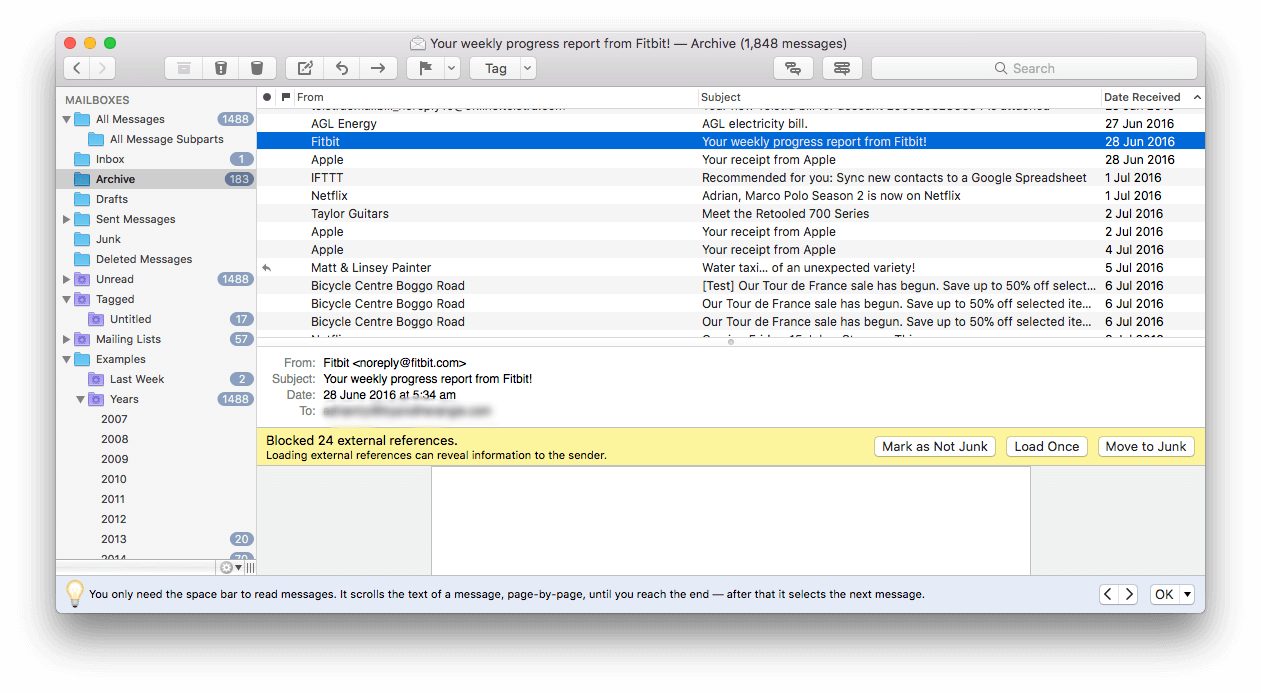
MailMate is an email client for macOS from Freron Software (Benny Kjær Nielsen) for power users. It works with IMAP accounts only and offers extensive keyboard control, Markdown composing, advanced search, smart mailboxes, tagging, and OpenPGP and S/MIME encryption and signing. It is a proprietary Mac-only app sold by subscription, with a free mode that keeps all features but marks outgoing mail and is not intended for business use.
What users say
Evidence ↓Only one reviewer's account was read, a 2020-era SoftwareHow roundup. It calls MailMate the most powerful Mac email client, built for keyboard-centric power users with IMAP accounts, but plain-text only (formatting via Markdown), without Exchange support and plain-looking. Treat this as a single, possibly dated view, not a sampled measure.
Rankings and alternatives
- Mac email clients #10 of 10 Keyboard and search power for IMAP
- Apple Mail #1 Best for most Mac users
- Spark Mail by Readdle #2 Smarter inbox, free on every device
- Superhuman Mail #3 For people who live in email



Mac email clients scores
Evaluated Nov 17, 2026 Evidence ↓- Fast and pleasant every day · counts double 3
3/5 means: Solid but plain, dated, heavy or un-Mac-like, with known rough edges
Fast with very large mailboxes and has the most powerful search conditions of any Mac client, but its interface is plain and dated, and messages are plain text with Markdown for formatting.
- Works with all your accounts 3
3/5 means: Most providers, but Microsoft 365 or Exchange works poorly or not at all
Works with any IMAP account, including Gmail and iCloud, but doesn't support Exchange, so Microsoft 365 works only over IMAP.
- Tools for getting through the inbox 1
1/5 means: None of the five
Smart mailboxes, rules and tags are strong, but no snooze, scheduled sending, reply reminders or automatic sorting were found.
- Same app on your iPhone 1
1/5 means: No iPhone app
Mac only, with no iPhone app.
- Mail stays between you and your provider 5
5/5 means: Direct between your devices and your provider, tracking pixels blocked, and any AI runs on the device or in a private cloud with published guarantees
A local IMAP client that talks straight to your server, blocks remote content and supports OpenPGP and S/MIME, with no cloud features.
- Cost over three years 4
4/5 means: Free with ads or limits, or under $80
Free Mode keeps every feature but adds "MailMate Free Mode" to a header of outgoing mail and isn't meant for business use; Paid Mode is $10 every three months.
- Calendar built in · counts half 1
1/5 means: No calendar, and invitations open elsewhere
An email client only, with no calendar.
- Keyboard and automation · counts half 5
5/5 means: Built for the keyboard with custom key bindings, plus scripting or extensions
Extensive keyboard control with custom key bindings, bundles that script actions, Markdown composing and drill-down search.
- AI help · counts half 1
1/5 means: No built-in AI
No AI features.
Pricing
- Trial Mode Free All features for 14 days of active use. Outgoing mail carries a "MailMate Trial" header.
- Paid Mode $40.00 /year Billed $10 every 3 months ($40 per year), plus any VAT. Subscription replaced the former $50 one-time license with version 2.0 in December 2024. Outgoing mail carries a "MailMate" header. Support is not guaranteed.
- Free Mode Free Applies after a subscription lapses. All features remain, outgoing mail carries a "MailMate Free Mode" header, and business use requires Paid Mode.
Prices checked Nov 17, 2026.
Evidence and sources
What users say
Summary 4 quotes
-
It works well with multiple IMAP accounts but doesn’t support Microsoft Exchange. MailMate aims to be standards-compliant, rather than cater to every proprietary system out there.
Adrian Try, reviewer at SoftwareHow · softwarehow.com/best-mac-email-client · checked -
Rather than focussing on ease of use, MailMate is a keyboard-centric, text-based email client designed for power users.
Adrian Try, reviewer at SoftwareHow · softwarehow.com/best-mac-email-client · checked -
Then there’s MailMate, which won’t win any beauty contests but has more muscles than any other email client for macOS — at a price.
Adrian Try, reviewer at SoftwareHow · softwarehow.com/best-mac-email-client · checked -
Standards compliance means that MailMate is text only. So the only way to apply formatting is to use Markdown syntax.
Adrian Try, reviewer at SoftwareHow · softwarehow.com/best-mac-email-client · checked
Mac email clients scores
Fast and pleasant every day 4 quotes
-
MailMate is an IMAP email client for macOS featuring extensive keyboard control, Markdown integrated email composition, advanced search conditions and drill-down search links, equally advanced smart mailboxes, automatic signature handling, cryptographic encryption/signing (OpenPGP and S/MIME), tagging, multiple notification methods, alternative message viewer layouts including a widescreen layout, flexible integration with third party applications, and much more.
freron.com · checked -
Rather than focussing on ease of use, MailMate is a keyboard-centric, text-based email client designed for power users.
Adrian Try, reviewer at SoftwareHow · softwarehow.com/best-mac-email-client · checked -
Then there’s MailMate, which won’t win any beauty contests but has more muscles than any other email client for macOS — at a price.
Adrian Try, reviewer at SoftwareHow · softwarehow.com/best-mac-email-client · checked -
Standards compliance means that MailMate is text only. So the only way to apply formatting is to use Markdown syntax.
Adrian Try, reviewer at SoftwareHow · softwarehow.com/best-mac-email-client · checked
Works with all your accounts 2 quotes
-
MailMate is an IMAP email client for macOS featuring extensive keyboard control, Markdown integrated email composition, advanced search conditions and drill-down search links, equally advanced smart mailboxes, automatic signature handling, cryptographic encryption/signing (OpenPGP and S/MIME), tagging, multiple notification methods, alternative message viewer layouts including a widescreen layout, flexible integration with third party applications, and much more.
freron.com · checked -
It works well with multiple IMAP accounts but doesn’t support Microsoft Exchange. MailMate aims to be standards-compliant, rather than cater to every proprietary system out there.
Adrian Try, reviewer at SoftwareHow · softwarehow.com/best-mac-email-client · checked
Tools for getting through the inbox 1 quote
-
MailMate is an IMAP email client for macOS featuring extensive keyboard control, Markdown integrated email composition, advanced search conditions and drill-down search links, equally advanced smart mailboxes, automatic signature handling, cryptographic encryption/signing (OpenPGP and S/MIME), tagging, multiple notification methods, alternative message viewer layouts including a widescreen layout, flexible integration with third party applications, and much more.
freron.com · checked
Same app on your iPhone 1 quote
-
MailMate is an IMAP email client for macOS featuring extensive keyboard control, Markdown integrated email composition, advanced search conditions and drill-down search links, equally advanced smart mailboxes, automatic signature handling, cryptographic encryption/signing (OpenPGP and S/MIME), tagging, multiple notification methods, alternative message viewer layouts including a widescreen layout, flexible integration with third party applications, and much more.
freron.com · checked
Mail stays between you and your provider 1 quote
-
MailMate is an IMAP email client for macOS featuring extensive keyboard control, Markdown integrated email composition, advanced search conditions and drill-down search links, equally advanced smart mailboxes, automatic signature handling, cryptographic encryption/signing (OpenPGP and S/MIME), tagging, multiple notification methods, alternative message viewer layouts including a widescreen layout, flexible integration with third party applications, and much more.
freron.com · checked
Cost over three years 3 quotes
-
You get a license key by signing up for a subscription paying for the ongoing development of MailMate. The price is currently $10 every 3 months (or the equivalent in your local currency plus any VAT required).
freron.com/pricing · checked -
When Paid Mode expires, MailMate will automatically switch to Free Mode. In this mode, you continue to have access to all features of MailMate, but it is not intended to be used by all users. If you are part of a business or you run a business relying on the use of MailMate then it is also required that you use MailMate in Paid Mode.
freron.com/pricing · checked -
In Free Mode, this header line will explicitly use “MailMate Free Mode” as the email client name. Most of your correspondents will never see this, but some email clients will display it when it’s available.
freron.com/pricing · checked
Calendar built in 1 quote
-
MailMate is an IMAP email client for macOS featuring extensive keyboard control, Markdown integrated email composition, advanced search conditions and drill-down search links, equally advanced smart mailboxes, automatic signature handling, cryptographic encryption/signing (OpenPGP and S/MIME), tagging, multiple notification methods, alternative message viewer layouts including a widescreen layout, flexible integration with third party applications, and much more.
freron.com · checked
Keyboard and automation 2 quotes
-
MailMate is an IMAP email client for macOS featuring extensive keyboard control, Markdown integrated email composition, advanced search conditions and drill-down search links, equally advanced smart mailboxes, automatic signature handling, cryptographic encryption/signing (OpenPGP and S/MIME), tagging, multiple notification methods, alternative message viewer layouts including a widescreen layout, flexible integration with third party applications, and much more.
freron.com · checked -
Rather than focussing on ease of use, MailMate is a keyboard-centric, text-based email client designed for power users.
Adrian Try, reviewer at SoftwareHow · softwarehow.com/best-mac-email-client · checked
AI help 1 quote
-
MailMate is an IMAP email client for macOS featuring extensive keyboard control, Markdown integrated email composition, advanced search conditions and drill-down search links, equally advanced smart mailboxes, automatic signature handling, cryptographic encryption/signing (OpenPGP and S/MIME), tagging, multiple notification methods, alternative message viewer layouts including a widescreen layout, flexible integration with third party applications, and much more.
freron.com · checked
Facts
Runs on 1 quote
-
MailMate is an IMAP email client for macOS featuring extensive keyboard control, Markdown integrated email composition, advanced search conditions and drill-down search links, equally advanced smart mailboxes, automatic signature handling, cryptographic encryption/signing (OpenPGP and S/MIME), tagging, multiple notification methods, alternative message viewer layouts including a widescreen layout, flexible integration with third party applications, and much more.
freron.com · checked
More from the sources
Pricing 2 quotes
-
Older license keys (of any kind) will continue to work as if in Paid Mode for at least 2 years after its purchase date or until July 1st, 2025, whichever occurs last. It’ll then switch to Free Mode (unless you are already a MailMate patron/supporter of course).
freron.com/pricing · checked -
This change from the former $50 one-time fee aims to provide a consistent revenue stream to support ongoing development and maintenance, similar to the previous patronage system encouraging regular user contributions. Despite the new subscription model, customer support is not covered, and users might face delays or lack of responses to inquiries.
alternativeto.net/news/2024/12/mailmate-adopts-a-subscription-model-with-version-2-0-release-shifts-from-one-time-fee · published · checked
Pricing
freron.com/pricing · checked