Microsoft Outlook
Microsoft's free Mac email and calendar app, with a unified inbox for Microsoft 365, Gmail, iCloud and IMAP accounts
Our verdict
#6 of 10 in Mac email clients · For Microsoft 365 and Exchange at work
What it does
- Full Microsoft 365 and Exchange mail and calendar
- Teams meetings and the Scheduling Assistant
- Focused Inbox, snooze and pinning
- Gmail, iCloud and IMAP accounts in a unified inbox
Pros
- The best Mac app for Microsoft 365 work accounts
- Free, even for work
- Strongest calendar of any app here
Cons
- Copies non-Microsoft accounts to Microsoft's cloud
- Ads unless you subscribe to Microsoft 365
- Heavy and busy for personal mail
- Skip if:
- You only want it for personal Gmail or iCloud mail
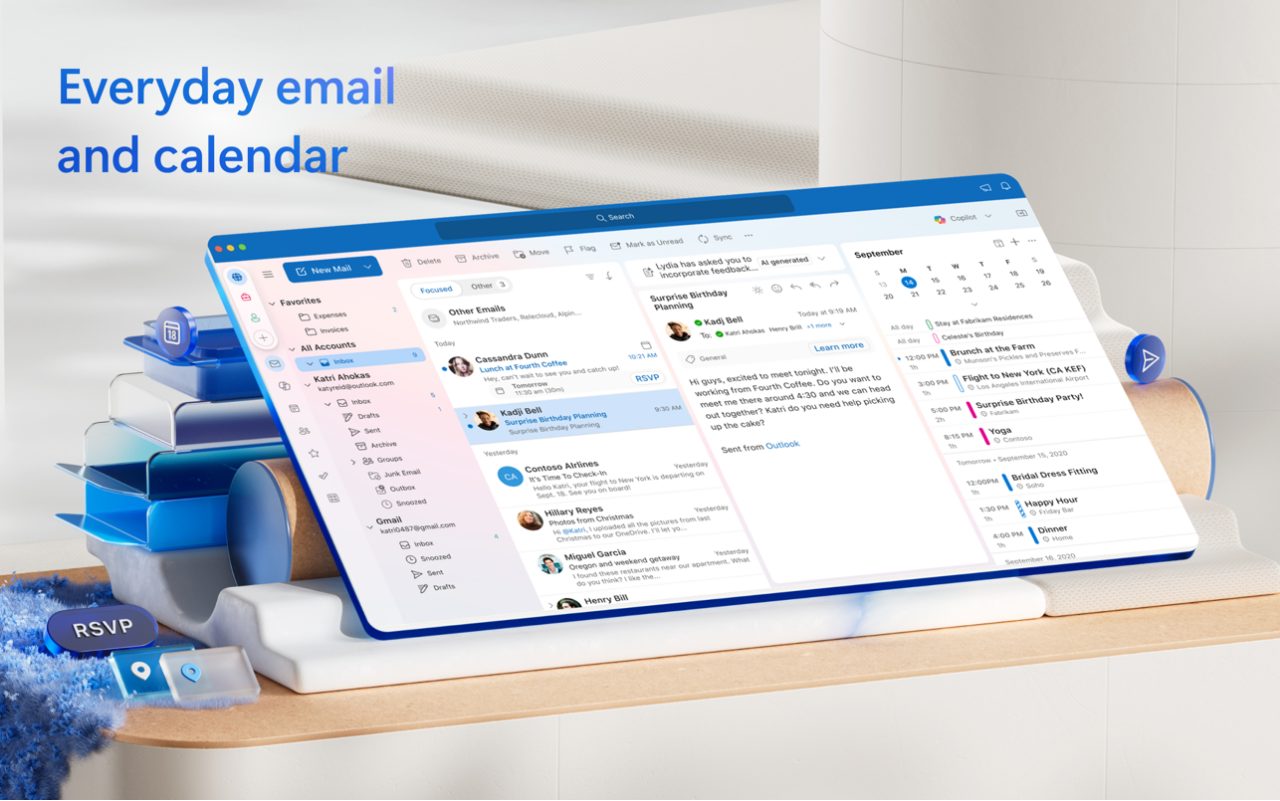
Microsoft Outlook for Mac is Microsoft’s native macOS email, calendar and contacts app. The current “new Outlook” replaces the legacy Outlook for Mac, whose support Microsoft says ends in October 2026. It supports Microsoft 365 and Exchange, Outlook.com, Gmail, iCloud, Yahoo, IMAP and POP accounts in one unified inbox, and it is free for personal and work use, with ads unless you have a Microsoft 365 subscription. Non-Microsoft accounts are synced through Microsoft’s cloud to enable features such as Focused Inbox, snooze and pinning. An iPhone companion, Outlook for iOS, is a separate free app. It is proprietary software from Microsoft.
What users say
Evidence ↓The Mac App Store listing has too few ratings to show an overview, so these views come from a few individual reviews. One long-term user says sending and receiving mail and calendar items "has never faltered" but reports search ranking and rich-text formatting bugs. Another likes consolidating accounts but says it does not coexist well with Apple Mail and that rules and junk filtering are weak. A third objects to unrequested changes in frequent updates. Each is a single review, not a measured consensus.
Rankings and alternatives
- Mac email clients #6 of 10 For Microsoft 365 and Exchange at work
- Apple Mail #1 Best for most Mac users
- Spark Mail by Readdle #2 Smarter inbox, free on every device
- Superhuman Mail #3 For people who live in email



Mac email clients scores
Evaluated Nov 17, 2026 Evidence ↓- Fast and pleasant every day · counts double 3
3/5 means: Solid but plain, dated, heavy or un-Mac-like, with known rough edges
A native Mac app that reliably handles mail and calendar, but it is heavy and busy for personal mail, and users complain about bugs, weak search ranking and changes that arrive with frequent updates.
- Works with all your accounts 5
5/5 means: Gmail, iCloud, Microsoft 365 and IMAP in a combined inbox, each working well
The best Microsoft 365 and Exchange support of any Mac client, plus Outlook.com, Gmail, iCloud, Yahoo, IMAP and POP, with a unified inbox.
- Tools for getting through the inbox 2
2/5 means: One or two of the five
The free version has Focused Inbox sorting and snooze. Scheduled sending needs a Microsoft 365 subscription, and there are no automatic reply reminders or sender screening.
- Same app on your iPhone 4
4/5 means: A full iPhone app, but accounts or settings are set up separately on each device
Outlook for iPhone and iPad is a full app, but accounts are added on each device.
- Mail stays between you and your provider 1
1/5 means: The app maker keeps a copy of your mailbox on its own servers
When you add a Gmail, iCloud, Yahoo or IMAP account, Outlook syncs a copy of its mail, calendar and contacts to Microsoft's data centers to power features such as Focused Inbox, snooze and pinning.
- Cost over three years 4
4/5 means: Free with ads or limits, or under $80
Free for personal and work use, but the free version shows ads; a Microsoft 365 subscription removes them and adds scheduled sending.
- Calendar built in · counts half 5
5/5 means: All of 4 plus scheduling help, such as finding a time that suits everyone or sharing booking links
A full calendar with Teams meetings, a Scheduling Assistant for finding a time, shared and delegated calendars, and Gmail and iCloud calendars too.
- Keyboard and automation · counts half 3
3/5 means: Shortcuts for most actions, plus some automation or a command palette
Shortcuts for most actions and Office add-ins, but the new Outlook dropped the old plug-ins and scripting.
- AI help · counts half 1
1/5 means: No built-in AI
Copilot in Outlook comes with a Microsoft 365 subscription; the free version has no built-in AI.
Pricing
- Outlook for Mac (free) Free Free for home, work and school use, no Microsoft 365 subscription needed. The App Store listing says the app contains advertising; a premium subscription removes ads. Send later and delivery and read receipts are marked "Available with Microsoft 365" in Microsoft's feature table.
- Microsoft 365 Personal (in-app purchase) $99.99 /year , extra Price shown in the Mac App Store listing as an in-app purchase; the listing also shows $9.99 (presumably monthly) and $119.99 for Personal and $129.99 for Family and $12.99 Family Monthly, without labelling every billing period. Microsoft's own pricing page was not read; check it before quoting prices.
Prices checked Nov 17, 2026.
Evidence and sources
What users say
Summary 3 quotes
-
The core functionality of this app - to reliably send and receive emails, calendar appointments, etc. - has never faltered. However, there are many bugs that need fixing.
EN (Houston, Texas), Mac App Store reviewer · apps.apple.com/us/app/microsoft-outlook/id985367838 · checked -
I like the way Outlook can consolidate your other email platforms so you do not have to open each one of your different email platforms to read or reply to your mail, however it does not interact well with the Apple mail platform
apps.apple.com/us/app/microsoft-outlook/id985367838 · checked -
There are so many unwanted changes each time you put out an update to Outlook.
Blu Barry - Daniel Griner, Mac App Store reviewer · apps.apple.com/us/app/microsoft-outlook/id985367838 · checked
Mac email clients scores
Fast and pleasant every day 4 quotes
-
Reimagined from the ground up and crafted natively for Mac so that it feels smooth, easy to use, and powerful • End-to-end redesign brings simplicity and customization to your email and calendaring Enhanced speed and performance • Optimized for Apple Silicon
apps.apple.com/us/app/microsoft-outlook/id985367838 · checked -
The new Outlook for Mac is a native macOS app. Microsoft plans to continue building and maintaining best-in-class native apps on macOS and iOS. No Progressive Web Apps (PWAs) are planned for Mac Outlook
Michael Palermiti, Partner Product Group Manager for Outlook at Microsoft · windowscentral.com/software-apps/outlook-for-mac-is-now-free-no-microsoft-365-subscription-required · checked -
The core functionality of this app - to reliably send and receive emails, calendar appointments, etc. - has never faltered. However, there are many bugs that need fixing.
EN (Houston, Texas), Mac App Store reviewer · apps.apple.com/us/app/microsoft-outlook/id985367838 · checked -
There are so many unwanted changes each time you put out an update to Outlook.
Blu Barry - Daniel Griner, Mac App Store reviewer · apps.apple.com/us/app/microsoft-outlook/id985367838 · checked
Works with all your accounts 2 quotes
-
Third-party accounts such as a Google, iCloud, Yahoo, POP, or IMAP account
support.microsoft.com/en-us/outlook/outlook-for-mac · checked -
Unified Inbox · Available
support.microsoft.com/en-us/outlook/outlook-for-mac-features · checked
Tools for getting through the inbox 2 quotes
-
Send later · Available with Microsoft 365
support.microsoft.com/en-us/outlook/outlook-for-mac-features · checked -
Focused inbox My Day tool Flag tag Pinning emails Snooze emails
support.microsoft.com/en-us/outlook/sync-account-in-outlook-for-mac-to-microsoft-cloud · checked
Same app on your iPhone 1 quote
-
Syncing your account to the Microsoft Cloud means that a copy of your email, calendar, and contacts will be synchronized between your email provider and Microsoft data centers.
support.microsoft.com/en-us/outlook/sync-account-in-outlook-for-mac-to-microsoft-cloud · checked
Mail stays between you and your provider 2 quotes
-
Syncing your account to the Microsoft Cloud means that a copy of your email, calendar, and contacts will be synchronized between your email provider and Microsoft data centers.
support.microsoft.com/en-us/outlook/sync-account-in-outlook-for-mac-to-microsoft-cloud · checked -
Focused inbox My Day tool Flag tag Pinning emails Snooze emails
support.microsoft.com/en-us/outlook/sync-account-in-outlook-for-mac-to-microsoft-cloud · checked
Cost over three years 3 quotes
-
Now free with your personal email accounts • Multi-account experience for email, calendar, and contacts, so you can focus and get things done without leaving the app • Compatible with Microsoft 365, Outlook.com (including Hotmail and MSN), Gmail, Yahoo! Mail, iCloud, IMAP, and POP accounts • Add a premium subscription to go ad-free
apps.apple.com/us/app/microsoft-outlook/id985367838 · checked -
Free · In‑App Purchases
apps.apple.com/us/app/microsoft-outlook/id985367838 · checked -
Outlook for Mac is now free for all users, including those using the app at home, work, or school. The email client no longer requires a Microsoft 365 subscription or license.
windowscentral.com/software-apps/outlook-for-mac-is-now-free-no-microsoft-365-subscription-required · checked
Calendar built in 2 quotes
-
Online meetings (Teams) · Available
support.microsoft.com/en-us/outlook/outlook-for-mac-features · checked -
Calendar: Outlook Settings now let users manage work hours and work-location schedules for supported accounts.
apps.apple.com/us/app/microsoft-outlook/id985367838 · checked
Keyboard and automation 1 quote
-
Injection-based plug-in support Not available
support.microsoft.com/en-us/outlook/outlook-for-mac-features · checked
Facts
License 1 quote
-
Now free with your personal email accounts • Multi-account experience for email, calendar, and contacts, so you can focus and get things done without leaving the app • Compatible with Microsoft 365, Outlook.com (including Hotmail and MSN), Gmail, Yahoo! Mail, iCloud, IMAP, and POP accounts • Add a premium subscription to go ad-free
apps.apple.com/us/app/microsoft-outlook/id985367838 · checked
Runs on 2 quotes
-
Now free with your personal email accounts • Multi-account experience for email, calendar, and contacts, so you can focus and get things done without leaving the app • Compatible with Microsoft 365, Outlook.com (including Hotmail and MSN), Gmail, Yahoo! Mail, iCloud, IMAP, and POP accounts • Add a premium subscription to go ad-free
apps.apple.com/us/app/microsoft-outlook/id985367838 · checked -
Requires macOS 15.0 or later.
apps.apple.com/us/app/microsoft-outlook/id985367838 · checked
Needs 1 quote
-
Requires macOS 15.0 or later.
apps.apple.com/us/app/microsoft-outlook/id985367838 · checked
More from the sources
Features 1 quote
-
Search is now powered by Microsoft Search and has better results and suggestions.
support.microsoft.com/en-us/outlook/outlook-for-mac · checked
Limits and known issues 2 quotes
-
Support for legacy Outlook for Mac will end in October 2026. Continued support for legacy Outlook for Mac will depend on your Microsoft 365, Office, or Outlook license.
support.microsoft.com/en-us/outlook/outlook-for-mac-features · checked -
Compose in plaintext · Not available
support.microsoft.com/en-us/outlook/outlook-for-mac-features · checked
Pricing
apps.apple.com/us/app/microsoft-outlook/id985367838 · checked