
Mixpanel
Self-service funnels, retention and flows with replay and experiments
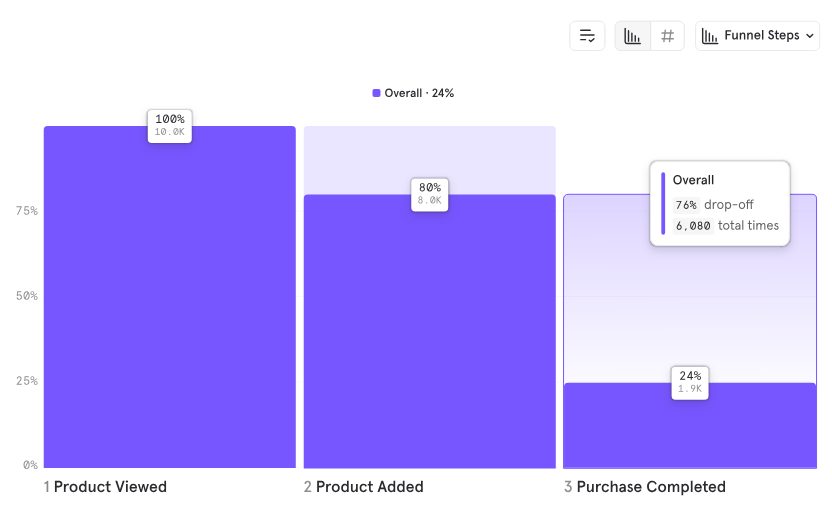
Our verdict
#5 of 9 in Product analytics tools · For focused conversion and retention analysis
Pros
- Core funnels, retention and flows on every plan
- Formulas and cohorts support more specific questions
- Web and mobile autocapture and session replay
Cons
- Free allows only five saved reports per seat
- Company-level analysis is a paid add-on
Who should skip: Teams that need account-level analytics without paying for an add-on.
Rankings and alternatives



Product analytics tools scores
Evaluated Nov 9, 2026 Evidence ↓- Self-service exploration 5
5/5 means: Teammates can define shared measures and behavioral groups once, reuse them across report types, and independently refine follow-up questions
Saved formulas, cohorts and conversion/retention workflows support reusable definitions and independent follow-up. OMR supplies a positive ease signal supporting the judgment, rather than being a product capability.
- Tracking without repeated code changes 4
4/5 means: Automatic collection of interactions such as clicks and forms
Autocapture collects clicks and forms on web and mobile. The fetched page does not establish retroactive visual event labeling.
Rests partly on what the sources don't mention, which is a weaker signal than what they say.
- Investigating sessions 5
5/5 means: Connected recordings with developer diagnostics such as console, network or error context
Matching analyses, events or experiment exposures lead to session recordings, with console/network diagnostic context documented directly.
- Useful ongoing free plan 4
4/5 means: At least a million monthly events, with a core report, cohort or saved-report restriction
A million monthly events are free, but saved reports are limited to five per seat.
- Analysis of customer accounts 5
5/5 means: Account funnels and account-level retention or broad chart coverage
The Group Analytics documentation covers group conversion funnels and company-level retention KPIs with underlying reports.
- Control over deployment 2
2/5 means: Vendor-operated cloud with a region choice
Vendor-operated subscription service with selectable US, EEA and purchased India hosting. Customer-operated full deployment is not established.
Rests partly on what the sources don't mention, which is a weaker signal than what they say.
- Testing product changes 4
4/5 means: Native feature or variable assignment with conversion measurement
Native experiments and feature flags are included with plan-specific experiment-user quotas; advanced statistical methods are not settled here.
Rests partly on what the sources don't mention, which is a weaker signal than what they say.
- Acting through in-app guidance 1
1/5 means: Send behavioral audiences to a separate engagement or guidance tool
The Chameleon integration uses Mixpanel cohorts to target in-product guidance. Native guidance is not established.
Rests partly on what the sources don't mention, which is a weaker signal than what they say.
Pricing
- Free Free 1 million monthly events, 10,000 monthly replays, five saved reports per seat.
- Growth Contact sales Usage-based above the free allowance; group analytics is an extra paid add-on.
From the vendor’s pricing page, checked Nov 9, 2026. That page is authoritative.
Evidence and sources
Product analytics tools scores
Self-service exploration 4 quotes
-
“Discover critical drop-off points and optimize user journeys to boost conversion rates and long-term retention.”
mixpanel.com/platform/product-analytics · checked -
“Drive tailored experiences by understanding distinct user groups and their unique behaviors.”
mixpanel.com/platform/product-analytics · checked -
“82% Ease of use Category average: 79 % Very good”
omr.com/en/reviews/vs/mixpanel-versus-amplitude · checked -
“You can save the metric you built and reuse it in other reports. Select the ”…” button in the top right corner of the metric, then click “Save Metric”. Note that saving a metric and saving a behavior are different; a saved behavior consists of the events/Funnels/Retention, while a saved metric consists of the saved behavior and the measurements of the behavior. Learn more about Saved Metrics and Behaviors.”
docs.mixpanel.com/docs/reports/insights · checked
Tracking without repeated code changes 2 quotes
-
“Autocapture allows you to capture information about your website with minimal setup. Once enabled via SDK, Autocapture automatically captures frontend events like page views, button clicks, and form interactions.”
docs.mixpanel.com/docs/tracking-methods/autocapture · checked -
“Autocapture is available on all plans. On web, Autocapture is available via Mixpanel’s JavaScript SDK. To turn it on, ensure you have the config {autocapture: true} set in the SDK. Autocapture is also available on mobile. Each SDK captures screen views, clicks, dead clicks, and rage clicks.”
docs.mixpanel.com/docs/tracking-methods/autocapture · checked
Investigating sessions 2 quotes
-
“Mixpanel’s Session Replay functionality fits right into your existing workflows. As you analyze data in your our charts, you can jump directly into replays that contain the events you’re analyzing. You can analyze conversion rates directly from a Funnels chart, then you can dive into the specific replays that you care about and quickly understand what's going right or wrong. It's the best possible way to derive valuable insights really quickly.”
mixpanel.com/blog/session-replay-qa · checked -
“Console logs & network calls: Free – Available; Growth – Available; Enterprise – Available.”
mixpanel.com/pricing · checked
Useful ongoing free plan 3 quotes
-
“Monthly events: Free – Up to 1M; Growth – First 1M free, up to 20M; Enterprise – Up to 1T.”
mixpanel.com/pricing · checked -
“Saved reports: Free – 5 per seat; Growth – Unlimited; Enterprise – Unlimited.”
mixpanel.com/pricing · checked -
“Behavioral cohorts (Create cohorts of users for behavioral segmentation and analysis.): Free – Limited (You can create cohorts but can’t save them.); Growth – Available; Enterprise – Available.”
mixpanel.com/pricing · checked
Analysis of customer accounts 2 quotes
-
“The Company Profiles page gives you a holistic view of your company health, which includes key metrics and company profile properties (i.e., company attributes). Company Health Metrics on the page include KPIs on usage (DAU, WAU, MAU, new users), users’ engagement level (activity per user, life cycle of user), and their retention (Day 1, Week 1, and Month 1). You can view the definition of each metric by clicking on the metric card, which will open the underlying Mixpanel report. To access this page, click on Users/ Companies → Company Profile. Note: This is only available if you have set up a B2B Company Key, an option available in the Group Analytics package.”
docs.mixpanel.com/docs/data-structure/group-analytics · checked -
“What groups convert through a funnel to a goal event (as opposed to what individual users convert)?”
docs.mixpanel.com/docs/data-structure/group-analytics · checked
Control over deployment 2 quotes
-
“4.2 Hosting and Processing. Customer Content is hosted in Mixpanel's data center in the United States or the European Economic Area, as elected by Customer, or, if purchased by Customer, in India. In providing aspects of the Application Services, Mixpanel's service providers may process Customer Content, including, without limitation, any associated Personal Information, within the United States, the European Economic Area, and in other countries and territories as identified in the DPA.”
mixpanel.com/legal/terms-of-use · checked -
“2.2 Maintenance. You acknowledge that the Application Services are an on-line, subscription-based product and that, in order to provide an improved customer experience, Mixpanel may make changes to the Application Services and update the applicable Documentation accordingly, over time. Provided that the overall functionality and security of the Application Services does not materially decrease, Mixpanel reserves the right to change, discontinue, delete or deprecate, any product feature, support service and any custom report template that may be made available to Customer.”
mixpanel.com/legal/terms-of-use · checked
Testing product changes 1 quote
-
“Experiments: Free – 1k MEU / month (Monthly Experiment Users = number of users exposed to an experiment); Growth – 5k MEU / month (May add up to 100k MEU/month); Enterprise – Custom.”
mixpanel.com/pricing · checked
Acting through in-app guidance 3 quotes
-
“When you use Segment to send data to Mixpanel, instead of needing to work with different Mixpanel APIs and SDKs, your developer only needs to learn Segment’s API and 3 simple methods: identify, track, and alias. Use first-party data from all your customer touchpoints to trigger personalized in-app messages, guides, and polls.”
mixpanel.com/partners/integrations/segment · checked -
“Click a segment in an Insights report to see the list of users that underlie that data point. This helps see a representative sample of users from any analysis, so you can drill into anomalies or simply get to know your users. You can also save this user list as a cohort to either export or use for message targeting. See this video walkthrough for examples of how View Users can help you understand users contributing to a specific metric.”
docs.mixpanel.com/docs/reports/insights · checked -
“Leverage your Mixpanel cohorts inside Chameleon; target users within these cohorts with specific in-product experiences built with Chameleon.”
mixpanel.com/partners/integrations/chameleon · checked
Facts
License 1 quote
-
“2.2 Maintenance. You acknowledge that the Application Services are an on-line, subscription-based product and that, in order to provide an improved customer experience, Mixpanel may make changes to the Application Services and update the applicable Documentation accordingly, over time. Provided that the overall functionality and security of the Application Services does not materially decrease, Mixpanel reserves the right to change, discontinue, delete or deprecate, any product feature, support service and any custom report template that may be made available to Customer.”
mixpanel.com/legal/terms-of-use · checked
Runs on 1 quote
-
“Autocapture is available on all plans. On web, Autocapture is available via Mixpanel’s JavaScript SDK. To turn it on, ensure you have the config {autocapture: true} set in the SDK. Autocapture is also available on mobile. Each SDK captures screen views, clicks, dead clicks, and rage clicks.”
docs.mixpanel.com/docs/tracking-methods/autocapture · checked
Needs 1 quote
-
“Autocapture allows you to capture information about your website with minimal setup. Once enabled via SDK, Autocapture automatically captures frontend events like page views, button clicks, and form interactions.”
docs.mixpanel.com/docs/tracking-methods/autocapture · checked
Notability
- Wikidata item Q25048114 · checked
- Page views, en.wikipedia.org (the edition with the most), Nov 2025 to Oct 2026 · checked
Users 1 quote
-
“Trusted by 29,000+ companies”
mixpanel.com/pricing · checked
Other quotes
Not cited by a score or fact 8 quotes
-
“Insights, funnels, retention, & flows reports (View event frequencies as trendlines, identify top user paths, understand user conversion, and analyze user retention and usage frequency.): Free – Available; Growth – Available; Enterprise – Available.”
mixpanel.com/pricing · checked -
“Before permanently implementing Autocapture, we recommend thoroughly testing the feature in a sandbox project to evaluate its impact on your data consumption and confirm that it meets your use case.”
docs.mixpanel.com/docs/tracking-methods/autocapture · checked -
“Session replays: Free – 10k monthly sessions; Growth – 20k monthly sessions (Add up to 500k sessions); Enterprise – 20k monthly sessions, customizable.”
mixpanel.com/pricing · checked -
“Group analytics (Measure KPIs at the account or company level. B2B companies can use this add-on to prevent churn and discover upsell opportunities based on their group-level product usage.): Free – Not available; Growth – Add-on (Group Analytics add-on is available for an extra fee with paid plans.); Enterprise – Add-on (Group Analytics add-on is available for an extra fee with paid plans.).”
mixpanel.com/pricing · checked -
“Ingestion & export API access (Import historical data.): Free – Available; Growth – Available; Enterprise – Available.”
mixpanel.com/pricing · checked -
“Growth plan (starts at $0/month, volume discounts available): Get advanced intelligence with higher limits. Includes up to 20M events/month (1M events included in the base price, additional events billed per the pricing breakdown above), up to 500K session replays/month (20K session replays/month included in the base price), 5k MEU/month included for experiments (up to 100k MEU/month with purchase of additional MEU), up to 50 active feature flags (up to 500 with purchase of additional MEU), unlimited saved cohorts/metrics/reports, custom & borrowed properties, and up to 5 alerts per project. Start for free at https://mixpanel.com/signup?next=%2Fpricing%2Fplan-builder%2F/. Preferred by: Snapchat, Coinbase, Andreessen Horowitz.”
mixpanel.com/pricing · checked -
“Use Saved Formulas if your report contains formulas. Learn more about Saved Formulas. Combine multiple events into a behavior. Learn more about Saved Behaviors. ”
docs.mixpanel.com/docs/reports/insights · checked -
“Mobile session replays: Free – Available; Growth – Available; Enterprise – Available.”
mixpanel.com/pricing · checked
Show all 8
Pricing
mixpanel.com/pricing · checked