MyScript Notes
Handwriting note-taking app for Apple Pencil with industry-leading handwriting-to-text conversion, now sold as MyScript Notes
Our verdict
#4 of 9 in Note-taking apps for iPad · For turning handwriting into typed text
What it does
- Handwriting, math and diagram conversion
- Document pages that reflow, plus freeform boards and PDF notes
- Export to Word, PDF, PNG and SVG
Pros
- The most accurate handwriting conversion here
- One purchase covers iPad, Mac, Windows and Android
Cons
- No audio recording
- Document pages drop strokes they don't recognize
- Choose if:
- You need typed documents out of your handwritten notes
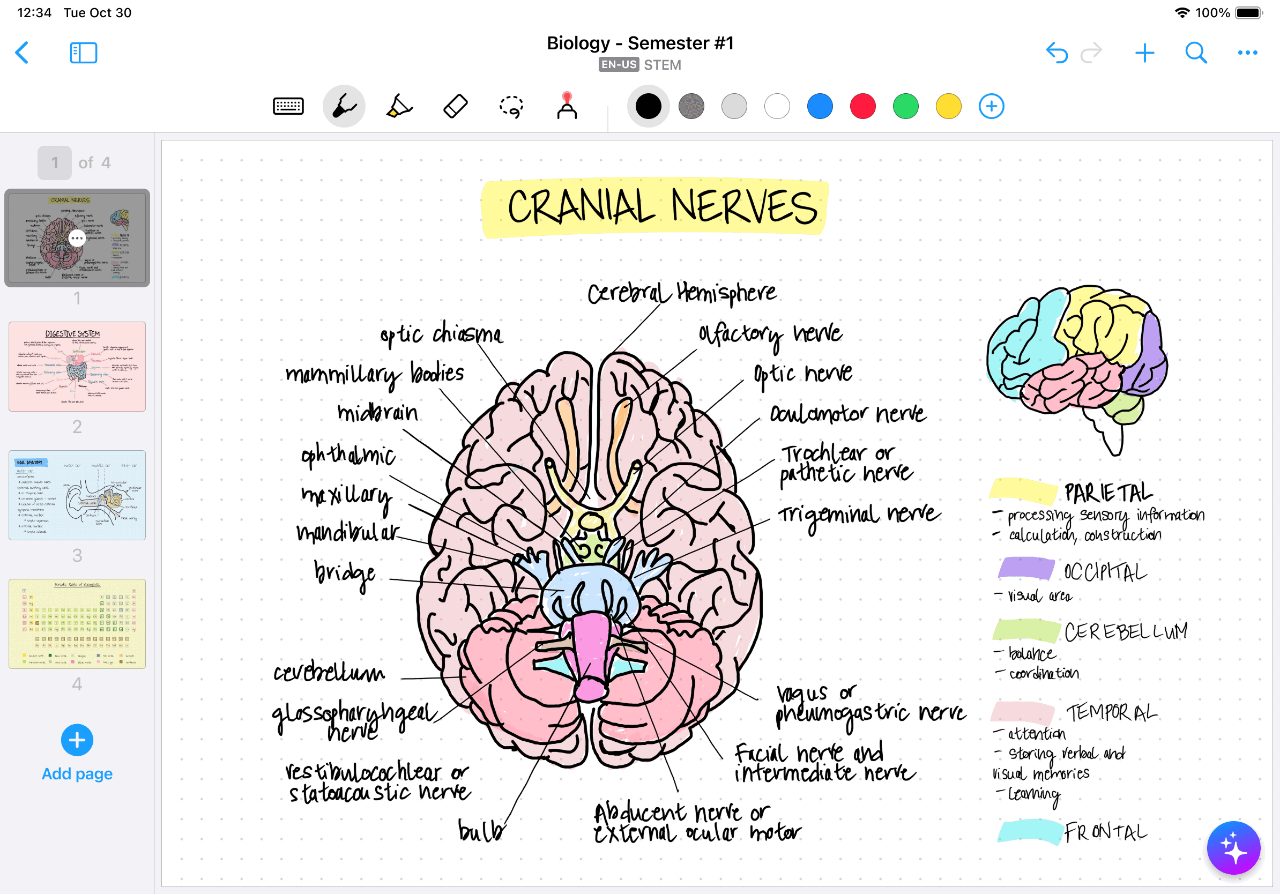
Nebo, renamed MyScript Notes on iOS and Android in early 2026 (it keeps the Nebo name on Windows), is a handwriting note-taking app from MyScript built on its Interactive Ink recognition. It offers four note types, which are fixed-page notebooks, reflowing structured documents, infinite-canvas boards and annotatable imported PDFs. Handwriting, math and hand-drawn diagrams convert to typed text, LaTeX and clean shapes. It targets students and professionals who write with an Apple Pencil on iPad, and also runs on iPhone, Apple silicon Macs, Android and Windows. It is free to download with a 7-day trial and a limited free version, and full access is a subscription or a lifetime purchase made through the App Store or Google Play. Recognition supports 66 languages. The app does not list audio recording among its features.
What users say
Evidence ↓Users and reviewers consistently praise the handwriting recognition and conversion, and a Paperlike review calls it the best available and finds the pen smooth with no lag. A long-time App Store user likes the one-time purchase option. The criticisms are structural. Paperlike finds organization shallow (collections, folders, notes) and customization limited, an iPad user reports slow PDF navigation on lecture slides (the developer says an update addressed it), and an older 2022 review reports lost notes from manual sync (auto-sync has since been added). These are single reviewers, not measured agreement, and the App Store rating is 4.7 from 39K ratings.
Rankings and alternatives
- Note-taking apps for iPad #4 of 9 For turning handwriting into typed text
- Goodnotes #1 Best all-rounder for class notes and PDFs
- Notability #2 For recording lectures alongside your notes
- Noteshelf 3 #3 Nicest pens for a one-time price



iPad handwritten note-taking apps scores
Evaluated Nov 17, 2026 Evidence ↓- Writing feel · counts double 4
4/5 means: Smooth, natural ink and a good set of pens and editing tools, with minor complaints
Smooth, no-lag ink with felt, fountain and brush pens, a highlighter, lasso, shape snapping and per-letter stroke erasing. Pen range is modest and Document pages drop strokes the app doesn't recognize, so it is not the most paper-like.
- Marking up PDFs and slides 4
4/5 means: Full PDF markup with page management, with small gaps
Imports PDFs, Word and PowerPoint files, annotates every page, has a thumbnail sidebar to add, move and delete pages, internal-link navigation and annotated export. Slow navigation on long slide decks was reported and patched, so small gaps remain.
- Finding notes later 4
4/5 means: Searches handwriting and typed text across the whole library
Search covers handwriting, diagram text and PDF annotations across the whole library, with collections and folders. Search of the underlying text of imported PDFs or scans is not documented, and Paperlike calls the hierarchy shallow.
- Recording lectures 1
1/5 means: No audio recording
No audio recording appears in the vendor's full feature list, and an Android user reported none. No explicit statement of absence was found.
- Sync and other devices 5
5/5 means: The same notes on iPad and on Windows, Android or the web, as well as Apple devices
The same notes appear on iPad, iPhone, Apple silicon Mac, Android and Windows through a free MyScript account with iCloud, Dropbox or Google Drive, and the single Full Access purchase covers all platforms. No web app was found.
- Cost of unlimited notes 3
3/5 means: $20 to $50 over four years
Lifetime Full Access is $29.99 on the App Store (Paperlike says $24.99), and four years of the $7.99 yearly plan is $31.96. Either is $20 to $50, and the cap-free tier is the paid one.
- Turning handwriting into text · counts half 5
5/5 means: Conversion is the core of the app, with whole pages, math and diagrams turned into editable content that users praise
Conversion is the core of the app, covering selections and whole documents, math to LaTeX, and diagrams to editable shapes. Reviewers call the accuracy best-in-class.
Pricing
- Free (trial, then limited) Free 7-day free trial of all features, then a free limited version. Paperlike says the free version includes most features with limited pages; the exact page or notebook cap was not found on the pages read.
- Subscription, monthly $1.99 /month Full access to all features. The App Store lists a "Full Access" purchase at $1.99, and Paperlike assigns it to monthly billing. Prices vary by region and promotion.
- Subscription, yearly $7.99 /year Full access to all features, billed $7.99 once a year. The App Store lists a "Full Access" purchase at $7.99, and Paperlike assigns it to yearly billing.
- Lifetime $29.99 one-time One-time purchase of full access, valid across iOS, Android, Mac and Windows with a MyScript account (Paperlike says up to 10 devices). Sources conflict on the price. The App Store in-app purchase list shows "MyScript Notes – Full Access" at $29.99, while Paperlike (updated January 2026) says $24.99. Prior Nebo purchasers keep access at no extra cost.
Prices checked Nov 17, 2026.
Evidence and sources
What users say
Summary 5 quotes
-
MyScript Notes’ handwriting recognition accuracy is insanely good. It perfectly picks up cursive and (to my surprise) even super-sloppy handwriting.
Lindsay Armstrong, reviewer at Paperlike · paperlike.com/blogs/paperlikers-insights/myscript-notes-app-review · checked -
Writing with the pen feels smooth, and there’s no lag when using an active stylus like the Apple Pencil, so you can always enjoy a pleasant and comfortable handwriting experience.
Lindsay Armstrong, reviewer at Paperlike · paperlike.com/blogs/paperlikers-insights/myscript-notes-app-review · checked -
MyScript Notes’s three-level hierarchy may not provide enough nesting capability for serious notetakers, and the setup is a little different from the other apps on the market.
Lindsay Armstrong, reviewer at Paperlike · paperlike.com/blogs/paperlikers-insights/myscript-notes-app-review · checked -
definitely the best note-taking app I’ve tried (and I’ve tried a lot!) and the pro version is a one-time purchase which I really appreciate!!
hey_its_kae, App Store reviewer · apps.apple.com/us/app/myscript-notes-ai-handwriting/id1119601770 · published · checked -
While typing notes on my computer, with Nebo open on my iPad, I synced my computer, and lost hours of notes taken on my iPad. Why is background sync not enabled? Why am I syncing manually?
lilBthaBEANgod, App Store reviewer · apps.apple.com/us/app/myscript-notes-ai-handwriting/id1119601770 · published · checked
iPad handwritten note-taking apps scores
Writing feel 3 quotes
-
Writing with the pen feels smooth, and there’s no lag when using an active stylus like the Apple Pencil, so you can always enjoy a pleasant and comfortable handwriting experience.
Lindsay Armstrong, reviewer at Paperlike · paperlike.com/blogs/paperlikers-insights/myscript-notes-app-review · checked -
In document pages, any stroke you make that MyScript Notes doesn’t recognize will automatically disappear when you lift your pen.
Lindsay Armstrong, reviewer at Paperlike · paperlike.com/blogs/paperlikers-insights/myscript-notes-app-review · checked -
MyScript Notes’s three-level hierarchy may not provide enough nesting capability for serious notetakers, and the setup is a little different from the other apps on the market.
Lindsay Armstrong, reviewer at Paperlike · paperlike.com/blogs/paperlikers-insights/myscript-notes-app-review · checked
Marking up PDFs and slides 2 quotes
-
Import Word documents and PowerPoint presentations as PDFs, then mark them up freely with your pen.
myscript.com/notes · checked -
definitely the best note-taking app I’ve tried (and I’ve tried a lot!) and the pro version is a one-time purchase which I really appreciate!!
hey_its_kae, App Store reviewer · apps.apple.com/us/app/myscript-notes-ai-handwriting/id1119601770 · published · checked
Finding notes later 2 quotes
-
Search your entire library of notes, including handwritten content, diagram text and PDF annotations.
myscript.com/notes · checked -
MyScript Notes’s three-level hierarchy may not provide enough nesting capability for serious notetakers, and the setup is a little different from the other apps on the market.
Lindsay Armstrong, reviewer at Paperlike · paperlike.com/blogs/paperlikers-insights/myscript-notes-app-review · checked
Recording lectures 2 quotes
-
Search your entire library of notes, including handwritten content, diagram text and PDF annotations.
myscript.com/notes · checked -
Can't record any audio... no option for syncing audio with notes either...No option to Edit the recorded sound
Soumyadiproy, Samsung Community user · community.samsung.com/in/conversations/tech-talk/Nebo-why-they-don-t-update-these-apps-with-features/r2_15621773 · published · checked
Sync and other devices 3 quotes
-
On iOS and Android, Nebo is now called MyScript Notes. On Windows, it keeps the name Nebo, with full functionality and compatibility so your notes sync across devices. Lifetime purchases remain valid, with no extra charges for existing features.
myscript.com/notes · checked -
Sync notes between devices using iCloud (iOS only), Google Drive or Dropbox. Requires a free MyScript account.
myscript.com/notes · checked -
New cross-platform access Unlocked the full version? Use it on multiple devices and platforms — for free — with your MyScript account.
apps.apple.com/us/app/myscript-notes-ai-handwriting/id1119601770 · checked
Cost of unlimited notes 3 quotes
-
MyScript Notes – Full Access $29.99
apps.apple.com/us/app/myscript-notes-ai-handwriting/id1119601770 · checked -
$1.99/month or $7.99/year subscription for full access to all features.
paperlike.com/blogs/paperlikers-insights/myscript-notes-app-review · checked -
$24.99/lifetime, one-time payment for full access to all current features and future updates.
paperlike.com/blogs/paperlikers-insights/myscript-notes-app-review · checked
Turning handwriting into text 2 quotes
-
Use Math objects to solve simple calculations and to develop equations and matrices across several lines – then copy as images or LaTeX.
myscript.com/notes · checked -
MyScript Notes’ handwriting recognition accuracy is insanely good. It perfectly picks up cursive and (to my surprise) even super-sloppy handwriting.
Lindsay Armstrong, reviewer at Paperlike · paperlike.com/blogs/paperlikers-insights/myscript-notes-app-review · checked
Facts
Runs on 3 quotes
-
Requires macOS 14.0 or later and a Mac with Apple M1 chip or later.
apps.apple.com/us/app/myscript-notes-ai-handwriting/id1119601770 · checked -
On iOS and Android, Nebo is now called MyScript Notes. On Windows, it keeps the name Nebo, with full functionality and compatibility so your notes sync across devices. Lifetime purchases remain valid, with no extra charges for existing features.
myscript.com/notes · checked -
New cross-platform access Unlocked the full version? Use it on multiple devices and platforms — for free — with your MyScript account.
apps.apple.com/us/app/myscript-notes-ai-handwriting/id1119601770 · checked
Needs 1 quote
-
Sync notes between devices using iCloud (iOS only), Google Drive or Dropbox. Requires a free MyScript account.
myscript.com/notes · checked
More from the sources
Pricing 1 quote
-
Start with a 7-day free trial to get the full experience — then choose to upgrade to keep all features, or continue with a free limited version.
apps.apple.com/us/app/myscript-notes-ai-handwriting/id1119601770 · checked
Features 1 quote
-
Export your notes in multiple formats — PDF, PNG, SVG, Word, or Nebo. You can even export multiple pages to a single file.
myscript.com/notes · checked
Limits and known issues 1 quote
-
If you edit the same note on two devices at once, a conflict can happen. Syncing lets you access notes on multiple devices, but it doesn’t allow real-time collaboration or simultaneous editing.
help.myscript.com/notes/export-sync-and-back-up/cloud-sync · checked
Pricing
apps.apple.com/us/app/myscript-notes-ai-handwriting/id1119601770 · checked