
Norton Family
Gen Digital's parental control subscription for kids' Android phones, iPhones and Windows PCs, sold alone or bundled with Norton 360
Our verdict
#6 of 7 in Parental control apps · Cheap, with good location tools and weak iPhone support
What it does
- Daily limits and schedules on Android and Windows
- Web filter with about 45 categories
- Location history and place alerts
Pros
- Cheap for any number of kids
- Included with Norton 360 Deluxe
- Good location tools on iPhone and Android
Cons
- No app blocking or daily limit on iPhone
- Web filtering on iPhone only in Norton's browser
- No message or social media monitoring
- Choose if:
- You already pay for Norton 360 and your kids have Android phones
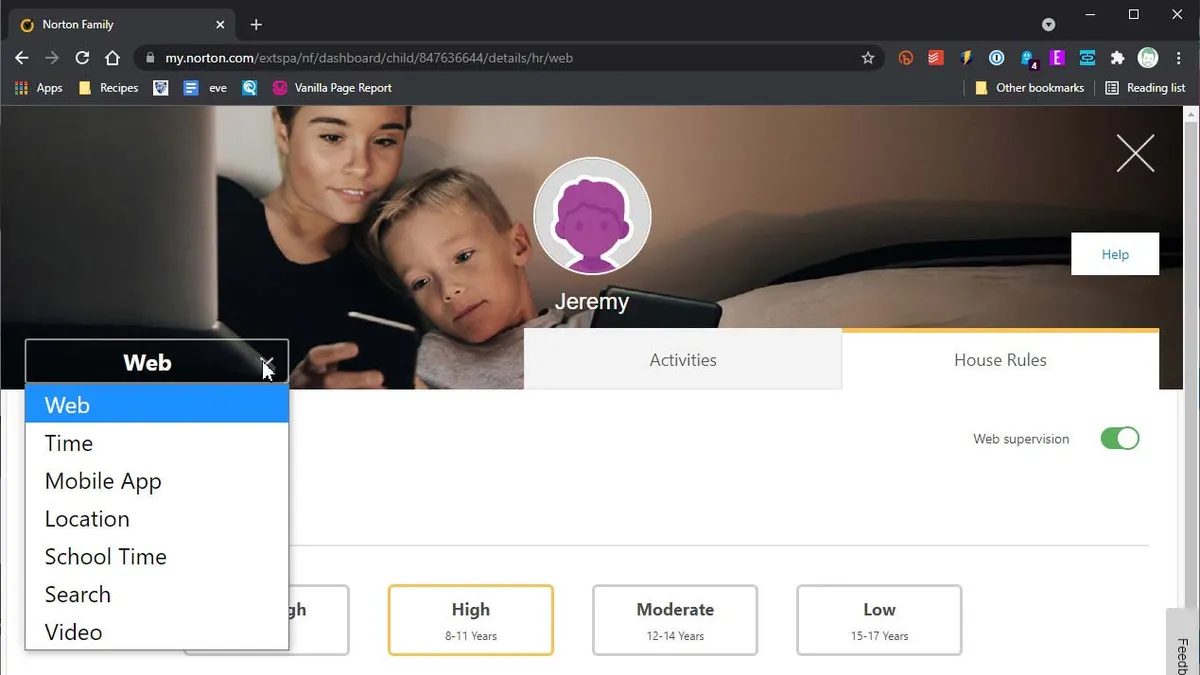
Norton Family is Gen Digital’s parental control service. Parents manage web filtering, time limits and schedules, search and video supervision, and location (including geofenced Favorite Locations) from a web portal or the parent mobile apps. The child app runs on Android, iPhone and iPad, and Windows; Macs are not supported as child devices. Features differ by platform, and Android gets the most (app blocking and daily time limits), while iPhone is more limited. It does not read text messages or social media conversations. It is a paid, closed-source subscription with a 30-day free trial, sold standalone and included in some Norton 360 plans, with no limit on children or devices according to reviewers.
What users say
Evidence ↓Two reviewers (Tom's Guide, TechRadar) like the wide web filtering, location tracking and price, and agree it does less on iOS than on Android. They disagree on ease of use, since Tom's Guide finds the portal convoluted and the mobile apps poor, while TechRadar finds it very easy to use. Both are single-reviewer accounts; neither covers long-term family use.
Rankings and alternatives
- Parental control apps #6 of 7 Cheap, with good location tools and weak iPhone support
- Google Family Link #1 Free and the most control over an Android phone
- Apple Screen Time #2 The free default for a kid's iPhone
- FamiSafe #3 Most features for the price, mostly on Android

Parental control apps for iPhone and Android scores
Evaluated Nov 17, 2026 Evidence ↓- Screen time limits and schedules · counts double 3
3/5 means: A daily limit and schedules, but on one platform the limit only cuts internet or can be dismissed, or there are no per-app limits
Daily limit plus schedules and extra-time requests on Android and Windows, but iOS gets schedules only, and there are no per-app time limits. Instant Lock works on iOS via a profile. Lock-at-limit behavior on iPhone was not tested by sources read.
- Hard for kids to get around 3
3/5 means: Needs a parent password or passcode to remove, but known workarounds or reliability bugs let a determined kid through
TechRadar says it can prevent app uninstallation, but no source read documents tamper alerts or workarounds. Tom's Guide lists "Unreliable performance" as a con, and a review aggregator reports bypass complaints that I did not read. Score is a judgment from knowledge.
- Blocking and approving apps 2
2/5 means: Blocks apps on Android only, or only by broad category or age rating
Blocks any app on Android and Windows only; no app supervision on iPhone, no download approval, no age-rating restriction.
- Web filtering 3
3/5 means: Category filters or an allow-only mode, but limited to certain browsers or with gaps reviewers found
45-47 categories with Monitor/Warn/Block, allow and block lists and age levels, and it worked in Tom's Guide's test. TechRadar says on iOS it works only via the Norton browser, and a 2017 test found misses, so coverage of all browsers is not established.
- Alerts about messages and social media 1
1/5 means: No message or social media features
No social media monitoring and no call or text monitoring; SMS supervision is disabled on Android. Only search and YouTube video supervision and keyword alerts.
- Works for mixed iPhone and Android families 4
4/5 means: Manages kids on both platforms from a parent app on either, with notable features missing on iPhone
One account manages Android, iPhone/iPad and Windows kids from the web portal or parent apps on Android and iOS (TechRadar). Notable iPhone gaps are no app blocking, no daily limit, browser dependence. Mac is not supported as a child device.
- Yearly cost for a family 4
4/5 means: Under $60 a year
$49.99 per year standalone with unlimited children and devices per Tom's Guide and TechRadar. No renewal price for standalone was found; Tom's Guide says Norton has held that price since 2018. The 360 Deluxe bundle renews at about $120-125 but is not the scored plan.
- Easy to set up and use 3
3/5 means: Fine once set up, with known snags such as an involved iPhone setup, noisy alerts or a dated dashboard
Android setup is praised and TechRadar finds it very easy, but iOS setup needs a VPN and MDM profile and Tom's Guide calls the portal convoluted and dated and the mobile apps poor.
- Location and place alerts · counts half 4
4/5 means: Live location and arrive and leave alerts for places the parent picks
Live location on both platforms, location history, geofenced Favorite Locations with up to a 2-mile radius, scheduled Alert Me and child check-in. No SOS button or driving reports are documented, which level 5 asks for (writer calibration from 5).
Pricing
- Norton Family (standalone) $49.99/year
- Norton 360 Deluxe (includes Norton Family) $49.99/year
Prices checked Nov 17, 2026.
Evidence and sources
What users say
Summary 4 quotes
-
I still find it to be too convoluted and dated despite the new coat of paint. The mobile apps are even worse, so I would strongly recommend that you turn to the web portal for anything other than minor tasks or checking on an alert.
Sean Riley, freelance reviewer at Tom's Guide · tomsguide.com/reviews/norton-family · published · checked -
Norton has the best set-up process of all the parental-control apps. I tested it on Android.
Sean Riley, freelance reviewer at Tom's Guide · tomsguide.com/reviews/norton-family · published · checked -
For those parents who need better iOS support for their children's devices, I would recommend alternatives like OurPact or Net Nanny as they come much closer to offering complete parity between the two operating systems
Sean Riley, freelance reviewer at Tom's Guide · tomsguide.com/reviews/norton-family · published · checked -
web content filtering and Safe Search enforcement only work through the Norton Browser on iOS. Similarly, search supervision and video supervision also work only on the Norton Browser on both Android and iOS, while app supervision is not available on iOS at all.
Mike Jennings, reviewer at TechRadar · techradar.com/reviews/norton-family-parental-control-software · checked
Parental control apps for iPhone and Android scores
Screen time limits and schedules 3 quotes
-
Time supervision is supported on Windows computer, Android phone and tablet, iPhone, and iPad.
support.norton.com/sp/en/us/uhd/all/solutions/v40429063 · checked -
On iOS devices, you need to install a profile for Instant Lock to work.
support.norton.com/sp/en/us/uhd/all/solutions/v40429063 · checked -
Children using Android or Windows get a daily time limit on top of a weekly schedule, while iOS users are limited to just the schedule.
Sean Riley, freelance reviewer at Tom's Guide · tomsguide.com/reviews/norton-family · published · checked
Hard for kids to get around 1 quote
-
web content filtering and Safe Search enforcement only work through the Norton Browser on iOS. Similarly, search supervision and video supervision also work only on the Norton Browser on both Android and iOS, while app supervision is not available on iOS at all.
Mike Jennings, reviewer at TechRadar · techradar.com/reviews/norton-family-parental-control-software · checked
Blocking and approving apps 3 quotes
-
App supervision is supported on Android phones, tablets, and Windows devices.
support.norton.com/sp/en/us/uhd/all/solutions/v40429063 · checked -
Norton Family's app management works only on Android, but it does work very well.
Sean Riley, freelance reviewer at Tom's Guide · tomsguide.com/reviews/norton-family · published · checked -
web content filtering and Safe Search enforcement only work through the Norton Browser on iOS. Similarly, search supervision and video supervision also work only on the Norton Browser on both Android and iOS, while app supervision is not available on iOS at all.
Mike Jennings, reviewer at TechRadar · techradar.com/reviews/norton-family-parental-control-software · checked
Web filtering 4 quotes
-
To get the best from Norton Family, ask your children to use Norton Family browser for the browsing activities on their mobile devices.
support.norton.com/sp/en/us/uhd/all/solutions/v40429063 · checked -
Web filtering is an area where Norton Family shines. It has one of the widest collection of categories at 47, and the automatic age-based restrictions make this a quick setup process.
Sean Riley, freelance reviewer at Tom's Guide · tomsguide.com/reviews/norton-family · published · checked -
This all worked perfectly for me across both Android and iOS.
Sean Riley, freelance reviewer at Tom's Guide · tomsguide.com/reviews/norton-family · published · checked -
web content filtering and Safe Search enforcement only work through the Norton Browser on iOS. Similarly, search supervision and video supervision also work only on the Norton Browser on both Android and iOS, while app supervision is not available on iOS at all.
Mike Jennings, reviewer at TechRadar · techradar.com/reviews/norton-family-parental-control-software · checked
Alerts about messages and social media 3 quotes
-
Text message supervision and call blocking features are currently disabled on Android.
support.norton.com/sp/en/us/uhd/all/solutions/v40429063 · checked -
there's no dedicated social media monitoring. Parents have to rely on app limitations and keyword alerts if they want to monitor their child's activity on social media platforms. Norton Family cannot directly read your child's conversations on various social messaging apps.
Mike Jennings, reviewer at TechRadar · techradar.com/reviews/norton-family-parental-control-software · checked -
Norton cannot monitor calls or text messages either.
Mike Jennings, reviewer at TechRadar · techradar.com/reviews/norton-family-parental-control-software · checked
Works for mixed iPhone and Android families 4 quotes
-
You can use Norton Family on your child's Windows computer, Android phone and tablet, iPhone, and iPad. However, the features that are supported differ based on the device's operating system. To view your child's activities or update any of your family settings, you can use either Norton Family website or Norton Family mobile app.
support.norton.com/sp/en/us/uhd/all/solutions/v40429063 · checked -
App supervision is supported on Android phones, tablets, and Windows devices.
support.norton.com/sp/en/us/uhd/all/solutions/v40429063 · checked -
Children using Android or Windows get a daily time limit on top of a weekly schedule, while iOS users are limited to just the schedule.
Sean Riley, freelance reviewer at Tom's Guide · tomsguide.com/reviews/norton-family · published · checked -
It is not compatible with macOS.
Sean Riley, freelance reviewer at Tom's Guide · tomsguide.com/reviews/norton-family · published · checked
Yearly cost for a family 3 quotes
-
Norton Family dropped its free tier in early 2018 and moved to a strictly paid option at $49.99 per year.
Sean Riley, freelance reviewer at Tom's Guide · tomsguide.com/reviews/norton-family · published · checked -
It's refreshing to see just a single plan offered, reducing complications, and it's the only Norton plan you would ever need as it supports unlimited devices and child accounts.
Sean Riley, freelance reviewer at Tom's Guide · tomsguide.com/reviews/norton-family · published · checked -
Norton 360 Deluxe, for instance, includes Norton's parental control features alongside a secure VPN, dark web monitoring, and scam protection. It costs $49.99/£29.99 for the first year, with a renewal price of $119.99/£89.99.
Mike Jennings, reviewer at TechRadar · techradar.com/reviews/norton-family-parental-control-software · checked
Easy to set up and use 3 quotes
-
To get the best from Norton Family, ask your children to use Norton Family browser for the browsing activities on their mobile devices.
support.norton.com/sp/en/us/uhd/all/solutions/v40429063 · checked -
I still find it to be too convoluted and dated despite the new coat of paint. The mobile apps are even worse, so I would strongly recommend that you turn to the web portal for anything other than minor tasks or checking on an alert.
Sean Riley, freelance reviewer at Tom's Guide · tomsguide.com/reviews/norton-family · published · checked -
Norton has the best set-up process of all the parental-control apps. I tested it on Android.
Sean Riley, freelance reviewer at Tom's Guide · tomsguide.com/reviews/norton-family · published · checked
Location and place alerts 2 quotes
-
the geofencing tool includes a generous radius of 3,200m (2 miles) – the largest we've seen on any parental control app.
Mike Jennings, reviewer at TechRadar · techradar.com/reviews/norton-family-parental-control-software · checked -
Norton Family has finally implemented geofencing, which is calls "Favorite Locations." It will let you know when the child enters or departs the designated perimeter around a chosen spot, such as home, school or a playground.
Sean Riley, freelance reviewer at Tom's Guide · tomsguide.com/reviews/norton-family · published · checked
Facts
License 1 quote
-
Norton Family dropped its free tier in early 2018 and moved to a strictly paid option at $49.99 per year.
Sean Riley, freelance reviewer at Tom's Guide · tomsguide.com/reviews/norton-family · published · checked
Runs on 2 quotes
-
You can use Norton Family on your child's Windows computer, Android phone and tablet, iPhone, and iPad. However, the features that are supported differ based on the device's operating system. To view your child's activities or update any of your family settings, you can use either Norton Family website or Norton Family mobile app.
support.norton.com/sp/en/us/uhd/all/solutions/v40429063 · checked -
It is not compatible with macOS.
Sean Riley, freelance reviewer at Tom's Guide · tomsguide.com/reviews/norton-family · published · checked
More from the sources
Pricing 2 quotes
-
You can try Norton Family free for 30 days. Once the trial period ends, you must subscribe for Norton Family to continue using it.
support.norton.com/sp/en/us/uhd/all/solutions/v40429063 · checked -
Norton 360 Deluxe and Norton 360 with LifeLock include subscriptions to Norton Family Premier along with the excellent Norton antivirus protection.
Sean Riley, freelance reviewer at Tom's Guide · tomsguide.com/reviews/norton-family · published · checked
Pricing
techradar.com/reviews/norton-family-parental-control-software · checked