NVIDIA app
Free NVIDIA GPU app whose overlay records games and the desktop on GeForce PCs
Our verdict
#7 of 10 in Windows screen recorders · Instant replay for GeForce gamers
What it does
- Instant Replay saved on a hotkey
- Recording up to 4K and 120 fps on the graphics card
- Automatic Highlights in supported games
Pros
- Free and already installed for many gamers
- Very low performance cost
Cons
- Needs an NVIDIA graphics card
- No webcam overlay, area selection or editor
- Skip if:
- You mostly record the desktop for tutorials
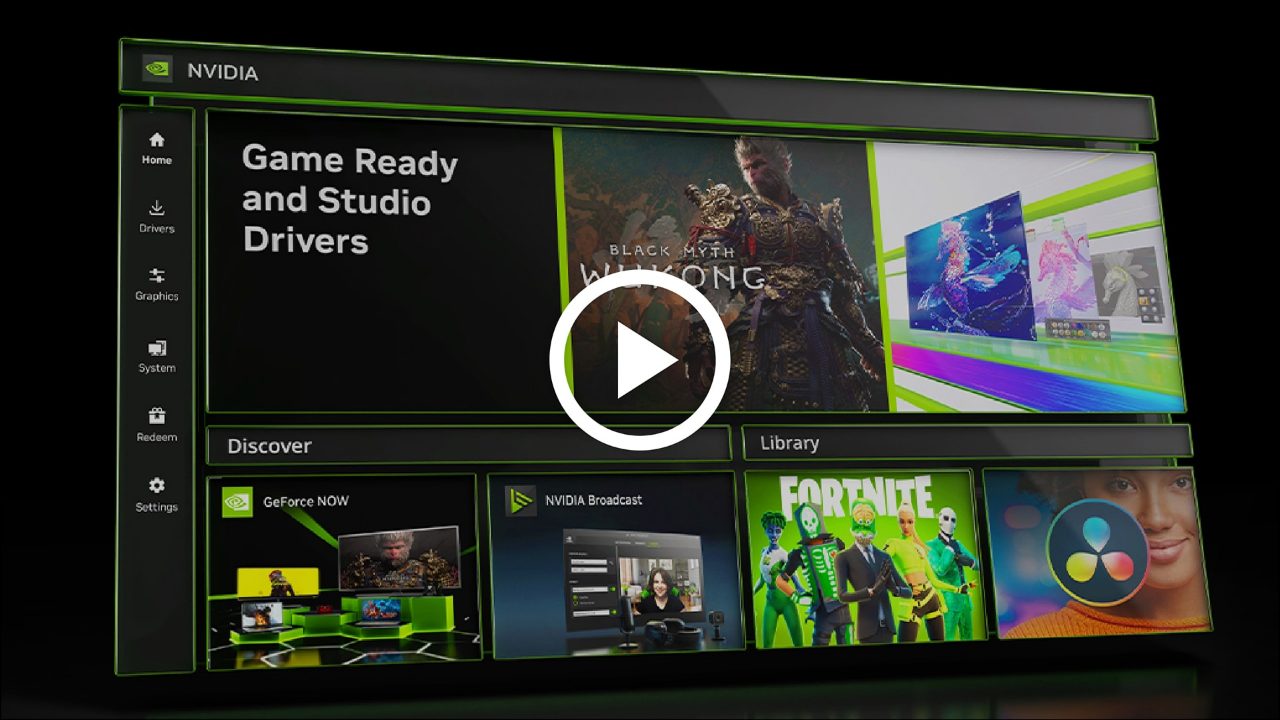
The NVIDIA app is NVIDIA’s free Windows app for PCs with NVIDIA GPUs. It replaced GeForce Experience and combines driver updates, game and GPU settings, and an in-game overlay (Alt+Z) with ShadowPlay recording. The overlay has manual Record, a rolling Instant Replay, screenshots, Highlights in supported games, a performance overlay and a Gallery. Record can capture games, other apps and the Windows desktop once desktop capture is on. It uses the GPU’s NVENC encoder, supports AV1 on RTX 40-series and newer cards, and records up to 4K at 120 fps. It has no editor or direct upload of its own, and it needs an NVIDIA GPU.
What users say
Evidence ↓Practitioner views are thin and mostly from troubleshooting guides. A 2019 PCWorld review of the earlier GeForce Experience ShadowPlay called it free and easy to use with generally good performance, but measured frame-rate drops on a low-end rig and found its overlay awkward outside games. A 2026 BGR guide says desktop capture and Instant Replay conflict with background apps and DRM-protected media for some users. Each view comes from one author.
Rankings and alternatives
- Windows screen recorders #7 of 10 Instant replay for GeForce gamers
- OBS Studio #1 Free, no limits, the most control
- Bandicam #2 Simple recorder you can buy once
- FocuSee #3 Automatic zooms for tutorials and demos



Windows screen recorders scores
Evaluated Nov 17, 2026 Evidence ↓- Recording quality and smoothness · counts double 4
4/5 means: 4K at 60 fps with hardware encoding and few reliability complaints
NVENC hardware encoding with AV1 on RTX 40 and newer, up to 4K at 120 fps or more (vendor claims). Held at 4 because the only measured FPS cost is from 2019, and recent reports describe capture shutting off with DRM-protected media and bugs fixed in 11.0.2.
- Ease of getting a finished video 3
3/5 means: Recording is easy, but finishing a video means learning a full editor or a second app
Alt+Z overlay and hotkeys make recording easy, but desktop capture is a setting to turn on and there is no editor, so finishing a video needs a second app. Ease of use rests partly on established knowledge of ShadowPlay.
- Editing depth 1
1/5 means: No editor; recordings go to another app
The Gallery lists captures and opens their files; no trim or editor was found in the sources. This rests on knowledge that ShadowPlay has no editor, not on a source stating it.
- Cost over three years 5
5/5 means: Free
Free, with no watermark or time limit as far as known; needs an NVIDIA GPU. The only price statement read is from a 2019 review of the earlier version, so this also rests on knowledge.
- Recording options 2
2/5 means: Missing one basic, such as the webcam overlay, the PC's sound or a free choice of area
Records the desktop, apps and games with the mic on a separate track, but there is no free choice of area and no webcam overlay in the app (Broadcast is a separate app). System audio is assumed from established knowledge of ShadowPlay.
- Polish without editing · counts half 1
1/5 means: The raw capture, with nothing added
No zooms, cursor effects or backgrounds were found in the sources; this rests on knowledge that ShadowPlay saves the raw capture.
- Sharing · counts half 1
1/5 means: Save a file only
The Gallery opens files for you to share or upload yourself; no direct upload was found. Older GeForce Experience had live broadcast, which does not count as sharing a recording.
- Gameplay capture · counts half 5
5/5 means: Game capture and an instant replay buffer you save on a hotkey
Instant Replay with a hotkey save, Highlights in supported games, and an FPS and performance overlay.
Pricing
- NVIDIA app Free Free download. Needs an NVIDIA GPU; an NVIDIA account is only needed to claim rewards.
Prices checked Nov 17, 2026.
Evidence and sources
What users say
Summary 3 quotes
-
Privacy controls inside the Nvidia overlay are designed to manage continuous desktop video recording, but desktop capture frequently conflicts with background applications. When desktop capture is turned on, it continuously scans a user's desktop environment. If gamers launch media tools like Apple Music or stream audio inside Discord, the overlay senses protected content and forces background recording to turn off immediately.
Christian Wait, writer at BGR · bgr.com/2222483/5-solutions-nvidia-instant-replay-issues · published · checked -
Using our standard test on a low-end gaming rig we found that running ShadowPlay had mixed results. Running three passes of the Metro: Last Light Redux benchmark on our low-end test rig on we saw an average framerate of 57.67. With the ShadowPlay Record feature active the average framerate dropped to 52.33.
Ian Paul, reviewer at PCWorld · pcworld.com/article/402765/nvidia-shadowplay-review.html · published · checked -
But it’s free, easy to use, and can be tweaked for straight-up recording, grabbing the last few action-packed minutes of your game, or broadcasting your adventures on Twitch.
Ian Paul, reviewer at PCWorld · pcworld.com/article/402765/nvidia-shadowplay-review.html · published · checked
Windows screen recorders scores
Recording quality and smoothness 6 quotes
-
NVIDIA ShadowPlay simplifies recording of videos and screenshots, featuring DVR-style Instant Replay, enabling users to instantly save the last 30 seconds of gameplay. You can also manually record at up to 8K HDR at 30 fps, or 4K HDR at 120 fps with minimal impact to performance. RTX 40-series GPU owners can now record in AV1 codec, which delivers higher fidelity video with less disk space needed. NVIDIA Highlights automatically captures key moments, clutch kills, and match-winning plays, ensuring that your best gaming moments are automatically saved.
nvidia.com/en-us/software/nvidia-app · checked -
In NVIDIA app, these and other recordings can be captured at up to 4K 120 FPS, or 8K 60 FPS, using the advanced AV1 codec. Utilizing the eighth-generation NVIDIA Encoders (NVENC) on GeForce RTX 40 Series graphics cards and laptop GPUs, AV1 improves encoding efficiency by 40%, producing higher quality videos without requiring more disk space.
nvidia.com/en-us/geforce/news/nvidia-app-download-and-features · checked -
Using our standard test on a low-end gaming rig we found that running ShadowPlay had mixed results. Running three passes of the Metro: Last Light Redux benchmark on our low-end test rig on we saw an average framerate of 57.67. With the ShadowPlay Record feature active the average framerate dropped to 52.33.
Ian Paul, reviewer at PCWorld · pcworld.com/article/402765/nvidia-shadowplay-review.html · published · checked -
NVIDIA’s 2026 beta update added up to 4K at 240 FPS for GeForce RTX 50- and 40-Series GPUs with dual NVENC encoders, and 1440p at 240 FPS for GPUs with a single NVENC encoder. These are hardware-dependent capabilities, not universal ShadowPlay settings.
macmyths.com/how-to-use-nvidia-share-shadowplay-to-record-desktop-on-windows · published · checked -
NVIDIA app 11.0.2 fixed an issue that could prevent microphone selection or capture and another issue where temporary Instant Replay recordings were not saved to the selected directory. It also fixed video synchronization problems involving OneDrive.
macmyths.com/how-to-use-nvidia-share-shadowplay-to-record-desktop-on-windows · published · checked -
When streaming services like Netflix, Spotify, Disney+, or Apple TV+ run in the background while you're playing games, the GPU driver detects the protected content. That causes it to automatically deactivate video capture features to prevent unauthorized duplication.
Christian Wait, writer at BGR · bgr.com/2222483/5-solutions-nvidia-instant-replay-issues · published · checked
Ease of getting a finished video 5 quotes
-
Record captures your game, app or desktop when you hit the button or Alt+F9 hotkey, only stopping once pressed again. This is great for recording competitive matches in online games, YouTube walkthroughs and tutorials, and your in-progress work, which can then be sped up in post to create a timelapse showing the creation of a new piece of art, for example.
nvidia.com/en-us/geforce/news/nvidia-app-download-and-features · checked -
Instant Replay creates a rolling recording as you work or play. If you’re not interested in capturing a full multiplayer match, but do want to record incredible kills and hilarious moments, Instant Replay is the option for you - simply press Alt+Shift+F10 whenever something memorable happens and a clip will be saved. Configure the length of these via the Settings cog.
nvidia.com/en-us/geforce/news/nvidia-app-download-and-features · checked -
Privacy controls inside the Nvidia overlay are designed to manage continuous desktop video recording, but desktop capture frequently conflicts with background applications. When desktop capture is turned on, it continuously scans a user's desktop environment. If gamers launch media tools like Apple Music or stream audio inside Discord, the overlay senses protected content and forces background recording to turn off immediately.
Christian Wait, writer at BGR · bgr.com/2222483/5-solutions-nvidia-instant-replay-issues · published · checked -
But it’s free, easy to use, and can be tweaked for straight-up recording, grabbing the last few action-packed minutes of your game, or broadcasting your adventures on Twitch.
Ian Paul, reviewer at PCWorld · pcworld.com/article/402765/nvidia-shadowplay-review.html · published · checked -
ShadowPlay records according to the active capture mode rather than offering a universal region-selection workflow. Keep unwanted windows and notifications out of view before starting.
macmyths.com/how-to-use-nvidia-share-shadowplay-to-record-desktop-on-windows · published · checked
Editing depth 1 quote
-
Click to enlarge or watch, and to access the files on your disk drive for sharing with friends or for uploading to social media.
nvidia.com/en-us/geforce/news/nvidia-app-download-and-features · checked
Cost over three years 1 quote
-
But it’s free, easy to use, and can be tweaked for straight-up recording, grabbing the last few action-packed minutes of your game, or broadcasting your adventures on Twitch.
Ian Paul, reviewer at PCWorld · pcworld.com/article/402765/nvidia-shadowplay-review.html · published · checked
Recording options 3 quotes
-
Record captures your game, app or desktop when you hit the button or Alt+F9 hotkey, only stopping once pressed again. This is great for recording competitive matches in online games, YouTube walkthroughs and tutorials, and your in-progress work, which can then be sped up in post to create a timelapse showing the creation of a new piece of art, for example.
nvidia.com/en-us/geforce/news/nvidia-app-download-and-features · checked -
Change hotkeys, adjust the notifications shown, change sound sources for videos and enable multi-track audio to make your mic input a separate recording, change video recording quality settings, limit the amount of disk space used by files, and adjust where files are saved.
nvidia.com/en-us/geforce/news/nvidia-app-download-and-features · checked -
ShadowPlay records according to the active capture mode rather than offering a universal region-selection workflow. Keep unwanted windows and notifications out of view before starting.
macmyths.com/how-to-use-nvidia-share-shadowplay-to-record-desktop-on-windows · published · checked
Sharing 1 quote
-
Click to enlarge or watch, and to access the files on your disk drive for sharing with friends or for uploading to social media.
nvidia.com/en-us/geforce/news/nvidia-app-download-and-features · checked
Gameplay capture 3 quotes
-
NVIDIA ShadowPlay simplifies recording of videos and screenshots, featuring DVR-style Instant Replay, enabling users to instantly save the last 30 seconds of gameplay. You can also manually record at up to 8K HDR at 30 fps, or 4K HDR at 120 fps with minimal impact to performance. RTX 40-series GPU owners can now record in AV1 codec, which delivers higher fidelity video with less disk space needed. NVIDIA Highlights automatically captures key moments, clutch kills, and match-winning plays, ensuring that your best gaming moments are automatically saved.
nvidia.com/en-us/software/nvidia-app · checked -
Instant Replay creates a rolling recording as you work or play. If you’re not interested in capturing a full multiplayer match, but do want to record incredible kills and hilarious moments, Instant Replay is the option for you - simply press Alt+Shift+F10 whenever something memorable happens and a clip will be saved. Configure the length of these via the Settings cog.
nvidia.com/en-us/geforce/news/nvidia-app-download-and-features · checked -
Display real-time FPS and performance statistics through the newly updated NVIDIA overlay. Tailor the display to showcase metrics like GPU and CPU utilization, FPS 1% Low, and PC and system latency with integrated NVIDIA Reflex Analyzer support.
nvidia.com/en-us/software/nvidia-app · checked
Facts
License 2 quotes
-
The NVIDIA App is the essential companion for PC gamers and creators. Keep your PC up to date with the latest NVIDIA drivers and technology. Optimize games and applications with a new unified GPU control center, capture your favorite moments with powerful recording tools through the in-game overlay, and discover the latest NVIDIA tools and software.
nvidia.com/en-us/software/nvidia-app · checked -
But it’s free, easy to use, and can be tweaked for straight-up recording, grabbing the last few action-packed minutes of your game, or broadcasting your adventures on Twitch.
Ian Paul, reviewer at PCWorld · pcworld.com/article/402765/nvidia-shadowplay-review.html · published · checked
Runs on 1 quote
-
Windows Windows on ARM
nvidia.com/en-us/software/nvidia-app · checked
Needs 1 quote
-
NVIDIA app is the essential companion for users with NVIDIA GPUs in their PCs and laptops.
nvidia.com/en-us/geforce/news/nvidia-app-download-and-features · checked
More from the sources
Pricing 1 quote
-
To claim rewards, users must login on GeForce PCs and laptops with an NVIDIA account, which can be created using common login services such as Google and Discord, or an email address. All other aspects of NVIDIA app can be used without a login or account.
nvidia.com/en-us/geforce/news/nvidia-app-download-and-features · checked
Features 2 quotes
-
Scenes, multiple sources, or advanced layouts · More limited. · Use a dedicated recorder such as OBS Studio.
macmyths.com/how-to-use-nvidia-share-shadowplay-to-record-desktop-on-windows · published · checked -
Project G-Assist is an AI assistant for your GeForce RTX PC. With simple voice or text commands, G-Assist can maximize performance and optimize power efficiency, adjust game settings, provide real-time diagnostics, chart performance metrics, customize your peripherals and more – all powered locally by your GeForce RTX GPU.
nvidia.com/en-us/software/nvidia-app · checked
What users say 1 quote
-
Although Nvidia has transitioned away from the legacy GeForce Experience software in favor of the Nvidia app (which comes with plenty of features players should be using), background capture glitches remain an issue for some users.
Christian Wait, writer at BGR · bgr.com/2222483/5-solutions-nvidia-instant-replay-issues · published · checked
Pricing
nvidia.com/en-us/software/nvidia-app · checked