
FocuSee
Auto-zoom screen recorder for Mac and Windows, with yearly and one-time licenses
Our verdict
#3 of 10 in Windows screen recorders · Automatic zooms for tutorials and demos
What it does
- Zooms that follow clicks and typing
- Cursor smoothing, backgrounds and motion blur
- Phone recording and a teleprompter
- Share links with 5 GB of storage
Pros
- Polished tutorials with little editing
- Cheaper than Camtasia
- Records a single app's sound
Cons
- Slow exports and a weak webcam image reported on Windows
- AI features cost extra credits
- Choose if:
- You publish software tutorials and want them to look produced
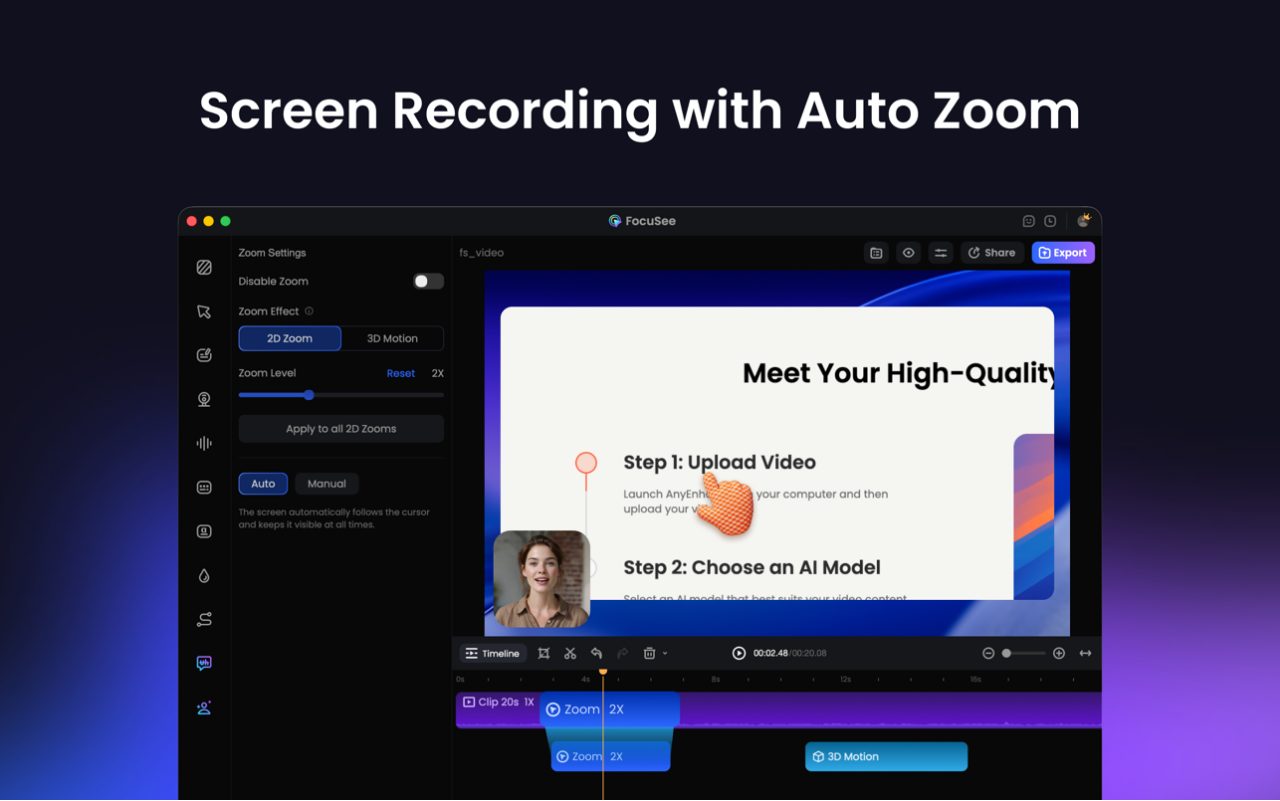
FocuSee, from iMobie, is a screen recorder for Mac and Windows that automatically zooms in on clicks and typing, styles the cursor, adds backgrounds and motion blur, and exports up to 4K at 60 fps or shares a hosted link. Its editor handles zooms, cuts and webcam styling; AI subtitles, filler-word removal and voice enhancement use credits that the Standard plan doesn’t include. It is sold as a yearly or monthly subscription per computer, or as a one-time license for the 2.x versions.
What users say
Evidence ↓A hands-on reviewer found FocuSee's automatic zooms useful and close to Screen Studio's headline features for less money, but criticized slow loading after recording, real-time exports and a camera setting that can't change within a project.
Rankings and alternatives
- Windows screen recorders #3 of 10 Automatic zooms for tutorials and demos
- OBS Studio #1 Free, no limits, the most control
- Bandicam #2 Simple recorder you can buy once
- Cap #4 Cheap auto-zoom recorder with share links
- Mac screen recorders #5 of 9 Auto-zoom on Mac and Windows for less
- CleanShot X #1 Best for most Mac users
- Screen Studio #2 For demos where the video is the product
- Tella #3 For hosted, edited course and pitch videos






Windows screen recorders scores
Evaluated Nov 17, 2026 Evidence ↓- Recording quality and smoothness · counts double 3
3/5 means: 1080p or 4K at up to 60 fps, with some reports of stutter, crashes or heavy load on Windows
Export goes up to 4K at 60 fps and recordings have no length cap, but hardware encoding and capture frame rate on Windows are not documented. Reports of poor Windows camera recording, slow exports and dual-monitor bugs are single accounts, with no independent benchmark.
- Ease of getting a finished video 4
4/5 means: Easy to record and finish, with a few rough edges or extra steps
Record in three modes, zooms are applied automatically, and the editor is built in so a second app is usually unnecessary. A 2024 reviewer still needed another editor for speed-ups and camera switching, so some rough edges remain.
- Editing depth 3
3/5 means: Cuts plus a few extras such as combining clips, captions, or editing the zooms, cursor and camera of one recording
Cuts, editing the zooms, cursor and camera of one recording, annotations, captions with subtitle editing, and imported videos. Speed changes were missing in 2024 and a project-wide camera setting limits layout; a multi-clip timeline is not documented. AI captions need credits the Standard plan lacks.
- Cost over three years 3
3/5 means: $100 to $250
Standard yearly at $49.99 for one computer x 3 = $149.97, cheaper than the $199.99 one-time Advanced license. No watermark or length cap on paid plans; AI credits cost extra. License terms for work videos were not checked.
- Recording options 4
4/5 means: All the basics plus one or two extras, such as separate audio tracks, a phone or a capture device
Full screen, window and custom area, webcam, mic and system audio including per-app audio, plus Android and iPhone/iPad recording and a teleprompter. Separate audio tracks and several simultaneous cameras are not documented.
- Polish without editing · counts half 4
4/5 means: Automatic zooms that follow your clicks, cursor smoothing and backgrounds, with some manual fixing
Automatic zooms follow clicks and typing, with cursor effects, backgrounds, motion blur and 3D motion. A reviewer found the auto zoom useful; some manual fixing is still expected.
- Sharing · counts half 3
3/5 means: A hosted share link with limited storage or features
Hosted password- and permission-controlled links with 5 GB storage on Standard. Comments, transcripts and viewer analytics are not documented.
- Gameplay capture · counts half 2
2/5 means: Records games through ordinary screen or window capture
Records through ordinary screen or window capture; no game capture mode, instant replay or FPS overlay is documented, and whether fullscreen games record reliably on Windows is untested.
Mac screen recorders scores
Evaluated Nov 17, 2026 Evidence ↓- Polish without editing 4
4/5 means: Automatic zooms that follow your clicks, cursor smoothing and backgrounds, with some manual fixing
Automatic zooms on clicks and typing, cursor styles and effects, motion blur and backgrounds; a hands-on review found the zooms useful but every zoom has a fixed slow zoom-out.
- Editing depth 3
3/5 means: Cuts plus editing the zooms, cursor, camera and background of one recording
A timeline for zooms, cuts and webcam styling; AI subtitles and filler-word removal need credits on Standard, and a reviewer found no independent audio editing and a camera setting that applies to the whole project.
- Ease of getting a finished video 4
4/5 means: Easy to record and finish, with a few rough edges or extra steps
Close to Screen Studio's workflow, but a reviewer reported slow loading after each recording and exports that take about as long as the video.
- Sharing 3
3/5 means: A hosted share link with limited storage or features
Shareable links with password and permission controls and 5 GB of cloud storage on Standard.
- Cost over three years 3
3/5 means: $100 to $250
Standard is $49.99 a year ($150 over three years) for one computer; the one-time Advanced license is $199.99 for FocuSee 2.x.
- Recording options · counts half 4
4/5 means: All the basics at up to 4K, plus one or two extras such as an iPhone, keystrokes or GIF export
Full screen, region or window with webcam and microphone, a teleprompter, and export up to 4K at 60 fps.
Pricing
- Standard (yearly) $49.99 /year One computer, Mac or Windows. Unlimited videos and recording length, 4K 60 fps export, 5 GB cloud storage. AI features need separately bought credits.
- Standard (monthly) $19.99 /month The same as Standard yearly, billed monthly.
- Advanced (yearly) $79.99 /year Up to 3 computers and 300 AI credits a month.
- Advanced (one-time) $199.99 one-time Up to 5 computers, lifetime access to FocuSee 2.x, and 1000 AI credits valid for one year.
Prices checked Nov 17, 2026.
Evidence and sources
What users say
Summary 3 quotes
-
The auto-zoom detection is genuinely useful — Focusee watches where your mouse activity happens and automatically creates zoom effects at those moments.
Dave Swift, YouTube creator and reviewer · daveswift.com/focusee · published · checked -
However, there's a significant limitation: the show/hide camera toggle is a global project setting. You can't have your camera full-screen for an intro, then switch to picture-in-picture for the tutorial portion.
Dave Swift, YouTube creator and reviewer · daveswift.com/focusee · published · checked -
On an M1 Max Mac Studio, export times roughly matched playback duration — so a one-minute video takes about one minute to export at 1080p.
Dave Swift, YouTube creator and reviewer · daveswift.com/focusee · published · checked
Windows screen recorders scores
Recording quality and smoothness 5 quotes
-
4K & 60 FPS Export
focusee.ai/pricing.htm · checked -
Frame Rate: Set the frame rate to 10, 20, 24, 25, 30, 50, or 60 frames per second (FPS).
focusee.ai/guide/record-video.htm · checked -
First, and most surprising, the camera recording on Windows is very poor. I have a 4k webcam and an rtx 4090. My rig can easily record a 1080 window at 30fps and 4k webcam at 30fps simultaneously.
RW90, AppSumo verified purchaser · appsumo.com/products/focusee/reviews/a-good-tool-worth-the-price-but-falls-309347 · published · checked -
then a lot of bugs and very slow no updates at all same features from July that looks very basic at that time i use obs free and much better than thhis. export is very slow, subtitles are very limited
AppSumo verified purchaser, AppSumo reviewer who bought one deal · appsumo.com/products/focusee/reviews/not-worth-at-all-332288 · published · checked -
Nothing major - just noticed a few small bugs when working with dual monitors on Windows. On macOS it is mosttly fine.
Designer, Capterra reviewer · capterra.com/p/10016993/FocuSee · published · checked
Ease of getting a finished video 2 quotes
-
Auto zoom follows clicks and typing sections to emphasize key actions. Guide viewers’ attention and keep videos polished with smooth transitions — no manual keyframing needed.
focusee.ai · checked -
First, and most surprising, the camera recording on Windows is very poor. I have a 4k webcam and an rtx 4090. My rig can easily record a 1080 window at 30fps and 4k webcam at 30fps simultaneously.
RW90, AppSumo verified purchaser · appsumo.com/products/focusee/reviews/a-good-tool-worth-the-price-but-falls-309347 · published · checked
Editing depth 3 quotes
-
Need to purchase AI credits separately.
focusee.ai/pricing.htm · checked -
However, there's a significant limitation: the show/hide camera toggle is a global project setting. You can't have your camera full-screen for an intro, then switch to picture-in-picture for the tutorial portion.
Dave Swift, YouTube creator and reviewer · daveswift.com/focusee · published · checked -
First, and most surprising, the camera recording on Windows is very poor. I have a 4k webcam and an rtx 4090. My rig can easily record a 1080 window at 30fps and 4k webcam at 30fps simultaneously.
RW90, AppSumo verified purchaser · appsumo.com/products/focusee/reviews/a-good-tool-worth-the-price-but-falls-309347 · published · checked
Cost over three years 4 quotes
-
Billed at $49.99 /year This is a subscription product that will be automatically renewed yearly.
focusee.ai/pricing.htm · checked -
One-Time Purchase
focusee.ai/pricing.htm · checked -
Need to purchase AI credits separately.
focusee.ai/pricing.htm · checked -
You can use FocuSee for free to record and edit your screen, and even export one video for free with a watermark to experience its full quality. To unlock unlimited high-quality exports (up to 4K & 60FPS) and remove all watermarks, upgrade to an activated plan.
focusee.ai/guide/basic-information.htm · checked
Recording options 3 quotes
-
System Audio: Click on the System Audio icon to toggle system audio on or off. Access the dropdown menu to display the list of supported system audio devices on your computer and choose the desired one. It also supports selecting to record audio from a selected application only.
focusee.ai/guide/record-video.htm · checked -
On Mac, it appears in the upper navigation bar, whereas on Windows, it is integrated into the lower system tray, allowing you to promptly access three recording modes.
focusee.ai/guide/record-video.htm · checked -
Capture every moment on your Android with clarity. From mobile tutorials and gameplay to important video calls—FocuSee delivers it all.
focusee.ai/guide/basic-information.htm · checked
Polish without editing 2 quotes
-
Auto zoom follows clicks and typing sections to emphasize key actions. Guide viewers’ attention and keep videos polished with smooth transitions — no manual keyframing needed.
focusee.ai · checked -
The auto-zoom detection is genuinely useful — Focusee watches where your mouse activity happens and automatically creates zoom effects at those moments.
Dave Swift, YouTube creator and reviewer · daveswift.com/focusee · published · checked
Sharing 1 quote
-
Export videos via a shareable link, speeding up deliveries and keeping content secure with password and permission controls.
focusee.ai · checked
Gameplay capture 1 quote
-
On Mac, it appears in the upper navigation bar, whereas on Windows, it is integrated into the lower system tray, allowing you to promptly access three recording modes.
focusee.ai/guide/record-video.htm · checked
Mac screen recorders scores
Polish without editing 2 quotes
-
Auto zoom follows clicks and typing sections to emphasize key actions. Guide viewers’ attention and keep videos polished with smooth transitions — no manual keyframing needed.
focusee.ai · checked -
The auto-zoom detection is genuinely useful — Focusee watches where your mouse activity happens and automatically creates zoom effects at those moments.
Dave Swift, YouTube creator and reviewer · daveswift.com/focusee · published · checked
Editing depth 2 quotes
-
Need to purchase AI credits separately.
focusee.ai/pricing.htm · checked -
However, there's a significant limitation: the show/hide camera toggle is a global project setting. You can't have your camera full-screen for an intro, then switch to picture-in-picture for the tutorial portion.
Dave Swift, YouTube creator and reviewer · daveswift.com/focusee · published · checked
Ease of getting a finished video 1 quote
-
On an M1 Max Mac Studio, export times roughly matched playback duration — so a one-minute video takes about one minute to export at 1080p.
Dave Swift, YouTube creator and reviewer · daveswift.com/focusee · published · checked
Sharing 1 quote
-
Export videos via a shareable link, speeding up deliveries and keeping content secure with password and permission controls.
focusee.ai · checked
Cost over three years 3 quotes
-
Billed at $49.99 /year This is a subscription product that will be automatically renewed yearly.
focusee.ai/pricing.htm · checked -
One-Time Purchase
focusee.ai/pricing.htm · checked -
Lifetime Access to FocuSee 2.x
focusee.ai/pricing.htm · checked
Recording options 1 quote
-
4K & 60 FPS Export
focusee.ai/pricing.htm · checked
Facts
License 1 quote
-
Billed at $49.99 /year This is a subscription product that will be automatically renewed yearly.
focusee.ai/pricing.htm · checked
Runs on 2 quotes
-
1 Computer (Win/Mac)
focusee.ai/pricing.htm · checked -
The big differentiator here is platform support. Screen Studio is Mac-only, while Focusee works on both Mac and Windows.
Dave Swift, YouTube creator and reviewer · daveswift.com/focusee · published · checked
Needs 1 quote
-
Operating System · Windows 10 or later · macOS 10.15 or later, and optimal experience on macOS 12.3 and above
focusee.ai/guide/basic-information.htm · checked
Pricing
focusee.ai/pricing.htm · checked