
Cap
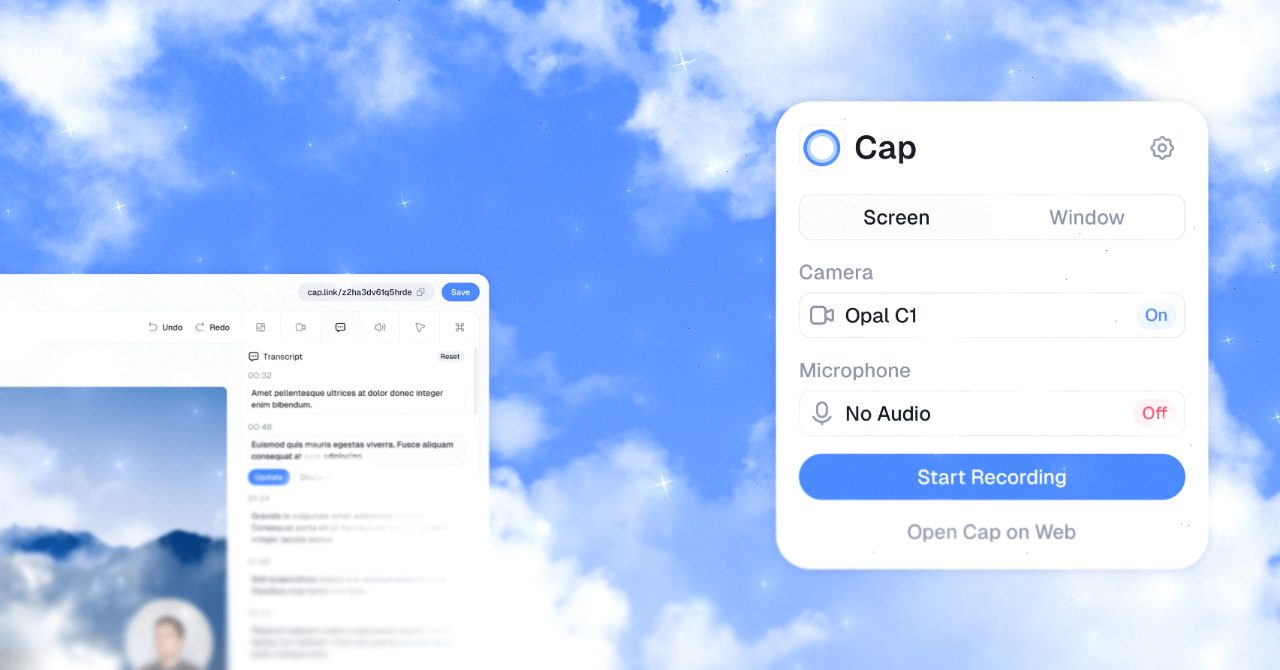
Open-source screen recorder with Loom-style instant links and a Screen Studio-style editor
Our verdict
#4 of 9 in Mac screen recorders · Free for personal use, open source
What it does
- Instant Mode with a share link as soon as you stop
- Studio Mode editor with zooms, backgrounds, trimming and captions
- Self-hosting and your own S3 storage for shared videos
Pros
- Free for personal use, including the Studio Mode editor and 4K export
- $58 once for a commercial license
- Open source, on Mac, Windows and Linux
Cons
- Free and Desktop License links are limited to 25 a month, five minutes each
- Less refined automatic motion than Screen Studio or CleanShot X
Cap is an open-source screen recorder for Mac, Windows and Linux, licensed mostly under the AGPLv3. Instant Mode uploads while you record and gives you a share link when you stop; Studio Mode records locally and opens an editor with backgrounds, zooms, trimming and captions, exporting up to 4K at 60 fps. The app is free for personal use with 25 short shareable links a month; commercial use needs a Desktop License, and Cap Pro adds unlimited cloud sharing, AI summaries and team features. Teams can also connect their own S3 storage or self-host the sharing platform.
Rankings and alternatives
- Mac screen recorders #4 of 9 Free for personal use, open source
- CleanShot X #1 Best for most Mac users
- Screen Studio #2 For demos where the video is the product
- Tella #3 For hosted, edited course and pitch videos
- Windows screen recorders #4 of 10 Cheap auto-zoom recorder with share links
- OBS Studio #1 Free, no limits, the most control
- Bandicam #2 Simple recorder you can buy once
- FocuSee #3 Automatic zooms for tutorials and demos





Windows screen recorders scores
Evaluated Nov 17, 2026 Evidence ↓- Recording quality and smoothness · counts double 3
3/5 means: 1080p or 4K at up to 60 fps, with some reports of stutter, crashes or heavy load on Windows
4K at 60 fps export and GPU hardware encoding with a software fallback on Windows, no time limit on local Studio recordings. Reports of crashes, failed starts and unreliable multi-screen capture on Windows keep it below 4; most complaints are about a year old and the issue tracker fixes quickly.
- Ease of getting a finished video 4
4/5 means: Easy to record and finish, with a few rough edges or extra steps
Record, edit in the same app and share without a second app, and reviewers praise fast startup. Rough edges are the Windows reliability reports and slow Studio exports.
- Editing depth 3
3/5 means: Cuts plus a few extras such as combining clips, captions, or editing the zooms, cursor and camera of one recording
Studio Mode edits one recording with cuts, zooms, cursor, camera and background, with some timeline features in recent releases. Captions and transcripts need Cap Pro, and Windows parity is not stated.
- Cost over three years 4
4/5 means: Under $100
Desktop License is $58 once (or $29 per year, $87 over three years), unlimited local recording with no watermark; both are under $100. The free plan is personal use only.
- Recording options 3
3/5 means: All the basics, with no extras
Full screen, window or region, webcam overlay, microphone plus system audio, and a Focus mode for single windows on Windows. Separate audio tracks and multi-monitor behavior are not documented, and multi-screen capture has been reported unreliable.
- Polish without editing · counts half 3
3/5 means: Click effects plus cursor smoothing or simple automatic zooms; most zooms are placed or fixed by hand
Studio Mode adds backgrounds, smoothed cursors and automatic zooms, but its automatic polish is younger and less refined than FocuSee's, and nothing states it behaves the same on Windows as on Mac.
- Sharing · counts half 3
3/5 means: A hosted share link with limited storage or features
Instant links are ready when you stop, but the free and Desktop License plans allow 25 links a month of up to 5 minutes. Analytics, transcriptions and unlimited storage need Cap Pro, which would score 4 to 5.
- Gameplay capture · counts half 2
2/5 means: Records games through ordinary screen or window capture
Records through ordinary screen or window capture. No game capture mode, instant replay or FPS overlay was found in the docs or release notes I read, but I did not search for them explicitly.
Mac screen recorders scores
Evaluated Nov 17, 2026 Evidence ↓- Polish without editing 3
3/5 means: Cursor smoothing and click effects after recording; zooms are placed by hand
Studio Mode adds backgrounds and zooms after recording, but its automatic polish is younger and less refined than the dedicated tools in this set, so it sits between manual and automatic.
- Editing depth 3
3/5 means: Cuts plus editing the zooms, cursor, camera and background of one recording
Studio Mode edits one recording: backgrounds, zooms, trimming, captions and export settings.
- Ease of getting a finished video 4
4/5 means: Easy to record and finish, with a few rough edges or extra steps
Two clear modes, Instant for a link and Studio for polish; an open-source app that is still maturing, with occasional rough edges.
- Sharing 4
4/5 means: Hosted links with comments, transcripts or analytics
Instant Mode uploads while recording and gives a link the moment you stop, with comments, transcripts and analytics, but free and Desktop License users get 25 links a month of up to five minutes; unlimited links need Cap Pro.
- Cost over three years 4
4/5 means: Under $100
Free for personal use; commercial use needs the Desktop License at $58 once (or $29 a year).
- Recording options · counts half 4
4/5 means: All the basics at up to 4K, plus one or two extras such as an iPhone, keystrokes or GIF export
Screen or window with camera, microphone and system audio, exported up to 4K at 60 fps.
Pricing
- Free Free Personal use only. Full recorder and Studio Mode editor, 4K 60 fps export, 25 shareable links a month of up to 5 minutes each.
- Desktop License $29.00 /year Commercial use, unlimited local recording and editing, same 25 short links a month. Also sold once for $58 as a license that never renews.
- Cap Pro $12.00 /month per seat Per user per month, or $8.16 a month billed annually. Unlimited cloud storage and links, AI titles, summaries and chapters, custom domain, password-protected shares, analytics and team workspaces.
Prices checked Nov 17, 2026.
Evidence and sources
Windows screen recorders scores
Recording quality and smoothness 6 quotes
-
4K export at 60fps
cap.so/pricing · checked -
When a GPU encoder fails mid-recording, Cap switches to software encoding and keeps recording. A hardware encoder that crashes Cap is skipped afterwards instead of crashing every recording.
github.com/CapSoftware/Cap/releases · checked -
Recordings on high-refresh-rate Windows monitors could come out stretched and out of sync with their audio. New recordings capture at the correct speed, and affected existing recordings are automatically repaired when opened in the editor, keeping the original file as a backup.
github.com/CapSoftware/Cap/releases · checked -
Fix crashes on windows 10/11, have a dedicated support team to handle billing issues.
sherif313, Product Hunt reviewer who paid for Cap · producthunt.com/products/cap-3/reviews · published · checked -
The multi-screen recording is unreliable, and I’ve lost a fair amount of time to bugs where recordings either didn’t start properly or didn’t capture the screens I selected. When it works, it’s solid, but right now it feels a bit hit-and-miss.
garethjohnsdesign, Product Hunt reviewer · producthunt.com/products/cap-3/reviews · published · checked -
Recording in studio mode resulting in force close, the app suddenly quit when dialog say Starting.
GitHub issue reporter, Cap 0.6.2 user on Windows 26H2 (Lenovo Legion Y530) · github.com/CapSoftware/Cap/issues/3928 · checked
Ease of getting a finished video 3 quotes
-
Studio Mode for polish. Record locally, edit with backgrounds, zooms, trimming, captions, and export controls.
github.com/CapSoftware/Cap · checked -
Cap kept crashing when I first installed it but hopped onto the Discord and it got fixed within hours.
thejackstephen, Product Hunt reviewer · producthunt.com/products/cap-3/reviews · published · checked -
The multi-screen recording is unreliable, and I’ve lost a fair amount of time to bugs where recordings either didn’t start properly or didn’t capture the screens I selected. When it works, it’s solid, but right now it feels a bit hit-and-miss.
garethjohnsdesign, Product Hunt reviewer · producthunt.com/products/cap-3/reviews · published · checked
Editing depth 3 quotes
-
Studio Mode for polish. Record locally, edit with backgrounds, zooms, trimming, captions, and export controls.
github.com/CapSoftware/Cap · checked -
Viewer analytics & engagement
cap.so/pricing · checked -
Auto zoom ignores cursor movement in cut sections. Smoothed cursors reach where the mouse stopped, and text cursors confirmed by a click keep their shape.
github.com/CapSoftware/Cap/releases · checked
Cost over three years 4 quotes
-
Or $58 once, for a license that never renews.
cap.so/pricing · checked -
We define commercial purposes as any use of Cap Desktop for recording or editing content that will be used as part of revenue-generating activities.
cap.so/docs/commercial-license · checked -
Producing content for communication between team members of a company
cap.so/docs/commercial-license · checked -
There are no watermarks, no hidden paywalls, and no time limit on Studio Mode recordings.
cap.so/screen-recorder-windows · checked
Recording options 3 quotes
-
Record system audio, microphone input, or both simultaneously.
cap.so/screen-recorder-windows · checked -
On macOS and Windows, record a window by itself. Other windows, even ones on top of it, stay out of the video, and the recording follows the window if it moves.
github.com/CapSoftware/Cap/releases · checked -
The multi-screen recording is unreliable, and I’ve lost a fair amount of time to bugs where recordings either didn’t start properly or didn’t capture the screens I selected. When it works, it’s solid, but right now it feels a bit hit-and-miss.
garethjohnsdesign, Product Hunt reviewer · producthunt.com/products/cap-3/reviews · published · checked
Polish without editing 3 quotes
-
Studio Mode for polish. Record locally, edit with backgrounds, zooms, trimming, captions, and export controls.
github.com/CapSoftware/Cap · checked -
Auto zoom ignores cursor movement in cut sections. Smoothed cursors reach where the mouse stopped, and text cursors confirmed by a click keep their shape.
github.com/CapSoftware/Cap/releases · checked -
Record system audio, microphone input, or both simultaneously.
cap.so/screen-recorder-windows · checked
Sharing 4 quotes
-
25 shareable links a month, up to 5 minutes each
cap.so/pricing · checked -
Instant Mode for speed. Upload while recording and get a shareable link the moment you stop.
github.com/CapSoftware/Cap · checked -
Viewer analytics & engagement
cap.so/pricing · checked -
Team Sharing - Share recordings with your team through workspaces. Viewers can leave timestamped comments and emoji reactions.
cap.so/docs · checked
Gameplay capture 2 quotes
-
Record system audio, microphone input, or both simultaneously.
cap.so/screen-recorder-windows · checked -
On macOS and Windows, record a window by itself. Other windows, even ones on top of it, stay out of the video, and the recording follows the window if it moves.
github.com/CapSoftware/Cap/releases · checked
Mac screen recorders scores
Polish without editing 1 quote
-
Studio Mode for polish. Record locally, edit with backgrounds, zooms, trimming, captions, and export controls.
github.com/CapSoftware/Cap · checked
Editing depth 1 quote
-
Studio Mode for polish. Record locally, edit with backgrounds, zooms, trimming, captions, and export controls.
github.com/CapSoftware/Cap · checked
Ease of getting a finished video 2 quotes
-
Instant Mode for speed. Upload while recording and get a shareable link the moment you stop.
github.com/CapSoftware/Cap · checked -
Studio Mode for polish. Record locally, edit with backgrounds, zooms, trimming, captions, and export controls.
github.com/CapSoftware/Cap · checked
Sharing 3 quotes
-
25 shareable links a month, up to 5 minutes each
cap.so/pricing · checked -
Or $8.16 a month, billed annually.
cap.so/pricing · checked -
Instant Mode for speed. Upload while recording and get a shareable link the moment you stop.
github.com/CapSoftware/Cap · checked
Cost over three years 3 quotes
-
The full recorder and editor for personal use, with shareable links included.
cap.so/pricing · checked -
Or $58 once, for a license that never renews.
cap.so/pricing · checked -
Free covers personal use with no time limit on local recordings. Paid plans add commercial rights, and Cap Pro adds the cloud.
cap.so/pricing · checked
Recording options 1 quote
-
4K export at 60fps
cap.so/pricing · checked
Facts
License 1 quote
-
All other content not mentioned above is available under the AGPLv3 license as defined in LICENSE.
github.com/CapSoftware/Cap · checked
Runs on 1 quote
-
Apps for Mac, Windows and Linux
cap.so/pricing · checked
More from the sources
Features 9 quotes
-
Self-host Cap Web, the API, database, media server, and object storage with Docker Compose.
github.com/CapSoftware/Cap · checked -
Loom video importer
cap.so/pricing · checked -
Custom S3 bucket & Google Drive support
cap.so/pricing · checked -
Anonymous and signed-in playback can both contribute to aggregate data.
cap.so/docs/sharing/analytics · checked -
Instant sharing. Record and get a shareable link in seconds.
cap.so/docs · checked -
Downgrade to our free plan to keep recording locally, or self-host to maintain all features.
cap.so/pricing · checked -
Connect AWS S3, Cloudflare R2, Backblaze B2, MinIO, Wasabi, or another S3-compatible provider.
github.com/CapSoftware/Cap · checked -
Cap Pro also lets you bring your own storage, including custom S3 buckets in any region or your own Google Drive, for GDPR compliance.
cap.so/pricing · checked -
Move from Loom. Import existing Loom videos into Cap and keep your library in one place.
github.com/CapSoftware/Cap · checked
Limits and known issues 4 quotes
-
Producing content for promotion or demonstration of your employer's product or service
cap.so/docs/commercial-license · checked -
Camera background blur no longer crashes when DirectML is missing, and is turned off after a crash so Cap can relaunch.
github.com/CapSoftware/Cap/releases · checked -
hey Sam! We're in early beta - would love for you to have sent this feedback to us so we could address the bugs and get a fix out.
Cap, product team reply on Product Hunt · producthunt.com/products/cap-3/reviews · checked -
Windows: area recording loses its outline once recording starts, so the capture boundary is invisible
github.com/CapSoftware/Cap/issues · checked
What users say 1 quote
-
But the main complaint is reliability: multiple users report repeated crashes, failed launches, buggy camera rendering, unreliable multi-screen capture, and slow studio exports.
producthunt.com/products/cap-3/reviews · checked
Platforms and requirements 5 quotes
-
Cap Desktop release builds are available for Apple Silicon and Intel Macs, 64-bit Windows, and 64-bit Linux through a Debian package.
cap.so/docs/installation · checked -
System-audio support can depend on the macOS version and selected capture path.
cap.so/docs/installation · checked -
Download CaporAdd to Chrome
cap.so/download · checked -
Without ETag, recordings from the web recorder and the Chrome extension fail to upload.
cap.so/docs/self-hosting · checked -
Screen capture uses the native Windows capture path and does not present the same separate Screen Recording permission used by macOS.
cap.so/docs/installation · checked
License 1 quote
-
This license does not apply to versions of the app you build yourself from our source code, only to binaries that we distribute.
cap.so/docs/commercial-license · checked
Pricing
cap.so/pricing · checked