
OBS Studio
Free, open-source recording and live-streaming app built around scenes and sources
Our verdict
#1 of 10 in Windows screen recorders · Free, no limits, the most control
What it does
- Scenes that combine screen, window, webcam, images and text
- Hardware encoding on NVIDIA, AMD and Intel graphics
- Game Capture and a Replay Buffer for games
- Per-app audio on separate tracks
Pros
- Free with no watermark, time limit or account
- The best recording quality and lowest overhead you can set up
- Records anything you can arrange on screen
Cons
- Takes real setup before the first good recording
- No editor, zooms or share links
- Choose if:
- You'll spend an evening on setup to never pay for a recorder
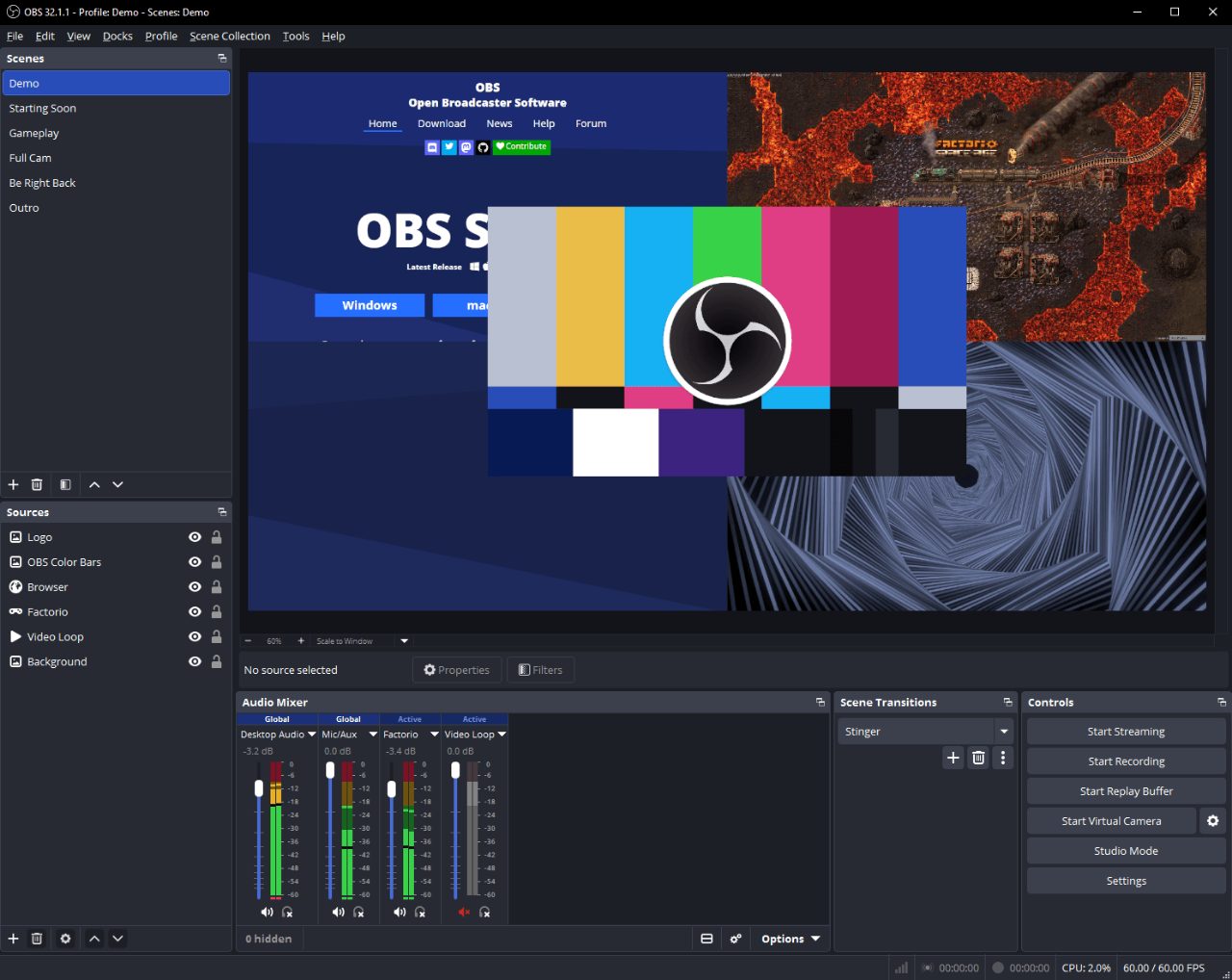
OBS Studio is free, open-source software for recording and live streaming on Windows, macOS and Linux, licensed under the GPL. You build scenes from sources such as a screen or window capture, a webcam, images and text, and record them to a file or stream them. On Windows 10 and 11 it has a Game Capture source for fullscreen games, per-application audio capture, and NVIDIA NVENC, AMD AMF and Intel Quick Sync hardware encoders for low-overhead recording. On macOS 13 or later it records system or per-app audio with its own capture sources. It has no video editor, automatic zoom or sharing of its own, so recordings usually go to a separate editor.
Rankings and alternatives
- Windows screen recorders #1 of 10 Free, no limits, the most control
- Mac screen recorders #9 of 9 Free, for long or multi-source recordings
- CleanShot X #1 Best for most Mac users
- Screen Studio #2 For demos where the video is the product
- Tella #3 For hosted, edited course and pitch videos





Windows screen recorders scores
Evaluated Nov 17, 2026 Evidence ↓- Recording quality and smoothness · counts double 5
5/5 means: Any resolution and frame rate your hardware allows, hardware encoding, low overhead even in games, and a track record of reliable long recordings
No resolution or frame rate caps beyond the hardware, and NVENC, AMF and Quick Sync hardware encoding that OBS's docs say has minimal performance impact. Independent head-to-head load figures were not found, and ShadowPlay is generally reported as lighter.
- Ease of getting a finished video 2
2/5 means: Records well after some setup, but most users need tutorials, and finishing a video means a second app
Records well after setup, but sources agree it takes tuning, scenes and sources, and dual-GPU laptops can hit capture problems. There is no editor, so finishing a video needs a second app. Based on the official laptop guide and comparison pages, not user threads.
- Editing depth 1
1/5 means: No editor; recordings go to another app
A recorder and streamer with no editor, so recordings go to another app. Not checked against the repository or issue tracker.
- Cost over three years 5
5/5 means: Free
Free and open source (GPL), with no watermark or time limit, so no license is needed for work use.
- Recording options 5
5/5 means: Several screens, cameras and devices at once, or full scene composition
Scene composition from display, window, game, webcam, capture card, browser and image sources, with mic and desktop audio, per-application audio sources and multiple audio tracks.
- Polish without editing · counts half 1
1/5 means: The raw capture, with nothing added
No automatic zoom, cursor smoothing or click effects as far as is known; it records the raw capture. Absence was not confirmed against the docs or source.
- Sharing · counts half 1
1/5 means: Save a file only
Saves files; it has no hosted share links. It can stream to services, but that is live streaming, not sharing a recording. Absence was not confirmed against the docs.
- Gameplay capture · counts half 5
5/5 means: Game capture and an instant replay buffer you save on a hotkey
A Game Capture source that hooks fullscreen games, with optional per-game audio, plus a built-in Replay Buffer saved on a hotkey. Replay Buffer rests on established knowledge, not a stored quote.
Mac screen recorders scores
Evaluated Nov 17, 2026 Evidence ↓- Polish without editing 1
1/5 means: The raw capture, with nothing added
Records the scene as it is; zooms, cursor effects and backgrounds have to be built by hand or added in another app.
- Editing depth 1
1/5 means: No editor; recordings go to another app
OBS has no editor; recordings go to a separate video editor.
- Ease of getting a finished video 2
2/5 means: Works after some setup, but most users need tutorials to get good results
Built for streaming, with scenes, sources and encoder settings to set up before the first good recording; widely described as having a steep learning curve.
- Sharing 1
1/5 means: Export a file only
Saves a file; sharing happens elsewhere.
- Cost over three years 5
5/5 means: Free
Free and open source with no watermark or time limit.
- Recording options · counts half 5
5/5 means: Several screens, cameras or devices at once, or full scene composition
Scenes built from any mix of screens, windows, webcams, capture cards, images and text, with system or per-app audio on macOS 13 or later.
Pricing
- OBS Studio Free Free and open source, with no watermark or time limit.
Prices checked Nov 17, 2026.
Evidence and sources
Windows screen recorders scores
Recording quality and smoothness 4 quotes
-
Hardware encoders, as opposed to the included x264 software encoder, are generally recommended for best performance as they take the workload off the CPU and to a specialised component in the GPU that can perform video encoding more efficiently. Modern hardware encoders provide very good quality video with minimal performance impact.
obsproject.com/kb/hardware-encoding · checked -
NVIDIA's NVENC encoder is supported on Windows and Linux.
obsproject.com/kb/hardware-encoding · checked -
AMD's Advanced Media Framework encoder is supported on Windows and Linux.
obsproject.com/kb/hardware-encoding · checked -
Intel's Quick Sync Video encoder is supported on Windows and Linux.
obsproject.com/kb/hardware-encoding · checked
Ease of getting a finished video 2 quotes
-
A lot of laptops have two graphics cards enabled, working in unison. This has historically caused issues with OBS display capture, where you would need to decide between good performance and game capture, or working display capture.
obsproject.com/kb/laptop-troubleshooting · checked -
It is highly recommended to leave OBS running on the default (high power) GPU. If you have previously changed it to "power saving" (iGPU), it is recommended to make sure your OBS and Windows is up to date, and reverting it back to "high power".
obsproject.com/kb/laptop-troubleshooting · checked
Editing depth 2 quotes
-
Free and open source software for video recording and live streaming.
obsproject.com · checked -
High performance real time video/audio capturing and mixing. Create scenes made up of multiple sources including window captures, images, text, browser windows, webcams, capture cards and more.
obsproject.com · checked
Cost over three years 2 quotes
-
Free and open source software for video recording and live streaming.
obsproject.com · checked -
It's distributed under the GNU General Public License v2 (or any later version) - see the accompanying COPYING file for more details.
github.com/obsproject/obs-studio · checked
Recording options 3 quotes
-
High performance real time video/audio capturing and mixing. Create scenes made up of multiple sources including window captures, images, text, browser windows, webcams, capture cards and more.
obsproject.com · checked -
As of OBS Studio 28, per-application audio sources are available for users running Windows 10 (Version 2004 or later) and Windows 11. These Application Audio Capture (BETA) sources allow you to add each application you would like to capture as its own audio source. With the release of OBS Studio 30.1, you are able to include audio with a Window Capture or Game Capture source.
obsproject.com/kb/application-audio-capture-guide · checked -
Having separate audio sources can be useful when you want to stream to Twitch and have a separate VOD audio track. This is also useful when splitting your audio into multiple tracks while recording.
obsproject.com/kb/application-audio-capture-guide · checked
Gameplay capture 1 quote
-
As of OBS Studio 28, per-application audio sources are available for users running Windows 10 (Version 2004 or later) and Windows 11. These Application Audio Capture (BETA) sources allow you to add each application you would like to capture as its own audio source. With the release of OBS Studio 30.1, you are able to include audio with a Window Capture or Game Capture source.
obsproject.com/kb/application-audio-capture-guide · checked
Mac screen recorders scores
Editing depth 1 quote
-
High performance real time video/audio capturing and mixing. Create scenes made up of multiple sources including window captures, images, text, browser windows, webcams, capture cards and more.
obsproject.com · checked
Cost over three years 2 quotes
-
Free and open source software for video recording and live streaming.
obsproject.com · checked -
It's distributed under the GNU General Public License v2 (or any later version) - see the accompanying COPYING file for more details.
github.com/obsproject/obs-studio · checked
Recording options 2 quotes
-
High performance real time video/audio capturing and mixing. Create scenes made up of multiple sources including window captures, images, text, browser windows, webcams, capture cards and more.
obsproject.com · checked -
When using OBS Studio 30 on macOS 13 (Ventura) and higher, you can use the new macOS Audio Capture Source. You can choose to capture all desktop audio or just a certain application.
obsproject.com/kb/macos-desktop-audio-capture-guide · checked
Facts
License 2 quotes
-
Free and open source software for video recording and live streaming.
obsproject.com · checked -
It's distributed under the GNU General Public License v2 (or any later version) - see the accompanying COPYING file for more details.
github.com/obsproject/obs-studio · checked
Runs on 2 quotes
-
Download and start streaming quickly and easily on Windows, Mac or Linux.
obsproject.com · checked -
DirectX 10.1 compatible GPU Windows 10, or Windows 11
obsproject.com/kb/system-requirements · checked
Needs 1 quote
-
DirectX 10.1 compatible GPU Windows 10, or Windows 11
obsproject.com/kb/system-requirements · checked
More from the sources
Features 1 quote
-
Hybrid MP4/MOV is now out of beta and has been made the default output format for new profiles [derrod]
github.com/obsproject/obs-studio/releases/tag/32.0.0 · checked
Limits and known issues 3 quotes
-
In order to capture desktop audio on older versions of macOS, you will require additional software.
obsproject.com/kb/macos-desktop-audio-capture-guide · checked -
Due to how some applications output some of their audio, it may be incompatible with the Application Audio Capture (BETA) source. For these applications, there are separate steps required to isolate the missing audio as it's own source in OBS Studio.
obsproject.com/kb/application-audio-capture-guide · checked -
One current downside of the new capture method is that it uses on of Microsoft's APIs to make this happen, and for security reasons (so you know you're capturing the screen), they add a yellow border around the edge.
obsproject.com/kb/laptop-troubleshooting · checked
Pricing
obsproject.com · checked