
OmniFocus 4
Powerful GTD-style task manager for iPhone, iPad, Mac, Apple Watch and Vision Pro, sold as a one-time license or a subscription
Our verdict
#9 of 10 in To-do list apps for iPhone · Deep Getting Things Done system for Apple power users
Pros
- Defer dates, reviews, and custom perspectives for a full GTD system
- One license covers every Apple device
Cons
- Steep learning curve
- Expensive, with the web version only on the subscription
- No sharing
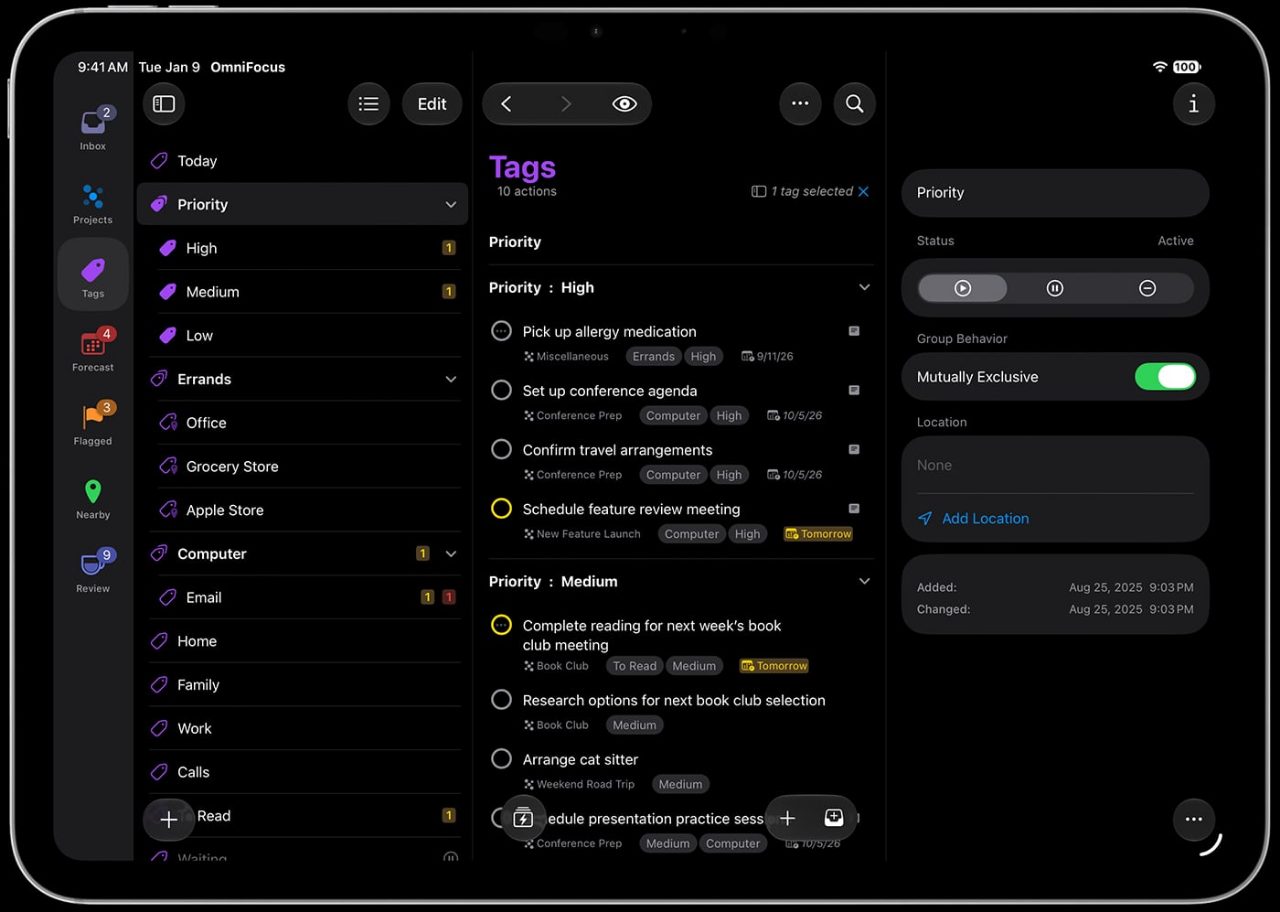
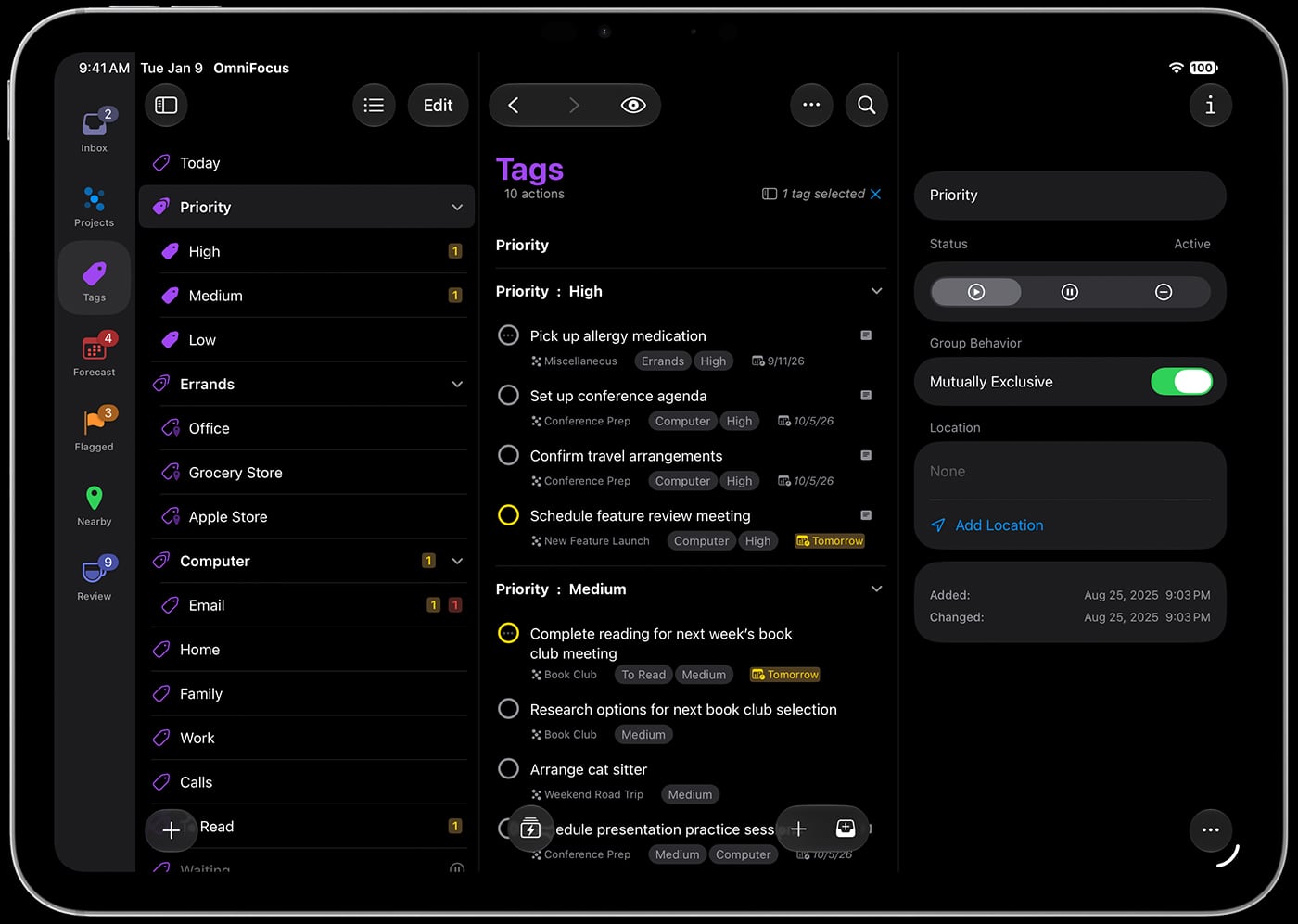
OmniFocus 4 is a task manager from The Omni Group for people who want projects, tags, defer and due dates, weekly review and custom views. It runs natively on iPhone, iPad, Mac, Apple Watch and Apple Vision Pro, with one purchase covering all of them, and syncs through Omni’s free end-to-end-encrypted sync service or your own server. It is sold as a one-time Standard or Pro license or as a subscription that includes Pro and OmniFocus for the Web, the only way to use it from Windows or Android. Capture options include quick entry, a share extension, widgets and Siri, and Forecast shows tasks next to calendar events. It has no shared projects or task assignment.
What users say
Evidence ↓A long-time Mac and iOS developer who has used OmniFocus since version 1.0 calls the version 4 data model rock solid and the interface harmonized across devices, while reporting early iPhone glitches, slow scrolling, a less efficient new-task button and unreliable Apple Watch sync. App Store reviews in 2024 were mixed; critics called version 4 glitchy and slow, and Apple's own editorial text calls it easy to pick up but powerful. These are single accounts from 2024 versions, not a measured share, and the iPhone rating is 4.0 out of 5 from 346 ratings.
Rankings and alternatives
- To-do list apps for iPhone #9 of 10 Deep Getting Things Done system for Apple power users
- Todoist #1 Best all-rounder across iPhone, Windows, and Android
- TickTick #2 Calendar, habits, and focus timer in one app
- Apple Reminders #3 Free and already on your iPhone

iPhone to-do list apps scores
Evaluated Nov 17, 2026 Evidence ↓- Pleasant and quick to use · counts double 2
2/5 means: Capable but hard to learn or rough, with frequent complaints about glitches, clutter or confusing layout
Capable but hard to learn, the scale's second level. Apple's editors call it easy to pick up and a long-time user praises the harmonized design, but 2024 App Store reviews cite glitches, slowness and a confusing layout, the rating is 4.0, and it is known to have a steep learning curve. Complaints date from early version 4 builds, so the current state is uncertain.
- Fast capture 4
4/5 means: Typed dates and times plus most system shortcuts
Natural-language typed dates on iPhone, Quick Entry from the share sheet, widgets, Siri and a standalone Watch app. A typed line does not set list or repeat, and Shortcuts, Action button and Mail Drop were not confirmed in the sources read.
- Reminders that get your attention 4
4/5 means: Time alerts and flexible repeats, plus either location alerts or alerts that repeat or ring until you act
Due, defer and scheduled-time notifications, location-tag notifications and flexible repeat schedules. No alerts that repeat until acted on were found.
- Organizing lots of tasks 5
5/5 means: Projects in folders or areas, sections, tags, subtasks, start or defer dates, and saved filters or custom views
Projects in folders, action groups, tags, defer dates, and custom perspectives with Pro, which is the setup scored.
- Planning your day and week 4
4/5 means: Today and upcoming views with calendar events beside tasks, or tasks shown on a calendar, but no time blocking
Forecast shows tasks beside calendar events with a Today-style and upcoming list. No calendar grid or time blocking was found.
- Devices it works on 3
3/5 means: All the Apple devices most readers own, but nothing for Windows, Android or the web
One Pro license covers iPhone, iPad, Mac, Watch and Vision Pro, but the web version, the only route to Windows or Android, needs the subscription, not this license.
- Cost over three years 2
2/5 means: $100 to $200
Pro one-time license is $149.99 for all Apple devices, so $149.99 over three years, in the $100 to $200 band.
- Sharing lists with others · counts half 1
1/5 means: No shared lists
No shared projects or assignment; this is a well-known absence, not stated in the sources read.
Pricing
- OmniFocus Standard $74.99 one-time One-time license that covers iPhone, iPad, Mac, Apple Watch and Apple Vision Pro. Excludes Pro features such as custom perspectives, Focus and automation. 14-day free trial. Upgrade from version 1-3 is $37.49.
- OmniFocus Pro $149.99 one-time One-time license on all Apple platforms with custom perspectives, Focus, extra Forecast options, automation and view options. Upgrading from Standard is $74.99. Does not include OmniFocus for the Web.
- OmniFocus subscription (annual) $99.99 /year Unlocks Pro on all supported Apple devices and includes OmniFocus for the Web. The App Store labels it "Legacy Subscription"; the vendor's own pricing page could not be read, so check it for current terms.
- OmniFocus subscription (monthly) $9.99 /month Same as the annual subscription, billed monthly.
Prices checked Nov 17, 2026.
Evidence and sources
What users say
Summary 6 quotes
-
4.0 out of 5 346 Ratings
apps.apple.com/us/app/omnifocus-4/id1542143627 · checked -
This incredibly flexible task and project manager is easy to pick up but powerful enough for productivity pros and complex projects.
apps.apple.com/us/app/omnifocus-4/id1542143627 · checked -
OMNI FOCUS 4 is a glitchy, slow, UI nightmare. I am VERY DISAPPOINTED.
jared platt, App Store reviewer and long-time OmniFocus upgrader · apps.apple.com/us/app/omnifocus-4/id1542143627 · published · checked -
The data model remains rock solid, while the interface has been expanded and largely harmonized across platforms, without any of them feeling shortchanged.
Michael Tsai, Mac and iOS developer and OmniFocus user since 1.0 · mjtsai.com/blog/2024/02/12/omnifocus-4 · published · checked -
Now, there’s a single, multipurpose + button that provides a lot of functionality in a small amount of screen space. Single tapping creates a new action in the current list. Double-tapping creates one in the inbox.
Michael Tsai, Mac and iOS developer and OmniFocus user since 1.0 · mjtsai.com/blog/2024/02/12/omnifocus-4 · published · checked -
You can Complete, Drop, Unflag, and Delete actions; there is no way to Defer them or to edit the text.
Michael Tsai, Mac and iOS developer and OmniFocus user since 1.0 · mjtsai.com/blog/2024/02/12/omnifocus-4 · published · checked
iPhone to-do list apps scores
Pleasant and quick to use 5 quotes
-
4.0 out of 5 346 Ratings
apps.apple.com/us/app/omnifocus-4/id1542143627 · checked -
This incredibly flexible task and project manager is easy to pick up but powerful enough for productivity pros and complex projects.
apps.apple.com/us/app/omnifocus-4/id1542143627 · checked -
OMNI FOCUS 4 is a glitchy, slow, UI nightmare. I am VERY DISAPPOINTED.
jared platt, App Store reviewer and long-time OmniFocus upgrader · apps.apple.com/us/app/omnifocus-4/id1542143627 · published · checked -
The data model remains rock solid, while the interface has been expanded and largely harmonized across platforms, without any of them feeling shortchanged.
Michael Tsai, Mac and iOS developer and OmniFocus user since 1.0 · mjtsai.com/blog/2024/02/12/omnifocus-4 · published · checked -
Now, there’s a single, multipurpose + button that provides a lot of functionality in a small amount of screen space. Single tapping creates a new action in the current list. Double-tapping creates one in the inbox.
Michael Tsai, Mac and iOS developer and OmniFocus user since 1.0 · mjtsai.com/blog/2024/02/12/omnifocus-4 · published · checked
Fast capture 3 quotes
-
Entering dates as natural language text (i.e. “tomorrow” or “next Thursday”) is now supported.
support.omnigroup.com/documentation/omnifocus/universal/4.10.1/en/welcome · checked -
Quick Entry interface is now presented when sharing items to OmniFocus, allowing for immediate capture of additional details, like dates and flagged status.
support.omnigroup.com/documentation/omnifocus/universal/4.10.1/en/welcome · checked -
OmniFocus for Apple Watch now syncs your full OmniFocus database into the watch app, allowing for access to all items and perspectives from your Apple Watch.
support.omnigroup.com/documentation/omnifocus/universal/4.10.1/en/welcome · checked
Reminders that get your attention 3 quotes
-
Notifications — Let OmniFocus notify you when an action is coming due, when it becomes available after a defer date, at a scheduled time, or when it’s tagged with your current location.
support.omnigroup.com/documentation/omnifocus/universal/4.10.1/en/welcome · checked -
Nearby — View items assigned to location-based tags on a map or in a list so that you know what you can get done where you are right now.
support.omnigroup.com/documentation/omnifocus/universal/4.10.1/en/welcome · checked -
Repeat Schedules — Set up items to repeat on real-world schedules. Every Monday and Thursday. The last weekend day of the month. The first weekday of the month.
support.omnigroup.com/documentation/omnifocus/universal/4.10.1/en/welcome · checked
Organizing lots of tasks 1 quote
-
Custom Perspectives — Create new ways to see your data by filtering and grouping projects and tags.
support.omnigroup.com/documentation/omnifocus/universal/4.10.1/en/welcome · checked
Planning your day and week 1 quote
-
Forecast — Know what’s coming up in your day with the Forecast, which shows your actions and calendar events in a reorder-able list. (Calendar event integration is not available in OmniFocus for Web.)
support.omnigroup.com/documentation/omnifocus/universal/4.10.1/en/welcome · checked
Devices it works on 4 quotes
-
Purchase or subscribe to OmniFocus 4 once for full access to OmniFocus on your Mac, iPhone, iPad, Apple Watch, and Apple Vision Pro.
omnigroup.com/omnifocus · checked -
OmniFocus syncs across all your Apple devices and is available on Android or PC with OmniFocus for the Web.
omnigroup.com/omnifocus · checked -
There’s also a Web version, which you can only get via subscription.
Michael Tsai, Mac and iOS developer and long-time OmniFocus user · mjtsai.com/blog/2024/02/12/omnifocus-4 · published · checked -
An OmniFocus subscription unlocks OmniFocus Pro on all supported Apple devices, and includes access to OmniFocus for the Web from any web browser.
support.omnigroup.com/documentation/omnifocus/universal/4.10.1/en/welcome · checked
Cost over three years 1 quote
-
Legacy Subscription $9.99 Upgrade to v4 Pro from v1-v3 $74.99 Unlock Standard $74.99 Unlock Pro $149.99 Legacy Subscription $99.99 Upgrade to v4 from v1-v3 $37.49 Upgrade v4 to Pro from v1-v3 $37.49 Upgrade from Standard to Pro $74.99
apps.apple.com/us/app/omnifocus-4/id1542143627 · checked
Facts
License 2 quotes
-
Legacy Subscription $9.99 Upgrade to v4 Pro from v1-v3 $74.99 Unlock Standard $74.99 Unlock Pro $149.99 Legacy Subscription $99.99 Upgrade to v4 from v1-v3 $37.49 Upgrade v4 to Pro from v1-v3 $37.49 Upgrade from Standard to Pro $74.99
apps.apple.com/us/app/omnifocus-4/id1542143627 · checked -
An OmniFocus subscription unlocks OmniFocus Pro on all supported Apple devices, and includes access to OmniFocus for the Web from any web browser.
support.omnigroup.com/documentation/omnifocus/universal/4.10.1/en/welcome · checked
Runs on 3 quotes
-
Purchase or subscribe to OmniFocus 4 once for full access to OmniFocus on your Mac, iPhone, iPad, Apple Watch, and Apple Vision Pro.
omnigroup.com/omnifocus · checked -
OmniFocus syncs across all your Apple devices and is available on Android or PC with OmniFocus for the Web.
omnigroup.com/omnifocus · checked -
An OmniFocus subscription unlocks OmniFocus Pro on all supported Apple devices, and includes access to OmniFocus for the Web from any web browser.
support.omnigroup.com/documentation/omnifocus/universal/4.10.1/en/welcome · checked
Needs 1 quote
-
Requires iOS 18.2 or later.
apps.apple.com/us/app/omnifocus-4/id1542143627 · checked
More from the sources
Pricing 2 quotes
-
Includes a free 14-day trial
omnigroup.com/omnifocus · checked -
It’s now a universal purchase, either from their store or the App Store. The subscription is still $10/month or $100/year. You can also still purchase perpetual licenses for $75 or $150 (Pro), and there’s a 50% discount for upgrades.
Michael Tsai, Mac and iOS developer and long-time OmniFocus user · mjtsai.com/blog/2024/02/12/omnifocus-4 · published · checked
Features 2 quotes
-
Focus Mode — Select what to concentrate on, and make OmniFocus temporarily hide all other items.
support.omnigroup.com/documentation/omnifocus/universal/4.10.1/en/welcome · checked -
Automation — Automate OmniFocus with cross-platform Omni Automation Plug-Ins or Mac-only AppleScripts.
support.omnigroup.com/documentation/omnifocus/universal/4.10.1/en/welcome · checked
Pricing
omnigroup.com/omnifocus · checked