
OpenCloud
Self-hosted Go file sync and sharing server with Spaces, a web office and desktop and mobile clients
Our verdict
#4 of 8 in Self-hosted file sync · Lean server that keeps plain files
What it does
- One program with no database to manage
- Files stored under their real names on the server
- Spaces for shared project folders
- Password, expiry and file-drop share links
Pros
- The simplest server here to run and back up
- Everything a household needs is free
- Its own apps on every desktop and phone
Cons
- Young, with a short track record for sync
- Files on demand only on Windows
- Its storage folder shouldn't be edited while it runs
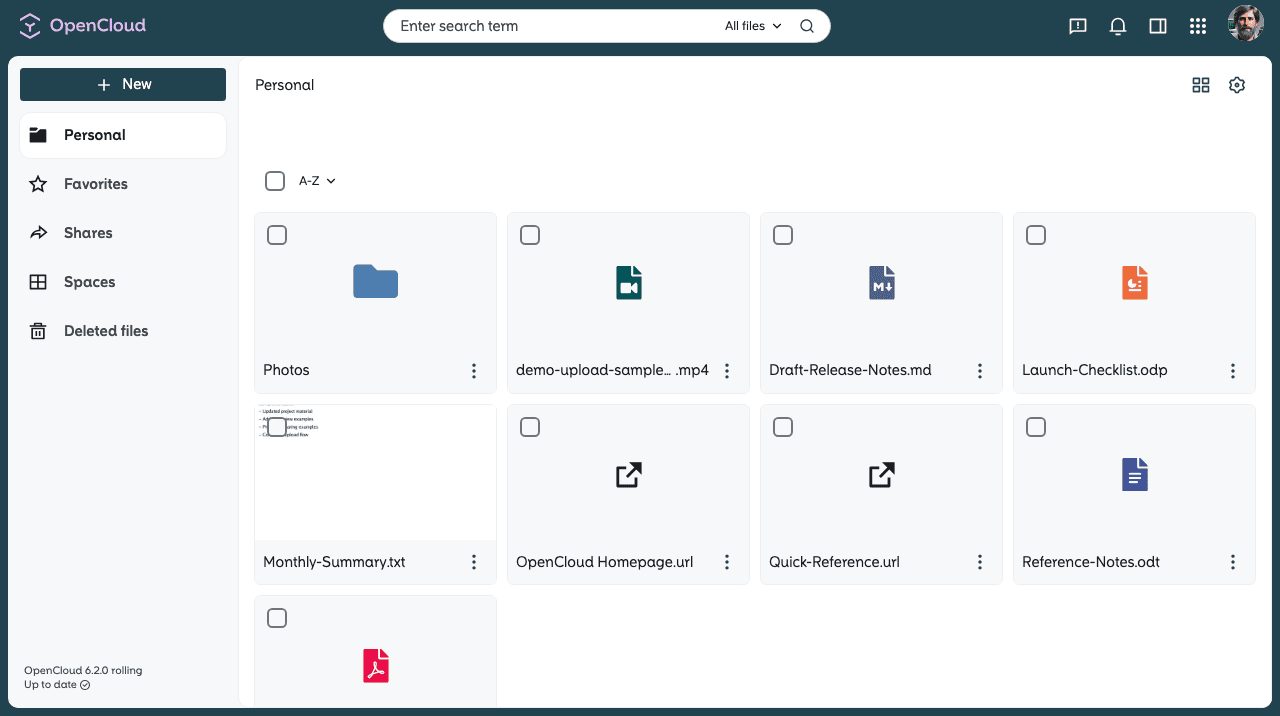
OpenCloud is an open-source server for storing, syncing and sharing files from your own hardware, made by OpenCloud GmbH of the Heinlein Group as a fork of ownCloud Infinite Scale. It runs as a Go binary or Docker container with no database, and comes with its own web interface, desktop clients for Windows, macOS and Linux, and iOS and Android apps. It adds Spaces for shared project folders, public links with passwords and expiry, file-drop uploads and Collabora web office editing. The Community Edition is free under Apache 2.0; the paid plans are per-user subscriptions aimed at organizations of 100 or more users.
What users say
Evidence ↓Few practitioner accounts were found, and none test sync speed or reliability. A Cloudron forum user liked its simplicity and microservice design but worried about early rolling releases, a Cloudron staff member could not get login (OIDC) working when packaging it and preferred a competing app, and another user valued that search is built in rather than an add-on. Each is a single voice.
Rankings and alternatives



Self-hosted file sync scores
Evaluated Nov 17, 2026 Evidence ↓- Sync reliability and speed · counts double 3
3/5 means: Fine for typical folders, but many users hit slow syncs or conflicts with large folders, many small files or frequent edits
No benchmarks or long-term user reports were found. Docs describe real-time sync, resumable TUS uploads and conflict handling, and it is a young fork of ownCloud Infinite Scale whose desktop client descends from the long-used ownCloud client; the score rests mostly on that background, so it is a cautious middle.
- Phone apps 4
4/5 means: Official apps on both that browse files and upload new photos automatically
Official iOS and Android apps exist and the docs describe offline files and automatic upload of new or changed files, but I did not read the store listings or confirm photo auto-upload by name. 5 is possible if both are confirmed.
- Desktop app 4
4/5 means: Level 3, plus files on demand on one of Windows and macOS
Own clients for Windows, macOS and Linux; files on demand is documented for Windows desktop (and mobile) only.
- Sharing with other people 5
5/5 means: Level 4, plus folders shared with other accounts on the server that they can edit
Public links with password and expiry, file-drop upload links, and sharing with users and groups by role, plus Spaces, all in the free edition.
- Setup and upkeep 4
4/5 means: One binary, container or app-store package with no separate database to manage
A single Go binary or Docker container with no database. Upgrade experience is not documented in sources read; web office needs a separate Collabora server.
- What it costs a household 5
5/5 means: Free, with every feature a household uses and no user cap
The Community Edition is free under Apache 2.0 with no user cap and can be used in production; the paid plans start at 100 users and add support and compliance features a household does not need.
- Files stay ordinary files 4
4/5 means: Ordinary files and folders under their real names, but changes made outside the software are picked up only by a rescan or a restart
PosixFS is the default for new installs and stores real file and folder names, but in that mode the tree must not be modified while OpenCloud runs; outside changes are picked up at startup.
- Open source 4
4/5 means: Open source, with a closed or separately licensed edition for organizations
The Community Edition is Apache 2.0. Paid plans add audit logs, file firewall and ransomware protection, which appear to be available only to subscribers, so the score assumes a separately licensed edition for organizations.
- Apps beyond files · counts half 3
3/5 means: Two of the five
Two of five - calendar and contacts over CalDAV/CardDAV, and browser office editing through a Collabora server. No photo timeline, chat or calls, or wiki. Calendar support status for self-hosters is unclear.
Pricing
- Community Edition (self-hosted) Free Open source under Apache 2.0, free to run yourself, with community support. The vendor says it can be used in production; production releases and LTS releases are listed under the paid plans.
- Basic €2.00 /month per seat Quoted from 100 users, so at least 200 EUR per month by the published rate. Adds access to production releases and long-term support releases; community support only.
- Professional €4.00 /month per seat From 100 users. Adds 9/5 email support with SLA, password policy, GDPR export, audit logs, file firewall and ransomware protection.
- Premium €8.00 /month per seat From 100 users. Adds 24/7 phone support, multi-tenancy and custom logo.
Prices checked Nov 17, 2026.
Evidence and sources
What users say
Summary 3 quotes
-
I like OpenCloud for its focus on simplicity, data privacy, and its modular microservices architecture that minimizes maintenance efforts. One potential concern is that its rolling release (v1.0.0 Rolling) may require additional evaluation before deploying in production environments.
timka, Cloudron forum user who requested the app · forum.cloudron.io/topic/13387/opencloud-secure-simple-reliable-file-sharing · checked -
I couldn't get OIDC to work
girish, Cloudron staff member packaging OpenCloud · forum.cloudron.io/topic/13387/opencloud-secure-simple-reliable-file-sharing · checked -
Also - to repeat myself - , unlike Nextcloud, core functionalities (like e.g. full-text search) are built-in and supported; they are not apps.
necrevistonnezr, Cloudron forum user · forum.cloudron.io/topic/13387/opencloud-secure-simple-reliable-file-sharing · checked
Self-hosted file sync scores
Sync reliability and speed 1 quote
-
Files and folders can be opened, synchronized, and shared from any location and device—via browser, desktop client (Windows, macOS, Linux), or mobile apps (iOS, Android).
docs.opencloud.eu/docs/admin/features · checked
Phone apps 2 quotes
-
Files and folders can be opened, synchronized, and shared from any location and device—via browser, desktop client (Windows, macOS, Linux), or mobile apps (iOS, Android).
docs.opencloud.eu/docs/admin/features · checked -
Users can mark files or folders for offline use to open and edit them without an internet connection. Changes are automatically synced once connectivity is restored.
docs.opencloud.eu/docs/admin/features · checked
Desktop app 2 quotes
-
Files and folders can be opened, synchronized, and shared from any location and device—via browser, desktop client (Windows, macOS, Linux), or mobile apps (iOS, Android).
docs.opencloud.eu/docs/admin/features · checked -
Files can be viewed directly in the device’s File Explorer and are stored efficiently, as they are only downloaded when needed. Large folder structures are immediately accessible without full synchronization, reducing network load and sync overhead. Available on Windows desktop operating systems and mobile clients.
docs.opencloud.eu/docs/admin/features · checked
Sharing with other people 1 quote
-
Spaces are independent work areas that go beyond simple folders. They bundle files, permissions, and responsibilities for projects or departments and can be managed separately—with dedicated owners, rules, and storage limits.
docs.opencloud.eu/docs/admin/features · checked
Setup and upkeep 1 quote
-
The OpenCloud backend does not use a database. It stores all data in the filesystem. By default, the root directory of the backend is $HOME/.opencloud/.
github.com/opencloud-eu/opencloud · checked
What it costs a household 3 quotes
-
Yes, the Community Edition of OpenCloud is open source and can be run yourself free of charge.
opencloud.eu/en/subscription-support · checked -
The Community Edition can be used in production. However, commercial plans offer additional stability, security and compliance features.
opencloud.eu/en/subscription-support · checked -
Access to production releases
opencloud.eu/en/subscription-support · checked
Open source 2 quotes
-
The OpenCloud server is released under Apache 2.0.
github.com/opencloud-eu/opencloud · checked -
Access to production releases
opencloud.eu/en/subscription-support · checked
Apps beyond files 1 quote
-
Through Collabora Online integration, office documents can be opened and collaboratively edited directly within the web interface—without local installation.
docs.opencloud.eu/docs/admin/features · checked
Facts
License 1 quote
-
The OpenCloud server is released under Apache 2.0.
github.com/opencloud-eu/opencloud · checked
Runs on 1 quote
-
Files and folders can be opened, synchronized, and shared from any location and device—via browser, desktop client (Windows, macOS, Linux), or mobile apps (iOS, Android).
docs.opencloud.eu/docs/admin/features · checked
Needs 2 quotes
-
The OpenCloud backend does not use a database. It stores all data in the filesystem. By default, the root directory of the backend is $HOME/.opencloud/.
github.com/opencloud-eu/opencloud · checked -
Through Collabora Online integration, office documents can be opened and collaboratively edited directly within the web interface—without local installation.
docs.opencloud.eu/docs/admin/features · checked
More from the sources
Pricing 1 quote
-
The Community Edition and the Basic plan include community support via public channels.
opencloud.eu/en/subscription-support · checked
Features 1 quote
-
Files can be encrypted automatically on S3 storage. The key resides on the server and protects against physical access or unauthorized access to drives or backups. Combined with TLS in transit, this provides consistent security but does not prevent admin-level access inside the application (unlike end-to-end encryption).
docs.opencloud.eu/docs/admin/features · checked
Limits and known issues 1 quote
-
Production Releases contain versions that have been tested and approved for production use, with stable upgrade paths.
opencloud.eu/en/subscription-support · checked
Pricing
opencloud.eu/en/subscription-support · checked