
Seafile
Self-hosted file sync and sharing server (Community Edition, Docker) with desktop, virtual-drive and mobile clients
Our verdict
#2 of 8 in Self-hosted file sync · Fastest, most dependable sync
What it does
- Block-level sync that sends only the changed parts of files
- SeaDrive virtual drive with files on demand on Windows, macOS and Linux
- Libraries encrypted on your own computer before upload
- Password, expiry and upload share links
Pros
- The most dependable sync of the servers here
- Files on demand on all three desktop systems
- Lighter to run than Nextcloud
Cons
- Stores files as blocks only Seafile can read
- Phone apps don't keep folders in sync
- Few extras beyond files
- Choose if:
- Your synced folders are large or change all day
- Skip if:
- You want to see your files as ordinary files on the server's disk
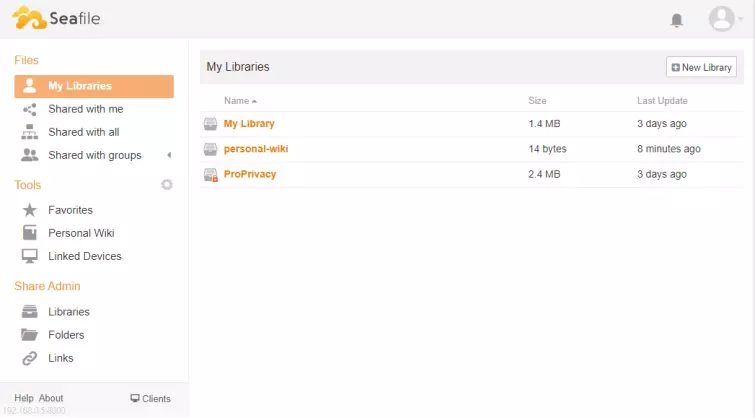
Seafile is an open-source cloud storage server for syncing and sharing files across desktop and phone from hardware you control. Files are organized into libraries that sync separately, with block-level delta sync, optional client-side encryption per library, share links, group sharing and the SeaDrive virtual-drive client. The free Community Edition runs on Linux, most easily with the official Docker compose files; the Professional Edition adds enterprise features and needs no license file for up to 3 users. The server core is AGPLv3 and the clients are open source. It also bundles a wiki, the SeaDoc editor and metadata views, and a vendor-hosted Plus Edition exists for people who do not want to self-host.
What users say
Evidence ↓The views come from two third-party sources, a ProPrivacy review (undated, likely years old) and a self-hosting guide site, so they are few and not independent of the vendor's own feature list. The guide site calls Seafile faster and lighter than Nextcloud for pure file sync, without showing benchmarks. The ProPrivacy reviewer liked its Linux support and clients but found deployment the big hurdle for non-experts, and was disappointed that Android cannot auto-sync arbitrary folders. A forgotten encrypted-library password cannot be recovered.
Rankings and alternatives



Self-hosted file sync scores
Evaluated Nov 17, 2026 Evidence ↓- Sync reliability and speed · counts double 5
5/5 means: Widely trusted for large, busy folders, and sends only the changed parts of files
Block-level delta sync sends only changed parts of files, resumes interrupted transfers and handles conflicts from file history. Experienced self-hosters widely name it the fastest and most dependable sync of the self-hosted servers, especially for large libraries. Calibrated up from 4 on that knowledge.
- Phone apps 4
4/5 means: Official apps on both that browse files and upload new photos automatically
Official iOS and Android apps browse files and auto-upload photos and videos. They do not keep whole folders synced for offline use, only individually chosen files.
- Desktop app 5
5/5 means: Level 3, plus files on demand on both Windows and macOS
Sync clients on Windows, macOS and Linux, plus SeaDrive with on-demand files. The sources I read name Windows, macOS and Linux for SeaDrive; macOS support quality is from general knowledge.
- Sharing with other people 5
5/5 means: Level 4, plus folders shared with other accounts on the server that they can edit
Password-protected download links with expiry, upload links, and folders or libraries shared with users and groups with read-write permission.
- Setup and upkeep 3
3/5 means: A Docker Compose stack with a database and other services; upgrades are mostly pulling new images
The official Docker Compose stack runs the server with a MySQL/MariaDB database, Redis and Caddy. Upgrades are mostly new images, though the version 13 move to Redis shows changes that need reading notes. No user upgrade reports read.
- What it costs a household 4
4/5 means: Free for a household; only features organizations need cost money
The Community Edition is free with no user cap, and the Professional Edition is free for up to 3 users; beyond that Pro costs $100 a year for 9 users. Pro adds mostly organization features, so a household can stay on the free editions.
- Files stay ordinary files 2
2/5 means: Split into blocks that only the software's own tools can put back together
Files are stored as deduplicated blocks with metadata in the database and need Seafile's own tools to be reassembled.
- Open source 4
4/5 means: Open source, with a closed or separately licensed edition for organizations
The Community Edition server and all clients are open source; the Professional Edition is a separate closed edition.
- Apps beyond files · counts half 3
3/5 means: Two of the five
Two of the five, a wiki or notes (SeaDoc and wiki) and browser office editing through OnlyOffice or Collabora. No calendar and contacts, photo timeline, or chat. Whether Collabora and OnlyOffice need Pro is unconfirmed.
Pricing
- Community Edition (self-hosted) Free Free and open source; you supply the server. Recommended at least 2 GB RAM and a 2-core CPU. Which features are Pro-only is shown in the vendor's comparison table, whose per-edition marks did not load.
- Professional Edition, up to 3 users Free No license file needed for 3 users. Self-hosted via the Pro Docker image.
- Professional Edition, 9 users $100.00 /year Special small-business offer, $100 total per year for 9 users, excluding the basic email support included with other Pro licenses.
- Professional Edition, 10 to 249 users $48.00 /year per seat Billed annually; $24 per user per year for educational use; lower per-user prices from 250 users up; 1000+ users contact sales. Basic email support is included.
- Plus Edition (Cloud) Team Plan $8.00 /month per seat Vendor-hosted, not self-hosted. Starts from 3 users with 500GB storage; a free trial allows 1GB and 3 users for 30 days.
Prices checked Nov 17, 2026.
Evidence and sources
What users say
Summary 4 quotes
-
It's noticeably faster than Nextcloud for file operations, uses fewer resources, and is more reliable under heavy sync workloads.
Selfhosted Guides Editorial Team, self-hosting guide site · selfhosted-sh.pages.dev/seafile-file-sync-server · published · checked -
We are a little disappointed, however, that you can’t automatically sync folders from Android devices (a feature we know iOS would never support anyway).
Douglas Crawford, reviewer at ProPrivacy · proprivacy.com/cloud/review/seafile · checked -
Which brings us to the big hurdle with Seafile – deployment.
Douglas Crawford, reviewer at ProPrivacy · proprivacy.com/cloud/review/seafile · checked -
The trade-off: if you forget the password, your data is permanently unrecoverable. There is no password reset for encrypted libraries.
Selfhosted Guides Editorial Team, self-hosting guide site · selfhosted-sh.pages.dev/seafile-file-sync-server · published · checked
Self-hosted file sync scores
Sync reliability and speed 2 quotes
-
Only transfer content delta to the server. Interrupted transfers can be resumed.
github.com/haiwen/seafile · checked -
It's noticeably faster than Nextcloud for file operations, uses fewer resources, and is more reliable under heavy sync workloads.
Selfhosted Guides Editorial Team, self-hosting guide site · selfhosted-sh.pages.dev/seafile-file-sync-server · published · checked
Phone apps 2 quotes
-
The Android and iOS apps allow you to auto-upload photos and videos to a library of your choice. You can upload via WiFi only or also use mobile data, and you can allow the app to guess camera albums or pick them yourself.
Douglas Crawford, reviewer at ProPrivacy · proprivacy.com/cloud/review/seafile · checked -
We are a little disappointed, however, that you can’t automatically sync folders from Android devices (a feature we know iOS would never support anyway).
Douglas Crawford, reviewer at ProPrivacy · proprivacy.com/cloud/review/seafile · checked
Desktop app 3 quotes
-
Selective sync for any folder.
github.com/haiwen/seafile · checked -
Access all files in the cloud via virtual drive. Files are synced on demand.
github.com/haiwen/seafile · checked -
An icon next to each file indicated its status: cloud-only, downloaded, or partially downloaded (for folders).
Douglas Crawford, reviewer at ProPrivacy · proprivacy.com/cloud/review/seafile · checked
Sharing with other people 1 quote
-
Download links with password protection 3. Upload links
github.com/haiwen/seafile · checked
Setup and upkeep 1 quote
-
In general, we recommend that you have at least 2G RAM and a 2-core CPU (> 2GHz).
manual.seafile.com/latest/setup/setup_ce_by_docker · checked
What it costs a household 4 quotes
-
3 users · Free · Free
Seafile, vendor · seafile.com/en/pricing · checked -
9 users · $100 in Total · $100 in Total
seafile.com/en/pricing · checked -
You don't need a license file to run the pro edition for 3 users.
seafile.com/en/pricing · checked -
In general, we recommend that you have at least 2G RAM and a 2-core CPU (> 2GHz).
manual.seafile.com/latest/setup/setup_ce_by_docker · checked
Files stay ordinary files 1 quote
-
When files are deleted, the blocks comprising those files are not immediately removed as there may be other files that reference those blocks (due to the magic of deduplication). To remove them, Seafile requires a 'garbage collection' process to be run, which detects which blocks no longer used and purges them.
manual.seafile.com/latest/setup/setup_ce_by_docker · checked
Open source 2 quotes
-
3 users · Free · Free
Seafile, vendor · seafile.com/en/pricing · checked -
Seafile iOS client: Apache License v2 Seafile Android client: GPLv3 Desktop syncing client (this repository): GPLv2 Seafile Server core: AGPLv3 Seahub (Seafile server Web UI): Apache License v2
github.com/haiwen/seafile · checked
Apps beyond files 1 quote
-
Integration with Online Office Suites, including OnlyOffice, Collabora SeaDoc: a built-in collaborative document editor Wiki: built-in knowledge bases Integrarion with Excalidraw for collaborative white-board
github.com/haiwen/seafile · checked
Facts
License 1 quote
-
Seafile iOS client: Apache License v2 Seafile Android client: GPLv3 Desktop syncing client (this repository): GPLv2 Seafile Server core: AGPLv3 Seahub (Seafile server Web UI): Apache License v2
github.com/haiwen/seafile · checked
Runs on 3 quotes
-
Seafile iOS client: Apache License v2 Seafile Android client: GPLv3 Desktop syncing client (this repository): GPLv2 Seafile Server core: AGPLv3 Seahub (Seafile server Web UI): Apache License v2
github.com/haiwen/seafile · checked -
The Android and iOS apps allow you to auto-upload photos and videos to a library of your choice. You can upload via WiFi only or also use mobile data, and you can allow the app to guess camera albums or pick them yourself.
Douglas Crawford, reviewer at ProPrivacy · proprivacy.com/cloud/review/seafile · checked -
An icon next to each file indicated its status: cloud-only, downloaded, or partially downloaded (for folders).
Douglas Crawford, reviewer at ProPrivacy · proprivacy.com/cloud/review/seafile · checked
Needs 1 quote
-
In general, we recommend that you have at least 2G RAM and a 2-core CPU (> 2GHz).
manual.seafile.com/latest/setup/setup_ce_by_docker · checked
More from the sources
Pricing 2 quotes
-
From 10 to 249 · $48 /User (€44) · $24 /User (€22)
seafile.com/en/pricing · checked -
Pricing · Free · 8 USD/user/month
seafile.com/en/pricing · checked
Features 1 quote
-
Library encryption with a user chosen password. 2. Client side encryption when using the desktop syncing.
github.com/haiwen/seafile · checked
Limits and known issues 1 quote
-
It is worth noting that the contents of files are encrypted, but file names and directory structure are not.
Douglas Crawford, reviewer at ProPrivacy · proprivacy.com/cloud/review/seafile · checked
How widely it is used 1 quote
-
15.5k stars
github.com/haiwen/seafile · checked
Pricing
seafile.com/en/pricing · checked