
OpenShot Video Editor
Free, open-source desktop video editor for Windows, macOS and Linux, aimed at first-time editors
Our verdict
#7 of 8 in Free video editors for beginners · Simplest open-source start
What it does
- Unlimited tracks and keyframes for position, scale, opacity and volume
- Title templates and 3D animated titles through Blender
- Screen and webcam recording
Pros
- Free and open source, with no account or watermark
- Simple, uncluttered layout
Cons
- Crashes and failed exports, especially on Windows
- No automatic captions
- Skip if:
- You're editing long or important projects on Windows
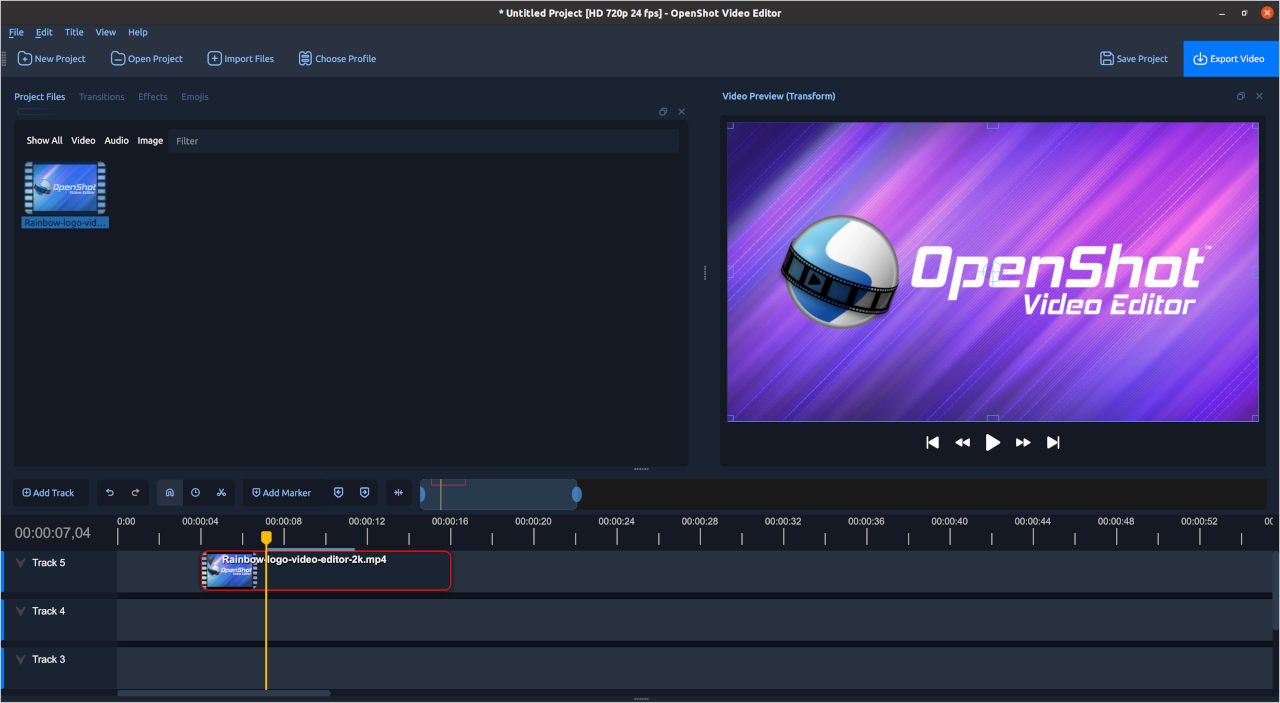
OpenShot is a free, open-source desktop video editor built for people who are new to editing. It has a drag-and-drop multitrack timeline with unlimited tracks, a title editor with templates, keyframe animation, video and audio effects, color grading, built-in screen and camera recording, and local AI-assisted object masks. It runs on Windows, macOS, Linux and Chrome OS (Intel/AMD only, through Linux), is licensed under GPLv3, and the vendor says exports carry no watermark and need no subscription. The current version is 4.1.1.
What users say
Evidence ↓Commenters on AlternativeTo often call OpenShot very easy for a complete beginner, and a YouTuber who learned it from tutorials kept using it for months. The most common complaint is stability. AlternativeTo's summary of 59 comments says many report crashes, slowness and export problems, mostly on Windows, with Linux better, and one reviewer in November 2026 still wished it were "a bit more stable". Others find it basic, citing weak green-screen results and missing animated text. These are sampled comments from one site, not a survey.
Rankings and alternatives
- Free video editors for beginners #7 of 8 Simplest open-source start
- CapCut #1 Easiest path to a finished video
- iMovie #2 Best for Mac owners
- DaVinci Resolve 21 #3 The free editor you won't outgrow



Free video editors for beginners scores
Evaluated Nov 17, 2026 Evidence ↓- Ease of learning · counts double 4
4/5 means: Approachable; most newcomers finish a simple video in their first session with a little looking around
A simple layout of project files, preview and timeline that many first-time users call easy, with title templates ready to drop in. Short of 5 because keyframes, audio levels and export profiles trip newcomers up, and moving source files breaks a project's links.
- Editing depth and room to grow · counts double 3
3/5 means: Multiple tracks and keyframes, with clear limits in color, audio or long projects
Unlimited tracks, keyframes for position, scale, rotation, opacity, volume and effect settings, chroma key, masks and a color view. Short of 4 because audio work, compositing and long projects are where users outgrow it, and its green screen results are weaker.
- What the free version gives you 5
5/5 means: Everything free with no watermark, no account, no caps and no upsell
Free and open source (GPLv3) with no subscription, no watermark, no project limits and no account.
- Built-in shortcuts in the free version 2
2/5 means: Title presets and some effects, but no automatic captions and no media library
Title templates, 3D animated titles (with Blender installed), AI object masks and screen recording, but from knowledge no automatic captions and no stock music or footage library.
- Runs well on an ordinary laptop 2
2/5 means: Needs more memory or graphics than a typical laptop has, or users widely report crashes
The official minimum is modest, but users widely report crashes, slow performance and export problems, especially on Windows, and even fans on Linux wish it were more stable.
- Tutorials and help 3
3/5 means: A moderate community; most common questions have an answer
From knowledge: an official user guide and a moderate number of YouTube tutorials from its long history as a beginner's Linux editor.
- Computers it runs on · counts half 4
4/5 means: Windows, Mac and Linux, or Windows, Mac and Chromebook
Windows, Mac and Linux; Chromebooks only through the Linux environment on Intel or AMD models.
Pricing
- OpenShot Free Free to download and use, with no watermark, subscription or project limits according to the vendor. Optional donations from $5 fund development.
Prices checked Nov 17, 2026.
Evidence and sources
What users say
Summary 5 quotes
-
Many report frequent crashes, slow performance, and issues with exporting, particularly on Windows. While some find it simple and suitable for basic edits, others cite a lack of features and reliability, especially for more advanced tasks. Linux users generally report better stability.
alternativeto.net/software/openshot/about · checked -
I'm beyond a newbie. This is quick, Very easy to use with no experience made a great vid!
Ian James, AlternativeTo commenter · alternativeto.net/software/openshot/about · published · checked -
OpenShot isn't without problems, I have the System Package installed but I also use the AppImage. In both instances there are odd behaviors, but i have learned to work around them and they do not interfere.
hansencomputers, AlternativeTo commenter who runs a YouTube channel and edits on Linux Mint 22 · alternativeto.net/software/openshot/about · published · checked -
Linux needs the interface of OpenShot. If it was just a bit more stable
dm29, AlternativeTo reviewer · alternativeto.net/software/openshot/about · published · checked -
OpenShot is great start for beginners who want to make videos in YouTube but also OpenShot missing some things like animated text and etc plus green screen effect need to be updated because he don't work well because he don't remove all green color he remove the green screen but on the edges of the video he leave green color which is not good
Pavlin Lazarov, AlternativeTo commenter · alternativeto.net/software/openshot/about · published · checked
Free video editors for beginners scores
Ease of learning 2 quotes
-
Common friction points are project organization, preview quality, keyframes, audio levels, and export profiles. Keep source files in a stable folder and save versions before large changes. Moving imported files after saving can break their project links.
seedance.tv/blog/openshot-4-0-review · published · checked -
I'm beyond a newbie. This is quick, Very easy to use with no experience made a great vid!
Ian James, AlternativeTo commenter · alternativeto.net/software/openshot/about · published · checked
Editing depth and room to grow 5 quotes
-
Trim and arrange video, audio, and images across unlimited tracks with snapping, waveforms, and frame-accurate controls.
openshot.org · checked -
Animate position, scale, rotation, opacity, volume, and effect settings with precise timeline keyframes.
openshot.org · checked -
Select a subject or region, refine the generated video mask, and preview the composite inside OpenShot.
openshot.org · checked -
Common friction points are project organization, preview quality, keyframes, audio levels, and export profiles. Keep source files in a stable folder and save versions before large changes. Moving imported files after saving can break their project links.
seedance.tv/blog/openshot-4-0-review · published · checked -
OpenShot is great start for beginners who want to make videos in YouTube but also OpenShot missing some things like animated text and etc plus green screen effect need to be updated because he don't work well because he don't remove all green color he remove the green screen but on the edges of the video he leave green color which is not good
Pavlin Lazarov, AlternativeTo commenter · alternativeto.net/software/openshot/about · published · checked
What the free version gives you 2 quotes
-
Edit without subscriptions, watermarks, or project limits. OpenShot is free to download and use.
openshot.org · checked -
OpenShot is licensed under GPLv3 and does not require a subscription, export watermark, or paid account.
seedance.tv/blog/openshot-4-0-review · published · checked
Built-in shortcuts in the free version 3 quotes
-
Select a subject or region, refine the generated video mask, and preview the composite inside OpenShot.
openshot.org · checked -
Adding titles to your video has never been easier. Use one of our templates, or make your own.
alternativeto.net/software/openshot/about · checked -
OpenShot can now capture a screen, window, region, webcam, microphone, and system audio from its Recording View.
seedance.tv/blog/openshot-4-0-review · published · checked
Runs well on an ordinary laptop 3 quotes
-
The official guidance starts around a 64-bit, four-thread processor with 4 GB of RAM, while recommending more CPU speed, six or more threads, 16 GB of memory, solid-state storage, and ample disk space.
seedance.tv/blog/openshot-4-0-review · published · checked -
Many report frequent crashes, slow performance, and issues with exporting, particularly on Windows. While some find it simple and suitable for basic edits, others cite a lack of features and reliability, especially for more advanced tasks. Linux users generally report better stability.
alternativeto.net/software/openshot/about · checked -
Linux needs the interface of OpenShot. If it was just a bit more stable
dm29, AlternativeTo reviewer · alternativeto.net/software/openshot/about · published · checked
Computers it runs on 2 quotes
-
Requires Linux and an Intel/AMD CPU.
openshot.org/download · checked -
OpenShot is a free and open-source video editor for Windows, macOS, Linux, and Chrome OS, designed to be easy to use and quick to learn.
alternativeto.net/software/openshot/about · checked
Facts
License 1 quote
-
OpenShot is licensed under GPLv3 and does not require a subscription, export watermark, or paid account.
seedance.tv/blog/openshot-4-0-review · published · checked
Runs on 2 quotes
-
Requires Linux and an Intel/AMD CPU.
openshot.org/download · checked -
OpenShot is a free and open-source video editor for Windows, macOS, Linux, and Chrome OS, designed to be easy to use and quick to learn.
alternativeto.net/software/openshot/about · checked
Needs 1 quote
-
The official guidance starts around a 64-bit, four-thread processor with 4 GB of RAM, while recommending more CPU speed, six or more threads, 16 GB of memory, solid-state storage, and ample disk space.
seedance.tv/blog/openshot-4-0-review · published · checked
Pricing
openshot.org · checked