Otter.ai
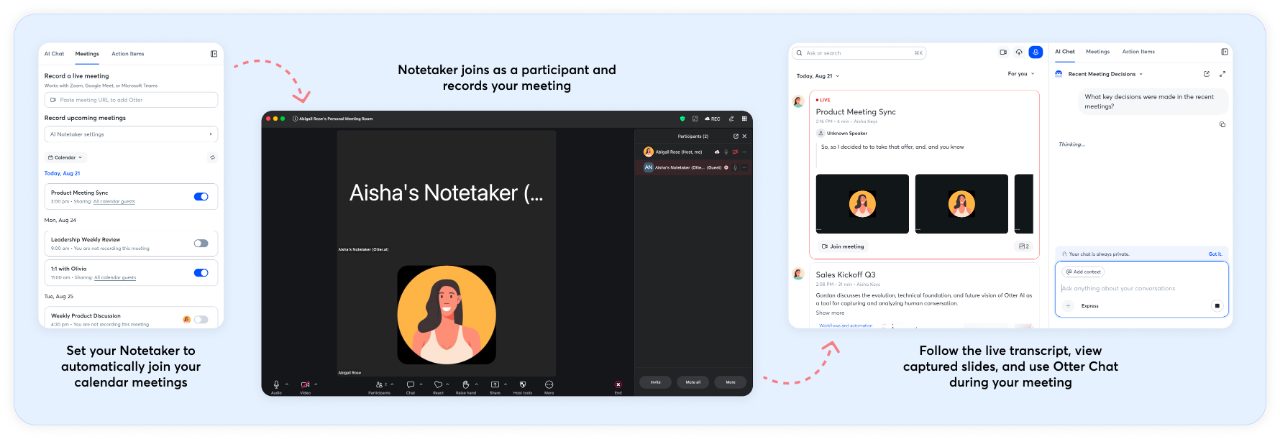
AI meeting note-taker that joins Zoom, Teams and Google Meet calls or records from your desktop and phone
Our verdict
#3 of 5 in AI meeting note-takers · Cheapest paid plan
What it does
- Bot for Zoom, Microsoft Teams and Google Meet
- Records any conversation without a bot, from its Mac or Windows app
- Exports transcripts as TXT, PDF, DOCX and SRT, with bulk export on Business
- MCP server on every plan; API and webhooks on Enterprise
Pros
- Cheapest paid plan of the five, at $8.33 a month billed annually
- Writes meeting insights into the HubSpot deal properties and Salesforce fields you choose
- Records in-person conversations and transcribes Zoom Phone calls
Cons
- Trains its own models on de-identified recordings and transcripts, with no opt-out
- Transcribes six languages: English, Spanish, French, German, Japanese and Chinese
- The free plan transcribes at most 30 minutes of each conversation and keeps only the 25 most recent conversations
- No EU storage option; it uses Amazon Web Services, based in the United States
Rankings and alternatives
All Otter.ai alternatives →- AI meeting note-takers #3 of 5 Cheapest paid plan
- Fireflies.ai #1 Best all-round for work calls
- Granola #2 If you want no bot and no recording kept
- Fathom AI Notetaker #4 If you want to stay on a free plan


AI meeting note-takers scores
Evaluated Nov 7, 2026 Evidence ↓- Free plan allowance 3
3/5 means: Renews monthly, but covers meetings of 30 minutes or less, or under 10 hours a month
The free Basic plan gives 300 transcription minutes a month, but transcribes at most 30 minutes of each conversation.
- Price of the cheapest paid plan 5
5/5 means: Under 10 a month
Pro costs $8.33 per user per month billed annually ($16.99 monthly).
- Transcription languages 3
3/5 means: Six to 19 languages
Six transcription languages: English, Spanish, French, German, Japanese and Chinese.
- Where it can take notes 5
5/5 means: All seven
The bot joins Zoom, Microsoft Teams and Google Meet; the desktop app records any conversation without a bot, Slack huddles and in-person ones included, which covers Webex and other call apps; it also transcribes Zoom Phone calls and imported audio or video files.
- Notes without a bot in the call 5
5/5 means: Without a bot in any call app on both macOS and Windows
The desktop app, for Mac and Windows, records any conversation without a bot in the meeting.
- Transcript export formats 4
4/5 means: Four or five file formats, including DOCX or PDF
Transcripts export as TXT, PDF, DOCX and SRT on paid plans (four file formats; MP3 is audio), and only TXT on the free plan.
- API access 5
5/5 means: As 4, plus an MCP server for AI assistants
An MCP server is available on every plan, and the Enterprise plan adds the Otter API and webhooks.
- CRM sync 5
5/5 means: As 4, plus it writes meeting details into fields or properties you choose (such as a deal's next steps)
Syncs to Salesforce and HubSpot from the Pro plan, and maps meeting insights to chosen HubSpot deal properties and Salesforce fields.
- Control over stored recordings 4
4/5 means: Two of the three controls
Administration controls include custom data retention and removal of audio from conversations; there is no known setting for each person to delete their own meetings automatically.
- AI training on your meetings 1
1/5 means: Used for training by default, with no known way to opt out
Otter trains its own models automatically on de-identified recordings and transcripts, and there is no known way to opt out. Its AI providers don't train on customer data.
- Security and admin 4
4/5 means: Four or five
Four of the six: a SOC 2 Type 2 report, HIPAA compliance as an Enterprise add-on, and SSO and SCIM (for 100 users or more). Its policies are based on the ISO 27001 framework rather than certified, and data storage is with AWS in the United States.
Pricing
- Basic Free
- Pro $8.33 /month per seat Billed annually; $16.99 billed monthly
- Business $19.99 /month per seat Billed annually; $30 billed monthly
- Enterprise Contact sales Custom pricing
Prices checked Nov 7, 2026.
Evidence and sources
AI meeting note-takers scores
Free plan allowance 2 quotes
-
300 monthly transcription minutes
otter.ai/pricing · checked -
Max transcription time per conversation 30 minutes 90 minutes 4 hours 4 hours
otter.ai/pricing · checked
Price of the cheapest paid plan 1 quote
-
$8.33 /user/month save 51%
otter.ai/pricing · checked
Where it can take notes 1 quote
-
Now you can record any conversation without a bot across Slack Huddles, Zoom, Google Meet, and in-person.
otter.ai/desktop · checked
Notes without a bot in the call 1 quote
-
Now you can record any conversation without a bot across Slack Huddles, Zoom, Google Meet, and in-person.
otter.ai/desktop · checked
Security and admin 1 quote
-
Single Sign-On (SSO) minimum 100-user license required
otter.ai/pricing · checked
Facts
Users 1 quote
-
Otter.ai says its platform has more than 40 million users worldwide, including employees at more than 86% of the Fortune 500.
siliconangle.com/2026/10/20/otter-ai-raises-320m-in-funding-for-its-ai-meeting-assistant · checked
More from the sources
Features 1 quote
-
Botless recording lets you capture meeting audio and generate a transcript without adding Otter Notetaker as a meeting participant.
help.otter.ai/hc/en-us/articles/35973988280215-Otter-Desktop-App-Mac-Windows · checked
Limits and known issues 2 quotes
-
Meeting & recording transcription monthly limit (no rollover) 300 minutes per user* 1,200 minutes per user* Unlimited
otter.ai/pricing · checked -
Your meeting and organization settings must allow guest participants for Notetaker to join.
help.otter.ai/hc/en-us/articles/4425393298327-Otter-Notetaker-Overview · checked
Pricing
otter.ai/pricing · checked