
Pixlr
Free browser-based photo editor and AI image tool with templates, background removal and layers, plus mobile apps.
Our verdict
#5 of 8 in Graphic design software for beginners · Photo-first editor for thumbnails
What it does
- One-click background and object removal
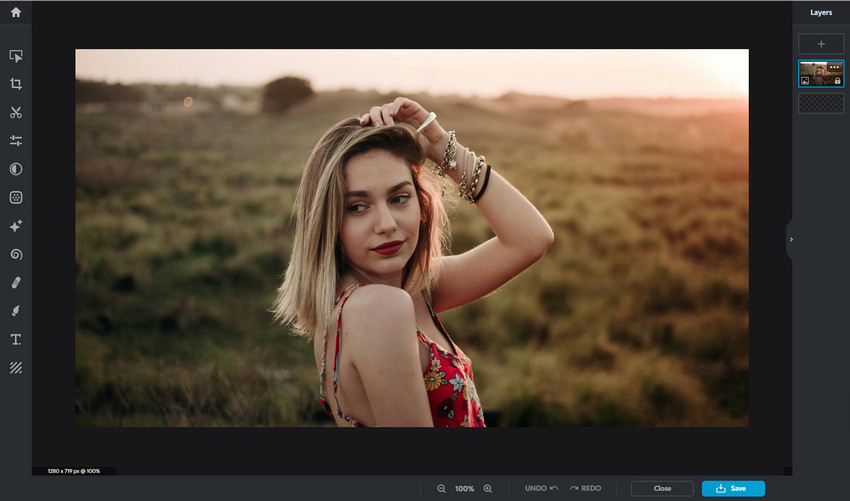
- Layer-based photo editor that opens PSD files
- Templates for thumbnails and social posts on Premium
- Browser, iPhone, Android and desktop
Pros
- Best photo tools of the template-style apps
- One subscription covers every device
Cons
- Ads and limits on the free version
- Templates need Premium, not the cheaper Plus plan
- No vector tools for logos
- Choose if:
- Your designs start from photos, like thumbnails or product shots
Pixlr is a suite of online photo editors, design tools and AI tools that runs in a browser, with iOS and Android apps and a desktop version. Its main entry point is Pixlr Express, a quick editor with filters, text, stickers, collages and one-click AI tools such as background removal, object removal, generative fill and upscaling. The suite also includes Pixlr Editor (a layer-based editor with masks and blend modes, like a light Photoshop), Pixlr Designer for templates, a batch editor, and generators for AI images, video, audio and face swap. It is stronger at photo editing than at template-based design, and its template library is smaller than Canva’s. It is proprietary software with a free ad-supported tier and Plus and Premium subscriptions.
What users say
Evidence ↓Reviewers call Pixlr easy to pick up, with an interface that resembles Photoshop in its layer-based editor and a simpler Express editor for quick posts. They also say its template library is smaller than Canva's, that it lags with large files, and that free-plan limits on exports and AI use are the common complaints. These are a handful of reviews, two of them from sites with affiliate links or competing products, not a measured consensus.
Rankings and alternatives
- Graphic design software for beginners #5 of 8 Photo-first editor for thumbnails
- Canva #1 Best for most beginners
- Adobe Express #2 Canva-style app with more free tools
- Affinity #3 Free professional design app


Graphic design software for beginners scores
Evaluated Nov 17, 2026 Evidence ↓- Ease for non-designers · counts double 3
3/5 means: Learnable in a few sessions, but it assumes some design vocabulary or leaves layout decisions to the reader
Reviewers describe a minimal learning curve in the quick Express editor, but the suite is split across several editors and is photo-first, so a newcomer has to find the template tool (Designer) and learn which app does what. Set below the template-first apps such as Adobe Express and VistaCreate.
- Templates for everyday jobs · counts double 3
3/5 means: Thousands of templates, but thin in some of these kinds or mostly in one style
Designer is described as thousands of templates covering social sizes, thumbnails and pins, but a review says the library is smaller than Canva's, and flyers, posters, logos and presentations are not shown. Templates are listed under Premium.
- What the free version lets you make 2
2/5 means: Downloads are small, watermarked, capped to a few a day, or limited to personal use
Free is ad-supported and reviewers report a daily save cap (2 to 5 by third-party reports), limited AI and lower export resolution, with templates reserved for Premium. Pixlr's own pages give no numbers, so the level is uncertain; watermark and commercial-use terms were not found.
- Print and export quality unknown
No page read documents export formats, PDF, SVG, transparent PNG or CMYK. A reviewer says it is weak on print color management.
- Photo editing and background removal 5
5/5 means: Full layer-based photo editing with masks and retouching, plus quick automatic tools
Pixlr Editor has layers, masks, blend modes, selection and retouching, plus one-click background removal, object removal, generative fill and upscaling. Complex edges such as hair can need touch-up.
- Making a logo you can use as a brand 1
1/5 means: Not suited to logos, or the license bars brand use
No vector drawing or vector export was found, and nothing on logo templates or trademark licensing; this is a raster, photo-first suite. Based on knowledge and absence of evidence, not an established absence.
- Room to grow 3
3/5 means: Layers, grouping and alignment tools with decent typography, short of a designer's tools
Layers, masks, blend modes and text tools give a path beyond templates, but no vector editing or advanced typography was documented, and reviewers say it is not for detail-heavy professional work; large files lag.
- Phone and computer support 5
5/5 means: A browser, desktop apps and full iPhone and Android apps, with work synced between them
A browser, iOS, Android and a desktop version, and one subscription covers all platforms through the Pixlr account. Quality of the mobile and desktop apps and sync was not examined.
- AI helpers · counts half 4
4/5 means: AI image generation, text and editing tools with generous limits on the paid plan
Image and video generation, generative fill and expand, background and object removal and an instruct editor are included; Premium gives 1,000 credits a month and all models. There is no AI design generation or resizing documented.
Pricing
- Free Free
- Plus $23.88/year
- Premium $95.88/year
- AI credit pack Contact sales , extra
Prices checked Nov 17, 2026.
Evidence and sources
What users say
Summary 5 quotes
-
Pixlr might be a tool powered by AI, but its interface is an excellent fit for human users. You’ll find the editor resembling Photoshop to some point.
sonary.com/reviews/pixlr · published · checked -
The template library isn't as extensive as Canva's, but it covers the most common use cases. If you need a quick Instagram post or YouTube thumbnail, you can start from a template, swap in your image, adjust the text, and export in under two minutes.
digi-tools.pages.dev/articles/pixlr-review · published · checked -
Larger files are where things slow down. We tested with a 50MP DSLR image and experienced noticeable lag when applying effects or working with multiple layers.
digi-tools.pages.dev/articles/pixlr-review · published · checked -
Common complaints include quality limitations, export restrictions on the free plan, and occasional performance issues tied to browser or internet speed.
aiarty.com/edit-photo/pixlr-review.htm · checked -
Pixlr can replace Photoshop or Canva in certain use cases, such as quick edits or simple designs. However, it does not fully match Photoshop’s advanced precision or Canva’s extensive design ecosystem.
aiarty.com/edit-photo/pixlr-review.htm · checked
Graphic design software for beginners scores
Ease for non-designers 3 quotes
-
Pixlr might be a tool powered by AI, but its interface is an excellent fit for human users. You’ll find the editor resembling Photoshop to some point.
sonary.com/reviews/pixlr · published · checked -
The Pixlr Suite is built around two main editors. Pixlr X focuses on speed and simplicity, making it suitable for beginners, social media content, and template-based designs. Pixlr E, on the other hand, offers more advanced tools such as layers, masks, and blend modes, appealing to users who need greater control without the learning curve of professional software.
aiarty.com/edit-photo/pixlr-review.htm · checked -
The template library isn't as extensive as Canva's, but it covers the most common use cases. If you need a quick Instagram post or YouTube thumbnail, you can start from a template, swap in your image, adjust the text, and export in under two minutes.
digi-tools.pages.dev/articles/pixlr-review · published · checked
Templates for everyday jobs 3 quotes
-
Designer: It offers thousands of templates and image grids for collages. You can create all types of images with generous help from the available collections.
sonary.com/reviews/pixlr · published · checked -
The template library isn't as extensive as Canva's, but it covers the most common use cases. If you need a quick Instagram post or YouTube thumbnail, you can start from a template, swap in your image, adjust the text, and export in under two minutes.
digi-tools.pages.dev/articles/pixlr-review · published · checked -
Everything in Plus, plus: Access to all image, video & audio models 4 concurrent AI generations 1,000 monthly AI Credits 12,000 AI Credits valid for the year Credits valid for 1 month All credits valid for 1 year Private mode for AI Generations Big library of fonts, templates, elements, animations and more
pixlr.com/pricing · checked
What the free version lets you make 3 quotes
-
Get ad-free editing, thousands of AI credits, access to all image, video and audio models, private mode, priority generation queue, and a huge library of fonts, templates and elements. Plans start at just $1.99/month. Pixlr is free for Education.
pixlr.com · checked -
You can enjoy Pixlr’s free version, which offers a robust set of features that many users find satisfying without requiring an account or any charges.
pixlr.com · checked -
The free tier is genuinely usable — you get access to both Pixlr X and Pixlr E with core editing tools intact. The main limitations are ads, restricted AI usage, and lower maximum export resolution.
digi-tools.pages.dev/articles/pixlr-review · published · checked
Print and export quality 2 quotes
-
Skip if: you're already comfortable in Photopea (free), or you need pro color management for print
sonary.com/reviews/pixlr · published · checked -
Both editors handle common formats including JPEG, PNG, WebP, and PSD files. Yes — you can open Photoshop files directly in Pixlr E, complete with layers intact.
digi-tools.pages.dev/articles/pixlr-review · published · checked
Photo editing and background removal 3 quotes
-
The Pixlr Suite is built around two main editors. Pixlr X focuses on speed and simplicity, making it suitable for beginners, social media content, and template-based designs. Pixlr E, on the other hand, offers more advanced tools such as layers, masks, and blend modes, appealing to users who need greater control without the learning curve of professional software.
aiarty.com/edit-photo/pixlr-review.htm · checked -
Pixlr is a suite of user-friendly online photo editors, design tools and AI tools for browser, mobile and desktop.
pixlr.com · checked -
Both editors handle common formats including JPEG, PNG, WebP, and PSD files. Yes — you can open Photoshop files directly in Pixlr E, complete with layers intact.
digi-tools.pages.dev/articles/pixlr-review · published · checked
Room to grow 3 quotes
-
The Pixlr Suite is built around two main editors. Pixlr X focuses on speed and simplicity, making it suitable for beginners, social media content, and template-based designs. Pixlr E, on the other hand, offers more advanced tools such as layers, masks, and blend modes, appealing to users who need greater control without the learning curve of professional software.
aiarty.com/edit-photo/pixlr-review.htm · checked -
Pixlr can replace Photoshop or Canva in certain use cases, such as quick edits or simple designs. However, it does not fully match Photoshop’s advanced precision or Canva’s extensive design ecosystem.
aiarty.com/edit-photo/pixlr-review.htm · checked -
Larger files are where things slow down. We tested with a 50MP DSLR image and experienced noticeable lag when applying effects or working with multiple layers.
digi-tools.pages.dev/articles/pixlr-review · published · checked
Phone and computer support 2 quotes
-
Pixlr is accessible across various platforms, including web browsers, iOS, and Android devices.
pixlr.com · checked -
Purchasing any subscription from Pixlr will give you the same access to all platforms, you will be able to enjoy Plus or Premium access on web, desktop and Mobile devices via your Pixlr Account.
pixlr.com/pricing · checked
AI helpers 2 quotes
-
Pixlr is a suite of user-friendly online photo editors, design tools and AI tools for browser, mobile and desktop.
pixlr.com · checked -
Everything in Plus, plus: Access to all image, video & audio models 4 concurrent AI generations 1,000 monthly AI Credits 12,000 AI Credits valid for the year Credits valid for 1 month All credits valid for 1 year Private mode for AI Generations Big library of fonts, templates, elements, animations and more
pixlr.com/pricing · checked
Facts
License 1 quote
-
Pixlr is a suite of user-friendly online photo editors, design tools and AI tools for browser, mobile and desktop.
pixlr.com · checked
Runs on 2 quotes
-
Pixlr is accessible across various platforms, including web browsers, iOS, and Android devices.
pixlr.com · checked -
Purchasing any subscription from Pixlr will give you the same access to all platforms, you will be able to enjoy Plus or Premium access on web, desktop and Mobile devices via your Pixlr Account.
pixlr.com/pricing · checked
More from the sources
Pricing 2 quotes
-
{"premium-monthly":9.99,"premium-yearly":"7.99","plus-monthly":2.49,"plus-yearly":"1.99","ultra-monthly":24.99,"ultra-yearly":"19.99","ultra-max-monthly":49.99,"ultra-max-yearly":"39.99"}
pixlr.com/pricing · checked -
Plus I just need the basics! $2.49 per month $2.49Save 20% $1.99 per month
pixlr.com/pricing · checked
Features 6 quotes
-
You select the images you want to edit, then apply functions like cropping, resizing, adding borders, and adjusting brightness.
whop.methods.app/blog/pixlr-review · checked -
AI upscaling that preserves detail, up to 25 megapixels.
pixlr.com · checked -
Layers & masks — full layer support with blend modes, opacity, and layer masks
digi-tools.pages.dev/articles/pixlr-review · published · checked -
Colour tools — curves, levels, hue/saturation, brightness/contrast
digi-tools.pages.dev/articles/pixlr-review · published · checked -
You can automatically adjust colors, pick the auto-pop option, and even turn your image into a black-and-white photo.
sonary.com/reviews/pixlr · published · checked -
For novice photo editors, there’s no platform that can suit you better than Pixlr X.
pixlr.com/blog/best-photo-editing-tutorials-for-beginners-with-pixlr · published · checked
Limits and known issues 4 quotes
-
Ad-Free Unlimited saves 1 concurrent AI generation 80 monthly AI Credits 960 AI Credits valid for the year
pixlr.com/pricing · checked -
Similarly, an error #2124 may indicate that you are attempting to open an image with a file format that Pixlr Editor does not recognize. For example, some proprietary RAW formats (e.g., Nikon’s NEF format) will not work in Pixlr Editor.
pixlr.com/blog/support/i-tried-to-open-a-file-or-image-and-got-an-error-2030-or-2124-message · checked -
However, you’re limited to 3 daily saves and 50 AI credits, and you’ll also have to endure the in-app ads.
whop.methods.app/blog/pixlr-review · checked -
One practical benefit: because everything runs in the browser, Pixlr works on Chromebooks and low-spec machines that can't run heavy desktop editors.
digi-tools.pages.dev/articles/pixlr-review · published · checked
Platforms and requirements 1 quote
-
You can download the Windows software to use on desktop devices or use Pixlr mobile apps for Android and iOS.
sonary.com/reviews/pixlr · published · checked
Pricing
pixlr.com/pricing · checked