
Qustodio
Cross-platform parental control app for screen time limits, web filtering and monitoring
Our verdict
#4 of 7 in Parental control apps · Best all-rounder for mixed families
What it does
- Time limits, schedules, and app blocking on phones, computers, and Kindle
- Web filter with 29 categories and an alert-only option
- Location history and place alerts
- Call, text, and social media alerts on the Complete plan
Pros
- Manages iPhone and Android kids from one account
- Filters every browser
- Alerts you if the kid uninstalls it
Cons
- Message monitoring on iPhone needs a home computer
- Time limits on iPhone are easier to dodge than Screen Time's
- Noticeable battery drain on the kid's phone
- Choose if:
- Your family mixes iPhones, Android phones and laptops
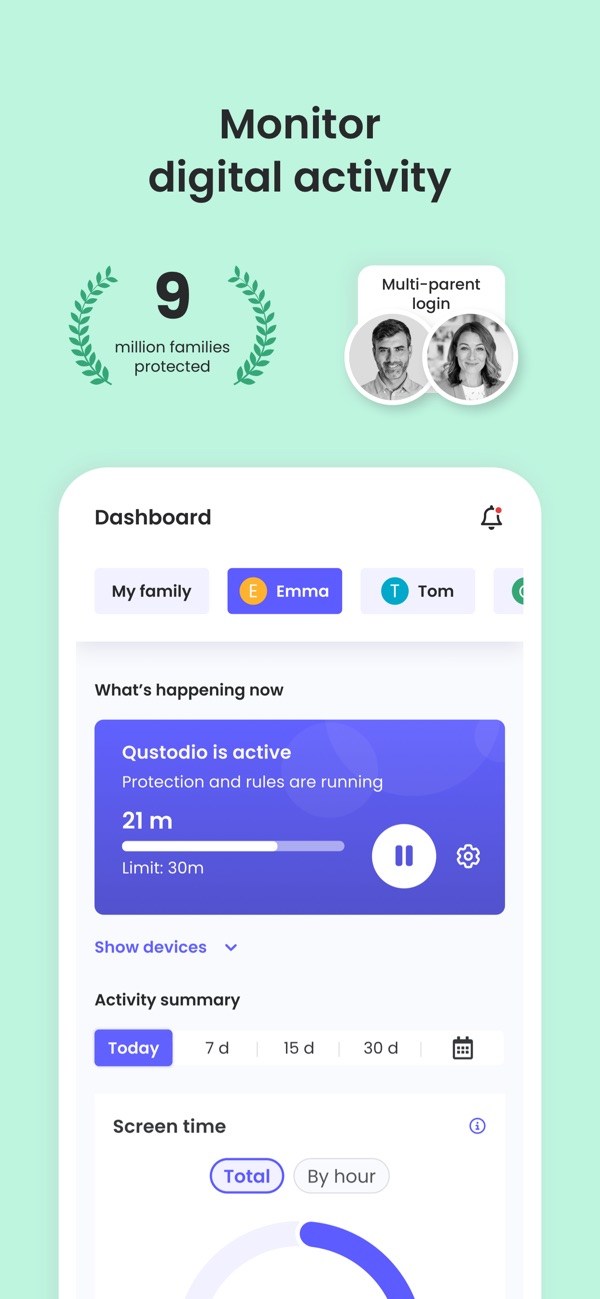
Qustodio is a parental control app from Qustodio, sold as a free plan for one device and two paid Premium plans, Basic and Complete. It has a parent app and web dashboard plus a kids app for Android, iPhone and iPad, Windows, Mac, Chromebook and Kindle. It covers daily time limits, routines, app and website blocking, web filtering, location, and alerts, with Complete adding calls and messages monitoring, YouTube monitoring and priority support. Several features differ on iPhone, where app control covers only supported apps and some monitoring needs a computer. It is proprietary software sold by subscription.
What users say
Evidence ↓Reviewers agree the feature set is broad and that Android gets more than iPhone. Security.org (2026) praised its reports, screen-time controls and VPN-bypass resistance and recommends it for Android and multi-child families. Tom's Guide (2024) criticized the web filtering, the iPhone scheduled-block screen it could swipe away, and limited iOS features. Both are single reviewers' tests and they disagree on filtering reliability. Security.org measured 10 to 15 percent extra battery drain and some 10 to 15 minute reporting lag.
Rankings and alternatives
- Parental control apps #4 of 7 Best all-rounder for mixed families
- Google Family Link #1 Free and the most control over an Android phone
- Apple Screen Time #2 The free default for a kid's iPhone
- FamiSafe #3 Most features for the price, mostly on Android

Parental control apps for iPhone and Android scores
Evaluated Nov 17, 2026 Evidence ↓- Screen time limits and schedules · counts double 3
3/5 means: A daily limit and schedules, but on one platform the limit only cuts internet or can be dismissed, or there are no per-app limits
Daily limits, restricted-time schedules, per-app limits and pause internet exist, and Android shows a lock screen. On iPhone, Tom's Guide (2024) could swipe the lock screen away, and per-app limits cover only compatible apps. No parent-approved extra-time request was found.
- Hard for kids to get around 4
4/5 means: Removal or tampering is blocked or alerts the parent on both platforms, with only rare or hard workarounds
Uninstalling needs the parent password on Android or the device passcode on iOS, and the parent is alerted on both, and Security.org's VPN and proxy bypass attempts were mostly caught. On iPhone a kid who knows the phone's passcode can remove it, though the parent finds out (writer calibration from 3, to match the other apps' tamper alerts).
- Blocking and approving apps 3
3/5 means: Blocks specific apps on both platforms, but only a limited list on iPhone, or no approval of new downloads
Any app can be blocked on Android, but on iPhone only compatible apps (about 6,000 per Tom's Guide). It does alert on new app downloads, but I found no approval of installs and no age-rating restriction.
- Web filtering 4
4/5 means: Category filters with allow and block lists that cover all browsers on the phone, with occasional misses
29 categories with allow, block and alert, plus exceptions and Safe Search. On iPhone filtering runs through a VPN profile that carries all traffic, and on Android it can block unsupported browsers, so it isn't limited to one browser in practice. Tom's Guide (2024) found missed sites, while Security.org (2026) found it consistent across browsers (writer calibration from 3).
- Alerts about messages and social media 4
4/5 means: Scans texts and several social apps for risks on Android and texts on iPhone, and alerts the parent
Complete has AI message alerts, calls and SMS monitoring on Android, and WhatsApp and other social alerts. Instagram, TikTok, Snapchat and X alerts are Android-only, and iPhone needs a computer for calls and messages. Security.org disputes the depth of the coverage, and I found no email scanning.
- Works for mixed iPhone and Android families 4
4/5 means: Manages kids on both platforms from a parent app on either, with notable features missing on iPhone
One account manages kids on both platforms, from the parent app on iPhone or Android or the web dashboard (parent app availability from knowledge). The vendor's table shows iOS lacking the panic button and with partial app control, and iPhone calls, messages and social monitoring need a Windows or Mac computer (writer calibration from 3).
- Yearly cost for a family 2
2/5 means: About $100 to $150 a year
Complete costs $104.95 a year and covers unlimited devices, and it is the plan with the scored features such as message alerts. Basic is $59.95 a year for up to 5 devices.
- Easy to set up and use 3
3/5 means: Fine once set up, with known snags such as an involved iPhone setup, noisy alerts or a dated dashboard
Android and Windows setup is easy, but iOS setup needs a VPN profile and more steps, and kids are added one at a time. Security.org measured 10 to 15 percent extra battery drain, a dashboard sync lag, and slowdown on an old phone. Both reviewers found the dashboard clear.
- Location and place alerts · counts half 5
5/5 means: Live location, place alerts and location history, with extras such as an SOS button or driving reports
Live location, location history, saved-place alerts, and an SOS panic button on Android. The panic button is Android-only and iOS location pings only every five minutes.
Pricing
- Free Free
- Basic $59.95/year
- Complete $104.95/year
- Care Plus $12.99/year , extra
Prices checked Nov 17, 2026.
Evidence and sources
What users say
Summary 8 quotes
-
Overall, I was unimpressed by Qustodio's web filtering. Across multiple categories, it failed to identify sites that clearly should have been flagged, even when the sites were identified as being in blocked category in the activity timeline.
Sean Riley, reviewer at Tom's Guide · tomsguide.com/reviews/qustodio · published · checked -
Apple's iOS doesn't hold up well in this category. When I blocked out time on my iPhone 12, the Qustodio app popped up a "Lost iPhone" alert message to tell me that my time was up, with just the emergency-call option and the flashlight displayed as available. However, I was able to swipe this away without a problem.
Sean Riley, reviewer at Tom's Guide · tomsguide.com/reviews/qustodio · published · checked -
The iOS installation was trickier. Since Apple doesn’t allow the level of system access Qustodio needs, we had to configure a VPN profile so that all traffic goes through Qustodio’s filters. This worked, but the setup process involved more steps than on other platforms.
Security.org testers, reviewers at Security.org · security.org/parental-controls/qustodio · published · checked -
In our testing, we noticed about a 10 to 15 percent increase in battery drain on the monitored device.
Security.org testers, reviewers at Security.org · security.org/parental-controls/qustodio · published · checked -
During our tests, we attempted to use VPN services and proxy sites to bypass the filters, but Qustodio caught most of these attempts and blocked them.
Security.org testers, reviewers at Security.org · security.org/parental-controls/qustodio · published · checked -
Sometimes activity on a monitored device took 10 to 15 minutes to appear in the parent dashboard.
Security.org testers, reviewers at Security.org · security.org/parental-controls/qustodio · published · checked -
Parents with iPhone-wielding kids should know they’ll miss out on SMS monitoring, detailed app usage insights, and granular app blocking.
Security.org testers, reviewers at Security.org · security.org/parental-controls/qustodio · published · checked -
We recommend Qustodio for families with multiple children of different ages who need different levels of restriction, families with children using Android devices, and parents who want detailed reporting rather than just basic blocking.
Security.org testers, reviewers at Security.org · security.org/parental-controls/qustodio · published · checked
Parental control apps for iPhone and Android scores
Screen time limits and schedules 5 quotes
-
The Complete plan has all the features included in the Basic plan plus calls & messages monitoring, custom rules for web, apps and games, YouTube monitoring, and more. The Complete plan also includes priority phone support and personalized help from our Care Plus team.
qustodio.com/en/premium · checked -
App monitoring · Yes · Only supported apps* Location · Yes · Yes Panic Button · Yes · No Calls and messages monitoring · Yes · Yes* Social monitoring · Yes · Yes*
help.qustodio.com/hc/en-us/articles/360005217877-What-s-the-difference-between-Qustodio-for-Android-and-iPhone-iPad · checked -
Overall, I was unimpressed by Qustodio's web filtering. Across multiple categories, it failed to identify sites that clearly should have been flagged, even when the sites were identified as being in blocked category in the activity timeline.
Sean Riley, reviewer at Tom's Guide · tomsguide.com/reviews/qustodio · published · checked -
Apple's iOS doesn't hold up well in this category. When I blocked out time on my iPhone 12, the Qustodio app popped up a "Lost iPhone" alert message to tell me that my time was up, with just the emergency-call option and the flashlight displayed as available. However, I was able to swipe this away without a problem.
Sean Riley, reviewer at Tom's Guide · tomsguide.com/reviews/qustodio · published · checked -
For iOS users, this is more limited, although better than it was. There are approximately 6,000 iOS apps that work with the app-management features, according to Qustodio.
Sean Riley, reviewer at Tom's Guide · tomsguide.com/reviews/qustodio · published · checked
Hard for kids to get around 4 quotes
-
Uninstalling Qustodio from a child's device wasn't difficult, but on Android, it requires the parental password. On iOS, it requires the device passcode. Naturally, the parent app notifies you immediately that tampering has been detected.
Sean Riley, reviewer at Tom's Guide · tomsguide.com/reviews/qustodio · published · checked -
The iOS installation was trickier. Since Apple doesn’t allow the level of system access Qustodio needs, we had to configure a VPN profile so that all traffic goes through Qustodio’s filters. This worked, but the setup process involved more steps than on other platforms.
Security.org testers, reviewers at Security.org · security.org/parental-controls/qustodio · published · checked -
During our tests, we attempted to use VPN services and proxy sites to bypass the filters, but Qustodio caught most of these attempts and blocked them.
Security.org testers, reviewers at Security.org · security.org/parental-controls/qustodio · published · checked -
Apple's iOS doesn't hold up well in this category. When I blocked out time on my iPhone 12, the Qustodio app popped up a "Lost iPhone" alert message to tell me that my time was up, with just the emergency-call option and the flashlight displayed as available. However, I was able to swipe this away without a problem.
Sean Riley, reviewer at Tom's Guide · tomsguide.com/reviews/qustodio · published · checked
Blocking and approving apps 3 quotes
-
App monitoring · Yes · Only supported apps* Location · Yes · Yes Panic Button · Yes · No Calls and messages monitoring · Yes · Yes* Social monitoring · Yes · Yes*
help.qustodio.com/hc/en-us/articles/360005217877-What-s-the-difference-between-Qustodio-for-Android-and-iPhone-iPad · checked -
For iOS users, this is more limited, although better than it was. There are approximately 6,000 iOS apps that work with the app-management features, according to Qustodio.
Sean Riley, reviewer at Tom's Guide · tomsguide.com/reviews/qustodio · published · checked -
Parents with iPhone-wielding kids should know they’ll miss out on SMS monitoring, detailed app usage insights, and granular app blocking.
Security.org testers, reviewers at Security.org · security.org/parental-controls/qustodio · published · checked
Web filtering 3 quotes
-
App monitoring · Yes · Only supported apps* Location · Yes · Yes Panic Button · Yes · No Calls and messages monitoring · Yes · Yes* Social monitoring · Yes · Yes*
help.qustodio.com/hc/en-us/articles/360005217877-What-s-the-difference-between-Qustodio-for-Android-and-iPhone-iPad · checked -
Overall, I was unimpressed by Qustodio's web filtering. Across multiple categories, it failed to identify sites that clearly should have been flagged, even when the sites were identified as being in blocked category in the activity timeline.
Sean Riley, reviewer at Tom's Guide · tomsguide.com/reviews/qustodio · published · checked -
During our tests, we attempted to use VPN services and proxy sites to bypass the filters, but Qustodio caught most of these attempts and blocked them.
Security.org testers, reviewers at Security.org · security.org/parental-controls/qustodio · published · checked
Alerts about messages and social media 5 quotes
-
The Complete plan has all the features included in the Basic plan plus calls & messages monitoring, custom rules for web, apps and games, YouTube monitoring, and more. The Complete plan also includes priority phone support and personalized help from our Care Plus team.
qustodio.com/en/premium · checked -
*Panic button and Instagram, TikTok, Snapchat and X message alerts are only available for Android. Calls & messages for iOS requires a Windows or Mac computer.
qustodio.com/en/premium · checked -
App monitoring · Yes · Only supported apps* Location · Yes · Yes Panic Button · Yes · No Calls and messages monitoring · Yes · Yes* Social monitoring · Yes · Yes*
help.qustodio.com/hc/en-us/articles/360005217877-What-s-the-difference-between-Qustodio-for-Android-and-iPhone-iPad · checked -
This is an Android-only feature, and Google now prevents Qustodio from including this feature in the Qustodio app in Google Play Store. If you wish to monitor your child's calls and texts, you will need to sideload a separate version of the app downloaded directly from Qustodio's website.
Sean Riley, reviewer at Tom's Guide · tomsguide.com/reviews/qustodio · published · checked -
Parents with iPhone-wielding kids should know they’ll miss out on SMS monitoring, detailed app usage insights, and granular app blocking.
Security.org testers, reviewers at Security.org · security.org/parental-controls/qustodio · published · checked
Works for mixed iPhone and Android families 2 quotes
-
*Panic button and Instagram, TikTok, Snapchat and X message alerts are only available for Android. Calls & messages for iOS requires a Windows or Mac computer.
qustodio.com/en/premium · checked -
App monitoring · Yes · Only supported apps* Location · Yes · Yes Panic Button · Yes · No Calls and messages monitoring · Yes · Yes* Social monitoring · Yes · Yes*
help.qustodio.com/hc/en-us/articles/360005217877-What-s-the-difference-between-Qustodio-for-Android-and-iPhone-iPad · checked
Yearly cost for a family 3 quotes
-
Basic $59.95/year Same as $5.00/month
qustodio.com/en/premium · checked -
Complete $104.95/year Same as $8.75/month
qustodio.com/en/premium · checked -
The Complete plan has all the features included in the Basic plan plus calls & messages monitoring, custom rules for web, apps and games, YouTube monitoring, and more. The Complete plan also includes priority phone support and personalized help from our Care Plus team.
qustodio.com/en/premium · checked
Easy to set up and use 4 quotes
-
Like a number of other parental-control services, Qustodio uses separate parent and child apps as kids tend to give their apps terrible ratings. You'll sign into your account on the child's device, and then the app walks you through the process of granting the necessary permissions including installing a profile that allows for the management of their device(s).
Sean Riley, reviewer at Tom's Guide · tomsguide.com/reviews/qustodio · published · checked -
The iOS installation was trickier. Since Apple doesn’t allow the level of system access Qustodio needs, we had to configure a VPN profile so that all traffic goes through Qustodio’s filters. This worked, but the setup process involved more steps than on other platforms.
Security.org testers, reviewers at Security.org · security.org/parental-controls/qustodio · published · checked -
In our testing, we noticed about a 10 to 15 percent increase in battery drain on the monitored device.
Security.org testers, reviewers at Security.org · security.org/parental-controls/qustodio · published · checked -
Sometimes activity on a monitored device took 10 to 15 minutes to appear in the parent dashboard.
Security.org testers, reviewers at Security.org · security.org/parental-controls/qustodio · published · checked
Location and place alerts 3 quotes
-
*Panic button and Instagram, TikTok, Snapchat and X message alerts are only available for Android. Calls & messages for iOS requires a Windows or Mac computer.
qustodio.com/en/premium · checked -
App monitoring · Yes · Only supported apps* Location · Yes · Yes Panic Button · Yes · No Calls and messages monitoring · Yes · Yes* Social monitoring · Yes · Yes*
help.qustodio.com/hc/en-us/articles/360005217877-What-s-the-difference-between-Qustodio-for-Android-and-iPhone-iPad · checked -
Qustodio's location tracking allows you to view your child's present location and location history. On both Android and iOS, this happens automatically once the feature is enabled, although the frequency of location checks is somewhat lower on iOS, pinging approximately every five minutes.
Sean Riley, reviewer at Tom's Guide · tomsguide.com/reviews/qustodio · published · checked
Facts
Runs on 2 quotes
-
*Panic button and Instagram, TikTok, Snapchat and X message alerts are only available for Android. Calls & messages for iOS requires a Windows or Mac computer.
qustodio.com/en/premium · checked -
App monitoring · Yes · Only supported apps* Location · Yes · Yes Panic Button · Yes · No Calls and messages monitoring · Yes · Yes* Social monitoring · Yes · Yes*
help.qustodio.com/hc/en-us/articles/360005217877-What-s-the-difference-between-Qustodio-for-Android-and-iPhone-iPad · checked
Users 1 quote
-
Over 9 million parents trust Qustodio’s parental control tools to keep their kids’ screen time safe and balanced on every device
qustodio.com/en · checked
More from the sources
Pricing 1 quote
-
Absolutely, we do have 30-day money back guarantee in case you’re not satisfied with the product.
qustodio.com/en/premium · checked
Limits and known issues 2 quotes
-
The Basic plan protects up to 5 devices with core safety features. This plan is ideal for small families looking for basic safety features such as games & app blocking, location monitoring and web filtering.
qustodio.com/en/premium · checked -
The Free version of Qustodio can protect a single device and includes basic protection features.
qustodio.com/en/premium · checked
Pricing
qustodio.com/en/premium · checked