ScreenFlow
Mac screen recorder with a full multitrack editor, sold as a one-time license
Our verdict
#6 of 9 in Mac screen recorders · A full editor you buy once
What it does
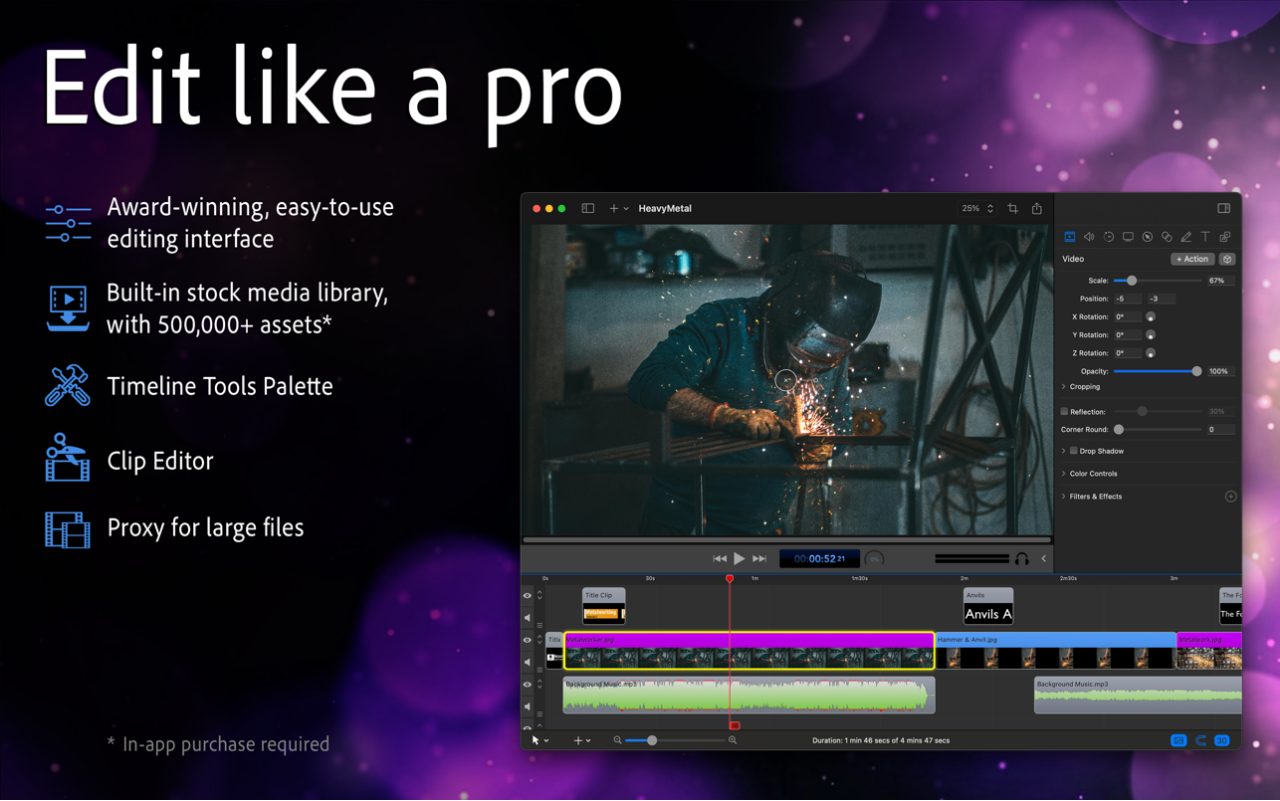
- Multitrack editor with callouts, animations, transitions and captions
- Records multiple screens, cameras, microphones and an iPhone or iPad
- Separate audio tracks per app
Pros
- One-time purchase for a full editor
- Handles long, multi-clip lessons without a second app
Cons
- Zooms and callouts are all manual
- No hosted share links
- The interface takes time to learn
- Choose if:
- You'd otherwise pay for a separate video editor
ScreenFlow, from Telestream, is a Mac-only screen recorder joined to a full video editor. It records the screen, camera, microphone and computer audio, and an iPhone or iPad over a cable, then edits them on a multitrack timeline with callouts, text and video animations, transitions, freehand annotations and a caption editor. It is a one-time purchase for Apple Silicon and Intel Macs, with an optional stock media library sold by the year.
What users say
Evidence ↓Long-time Mac reviewers have described ScreenFlow as a screen recorder whose editor approaches a general video editor.
Rankings and alternatives
- Mac screen recorders #6 of 9 A full editor you buy once
- CleanShot X #1 Best for most Mac users
- Screen Studio #2 For demos where the video is the product
- Tella #3 For hosted, edited course and pitch videos


Mac screen recorders scores
Evaluated Nov 17, 2026 Evidence ↓- Polish without editing 3
3/5 means: Cursor smoothing and click effects after recording; zooms are placed by hand
Click effects, cursor highlighting and mouse-path smoothing; zooms and callouts are added by hand as actions on the timeline.
- Editing depth 5
5/5 means: A full multitrack editor with annotations, callouts, transitions, captions and your own media on separate tracks
A full multitrack editor with nested clips, markers, callouts, text and video animations, transitions, freehand annotations, multi-channel audio and a caption editor.
- Ease of getting a finished video 3
3/5 means: Recording is easy, but finishing a video means learning a full editor
Recording is easy, but the result is raw until you edit it, and the editor takes time to learn; some reviewers find the interface dated.
- Sharing 2
2/5 means: Export plus direct publishing to services such as YouTube or Dropbox
Publishes from the app to hosting services, but has no hosted links of its own.
- Cost over three years 3
3/5 means: $100 to $250
$199 once; major new versions have been paid upgrades, and the stock media library is an optional $99 a year.
- Recording options · counts half 5
5/5 means: Several screens, cameras or devices at once, or full scene composition
Several screens, cameras and microphones at once, an iPhone or iPad over a cable, and audio from individual apps.
Pricing
- ScreenFlow $199.00 one-time The app with self-help support. The free trial exports with a watermark.
- Stock Media Library $99.00 /year , extra Optional add-on with royalty-free images, audio and video clips; $76 for the first year when bought with ScreenFlow.
- Upgrade from ScreenFlow 8 or 9 $79.00 one-time , extra Upgrade to ScreenFlow 10 for Telestream web store customers; $119 from versions 4 to 7. Mac App Store buyers get no upgrade pricing.
- Premium Support $59.00 /year , extra Priority email support and 25% off future ScreenFlow upgrades; sold in the Super Pak + bundle ($325 first year with Stock Media Library).
Prices checked Nov 17, 2026.
Evidence and sources
What users say
Summary 1 quote
-
ScreenFlow used to be an exceptional tool for recording your Mac's screen and it still is—but the new update has it knocking at the door of apps like Final Cut Pro for video production.
William Gallagher, writer at AppleInsider · telestream.net/screenflow/overview.htm · checked
Mac screen recorders scores
Polish without editing 1 quote
-
Add pro touches to your videos with transitions, text animations, video animations, freehand annotations, multi-channel audio and more.
telestream.net/screenflow/overview.htm · checked
Editing depth 3 quotes
-
Organize your projects with nested clips, multi-track editing, markers, color labels and complete access to media files stored on your computer.
telestream.net/screenflow/overview.htm · checked -
Use ScreenFlow’s caption editor tool to add, edit and even burn in ADA compliant soft subtitles to your videos.
telestream.net/screenflow/overview.htm · checked -
Add pro touches to your videos with transitions, text animations, video animations, freehand annotations, multi-channel audio and more.
telestream.net/screenflow/overview.htm · checked
Ease of getting a finished video 1 quote
-
Organize your projects with nested clips, multi-track editing, markers, color labels and complete access to media files stored on your computer.
telestream.net/screenflow/overview.htm · checked
Cost over three years 2 quotes
-
Buy and download the industry-leading video editing and screen recording software - ScreenFlow. Starting at $199.
telestream.net/screenflow/store.asp · checked -
Stock Media Library¹ ($99/year $76/1st year)
telestream.net/screenflow/store.asp · checked
Recording options 2 quotes
-
Simultaneous screen, camera, and microphone recording — capture every angle in perfect sync.
telestream.net/screenflow/overview.htm · checked -
Record your iPhone or iPad screen for high quality app demos.
telestream.net/screenflow/overview.htm · checked
Facts
License 1 quote
-
Buy and download the industry-leading video editing and screen recording software - ScreenFlow. Starting at $199.
telestream.net/screenflow/store.asp · checked
Runs on 1 quote
-
For Apple Silicon & Intel-based Macs running macOS Sequoia and macOS Sonoma
telestream.net/screenflow/store.asp · checked
Needs 1 quote
-
For Apple Silicon & Intel-based Macs running macOS Sequoia and macOS Sonoma
telestream.net/screenflow/store.asp · checked
More from the sources
Pricing 3 quotes
-
ATTENTION previous version customers: ScreenFlow 10 is a paid upgrade
telestream.net/screenflow/upgrade.htm · checked -
ScreenFlow 9 → ScreenFlow 10 = $79
telestream.net/screenflow/upgrade.htm · checked -
Premium Support ($59/yr)
telestream.net/screenflow/store.asp · checked
Features 3 quotes
-
Beyond basic editing, ScreenFlow offers a filter library with color adjustments, stylizing effects, and blur or sharpen options. Custom LUT files also import for a unique look.
Jeff Cobb, founder of Learning Revolution (reviewer) · learningrevolution.net/screenflow-review · published · checked -
ScreenFlow 10 has been the current version since 2021. Telestream hasn’t released a new major version since then, but updates keep coming. Version 10.5 in August 2025 added region recording, app inclusion and exclusion, looped and timed recordings, and system audio recording without an extra audio driver.
Jeff Cobb, founder of Learning Revolution (reviewer) · learningrevolution.net/screenflow-review · published · checked -
ScreenFlow exports to MP4, ProRes, GIF, APNG, and other formats, with presets for common uses. Direct uploads go to YouTube, Vimeo, Wistia, Box, and Imgur.
Jeff Cobb, founder of Learning Revolution (reviewer) · learningrevolution.net/screenflow-review · published · checked
Limits and known issues 3 quotes
-
ScreenFlow doesn’t transcribe speech automatically. In 2026, Descript, Camtasia, YouTube, and most phone apps generate captions in seconds, so typing or importing them by hand feels slow. Most ScreenFlow users now generate an SRT file with a transcription tool and import it.
Jeff Cobb, founder of Learning Revolution (reviewer) · learningrevolution.net/screenflow-review · published · checked -
Video editing · Multi-track timeline with nesting, markers, trimming, and transitions · No text-based or AI editing
Jeff Cobb, founder of Learning Revolution (reviewer) · learningrevolution.net/screenflow-review · published · checked -
Cameras using the DV and/or HDV codec are not supported.
telestream.net/screenflow/tech-specs.htm · checked
What users say 4 quotes
-
Overall, the editor gives you full control over how your lessons look, without the learning curve of Final Cut Pro or Premiere Pro.
Jeff Cobb, founder of Learning Revolution (reviewer) · learningrevolution.net/screenflow-review · published · checked -
On short-form social video, though, it falls behind, with no automatic captions, no AI editing, and no direct posting to TikTok or Instagram.
Jeff Cobb, founder of Learning Revolution (reviewer) · learningrevolution.net/screenflow-review · published · checked -
the tools in Screenflow don’t handle large files that well, at least in my experience.
webwalrus, ScreenFlow owner posting on the MacPowerUsers forum · talk.macpowerusers.com/t/final-cut-worth-it/23782 · published · checked -
I use ScreenFlow for any kind of walk-through video e.g. a video editing tutorial. So ScreenFlow does the screen recording segment but I’m also doing a lot of the basic edits in there too.
Justin Brown, YouTuber at Primal Video with 1.8M subscribers · primalvideo.com/guides/video-editing-software-i-use · published · checked
Platforms and requirements 1 quote
-
Apple Silicon + Intel-based1 Mac with 64-bit processor – Core i3+ recommended
telestream.net/screenflow/tech-specs.htm · checked
Pricing
telestream.net/screenflow/store.asp · checked