
Thunderbird
Free, open-source desktop email client from Mozilla with a unified inbox, calendar and add-ons
Our verdict
#8 of 10 in Mac email clients · Free and open source
What it does
- Mail, calendar and contacts in one app
- Native Exchange and Microsoft 365 mail
- Filters, tags and a large add-on library
- Built-in OpenPGP encryption
Pros
- Free, open source and ad-free
- Mail stays between your Mac and your provider
- Same app on Windows and Linux
Cons
- Doesn't feel like a Mac app
- Snooze and scheduled sending need add-ons
- No iPhone app
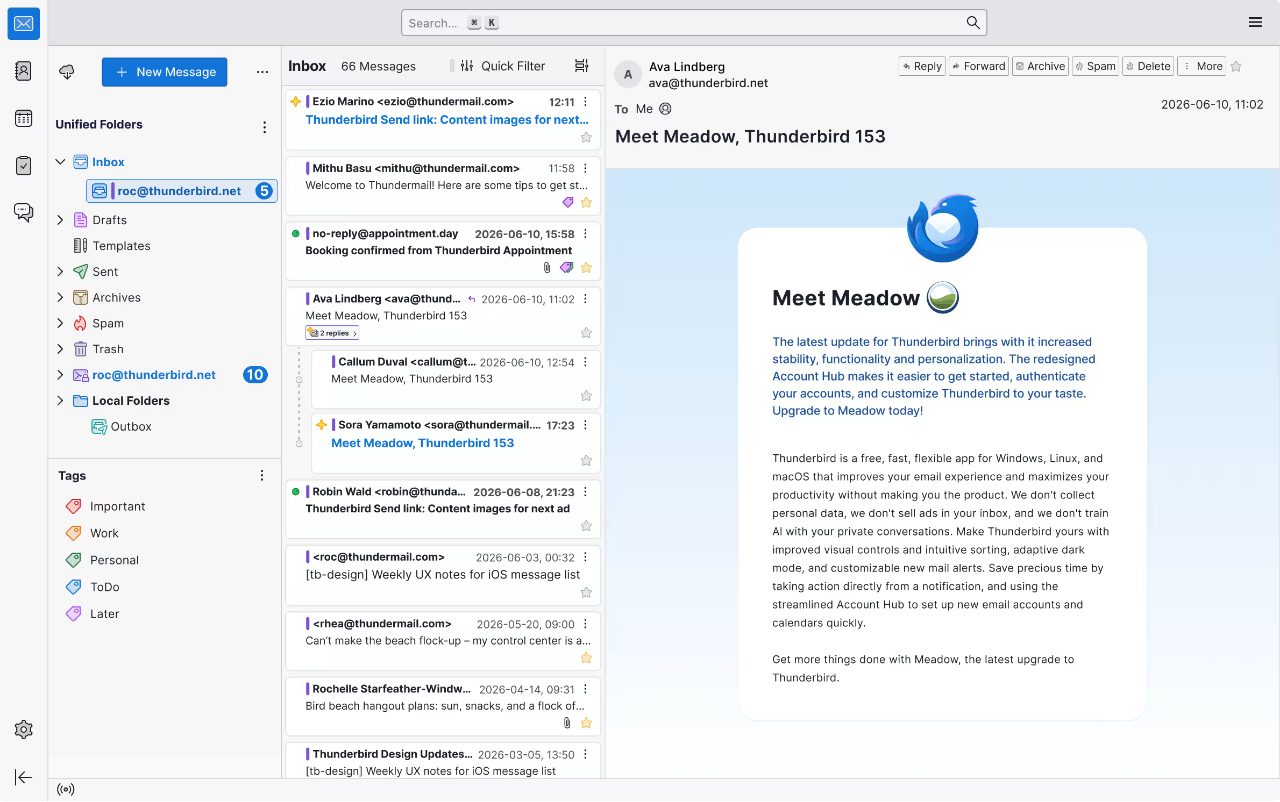
Thunderbird is a free, open-source desktop email client from the Mozilla family, funded by user donations. It runs on Mac, Windows and Linux and handles IMAP, POP and SMTP accounts plus, since version 145, native Microsoft Exchange email. It combines mail, calendar and contacts with a unified inbox, filters and tags, and is highly extensible through add-ons. It is aimed at people who want control and privacy and are willing to configure it. An Android app exists; an iOS app was still in development at last report.
What users say
Evidence ↓The only first-hand Mac review found is Macworld's 2012 review of Thunderbird 16, which praised its search and extensibility but called it bare-bones out of the box and said it looks and works like a tool built by committee. It is one reviewer and 14 years old, so it says little about the current app. Recent third-party coverage is a Windows 11 guide that recommends Thunderbird as the best all-round client but warns that Exchange calendars are not supported natively.
Rankings and alternatives
- Mac email clients #8 of 10 Free and open source
- Apple Mail #1 Best for most Mac users
- Spark Mail by Readdle #2 Smarter inbox, free on every device
- Superhuman Mail #3 For people who live in email




Mac email clients scores
Evaluated Nov 17, 2026 Evidence ↓- Fast and pleasant every day · counts double 3
3/5 means: Solid but plain, dated, heavy or un-Mac-like, with known rough edges
Capable and dependable, with strong search and offline access, but it looks and works like a cross-platform app rather than a Mac one, and its search and database are still being rebuilt.
- Works with all your accounts 4
4/5 means: Gmail, iCloud, Microsoft 365 and IMAP in a combined inbox, with a known weak spot for one of them
IMAP, POP, Gmail, iCloud and, since version 145, Exchange and Microsoft 365 mail natively, in unified folders. Exchange calendars aren't supported yet, and some company Microsoft 365 setups block sending.
- Tools for getting through the inbox 1
1/5 means: None of the five
Filters, tags and unified folders, but snooze and scheduled sending need third-party add-ons, and there is no automatic sorting or sender screening.
- Same app on your iPhone 1
1/5 means: No iPhone app
No iPhone app has been released; one was still in development in late 2026.
- Mail stays between you and your provider 5
5/5 means: Direct between your devices and your provider, tracking pixels blocked, and any AI runs on the device or in a private cloud with published guarantees
Open source, connects straight to your provider, collects no personal data, blocks remote content by default, and has no cloud AI.
- Cost over three years 5
5/5 means: Free, with no ads and nothing most personal users need held back
Free and funded by donations, with no ads.
- Calendar built in · counts half 3
3/5 means: A built-in calendar that covers only some account types
A built-in calendar for CalDAV and Google calendars, but Exchange calendars aren't supported natively.
- Keyboard and automation · counts half 4
4/5 means: Built for the keyboard, or deeply automatable with scripting, custom actions or add-ons
A large add-on library and flexible filters make it deeply customizable, though it isn't built around the keyboard.
- AI help · counts half 1
1/5 means: No built-in AI
No AI is built into the desktop app.
Pricing
- Thunderbird Free Free, funded by donations. Thunderbird Pro (Thundermail, Appointment, Send, Assist) is a separate planned paid service and not part of the desktop app.
Prices checked Nov 17, 2026.
Evidence and sources
What users say
Summary 3 quotes
-
In my tests, its search feature was truly impressive, displaying the results of my query in a new tab, with further filters for incoming or outgoing messages, or those from a given recipient.
Nathan Alderman, reviewer at Macworld · macworld.com/article/219554/review-thunderbird-mail-client-offers-freedom-flexibility-and-drawbacks.html · published · checked -
But freedom and flexibility have their drawbacks, too: Thunderbird looks and works like a tool built by committee.
Nathan Alderman, reviewer at Macworld · macworld.com/article/219554/review-thunderbird-mail-client-offers-freedom-flexibility-and-drawbacks.html · published · checked -
Bare-Bones to Start: Thunderbird requires you to download add-ons just to get features that other email clients come with by default.
Nathan Alderman, reviewer at Macworld · macworld.com/article/219554/review-thunderbird-mail-client-offers-freedom-flexibility-and-drawbacks.html · published · checked
Mac email clients scores
Fast and pleasant every day 3 quotes
-
It is free, open source, works with IMAP, POP, SMTP, and Exchange email, supports multiple accounts, and still offers proper offline access.
macmyths.com/best-email-client · checked -
In my tests, its search feature was truly impressive, displaying the results of my query in a new tab, with further filters for incoming or outgoing messages, or those from a given recipient.
Nathan Alderman, reviewer at Macworld · macworld.com/article/219554/review-thunderbird-mail-client-offers-freedom-flexibility-and-drawbacks.html · published · checked -
But freedom and flexibility have their drawbacks, too: Thunderbird looks and works like a tool built by committee.
Nathan Alderman, reviewer at Macworld · macworld.com/article/219554/review-thunderbird-mail-client-offers-freedom-flexibility-and-drawbacks.html · published · checked
Works with all your accounts 4 quotes
-
Access all your messages, calendars, and contacts in one fast app. Filter and organize the way you like. Manage all accounts separately or in a unified inbox.
thunderbird.net/en-US · checked -
This year brought Thunderbird 140 as their newest Extended Support Release (ESR), native Microsoft Exchange email support in Thunderbird 145, continued work on their mobile story, and also the introduction of Thundermail and Thunderbird Pro.
phoronix.com/news/Thunderbird-2026-Plans · published · checked -
Thunderbird’s Exchange support is easy to misunderstand. It can connect to Exchange email, but it does not support Exchange calendars natively. If your work depends on shared Exchange calendars, you may need an add-on or separate calendar software.
macmyths.com/best-email-client · checked -
For Microsoft 365 business accounts, receiving mail may work while sending fails. That usually means SMTP AUTH is disabled by the organization.
macmyths.com/best-email-client · checked
Tools for getting through the inbox 1 quote
-
Bare-Bones to Start: Thunderbird requires you to download add-ons just to get features that other email clients come with by default.
Nathan Alderman, reviewer at Macworld · macworld.com/article/219554/review-thunderbird-mail-client-offers-freedom-flexibility-and-drawbacks.html · published · checked
Same app on your iPhone 1 quote
-
As of October 2026 an iOS app was still in development, with a first version for community testing planned within a few months.
timingapp.com/blog/best-email-apps-for-mac · published · checked
Mail stays between you and your provider 1 quote
-
Thunderbird is funded by user donations. We don’t collect personal data, sell ads in your inbox, or secretly train AI with your private conversations.
thunderbird.net/en-US · checked
Cost over three years 1 quote
-
Thunderbird is funded by user donations. We don’t collect personal data, sell ads in your inbox, or secretly train AI with your private conversations.
thunderbird.net/en-US · checked
Calendar built in 3 quotes
-
Access all your messages, calendars, and contacts in one fast app. Filter and organize the way you like. Manage all accounts separately or in a unified inbox.
thunderbird.net/en-US · checked -
With email functionality nearing completion, the team has already begun planning the next stage of Exchange support, including calendar integration work that will build upon the foundation established over the past year.
Toby Pilling, Senior Manager, Desktop Engineering at Thunderbird · blog.thunderbird.net/2026/06/thunderbird-monthly-development-digest-june-2026 · published · checked -
Thunderbird’s Exchange support is easy to misunderstand. It can connect to Exchange email, but it does not support Exchange calendars natively. If your work depends on shared Exchange calendars, you may need an add-on or separate calendar software.
macmyths.com/best-email-client · checked
Keyboard and automation 1 quote
-
Bare-Bones to Start: Thunderbird requires you to download add-ons just to get features that other email clients come with by default.
Nathan Alderman, reviewer at Macworld · macworld.com/article/219554/review-thunderbird-mail-client-offers-freedom-flexibility-and-drawbacks.html · published · checked
AI help 1 quote
-
Thunderbird is funded by user donations. We don’t collect personal data, sell ads in your inbox, or secretly train AI with your private conversations.
thunderbird.net/en-US · checked
Facts
License 1 quote
-
Thunderbird is funded by user donations. We don’t collect personal data, sell ads in your inbox, or secretly train AI with your private conversations.
thunderbird.net/en-US · checked
Runs on 1 quote
-
It is the first program I install on any PC I use / own... I use it on Windows / Mac and Linux.
Ernie, I.T. Manager, UK (testimonial chosen by the vendor) · thunderbird.net/en-US · checked
More from the sources
Features 2 quotes
-
Over the past several months, the team has pushed through multiple Graph API implementation phases and is now entering the final stretch toward feature parity with our existing EWS implementation.
Toby Pilling, Senior Manager, Desktop Engineering at Thunderbird · blog.thunderbird.net/2026/06/thunderbird-monthly-development-digest-june-2026 · published · checked -
Microsoft confirmed that approved mail clients such as Thunderbird will continue to be able to obtain user consent for permissions that were previously unavailable to third-party applications. This removed a significant long-term uncertainty around Graph support and helps to ensure Thunderbird users can continue connecting Exchange accounts without requiring administrator intervention.
Toby Pilling, Senior Manager, Desktop Engineering at Thunderbird · blog.thunderbird.net/2026/06/thunderbird-monthly-development-digest-june-2026 · published · checked
Pricing
thunderbird.net/en-US · checked