
Zoho Projects
Cloud project management from Zoho with a free plan for up to 5 users and 3 projects
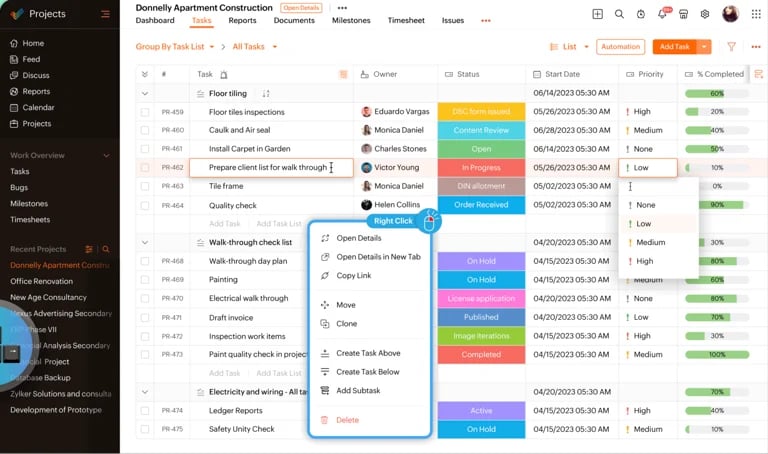
Our verdict
#8 of 11 in Free project management software · Free Gantt chart for up to five
Pros
- Free Gantt chart with dependencies
- 5 GB of storage
- Cheapest paid upgrade
Cons
- Three projects
- Crowded interface with a learning curve
- No client access on the free plan
Zoho Projects is a cloud-based project management service from Zoho for planning work, assigning tasks, tracking time and managing issues. It runs in the browser, with iOS and Android apps, and is sold as a proprietary subscription. The free plan allows up to 5 users, 3 projects and 5 GB of storage, with subtasks, a Gantt view, calendar, forums, a whiteboard and limited automation. Paid plans (Premium, Enterprise and Ultimate) charge per user and add unlimited projects, time tracking, budgeting, custom views and more automation. It suits very small teams, and works best for those already using other Zoho apps.
What users say
Evidence ↓Reviewers agree Zoho Projects is feature-rich and low priced, and that basic tasks are easy to learn. The most repeated criticism is a crowded interface and a learning curve once workflows, permissions and custom setup come in; about a third of the 25 Capterra reviews read mention it, as does an independent reviewer's own testing. Mobile app opinions split. Most reviews come from paying business users, so they say little about the free plan, whose three-project cap an independent reviewer names as its main limit.
Rankings and alternatives



Free project management software scores
Evaluated Nov 17, 2026 Evidence ↓- Easy for the whole group · counts double 3
3/5 means: Fine once someone builds the structure or learns the product's terms, with known snags such as a blank-page start or a crowded interface
Reviewers say basic tasks are easy to learn, but about a third of sampled Capterra reviews and the independent reviewer describe a crowded interface, a learning curve and extra setup time versus simpler tools. Fine once someone builds the structure.
- People on the free plan 3
3/5 means: Five to nine people
Free allows up to 5 users, the five-to-nine band.
- Room on the free plan · counts double 2
2/5 means: A total cap a busy group fills within a few months, such as about 1,000 tasks, blocks or issues, or two or three projects
Free is capped at 3 projects and 5 GB; the vendor FAQ even says 2 projects after a downgrade. No task cap was found, but the project cap is what a busy group fills first. Behavior at the cap is not documented.
- Planning views on the free plan 4
4/5 means: A timeline or Gantt chart with task dependencies, fully on the free plan
Free lists Gantt and project timeline Gantt, with finish-to-start dependencies within a project, plus calendar. Not multi-project. One third-party summary says the free Gantt is read-only, which was not verified; Kanban and list views are not confirmed on Free.
- Docs and discussion 4
4/5 means: Comments and docs plus either chat or a message board
Free has feeds, document sharing, forums, and pages and chat, but pages and chat work in one project only. Task comments rest on my knowledge of the product. A reviewer calls real-time communication lacking.
- Clients and outsiders 1
1/5 means: No way to bring in anyone outside the free plan's small member limit
Client users are not available on Free (a paid add-on from Premium), and read-only users start on Enterprise, so there is no way to add outsiders beyond the 5 members.
- First paid step · counts half 5
5/5 means: $5 or less per person a month
Premium is $4 per user per month billed annually per one independent review, with no seat minimum found. A price aggregator lists $5, which would still be in the same band. The vendor pages read showed no dollar amounts.
- Software project workflow · counts half 1
1/5 means: No sprints and no code-hosting integration on the free plan
Sprints is a separate Zoho product, only linked by an integration, and GitHub, GitLab and Bitbucket integrations start at Premium, not Free.
Pricing
- Free Free Up to 5 users, 3 projects, 5 GB storage, subtasks, whiteboard, Gantt and calendar views, task dependencies (finish-to-start only, within a project), forums, 50 automation actions per month, 2 workflow rules per layout, Google and Office 365 integrations, Slack, Zapier, iOS and Android apps. No client users, recurring tasks, time tracking, custom views, blueprints or GitHub/GitLab integration. Pages and chat in one project only.
- Premium $4.00 /month per seat $4 per user per month billed annually per an independent review; a price aggregator lists $5 per user per month, probably the monthly-billing price (not confirmed on the vendor pages read). Adds unlimited projects, 100 GB storage, custom views, recurring tasks, time tracking and timesheets, budgeting, all four dependency types within a project, 500 automation actions per month, GitHub, GitLab and Bitbucket integrations, Zia AI features. 15-day free trial, no credit card.
- Client user $4.00 /month per seat , extra Add-on for paid plans only; $4 per client user per month billed annually per an independent review.
Prices checked Nov 17, 2026.
Evidence and sources
What users say
Summary 6 quotes
-
It becomes less intuitive when configuring advanced settings, since some menus and project views can feel crowded and take longer to learn.
project-management.com/zoho-projects-review · published · checked -
The free version is limited to three projects, so teams managing several initiatives will need a paid plan.
project-management.com/zoho-projects-review · published · checked -
Sometimes its interface can feel a bit crowded at first since new teams often take longer to set up workflows compared to simpler tools.
Gail L, project manager at a 2 to 10 person construction firm, Capterra reviewer · capterra.com/p/169455/Zoho-Projects/reviews · published · checked -
The UI is constantly improving, but still feels quite overwhelming for some of our team members. Once you get the hang of it, you can start to speed up.
David V., Capterra reviewer · capterra.com/p/169455/Zoho-Projects/reviews · published · checked -
Zoho Projects is easy to use and helps us manage tasks efficiently.
Pippa B., director facilitator, Capterra reviewer · capterra.com/p/169455/Zoho-Projects/reviews · published · checked -
Steep learning curve but that could also be down to having to get away from sole trader mindset into bigger projects
Lewis E., managing director, Capterra reviewer · capterra.com/p/169455/Zoho-Projects/reviews · published · checked
Free project management software scores
Easy for the whole group 4 quotes
-
It becomes less intuitive when configuring advanced settings, since some menus and project views can feel crowded and take longer to learn.
project-management.com/zoho-projects-review · published · checked -
Sometimes its interface can feel a bit crowded at first since new teams often take longer to set up workflows compared to simpler tools.
Gail L, project manager at a 2 to 10 person construction firm, Capterra reviewer · capterra.com/p/169455/Zoho-Projects/reviews · published · checked -
The UI is constantly improving, but still feels quite overwhelming for some of our team members. Once you get the hang of it, you can start to speed up.
David V., Capterra reviewer · capterra.com/p/169455/Zoho-Projects/reviews · published · checked -
Steep learning curve but that could also be down to having to get away from sole trader mindset into bigger projects
Lewis E., managing director, Capterra reviewer · capterra.com/p/169455/Zoho-Projects/reviews · published · checked
People on the free plan 1 quote
-
FreeUp to 5 users
zoho.com/projects/zohoprojects-pricing.html · checked
Room on the free plan 4 quotes
-
5 GB of storage space
zoho.com/projects/zohoprojects-pricing.html · checked -
When you downgrade to a free plan, you have access to two projects with limited features.
zoho.com/projects/zohoprojects-pricing.html · checked -
Projects · 3 · Unlimited · Unlimited · Unlimited
zoho.com/projects/pricing-comparison.html · checked -
The free version is limited to three projects, so teams managing several initiatives will need a paid plan.
project-management.com/zoho-projects-review · published · checked
Planning views on the free plan 3 quotes
-
Task Dependency · Within project (Finish-to-Start) · Within project (All four types) · Across projects (All four types) · Across projects (All four types)
zoho.com/projects/pricing-comparison.html · checked -
Gantt Charts · Yes · Yes · Yes · Yes
zoho.com/projects/pricing-comparison.html · checked -
Calendar & Forums · Yes · Yes · Yes · Yes
zoho.com/projects/pricing-comparison.html · checked
Docs and discussion 3 quotes
-
Calendar & Forums · Yes · Yes · Yes · Yes
zoho.com/projects/pricing-comparison.html · checked -
Pages & Chat · 1 Project · All Projects · All Projects · All Projects
zoho.com/projects/pricing-comparison.html · checked -
It becomes less intuitive when configuring advanced settings, since some menus and project views can feel crowded and take longer to learn.
project-management.com/zoho-projects-review · published · checked
Clients and outsiders 2 quotes
-
Client Users · - · Can be purchased as add-ons · Can be purchased as add-ons · Can be purchased as add-ons
zoho.com/projects/pricing-comparison.html · checked -
Client users cost $4 per user with annual billing, while read-only users cost $7 per five users annually.
project-management.com/zoho-projects-review · published · checked
First paid step 2 quotes
-
Premium · $4/user · Small and midsize teams · Unlimited projects, time tracking, budgeting, recurring tasks, Zia AI features, and higher automation limits
project-management.com/zoho-projects-review · published · checked -
Premium at $5/user/month, Enterprise at $10/user/month, and Ultimate at $15/user/month.
costbench.com/software/project-management/zoho-projects/free-plan · published · checked
Software project workflow 1 quote
-
GitHub · - · Yes · Yes · Yes
zoho.com/projects/pricing-comparison.html · checked
Facts
License 1 quote
-
FreeUp to 5 users
zoho.com/projects/zohoprojects-pricing.html · checked
Runs on 1 quote
-
iOS and Android Apps
zoho.com/projects/zohoprojects-pricing.html · checked
More from the sources
Pricing 1 quote
-
You start out with the free plan. You can choose to stay in it or upgrade to a higher plan any time.
zoho.com/projects/zohoprojects-pricing.html · checked
Features 2 quotes
-
Integration with Google apps and Office 365
zoho.com/projects/zohoprojects-pricing.html · checked -
Workflow Rules · 2 per layout · 2 per layout · 20 per layout · 40 per layout
zoho.com/projects/pricing-comparison.html · checked
Limits and known issues 1 quote
-
Workflow Actions (50 executions/month)
zoho.com/projects/zohoprojects-pricing.html · checked