
2FAS Auth
Free, open-source authenticator app for iPhone and Android, no account needed, with a browser extension
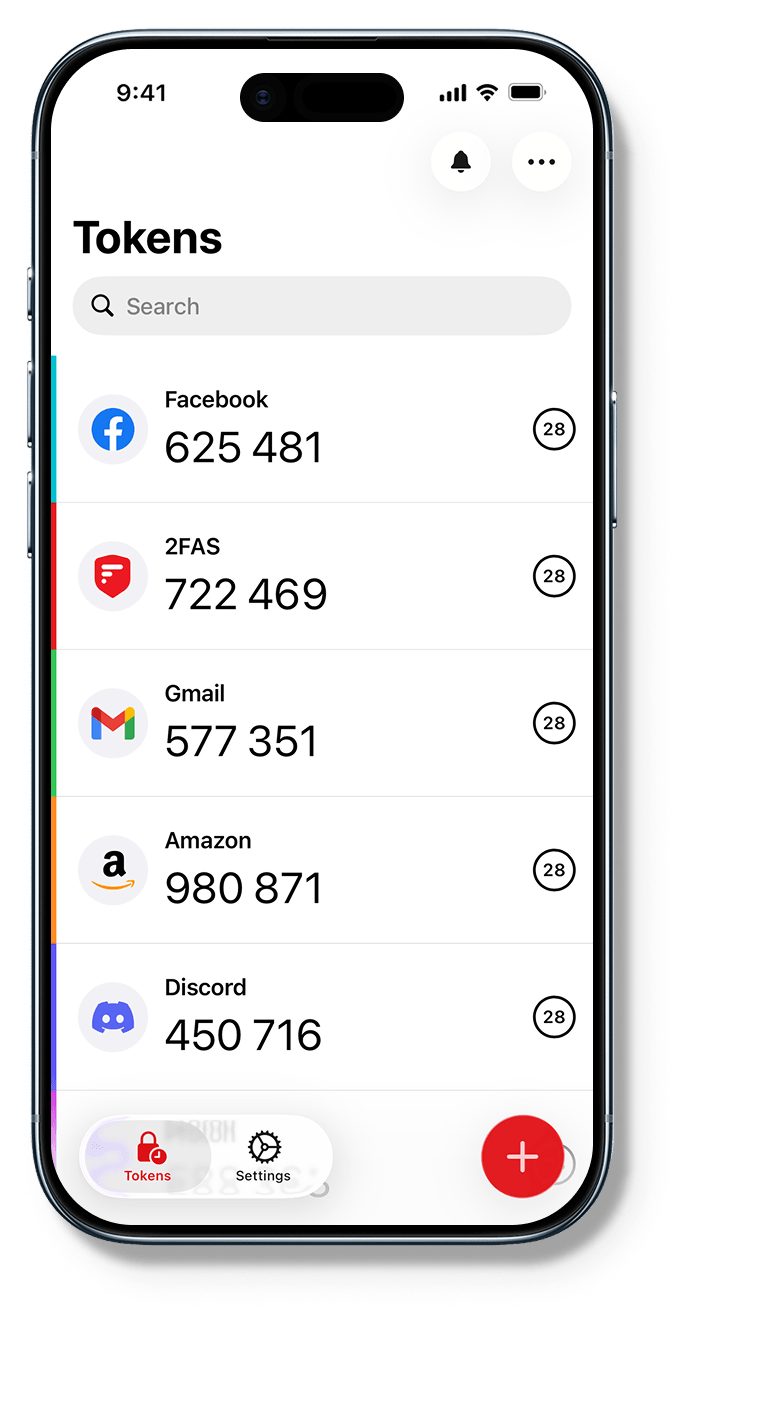
Our verdict
#3 of 9 in Authenticator apps · For browser autofill without an account
What it does
- Browser extension that fills codes after you approve on your phone
- Backup to your own iCloud or Google Drive
- Apple Watch app and iPhone widgets
Pros
- No account needed
- Free and open source
- Clean, quick interface
Cons
- iPhone and Android backups don't sync with each other
- No desktop app; the extension always needs your phone
- Choose if:
- You enter codes on a computer often and want to skip typing them
2FAS Auth is a free, open-source phone app that stores and shows time-based one-time codes (TOTP) for two-factor authentication. It runs on iOS (with an Apple Watch app) and Android, needs no account, and works offline. Backups go to your own iCloud (iOS) or Google Drive (Android), or to an export file. A browser extension for Chrome, Brave, Firefox, Edge, Opera and Safari fetches codes from the phone, which must confirm each request. The apps, extension and server are published under GPL-3.0 by Two Factor Authentication Service, Inc. The company also makes 2FAS Pass, a separate local-first password manager.
What users say
Evidence ↓Reviewers on the stores praise the clean interface, easy setup and the lack of ads or subscriptions, and the 4.7 App Store average across 36K ratings reflects that. Critics in a Privacy Guides thread say sync works only within one ecosystem (iCloud or Google Drive) with no iOS-Android sync, that the app has not been independently audited, and that support runs mostly through Discord. These are individual accounts, not measured shares.
Rankings and alternatives
- Authenticator apps #3 of 9 For browser autofill without an account
- Ente Auth #1 Best for most people
- Proton Authenticator #2 For people already using Proton
- Bitwarden Authenticator #4 For Bitwarden password manager users


Authenticator apps scores
Evaluated Nov 22, 2026 Evidence ↓- Getting your codes back on a new phone · counts double 4
4/5 means: An automatic backup you restore by signing in, but the provider could read it, or getting it back depends on a text message to your phone number
Automatic backup to your own iCloud or Google Drive, reported as end-to-end encrypted, with optional password protection on iOS. It sits between levels 3 and 5, and whether Android restore needs a separate password is not confirmed.
- Moving your codes in and out 4
4/5 means: Exports every account to a file or QR code other apps read, and imports from a few major apps
Exports every account to a .2fas JSON file and as otpauth links, and imports from Google, Raivo, Aegis, LastPass and others. Few other apps read the .2fas file, so it is not a 5.
- Codes on all your devices 3
3/5 means: Both iPhone and Android, but codes don't sync automatically between an iPhone and an Android phone
iPhone and Android apps plus a browser extension, but backups use iCloud on iOS and Google Drive on Android with no cross-platform sync, and the extension needs the phone.
- Easy to set up and use every day 4
4/5 means: Easy to add accounts, quick to find and copy a code, with search and clear icons
Reviewers describe quick QR setup, a clean interface, search, icons and groups. No autofill or next-code preview confirmed.
- Security and openness 4
4/5 means: Open source code or independent audits, end-to-end encrypted storage and an app lock, with no known incident
GPL-3.0 open source with app lock and encrypted backup, and no known incident. No independent audit was found, and an import data-loss bug was reported by one user.
- No account, no tracking 4
4/5 means: Works without an account, with an optional backup that the provider can't read, and collects little data
No account is needed and backups go to your own cloud drive. Crash diagnostics not linked to identity are collected.
- Extras that save time · counts half 4
4/5 means: Three
Three of six extras are confirmed for the free app, which are a browser extension, an Apple Watch app and widgets (iOS). No autofill, push approval or passkeys.
Pricing
- 2FAS Auth Free
Prices checked Nov 22, 2026.
Evidence and sources
What users say
Summary 4 quotes
-
This app has everything I am looking for- It is FOSS, it has a great user interface, you can import, export, cloud sync your seeds, and backup offline.
Abra C A Dabra, App Store reviewer · apps.apple.com/us/app/2fa-authenticator-2fas/id1217793794 · published · checked -
The app itself is fine and has most of the functionality I want. But if you ever have an issue there is no way to get help. The only form of support is a Discord, where they copy paste the same responses at you.
okgreygfyfrystshg, App Store reviewer · apps.apple.com/us/app/2fa-authenticator-2fas/id1217793794 · published · checked -
Even with the Auth app, the sync is only available via iCloud. Annoying if you use all kinds of devices. No true cross sync option. Not ideal for me and I suspect many users. That and them not being audited is the only gripe I have.
anon96036341, Privacy Guides forum user · discuss.privacyguides.net/t/2fas-auth-totp-app/12958 · published · checked -
Opinions on 2FAS are pretty mixed — some consider it good for privacy, while others consider it bad for privacy. But whatever the opinions are, I really like its approach of accessing TOTP codes through its browser extension without uploading the database anywhere.
night_driver, Privacy Guides forum user · discuss.privacyguides.net/t/2fas-auth-totp-app/12958 · published · checked
Authenticator apps scores
Getting your codes back on a new phone 4 quotes
-
Synchronize your Tokens with 2FAS export files, iCloud or Google Drive.
2fas.com/auth · checked -
You can enable secure data syncing with your personal iCloud or Google Drive to protect yourself from losing Tokens in case of phone damage or loss.
2fas.com/auth · checked -
New iCloud Backup with optional password protection.
apps.apple.com/us/app/2fa-authenticator-2fas/id1217793794 · checked -
It backs up to iCloud and Google Drive, both end-to-end encrypted. 2FAS supports Advanced Data Protection for iCloud, and also adds its own separate E2EE layer for the backup data.
Agrematic, Privacy Guides forum user · discuss.privacyguides.net/t/2fas-auth-totp-app/12958 · published · checked
Moving your codes in and out 3 quotes
-
Importing and exporting OTP Auth links, - widget improvements, - QR Code generation for easy sharing.
apps.apple.com/us/app/2fa-authenticator-2fas/id1217793794 · checked -
The .2fas file our app generates is a .json file, therefore all the apps that support the .json files will be able to import our file without a problem.
Developer response in App Store, 2FAS developer · apps.apple.com/us/app/2fa-authenticator-2fas/id1217793794 · checked -
This app has everything I am looking for- It is FOSS, it has a great user interface, you can import, export, cloud sync your seeds, and backup offline.
Abra C A Dabra, App Store reviewer · apps.apple.com/us/app/2fa-authenticator-2fas/id1217793794 · published · checked
Codes on all your devices 3 quotes
-
Add 2FAS Auth to your web browser by installing the extension for Chrome, Brave, Firefox, Edge, Opera and Safari and enjoy a streamlined 2FA process while keeping your tokens private.
2fas.com/auth · checked -
Click the browser extension icon when you need to enter a 2FA token, then confirm in the mobile app. You don't have to retype anything.
2fas.com/auth · checked -
Even with the Auth app, the sync is only available via iCloud. Annoying if you use all kinds of devices. No true cross sync option. Not ideal for me and I suspect many users. That and them not being audited is the only gripe I have.
anon96036341, Privacy Guides forum user · discuss.privacyguides.net/t/2fas-auth-totp-app/12958 · published · checked
Easy to set up and use every day 1 quote
-
This app has everything I am looking for- It is FOSS, it has a great user interface, you can import, export, cloud sync your seeds, and backup offline.
Abra C A Dabra, App Store reviewer · apps.apple.com/us/app/2fa-authenticator-2fas/id1217793794 · published · checked
Security and openness 4 quotes
-
Source code for 2FAS Auth Android app
github.com/twofas · checked -
The app itself is fine and has most of the functionality I want. But if you ever have an issue there is no way to get help. The only form of support is a Discord, where they copy paste the same responses at you.
okgreygfyfrystshg, App Store reviewer · apps.apple.com/us/app/2fa-authenticator-2fas/id1217793794 · published · checked -
It backs up to iCloud and Google Drive, both end-to-end encrypted. 2FAS supports Advanced Data Protection for iCloud, and also adds its own separate E2EE layer for the backup data.
Agrematic, Privacy Guides forum user · discuss.privacyguides.net/t/2fas-auth-totp-app/12958 · published · checked -
Even with the Auth app, the sync is only available via iCloud. Annoying if you use all kinds of devices. No true cross sync option. Not ideal for me and I suspect many users. That and them not being audited is the only gripe I have.
anon96036341, Privacy Guides forum user · discuss.privacyguides.net/t/2fas-auth-totp-app/12958 · published · checked
No account, no tracking 2 quotes
-
Privacy is an integral part of 2FAS Auth, therefore, the app is 100% anonymous and doesn't require an account to use.
2fas.com/auth · checked -
2FAS doesn't store any passwords or metadata. • 100% anonymous use, no account required.
apps.apple.com/us/app/2fa-authenticator-2fas/id1217793794 · checked
Extras that save time 3 quotes
-
Add 2FAS Auth to your web browser by installing the extension for Chrome, Brave, Firefox, Edge, Opera and Safari and enjoy a streamlined 2FA process while keeping your tokens private.
2fas.com/auth · checked -
The long-awaited Watch companion app has arrived!
apps.apple.com/us/app/2fa-authenticator-2fas/id1217793794 · checked -
Importing and exporting OTP Auth links, - widget improvements, - QR Code generation for easy sharing.
apps.apple.com/us/app/2fa-authenticator-2fas/id1217793794 · checked
Facts
License 1 quote
-
Source code for 2FAS Auth Android app
github.com/twofas · checked
Runs on 3 quotes
-
Add 2FAS Auth to your web browser by installing the extension for Chrome, Brave, Firefox, Edge, Opera and Safari and enjoy a streamlined 2FA process while keeping your tokens private.
2fas.com/auth · checked -
Requires iOS 18.6 or later.
apps.apple.com/us/app/2fa-authenticator-2fas/id1217793794 · checked -
The long-awaited Watch companion app has arrived!
apps.apple.com/us/app/2fa-authenticator-2fas/id1217793794 · checked
Needs 2 quotes
-
Privacy is an integral part of 2FAS Auth, therefore, the app is 100% anonymous and doesn't require an account to use.
2fas.com/auth · checked -
Requires iOS 18.6 or later.
apps.apple.com/us/app/2fa-authenticator-2fas/id1217793794 · checked
Users 1 quote
-
6+ Million downloads
2fas.com · checked
More from the sources
Pricing 1 quote
-
It's 100% free and works offline.
2fas.com/auth · checked
How widely it is used 1 quote
-
4.7 out of 5 36K Ratings
apps.apple.com/us/app/2fa-authenticator-2fas/id1217793794 · checked
Pricing
2fas.com/auth · checked