
Ente Auth
Free, open source 2FA authenticator with optional end-to-end encrypted sync and backup
Our verdict
#1 of 9 in Authenticator apps · Best for most people
What it does
- End-to-end encrypted backup and sync across phones and computers
- Apps for iPhone, Android, Windows, Mac, and Linux, plus a web page that shows codes
- Export to an encrypted file, plain text or printable QR codes
- Optional offline mode with no account
Pros
- A new phone gets every code back with just your sign-in
- Easy to leave later
- Open source, with an independent audit of the servers it relies on
Cons
- No watch app, browser extension or autofill
- Lose both your password and recovery key and the backup can't be opened
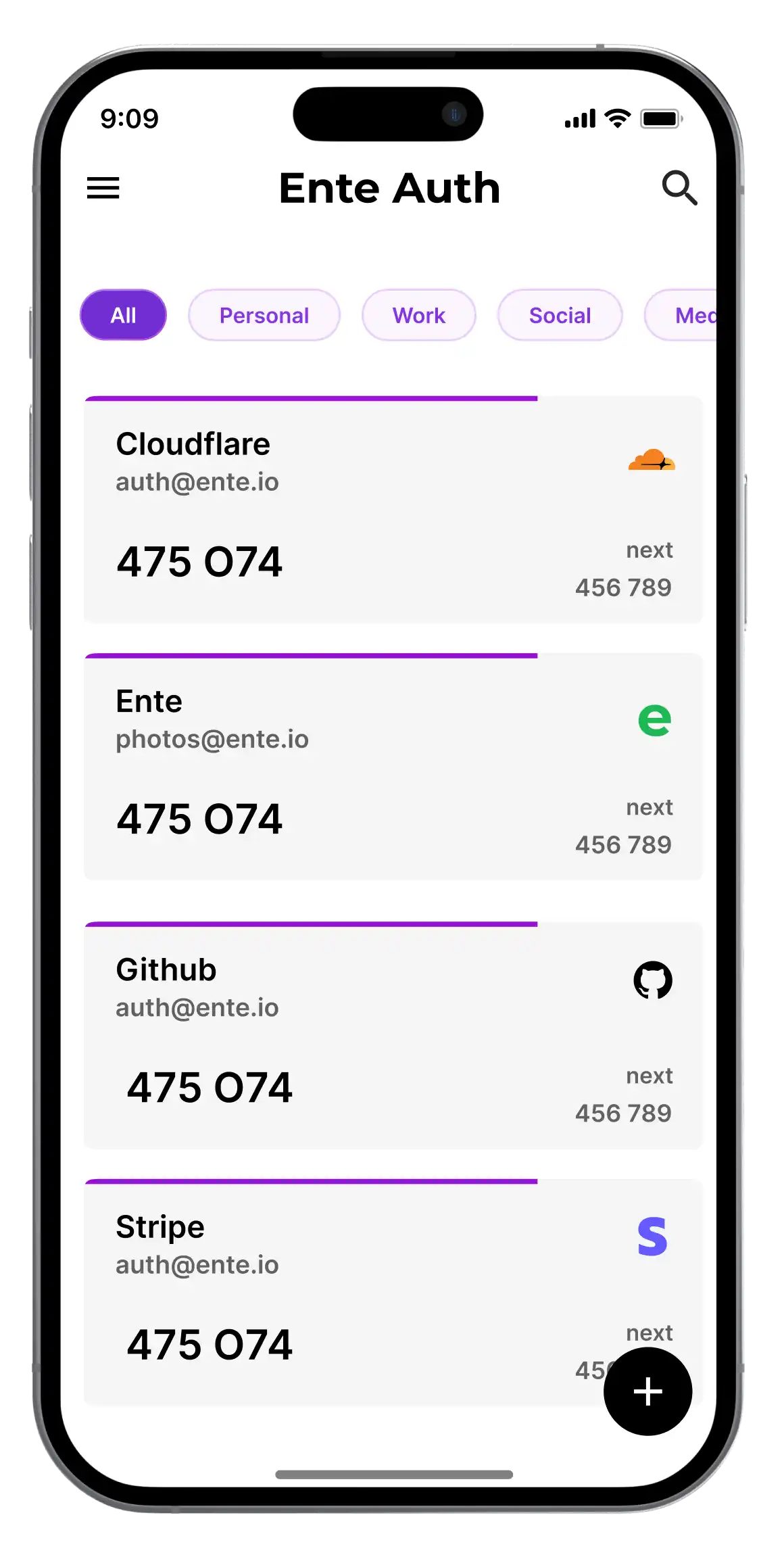
Ente Auth is a free, open source authenticator app from Ente that generates time-based one-time codes for two-factor authentication. It runs on iOS, Android, Windows, macOS and Linux, with a view-only web app for codes. Codes can be backed up and synced across devices with end-to-end encryption through an Ente account, or kept on one device with no account in offline mode. It imports from several authenticator apps, exports in encrypted and plain formats, and is licensed AGPL-3.0.
What users say
Evidence ↓The reviewers read (a Help Net Security writer in 2026 and an It's FOSS writer in 2024, each one person's view) are favorable. They like that it works without an account, syncs with end-to-end encryption and works offline, and the Help Net writer confirmed offline codes in airplane mode. One reviewer notes it needs only an email for cloud backup rather than a phone number but would like more recovery options. Because Authy has no export, moving from Authy means re-adding each service.
Rankings and alternatives
- Authenticator apps #1 of 9 Best for most people
- Proton Authenticator #2 For people already using Proton
- 2FAS Auth #3 For browser autofill without an account
- Bitwarden Authenticator #4 For Bitwarden password manager users


Authenticator apps scores
Evaluated Nov 22, 2026 Evidence ↓- Getting your codes back on a new phone · counts double 5
5/5 means: An automatic, end-to-end encrypted backup you restore by signing in or with your device passcode, with nothing else to keep track of
With an Ente account, codes are end-to-end encrypted on the device and sync automatically; restore is by signing in with the password, with a 24-word recovery key as the fallback. The recovery key is one extra thing to keep, and offline-mode codes have no backup.
- Moving your codes in and out 5
5/5 means: Exports to a standard file, plain or encrypted, and imports from most popular authenticators
Exports an encrypted Ente file, plain text, or plain HTML QR codes that Google Authenticator scans; imports from Google Authenticator, Aegis, Bitwarden, LastPass Authenticator and others. Authy cannot be imported because Authy has no export.
- Codes on all your devices 5
5/5 means: iPhone, Android and computer apps or a web app, all kept in sync automatically
iOS, Android, Windows, macOS, Linux and a web app, all synced end-to-end encrypted through the account. The web app only views codes.
- Easy to set up and use every day 5
5/5 means: Easy setup and quick everyday use, plus touches such as autofill or a next-code preview that save a step every time
QR scan, gallery import and manual entry, plus search, tags, pins, icons and a next-code preview with tap to copy. Reviewers call it simple; no autofill. Only two reviewers were read, no wider user sample.
- Security and openness 5
5/5 means: Open source code, published independent audits, end-to-end encryption and an app lock, with no known incident
Open source (AGPL-3.0), end-to-end encryption, an app lock, and a Cure53 audit in October 2025 that Ente says covers Auth. The audit scope is server code and infrastructure, so the Auth client apps may not be reviewed in depth. No incident found, but incidents were not searched for.
- No account, no tracking 4
4/5 means: Works without an account, with an optional backup that the provider can't read, and collects little data
Works with no account in offline mode, and the optional backup is end-to-end encrypted so Ente cannot read it. Cloud backup needs an email address, not a phone number. Data collection by the app was not examined.
- Extras that save time · counts half 1
1/5 means: None
None of the six extras (autofill, browser extension, watch app, push approval, widget, passkeys) were found in the pages read; the app was not searched for them, so this is uncertain.
Pricing
- Free Free
Prices checked Nov 22, 2026.
Evidence and sources
What users say
Summary 5 quotes
-
To verify this, I turned on airplane mode, and the codes appeared and refreshed as expected.
Anamarija Pogorelec, Senior Staff Writer at Help Net Security · helpnetsecurity.com/2026/04/16/product-showcase-ente-auth-authenticator-app · published · checked -
Ente Auth is worth considering if you want a simple, reliable 2FA app that puts privacy first.
Anamarija Pogorelec, Senior Staff Writer at Help Net Security · helpnetsecurity.com/2026/04/16/product-showcase-ente-auth-authenticator-app · published · checked -
Unlike Authy, it does not need your phone number, but requires your email address if you need to back up your codes to the cloud and have them sync across multiple devices.
Ankush Das, writer at It's FOSS · itsfoss.com/news/ente-auth · published · checked -
That being said, I would like the ability to have my phone number linked — as I wouldn't want to lose access to my account, and have multiple recovery options.
Ankush Das, writer at It's FOSS · itsfoss.com/news/ente-auth · published · checked -
Of course, Authy does not give you an option to export things. So, you cannot import anything here over to Ente.
Ankush Das, writer at It's FOSS · itsfoss.com/news/ente-auth · published · checked
Authenticator apps scores
Getting your codes back on a new phone 4 quotes
-
When you use Ente Auth with an account, your codes are encrypted on your device before they sync. Ente's servers store only encrypted copies of your codes and master key. They cannot read your codes or password.
ente.com/help/auth/faq · checked -
Ente can't reset your password or see your codes. If you've lost both your password and recovery key, check for a signed-in device, an export, or another recovery option before starting over. Without any of these, your codes can't be recovered.
ente.com/help/auth/faq · checked -
If your codes were created offline and you've since lost access to that device, they cannot be recovered from the server because they were never uploaded.
ente.com/help/auth/faq · checked -
To verify this, I turned on airplane mode, and the codes appeared and refreshed as expected.
Anamarija Pogorelec, Senior Staff Writer at Help Net Security · helpnetsecurity.com/2026/04/16/product-showcase-ente-auth-authenticator-app · published · checked
Moving your codes in and out 4 quotes
-
Ente is fully open source. You can export and import your data. No lockins.
ente.com/auth · checked -
Yes, you can export your codes as HTML QR codes and then scan them in Google Authenticator to import them.
ente.com/help/auth/faq · checked -
Vaults from password managers that are not listed, such as Proton Pass, are not supported.
ente.com/help/auth/faq · checked -
Of course, Authy does not give you an option to export things. So, you cannot import anything here over to Ente.
Ankush Das, writer at It's FOSS · itsfoss.com/news/ente-auth · published · checked
Codes on all your devices 3 quotes
-
Auth has an app for every platform. Mobile, desktop and web. Your codes sync across all your devices, end-to-end encrypted.
ente.com/auth · checked -
You can view your 2FA codes at auth.ente.com. For adding or managing your secrets, please use our mobile or desktop app.
github.com/ente/ente/blob/main/mobile/apps/auth/README.md · checked -
You can download a native desktop app from this repository's GitHub releases. The desktop app works on Windows, Linux and macOS.
github.com/ente/ente/blob/main/mobile/apps/auth/README.md · checked
Easy to set up and use every day 3 quotes
-
Tap a code on mobile, or click it on desktop, to copy the current code. Ente Auth shows Copied to clipboard. On Auth web, clicking a code card also copies the current code.
ente.com/help/auth/faq · checked -
To verify this, I turned on airplane mode, and the codes appeared and refreshed as expected.
Anamarija Pogorelec, Senior Staff Writer at Help Net Security · helpnetsecurity.com/2026/04/16/product-showcase-ente-auth-authenticator-app · published · checked -
Ente Auth is worth considering if you want a simple, reliable 2FA app that puts privacy first.
Anamarija Pogorelec, Senior Staff Writer at Help Net Security · helpnetsecurity.com/2026/04/16/product-showcase-ente-auth-authenticator-app · published · checked
Security and openness 4 quotes
-
Auth provides end-to-end encrypted cloud backups so you don't have to worry about losing your tokens. Our cryptography has been externally audited.
ente.com/auth · checked -
Ente is fully open source. You can export and import your data. No lockins.
ente.com/auth · checked -
The audit covered all the apps - Photos, Auth, and the upcoming Locker - since the same code and infrastructure powers the entire platform.
ente.com/blog/cern-audit · published · checked -
Auth's lock screen acts as a barrier to prevent an attacker from accessing the contents of the app. It does not introduce a layer of cryptographic security.
ente.com/help/auth/faq · checked
No account, no tracking 4 quotes
-
Ente's 2FA app. An end-to-end encrypted, cross platform and free app for storing your 2FA codes with cloud backups. Works offline. You can even use it without signing up for an account if you don't want the cloud backups or multi-device sync.
github.com/ente/ente/blob/main/mobile/apps/auth/README.md · checked -
When you use Ente Auth with an account, your codes are encrypted on your device before they sync. Ente's servers store only encrypted copies of your codes and master key. They cannot read your codes or password.
ente.com/help/auth/faq · checked -
Yes. Choose Use without backups to use Ente Auth offline without an account. Your codes are stored locally and are not synced or backed up to Ente.
ente.com/help/auth/faq · checked -
Unlike Authy, it does not need your phone number, but requires your email address if you need to back up your codes to the cloud and have them sync across multiple devices.
Ankush Das, writer at It's FOSS · itsfoss.com/news/ente-auth · published · checked
Facts
License 1 quote
-
Ente is fully open source. You can export and import your data. No lockins.
ente.com/auth · checked
Runs on 3 quotes
-
Auth has an app for every platform. Mobile, desktop and web. Your codes sync across all your devices, end-to-end encrypted.
ente.com/auth · checked -
You can view your 2FA codes at auth.ente.com. For adding or managing your secrets, please use our mobile or desktop app.
github.com/ente/ente/blob/main/mobile/apps/auth/README.md · checked -
You can download a native desktop app from this repository's GitHub releases. The desktop app works on Windows, Linux and macOS.
github.com/ente/ente/blob/main/mobile/apps/auth/README.md · checked
Needs 3 quotes
-
Ente's 2FA app. An end-to-end encrypted, cross platform and free app for storing your 2FA codes with cloud backups. Works offline. You can even use it without signing up for an account if you don't want the cloud backups or multi-device sync.
github.com/ente/ente/blob/main/mobile/apps/auth/README.md · checked -
Yes. Choose Use without backups to use Ente Auth offline without an account. Your codes are stored locally and are not synced or backed up to Ente.
ente.com/help/auth/faq · checked -
Unlike Authy, it does not need your phone number, but requires your email address if you need to back up your codes to the cloud and have them sync across multiple devices.
Ankush Das, writer at It's FOSS · itsfoss.com/news/ente-auth · published · checked
More from the sources
Limits and known issues 1 quote
-
Google Workspace doesn't explicitly block Ente Auth, but its implementation of TOTP is more restrictive and can sometimes be incompatible with third-party authenticators.
ente.com/help/auth/faq · checked
Pricing
ente.com/auth · checked