
Actual Budget
Free, open-source, local-first envelope budgeting app you self-host or rent a small server for
Our verdict
#1 of 9 in Free budgeting apps · Most budget for $0, on a computer
What it does
- Envelope budgeting with rollover and targets for future bills
- Imports transaction files from your bank
- Reports on spending, cash flow, and net worth
- Optional sync server with end-to-end encryption
Pros
- A complete budgeting system with no caps or paid tier
- No ads, upgrade prompts, or company holding your data
- Cheap bank syncing if you later want it
Cons
- Phone use and bank sync need a server you run or rent
- The envelope method takes some learning
- Choose if:
- You'd otherwise pay for YNAB and don't mind budgeting at a computer
- Skip if:
- You want to log purchases on your phone without any setup
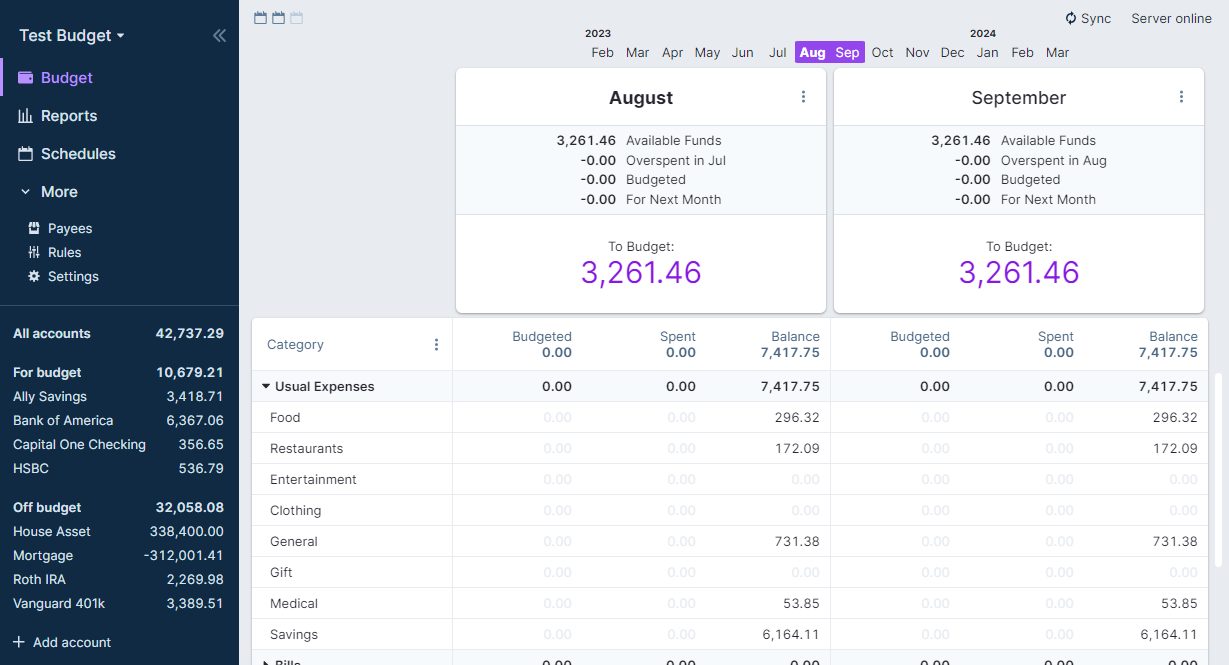
Actual Budget is a free, open-source personal finance app built on envelope budgeting. Your budget lives in the browser and syncs through a small server (actual-server) that you run yourself with Docker or rent from a host such as PikaPods or Fly.io; there are also downloadable desktop apps for Windows, Mac and Linux. There is no native phone app, so phones use the mobile-responsive web app, which can be installed as a PWA. Several people can share one server and budget files, with multi-user access managed through an external OpenID provider. Bank sync is optional and uses third-party services, with SimpleFIN Bridge for US and Canadian banks. It is aimed at people comfortable with some setup who want control of their data.
What users say
Evidence ↓A US user who moved from YNAB to Actual on PikaPods found it capable, especially for custom reports, but technical to set up, desktop-oriented on phones, and slower and more manual for bank sync, and said less technical people should stick with a paid app. Several commenters on the same thread agreed the process looked heavy, while one non-technical commenter said setup took under an hour and another said the PWA works just as well as a native app. These are accounts from one thread, not a survey, and none comes from a couple.
Rankings and alternatives
- Free budgeting apps #1 of 9 Most budget for $0, on a computer
- Goodbudget #2 Envelope budgeting on your phone
- Empower Personal Dashboard #3 Automatic tracking and net worth
- EveryDollar #4 Zero-based budgeting with no category cap
- Budgeting apps for couples #8 of 10 For couples who want their data at home
- Monarch Money #1 Best for most couples
- You Need A Budget #2 For couples who plan every dollar together
- Honeydue #3 Free, with privacy between partners







Budgeting apps for couples scores
Evaluated Nov 17, 2026 Evidence ↓- Budgeting strength · counts double 4
4/5 means: A full budgeting method, such as envelopes, zero-based or flexible budgets, with rollovers and goals
Envelope budgeting with rollovers, goal templates typed as notes, schedules, rules and strong custom reports. Goal setup is syntax-based rather than a plain interface, which keeps it from the top level.
- Partner access 3
3/5 means: Separate logins are possible, but joining takes technical setup or the partner must start somewhere awkward, such as the web only
Separate logins and per-budget access exist, but multi-user needs an external OpenID provider; without it, both partners share one server password. Phones use the web app only.
- Bank syncing 2
2/5 means: Narrow or do-it-yourself connections, such as card import for splitting only or a bridge service the user sets up
US sync runs through SimpleFIN Bridge, which the user sets up by getting their own credentials and pasting a token. Auto-sync is off by default and runs only while the app is open; GoCardless is closed to new accounts.
- Joint and separate money 3
3/5 means: Separate budgets for each person alongside a shared one, or owner labels, but no privacy from the paying partner
Several budget files on one server, each shareable with chosen users, so each partner can have a personal budget alongside a joint one. There are no owner labels or per-account privacy inside one budget.
- Easy for both partners 2
2/5 means: Heavy weekly upkeep, such as typing in every purchase, or a server to look after
A server (managed or self-run) has to be set up and kept, the password cannot be recovered, goals need syntax, and one user found phone use cramped. A few non-technical commenters found setup quick.
- Yearly cost for two 4
4/5 means: A free plan both partners can budget on without bank syncing, or a full setup under $60 a year
Managed host about $18 a year ($1.50 a month; README says $24) plus SimpleFIN about $18 a year, so about $36 to $42 a year for both partners with bank sync. SimpleFIN price is user-reported.
- Works on both partners' devices 2
2/5 means: One phone platform plus a web app for the other partner, or no phone app at all, only a mobile website
No native iPhone or Android app; both partners use the mobile-responsive web app or PWA, plus desktop apps for Windows, Mac and Linux.
- Splitting shared costs · counts half 2
2/5 means: Tags, notes or separate categories can mark whose spending it is, but nothing works out who owes whom
Split transactions across categories and separate categories or budgets can mark whose spending it is, but there is no who-owes-whom balance or settle-up. This rests on product knowledge, not a quote.
- Privacy of your financial data · counts half 5
5/5 means: Data stays on the couple's own devices or server, with an end-to-end encryption option and no bank link required
Free open source software with no ads or data sales, data on your own server or device, an end-to-end encryption option, and bank sync is optional. Bank tokens are readable by a managed host.
Free budgeting apps scores
Evaluated Nov 17, 2026 Evidence ↓- Budgeting on the free plan · counts double 5
5/5 means: A complete envelope or zero-based system with no caps, including rollovers, targets for future bills, goals and rules
Envelope budgeting is the default, with no paywall. Rollover, schedules, and goal templates (a typed note such as
- Free on your phone 2
2/5 means: Works on a phone only through a server you run yourself or pay to host
No native phone app. Phones use the web app installed as a PWA, which needs a server you run or rent (about $1.50-2 per month on PikaPods). The free desktop app alone does not reach a phone.
- Getting transactions in 3
3/5 means: Free automatic syncing for only a couple of accounts, or automatic syncing as a cheap add-on far below a budgeting subscription
Files can be imported with no server (formats not confirmed). Automatic sync needs a server plus SimpleFIN at $15 per year, which is a cheap add-on; it updates about once a day.
- Easy to learn and use 3
3/5 means: Takes some learning or has rough edges, such as bugs, slow screens or a crowded interface
The desktop app is easy to start, but phone use and sync need a server, and one user called it technical. Another non-technical user found the docs good. Evidence is a single Reddit thread.
- Caps on the free plan 4
4/5 means: Few caps; some extras, such as reports or debt tools, need the paid plan
No caps on accounts, budgets or history, but the free setup runs on one computer; using the same budget on a phone or a second device needs a server you run or rent for about $1.50 to $2 a month. Device access is also scored under phone.
- Free of ads and sales pitches 5
5/5 means: Nothing to sell; no ads and no upgrade prompts
Free, open-source community project; no ads or upgrade prompts are documented. Ad-free status is from product knowledge, not a quote.
- Privacy of your money data 5
5/5 means: Your budget stays on your own device or server, with an option for end-to-end encryption
Data stays on your device or your own server, with optional end-to-end encryption. Bank sync tokens are not covered by it and are readable by a host.
- Reports and net worth · counts half 4
4/5 means: Reports across months plus net worth from all your accounts
Reports across months are documented, and from product knowledge the built-in reports include net worth and cash flow across all accounts, plus custom reports. No investment tools such as fee analysis or retirement planning.
Pricing
- Software (self-hosted or desktop app) Free Free and open source. Self-hosting needs your own always-on server or Docker host; the desktop apps are local-only unless connected to a server.
- Managed host, PikaPods $18.00 /year , extra About $1.50 per month on Actual's PikaPods page as of November 2025 ($1.50 x 12 = $18 per year); the repository README says about $2.00 per month ($24 per year). $5 sign-up credit covers about 3 months. Minimum 10 GB storage. Billing terms not checked on PikaPods' own page.
- Managed host, Fly.io $18.00 /year , extra Repository README says about $1.50 per month ($1.50 x 12 = $18 per year). Not checked on Fly.io's pages.
- Desktop app or browser-only local mode (no server) Free Free; no server, account or hosting. Covers budgeting, reports, schedules and file import from files per the docs (formats not checked). No phone use, device sync or bank sync without a server. Browser-only mode keeps data in the browser, with no auto-save or backups; the desktop app adds automated backups.
- Bank sync, SimpleFIN Bridge (US and Canada) $18.00 /year , extra One US user reported $1.50 per month in early 2025 ($1.50 x 12 = $18 per year). Optional; SimpleFIN's own page lists $1.50 per month or $15 per year plus tax ($15 / 12 = $1.25 per month), up to 25 institutions and 25 apps. Updates about once a day and pulls at most 90 days per account. All budgets on one server share a single bank sync key.
Prices checked Nov 17, 2026.
Evidence and sources
What users say
Summary 5 quotes
-
Actual was designed with a desktop user in mind. There's no mobile app, although the website is mobile responsive and it does a good job at it. You will still need either a desktop computer or a tablet to use Actual Budget. Some functionality is impossible to use on a phone screen, even in desktop mode because it is just too small. I use the phone to enter transactions on the go, and to look up category balances, everything else I need my tablet to maintain.
Original poster (deleted account), Reddit user in r/ynab, 8-year YNAB user and IT professional, US, runs Actual on PikaPods · reddit.com/r/ynab/comments/1ifzpfi/ynab_vs_actual_budget_a_new_ab_users_perspective · published · checked -
In Actual, the sync happens once a day. This is far from a deal breaker, but it is awfully convenient to buy something in the store and have the transactions go up on my phone by the time I get home. Also, the sync between Actual and SimpleFin is not automatic like in YNAB. You have to click the sync button in Actual to get it to import from your banks.
Original poster (deleted account), Reddit user in r/ynab · reddit.com/r/ynab/comments/1ifzpfi/ynab_vs_actual_budget_a_new_ab_users_perspective · published · checked -
In Actual, you have to type a note like "#template 1000 by 2025-10" to get a budget target set to save $1000 by October 2025.
Original poster (deleted account), Reddit user in r/ynab · reddit.com/r/ynab/comments/1ifzpfi/ynab_vs_actual_budget_a_new_ab_users_perspective · published · checked -
I am not in a technical career, the documentation is just that good.
reddit.com/r/ynab/comments/1ifzpfi/ynab_vs_actual_budget_a_new_ab_users_perspective · published · checked -
As for mobile app, I actually forgot that there is no native app because I added it as a PWA, which works just as well for me.
reddit.com/r/ynab/comments/1ifzpfi/ynab_vs_actual_budget_a_new_ab_users_perspective · published · checked
Budgeting apps for couples scores
Budgeting strength 2 quotes
-
Actual is a local-first personal finance tool. It is 100% free and open-source, written in NodeJS, it has a synchronization element so that all your changes can move between devices without any heavy lifting.
github.com/actualbudget/actual · checked -
In Actual, you have to type a note like "#template 1000 by 2025-10" to get a budget target set to save $1000 by October 2025.
Original poster (deleted account), Reddit user in r/ynab · reddit.com/r/ynab/comments/1ifzpfi/ynab_vs_actual_budget_a_new_ab_users_perspective · published · checked
Partner access 4 quotes
-
This feature requires you to have set up an OpenID Provider. The usernames which people will log into your Actual instance will be fetched from the provider.
actualbudget.org/docs/config/multi-user · checked -
The Basic role: Users with the Basic role can create new budgets and collaborate on budgets made by others.
actualbudget.org/docs/config/multi-user · checked -
This screen is where you assign, give and revoke budget access and transfer ownership:
actualbudget.org/docs/config/multi-user · checked -
Keep your Actual Budget password safe, as it cannot be retrieved. If you forget your server password, you will not be able to retrieve your budget.
actualbudget.org/docs/install/pikapods · checked
Bank syncing 6 quotes
-
SimpleFIN Bridge (North American Banks)
actualbudget.org/docs/advanced/bank-sync · checked -
GoCardless BankAccountData (European Banks, not accepting new accounts)
actualbudget.org/docs/advanced/bank-sync · checked -
This integration relies on you providing your own API credentials that you will need to get by signing up with the service provider and Generate Keys and Secrets that will be used in Actual.
actualbudget.org/docs/advanced/bank-sync · checked -
Syncing only happens while Actual is open. If you close Actual, it catches up the next time you open it.
actualbudget.org/docs/advanced/bank-sync · checked -
First you have to create an account at SimpleFin (I'm in the US), and sign up for a subscription for $1.50/month.
Original poster (deleted account), Reddit user in r/ynab · reddit.com/r/ynab/comments/1ifzpfi/ynab_vs_actual_budget_a_new_ab_users_perspective · published · checked -
In Actual, the sync happens once a day. This is far from a deal breaker, but it is awfully convenient to buy something in the store and have the transactions go up on my phone by the time I get home. Also, the sync between Actual and SimpleFin is not automatic like in YNAB. You have to click the sync button in Actual to get it to import from your banks.
Original poster (deleted account), Reddit user in r/ynab · reddit.com/r/ynab/comments/1ifzpfi/ynab_vs_actual_budget_a_new_ab_users_perspective · published · checked
Joint and separate money 2 quotes
-
Multiple budgets can reside in one Pod running Actual. You do not need to set up a new Pod for each budget you create.
actualbudget.org/docs/install/pikapods · checked -
This screen is where you assign, give and revoke budget access and transfer ownership:
actualbudget.org/docs/config/multi-user · checked
Easy for both partners 4 quotes
-
Keep your Actual Budget password safe, as it cannot be retrieved. If you forget your server password, you will not be able to retrieve your budget.
actualbudget.org/docs/install/pikapods · checked -
Actual was designed with a desktop user in mind. There's no mobile app, although the website is mobile responsive and it does a good job at it. You will still need either a desktop computer or a tablet to use Actual Budget. Some functionality is impossible to use on a phone screen, even in desktop mode because it is just too small. I use the phone to enter transactions on the go, and to look up category balances, everything else I need my tablet to maintain.
Original poster (deleted account), Reddit user in r/ynab, 8-year YNAB user and IT professional, US, runs Actual on PikaPods · reddit.com/r/ynab/comments/1ifzpfi/ynab_vs_actual_budget_a_new_ab_users_perspective · published · checked -
In Actual, you have to type a note like "#template 1000 by 2025-10" to get a budget target set to save $1000 by October 2025.
Original poster (deleted account), Reddit user in r/ynab · reddit.com/r/ynab/comments/1ifzpfi/ynab_vs_actual_budget_a_new_ab_users_perspective · published · checked -
I am not in a technical career, the documentation is just that good.
reddit.com/r/ynab/comments/1ifzpfi/ynab_vs_actual_budget_a_new_ab_users_perspective · published · checked
Yearly cost for two 4 quotes
-
One-click deployment via PikaPods (~2.00 $/month) - recommended for non-technical users
github.com/actualbudget/actual · checked -
PikaPods offers one click "instant open source app hosting", allowing you to run Actual for about $ 1.50 per month (as of November 2025).
actualbudget.org/docs/install/pikapods · checked -
First you have to create an account at SimpleFin (I'm in the US), and sign up for a subscription for $1.50/month.
Original poster (deleted account), Reddit user in r/ynab · reddit.com/r/ynab/comments/1ifzpfi/ynab_vs_actual_budget_a_new_ab_users_perspective · published · checked -
YNAB costs $109 a year, while Actual with Pikapod and SimpleFin costs about $33 a year.
Original poster (deleted account), Reddit user in r/ynab · reddit.com/r/ynab/comments/1ifzpfi/ynab_vs_actual_budget_a_new_ab_users_perspective · published · checked
Works on both partners' devices 4 quotes
-
Local-only apps - downloadable Windows, Mac and Linux apps you can run on your device
github.com/actualbudget/actual · checked -
It is best to install Actual as a PWA (Progressive Web App) instead.
actualbudget.org/docs/install/pikapods · checked -
Actual was designed with a desktop user in mind. There's no mobile app, although the website is mobile responsive and it does a good job at it. You will still need either a desktop computer or a tablet to use Actual Budget. Some functionality is impossible to use on a phone screen, even in desktop mode because it is just too small. I use the phone to enter transactions on the go, and to look up category balances, everything else I need my tablet to maintain.
Original poster (deleted account), Reddit user in r/ynab, 8-year YNAB user and IT professional, US, runs Actual on PikaPods · reddit.com/r/ynab/comments/1ifzpfi/ynab_vs_actual_budget_a_new_ab_users_perspective · published · checked -
As for mobile app, I actually forgot that there is no native app because I added it as a PWA, which works just as well for me.
reddit.com/r/ynab/comments/1ifzpfi/ynab_vs_actual_budget_a_new_ab_users_perspective · published · checked
Privacy of your financial data 2 quotes
-
Actual is a local-first personal finance tool. It is 100% free and open-source, written in NodeJS, it has a synchronization element so that all your changes can move between devices without any heavy lifting.
github.com/actualbudget/actual · checked -
End-to-end encryption only protects your budget data. Server administrators or hosting providers with direct access to the server's database can read bank sync tokens. If this is a concern, consider self-hosting your server.
actualbudget.org/docs/advanced/bank-sync · checked
Free budgeting apps scores
Budgeting on the free plan 3 quotes
-
The Tracking budget won't automatically rollover funds from month to month, and you don't have to account for all on budget funds continually. Instead of working with what funds you have now, you can forecast expenses and income. All transactions do still need to be categorized.
actualbudget.org/docs/getting-started/tracking-budget · checked -
In Actual, you have to type a note like "#template 1000 by 2025-10" to get a budget target set to save $1000 by October 2025.
Original poster (deleted account), Reddit user in r/ynab · reddit.com/r/ynab/comments/1ifzpfi/ynab_vs_actual_budget_a_new_ab_users_perspective · published · checked -
Import transactions from files · X All budgeting features (budgets, reports, schedules, etc) · X Import or Export budget files · X Use Actual on a mobile device · X1 Use Actual in a web browser · X1 Sync budget between devices · X Use bank syncing (GoCardless or SimpleFIN) · X
actualbudget.org/docs/install · checked
Free on your phone 5 quotes
-
Import transactions from files · X All budgeting features (budgets, reports, schedules, etc) · X Import or Export budget files · X Use Actual on a mobile device · X1 Use Actual in a web browser · X1 Sync budget between devices · X Use bank syncing (GoCardless or SimpleFIN) · X
actualbudget.org/docs/install · checked -
The web page can also be installed on your device. For mobile devices, an installed web page will work offline.
actualbudget.org/docs/install · checked -
Actual was designed with a desktop user in mind. There's no mobile app, although the website is mobile responsive and it does a good job at it. You will still need either a desktop computer or a tablet to use Actual Budget. Some functionality is impossible to use on a phone screen, even in desktop mode because it is just too small. I use the phone to enter transactions on the go, and to look up category balances, everything else I need my tablet to maintain.
Original poster (deleted account), Reddit user in r/ynab, 8-year YNAB user and IT professional, US, runs Actual on PikaPods · reddit.com/r/ynab/comments/1ifzpfi/ynab_vs_actual_budget_a_new_ab_users_perspective · published · checked -
As for mobile app, I actually forgot that there is no native app because I added it as a PWA, which works just as well for me.
reddit.com/r/ynab/comments/1ifzpfi/ynab_vs_actual_budget_a_new_ab_users_perspective · published · checked -
PikaPods offers one click "instant open source app hosting", allowing you to run Actual for about $ 1.50 per month (as of November 2025).
actualbudget.org/docs/install/pikapods · checked
Getting transactions in 4 quotes
-
Import transactions from files · X All budgeting features (budgets, reports, schedules, etc) · X Import or Export budget files · X Use Actual on a mobile device · X1 Use Actual in a web browser · X1 Sync budget between devices · X Use bank syncing (GoCardless or SimpleFIN) · X
actualbudget.org/docs/install · checked -
You will need to subscribe before your first can be added. Current rates are $1.50 / mo, or $15 / year.
actualbudget.org/docs/advanced/bank-sync/simplefin · checked -
Connect up to 25 institutions and 25 apps for either: $1.50 + tax per month, or $15.00 + tax per year
beta-bridge.simplefin.org · checked -
SimpleFIN's data updates one time / day, roughly every 24 hours, for each linked account.
actualbudget.org/docs/advanced/bank-sync/simplefin · checked
Easy to learn and use 4 quotes
-
Actual was designed with a desktop user in mind. There's no mobile app, although the website is mobile responsive and it does a good job at it. You will still need either a desktop computer or a tablet to use Actual Budget. Some functionality is impossible to use on a phone screen, even in desktop mode because it is just too small. I use the phone to enter transactions on the go, and to look up category balances, everything else I need my tablet to maintain.
Original poster (deleted account), Reddit user in r/ynab, 8-year YNAB user and IT professional, US, runs Actual on PikaPods · reddit.com/r/ynab/comments/1ifzpfi/ynab_vs_actual_budget_a_new_ab_users_perspective · published · checked -
I am not in a technical career, the documentation is just that good.
reddit.com/r/ynab/comments/1ifzpfi/ynab_vs_actual_budget_a_new_ab_users_perspective · published · checked -
A server is not required for Actual to function but it is strongly recommended as it provides increased functionality.
actualbudget.org/docs/install · checked -
If you're not comfortable with the command line and are willing to pay a small amount of money to have your version of Actual hosted on the cloud for you, we recommend PikaPods.
actualbudget.org/docs/install · checked
Caps on the free plan 2 quotes
-
Import transactions from files · X All budgeting features (budgets, reports, schedules, etc) · X Import or Export budget files · X Use Actual on a mobile device · X1 Use Actual in a web browser · X1 Sync budget between devices · X Use bank syncing (GoCardless or SimpleFIN) · X
actualbudget.org/docs/install · checked -
Actual is a local-first personal finance tool. It is 100% free and open-source, written in NodeJS, it has a synchronization element so that all your changes can move between devices without any heavy lifting.
github.com/actualbudget/actual · checked
Free of ads and sales pitches 1 quote
-
Actual is a local-first personal finance tool. It is 100% free and open-source, written in NodeJS, it has a synchronization element so that all your changes can move between devices without any heavy lifting.
github.com/actualbudget/actual · checked
Privacy of your money data 3 quotes
-
Your data never goes to any external servers that you don't choose.
actualbudget.org/docs/getting-started/sync · checked -
you can optionally enable end-to-end encryption. This will require you to enter a second password to access the budget, and that the server will no longer be able to access your budget information. On the one hand, this improves security if you're worried that someone else will have access to the server's file or if you don't trust the server to check the password correctly (that said, we have done our best to make the server secure). On the other hand, you will not be able to recover your data if you forget your encryption password.
actualbudget.org/docs/getting-started/sync · checked -
the bank sync tokens (e.g. SimpleFIN, GoCardless, or Pluggy credentials) are stored separately on the server and are not covered by end-to-end encryption.
actualbudget.org/docs/getting-started/sync · checked
Reports and net worth 2 quotes
-
Import transactions from files · X All budgeting features (budgets, reports, schedules, etc) · X Import or Export budget files · X Use Actual on a mobile device · X1 Use Actual in a web browser · X1 Sync budget between devices · X Use bank syncing (GoCardless or SimpleFIN) · X
actualbudget.org/docs/install · checked -
Actual was designed with a desktop user in mind. There's no mobile app, although the website is mobile responsive and it does a good job at it. You will still need either a desktop computer or a tablet to use Actual Budget. Some functionality is impossible to use on a phone screen, even in desktop mode because it is just too small. I use the phone to enter transactions on the go, and to look up category balances, everything else I need my tablet to maintain.
Original poster (deleted account), Reddit user in r/ynab, 8-year YNAB user and IT professional, US, runs Actual on PikaPods · reddit.com/r/ynab/comments/1ifzpfi/ynab_vs_actual_budget_a_new_ab_users_perspective · published · checked
Facts
License 1 quote
-
Actual is a local-first personal finance tool. It is 100% free and open-source, written in NodeJS, it has a synchronization element so that all your changes can move between devices without any heavy lifting.
github.com/actualbudget/actual · checked
Runs on 2 quotes
-
Local-only apps - downloadable Windows, Mac and Linux apps you can run on your device
github.com/actualbudget/actual · checked -
It is best to install Actual as a PWA (Progressive Web App) instead.
actualbudget.org/docs/install/pikapods · checked
Needs 2 quotes
-
One-click deployment via PikaPods (~2.00 $/month) - recommended for non-technical users
github.com/actualbudget/actual · checked -
This feature requires you to have set up an OpenID Provider. The usernames which people will log into your Actual instance will be fetched from the provider.
actualbudget.org/docs/config/multi-user · checked
More from the sources
Pricing 1 quote
-
You get a $ 5.00 credit when you sign up, which means that you should be able to run Actual for 3 months before your credit runs out.
actualbudget.org/docs/install/pikapods · checked
Features 1 quote
-
If you are okay with not having sync, auto-save, or backups then the easiest and fastest way to get started is by using the Actual web app. This solution requires less setup but more maintenance.
actualbudget.org/docs/install · checked
Limits and known issues 4 quotes
-
If you connect to your bank, note that all budgets in the same Pod share a single bank sync key.
actualbudget.org/docs/install/pikapods · checked -
This solution is not recommended for long-term use due to the maintenance required and the high probability of data loss. It's intended as a quick start.
actualbudget.org/docs/install · checked -
Currently, the sync pulls at most 90 days of data from each linked account.
actualbudget.org/docs/advanced/bank-sync/simplefin · checked -
All the non-budgeting features of Actual can be used with the Tracking Budget the same as the Envelope Budget. Experimental features may not work with the Tracking Budget yet.
actualbudget.org/docs/getting-started/tracking-budget · checked
Platforms and requirements 1 quote
-
Desktop applications are available for Windows, Mac, and Linux. These can be downloaded from GitHub. The desktop apps have the following benefits: Can connect to a server (this gives them the ability to use the server-based features) Automated backups Offline use is ready out of the box
actualbudget.org/docs/install · checked
How widely it is used 1 quote
-
Star30.3k (30.3k)
github.com/actualbudget/actual · checked
Pricing
actualbudget.org/docs/install/pikapods · checked