
Goodbudget
Envelope budgeting app that two partners share through one household login
Our verdict
#2 of 9 in Free budgeting apps · Envelope budgeting on your phone
What it does
- 10 regular and 10 annual or goal envelopes on the free plan
- Imports bank files on the website
- Debt tracking and spending reports
Pros
- The simplest budgeting method to learn
- Works on two phones plus the web for free
- Never needs your bank login on the free plan
Cons
- One account, so cards and checking share a single register
- Every purchase is typed or imported and sorted by hand
- Bank sync costs $80 a year
- Choose if:
- You're new to budgeting and want a method that makes sense on day one
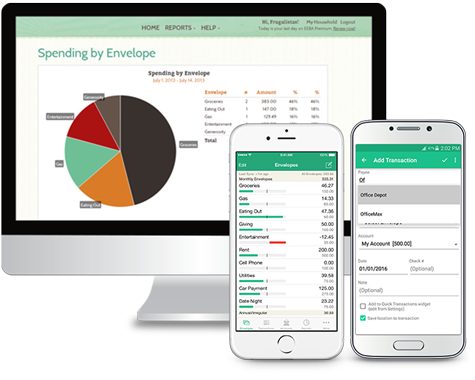
Goodbudget is a digital envelope budgeting service for the web, iPhone and Android. You divide income into envelopes and log spending against them. Partners share one household by signing in with the same login on their own devices, and both can add transactions and edit the budget. The free plan is manual entry or file import with one account, 10 regular and 10 goal or annual envelopes, and two devices. Premium adds automatic bank sync (US banks only), unlimited envelopes and accounts, five devices and seven years of history. It is a proprietary hosted service.
What users say
Evidence ↓Reviewers at NerdWallet say Goodbudget suits beginners who want a hands-on approach and that using one account on several devices is useful for partners who share their activity. The same review calls it high-maintenance because purchases take time to enter and, on the free plan, imported transactions still need manual categorizing. This rests on one editorial review, so the agreement is not broad.
Rankings and alternatives
- Free budgeting apps #2 of 9 Envelope budgeting on your phone
- Actual Budget #1 Most budget for $0, on a computer
- Empower Personal Dashboard #3 Automatic tracking and net worth
- EveryDollar #4 Zero-based budgeting with no category cap
- Budgeting apps for couples #6 of 10 Envelope budgeting without linking banks
- Monarch Money #1 Best for most couples
- You Need A Budget #2 For couples who plan every dollar together
- Honeydue #3 Free, with privacy between partners






Budgeting apps for couples scores
Evaluated Nov 17, 2026 Evidence ↓- Budgeting strength · counts double 4
4/5 means: A full budgeting method, such as envelopes, zero-based or flexible budgets, with rollovers and goals
Envelope budgeting with goal and annual envelopes, scheduled transactions, debt tracking and reports. You fill envelopes by hand and envelopes carry balances, but there is no automatic planning ahead beyond that.
- Partner access 2
2/5 means: Both partners sign in to one shared account, with one login and the same control
Both partners sign in to one household with the same username and password, with the same control. Joining is simple, but there are no individual logins.
- Bank syncing 3
3/5 means: Automatic syncing through one data provider, with frequent reports of dropped connections or account types it can't sync
Premium syncs US banks automatically through a single provider (not verified from the pages read), and investments and debts are not synced. Based on general knowledge, users report occasional dropped links.
- Joint and separate money 2
2/5 means: Only workarounds, such as tags, notes or a category group per person
One shared household with no owner labels or privacy between partners. Couples can only work around it with per-person envelopes or accounts, since the help index has no feature for it.
- Easy for both partners 3
3/5 means: Manageable once one partner sets it up, but it asks for regular work, such as learning a method or assigning every transaction by hand
Joining is easy because the partner just logs in, but envelopes must be filled and every free-plan purchase entered and categorized by hand, which a reviewer calls high-maintenance. Premium sync lightens that.
- Yearly cost for two 4
4/5 means: A free plan both partners can budget on without bank syncing, or a full setup under $60 a year
The free plan lets both partners budget together on two devices with manual entry (1 account, 10 regular and 10 goal envelopes); Premium, with bank syncing, is $80 a year for the household.
- Works on both partners' devices 5
5/5 means: Full apps for iPhone and Android plus a full web app
iPhone, Android and a web app that holds the full budget. This rests on the vendor description and general knowledge of the web app.
- Splitting shared costs · counts half 2
2/5 means: Tags, notes or separate categories can mark whose spending it is, but nothing works out who owes whom
No page read describes recording who paid or who owes whom. Partners can only mark spending with separate envelopes or notes.
- Privacy of your financial data · counts half 4
4/5 means: Paid by subscriptions, with no ads, a stated refusal to sell data, and manual accounts for anything a couple won't link
Paid by subscriptions with no ads, and it works fully without linking banks. I did not read the privacy policy, so the refusal to sell data rests on general knowledge.
Free budgeting apps scores
Evaluated Nov 17, 2026 Evidence ↓- Budgeting on the free plan · counts double 4
4/5 means: A full envelope or zero-based method with money that carries over and goals, but with caps or missing tools on the free plan
A full envelope system with goal and annual envelopes, but the free plan caps it at 10 regular and 10 goal/annual envelopes, and you fill envelopes by hand.
- Free on your phone 4
4/5 means: Phone apps and the web, with a cap on how many devices
iPhone, Android and web share one budget, but the free plan allows only 2 mobile devices; the web does not count toward that limit.
- Getting transactions in 2
2/5 means: Typed in, or imported from files you download from your bank
Free means typing transactions or importing QFX/OFX (CSV for advanced users) bank files; automatic sync is Premium-only.
- Easy to learn and use 4
4/5 means: Easy to pick up, with a few rough spots
Reviewers call the envelope method easy to understand and the app beginner-friendly. The work of typing in purchases is scored under getting transactions in, not here. Calibrated up from 3 by the writer for that reason.
- Caps on the free plan 2
2/5 means: Tight caps that a normal one-person budget runs into, such as one account, a handful of budgets or one wallet
One account and 10 regular plus 10 goal or annual envelopes are caps a normal one-person budget runs into, for example when you want a checking account and a credit card tracked separately; also 2 phones and a 1-year history that staff say is not currently enforced.
- Free of ads and sales pitches 4
4/5 means: No ads, and few prompts to upgrade
No ads were found in any source and the privacy policy never mentions advertising. Upgrade prompts were not documented beyond the device-limit message, so a few at the caps are likely.
- Privacy of your money data 4
4/5 means: No bank link needed, a company that says it doesn't sell your data, and no ads
No bank link is needed on Free and the policy says personal data is never sold or rented. No ads were found. Service providers such as AWS and Stripe receive data.
- Reports and net worth · counts half 3
3/5 means: Spending and income reports across months
Income vs. Spending and Spending by Envelope/Payee/Month reports across months exist. There is no net worth or investment tracking, and the plan-level availability of reports is not explicitly confirmed.
Pricing
- Free Free One account, 10 regular and 10 goal or annual envelopes, sharing with 2 mobile devices, 1 year of transaction history, debt tracking, community support. No automatic bank sync; manual entry or file import.
- Premium (monthly) $10.00 /month Automatic bank sync (US banks only), unlimited envelopes and accounts, sharing with 5 mobile devices, 7 years of history, email support. One household subscription covers both partners. 30-day refund on request.
- Premium (annual) $80.00 /year Billed $80 upfront each year; about $6.67 per month ($80 / 12). 30-day refund on request.
Prices checked Nov 17, 2026.
Evidence and sources
What users say
Summary 2 quotes
-
The ability to access the same Goodbudget account from multiple devices is useful for partners who want to share their activity.
Lauren Schwahn and Laura McMullen, writers at NerdWallet · nerdwallet.com/finance/learn/goodbudget-app-review · published · checked -
Also, entering purchases takes time and diligence; even if you import files from your bank account, you still have to categorize each transaction manually when using the free plan.
Lauren Schwahn and Laura McMullen, writers at NerdWallet · nerdwallet.com/finance/learn/goodbudget-app-review · published · checked
Budgeting apps for couples scores
Budgeting strength 3 quotes
-
With the Free version of Goodbudget you get: 10 Regular Envelopes 10 Annual/Goal Envelopes 1 Account Share your budget with 2 mobile devices 1 year of transaction history Debt tracking Community support
goodbudget.com/help/billing/subscribe-to-goodbudget · checked -
Goodbudget Premium gives you:Link Accounts for Automatic Bank Sync (US Banks only)Unlimited Regular EnvelopesUnlimited Annual/Goal EnvelopesUnlimited AccountsShare your budget with 5 mobile devices7 years of transaction historyDebt trackingE-mail supportfor US $10/month or $80/year.
goodbudget.com/help/billing/subscribe-to-goodbudget · checked -
Pay off debt with Debt Snowball using Debt Accounts
goodbudget.com/help · checked
Partner access 1 quote
-
you’ll be able to share your budget with your partner by having them login to Goodbudget on their device using the same username / email address and password you created when you registered.
goodbudget.com/help/mobile-apps/share-budget-w-partner · checked
Bank syncing 2 quotes
-
Goodbudget Premium gives you:Link Accounts for Automatic Bank Sync (US Banks only)Unlimited Regular EnvelopesUnlimited Annual/Goal EnvelopesUnlimited AccountsShare your budget with 5 mobile devices7 years of transaction historyDebt trackingE-mail supportfor US $10/month or $80/year.
goodbudget.com/help/billing/subscribe-to-goodbudget · checked -
Goodbudget syncs with your bank account and tracks transactions for you if you upgrade to the Premium version. You can link your Goodbudget account to as many supported checking, savings and credit card accounts as you want. However, investment accounts and debts are not automatically synced.
nerdwallet.com/finance/learn/goodbudget-app-review · published · checked
Joint and separate money 2 quotes
-
you’ll be able to share your budget with your partner by having them login to Goodbudget on their device using the same username / email address and password you created when you registered.
goodbudget.com/help/mobile-apps/share-budget-w-partner · checked -
Pay off debt with Debt Snowball using Debt Accounts
goodbudget.com/help · checked
Easy for both partners 3 quotes
-
If you prefer not to link your spending accounts, you always have the option to manually log your transactions or upload a history of transactions from your bank’s website to your Goodbudget account.
nerdwallet.com/finance/learn/goodbudget-app-review · published · checked -
Also, entering purchases takes time and diligence; even if you import files from your bank account, you still have to categorize each transaction manually when using the free plan.
Lauren Schwahn and Laura McMullen, writers at NerdWallet · nerdwallet.com/finance/learn/goodbudget-app-review · published · checked -
as of this writing, it has 4.6 stars out of 5 in the App Store (3.5 stars in the Google Play store) — but it’s also high-maintenance.
nerdwallet.com/finance/learn/goodbudget-app-review · published · checked
Yearly cost for two 1 quote
-
Goodbudget Premium gives you:Link Accounts for Automatic Bank Sync (US Banks only)Unlimited Regular EnvelopesUnlimited Annual/Goal EnvelopesUnlimited AccountsShare your budget with 5 mobile devices7 years of transaction historyDebt trackingE-mail supportfor US $10/month or $80/year.
goodbudget.com/help/billing/subscribe-to-goodbudget · checked
Works on both partners' devices 1 quote
-
Personal and household budgeting system for the Web, Android and iPhone. Keep track of money to spend, save, and give toward what's important in life.
goodbudget.com · checked
Splitting shared costs 1 quote
-
Pay off debt with Debt Snowball using Debt Accounts
goodbudget.com/help · checked
Privacy of your financial data 2 quotes
-
Goodbudget Premium gives you:Link Accounts for Automatic Bank Sync (US Banks only)Unlimited Regular EnvelopesUnlimited Annual/Goal EnvelopesUnlimited AccountsShare your budget with 5 mobile devices7 years of transaction historyDebt trackingE-mail supportfor US $10/month or $80/year.
goodbudget.com/help/billing/subscribe-to-goodbudget · checked -
If you prefer not to link your spending accounts, you always have the option to manually log your transactions or upload a history of transactions from your bank’s website to your Goodbudget account.
nerdwallet.com/finance/learn/goodbudget-app-review · published · checked
Free budgeting apps scores
Budgeting on the free plan 2 quotes
-
With the Free version of Goodbudget you get: 10 Regular Envelopes 10 Annual/Goal Envelopes 1 Account Share your budget with 2 mobile devices 1 year of transaction history Debt tracking Community support
goodbudget.com/help/billing/subscribe-to-goodbudget · checked -
You only get 20 total envelopes and one account with the free plan, which may not be enough for detailed budgeting. Families or people with complex finances will likely need to upgrade to premium.
Ben Luthi, writer at Experian · experian.com/blogs/ask-experian/goodbudget-budgeting-app-review · published · checked
Free on your phone 4 quotes
-
With the Free version of Goodbudget you get: 10 Regular Envelopes 10 Annual/Goal Envelopes 1 Account Share your budget with 2 mobile devices 1 year of transaction history Debt tracking Community support
goodbudget.com/help/billing/subscribe-to-goodbudget · checked -
Personal and household budgeting system for the Web, Android and iPhone. Keep track of money to spend, save, and give toward what's important in life.
goodbudget.com · checked -
Logging in on the Goodbudget webpage does not count against your device limit.
goodbudget.com/help/mobile-apps/device-limit-reached · checked -
When you’ve hit your limit the app will say “Device Limit Reached” and prevent additional devices from accessing your information.
goodbudget.com/help/mobile-apps/device-limit-reached · checked
Getting transactions in 4 quotes
-
Goodbudget Premium gives you:Link Accounts for Automatic Bank Sync (US Banks only)Unlimited Regular EnvelopesUnlimited Annual/Goal EnvelopesUnlimited AccountsShare your budget with 5 mobile devices7 years of transaction historyDebt trackingE-mail supportfor US $10/month or $80/year.
goodbudget.com/help/billing/subscribe-to-goodbudget · checked -
You can manually import QFX (Quicken) and OFX (MS Money) files
goodbudget.com/help/using-accounts/import · checked -
If you’re on the free version of Goodbudget with just one Account, you may want to import all of your transactions into that one Account.
goodbudget.com/help/using-accounts/import · checked -
Also, entering purchases takes time and diligence; even if you import files from your bank account, you still have to categorize each transaction manually when using the free plan.
Lauren Schwahn and Laura McMullen, writers at NerdWallet · nerdwallet.com/finance/learn/goodbudget-app-review · published · checked
Easy to learn and use 5 quotes
-
The ability to access the same Goodbudget account from multiple devices is useful for partners who want to share their activity.
Lauren Schwahn and Laura McMullen, writers at NerdWallet · nerdwallet.com/finance/learn/goodbudget-app-review · published · checked -
Also, entering purchases takes time and diligence; even if you import files from your bank account, you still have to categorize each transaction manually when using the free plan.
Lauren Schwahn and Laura McMullen, writers at NerdWallet · nerdwallet.com/finance/learn/goodbudget-app-review · published · checked -
as of this writing, it has 4.6 stars out of 5 in the App Store (3.5 stars in the Google Play store) — but it’s also high-maintenance.
nerdwallet.com/finance/learn/goodbudget-app-review · published · checked -
The mobile app has 4.7 stars across roughly 13,000 reviews on the Apple App Store and a 3.4-star rating over 19,300 reviews in the Google Play Store.
Ben Luthi, writer at Experian · experian.com/blogs/ask-experian/goodbudget-budgeting-app-review · published · checked -
Goodbudget's biggest perk is its hands-on approach to tracking your expenses. By requiring manual entry of your data, it helps you to really analyze your spending habits versus it being all automated.
CNBC Select, editorial reviewer · cnbc.com/select/goodbudget-app-review · published · checked
Caps on the free plan 4 quotes
-
With the Free version of Goodbudget you get: 10 Regular Envelopes 10 Annual/Goal Envelopes 1 Account Share your budget with 2 mobile devices 1 year of transaction history Debt tracking Community support
goodbudget.com/help/billing/subscribe-to-goodbudget · checked -
Goodbudget is not actively removing data past the stated saved history limits at this time. So the short answer to what will happen is… nothing. When you pass the 7 year mark right now, you won’t notice any changes. The same is true for users on the Free plan who pass the 1 year mark.
alex, Goodbudget staff member on the official forum · forums.goodbudget.com/t/data-after-7-years/1514 · published · checked -
However, the policy is in place to give us the option of removing old data in the future. Because this is not actively happening, I can’t say precisely what would happen if we did decide to start actively pruning the data, but my assumption (please don’t quote me on this though) is that it would indeed be deleted
alex, Goodbudget staff member on the official forum · forums.goodbudget.com/t/data-after-7-years/1514 · published · checked -
You only get 20 total envelopes and one account with the free plan, which may not be enough for detailed budgeting. Families or people with complex finances will likely need to upgrade to premium.
Ben Luthi, writer at Experian · experian.com/blogs/ask-experian/goodbudget-budgeting-app-review · published · checked
Free of ads and sales pitches 1 quote
-
When you’ve hit your limit the app will say “Device Limit Reached” and prevent additional devices from accessing your information.
goodbudget.com/help/mobile-apps/device-limit-reached · checked
Privacy of your money data 1 quote
-
Dayspring does NOT sell or rent your contact information or other personally identifiable information to third parties.
goodbudget.com/privacy-policy · checked
Reports and net worth 3 quotes
-
On the web, the following reports can be filtered by Account: Spending by Envelope, Spending by Payee, Spending by Month, and Income by Source.
Chi-En, Goodbudget staff replying in the post's comments · goodbudget.com/blog/2016/11/reports-help-you-see-where-it-all-goes · published · checked -
the top photo is of our Income vs Spending Report, which shows you a month-by-month look at your total income figure vs your total spending.
alex, Goodbudget staff replying in the post's comments · goodbudget.com/blog/2016/11/reports-help-you-see-where-it-all-goes · published · checked -
The app includes helpful reports like spending breakdowns and income versus expense comparisons.
Ben Luthi, writer at Experian · experian.com/blogs/ask-experian/goodbudget-budgeting-app-review · published · checked
Facts
Runs on 1 quote
-
Personal and household budgeting system for the Web, Android and iPhone. Keep track of money to spend, save, and give toward what's important in life.
goodbudget.com · checked
More from the sources
Pricing 1 quote
-
If you change your mind and would like a refund, email us at [email protected] within the first 30 days of your subscription.
goodbudget.com/help/billing/subscribe-to-goodbudget · checked
Features 1 quote
-
Check out your reports on Android, iPhone, or the Web!
goodbudget.com/blog/2016/11/reports-help-you-see-where-it-all-goes · published · checked
Pricing
goodbudget.com/help/billing/subscribe-to-goodbudget · checked